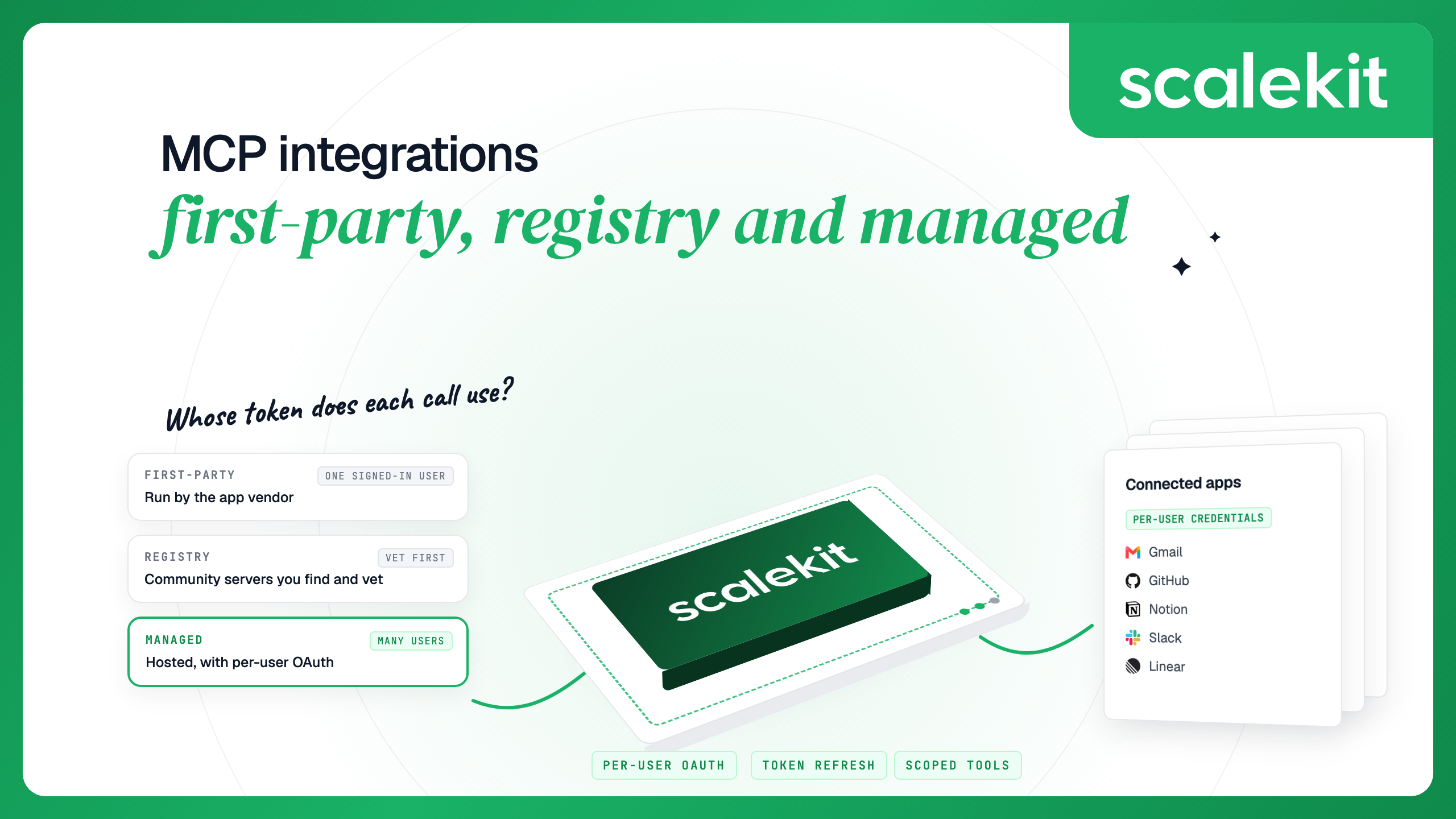


MCP integrations connect an AI agent to apps such as Gmail, GitHub and Notion through Model Context Protocol servers. There are three kinds: first-party servers run by the app, community servers listed in registries, and managed servers a platform hosts. In production, what matters is whose credentials each call uses. Scalekit stores each user's tokens and runs every call as that user.
The Model Context Protocol (MCP) is an open standard for connecting AI applications to tools and data. An MCP server exposes an app's actions, such as sending an email or creating an issue, as tools an agent can call. An MCP integration is that connection between an agent and an app, including how the agent authenticates and whose account it acts as. MCP vs APIs covers how this differs from calling an app's REST API directly.
Each of these 13 widely used apps runs an official remote MCP server.
These servers are free or included, and the vendor keeps them in step with its API. Each connection authenticates as one account. The servers do not store or refresh tokens for your users or keep one user's run apart from another's, so a product that connects many users has to run each vendor's OAuth app and keep the tokens itself. Some add their own limits: Notion needs an interactive sign-in, Slack accepts only directory-published or internal apps, Figma lets only approved clients connect, and Google's preview terms keep its Workspace servers out of public applications until they reach general availability. Stripe and Datadog also document keys for autonomous or service use, and Stripe accepts a Stripe-Account header for acting on behalf of connected accounts.
Google also runs official Workspace servers for Docs, Sheets, Slides, Chat, Classroom and the People API, all in Developer Preview, and servers for many Google Cloud products such as BigQuery and Cloud Run.
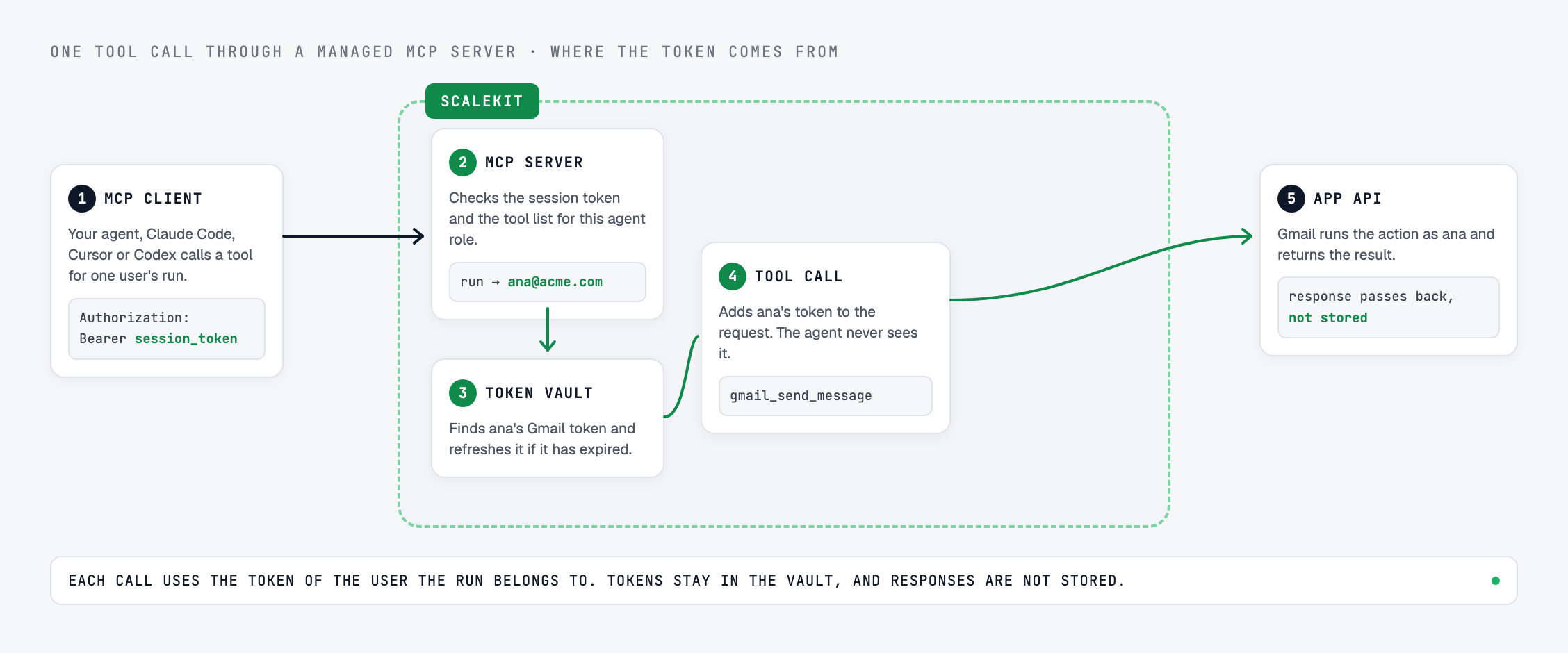
A tool call through a managed MCP server takes five hops.
The simplest MCP integration uses one token: a personal access token, an API key or one OAuth connection. Every call runs as that account. That is fine for a personal assistant or an internal tool where everyone is allowed to see the same data.
A product that serves many users needs each call to run as the person the agent is working for. Every user connects their own account once, the platform stores and refreshes each token, and one user's run can never use another user's credentials. Per-user OAuth for MCP integrations walks through the flow. With Scalekit, each run gets a session token for one user on one Virtual MCP server. At call time Scalekit uses that user's connected account for the app, and the call fails if the account isn't active. Tokens are encrypted with a key unique to your environment, and on Enterprise the root key can be your own, from Google Cloud KMS.
Adding OAuth to an MCP server you build is a separate problem. The MCP authorization guide explains what the spec requires, implementing OAuth for MCP servers shows the code, and Scalekit MCP Auth handles it as a product.
Managed MCP integration platforms for SaaS apps differ in catalog, auth model and deployment. Zapier MCP is the better fit when a team wants no-code access to more than 9,000 apps; each tool call counts as two Zapier tasks. Composio, with 1,500+ toolkits, and Pipedream, with 3,000+ APIs, are good fits when catalog breadth matters most. Hosted MCP servers compared puts Scalekit, Composio, Zapier, Pipedream, Merge and Nango side by side, best managed MCP server platforms covers ten platforms, and build vs buy MCP servers weighs running your own servers against a managed platform.
Scalekit's catalog covers these apps with per-user credentials: OAuth for all of them except Datadog, which uses an API key, and the Stripe API connector, which uses a bearer token. For seven of these apps, Scalekit also has a connector that routes calls to the vendor's own MCP server, so you get the vendor's tools with Scalekit's token handling and scoping.
For an app that is not in the catalog, a custom connector adds any REST API or remote MCP server under the same per-user model. Custom MCP connectors with user credentials walks through building one.
Any MCP client can connect to a Scalekit Virtual MCP server. Create the server once for an agent role, then mint a session token for a user on your backend and pass it as a bearer token. Session tokens are short-lived by design (one hour by default, up to 24 hours), so this setup suits development and testing; a production agent mints a new token for each run. Each example reads the token from an environment variable.
Add the server to .mcp.json in your project. Claude Code expands the environment variable when it loads the file, so restart it after you mint a new token.
Add the server to .cursor/mcp.json in your project, or ~/.cursor/mcp.json for all projects. Cursor reads the token from an environment variable. On macOS, launch Cursor from a terminal where the variable is set so it can read it.
Add the server to Codex's config file. Codex sends the value of the named environment variable as the bearer token.
First-party servers connect the same way, with the vendor's URL and the vendor's own OAuth sign-in in the client.
An MCP server can read and change data in your users' accounts, so treat each one like a dependency with access to production. MCP security risks in the enterprise covers the threats, and shipping a secure MCP server covers the server side. Three practices apply to every integration:
An expired or revoked token returns a 401, and a user who removed access has to reconnect. A managed platform refreshes expired tokens automatically, so only revoked access needs the user. Token refresh for third-party MCP servers explains the patterns, and troubleshooting MCP server errors covers 401, 404, invalid_grant and closed connections.
Local servers run on the user's machine over stdio and suit one developer. Remote servers run over HTTP and suit agents that serve many users. All 13 servers in the first-party table are remote. Remote vs stdio MCP servers compares the two transports in more depth.
MCP integrations connect an AI agent to apps such as Gmail, GitHub or Notion through Model Context Protocol servers. Each server exposes an app's actions as tools the agent can call. The integration also covers how the agent authenticates and whose account each call uses.
Yes. Google runs official remote MCP servers for Gmail, Calendar, Drive, Docs, Sheets, Slides, Chat, Classroom and the People API, all in Developer Preview, plus servers for Google Cloud products such as BigQuery and Cloud Run. The Workspace servers need a Google Cloud project enrolled in the Developer Preview Program and your own OAuth client, and the program terms keep preview features out of public applications until general availability.
Yes. GitHub's remote MCP server at api.githubcopilot.com/mcp/ is available on every GitHub plan, with OAuth or a personal access token. Copilot cloud agent tools inside it require a paid Copilot license.
Linear runs an official remote MCP server at mcp.linear.app/mcp. It supports OAuth 2.1 with Dynamic Client Registration, or an API key as a bearer token, and Linear also offers a read-only endpoint at mcp.linear.app/mcp/readonly.
Notion lists no separate price for its MCP server. Basic tools work on every plan, while AI search and meeting notes need a Business or Enterprise plan with Notion AI. Standard Notion API rate limits apply to each tool call.
Not if one person uses an agent with their own accounts; first-party servers cover that. You need one when your agent acts for many users or customers and each call must run with the right user's credentials, with tokens stored, refreshed and kept apart.
Not without checking them. A registry listing does not mean anyone has reviewed the code. Check the publisher, transport, auth type, tool descriptions and maintenance activity, prefer servers published by the app vendor, and expose only the tools an agent needs.
Connect your first user: the Scalekit quickstart walks through one user's OAuth connection and a tool call as that user. To talk through your architecture with an engineer, book a technical session.
Last updated October 15, 2026. First-party server details checked October 2026.