MCP (Model Context Protocol) is an open protocol that lets an AI agent discover and call tools through one standard interface. An API is the interface a service exposes to other software, such as the Slack Web API. An MCP server usually sits on top of an API. Use MCP when a model picks tools at runtime, and call the API directly when your code already knows the call.
For agents, the differences that matter are tool discovery, per-user credentials, transport, state and rate limits. The two are layers: an MCP server such as Slack's calls Slack's API for the agent, and production MCP integrations often use both. The video below gives a short overview.
An API (application programming interface) is the contract a service publishes for other software: endpoints, parameters, authentication and limits. REST over HTTP is the most common style, and GraphQL and gRPC are others. Many REST APIs also publish an OpenAPI document, a machine-readable description of every endpoint. Developers read it or generate a client from it.
MCP is an open protocol for connecting AI applications to external systems, and its own documentation compares it to a USB-C port for AI applications. It uses JSON-RPC 2.0 messages between a host (the AI application), the clients inside it and servers. Servers offer tools for the model to call, resources for context and prompts for users. The current revision of the specification is dated 2026-07-28.
The two usually stack. Each tool on an MCP server is a handler, and the handler typically calls the vendor's API. Google's Gmail MCP server is a clear example. Its tools/list returns 23 tools for searching, reading, labeling, trashing and drafting mail, and none of them sends a message. Sending stays on the Gmail API's users.messages.send method. An MCP server exposes the parts of an API that its author chose for agents.
MCP vs REST API, side by side: a remote MCP server compared with a REST API your code calls directly.
Each API has its own style, whether REST, GraphQL, SOAP or gRPC, plus its own auth scheme and error format. MCP standardizes the messages. Every server speaks JSON-RPC 2.0, lists tools the same way and returns results in the same shape, so one client works with any server on a revision it supports. What the tools do is still up to each server: Slack's and GitHub's differ in names, arguments and coverage.
A client calls tools/list and gets each tool's name, description and inputSchema, a JSON Schema for its arguments. When the list changes, a server that declares listChanged notifies clients that subscribed through subscriptions/listen, so a new tool can appear without a client release. The tools specification also lets the list vary with the authorization on the request, for example showing only the tools a user's granted scopes allow.
APIs have machine-readable descriptions too. The difference is when they are read: an OpenAPI file is usually consumed at build time to generate a client, while an MCP tool list is fetched by the running agent.
Discovery has a cost, because every tool definition goes into the model's context. The MCP project's client best practices recommend loading tools on demand once definitions pass a small share of the context window, such as 1 to 5 percent. In Scalekit's benchmark of GitHub tasks, the MCP agent used 4 to 32 times more tokens than a CLI agent, mostly from 43 tool schemas loaded on every run (MCP vs CLI). Give each agent only the tools it needs.
For HTTP servers, the MCP authorization specification builds on OAuth 2.1. The server publishes protected resource metadata (RFC 9728), linked from its 401 response or served at a well-known URL, and the client finds the authorization server there. The client names the MCP server in a resource parameter (RFC 8707). The server must accept only tokens issued for itself, and must not pass a client's token through to the upstream API it calls. For client registration, the 2026-07-28 revision prefers pre-registration and Client ID Metadata Documents and deprecates Dynamic Client Registration. Authorization itself is optional, and stdio servers should skip it and read credentials from the environment. The MCP authorization guide covers each step.
Vendors still differ in the details. Linear's server supports dynamic client registration and also accepts a Linear API key, while Slack's requires a registered Slack app and does not support dynamic registration. A direct API call has no shared discovery step at all: you implement each vendor's scheme, whether an API key, an OAuth 2.0 flow or a GitHub App installation token.
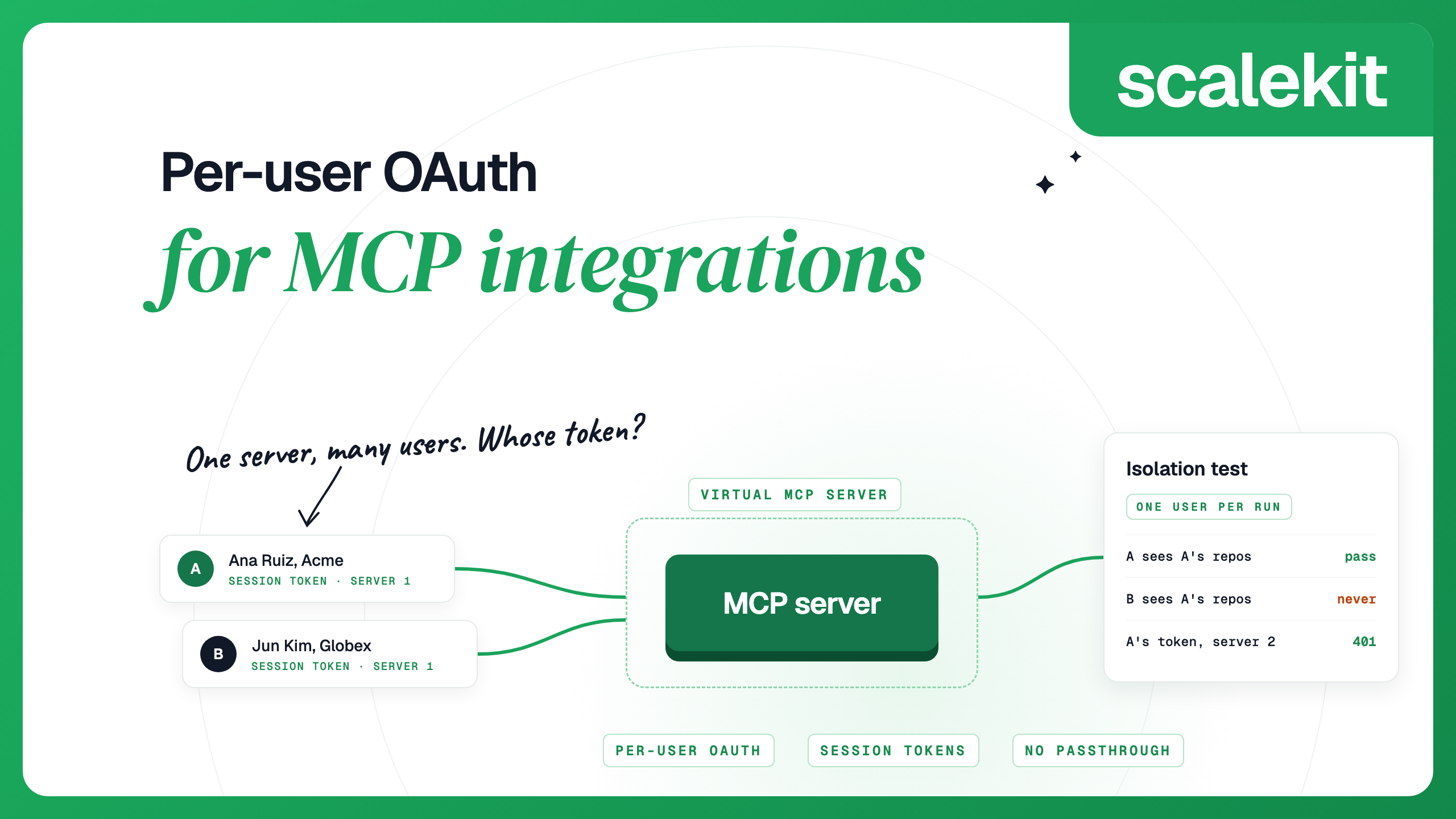
For a product with many users, both paths end in the same place: one credential per user, stored, refreshed and revocable for that user alone. MCP standardizes how a client gets a token. It does not store tokens for your users. Per-user OAuth for MCP integrations covers the designs, and a test that proves one user's session cannot return another user's data.
MCP defines two standard transports. With stdio, the client launches the server as a subprocess and exchanges newline-delimited JSON-RPC messages over standard input and output. With Streamable HTTP, each message is an HTTP POST to one endpoint, and the reply comes back as JSON or as an event stream for that request. The older HTTP+SSE transport is deprecated. A REST API uses plain HTTP, with a URL per resource. Remote vs local (stdio) MCP servers explains when each fits.
Up to the 2025-11-25 revision, an MCP client opened a session with an initialize handshake, and HTTP servers could assign an Mcp-Session-Id. The 2026-07-28 revision removed both. Every request now carries its protocol version and client capabilities in _meta. A server that needs state across calls mints a handle, such as a cart or workflow ID, and receives it back as an ordinary tool argument.
Servers on 2025-11-25 or an earlier revision still expect the handshake: Notion's client guide, for example, still describes an initialize request that may return an Mcp-Session-Id. The spec lets one implementation support both eras, and the MCP Python SDK's Client, used below, probes with server/discover and falls back to initialize on older servers.
At the protocol level, then, MCP now matches REST: each request stands alone, and the conversation history an agent relies on lives in the host application and the model's context. The MCP security best practices warn about handle hijacking, where someone who obtains another user's handle acts on that user's state, so bind each handle to the user who created it. Scalekit's Virtual MCP servers keep no session either: tools/list and tools/call work without an initialize call, and the server sends no Mcp-Session-Id.
APIs publish their limits and report where you stand. GitHub's REST API allows 5,000 requests per hour for a user's token and 15,000 for a GitHub App owned by an Enterprise Cloud organization, and returns x-ratelimit-remaining and x-ratelimit-reset on each response.
The MCP spec requires servers to rate limit tool invocations and leaves the numbers to each server. Many inherit the underlying API's limits: Slack applies the same rate limits to its MCP tools as to the matching Web API methods. An agent can reach those limits sooner than hand-written code, because the model decides how often to call a tool.
Errors also have a different reader. A REST error goes to your code. An MCP tool error comes back as a result with isError: true, and the spec says clients should pass it to the model so it can fix its arguments and try again.
Building on an API gives you control. You choose the endpoints, handle pagination, retries and versioning, and can generate a typed client from an OpenAPI file. The cost is repeated work: each new service brings its own auth, data model and failure modes, and its breaking changes land in your code.
With MCP, one client talks to every server, and a server publishes its tools once for every MCP client, from Claude and Cursor to your own agent. Vendors maintain their official servers, so new tools arrive without a release on your side. In exchange you get less control: the tools the vendor chose and per-call overhead from definitions in context. Reliability depends on the server too. In the same benchmark, 7 of 25 MCP runs failed with connection timeouts to GitHub's server, while every CLI run completed.
To offer your own API to agents, put an MCP server in front of it. Should you wrap MCP around your existing API? covers the design choices.
Both snippets list a user's Slack channels. The first calls the Slack Web API directly. Your code names the method, sends the user's token (from SLACK_TOKEN) and parses the response.
The second connects to an MCP server over Streamable HTTP with the MCP Python SDK (pip install mcp), lists the tools and calls one. In an agent, you pass the tool list to the model and run the call it returns. Set MCP_SERVER_URL to the server's URL and MCP_TOKEN to an access token for the user; the tool name comes from that server's list.
The MCP version never names a Slack endpoint, and apart from the tool name the same client code works against any other server. The token still belongs to one user.
Discovery pays off when the tool set is open-ended, as in a coding assistant that connects to whatever servers a developer adds. A nightly sync that always calls the same three endpoints gains nothing from it.
Discovery also moves trust onto the server. The spec says clients must treat tool annotations as untrusted unless the server is trusted, and that a human should be able to deny tool calls. Vet third-party MCP servers before you connect them, and keep approval on for tools that write.
Many SaaS vendors now run their own remote MCP server. Each wraps part of the vendor's API, and each signs users in its own way. Each guide shows what the server covers and where you still need the API.
Call the API directly when:
Use MCP when:
Not everyone expects MCP to last as a separate layer. In a 2025 Hacker News thread, one commenter called it "an indirection layer to the actual APIs" whose value depends on adoption. For one developer automating their own work, a CLI or a direct API call is often cheaper, as Scalekit's benchmark found. For a product acting for many customers' users, a standard way to discover tools and sign each user in is usually worth the overhead.
In a typical stack, the agent speaks MCP and the MCP server speaks to the API:
Your product sits around that loop. Webhooks, backfills and scheduled jobs usually call the API directly. Tie both paths to the same per-user connection, so that revoking a user's access in one place stops both. The tokens themselves differ: a spec-compliant MCP server accepts only tokens issued for it, and the API needs its own.
Scalekit's AgentKit is an MCP gateway built for this shape, with 600+ connectors and 30,000+ tools. Each user connects their apps once, and Scalekit stores and refreshes their tokens. A Virtual MCP server is one URL that all your users share, exposing only the tools you choose. Before each run you mint a session token bound to one user and one server; it lasts one hour by default (60 seconds to 24 hours) and is minted again rather than refreshed. For endpoints no tool covers, the API proxy calls the app as the same user. Both paths, from one connected account:
You can try this on a free account: sign up for Scalekit, or book a call to plan a rollout with the team.
Three questions decide most MCP vs API choices:
MCP is a protocol, and an MCP server exposes an interface of its own: JSON-RPC methods such as tools/list and tools/call. That interface is the same on every server and is written to be read by a model. MCP servers for SaaS apps usually call the vendor's REST API underneath.
A REST API exposes resources at URLs, and your code decides which endpoint to call. MCP exposes tools through one protocol, and the agent discovers them at runtime and lets the model choose. Remote MCP servers also run over HTTP, the current MCP revision has no protocol session, and the MCP spec adds an optional OAuth 2.1 sign-in for remote servers.
No. MCP servers are usually built on APIs and expose a subset of them, so the API remains the source of truth for webhooks, bulk work and everything the server leaves out. MCP adds a standard layer for agents on top.
Write an MCP server with an official MCP SDK, and give it a small set of task-shaped tools whose handlers call your API. Write the tool descriptions for a model, mark read-only tools, and add OAuth if the server is remote.
Yes. Model APIs support tool calling, so you can describe an endpoint as a tool and run the call your code gets back. You then write and maintain each tool's schema and auth yourself, which MCP moves into a server any client can reuse.
Not at the protocol level in the current revision. The 2026-07-28 specification removed the initialize handshake and the Mcp-Session-Id header, so every request carries its own version and capabilities. A server that needs state across calls returns a handle that the client passes back as a tool argument. Servers on 2025-11-25 or earlier still use initialize, and one server can support both.
The MCP spec defines one optional OAuth 2.1 profile with metadata discovery, so one client implementation can find out how to sign a user in to any remote server that follows it. APIs each define their own scheme, from API keys to OAuth 2.0 to app installation tokens. Either way, a product with many users needs one credential per user.
Details checked October 2026.