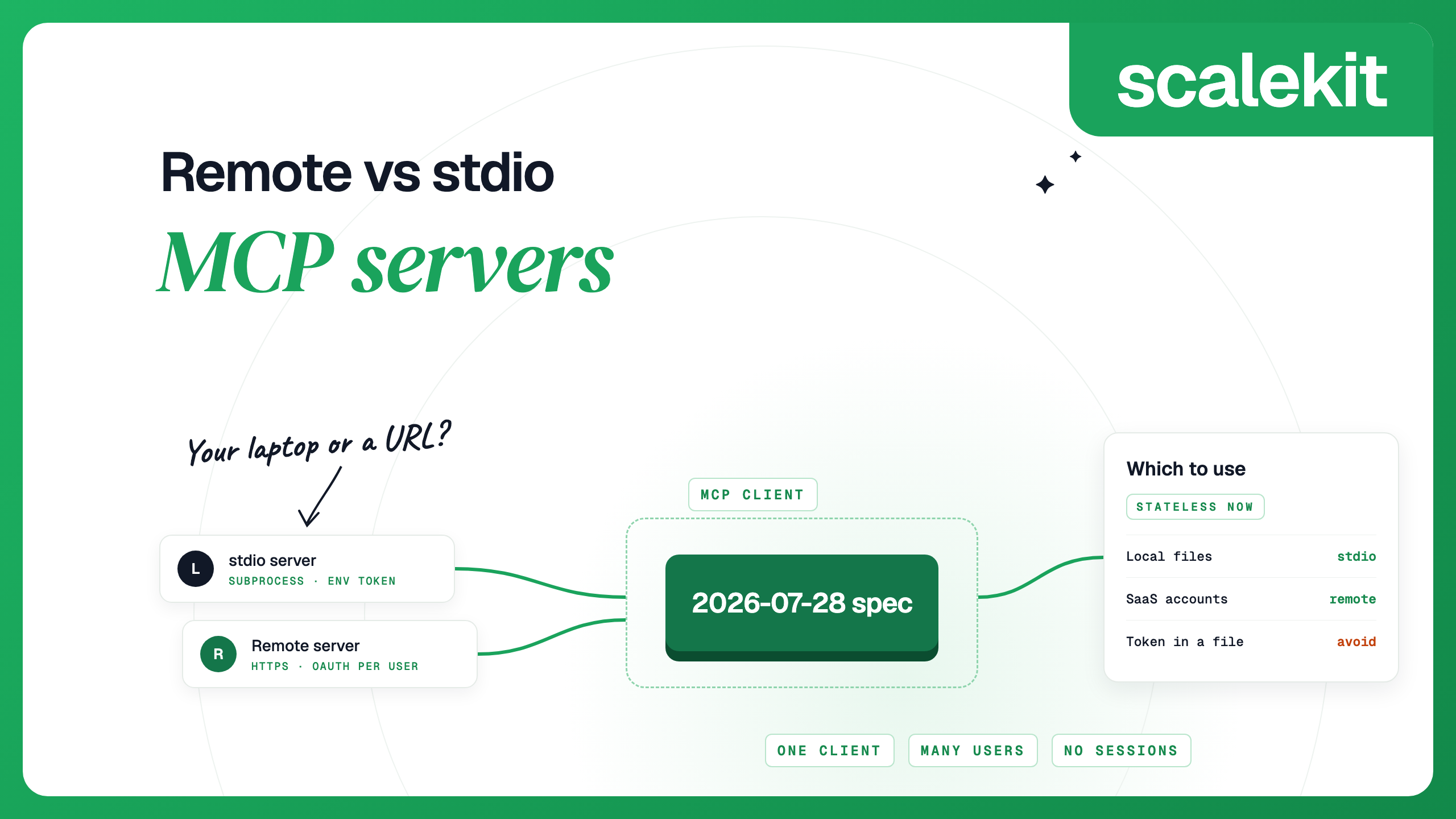


A stdio MCP server runs on your own machine: the MCP client starts it as a subprocess and talks to it through standard input and output. A remote MCP server runs somewhere else and the client reaches it over HTTP at a URL. Use stdio for tools that need your machine, such as local files, a local Git checkout or a database on localhost. Use a remote server for anything shared between people or acting on SaaS accounts, because a remote server can serve many users and usually lets each user sign in with OAuth. Both transports are defined in the current MCP spec (version 2026-07-28). For the wider picture of connecting agents to SaaS tools, see our MCP integrations guide.
For any server that acts on a SaaS account, remote should now be the default. The main argument for stdio was simplicity: no auth to build and nothing to host. For a server that calls a SaaS API, that simplicity usually means a long-lived API token sitting in a config file on each person's laptop, which is hard to scope, rotate or revoke. A remote server behind one shared API key has the same problem, so the gain comes from per-user sign-in. The main argument against remote servers was operational, since sessions needed sticky routing or a shared store; the July 2026 spec removes that for clients that adopt it. If you are the only user and the data is on your machine, stdio is simpler: everything stays local, there is no operator in the path, and it works offline. Keep stdio for what lives on your machine, and run in a sandbox anything local that you did not write.
As the MCP architecture overview describes them, a stdio server typically serves a single client with no network overhead, and a Streamable HTTP server can serve many clients.
Remote servers are now the more common way to publish. When we counted the latest entries in the official MCP Registry's public API on October 15, 2026, about 64% of roughly 44,000 entries listed a remote endpoint and about 40% listed an installable package; some list both. Almost all remote entries use Streamable HTTP, and a small minority still use SSE. A registry entry does not prove a server is maintained or in use, so treat this as a rough picture.
The client launches the server process and writes JSON-RPC messages to its stdin, one per line. The server writes replies to stdout. The stdio spec has one rule behind a lot of connection failures: the server MUST NOT write anything to stdout that is not a valid MCP message. Logs go to stderr. A stray print statement corrupts the stream and the client reports "Connection closed"; our MCP errors guide covers how to debug it.
A client can also restart a crashed stdio server and retry requests that were in flight, since there is no session to rebuild.
Under Streamable HTTP, every message is a POST to a single endpoint such as https://mcp.example.com/mcp. The server replies with JSON or with a server-sent event stream that belongs to that one request. The 2026-07-28 changelog lists the main changes:
The practical effect, as the 2026-07-28 release announcement describes it, is that a remote server can run behind a plain round-robin load balancer with no shared session storage. That holds for clients on the new spec. Servers that need to support older clients can serve both eras on the same endpoint, which the versioning rules call dual-era servers. An older client still opens a session with an initialize request, so its traffic needs sticky routing or a shared session store. The older HTTP+SSE transport from 2024 has been deprecated since March 2025 and new implementations should not adopt it. Claude Code still connects to SSE servers; from version 2.1.265 it tries HTTP first and falls back automatically, and older versions need --transport sse.
The authorization spec is optional, and it splits by transport. Servers using HTTP SHOULD follow it. Servers using stdio SHOULD NOT, and should read credentials from the environment. In practice:
This is why multi-user products use remote servers with OAuth: each user's token names that user, and the app behind the server enforces that user's permissions. Per-user OAuth for MCP integrations covers that design in depth.
A local server is code running on your machine with your privileges. The MCP security best practices list what can go wrong: a malicious startup command in a client config, a malicious payload inside the server package, data exfiltration and data loss. Clients that offer one-click install MUST show the full command, warn that it runs code on your system, and wait for your approval. They SHOULD also sandbox local servers with minimal privileges.
Running a server locally over HTTP instead of stdio adds a different risk. A server listening on localhost can be reached by web pages through DNS rebinding. The spec says local HTTP servers MUST validate the Origin header and SHOULD bind to 127.0.0.1, not 0.0.0.0, and the best practices recommend stdio for local servers so that only the client can reach them.
A remote server moves the code off your machine, but you are now trusting the operator with your requests and with whatever its tokens can reach. Either way, check the publisher and limit credentials; how to vet a third-party MCP server has a checklist.
The same two servers, one local and one remote, in five clients.
Claude Code. Everything after -- is the command that starts a stdio server. Add --scope project to share a server through .mcp.json in your repository, as described in the Claude Code MCP docs.
Claude Desktop reads local servers from claude_desktop_config.json. Remote servers are not added in that file. You add them in the app as custom connectors: on Pro and Max, go to Customize > Connectors and add a custom connector with the server URL, such as https://mcp.notion.com/mcp; on Team and Enterprise, an Owner adds it first under Organization settings. Custom connectors are available on Free (one connector), Pro, Max, Team and Enterprise plans. Claude connects to a custom connector from Anthropic's cloud infrastructure, so the server must be reachable over the public internet. A server on localhost, behind a VPN or on a private network will not connect, as Anthropic's custom connector guide explains. For a server that only your machine can reach, use the local config.
Cursor reads .cursor/mcp.json in a project or ~/.cursor/mcp.json globally. A command means stdio and a url means remote, as the Cursor MCP docs describe.
Codex reads ~/.codex/config.toml. Sign in to a remote server with codex mcp login notion; the Codex MCP docs cover the other options.
VS Code reads .vscode/mcp.json, with an explicit type for each server. On macOS and Linux it can sandbox stdio servers with sandboxEnabled, which the VS Code MCP configuration reference documents.
If a local server has grown into something a team or product depends on, the move usually takes four steps.
If the server is a wrapper around SaaS APIs you did not write, you may not need to host it at all. Scalekit AgentKit hosts scoped MCP endpoints across 500+ connectors, with per-user OAuth. Each Virtual MCP server combines the connectors an agent needs and exposes only the tools that agent uses.
A local (stdio) server runs on your machine as a subprocess of the MCP client and communicates over standard input and output. A remote server runs elsewhere and is reached over HTTP at a URL. Local servers usually serve one client with credentials from environment variables; remote servers serve many users and usually use OAuth, though some accept an API key header.
Use stdio for tools that need your local machine, such as files or a local database, or when you are the only user and want the data to stay local. Use Streamable HTTP for servers shared by a team or used by many end users, or that act on SaaS accounts, so each user can sign in with OAuth.
Yes. The HTTP+SSE transport from 2024 has been deprecated since the 2025-03-26 spec and remains deprecated in 2026-07-28. Streamable HTTP replaced it. Some clients, such as Claude Code, still connect to SSE servers for compatibility.
Normally not. The MCP authorization spec says stdio servers should not follow the OAuth flow and should read credentials from the environment instead. OAuth is for servers using HTTP, and even there the spec makes authorization optional.
Yes, at the protocol level, for clients and servers on 2026-07-28. The spec removed protocol sessions and the Mcp-Session-Id header, and servers that need state across calls return explicit handles that clients pass back as tool arguments. Servers that still accept older clients keep sessions for those clients.