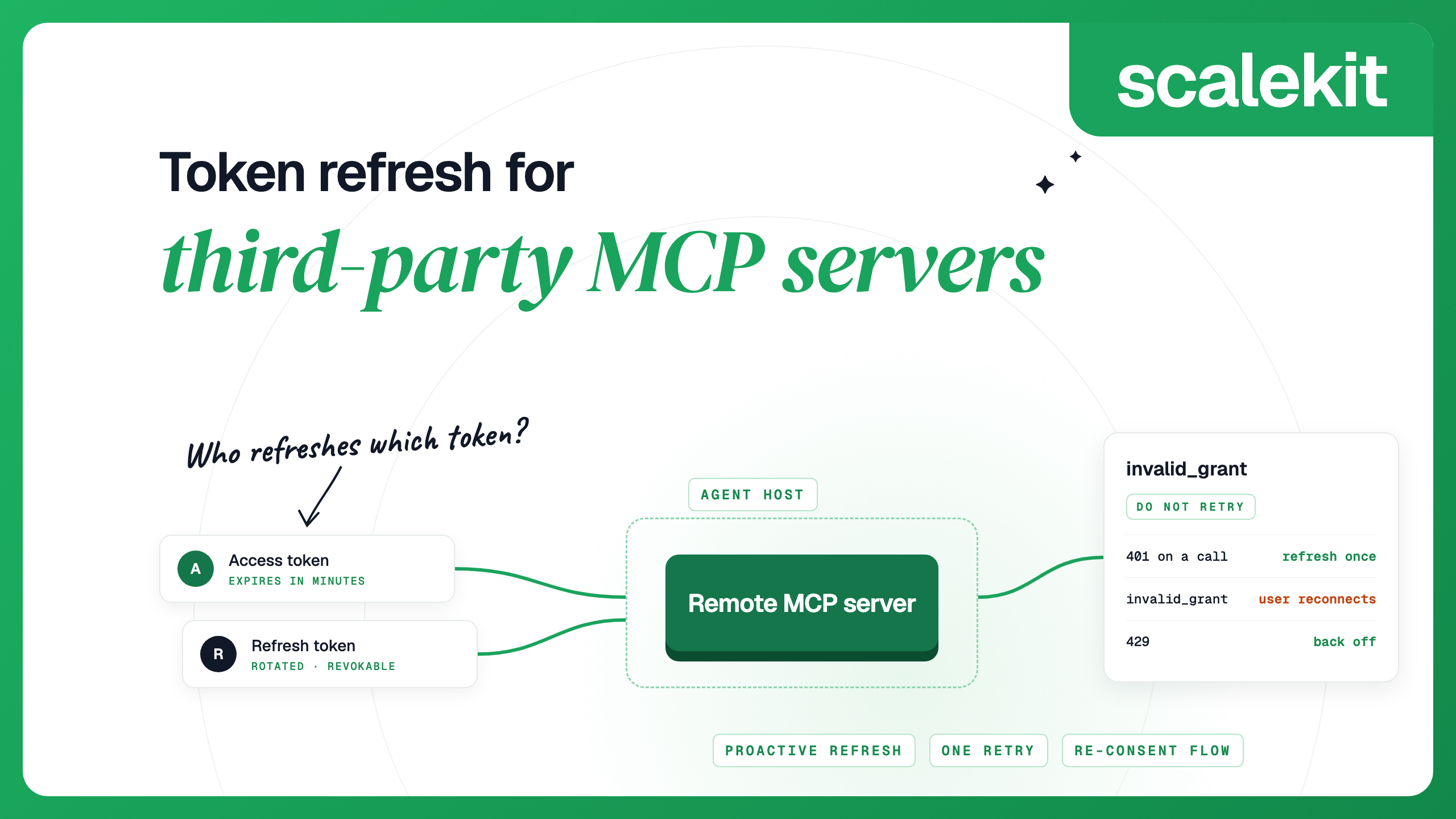
Whoever holds a token refreshes it. A third-party MCP server, or the platform behind it, refreshes the app tokens it holds. It does not refresh the token your client presents to it, and it cannot fix a revoked grant; only the user can. Access tokens expire in minutes or hours, and refresh tokens can be revoked, rotated or tied to the OAuth client that issued them. Name an owner for each token, refresh before expiry, treat invalid_grant as a reason to ask the user again, and never retry blindly. For the basics of OAuth refresh in agents, start with our token refresh guide.
TL;DR
- An agent that uses remote MCP servers deals with two kinds of token: the one your MCP client presents to the server, and the user's token for the app behind it. Whoever holds a token refreshes it: the server or its platform handles the app tokens it stores, and your client handles the token it presents.
- Refresh before expiry where you can, retry once on a 401, and stop retrying on invalid_grant. That error means the user has to authorize again.
- These failures are often silent: a refresh fails overnight and nobody notices until a user's tool call errors. Use refresh-failure events to catch them before a tool call does.
Our take
Plan the reconnect flow as a feature. A revoked refresh token cannot be repaired by code; the user has to authorize again. Measure how long it takes a user to reconnect after a refresh fails, and make sure the agent tells the user plainly when access is broken instead of failing quietly.
Two tokens, two owners
When your agent calls a remote MCP server for a user, which is how most MCP integrations work, two OAuth relationships are in play, and each token in them has a different owner.
Who holds and refreshes it
The MCP server's authorization server
Your MCP client or agent host
The server answers 401; the client refreshes or gets a new token
MCP server to the app (Gmail, Linear)
The app's authorization server
Whoever stores the user's app tokens: the MCP server, or a platform behind it
The app rejects the call; the holder refreshes, or the user re-authorizes
When you do not run the MCP server, you control only the first row, plus whatever the server tells you about the second. Write down who owns each row before you write any refresh code. A frequent design gap is code that assumes the other side is refreshing. For how the first row is set up, see the MCP authorization guide; for the second, see per-user OAuth for MCP integrations.
The draft MCP authorization spec puts two rules on the first row. Clients that want refresh tokens must keep them confidential, and must not assume the server will issue one at all. A client may request the offline_access scope when the authorization server advertises it. Plan for both cases: a refresh token that may be rotated on each use, and none at all, where the user signs in again when the access token expires.
When you refresh a token for an MCP server, send the same resource value (the server's canonical URL) that you used in the authorization request. The 2025-11-25 revision of the spec requires it on every token request, and a refresh without it can return a token for the wrong audience, which the server rejects with a 401. The same revision says authorization servers must rotate refresh tokens for public clients. Most MCP clients are public clients, so always save the new refresh token from the response.
What expires and when
Four things can stop working, on different clocks.
Minutes to hours, set by the provider
Expires on schedule; refresh it with the refresh token
Often capped by the provider, for example 30 days by default on Zendesk, 90 days on Microsoft Entra ID, six months on GitHub
Expires, is rotated on use, or is revoked
Token your client sends to the MCP server
Set by the server; Scalekit session tokens are short-lived by design (one hour by default, configurable from 60 seconds to 24 hours), Nango agent sessions last up to 15 days
Expires; some, such as Scalekit session tokens, are minted again instead of refreshed
Password change, admin revocation, the user disconnecting the app, or a provider security policy
Lifetimes for common providers, as each provider documents them (details checked October 2026):
No fixed expiry for production apps; 7 days for apps in Testing status. At most 100 per Google Account per client ID, oldest dropped first
Slack (token rotation on) 12 hours; without rotation, Slack tokens do not expire
60 to 90 minutes (75 on average)
90 days (24 hours for single-page apps)
Set by expires_in in the token response
Rotated on use; expires after 90 days of inactivity
Zendesk (clients created from 30 April 2026) 30 days by default (configurable from 7 to 90 days)
Three cases catch teams out:
- No refresh token was ever issued. If the connection's scopes do not request offline access, the provider returns only a short-lived access token, and the account expires soon after it is connected.
- Rotation. Some providers issue a new refresh token on each refresh and invalidate the old one. RFC 9700 requires refresh tokens for public clients to be sender-constrained or rotated. With rotation, two workers refreshing at once can lock each other out.
- Per-user token limits. Some providers keep only a fixed number of refresh tokens per user and app, and drop the oldest when a user reconnects repeatedly. Google keeps at most 100 refresh tokens per Google Account per OAuth client ID.
Proactive and reactive refresh
Do both:
- Proactive. Store the expiry with each token (from expires_in, or the server's expires_at) and refresh when it is within a few minutes of expiring, before the agent's next call. For a long-running agent host, do this on a schedule rather than waiting for the next request.
- Reactive. When a call returns 401, refresh once and retry the call once. If the retry fails too, stop and report it; do not loop.
- One refresh at a time. With rotation, two processes refreshing the same token at once can leave one of them holding a refresh token that is already dead. Put a lock per user and app around the refresh, and have the second caller wait for the first one's result.
Some MCP-side tokens are designed to be minted again instead of refreshed. Scalekit session tokens are short-lived by design (one hour by default, up to 24 hours): mint a new one once per run, at the start of a chat session, or on a schedule before expires_at for a host that stays up. Minting a new one does not revoke the old one, so overlapping tokens during a handover are fine.
invalid_grant and revoked tokens
invalid_grant is the error that matters most, because retrying cannot fix it. RFC 6749 defines it as a grant or refresh token that is invalid, expired, revoked, sent with the wrong redirect URI, or issued to another client. In every one of those cases the only way forward is for the user to authorize again.
Token endpoint, on refresh
Refresh token expired, revoked, already rotated, or issued to a different OAuth client
Stop retrying. Mark the account as needing re-authorization and ask the user to reconnect
Your client ID or secret is wrong, rotated or deleted
Fix your configuration; the user cannot help
The access token or session token expired, or was minted for a different server
Refresh or mint a new token once, then retry once
HTTP 403, insufficient_scope
The token is valid but lacks a scope this tool needs
Ask the user to authorize again with the added scope
Too many refreshes or calls
Back off with jitter; do not count it as a token failure
Status EXPIRED (Scalekit)
Connected account, tool call or webhook
Scalekit could not refresh the user's token
Ask the user to reconnect; tool calls fail until they do
To ask a user to reconnect, send them to a reconnect page in your app that requests a fresh authorization link when they click it. Authorization links expire within minutes, so do not put them in an email or a queued notification.
Client-bound refresh tokens
A refresh token belongs to the OAuth client that received it. Presented by any other client, it fails with invalid_grant. This has three practical effects.
- Changing OAuth clients means re-authorization. If you move from a vendor's shared OAuth app to your own, or to another platform's app, every user authorizes once more. Scalekit's Composio migration guide notes that existing Composio tokens cannot be transferred. If you registered your own OAuth app and the platform lets you export tokens, the new system can keep refreshing them with the same client, and users do not have to reconnect. Nango documents this for connections that use your own app.
- Changing OAuth credentials does not re-authorize anyone. On Scalekit, users who are already connected keep using the old credentials until they authorize again, as the bring-your-own OAuth docs describe. Plan a re-consent prompt if you need everyone on the new app.
- Every agent instance must refresh through the same client. If your workers hold different client credentials, a token refreshed by one is useless to the others. Keep refresh in one service, or let the platform that holds the tokens do it.
If you use a third-party MCP server that holds your users' app tokens, those tokens are bound to that server's OAuth client, unless you supplied your own. Leaving costs one re-authorization per user, so factor it in when you choose. If portability matters to you, register your own OAuth apps with whichever platform you pick, Scalekit included, so the OAuth client stays yours.
Retries and backoff
Whether to retry depends on the error:
- Retry with backoff: network errors, timeouts, HTTP 429 and 5xx from the token endpoint or the API. Use exponential backoff with jitter and a cap, and honour Retry-After when it is sent.
- Retry once, after refreshing: HTTP 401 with an expired or invalid token. One refresh, one retry. A second 401 means the problem is not expiry.
- Never retry: invalid_grant, invalid_client, insufficient_scope. Each needs a person, either the user (re-authorize) or you (fix configuration).
Agents add one more rule: tell the model what happened. If a tool call fails because the user must reconnect, return that as the tool result ("Linear is disconnected; ask the user to reconnect") rather than a generic error. Otherwise the model tends to retry the same call or invent a workaround. Tool call failures in production covers the other failure types.
Monitoring
The goal is to learn that a user's access broke before the user's next request does. Track these, per user and per app:
- Refresh attempts, successes and failures, with the error code
- Accounts that move out of an active state, and how long they stay out
- Tool calls that fail for auth reasons, separated from other failures
- Time until expiry for long-lived MCP-side tokens held by agent hosts
If a platform holds the tokens, use its events instead of polling every account. Scalekit sends three account events that matter here:
connected_account.token_refresh_succeeded
Scalekit refreshed the access token
Confirm refresh is working
connected_account.token_refresh_failed
A refresh failed; the status may still read ACTIVE
connected_account.status_updated
The status changed, with the old and new value
Ask the user to reconnect when it becomes EXPIRED or DISCONNECTED
Scalekit's docs treat token_refresh_failed as an early warning and status_updated as the signal to ask the user to reconnect. Expect duplicate deliveries and skip event IDs you have already handled. Other platforms manage refresh centrally too: Composio stores and refreshes credentials per user, Merge refreshes when the access token is near expiry, and Nango handles credential storage, refresh and validation.
Code
If you hold the tokens yourself. A refresh wrapper that does four things: refresh shortly before expiry, one lock per user and app, one retry on 401, and a re-consent path on invalid_grant. store, token_endpoint and ask_user_to_reconnect stand in for your own code. Pass resource when the token is for an MCP server.
import threading, time, requests
REFRESH_MARGIN = 300 # seconds before expiry
_locks = {}
class NeedsReconsent(Exception):
pass
def _lock_for(key):
return _locks.setdefault(key, threading.Lock())
def _error_code(r):
if r.headers.get("content-type", "").startswith("application/json"):
return r.json().get("error")
return None
def get_access_token(user_id, app, resource=None):
tok = store.get(user_id, app)
if tok.expires_at - time.time() > REFRESH_MARGIN:
return tok.access_token
with _lock_for((user_id, app)):
tok = store.get(user_id, app) # another worker may have refreshed
if tok.expires_at - time.time() > REFRESH_MARGIN:
return tok.access_token
data = {
"grant_type": "refresh_token",
"refresh_token": tok.refresh_token,
# client_secret_post; some providers require HTTP Basic auth instead
"client_id": CLIENT_ID, "client_secret": CLIENT_SECRET,
}
if resource: # MCP servers: the same canonical URL used at authorization
data["resource"] = resource
r = requests.post(token_endpoint(app), data=data, timeout=10)
if r.status_code == 400 and _error_code(r) == "invalid_grant":
latest = store.get(user_id, app) # another process may have rotated it
if latest.refresh_token != tok.refresh_token:
return latest.access_token
store.mark_needs_reconsent(user_id, app)
raise NeedsReconsent(app)
r.raise_for_status()
body = r.json()
store.save(user_id, app,
access_token=body["access_token"],
refresh_token=body.get("refresh_token", tok.refresh_token), # rotation
# expires_in is optional; 3600 is an assumption, and the 401 path covers a wrong guess
expires_at=time.time() + body.get("expires_in", 3600))
return body["access_token"]
def call_api(user_id, app, do_request, resource=None):
try:
resp = do_request(get_access_token(user_id, app, resource))
if resp.status_code == 401: # one refresh, one retry
store.expire_now(user_id, app)
resp = do_request(get_access_token(user_id, app, resource))
return resp
except NeedsReconsent:
ask_user_to_reconnect(user_id, app)
# handed back to the model as the tool result
return {"error": f"{app} is disconnected; ask the user to reconnect"}
The lock here works within one process. With several workers, use a shared lock (a database row lock or a Redis lock) so only one refresh runs at a time.
With Scalekit. Scalekit refreshes the app tokens, so your code checks the account before a run, mints a session token for the MCP server, and reacts to status changes. ENV_URL, CLIENT_ID, CLIENT_SECRET and config_id come from your Scalekit dashboard.
from datetime import timedelta
from scalekit import ScalekitClient
actions = ScalekitClient(ENV_URL, CLIENT_ID, CLIENT_SECRET).actions
accounts = actions.mcp.list_mcp_connected_accounts(
config_id=config_id, identifier="user_123", include_auth_link=False
)
for a in accounts.connected_accounts:
if (a.connected_account_status or "").upper() != "ACTIVE":
# your reconnect page requests a fresh authorization link when the user clicks
ask_user_to_reconnect("user_123", a.connection_name)
# Mint a session token for this run
session = actions.mcp.create_session_token(
mcp_config_id=config_id, identifier="user_123", expiry=timedelta(hours=1)
)
Then handle connected_account.status_updated in your webhook endpoint, as shown in the account events docs, and ask the user to reconnect when the status becomes EXPIRED or DISCONNECTED. Your reconnect page can call list_mcp_connected_accounts with include_auth_link=True when the user clicks, and redirect to the link it returns. To see how a user's connected account status works end to end, start with the AgentKit quickstart.
FAQs
How do I refresh OAuth tokens for an MCP server I don't run?
Refresh the token your client holds. Store its expiry, refresh a few minutes before it, send the same resource value you used at authorization, and refresh once more if a call returns 401. Keep one refresh at a time per user and server, save the new refresh token when the server rotates it, and ask the user to reconnect on invalid_grant. The app tokens behind the server are refreshed by whoever stores them.
Why do I get invalid_grant?
The refresh token is expired, revoked, already rotated, or was issued to a different OAuth client. Retrying will not help. The user needs to authorize again.
Do MCP servers refresh tokens?
Whoever holds a token refreshes it. A managed MCP server or platform refreshes the app tokens it stores; a server you run yourself does so only if you build it. The token your client sends to the MCP server is your client's job, and some, such as Scalekit session tokens, are designed to be minted again for each run instead of refreshed.
What happens when a refresh token is revoked?
Every later refresh fails with invalid_grant, and tool calls for that user and app fail until the user authorizes again. You cannot recover it on your side; detect it quickly and prompt the user.
How often should I refresh?
Only when a token is close to expiry, a few minutes before, or after a 401. Refreshing on a timer regardless of expiry adds load, can hit provider rate limits, and with rotation raises the chance of two workers colliding.