

An agent that acts in other apps needs a layer between it and those apps. That layer runs the OAuth flows, stores each user's tokens, refreshes them before they expire, and executes tool calls with the right credential attached. It holds standing access to every connected account and it is in the execution path of every action. A security architect reviewing an agent product looks at this layer first, because it is the one most often bought as a third-party service and the one with the widest reach into the customer's systems.
Vendors offer self-hosting in one of three ways: free images you can run today, a full runtime under an enterprise license, or not at all. That tier tells you how you get the software. For a deployment review it is the smallest of the questions. The larger ones are what you are getting once it runs inside your network: whether it is the same product as the cloud edition, whether each action still runs as the individual user, what the platform keeps after a call completes, who holds the encryption root key, and whether the license survives with no outbound connectivity.
This comparison is written for teams that already know the answer has to be self-hosted. It ranks five platforms on those questions, with every competitor fact taken from that vendor's own pages.
This is the question that separates an agent integration platform from a generic integration platform. An iPaaS or a sync engine typically connects once, with a service account or an admin's credential, and moves data on a schedule. An agent acting for a person needs that person's own authorization, scoped to what they are allowed to do, so that a tool call in Salesforce or an EHR carries the same permissions the user has and shows up in the target system's audit log under their name. Inside a regulated customer's boundary this matters more, not less: a shared service account that writes clinical notes or moves funds fails the audit on its own. Check whether per-user connected accounts, scoped tool sets and per-call attribution are part of the self-hosted product or a managed-cloud feature.
Teams build against a managed cloud for months before a customer's security review asks for a private deployment. If the self-hosted edition has a smaller feature set or a different API, that review becomes a rewrite and you maintain two integrations for the life of the contract. Ask which components ship in the self-hosted runtime, and run your own integration tests against both editions before a deal depends on it.
Tool calls return business data: a record, a thread, a file listing. The question for a review is retention. Some platforms execute the call and return the result without keeping it. Others log the response, cache it for retries, store it as part of a sync, or keep inputs and outputs to improve their own product. Each retained copy is a data store with its own retention period, backup policy and place in the subprocessor list. Ask what persists after a call completes, where, for how long, and what it is used for. In regulated deployments, a platform that retains nothing is a much shorter conversation.
Token vaults use envelope encryption: each credential is encrypted with a data key, and the data keys are encrypted with a root key held in a key management service. A vendor-managed root key in a KMS is a sound default, and it is how most platforms, including Scalekit, encrypt credentials out of the box. Bring your own key adds a layer of control on top: when the root key is in your KMS, you set the rotation policy, every wrap and unwrap appears in your own audit log, and revoking the vendor's access makes stored credentials unreadable until you restore it. Some self-hosted platforms instead take the key as a configuration secret you set on the deployment; that works, but more of the rotation, revocation and audit work falls to your team. Bring your own key is also easy to confuse with bringing your own LLM API key, which is a credential, not an encryption feature.
A license check that calls home at boot fails in a sealed network. For defense, government and some financial buyers, ask whether the license validates offline, whether images can be served from an internal registry, how upgrades reach the cluster, and what happens at renewal. Residency is a smaller version of the same question: if the customer's requirement is a region rather than their own network, confirm the managed cloud has one.
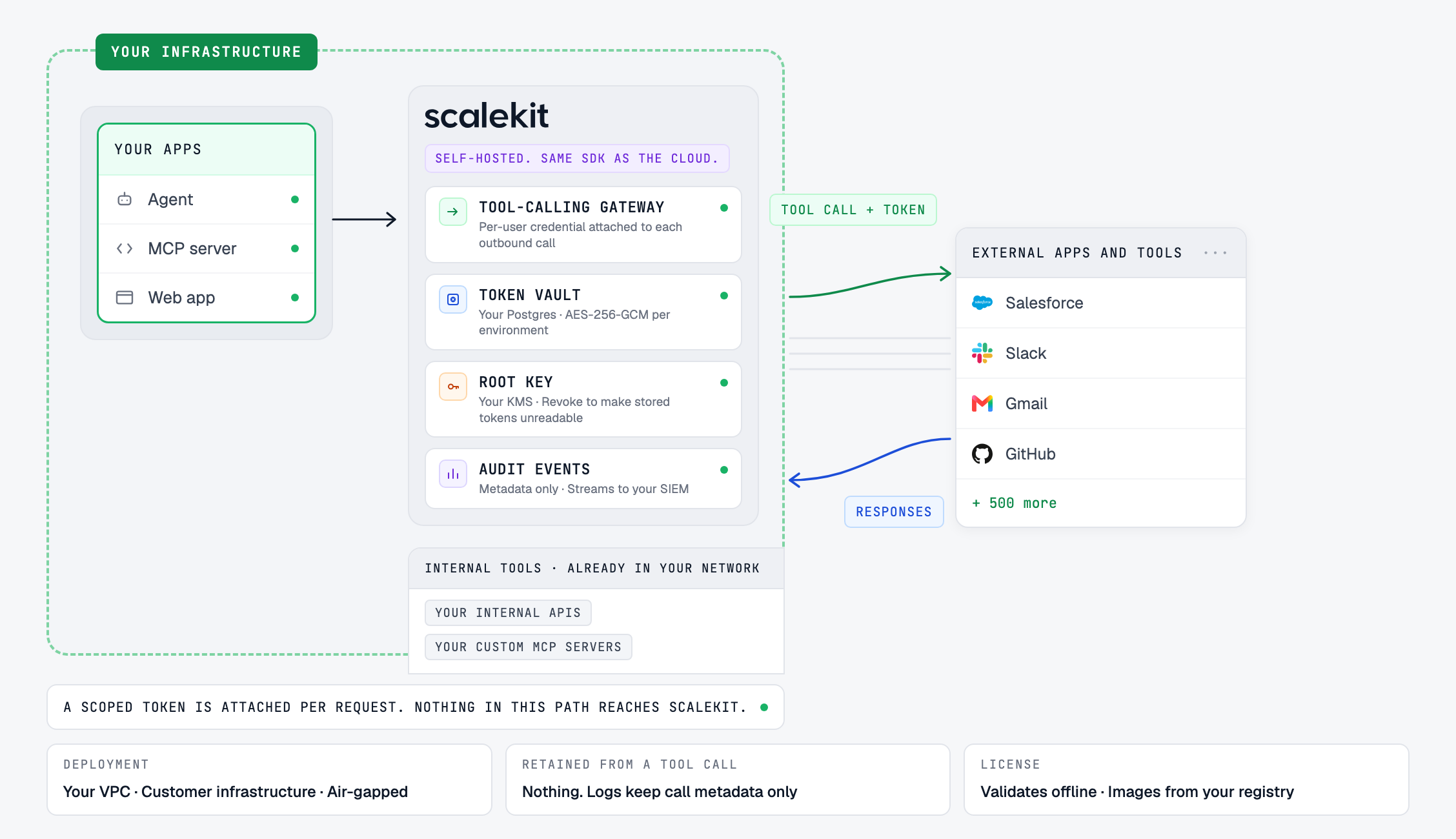
In a full self-hosted deployment, the agent calls the gateway, the gateway reads the user's credential from a vault in your database, the vault is encrypted under a key you control, and audit events go to your own logging. No step in that call path goes through the vendor. Depending on the deployment mode, license validation and update checks may still call out, so ask each vendor which connections remain. The gateway still calls each app's API and OAuth token endpoint, so the cluster needs outbound HTTPS to the providers your connectors use. Connectors for apps inside your own network need no internet access.
Deployment, authorization and retention (checked October 7, 2026)
Parity, air-gapped and compliance (checked October 7, 2026)
Region and fit
“Not documented” and “not published” mean the detail is not on the vendor's public pages as of the check date. It may exist. Ask them.
Read across the tables and one thing stands out: Scalekit is the only platform in this comparison whose public pages answer every column. It is also the only one that documents all five things a self-hosted review checks: per-user authorization, a customer-held root key, no storage of tool-call payloads, offline licensing for air-gapped installs, and the same SDK in every mode. Each of the others documents some of those and leaves the rest to a sales conversation.
Self-host tier: Enterprise-licensed · Best for: agent products that act as each user across SaaS apps and internal systems, deployed inside a regulated customer's boundary.
Scalekit AgentKit is an authorization and tool-calling runtime for agents, and the whole runtime self-hosts. Connections, connected accounts, the token vault, tool execution and Virtual MCP servers run in your Kubernetes cluster alongside auth and sessions. The SDKs, the REST API and the dashboard are the same as the managed cloud; a self-hosted app points SCALEKIT_ENVIRONMENT_URL at its own instance (docs). The integration you built is the integration that runs in the customer's environment.
Deployment modes. Scalekit self-hosted runs three ways, and you can use different modes for different customers:
Every action runs as the user. Each end user connects their own accounts, and every tool call runs with that user's credential, so the target system records the action under the user, not a service account. Virtual MCP Servers give each agent or role its own tool set, so a read-only agent does not see write tools. The catalog covers 500+ connectors and 20,000+ actions, including SMART on FHIR for healthcare, plus custom connectors for internal APIs that never leave the network.
Key custody. Credentials are encrypted with AES-256-GCM under a per-environment data key, and that key is wrapped by a root key in KMS. On Enterprise the root key can be yours: you register a key from your own Google Cloud KMS, and Scalekit calls it for each wrap and unwrap without storing the key material. Disabling the key or revoking Scalekit's access leaves stored credentials unreadable to Scalekit, once Google Cloud applies the change, until you restore it. The encryption keys docs walk through the setup with Google Cloud KMS.
Retention and audit. Tool-call requests and responses are not stored. They are processed in memory for the duration of the call and are not written to Scalekit's database or logs (HIPAA page). Because payloads are not kept, they are not used for training. Tool-call logs keep metadata: tool, connection, connected account, identifier, status, error code and duration (security docs). An optional Store connector error details setting also keeps the app's error response for debugging; leave it off outside debugging. On Enterprise, logs can stream to your SIEM. Self-hosted, Scalekit has no database access, no default telemetry, and no log access unless you share logs for support.
Compliance: SOC 2 Type II, ISO 27001, GDPR and CCPA. HIPAA BAA, custom DPA, BYOK and a 99.99% uptime SLA on Enterprise (pricing). Self-hosted, customer data stays in your deployment, so Scalekit is not a sub-processor for it. A BAA is available on Enterprise for both cloud and self-hosted deployments.
What to plan for:
Self-host tier: Free (auth and proxy) and Enterprise (full runtime) · Best for: code-first teams whose main job is data sync, with agent tool calling as a second use case.
Nango publishes a free self-hosted edition that runs from public images with docker-compose and covers managed auth and the API proxy, under the Elastic License, according to its docs. It is the quickest of the five to stand up for an evaluation. The full platform, including syncs, tool calls, webhooks and the MCP server, ships on Enterprise, with Helm deployment and bring-your-own-cloud in any AWS, GCP or Azure region, according to its pricing page.
What to check:
More in Scalekit vs Nango.
Self-host tier: Enterprise-licensed · Best for: fast prototyping across a large tool catalog.
Composio's self-hosting is an Enterprise feature, aimed at teams whose infrastructure, network or residency requirements put the action layer inside their own environment, according to its enterprise page. Its strength is catalog breadth and a short path from signup to a working agent. It holds SOC 2 Type II and ISO 27001:2022.
What to check:
More in Composio alternatives.
Self-host tier: Enterprise-licensed · Best for: MCP tool access across clients such as Cursor and Claude, with central governance.
Arcade describes itself as the actions runtime between agents and the systems they reach. Its homepage leads with developer SDKs and framework support, and alongside that it offers MCP gateways: a single gateway URL that works in Cursor, Claude Desktop, VS Code, ChatGPT and other MCP clients, with SSO, RBAC and audit logs for the organization. That second use, governed tool access for people already using MCP clients, is where much of Arcade's recent material points. For an agent vendor whose end users are customers rather than a workforce, the question is whether that governance model fits your product's users. Arcade co-authored the MCP URL elicitation proposal and holds per-user authorization for MCP tools as its core.
Deployment. Arcade Cloud has a free tier (2,000 auth events and 2,000 tool calls a month) and a Team plan at $25 a month plus usage, both cloud-only. The Enterprise plan adds your VPC or a fully air-gapped deployment, SSO, RBAC, audit logs and private registry access. Self-hosted deployments run as an Azure Marketplace managed app, through an AWS private offer (a GCP listing is in progress), or with Helm on your own cluster; Arcade's docs say the marketplace and Helm options run the complete platform. Arcade also offers hybrid MCP servers that run in your environment and connect to Arcade Cloud.
Keys and retention. In Arcade Cloud, tokens sit in Arcade's encrypted vault, protected by a KMS Arcade manages, with application-level AES-256 on sensitive fields. Self-hosted, Arcade's July 2026 post says the tokens stay in your KMS and the keys never leave your control. Arcade Cloud retains tool execution logs and audit trails for a period you set, and its infrastructure docs state that tool queries and execution inputs and outputs are retained as training data for up to five years, with an organization-level opt-out. All Arcade Cloud infrastructure is in the United States; for residency, Arcade points to self-hosting.
What to check:
More in Arcade alternatives.
Self-host tier: Enterprise-licensed · Best for: SaaS products embedding customer-facing integrations, with agent actions as an extension.
Paragon is an embedded integration platform, and ActionKit adds agent actions on top of it. Its January 2026 self-hosting post describes three models: unmanaged, where you install with its Terraform installer and Helm charts; managed, where Paragon runs it in your account; and forward-deployed, where Paragon deploys into your customer's VPC. It runs on AWS, Azure and GCP and its security page lists SOC 2 Type II, HIPAA and GDPR.
What to check:
More in Paragon alternatives.
For the deployment, residency and key custody questions regulated buyers put to agent vendors, with Scalekit's answer to each, see the security questionnaire for AI agent vendors.
It means the layer that stores user credentials and executes tool calls runs on your infrastructure or your customer's, not the vendor's. Platforms fall into three tiers: free self-hosting from public images, enterprise-licensed self-hosting, and managed-only.
Nango publishes a free self-hosted edition that covers managed auth and the API proxy; its syncs, tool calls, webhooks and MCP server require Enterprise. Scalekit, Composio and Arcade have free managed plans, with self-hosting on Enterprise. Paragon's self-hosting is also an enterprise arrangement.
Scalekit supports air-gapped deployment with no outbound calls, offline license validation and images from your own registry. Arcade lists a fully air-gapped deployment on its Enterprise plan without describing how licensing works offline. Paragon says it can support a complete airgap on request. Nango and Composio do not document air-gapped operation.
Scalekit supports a root key in your own Google Cloud KMS on Enterprise. Composio offers customer-managed keys through a keyring proxy on Enterprise. Arcade's self-hosted deployment keeps tokens in your KMS; its cloud edition uses a KMS Arcade manages. Nango's self-hosted edition uses an encryption key you set in configuration, which can be wrapped by your own KMS. Paragon does not document customer-managed keys.
It depends on the vendor and the mode. A self-hosted Scalekit instance keeps credentials, tool calls and logs in your network and sends no telemetry by default. In VPC mode, license validation and update checks may call out and can be routed through your egress controls; in air-gapped mode, the instance makes no calls to Scalekit. Paragon's self-hosted deployment contacts Paragon for license verification, billing metadata and anonymized usage analytics; the analytics can be disabled. Arcade's hybrid MCP servers connect to Arcade Cloud. Ask each vendor for a list of outbound connections.
Merge's Agent Handler pricing lists “custom deployments, including on-prem” on its Enterprise plan, and its security page describes single-tenant hosting and US, EU and APAC regions. Merge does not publish the details of its on-prem option, so ask during evaluation.