Use Glama for the largest index and quality grades, and Smithery if you also want it to manage connections. PulseMCP has official and community labels, mcp.so suits casual browsing, and the official MCP Registry serves canonical metadata through an API. Registries tell you what exists; to run those servers as MCP integrations for many users, Scalekit adds per-user OAuth, token storage and tool scoping.
An MCP registry is a searchable list of MCP servers. A listing tells you who publishes a server, how to install or reach it, which transport it uses, and sometimes how well it is maintained. The official registry describes its own role narrowly: package registries host the code, and the MCP Registry hosts metadata that points to those packages. The registry docs expect downstream directories, which they call aggregators, to consume that metadata and add ratings, scans and usage numbers.
That makes registries the right place to start when you need to know what exists. Most are not built to manage each of your users' connections to a server. Smithery Connect and Glama's hosted gateway cover part of that.
Counts as of October 15, 2026. They change daily.
The official registry is built by MCP contributors and backed by Anthropic, GitHub, PulseMCP and Microsoft. Publishers verify their namespace through GitHub, DNS or HTTP, and each entry is a server.json file with remote URLs and package details. The registry is still in preview, and its API has been at v0.1 since October 2025. It has no ratings or tool lists. It has a basic web page, but it is meant mainly to be read by other tools.
Glama lists 98,962 servers and grades each one on license, quality and maintenance. Security findings come from a separate sandbox analysis that labels servers as malicious or risky. Listings show stars, downloads, official and claimed badges, and a quality score for each tool definition. Glama also hosts servers behind a gateway with OAuth 2.1, per-tool access control and call logs, billed by usage on top of a workspace plan. Scalekit's own MCP server is listed on Glama with the Official badge.
Smithery lists 26,000+ servers and has been part of Arcade.dev since August 2026. Its Connect service handles OAuth flows and credential injection, tracks each end user by ID, refreshes tokens before they expire, and can scope a token to one user's connections. Connect takes an MCP server URL as input, including servers that Smithery does not host, and Smithery supplies the OAuth app for popular integrations. That makes Smithery the registry closest to a managed platform. Arcade.dev, its owner, also sells a managed tool-calling platform.
PulseMCP lists 21,705 servers and labels each one as official, reference or community, with an estimate of weekly visitors. A PulseMCP co-founder sits on the official registry's working group. New submissions are paused; PulseMCP asks publishers to use the official registry, which it will ingest when submissions reopen. Scalekit's MCP server is listed as official.
The GitHub MCP Registry lists 427 servers with one-click installs into VS Code. The Docker MCP Catalog has 300+ servers; Docker builds and signs the local servers with provenance and SBOM metadata, and its MCP Toolkit handles OAuth for remote servers in your browser. mcp.so is a community directory organized by category, with servers added through GitHub issues. MCP Market lists 49,488 servers alongside clients and skills.
After you find a server in a registry, letting an agent use it on behalf of many users in your product takes more work: running each user's OAuth flow, keeping and refreshing their tokens, keeping one user's run away from another user's account, and limiting which tools each agent sees. A managed MCP platform does that work. Best managed MCP server platforms compares ten of them.
With Scalekit, a server you found in a registry goes through five steps:
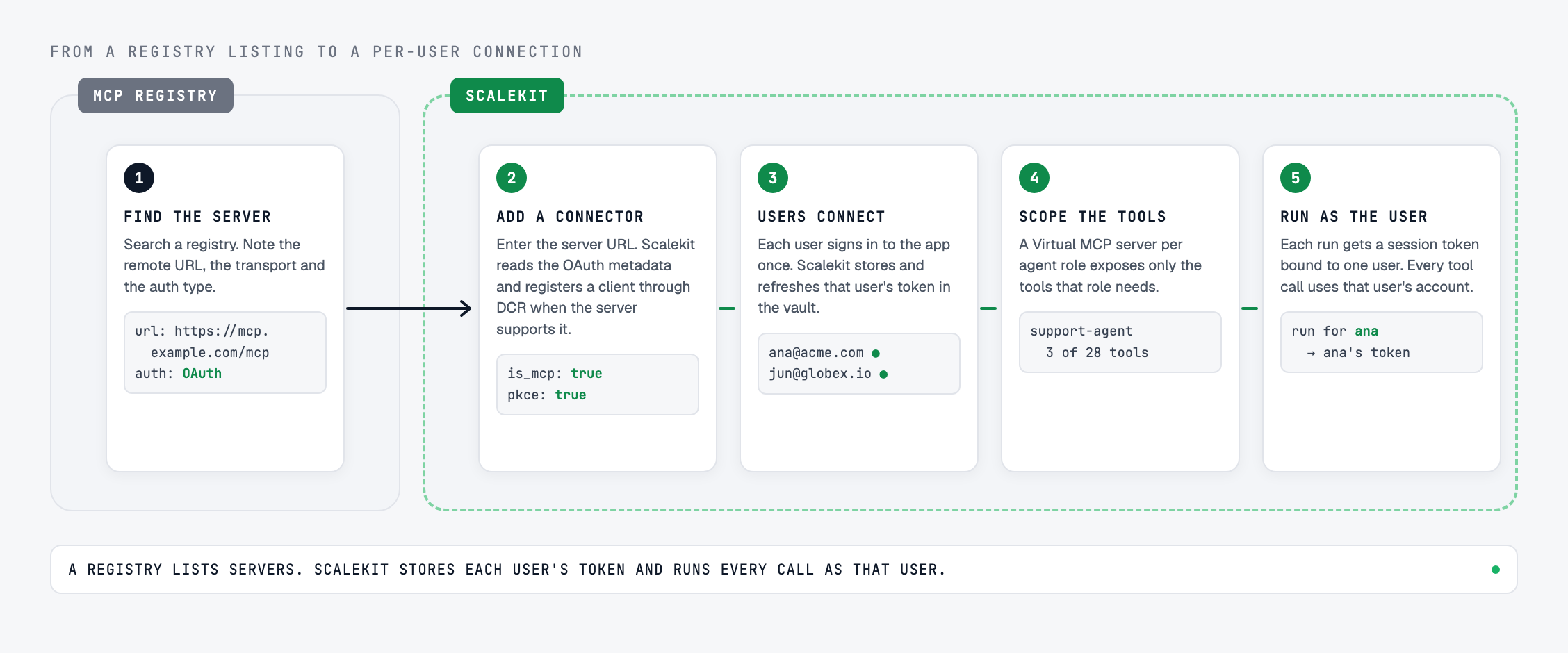
For many popular apps, you can skip step 2. Scalekit's catalog already includes connectors that route calls to the vendor's own MCP server, such as Notion, Linear, GitHub, Slack, Atlassian, HubSpot and Stripe, each with OAuth 2.1. Custom connectors follow the same flow as catalog connectors: create a connection, connect each user's account and call tools, and tool-call responses are not stored.
A registry listing does not tell you whether a server is safe to use with your users' data. How to vet a third-party MCP server walks through these checks in more depth, and MCP security risks in the enterprise covers the threats. Before you connect a server, check:
A registry is enough when one developer connects a server to their own client, such as Claude Code or Cursor, with their own account. The client handles OAuth for that one person, and there is no one else's data to keep apart.
You need a managed layer when the agent acts for many users or many customers: each person needs their own connection, tokens must be refreshed without user involvement, every call must run as the right user, and your security team will ask who did what. Smithery Connect covers part of this. Scalekit handles this for catalog connectors and for remote MCP servers you add as custom connectors. If you also need to govern agents your employees already use, see Top MCP gateways for AI agents.
An MCP registry is a searchable list of Model Context Protocol servers. Each listing describes a server's publisher, install or connection details and transport, and some registries add quality grades, popularity data or security scans. The official MCP Registry stores metadata only; directories such as Glama, Smithery and PulseMCP add ratings, hosting or labels on top of their own indexes.
Glama has the largest index, grades servers on license, quality and maintenance, and offers a hosted gateway. Smithery pairs discovery with Smithery Connect, which handles OAuth and credentials for each end user. mcp.so is a community directory that is easy to browse by category but has fewer vetting signals. PulseMCP labels servers as official, reference or community. The official MCP Registry is the canonical metadata source, read mainly through its API.
For discovery and canonical metadata, yes: it verifies publisher namespaces and gives tools a versioned API. It does not rate servers, host them, or handle OAuth for your users, and it is still in preview. Pair it with a directory for vetting signals and, when agents act for many users, a managed platform for per-user auth.
Yes, if it is a remote, stateless server reachable over HTTPS. Add it as a custom MCP connector with its URL and auth type. For OAuth servers, Scalekit discovers the endpoints from the server's metadata and registers a client through Dynamic Client Registration when supported, then handles each user's tokens and scoping through the same flow as catalog connectors.
Not automatically. Most registries list servers without reviewing them. Check the publisher, transport, auth type, tool descriptions and maintenance activity, prefer servers published by the app vendor, and expose only the tools an agent needs.
To connect a registry server or a catalog connector for your users, follow the Scalekit quickstart, or see how to bring your own connector. To talk through your architecture with an engineer, book a technical session.