
Announcing CIMD support for MCP Client registration
Learn more

Ahrefs MCP vs Ahrefs API for AI Agents (2026)

Saif Ali Shaik
Founding Developer Advocate

TL;DR

  • Ahrefs MCP and the Ahrefs API pull from the same data, but the MCP is scoped to supported AI clients (Claude, ChatGPT, Copilot Studio, and similar). Ahrefs explicitly does not permit hitting the MCP endpoint from custom scripts, bridges, or standalone HTTP or JSON-RPC clients. For a production agent backend, the REST API v3 is the supported path.
  • The MCP surface is retrieval-oriented: Site Explorer, Keywords Explorer, Rank Tracker reads, SERP Overview, Batch Analysis, Brand Radar, GSC Insights. Write and project-management operations (Rank Tracker projects, Keywords Explorer lists) live in the API.
  • MCP auth is an OAuth consent that mints an API key tagged with MCP scope. The REST API uses Authorization: Bearer keys created by workspace owners or admins. Both consume the same monthly API unit allowance; neither is a free lane.
  • For a multi-tenant SEO agent, every customer org has its own Ahrefs subscription and its own key. That is N keys to store, rotate before the one-year expiry, and revoke on offboarding. Neither path vaults, scopes, or audits those for you.
  • Scalekit's Ahrefs connector vaults the per-tenant key, resolves it server-side on every execute_tool call, scopes the tool surface per user, and logs each call for audit, so the MCP vs API decision does not change your credential infrastructure.

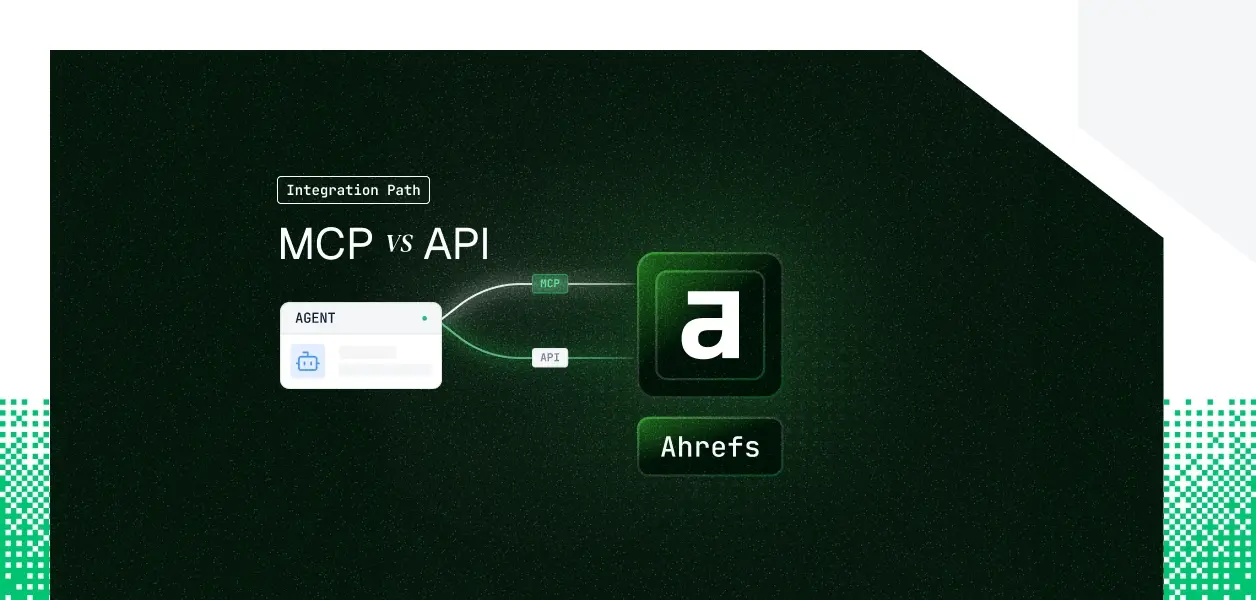
Your agent needs to read Ahrefs. It has to pull backlinks, compare organic keywords, check rank positions, and diagnose why a client's traffic dropped last month. Ahrefs ships a hosted remote MCP server and a REST API v3, and it is tempting to treat them as two interchangeable ways to reach the same data. They are not. One is built for interactive AI assistants; the other is the only path Ahrefs supports for programmatic agents. Picking the wrong one is not a style choice; it is a terms-of-use problem. Here is how to choose.

What Ahrefs MCP and Ahrefs API actually are

Ahrefs MCP

Ahrefs runs a hosted remote MCP server at https://api.ahrefs.com/mcp/mcp over Streamable HTTP. It is available on paid plans from Lite and up, and it connects Ahrefs data to supported AI assistants through natural language.

Connection is an OAuth consent screen. Once approved, a dedicated API key tagged with MCP scope appears in your account; you can also mint an MCP key manually, and Enterprise customers can connect with existing keys. The official docs, setup guides per client, and connection URLs live at the Ahrefs MCP reference.

One constraint defines the whole comparison: Ahrefs states that using the external MCP endpoint via custom scripts, bridges, or standalone HTTP or JSON-RPC clients is unsupported and not permitted, and that the MCP server is not a general-purpose programmatic API.

Ahrefs API

The Ahrefs API v3 is a REST interface over the same underlying data, plus surfaces the MCP does not expose. It covers Site Explorer, Keywords Explorer, Site Audit, Rank Tracker, SERP Overview, Batch Analysis, Brand Radar, Web Analytics, GSC Insights, Social Media Management, Management, Subscription Information, and Public endpoints.

Auth is a bearer key: Authorization: Bearer YOUR_API_KEY. Only workspace owners and admins create keys. This is the path Ahrefs points you to for any programmatic access, which for an agent backend means the API is the default, not the alternative.

Comparing them where it matters for agents

What your agent can actually do

The MCP and the API overlap heavily on data retrieval. They diverge on programmatic eligibility, writes, and the surfaces that never made it into the MCP. The table uses plain labels, not icons.

Capability
Ahrefs MCP
Ahrefs API v3
Site Explorer (backlinks, organic and paid, overview)
Yes
Yes
Keywords Explorer (volume, difficulty, ideas, related terms)
Yes
Yes
SERP Overview (top 100 results)
Yes
Yes
Rank Tracker reads (positions, competitors)
Yes
Yes
Batch Analysis (up to 100 targets per request)
Yes
Yes
Brand Radar (AI mentions, share of voice, cited pages)
Yes
Yes
GSC Insights (clicks, impressions, CTR, position)
Yes
Yes
Site Audit reads (health scores, issue reports)
Yes
Yes
Rank Tracker and Keyword list management (create, update)
No
Yes, Management endpoints
Social Media Management endpoints
No
Yes
Programmatic or headless backend access
Not permitted
Yes
Deterministic control of pagination, field selection, and unit cost
No
Yes

Listing the surface from official docs: what MCP omits

This is the section that saves you a wrong bet. Read the two official navigations side by side and the gap is unambiguous.

The MCP tool surface mirrors the API's read endpoints, exposed as tools for an assistant. Every tool in the connector catalog resolves to a data pull: batch_analysis, the brand_radar_* family, the gsc_* family, and the Site Explorer and Keywords Explorer reads. There is a doc tool whose only job is to return the input schema for the other tools.

Three things sit in the API navigation and not in the MCP.

  • Management, which creates and edits Rank Tracker projects and Keywords Explorer lists.
  • Social Media Management, for connected-account posts and metrics.
  • The operational controls (explicit pagination, field-level select to cut unit cost, and the 60-requests-per-minute rate contract) that only matter when code, not a chat client, is driving.

If your agent has to create a project, write a list, or run a scheduled crawl, the MCP cannot express it. That is not a missing tool shipping next month; the MCP was scoped for assistants reading data, and Ahrefs routes everything else to the API.

The auth path each one puts you on

The split is real but narrower than it looks, so state it precisely.

  • MCP auth is an OAuth consent. Approving it mints an Ahrefs API key carrying the MCP scope; you can also generate an MCP key by hand, and Enterprise customers may connect with existing keys. The credential is a scoped key behind a consent screen, not a separate credential type.
  • API auth is a bearer key created only by workspace owners or admins. Each key has a one-year lifetime, you can hold up to 1,000, and a key is invalidated automatically if the user who created it is removed from the workspace.

That last detail matters for offboarding: Ahrefs ties key validity to workspace membership, but only for the person who minted it, not for the tenant your agent serves.

The shared meter people miss

Neither path is a free lane. Ahrefs is explicit that when a third-party app makes an MCP call on your behalf, it consumes API units from the same monthly allowance as direct API usage. The minimum cost for a request is 50 units, and cost scales with rows returned and fields selected.

For an agent, that reframes the API's select parameter from a nicety into a cost lever. A chat client cannot trim fields to save units; your code can.

What you own in production

  • On the MCP path, Ahrefs manages the server, the tool schemas, and the client integrations. You own the per-user key storage, the refresh against key expiry, and the workspace-level unit budget. You also inherit the hard limit that the endpoint is off-limits to your own backend.
  • On the API path, you own everything above plus the operational surface: the 60-requests-per-minute rate contract that returns HTTP 429 when exceeded, dynamic throttling under load, pagination, and versioned endpoints you pin and migrate on your schedule.

Schema drift differs too. MCP tool schemas change when Ahrefs updates the hosted server; the API is versioned so you control when you move.

When to use MCP, when to use the API

Use Ahrefs MCP when:

  • A human is present in a supported assistant: an SEO querying rankings or a marketer pulling a keyword gap inside Claude or ChatGPT without leaving the chat.
  • The job is read and search: summarizing a backlink profile, drafting a content brief from live volume and difficulty, checking brand share of voice across AI answers.
  • You want zero connector code and are fine being governed by the assistant's own terms and the account's unit budget.

Use the Ahrefs API when:

  • You are building an agent backend, a scheduled job, or any headless flow, since the MCP endpoint is not permitted for programmatic clients.
  • You need writes or project management: creating Rank Tracker projects or managing Keywords Explorer lists through the Management endpoints.
  • You need deterministic control of pagination, field selection to manage unit cost, and versioned behavior in a production pipeline.
  • You are serving multiple customer orgs and need per-tenant credentials your backend can resolve on demand.

The credential problem that exists on both paths

Both paths hand you a key. Neither hands you a vault, a rotation schedule, or a revocation flow.

N keys, one per tenant

A multi-tenant SEO agent is the norm, not the exception: an agency-style product where each customer org has its own Ahrefs subscription and its own key. That is N keys to store encrypted, N keys to rotate before the one-year expiry, and N keys to revoke when a customer churns. The MCP's OAuth path produces per-user keys, but only inside a supported assistant, so it does nothing for your backend.

The isolation that is not automatic

An Ahrefs key grants access to the full database, not just tracked projects. So a key belonging to tenant A, if resolved for a request triggered by tenant B, reaches tenant A's subscription and burns tenant A's units. Per-tenant isolation, correct attribution, and scope enforcement are infrastructure you build, and they are identical whether the underlying token came from the MCP consent or a manually created API key.

Where Scalekit fits

Scalekit's Ahrefs connector vaults the Ahrefs key per tenant in an AES-256 token vault, resolves it server-side on every call so it never enters the agent runtime or the LLM context, and logs each call against the user who authorized it. The same infrastructure works whether your team connects through the assistant-facing MCP or builds directly on the API, so the path decision does not change what you need at the credential layer.

Building an Ahrefs agent with Scalekit

An SEO agent is a multi-tool, multi-tenant problem by default. It reaches into Ahrefs for keyword and backlink data, then writes to Slack, Notion, or a sheet, on behalf of a specific customer. Scalekit gives that agent one execute_tool interface across every connector, resolves the right tenant's Ahrefs credential at request time, and keeps the raw key out of your prompts and logs. You build the agent; not the auth plumbing for each connector.

Connect with the Node SDK

The pattern is discovery, then execution. First retrieve the tools this user's connected Ahrefs account is authorized to call, then execute one. The connectionNames value must match the connection name configured in your Scalekit dashboard exactly; a mismatch here is the most common integration error.

import { ScalekitClient } from "@scalekit-sdk/node"; const sk = new ScalekitClient( process.env.SCALEKIT_ENV_URL, process.env.SCALEKIT_CLIENT_ID, process.env.SCALEKIT_CLIENT_SECRET ); // Discovery: the tools this user's connected Ahrefs account is authorized to call const { tools } = await sk.tools.listScopedTools("user_123", { filter: { connectionNames: ["ahrefsmcp"], // must match the connection name in your Scalekit dashboard toolNames: ["ahrefs_keywords_get", "ahrefs_backlinks_get", "ahrefs_keyword_ideas"], }, pageSize: 100, }); // Execution: the vaulted Ahrefs key is resolved server-side, never in your agent const { data } = await sk.tools.executeTool({ toolName: "ahrefs_keywords_get", identifier: "user_123", params: { target: "example.com", country: "us", select: "keyword,volume,position" }, });

Connect with the Python SDK

The Python SDK follows the same discovery-then-execution sequence with snake_case methods. Exact method signatures and the authoritative tool list live in the connector docs.

import os from scalekit import ScalekitClient sk = ScalekitClient( env_url=os.environ["SCALEKIT_ENV_URL"], client_id=os.environ["SCALEKIT_CLIENT_ID"], client_secret=os.environ["SCALEKIT_CLIENT_SECRET"], ) # Discovery: retrieve the authorized Ahrefs tools for this user's connected account tools = sk.tools.list_scoped_tools( identifier="user_123", filter={ "connection_names": ["ahrefsmcp"], # must match the Scalekit dashboard connection name "tool_names": ["ahrefs_keywords_get", "ahrefs_backlinks_get", "ahrefs_keyword_ideas"], }, ) # Execution: Scalekit resolves the vaulted Ahrefs key at request time result = sk.tools.execute_tool( tool_name="ahrefs_keywords_get", identifier="user_123", params={"target": "example.com", "country": "us", "select": "keyword,volume,position"}, )

Connect with Claude (Anthropic)

Pass the scoped Ahrefs tools straight into the Anthropic messages call. The agent sees only the subset you authorized for this user, which keeps the tool surface small and tool selection accurate.

import { ScalekitClient } from "@scalekit-sdk/node"; import Anthropic from "@anthropic-ai/sdk"; const sk = new ScalekitClient(envUrl, clientId, clientSecret); const anthropic = new Anthropic(); const { tools } = await sk.tools.listScopedTools("user_123", { filter: { connectionNames: ["ahrefsmcp"], toolNames: ["ahrefs_backlinks_get", "ahrefs_keywords_get", "ahrefs_keyword_ideas"] }, pageSize: 100, }); const llmTools = tools.map((t) => ({ name: t.tool.definition.name, description: t.tool.definition.description, input_schema: t.tool.definition.input_schema, })); const msg = await anthropic.messages.create({ model: "claude-sonnet-4-6", max_tokens: 1024, tools: llmTools, messages: [{ role: "user", content: prompt }], });

Connect with LangChain

For a LangChain agent, wrap each scoped tool so its callable routes back through executeTool, which resolves the vaulted credential per user on every call.

import { ScalekitClient } from "@scalekit-sdk/node"; import { DynamicStructuredTool } from "@langchain/core/tools"; import { createReactAgent } from "@langchain/langgraph/prebuilt"; import { z } from "zod"; const sk = new ScalekitClient(envUrl, clientId, clientSecret); const { tools } = await sk.tools.listScopedTools("user_123", { filter: { connectionNames: ["ahrefsmcp"], toolNames: ["ahrefs_backlinks_get", "ahrefs_keywords_get", "ahrefs_keyword_ideas"] }, pageSize: 100, }); const lcTools = tools.map((t) => new DynamicStructuredTool({ name: t.tool.definition.name, description: t.tool.definition.description, schema: z.object({}).passthrough(), func: async (args) => { const { data } = await sk.tools.executeTool({ toolName: t.tool.definition.name, identifier: "user_123", params: args, }); return JSON.stringify(data); }, })); const agent = createReactAgent({ llm, tools: lcTools });

Scalekit also ships adapters for OpenAI, Google ADK, Vercel AI, and Mastra. If the framework you run is not documented yet, ask for it in the Scalekit community Slack or talk to Scalekit's engineers.

Why this pays off downstream

The benefit compounds as the agent grows. Scoping each user to the handful of Ahrefs tools their account authorizes keeps the tool surface small, which keeps tool selection accurate and the token overhead low. Adding the next connector, Slack, Notion, a CRM, inherits the same vault and audit chain with no new OAuth code. What the user cannot do, the agent cannot do, because scope is a function of identity, not connector configuration.

Observability for multi-tenant agents

Every execute_tool call is logged: which user triggered it, which tool ran, and what came back, with history you can export to a SIEM. For a multi-tenant SEO agent that spends real API units per tenant, that log is how you answer the questions that actually get asked in production. Whose subscription served this request, was the call in scope, and why did tenant B's unit budget move. Shared keys cannot answer any of those; per-user resolution answers all three. See Auth Logs for the queryable event trail.

When you need a capability that is not there yet

If your workflow needs an Ahrefs surface Scalekit has not exposed, or a write path the MCP cannot express, request it rather than building a one-off. Start a thread in the community Slack, or book a working session with the team.

Which one to build against

If your Ahrefs work happens inside a supported assistant with a human present, and the job is reading and searching data, the MCP is the faster route and needs no connector code. If you are shipping an agent backend, a scheduled job, or anything that writes or manages projects, build on the API v3, because the MCP endpoint is not open to programmatic clients and the write surface lives in the API. Most production SEO agents will land on the API for exactly those reasons. Either way, the credential problem is the same: N keys per tenant, stored, scoped, rotated, and revoked, and that is the part that needs production-grade infrastructure.

Browse the Scalekit Ahrefs connector: scalekit.com/connectors/ahrefsmcp

No items found.
Agent Auth Quickstart
On this page
Share this article
Agent Auth Quickstart

Acquire enterprise customers with zero upfront cost

Every feature unlocked. No hidden fees.
Start Free
$0
/ month
1 million Monthly Active Users
100 Monthly Active Organizations
1 SSO connection
1 SCIM connection
10K Connected Accounts
Unlimited Dev & Prod environments