It's a Tuesday afternoon, and the security alert fires without warning. Somewhere in the last hour, an AI agent that the team shipped three months ago, the one that reads Slack bug reports and auto-creates GitHub issues, has written a credential-containing issue to the wrong repository. It is now visible to 40 external contractors. The CISO wants one answer before anything else: "Did our agent do this, and was it authorized to access that repository?"
The engineering team opens their logs and finds nothing useful. There is no record of which OAuth token the agent used, no timestamp of when the original authorization was granted, and no trail connecting the Slack message to the GitHub write. The system works fine. The paper trail does not exist.
The compliance investigation that follows takes three weeks and kills a $200K enterprise deal in progress. Not because the agent did something malicious, but because the team could not prove it did not. That gap between "the system worked" and "we can prove it was authorized" is the audit trail problem for AI agents in B2B SaaS. This guide covers everything you need to close it: the four event categories every agent audit trail must include, how to log consent events and scope changes correctly, token refresh logs, revocation tracking, what enterprise security teams ask during procurement, and a full compliance mapping across SOC 2, GDPR, HIPAA, and ISO 27001.
Every developer understands application logging. A user clicks something, an API call fires, and the log records a user ID and a timestamp. That model works cleanly when a human is the direct actor. AI agents break it because a single action runs through multiple principals before it completes, and standard logging only captures the last one.
When a Slack triage agent creates a GitHub issue, four distinct principals are involved:
or for cloud workload identity:
Without this field, the audit log proves what the OAuth token owner authorized, but not which specific software process used that authorization, the precise gap SOC 2 CC6.1 is designed to close for non-human principals
Standard application logs capture the API call at the end of this chain. They do not capture whether the token was issued with the right scopes, whether the token owner consented to this type of action, or whether authorization had already been revoked before the call ran. That gap is exactly what makes post-incident investigations impossible — the team can see an issue was created, but cannot prove who authorized it or whether that authorization was legitimate.
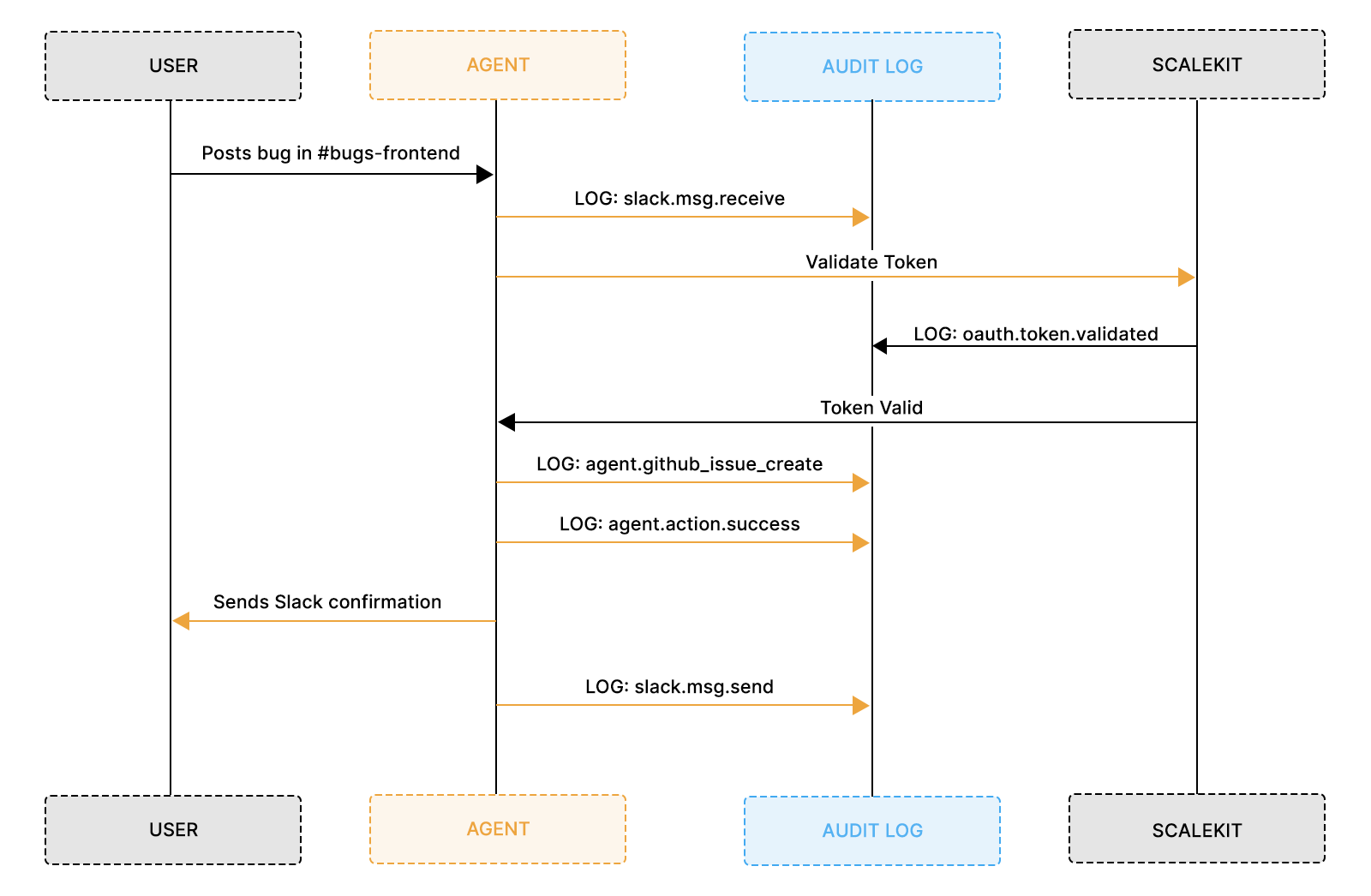
Without a log entry at every step, you can only answer the last question: "Did the API call succeed?" None of the preceding compliance questions can be answered.
The conversation most early-stage SaaS teams are not prepared for happens during procurement, not post-incident. An enterprise security team reviewing a new AI agent integration will ask for a walkthrough of the authorization model, and what they are looking for is a complete OAuth audit trail, not application logs with request IDs and response codes.
Most teams describe their logging setup in good faith, the security team nods, and then blocks the deal two weeks later when legal reviews the security questionnaire. The issue is not dishonesty. It is that teams answered a different question than the one being asked. "What did your agent do?" is a question from the application log. "Can you prove your agent was authorized for every action it took, and can you prove that authorization is revocable on demand?" is an OAuth lifecycle question.
In practice, engineering teams who have been through this estimate that implementing proper OAuth audit logging takes one sprint. The compliance investigation that replaces it typically takes three weeks, involves multiple engineers and lawyers, and ends with a lost deal or a failed audit.
Audit logs for AI agents fall into four categories. Each answers a different compliance question. Together, they let you reconstruct any agent action from original user intent to final API result, which is exactly what a compliance auditor needs to close an investigation.
OAuth lifecycle events are the foundation of your entire audit trail. They answer "did this agent have the right to do what it did?" by capturing the exact moment a user granted authorization, the scopes they approved, and when that authorization ended. Without these events, every other log entry in your system is floating. You can prove what the agent did, but not that it was allowed to.
The absence of OAuth lifecycle logs is precisely what makes post-incident investigations impossible. Teams have the OAuth token in their database, but cannot prove when the authorization flow started, which scopes were displayed on the consent screen, or whether the granted scopes match the scopes actually used. A properly structured lifecycle event makes all of these questions answerable from a single query.
Three expiry values serve different purposes. access_token_expires_at is operational; it indicates when to refresh the token. refresh_token_expires_at is a security boundary, the outer limit of the authorization before re-consent is needed. grant_valid_until is the consent boundary. Null means the user's consent is open-ended until explicitly revoked. Under GDPR Article 7(3), data subjects have the right to withdraw consent at any time, which means a null grant_valid_until is only compliant if your system has a working revocation path that terminates processing immediately on withdrawal. The oauth_consent_revoked event is what proves that the path exists and was exercised. SOC 2 CC6.2 looks for this same revocation evidence when evaluating access removal controls. GDPR Article 17 (right to erasure) is a separate downstream obligation; it applies when a user requests deletion of the personal data collected during the grant period, not to the grant itself.
Agent action events capture what the agent actually did, and they must log two distinct identities for every action: the executing identity, which is the OAuth connection used to make the API call, and the triggering identity, which is the human whose message caused the agent to run. These are not the same person, and conflating them is one of the most common audit trail mistakes teams make.
Without this dual-identity structure, logs show an API call to GitHub with an access token, but the token belonged to a channel admin, not the engineer who posted the message. Without an agent action event explicitly linking the triggering user to the executing OAuth identity acting on behalf of a user, you cannot prove the action was within the scope of what either party had authorized.
Storing full message text in audit logs means the log itself becomes a store of personal data under GDPR. Slack messages can contain names, email addresses, and customer references. Any user can request access to or erasure of log entries containing their data under Articles 15 and 17. The safer pattern is to log a hash of the message content for integrity verification and a short, truncated preview for operational context, never the full text. Apply the same principle to any field that may contain user-generated content.
Token refresh events are the category most teams skip, and the one security investigators reach for first during an incident. If you cannot prove the OAuth token used for a given action was valid at the time it ran, not expired, and not refreshed with a compromised credential, you cannot close the security question around that action.
For AI agents running continuously, tokens will expire and refresh dozens of times per week. Each refresh is a security checkpoint that either validates the continuing authorization or signals an anomaly. The genuine attacker signal is not the refresh frequency alone, but a bug that refreshes on every agent action looks identical, but a refresh initiated from an IP address or user agent outside the agent's normal footprint. This is why refresh_initiated_by matters as much as the timestamp.
Two fields worth understanding:
Error and anomaly events turn an incident investigation from a multi-week manual process into a single database query. When something goes wrong, whether an agent tries to access a channel it was not configured for, a permission denial comes back from GitHub, or a token refresh fails because the refresh token was revoked, those events need structured log entries capturing what was attempted, why it failed, and what recovery action the system took.
Without this, a post-incident investigation means replaying application code in your head against sparse logs, which is slow and unreliable. With it, "Did the agent ever attempt to access a repository it was not authorized for?" becomes a query that runs in under 10 seconds.
Consent events are the legal foundation of your audit trail. They prove that a real human made a deliberate decision to grant your agent access, not just that a token exists in a database somewhere. Four moments require distinct log entries: when authorization is initiated, when it is granted, when scopes expand, and when consent is withdrawn.
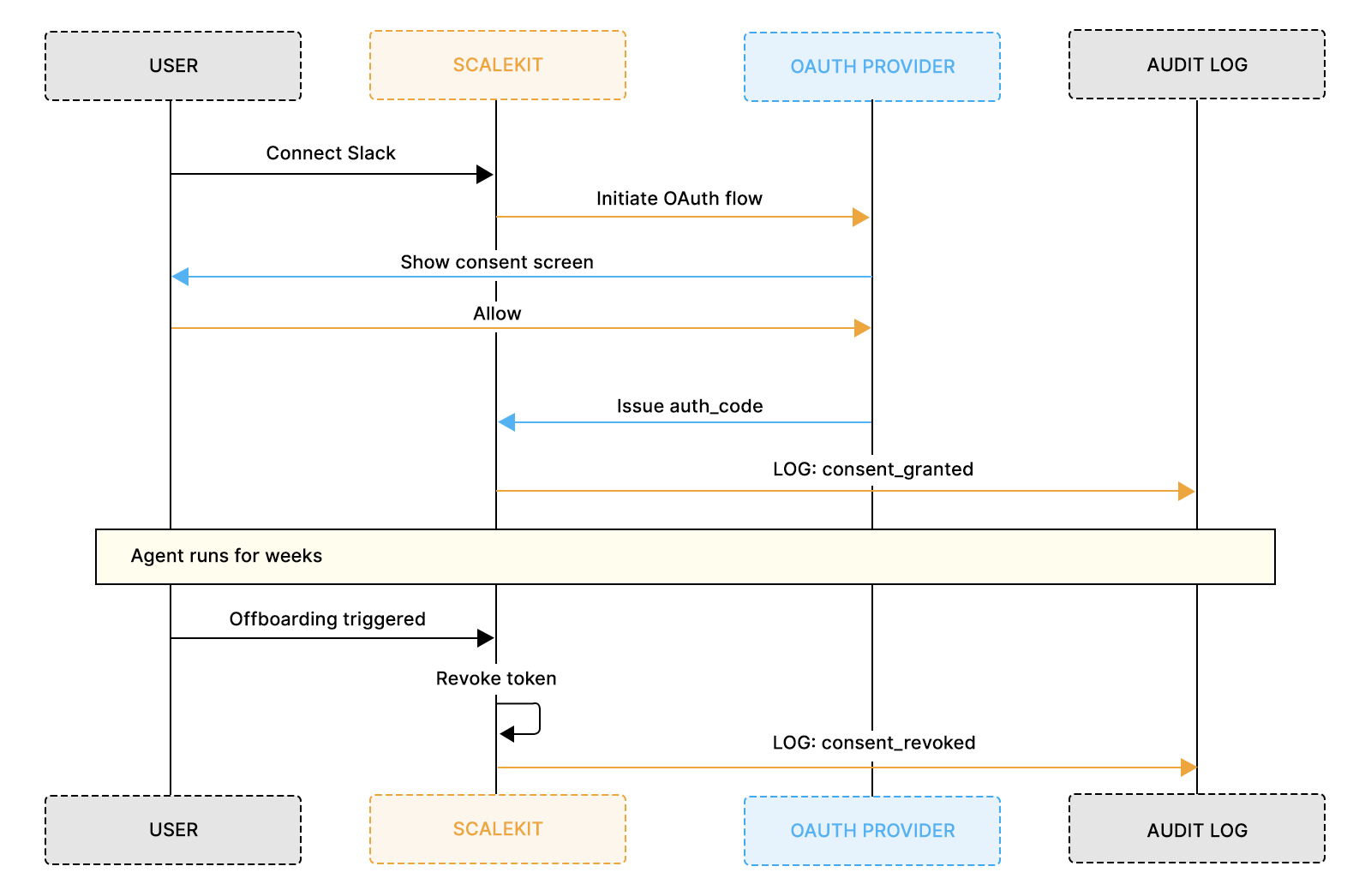
Log the initiation event before the user completes the OAuth flow. This creates a request_id that links the eventual grant back to a specific user action, proving a human deliberately started the authorization process and that it did not happen automatically in the background.
The grant event is the single most legally significant log entry your system produces. It is your GDPR Article 6 proof of lawful basis and your SOC 2 CC6.1 evidence of authorization controls. Getting this event right is not an implementation detail. It is a compliance requirement.
The event must carry the timestamp to the second, the full list of scopes actually granted, the connection ID Scalekit assigns to the grant, the IP address and user agent of the device used, and the specific OAuth provider account that was connected. That last field matters because enterprise users often have multiple GitHub or Slack accounts, and knowing exactly which one was connected is essential for investigations involving specific repositories or channels.
In practice, a former employee submitted a data subject access request asking what data was processed on their behalf. With the oauth_consent_granted event in the audit log, the team answered precisely: authorized on 2026-03-12 at 14:00:15Z from IP 192.168.1.115, granting scopes chat:write and conversations:history, processing ran until revocation on 2026-03-20. Without this event, responding would have required weeks of manual reconstruction.
Revocation events must distinguish between user-initiated revocations, in which a human deliberately disconnected the agent, and admin-initiated ones, in which an administrator terminated access as part of an offboarding process. This distinction matters legally. User-initiated revocation may trigger GDPR erasure rights, whereas admin-initiated revocation is a SOC 2-privileged-access-control event.
The revocation event must record who initiated it, the method used, the reason, and the timestamp of the last agent action before access ended. That last-action timestamp is what enterprise IT teams use to certify that a departing employee's agent access ended on a specific date, not a minute later.
Scope creep in AI integrations follows a predictable pattern. The initial deployment requires a minimal set of OAuth permissions for tool calling. Over the next few months, features will be added. The agent starts posting summaries to Slack, which needs chat:write. Then someone wants file attachments, which need files:write. Then a Project Manager requests issue closure, which requires broader access to the repo. Each addition is a legitimate product decision, but without logging scope changes as compliance events, users who consented to minimal permissions in January are running an agent with significantly broader access in June, with no audit record proving they agreed to the expansion.
If your original data processing agreement or consent disclosure specified limited OAuth scopes, expanding those scopes without notification or re-agreement may constitute a breach of your stated processing purpose under GDPR Article 5(1)(b). Under SOC 2, it fails the access controls criterion.
The technical system may work perfectly. The compliance problem is entirely in the audit trail, which is exactly the kind of finding that shows up in a security review and has no quick fix.
Every scope expansion requires exactly two log entries: one when the system detects new scopes are needed, and one when the user explicitly approves them through a re-authorization dialog. The re-authorization must be a real user interaction, not a background process. Scalekit's OAuth flow handles this correctly by presenting a new consent screen when requested scopes exceed the currently granted set.
In practice, a SaaS team facing a 12-month permission history request during a compliance review pulled together a complete scope-change timeline in one afternoon: an initial read-only grant, an expansion to write scopes after explicit re-authorization, and a scope reduction when a feature was deprecated. The security team approved in one cycle rather than requesting a full re-assessment.
Identifier values must be validated against a known-valid set of registered identifiers at log write time, not just at query time. A typo or casing inconsistency in the identifier field will silently break the JOIN between scope change events and the preceding consent grant event, meaning the scope expansion will appear unlinked to any authorization in your audit trail.
The safest pattern is to resolve and normalize the identifier from your identity store before writing any log entry, never from raw user input or request parameters.
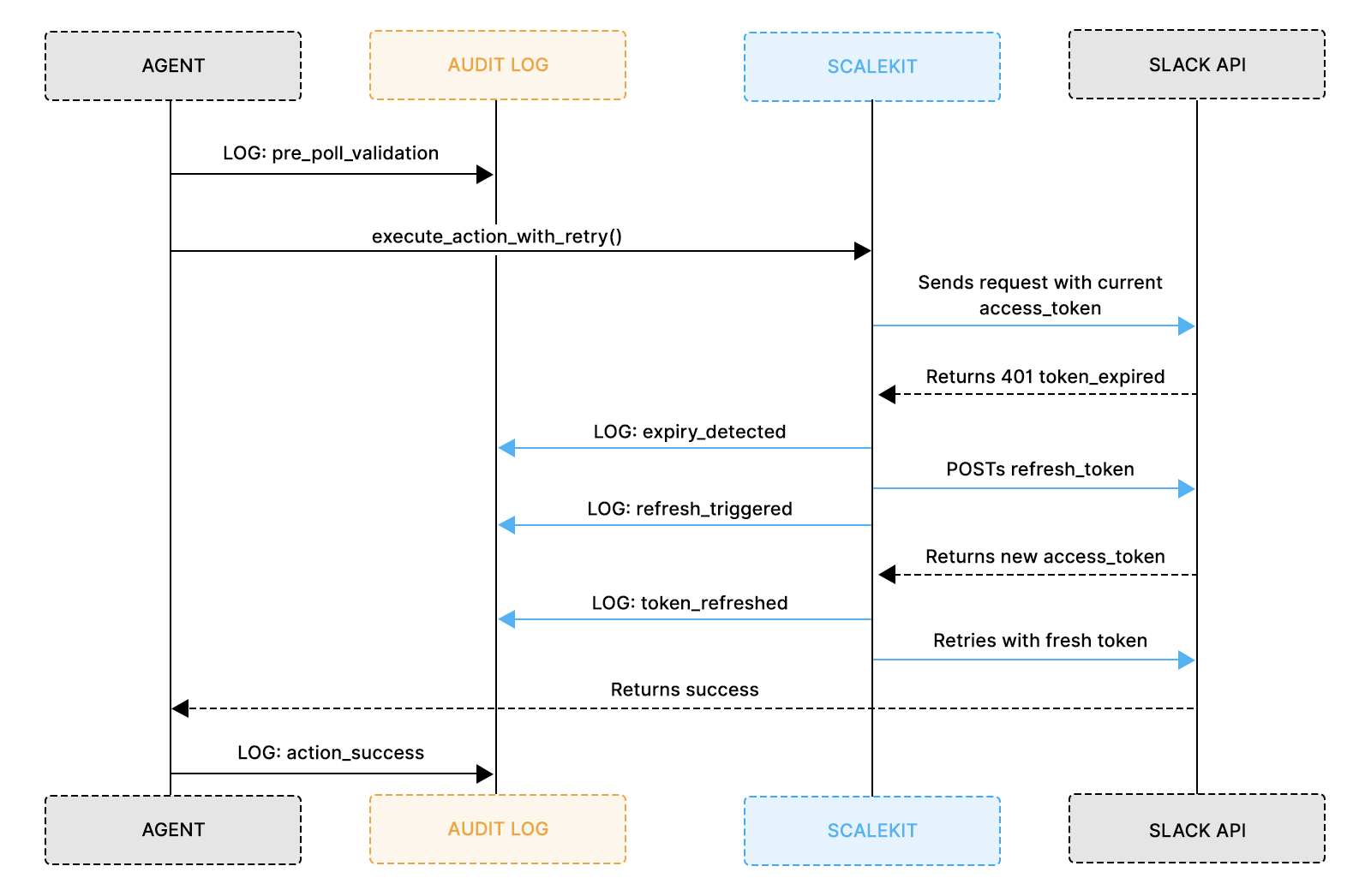
The mental model most developers have for OAuth token refresh is operational. Token expires; agent refreshes it and continues. That is correct as far as it goes, but it misses the security dimension entirely. Every token refresh is a moment where the authorization chain either continues cleanly or breaks. Knowing what happened at each refresh in your agent's lifetime is essential for closing security investigations.
A compromised refresh token in practice: an attacker who obtains a refresh token can generate fresh access tokens indefinitely until the refresh token is revoked. That pattern is a strong signal of unauthorized token use. But only if you are logging refresh events. Without them, the anomaly is invisible, and unauthorized access is indistinguishable from normal agent operation.
Three distinct scenarios each need their own log entry:
One of the core values Scalekit provides is that provider-specific refresh mechanics are completely abstracted. Slack, GitHub, Google Drive, Zendesk, and Microsoft 365 each have different token lifetimes, refresh flows, error codes, and behaviors around rotation. Building and maintaining correct refresh handling for each provider independently is a significant ongoing engineering cost.
With Scalekit, your application calls execute_action_with_retry and receives either a successful result or a structured error. The refresh attempt, the provider-specific POST to the OAuth token endpoint, token rotation, and new token storage in the vault are all handled by Scalekit's infrastructure. Your job is to log the events Scalekit surfaces: refresh trigger, outcome, and new expiry. That closes the security audit trail without requiring you to build the underlying mechanics yourself.
Revocation tracking is where compliance audits get surgical. An auditor does not just want to know when access was granted. They want to know when it ended, why it ended, who initiated it, and whether the agent took any actions after the revocation timestamp. That last question is the one that enterprise offboarding audits, security incident investigations, and GDPR erasure requests all depend on.
Four revocation types each need separate log entries because each has different compliance implications:
The most critical compliance verification for revocation is the gap analysis, which compares the revocation timestamp against subsequent agent action timestamps. This is what enterprise IT teams run as part of offboarding certification and what SOC 2 auditors check during access reviews. In practice, a financial services team running quarterly access reviews ran the gap analysis for every departed employee in under 10 minutes and produced a signed certification report. The audit that would have required a week of manual log review was completed in an afternoon.
The identifier value must match exactly between the two CTEs. A mismatch will always return zero post-revocation actions and generate a false certification. In production, parameterize this query and pass the identifier as a single input variable to eliminate this risk entirely.
Enterprise buyers evaluate audit logging during procurement, not after an incident. A VP of Engineering at a 500-person company is not asking "Does your agent work?" They are asking, "Can you prove what your agent does?" The answer needs to come from logs, not from a verbal explanation of your architecture, and it needs to be ready before the contract is signed.
Six questions appear in virtually every enterprise security review for AI integrations. If you can answer all six from logs alone, without involving engineers or replaying application state, the security review closes. If you cannot answer any one of them definitively, the deal stalls.
Automated compliance platforms such as Vanta, Drata, and Secureframe query for structured audit log evidence as part of continuous monitoring. Your log structure needs to be machine-queryable, not just human-readable, because these tools will be among the first things an enterprise customer's security team connects to your system during vendor onboarding.
In practice, a FinTech security team escalated mid-procurement, asking for proof that a GitHub issue was not created by the agent. With structured audit logs, the team queried the agent.github_issue_create events for that timestamp, confirmed that the connection_id mapped to their own repository, and showed that the trigger message came from an authorized Slack user, all in 4 minutes. The deal closed the same week.
Every major compliance framework enterprise customers operate under asks the same core question in different languages: "Can you prove your system did only what it was authorized to do?" Your audit trail needs to answer that question across all four simultaneously, not as an afterthought, but as a first-class design goal from the start.
The descriptions above are directional mappings, not authoritative definitions of the SOC 2 criteria. CC6.2 and CC6.3 cover a broader scope than any single log event can satisfy. For audit readiness, refer to the AICPA Trust Services Criteria document and work with your auditor to map your specific controls.
HIPAA §164.312(b) requires mechanisms to record and examine activity in systems that contain or use ePHI. This applies only if your agent handles protected health information. A Slack triage agent routing bug reports to GitHub is not a HIPAA use case by default. If your deployment involves ePHI, the agent action event structure in this guide satisfies the activity recording requirement, and you will also need append-only log storage with access controls and regular review for anomalous access patterns. On retention: HIPAA §164.312(b) itself specifies 'reasonable and appropriate' retention without a fixed minimum, the six-year figure comes from the documentation and policy retention requirement under §164.316(b)(2), which requires records to be kept for six years from the date of creation or the date they were last in effect, whichever is later. That second condition matters specifically for agent authorization records: if an OAuth grant was created in 2022 and revoked in 2025, the revocation log must be retained until at least 2031, not 2028. The practical guidance is to retain all authorization and action logs for six years from the last event on that connection, not from the date the first event was written.
The control numbers above follow ISO 27001:2022. If your organization is certified against the 2013 version, A.5.18 maps to A.9.2.3. For A.5.18 specifically, auditors look for evidence of the full privileged access lifecycle: initial grant, active review, and removal.
The three log events mapped above cover all three stages: oauth_consent_granted proves access was properly authorized, oauth.revocation_admin_initiated proves access was actively removed when no longer needed, and oauth.token_refresh_failed proves lapsed authorizations are detected and flagged rather than silently continuing.
Scalekit natively stores the OAuth infrastructure for everything covered in this guide. Every connection ID, scope grant, token lifecycle event, and revocation state is captured automatically without custom implementation on your side.
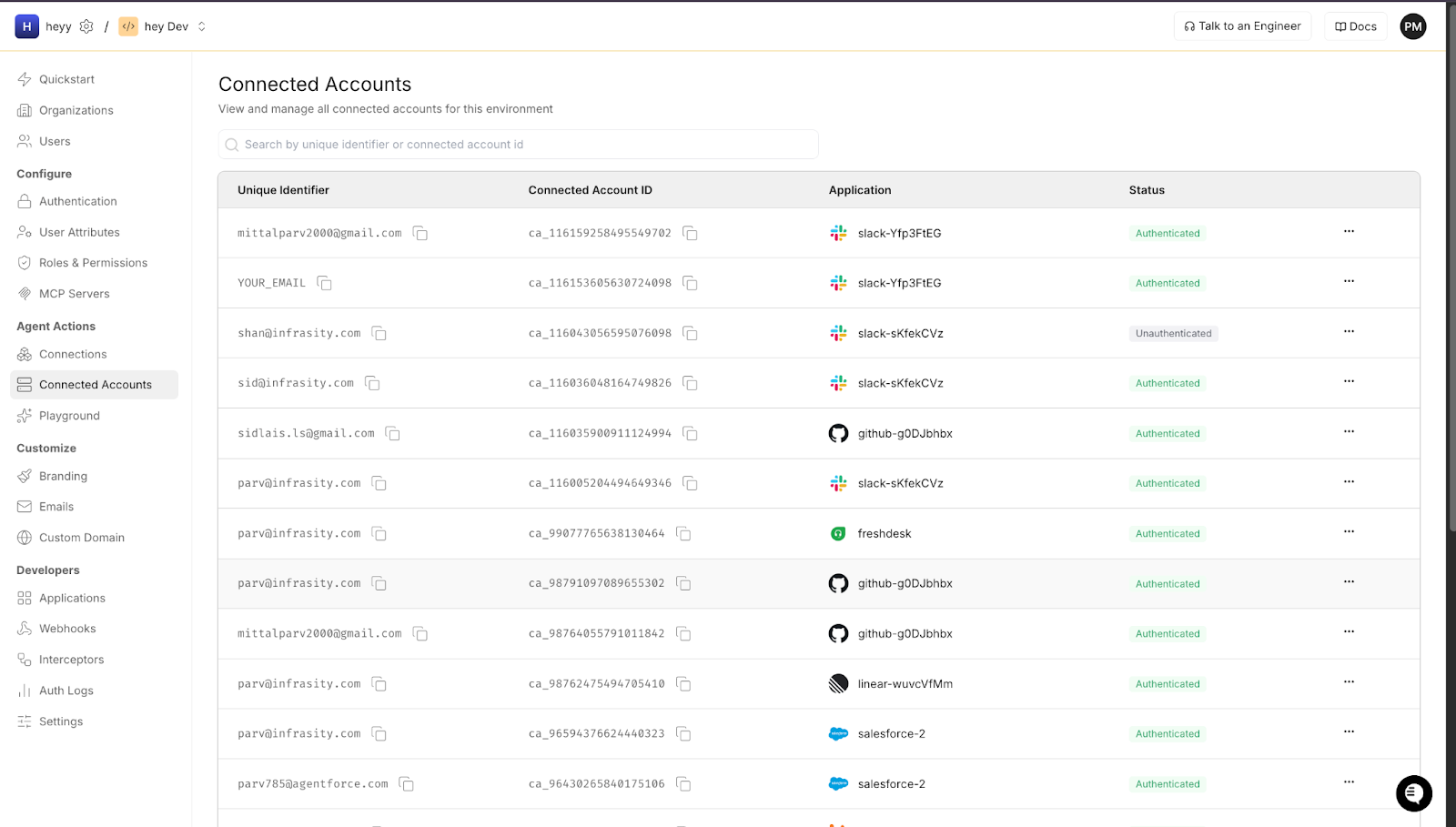
Every OAuth grant your agent uses is stored as a named connection with full metadata. When an agent action fires, Scalekit resolves and validates the connection before the call goes out.
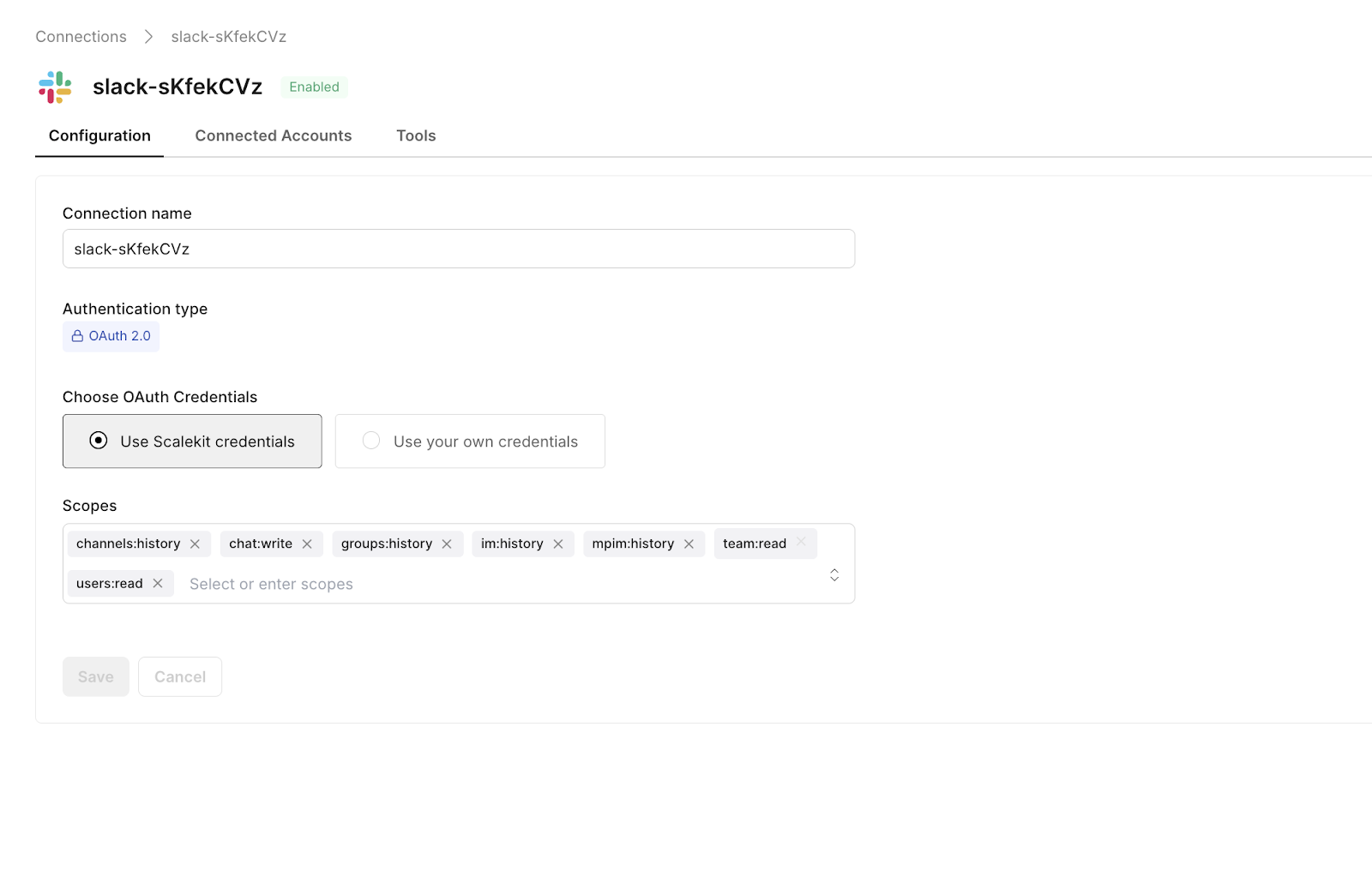
Token refresh events and rotation status are tracked per connection. You can see the last refresh time and expiry without building any custom token storage.
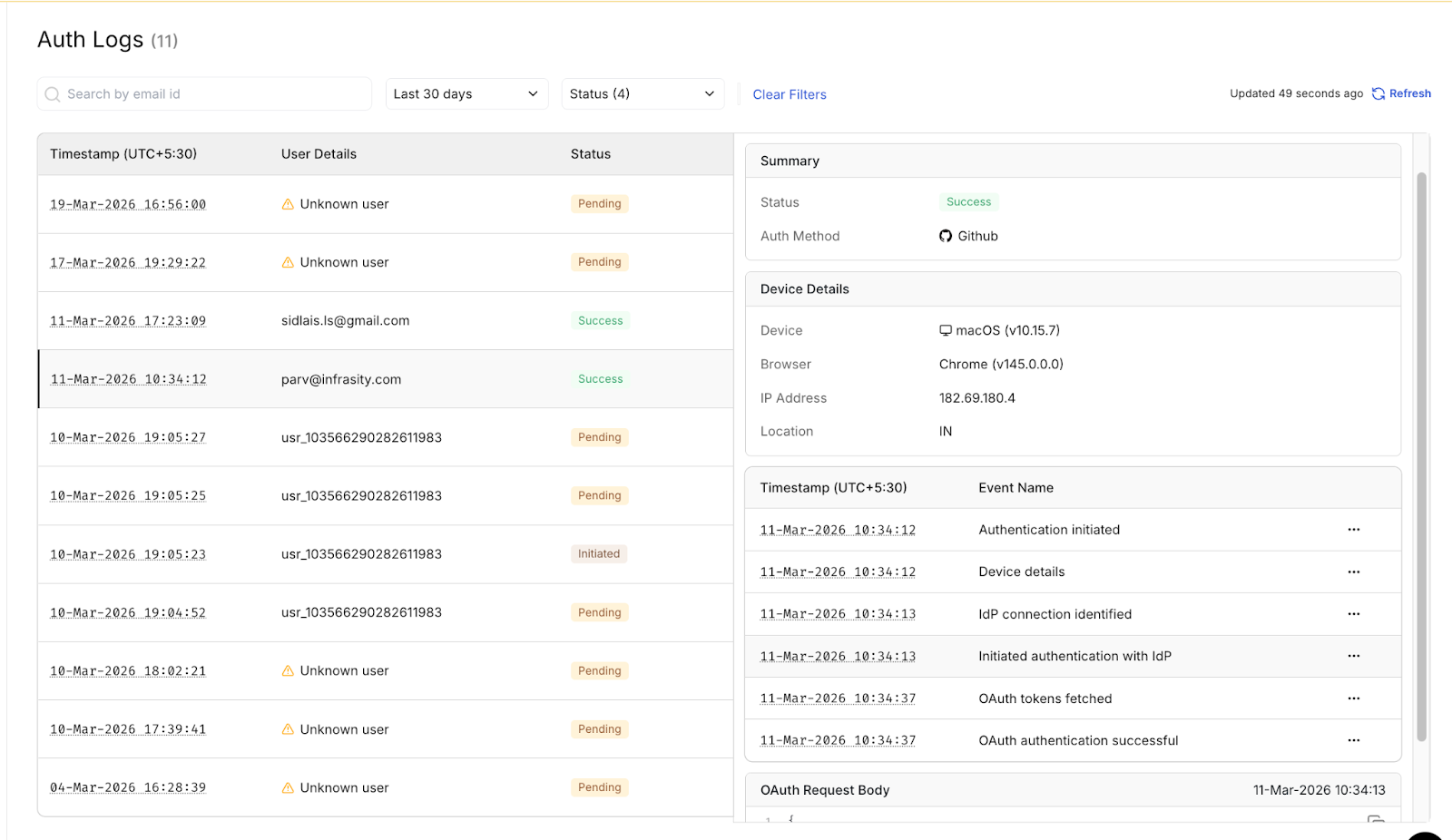
The split is straightforward. Scalekit owns the OAuth half: the connection IDs, the scope grants, the token lifecycle, and the revocation state. Your application owns the agent half: what was triggered, by whom, using which connection, and with what result. The connection_id is the join key between the two. Every agent action event your application logs references a connection_id that Scalekit has already captured with full authorization metadata. That reference makes any agent action traceable back to the specific user consent event that authorized it, which is the chain that every SOC 2 auditor, GDPR compliance officer, and enterprise security team reviewing your IAM setup is asking for when they review your system.
The story that opened this guide ended badly: a $200K deal lost, a three-week investigation, and an engineering team rebuilding their OAuth logging under pressure. But nothing about that outcome was inevitable. Every piece of the audit trail that was missing can be built in a normal sprint cycle, and most of the heavy lifting, including connection management, token lifecycle, and provider-specific refresh mechanics, is handled by Scalekit's infrastructure without custom implementation on your side.
The logging structure in this guide is not a compliance tax on your engineering velocity. It is the investment that makes enterprise deals closeable in one review cycle, that makes incident investigations a query rather than a reconstruction, and that makes offboarding certification an afternoon rather than a week. Every oauth_consent_granted event you log is a question you can answer under pressure. Every agent.github_issue_create event you log is an accountability chain you can prove to an auditor.
Start with OAuth lifecycle events and agent action events. These two cover the most common compliance questions and incident investigation scenarios. Token refresh events and error events can be added in a subsequent sprint without restructuring your existing log schema, because they reference the same connection IDs and identifiers that your lifecycle and action events already establish.
SOC 2 auditors typically expect 12 months of queryable history. GDPR requires a defined retention period for audit logs that contain personal data, and are subject to both storage limitations under Article 5(1)(e) and erasure requests under Article 17 so implement an automated deletion policy after your retention window. If your agent handles ePHI, HIPAA requires a six-year retention. When operating across frameworks, retain for the longest applicable period and document your deletion policy.
Scalekit automatically manages its own OAuth infrastructure. Connection IDs, scope grants, token lifecycle events, revocation state, and provider-specific metadata are all captured natively by Scalekit's connection management layer. Your application builds the agent-side events, which are the action events that link user messages to agent executions. The integration point is the connection_id: Scalekit provides it, your agent action events reference it, and that link is what ties the two halves of the audit trail together.
The minimum for SOC 2 CC6.1 requires a unique event ID, an ISO 8601 UTC timestamp, the event type, the identifier of the user whose authorization is involved, the service being accessed, the connection ID, and the outcome. For agent action events specifically, you also need the triggering user identity in addition to the executing OAuth identity. This is what satisfies CC6.1's requirement to attribute system actions to specific authorized principals.
Service account OAuth connections should be treated as privileged access grants and logged with an additional account_type: service_account field in the consent event. Revocation tracking is especially important for service accounts because they lack natural offboarding triggers. You need explicit policies and log events for when service account access is rotated, scope-reduced, or terminated. Most enterprise security teams ask specifically about service account access during procurement reviews.