LangChain's tool calling model is well-designed for orchestration. The framework serializes your tools, lets the LLM decide what to call, and handles the reasoning loop cleanly. What it does not do is handle credentials, token lifecycle, or user identity when those tools call need to reach real enterprise systems. The moment your agent needs to post to someone's Slack workspace, query their Salesforce org, or create a ticket in their Linear account, you are responsible for every credential that makes that call work. Do that for four services across a hundred customers, and you have an integration tax that consumes engineering capacity before a single line of agent logic ships.
This post covers how LangChain tool calling works, where the credential boundary is, how engineers are solving it today, and what the full pattern looks like when that layer is handled for you.
Tool calling is the mechanism that allows an LLM to interact with external systems during a conversation. Instead of generating only text, the model can call functions to fetch data, query databases, trigger workflows, or perform actions across APIs such as Salesforce, Slack, Gmail, or Linear. The model determines which action to take, passes the required arguments, and continues reasoning with the returned result.
LangChain builds the orchestration layer around that pattern. It exposes tools to the model, lets the LLM decide when to call them, executes the selected functions, and feeds the results back into the reasoning loop until the task is complete. The framework handles tool registration, chaining, memory, and execution flow inside LangGraph well.
What it does not handle is the credential layer behind those calls. The moment a tool needs to reach a real enterprise system, authentication, token refresh, user routing, connector management, and tenant isolation become your responsibility.
LangChain's tool model is built around three layers: defining what a tool is, letting the LLM decide when to call it, and executing the result.
You decorate a function with @tool, give it a name, a docstring the LLM reads to decide when to invoke it, and a typed input schema. That is the full contract between the reasoning loop and the action.
LangChain serializes the tool name, docstring, and schema into the model's context. The model decides which tool to call and with what arguments, and in LangGraph, ToolNode receives those decisions, runs the matching functions, and feeds results back into the message thread. The loop continues until the model stops calling tools.
The loop runs like this until the model stops calling tools.

The framework handles the reasoning loop well, and everything else is your responsibility. LangChain explicitly does not handle user authentication for external tool calls. The @tool decorator has no concept of OAuth, no access to user identity, and no awareness of which customer the agent is acting on behalf of. Credentials reach the tool function only if you pass them in manually.
LangSmith Deployment does have @auth.authenticate and @auth.on handlers, but these control access to LangGraph's own resources (threads, assistants, run history). They do not protect or provide credentials for external API calls to Salesforce, Gmail, Slack, or Linear.
For MCP-connected tools via MultiServerMCPClient, the JavaScript library exposes an authProvider interface where you implement your own OAuthClientProvider class, including token storage, token refresh, and redirect handling. The Python library does not yet have this. In either case, you are implementing the OAuth class yourself.
There are three patterns engineers use in practice, and all three share the same root problem.
Pattern 1: Environment variable
The most common approach. The token lives in os.environ, and every call across every customer uses the same one.
This is a single shared bot token. Every customer's agent posts as the same Slack identity. There is no per-user routing and no isolation between tenants.
Pattern 2: Closure over a token
You close over a token during tool construction, allowing you to pass different tokens to different tool instances. But you are still responsible for obtaining the token via the OAuth flow you built, storing it in a location you maintain, and refreshing it before it expires.
Pattern 3: RunnableConfig injection
The cleanest pattern LangChain supports natively. Credentials pass through RunnableConfig at invocation time, and LangGraph injects them into the tool function without leaking tokens through the LLM context. But RunnableConfig neither obtains, stores, nor refreshes the token. It carries whatever you already put there.
In all three patterns, the OAuth flow, token storage, refresh logic, and per-user routing are work you do before the tool exists.

The result is five gaps that appear the moment an agent needs to call real enterprise APIs on behalf of real users:
@tool function receives no user context unless you explicitly pass it. Every call uses whatever credentials the function has access to, which is typically a shared service accountEvery enterprise app your agent needs to reach, whether Salesforce, Gmail, Slack, Linear, HubSpot, or Jira, sits behind these five gaps.
Building a single enterprise connector requires four pieces of infrastructure that are unrelated to agent reasoning.
Build this for one service, and you have a working demo. Build it for four services across 100 customers, and these patterns converge on the same production failures: wrong identity because a shared token resolves to the wrong account, silent mid-chain 401s because refresh logic is missing, and data bleed between tenants because nothing enforces token boundaries at the call level. Together, that is the integration tax, all of it appearing before a single line of agent reasoning ships.
Engineers evaluating this problem are already looking at four options, each of which closes part of the gap.
Composio has the largest pre-built catalog at 1,000+ integrations, is agent-native with LangChain adapters, and handles managed OAuth and token refresh. The gap is authorization rather than authentication. Composio handles token storage and refresh well, but does not enforce per-tenant scope configuration at the infrastructure layer. For multi-customer deployments where Customer A's agent must be structurally isolated from Customer B's data at the token level, that isolation has to be managed outside the library.
Arcade is MCP-native and auth-first, built by the Okta founding team. Agents act through proper OAuth delegation rather than shared service accounts or bot tokens, and permission checks run before every tool execution. The catalog covers around 100+ pre-built tools. The boundary is connector breadth and enterprise SSO infrastructure depth, which sit outside its core model.
Merge covers 220+ integrations across HRIS, ATS, and CRM with strong schema normalization and enterprise governance (SOC 2, HIPAA). The Agent Handler layer, launched in late 2025, adds governed agent access with DLP and audit logs. The cost of the normalization model is API semantics: LangChain agents need field-level access, object relationships, and custom fields, and Merge's normalized layer removes that specificity. Per-tenant tool configuration is also not supported by design.
StackOne is agent-native, with 270+ connectors and 17,000+ actions, per-user OAuth isolation via origin_owner_id, automatic token refresh, LangChain support, and a prompt-injection defense layer. The gap relative to Scalekit is connector catalog depth across enterprise app categories and the per-org scope enforcement model.
The gap that none of the first four fully close is per-org scope enforcement combined with a deep enterprise connector catalog, in one layer, a LangChain agent plugs into without writing any auth code.

Scalekit sits between your LangChain agent and every external service, holding the tokens, handling refresh before every call, and enforcing that each customer's agent reaches only that customer's data, not by convention but structurally at the token level.
3,000+ tools across 150+ enterprise apps:
There is no connector to build, no OAuth flow to implement, and one integration surface your LangChain agent plugs into immediately.
Instead of any of the three credential patterns above, Scalekit replaces the entire auth layer with a single call. langchain.get_tools() returns standard LangChain Tool objects that slot into create_react_agent, ToolNode, or any LangGraph graph without changes to the agent architecture. The difference is what happens inside each tool call.
Compare this directly to Pattern 1 above. In that pattern, every Slack call uses os.environ["SLACK_BOT_TOKEN"] — one identity for every customer. Here, identifier=user_email routes every call to that specific user's connected Slack account. The token is resolved, checked for expiry, refreshed if needed, and used before the API call is made. Your tool function contains zero credential logic.
Under the hood, every tool call goes through execute_tool(), which handles the full credential lifecycle before the external API is touched. The LangChain integration wraps this automatically; you never call it directly in agent code.
Here is the full production pattern: one LangGraph agent, five enterprise systems, one variable changing per customer. The agent reads a rep's Salesforce pipeline, pulls their Gmail threads, updates HubSpot with the engagement signal, creates a Linear ticket if risk is high, and posts a Slack alert, all in a single chain, all using that rep's own OAuth tokens.
LangChain's reasoning layer decides which tool to call, in what order, and with what parameters. Scalekit routes each call to the right user's connected account. The entire credential model reduces to one variable.
rep_email is the only variable. Run this for 100 reps, and each one reaches their own Salesforce org, their own Gmail inbox, their own HubSpot contacts. The LangChain graph is identical across invocations.
The flow below shows what that single function actually does: LangChain orchestrates the five tool calls across the top, Scalekit sits as the horizontal auth layer in the middle, resolving and refreshing tokens per service, and each API at the bottom resolves to that rep's own connected account.
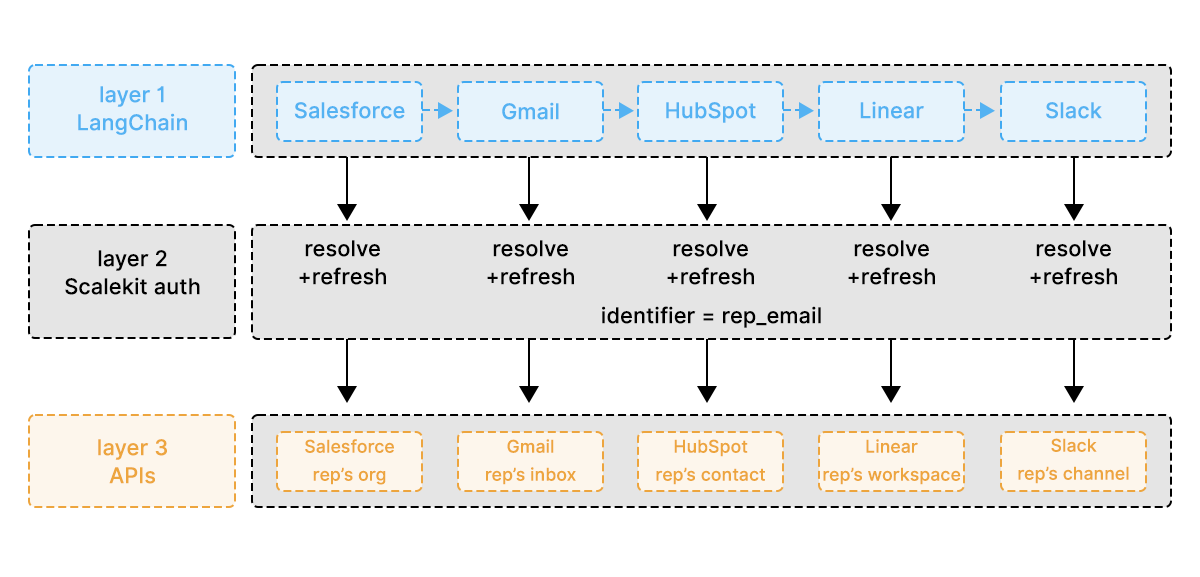
When the LLM selects a tool, Scalekit resolves the credential for the current identifier before the call leaves the agent. Each service below uses the same call pattern and user scope, with a different connector name.
Five services, five tool calls, one identifier. currentUser() in the Salesforce query resolves to the rep's org because the rep's token is used to make the request. The Gmail threads are from the rep's inbox because the rep's OAuth token was used. Every call is isolated to that user at the token level, not by the logic you wrote.
Before the pipeline runs, Scalekit's get_or_create_connected_account() validates that all five connectors are active for each user, surfacing a re-authorization link for any that have been revoked rather than failing silently mid-chain.
The same LangGraph agent runs for every rep, with rep_email as the only variable at invocation.
Each identifier resolves to a completely separate set of connected accounts in Scalekit, so Rep A's identifier maps to Rep A's Salesforce org, Gmail inbox, and Slack workspace, while Rep B's identifier maps to a fully isolated set with no overlap. A routing bug that passes the wrong identifier does not return the wrong rep's data. It returns empty or not-found, because the token making the request belongs to the wrong account and has no access to that org.
Isolation is enforced at the token level, not by naming conventions, try-catch blocks, or code review. The wrong token is structurally unable to access the wrong account. Scope enforcement follows the same principle: a read-only user's connected account holds a read-only OAuth token, so when the agent tries to write to Salesforce with that token, Salesforce returns a 403. The agent cannot write, not because the system prompt says so, but because the token has no write scope, and prompt injection that tries to escalate permissions has nothing to escalate against.
Three scenarios expose where per-service OAuth implementations break and where a unified connector layer holds.
A five-node LangGraph chain runs across Salesforce, Gmail, HubSpot, Slack, and Linear. The Gmail token expires at 7:05 am, and the chain reaches that step at 7:06 am. Without Scalekit, the step returns a 401, and the chain fails at step 2 of the 5-retry logic, which cannot preserve chain state across the failure. With Scalekit, execute_tool() checks for expiry before every call and automatically refreshes using the stored refresh token. The Gmail step runs, the chain continues to HubSpot, and there is zero refresh logic in the agent code.
100 reps run against the same agent. Rep 47 has a Salesforce org in a European data center with a different instance URL. Rep 83's Gmail token was revoked overnight. Without Scalekit, Rep 47's Salesforce calls fail on the hardcoded instance URL, and Rep 83's failure surfaces as empty email data rather than an auth error, causing both to be silently dropped from the output. With Scalekit, Rep 47's connector stores the correct per-org URL, and Rep 83's connector returns NOT_ACTIVE at startup, generates a re-authorization link, and skips that rep cleanly while the other 99 run without interruption.
A LangGraph supervisor delegates to three specialist sub-agents: CRM, communication, and ticketing, each calling different services for the same user. Without Scalekit, sub-agents either share credentials with no isolation between what each can access, or authenticate independently, duplicating token management at every handoff. With Scalekit, all three sub-agents share the same identifier, and each reaches the right user's tools through a single Scalekit session, with no re-authentication at handoff and no duplicate credential logic.
LangChain's tool-calling model (@tool, StructuredTool, ToolNode) provides a well-designed interface between the reasoning loop and the action. What it does not give you is the credential layer that makes that interface work across real enterprise apps at scale. Every tool that calls an external API sits behind the same five gaps: no credential storage, no token refresh, no per-user routing, no connector catalog, and no tenant isolation. The framework handles the reasoning well. The auth layer is what makes the tool calls production-ready.
Scalekit closes all five gaps. langchain.get_tools() returns standard LangChain Tool objects that slot into create_react_agent, ToolNode, or any LangGraph graph without changes to the agent architecture. identifier routes every call to the right user's connected account. Token refresh, scope enforcement, and tenant isolation happen before the API is touched; none of it is visible in your agent code.
The integration tax that consumed engineering capacity before a single line of agent logic could ship has disappeared. Adding a new service means adding a provider to the get_tools() call. Adding a new customer means passing a new identifier. The reasoning loop stays exactly as LangChain designed it, and the agent now has hands.
Each service has its own OAuth flow, token format, and refresh schedule. Scalekit collapses all of it into a single get_tools() call per agent and handles token refresh, expiry checking, and connection state automatically. Building the auth layer for four services from scratch is a multi-day implementation problem with ongoing maintenance, while configuring the same four connectors in Scalekit takes about 20 minutes.
Yes, it checks token expiry before every tool invocation and refreshes using the stored refresh token when needed, so there is no refresh logic anywhere in the agent code and no mid-run failures from a token expiring between steps in a chain.
Yes, get_tools() loads tools based on the providers list you pass in, so you can swap SALESFORCE for HUBSPOT or PIPEDRIVE, and LINEAR for JIRA. The agent prompt and LangChain architecture do not change. Only the connector Scalekit routes the call to changes.
Yes, all sub-agents pass the same identifier, and Scalekit routes each sub-agent's tool calls to the correct connected accounts without re-authentication at handoff. A CRM agent, a communication agent, and a ticketing agent can all operate within one Scalekit session, each reaching the right user's tools and each scoped correctly.
Yes, each team gets its own Scalekit environment with separate connector configurations and a different SLACK_CHANNEL, and Scalekit manages each set of connected accounts independently with no bleed between environments.