

We ran 75 benchmark runs comparing CLI and MCP for AI agent tasks. CLI won on every efficiency metric — 10 to 32× cheaper, 100% reliable versus MCP’s 72%.
If that were the whole story, this post would be three paragraphs long: use CLI, add a skills file, move on.
But we’re building agents that act on behalf of other people’s users, inside other people’s organizations, across third-party services those organizations control. And the moment you cross that boundary, from “I’m automating my own workflow” to “my product automates workflows for my customers,” every efficiency advantage CLI has becomes an architectural liability.
This post has two halves. The first gives you the benchmark data – use it, it’s real. The second explains why the data alone will mislead you if you’re building anything beyond a personal developer tool.
Same model (Claude Sonnet 4). Same tasks. Same prompts. Only the tool interface changes.
CLI: Hand the agent a bash tool. No guidance. It figures out gh commands on its own.
CLI + Skills: Same bash tool, plus ~800 tokens of tips — useful gh flags, output formatting patterns, common workflows. This is how tools like OpenClaw work in practice.
MCP: Connect to GitHub’s official Copilot MCP server at api.githubcopilot.com/mcp/. The agent gets all 43 tool schemas automatically.
Five read-only tasks against anthropics/anthropic-sdk-python: get repo info, fetch PR details, read metadata, summarize merged PRs, find release dependencies. All deterministic, all verifiable.
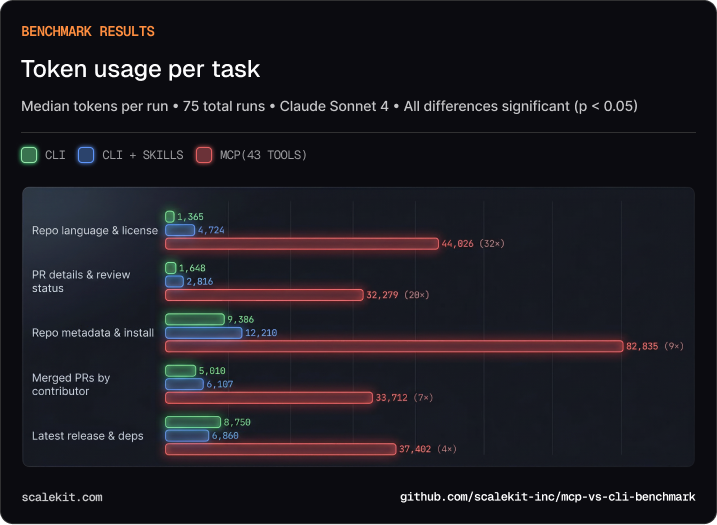
Median tokens per run. All CLI vs MCP differences statistically significant (p < 0.05).
For the simplest task — “what language is this repo?” — the CLI agent needs 1,365 tokens. The MCP agent needs 44,026. The difference is almost entirely schema: 43 tool definitions injected into every conversation, of which the agent uses one or two.
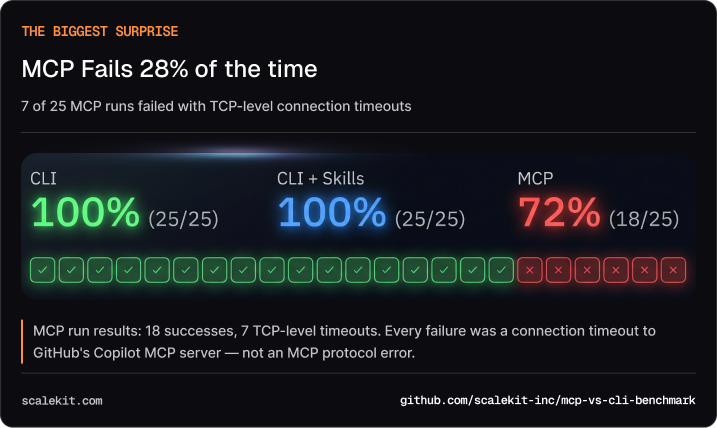
Of 25 MCP runs, 7 failed with ConnectTimeout.
CLI: 25/25 (100%). CLI+Skills: 25/25 (100%). MCP: 18/25 (72%).
Every failure was a TCP-level timeout — the connection to GitHub’s Copilot MCP server never completed. Not an MCP protocol error. Not a bad tool call. The remote server just didn’t respond in time.
CLI agents don’t have this problem. gh runs locally. There’s no remote server to time out.
MCP’s overhead isn’t a protocol problem. It’s a schema injection problem.
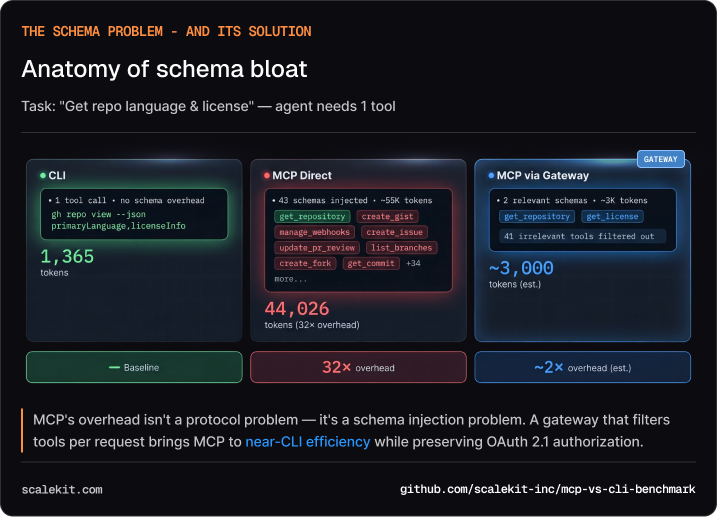
GitHub’s Copilot MCP server exposes 43 tools. Every time the agent makes a tool call, the entire schema for all 43 tools is part of the conversation context. For a simple “get repo info” call, the agent carries schemas for creating gists, managing pull request reviews, configuring webhooks — tools it will never touch.
The CLI agent doesn’t have this problem. It knows gh from training data. It composes the right command in one shot. No schema overhead. No discovery step.
The 800-token trick: A skill-augmented CLI — just an 800-token document of gh tips — reduces tool calls by a third and latency by a third versus naive CLI. That’s the best ROI in this entire benchmark. Any team can apply this today.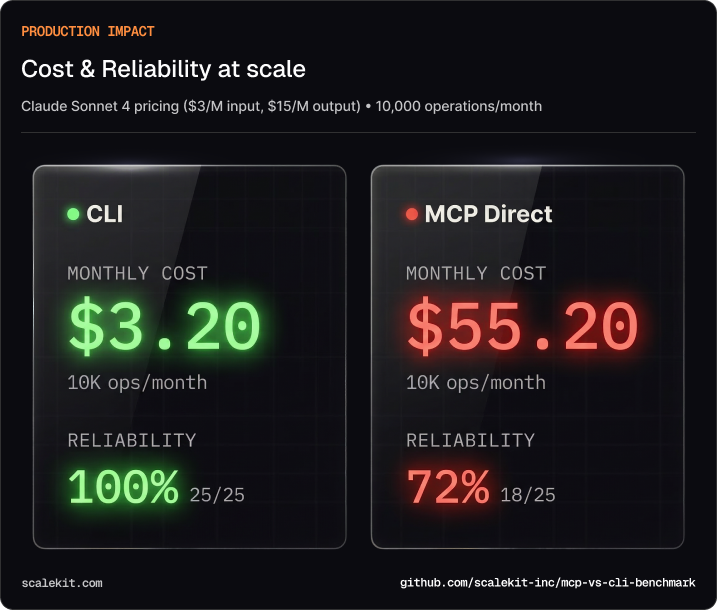
At Claude Sonnet 4 pricing ($3/M input, $15/M output), running 10,000 operations per month:
That’s a 17× cost multiplier for MCP, and a 28% failure rate on top of it.
At this point, the case for CLI looks overwhelming. Cheaper, more reliable, simpler. If you stopped reading here, you’d conclude MCP is a protocol in search of a problem.
That conclusion would be correct for developer tools. It would be dangerously wrong for anything else.
Every benchmark in the CLI-vs-MCP discourse, including ours, tests the same scenario: a single developer automating their own workflow. In that world, CLI wins. Obviously. The agent inherits your credentials, acts with your permissions, and the only person at risk is you.
But that’s not what most AI products look like in production. If you’re building a B2B SaaS, a project management tool, a support platform, a code review assistant, your agent doesn’t act as you. It acts as your customer’s employees, inside your customer’s organizations, touching your customer’s data across services your customer controls.
Here’s what that looks like concretely:
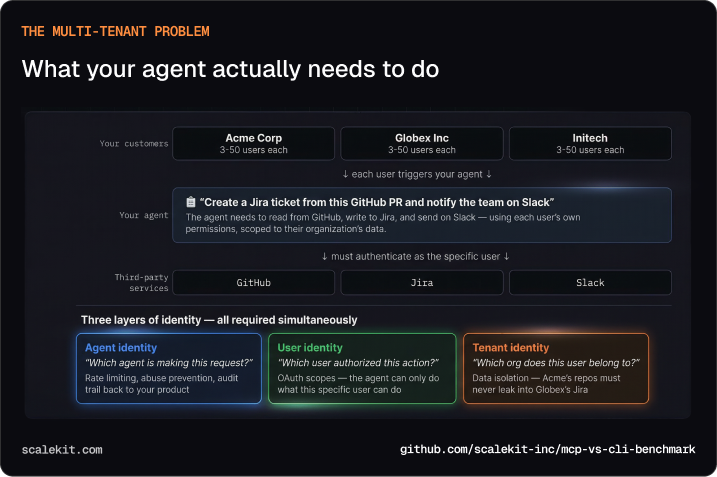
Imagine you’re building an AI assistant for a project management platform. A user at Acme Corp says: “Create a Jira ticket from this GitHub PR and notify the team on Slack.” Your agent needs to read from GitHub, write to Jira, and send on Slack — using that specific user’s permissions, scoped to Acme’s data, without leaking anything into Globex’s Jira or Initech’s Slack.
That’s three layers of identity resolving simultaneously on every agent action:
Agent identity — which agent is making this request? This is how you rate-limit, prevent abuse, and maintain an audit trail back to your product.
User identity — which user authorized this action? The agent can only do what this specific user can do. OAuth scopes enforce this at the protocol level.
Tenant identity — which organization does this user belong to? Acme’s repos must never appear in Globex’s Jira. This is data isolation, and getting it wrong isn’t a bug — it’s a breach.
gh auth loginWhen you run gh auth login, your agent inherits your personal token. One credential, one user. Now multiply by three organizations, each with dozens of users, each with different permission levels across GitHub, Jira, and Slack.
One credential, many users. CLI auth gives the agent YOUR GitHub token. To act as User A at Acme and User B at Globex, you’d need to manage a token vault, swap credentials per request, and handle refresh cycles — all in application code. You’ve just rebuilt half of OAuth in your backend.
No tenant isolation. With ambient credentials, there’s no protocol-level boundary between tenants. A bug in your token-swapping code could send Acme’s data to Globex’s Jira. This is a data breach, not a bug.
No consent flow. CLI tokens are created by the developer. There’s no way for end users to grant scoped access and revoke it later. You’d need to collect credentials directly or build your own OAuth integration per service. You’re now building auth infrastructure, not your product.
No audit trail. Shell history logs commands, not who authorized them. When Acme’s security team asks “which of our users triggered that GitHub action?”, you have no protocol-level answer. Enterprise customers won’t ship without this.
OpenClaw showed what happens when CLI-based agents go multi-user without protocol-level authorization:
These aren’t bugs in OpenClaw’s code. They’re consequences of an architecture where shell access and ambient credentials operate without authorization boundaries. The properties that make CLI agents fast — ambient auth, arbitrary execution, zero protocol overhead — are exactly the properties that create security incidents when agents cross from developer tool to customer-facing product.
Per-user authorization. OAuth 2.1 with PKCE. Each user grants scoped access to your agent. They can see what they authorized. They can revoke it. Your application never touches their credentials. This is how you get past enterprise security review.
Explicit tool boundaries. The agent can only call declared tools. No arbitrary shell commands. No “the agent figured out how to curl a private API.” Every operation is typed, scoped, and predictable. This is how you prevent the OpenClaw failure mode.
Structured audit trail. Every tool call produces a typed record that addresses the agent access control problem: who authorized it, what was requested, what was returned. Not shell history — structured, queryable, attributable to a specific user and tenant. This is what enterprise compliance requires.
The properties that make MCP expensive — explicit schemas, OAuth handshakes, structured responses — are the same properties that make it governable. You’re not paying a tax for overhead. You’re paying for authorization infrastructure that CLI agents would need to rebuild from scratch.
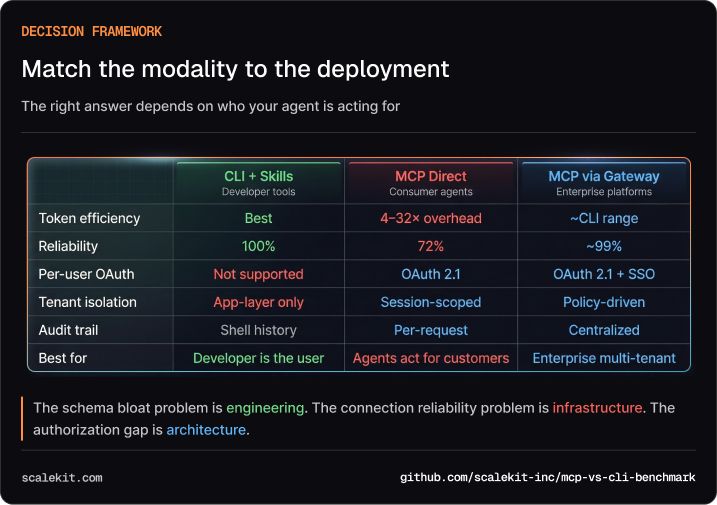
Building a developer tool where the user is the developer? Use CLI+Skills. Add an 800-token skill file. You’ll get the best efficiency we measured, and you don’t need per-user auth because you are the user.
Building a product where agents act on behalf of customers? You need MCP’s authorization model. But don’t connect directly to 43-tool servers — the cost and reliability numbers we showed you are real.
Building multi-tenant enterprise infrastructure? You need both: MCP’s auth model for governance, plus a gateway that solves the efficiency and reliability problems our benchmark exposed.
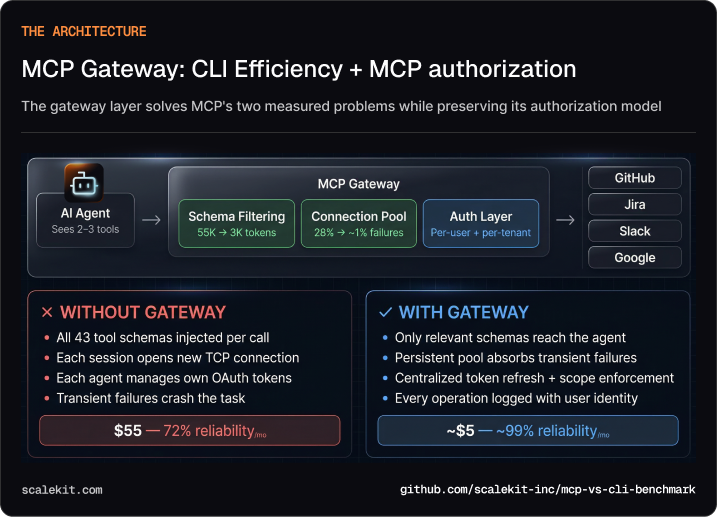
Schema filtering. Instead of injecting all 43 GitHub tool schemas, a gateway returns only the 2-3 tools relevant to the current request. That takes MCP from 44,000 tokens to ~3,000 — approaching CLI efficiency. ~90% token reduction.
Connection pooling. Instead of each agent session establishing its own TCP connection to every MCP server, a gateway maintains persistent connections and absorbs transient failures. 28% failure rate → ~1%.
Auth centralization. Instead of each agent managing OAuth tokens per service, the gateway handles token refresh, scope enforcement, and audit logging in one place. Single auth boundary per tenant.
This is the architecture we’re building at Scalekit. The benchmark data convinced us it’s necessary — and showed us exactly where the optimization opportunities are.
The full benchmark framework is open source:
You’ll need a GitHub PAT and an Anthropic API key. The harness runs all three modalities, generates statistical comparisons, and produces interactive charts. We’d welcome reproductions at larger sample sizes (n=30) and with additional services.
The schema bloat problem is engineering. The connection reliability problem is infrastructure. The authorization gap is architecture. Match the modality to what you’re building.
Resources:
MCP (Model Context Protocol) is a standardized protocol for connecting AI agents to external tools and data sources via structured, typed interfaces with built-in authorization. CLI gives agents direct shell access to run command-line tools like gh, psql, or kubectl. The distinction matters because they solve different problems. CLI wins on efficiency — it's faster, cheaper, and more debuggable. MCP wins on governance — it provides per-user OAuth, explicit tool boundaries, and structured audit trails. Choosing between them depends less on personal preference and more on who your agent is acting for.
The inflection point is when your agent stops acting as you and starts acting on behalf of other people. If you're automating your own GitHub workflow, CLI is the right call — it's simpler and dramatically cheaper. But if you're building a product where your agent reads a customer's repos, writes to their Jira, or messages their Slack team, you've crossed into territory where CLI's ambient credentials become an architectural liability. At that point, you need per-user OAuth, tenant isolation, and an auditable record of every action — none of which CLI can provide at the protocol level.
Benchmarks comparing identical tasks on the same model (Claude Sonnet 4) against GitHub's Copilot MCP server show MCP costs 4–32× more tokens than CLI, depending on the task. The primary driver is schema bloat: MCP injects definitions for every available tool into every conversation. GitHub's server exposes 43 tools, so even a simple "get repo info" task carries schemas for webhook management, gist creation, and PR review configuration — tools the agent never uses. At 10,000 operations per month, that translates to roughly $3 for CLI versus $55 for direct MCP. A gateway that filters schemas to only relevant tools can close most of this gap.
Schema bloat occurs because MCP servers inject definitions for all available tools into every agent conversation, regardless of which tools are actually needed for the task at hand. A server with 43 tools means the agent carries 43 schemas on every single call, even when it only uses one or two. The fix is schema filtering at a gateway layer — instead of passing all 43 definitions, the gateway returns only the 2–3 tools relevant to the current request. This alone can reduce MCP token usage by roughly 90%, bringing costs close to CLI efficiency while preserving MCP's authorization model.
An MCP gateway sits between your agents and upstream MCP servers, solving the three practical problems that make direct MCP connections expensive and unreliable. First, it filters schemas — returning only the tool definitions relevant to the current task rather than all 43, cutting token overhead by roughly 90%. Second, it pools connections — maintaining persistent TCP connections to upstream servers so individual agent sessions don't absorb timeout failures. Third, it centralizes auth — handling OAuth token refresh, scope enforcement, and audit logging in one place rather than per-agent. If you're building a developer tool for your own use, you don't need a gateway. If you're building a multi-tenant product where agents act on behalf of customers, a gateway is what makes MCP's authorization model economically viable.