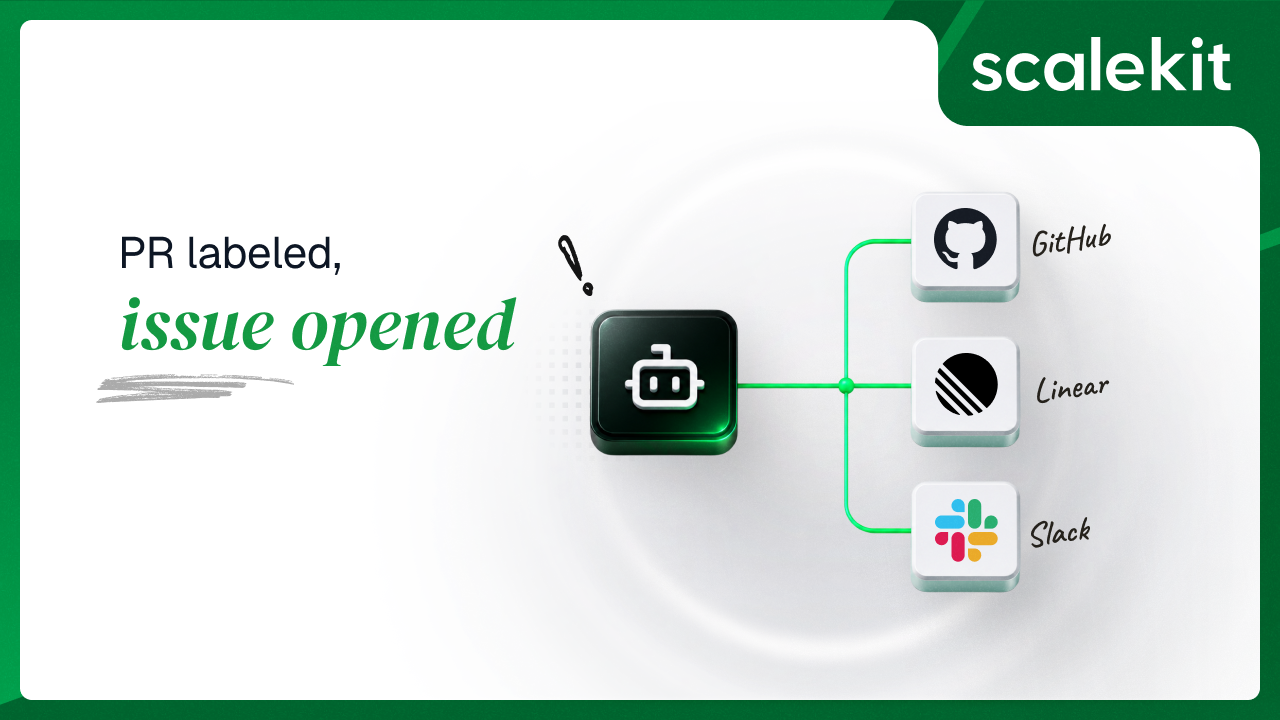


Someone on your team labels a pull request bug and assumes that means something. It does not. The label is a string attached to a PR in GitHub. Nothing in Linear knows it exists. The PR gets reviewed, gets merged, and the follow-up work that the label was standing in for never becomes a tracked issue. Two sprints later somebody asks why a known defect was never picked up, and the answer is that it was picked up, in a place the planning tool cannot see.
Every engineering org has a version of this seam. Work is described in the code host and planned in the tracker, and the two are joined by a human remembering to do it twice. An agent closes that seam in about 400 lines. But the first decision you make when you build it is the one most teams get wrong, and it happens before you write a line of business logic.
The obvious design is a webhook. GitHub fires pull_request.labeled, your service receives it, you create the Linear issue. Event-driven, near-instant, no wasted calls.
Now count what shipping that actually requires. A public HTTPS endpoint that stays reachable. HMAC signature verification against a shared secret on every request, because an unauthenticated webhook endpoint is a stranger writing into your issue tracker. A secret rotation path for when that shared secret leaks. Deduplication, because webhook delivery is at-least-once and GitHub will redeliver. Ordering tolerance, because events do not arrive in the order they happened. Repository admin access to install the hook, per repo. And a service that must be up at the moment the event fires, because a webhook you miss is gone.
The polling version is a process and a while loop.
That is the entire infrastructure decision. No inbound surface means no inbound attack surface, no signature verification, and no deployment target beyond somewhere a Python process can run. Restarts are free. Local development is the same code path as production.
The tradeoffs are real and worth naming before you commit. Latency is bounded by the poll interval, so a label added at 12:00:01 becomes a Linear issue at 12:00:30. Every cycle spends API budget whether or not anything changed; GitHub's authenticated REST limit is 5,000 requests per hour, so one repo at 30-second intervals is comfortable and forty repos on the same token is not. And polling sees state, not events: if someone adds a label and removes it inside one interval, the agent never knows it happened.
For a single-repo assistant that reconciles current state, polling is the right call. For anything that must react in under a second, or that needs the transition rather than the state, webhooks earn their setup cost.
None of these three connectors is a drop-in. Each requires you to register your own OAuth application and hand the credentials to Scalekit, which is the bring-your-own-OAuth pattern. That is the correct default for production, since the consent screen your engineers see should name your app, not a vendor's. It also means three separate registration flows before the agent runs once.
The GitHub connector authenticates with OAuth 2.0 and exposes 217 tools. Setup is a round trip: create the connection in the Scalekit dashboard, click Use your own credentials, copy the redirect URI, paste it into your OAuth app's Authorization callback URL at GitHub Developer Settings, then bring the Client ID and Secret back.
One boundary matters for a DevOps agent specifically. github_check_run_create requires a GitHub App; OAuth apps and authenticated users cannot create check runs at all. An OAuth-backed agent can read CI state through github_check_runs_list_for_ref but can never write it. If your roadmap includes the agent posting its own status check onto a PR, that is a GitHub App, not this connector, and it is better to learn that now than after you have built the feature.
Two other scope facts worth knowing before you widen this agent: github_dependabot_alerts_list and github_code_scanning_alerts_list both need the security_events scope on private repositories, and github_notifications_list caps per_page at 50 rather than the usual 100.
The Linear connector is OAuth 2.0 with 62 tools. Registration happens at Linear under Settings, then API, then OAuth applications, pasting Scalekit's redirect URI into Callback URLs.
The operational quirk is that Linear is ID-driven. linear_issue_create requires teamId and title; everything else, including assigneeId, labelIds, priority, projectId, and stateId, is optional but also an ID. Linear's connector docs are blunt about this: fetch IDs from the API, never guess or hard-code them, with linear_teams_list returning team IDs at teams.nodes[].id.
This agent takes the shortcut and reads LINEAR_TEAM_ID from .env, which you find by hand once. That is fine for a single-team deployment and it is the first thing to change if you roll this out across teams. Resolving team IDs at startup with linear_teams_list costs one call and removes a class of copy-paste failure.
The Slack connector is OAuth 2.0 with 91 tools. Create the app at the Slack API site, add Scalekit's redirect URI under OAuth and Permissions.
Then do the step people skip. Under Manage Distribution, complete Slack's checklist and click Activate Public Distribution. Skip it and OAuth succeeds in your own development workspace and fails the first time a user tries to connect a second one. The failure arrives weeks after the code worked, in someone else's workspace, which is the worst possible time to discover a configuration setting.
Scalekit's dashboard also asks you to choose Bot scope or User scope on this connection, and for this agent the docs' recommendation is right: choose Bot scope. The agent posts notifications into a shared channel; there is no reason for those to appear under an individual engineer's name.
That answer is connector-specific, not global, and the next section is why.
Recommended Reading: DevOps assistant agent for GitHub, Linear, and Slack, and related MCP variants of these connectors.
Most agent tutorials pass one user ID everywhere. This repo carries three:
That is not redundancy. Each connector answers a different question about whose authority backs the call, which is the core of how delegated agent access works in practice.
GitHub should be the engineer. PR visibility is bounded by what the authorizing account can see. An agent running on one engineer's connected account surfaces the private repos that engineer has access to and no others. Swap in a shared org-wide token and the agent's reach becomes the union of everything, which is both more access than any individual has and the reason security review will ask about it. What the user cannot see, the agent cannot see, and that property is free here rather than something you enforce in application code.
Linear should be the engineer. Issues created through a delegated connected account carry that person's identity. Created through a shared bot, every auto-filed issue is attributed to the bot, and the audit question "who opened this" has one useless answer for the entire backlog.
Slack can be the app. The agent posts to a team channel. Bot identity is correct and Slack's own model prefers it.
The one place that flips is search. slack_search_messages, slack_search_files, and slack_search_all all require search:read, which Slack supports on user tokens only and not on bot tokens. This agent never searches, so bot scope is fine. Extend it to find related discussion and you have changed the identity requirement, not just added a feature.
Recommended Reading: credential ownership patterns for agent tool calling, and agent tool calling auth production problems, patterns, and anti-patterns.
Add up the catalogs and this agent's three connectors expose 370 tools: 217 from GitHub, 91 from Slack, 62 from Linear.
The agent calls three.
That ratio is the practical case for scoped tool surfaces. Hand a model the full catalog and you have put 370 schemas in context before it does any work, which at roughly 200 tokens each is on the order of 74,000 tokens of pure overhead per run. Accuracy degrades in the same direction: an LLM asked to pick one action from 370 options, including near-duplicates like slack_archive_channel and slack_archive_conversation, or github_issue_labels_add and github_issue_labels_set, will pick wrong more often than one choosing from five.
This agent gets there by a blunter route: it is a deterministic pipeline with no model in the loop choosing anything. Poll, compare, create, notify. The tools are named in code. That is worth saying plainly, because a lot of things labelled "AI agent" are this, and there is nothing wrong with that when the work is genuinely deterministic.
Create a workspace and copy SCALEKIT_ENV_URL, SCALEKIT_CLIENT_ID, and SCALEKIT_CLIENT_SECRET into .env.
Create all three under AgentKit, then Connections. Each follows the same shape: copy the redirect URI, register it with the provider, bring back Client ID and Secret. For GitHub, grant repo read scope so the agent can list PRs in private repositories. For Slack, activate distribution before you finish.
Scalekit auto-suffixes connection names per workspace. What you see in the dashboard is github-g0DJbhbx or slack-sKfekCVz, not the bare provider label. If one identifier maps to more than one connection for the same service, resolving by identifier alone is ambiguous and the call fails with a multiple-accounts error.
Copy the exact names from Connected Accounts into .env:
Every execute_tool call in this agent passes connection_name. Set these even when you only have one connection per service, because the day you add a second is not the day you want to discover why the agent picked the wrong one.
Then prompt Claude Code:
What comes back is a single wrapper class that every call in the agent goes through.
This is the part of the wrapper worth copying into your own agents. A long-running poller will outlive at least one token, and the default failure mode is a cryptic exception at 3am on a Sunday. Instead, the agent watches for the specific error signals that mean a credential is dead and responds by generating a fresh authorization link into the logs.
Note _mask() on the identifier. Identifiers are usually emails or user IDs, and they end up in log files that outlive the incident, so they are truncated to first two and last two characters before anything is written.
Scalekit refreshes tokens on its own; this path only fires on genuine revocation, which refresh cannot fix. The distinction matters because the two failures look identical from inside the agent and only one of them requires a human, and it is the reason token lifecycle belongs outside the agent runtime.
The success path returns resp.data and logs a truncated preview at DEBUG, which is how you inspect an unfamiliar response shape without turning it on in production. The error path is where the design decision lives.
Returning None rather than raising is the design decision that keeps a poller alive. A transient Linear outage should skip one label, not kill the process. The cost is that every caller has to check for None, and the digest sender does exactly that, because a silently-None Slack call is otherwise indistinguishable from a delivered message.
The key-order walk exists because list responses do not always arrive under the same field name, and the for/else makes the miss loud rather than silent. That is the right instinct: an agent that treats an unrecognized response shape as "zero PRs" will run for a week looking healthy while doing nothing.
Polling means seeing the same labeled PR every 30 seconds forever. Without a memory, that is one Linear issue every 30 seconds.
The key is the smallest thing that uniquely identifies the unit of work:
PR plus label, not PR alone. A PR labeled both bug and security should produce two issues routed to two teams, and lowercasing means Bug and bug do not diverge into duplicates.
The map lives in state/pr_linear_links.json and is checked before every create:
There is one failure window the code handles honestly rather than hiding. If the Linear issue is created and the state write then fails, the issue exists but the agent does not know it, and the next poll will create a second one. Rather than pretend otherwise, it logs loudly at the exact moment:
A JSON file on local disk is the right amount of machinery for a single-instance poller and the wrong amount for two. Run a second instance against the same repo and both will read a stale map and both will create the issue. Moving the map to Redis or Postgres with the key as a unique constraint is the change that makes this horizontally safe, and it is a small one.
LABEL_TO_LINEAR_TEAM is a JSON map in .env, so {"bug":"TEAM-1","infra":"TEAM-2"} routes labels to different Linear teams without touching code. Labels with no mapping fall through to LINEAR_TEAM_ID.
The brace substitution is not cosmetic. PR titles regularly contain {} from code snippets, and templating layers downstream will try to interpret them. Replacing braces before they reach the tool input is cheaper than debugging why one PR in fifty fails.
Response parsing then walks several shapes, because a create can come back as a raw GraphQL envelope or as a flattened object:
Returning early without an ID is correct. Recording a placeholder would poison the idempotency map permanently.
Once per calendar day the agent posts a summary of every open PR:
The prefix match is why the key format matters. Because keys are owner/repo#42:label, a startswith on owner/repo#42: collects every issue linked to PR 42 regardless of how many labels it carries, with no second index.
Digest delivery checks for the silent failure explicitly:
Worth being straight about one thing: the digest's CI column is a placeholder in the shipped code. It renders CI: (not implemented) on every line. Wiring it up is a genuinely small change, covered in the extension section below.
Second cycle, same labeled PR:
No duplicate. That line is the whole idempotency design paying off, and it is the first thing to check on your own first run.
Logs go to the console with color when attached to a terminal and to logs/poller.log as plain text, rotating at 2 MB with 5 backups. Colors auto-disable when piped, so systemd journals stay readable.
The digest day resets on restart. last_digest_day is tracked in memory inside the run loop, not on disk. Restart the process and the next cycle sends another digest, which during a deploy-heavy afternoon means several. Persisting the last digest date alongside the link map is a two-line fix and worth making before this runs as a service.
Validation warns where it should stop. Missing identifiers raise correctly, but the broader config check logs a warning and continues, so a wrong GITHUB_REPO_OWNER surfaces as an empty PR list rather than a startup error. Promoting that warning to a hard exit turns a confusing runtime symptom into an obvious one.
Decide what happens on label removal. The agent creates on first sight and never reconciles. Remove a label and the Linear issue stays. That is defensible, since work already filed probably should not vanish, but it should be a decision you made rather than one the code made for you.
Give the agent a real identity per engineer. The repo uses fixed identifiers from .env, which is right for a demo and wrong for a team. In production, pass each engineer's real user ID as the identifier and surface an authorization link from your own application whenever their connected account is not active.
Wire observability to the question you will be asked. The agent's own logs cover its run. The question a security review asks is different: which identity, calling which tool, against which connector, and when. Tool call logs and audit trails for agent auth carry that, and the launch checklist is the short version of what to confirm first.
Add real CI status. Call github_check_runs_list_for_ref with the PR's head SHA and replace the placeholder in the digest formatter. Note the exact tool name; github_check_runs_list does not exist.
DM engineers instead of broadcasting. slack_send_message accepts a user ID in the channel field, so resolving a GitHub login to a Slack user through slack_lookup_user_by_email turns the digest into a per-engineer DM. That tool needs users:read.email and cannot be called by custom bot users, so check your scope choice first.
Ask before writing. Creating issues and posting messages are write operations. Putting an approval step in front of them is the human-in-the-loop tool calling pattern, and it is the right default when an agent acts on a shared backlog.
Swap or add connectors. GitLab, Jira, and Notion follow the same call shape. Configure a connection, add an identifier, call the tool. Linear also exposes linear_graphql_query as an escape hatch for anything the 62 typed tools do not cover. The auto-release-notes agent and the daily standup agent are the closest neighbours if you want to see the same pattern with different endpoints.
The full code is on GitHub. Clone the repo, configure your connections, and have it running in under 20 minutes.
Because the correct identity is different per connector. GitHub and Linear should act as the engineer, so PR visibility is bounded by that person's access and filed issues carry their name. Slack posts to a shared channel, where the app's own identity is correct. Keeping them separate lets you make that choice per service rather than accepting one answer for all three.
Scalekit refreshes them. The agent has no refresh logic, and execute_tool works identically on day 1 and day 180. What the agent does handle is revocation, which refresh cannot fix: on invalid_auth, token_expired, token_revoked, or not_authed, it generates a fresh authorization link straight into the logs.
No. The link map in state/pr_linear_links.json persists across restarts and is checked before every create. The one gap is running two instances against the same repo, since both read the same local file and can race. Move the map to a shared store with a unique constraint on the key before you scale out.
Not through this connector. Creating check runs requires a GitHub App; OAuth apps and authenticated users cannot do it. The agent can read check state with github_check_runs_list_for_ref and report it, which covers the digest use case, but writing a status back to the PR is a different integration.
Run one process per repo with its own .env, which is the simplest path and keeps state files independent. If you consolidate into one process, watch the GitHub rate limit: 5,000 authenticated requests per hour is generous for one repo at 30-second intervals and gets tight past a couple of dozen. Widening POLL_INTERVAL buys more headroom than any other change.