

TL;DR
Picture this: it’s peak hour before a major deployment, your team is merging the final pull requests, and suddenly the dreaded question pops up in your project channel: “Do we have the release notes ready?” For most developers, this is a familiar pain point. Someone ends up sifting through countless commits, deciphering the forest of code changes, drafting release notes manually, and pasting links across Slack and Notion. The cost isn’t just wasted hours; context switching at this critical stage derails momentum and increases the risk of missing crucial updates or introducing inconsistencies.
Manual documentation during release cycles fragments developer attention and introduces asynchronous bottlenecks. Every release, teams struggle with:
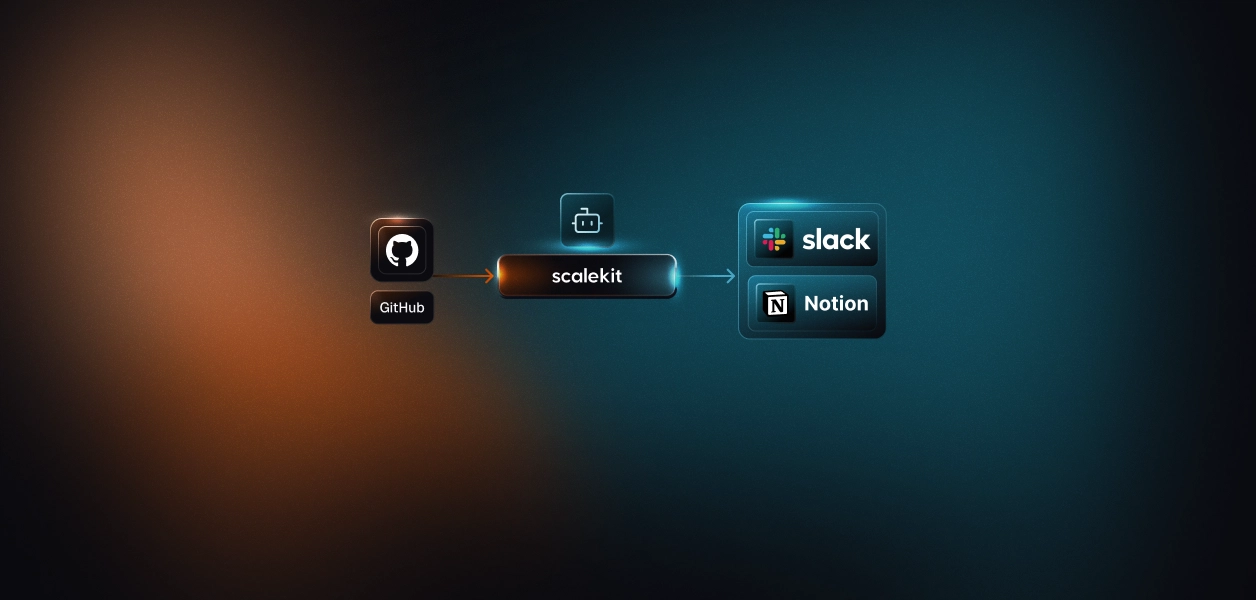
What if every PR merge triggered a reliable agent that automatically generated curated Notion pages, synced context-rich release notes using your existing repository metadata, and instantly posted a link to the correct Slack channel, without interrupting developer flow? That’s exactly what the GitHub to Notion release notes agent does. In this deep dive, you’ll learn the architectural decisions, API strategies, and implementation techniques behind building an end-to-end, idempotent auto-documenting release flow, and the concrete developer problems it solves.
Manually generating release notes seems simple at first glance, but it hides several technical challenges that become painfully apparent in real-world developer workflows. Handling multiple merged PRs, cross-referencing issues, and keeping documentation up-to-date quickly becomes a complex, error-prone process.
Processing numerous PRs: In active repositories, dozens of PRs might merge within hours. Tracking each PR’s metadata, title, description, author, SHA, and linked issues requires careful attention. Missing a single commit can result in incomplete release notes or miscommunication.
Synchronizing multiple tools: Release notes rarely live in GitHub alone. Teams often use Notion for documentation and Slack for notifications. Manually copying PR details into Notion and then sharing updates in Slack introduces friction, increases latency, and multiplies the opportunity for human error.
Ensuring idempotency: When automating, it’s crucial that each PR is processed exactly once. Reprocessing the same PR could create duplicate entries in Notion or spam Slack channels, which quickly erodes trust in the automation. Maintaining a reliable state and mapping between PRs and release notes is essential.
Delivering timely notifications: Teams expect immediate updates after a merge. Delays in creating release notes or sending Slack notifications slow down workflows, force developers to manually check for changes, and reduce confidence in release communication.
These challenges demonstrate why manual release notes don’t scale and why automation isn’t just convenient, it’s necessary. The GitHub → Notion release notes agent addresses each of these pain points systematically, which we’ll explore next.
The GitHub to Notion release notes agent is designed to handle the complexity of generating release notes automatically, integrating GitHub, Notion, and optionally Slack into a seamless workflow. Its architecture focuses on modularity, reliability, and idempotency, allowing developers to automate release documentation without disrupting their existing processes.
Polling server: The polling server periodically checks GitHub for merged PRs, typically every 60 seconds. It ensures that even in local or offline environments without public endpoints, PR merges are detected and processed reliably. The server maintains a polling_state.json to track processed PRs, preventing duplicates.
Webhook server: For production environments requiring instant updates, the webhook server listens for GitHub PR merge events in real time. This approach eliminates polling latency and ensures the immediate generation of release notes, ideal for continuous deployment pipelines.
Notion API service: This module handles all interactions with the Notion database. It formats PR metadata, title, SHA, description, repository, and status into Notion pages according to the predefined schema. The database schema includes properties like PR Number, Status, Summary, and Repository to keep release notes structured and searchable.
Scalekit OAuth connectors: Scalekit manages authentication and API calls for GitHub, Notion, and Slack. Developers don’t have to handle OAuth tokens manually; Scalekit ensures secure, unified access across all services. This abstraction simplifies integration and reduces the risk of exposing sensitive credentials.
Slack integration (Optional): Once a Notion page is created, the agent can send a Slack notification to a specified channel, providing a direct link to the release notes. This keeps the team informed in real time without manual intervention.
A key architectural decision is idempotency. The agent tracks processed PR SHAs to ensure that each PR generates only one Notion page and one Slack notification, even if polling overlaps or webhook events are retried. This guarantees consistent and reliable release notes without duplicates.
Automating release notes isn’t just about connecting GitHub and Notion; it requires careful orchestration of authentication, API calls, and state management. In this section, we’ll break down how the GitHub → Notion Release Notes Agent works end-to-end, from initial setup to running the agent and understanding the code flow.
Before the agent can generate release notes, it needs secure access to GitHub, Notion, and Slack. Each integration involves authentication, configuration, and mapping to ensure proper functionality.
The agent needs to read pull requests and commit data from GitHub. Using OAuth ensures credentials are not hardcoded, keeps the system secure, and allows Scalekit to handle API calls on your behalf.
Setup steps:
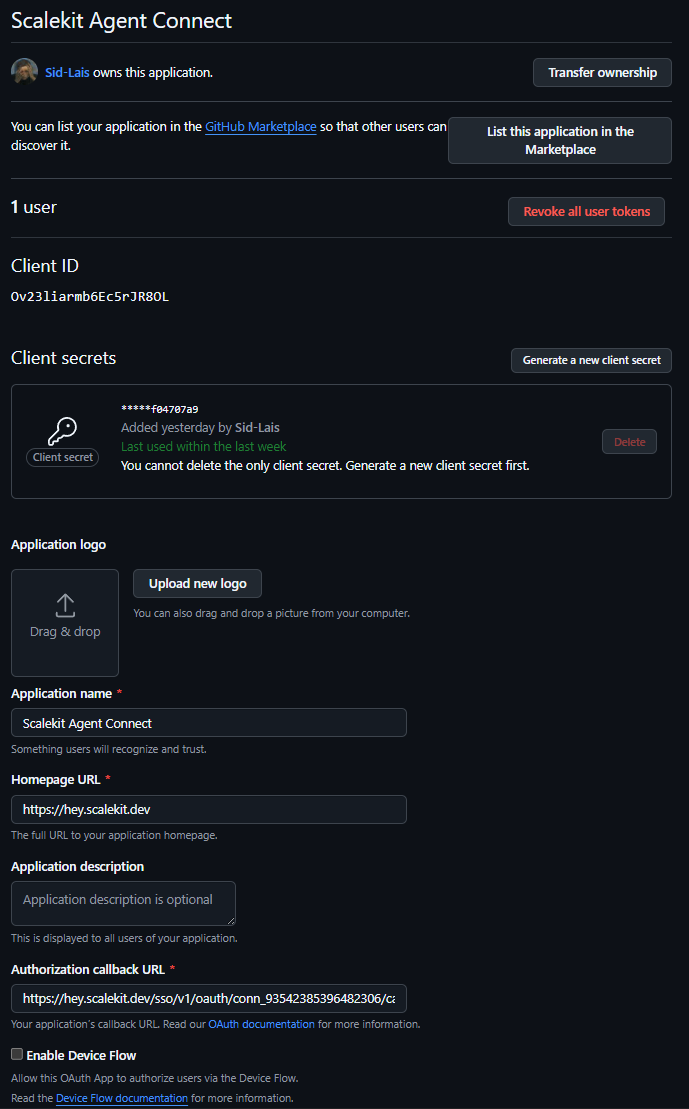
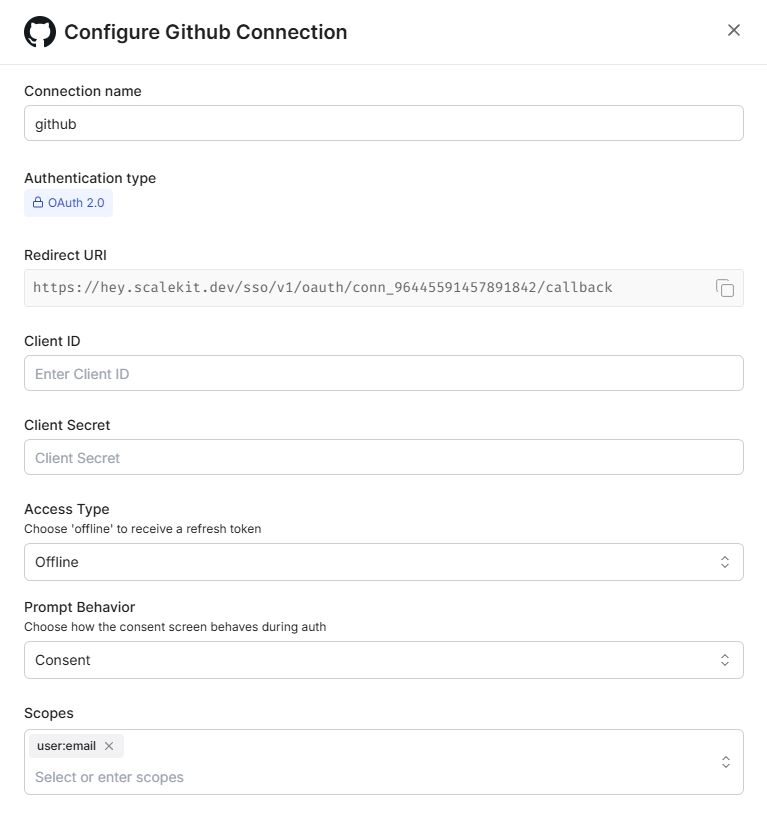
Why this matters:
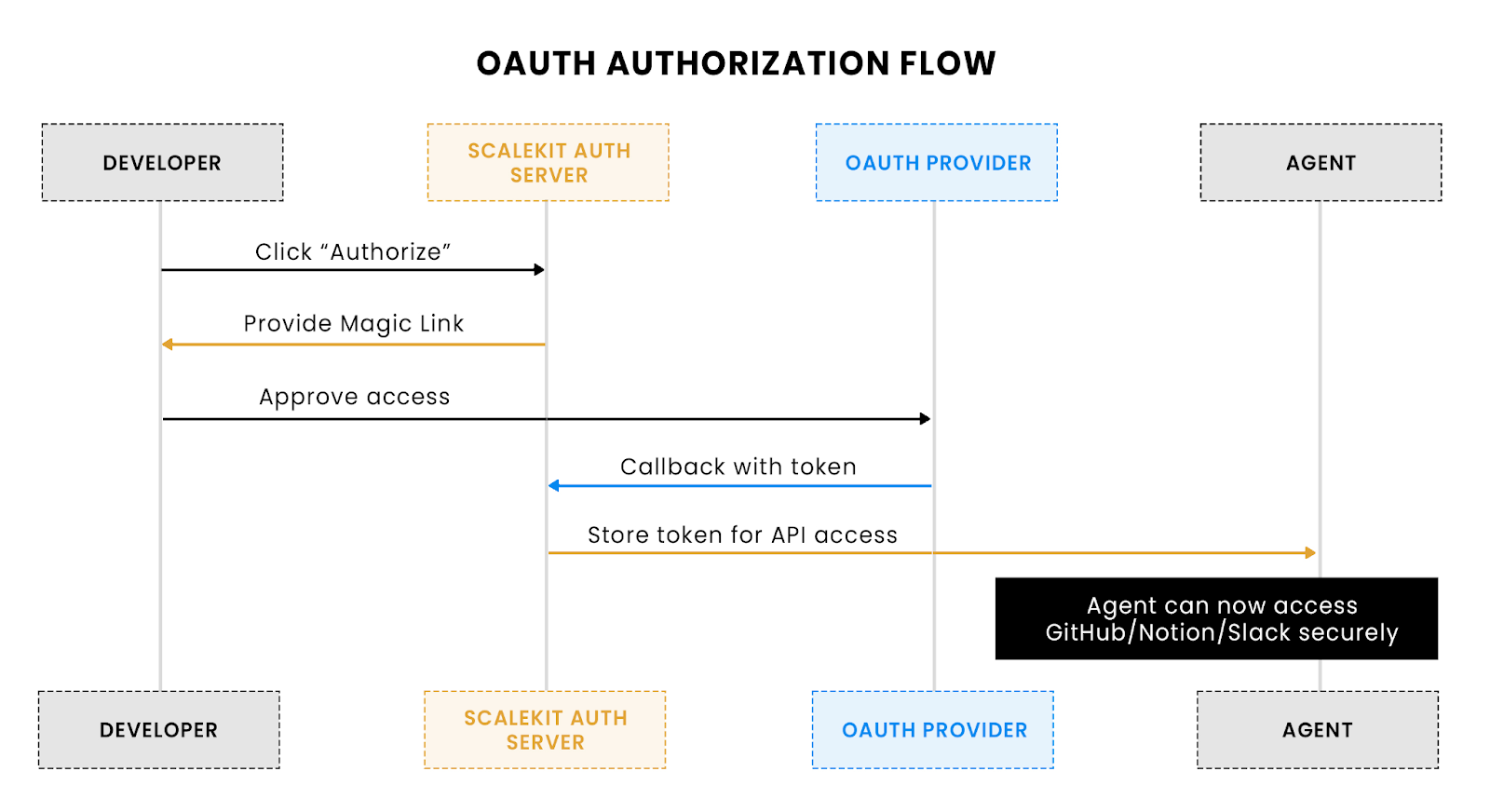
The above flow shows how a developer authorizes Scalekit to access GitHub, Notion, or Slack using magic links
The agent needs a structured place to store release notes, with clear properties for automation and searchability.
Database creation steps:
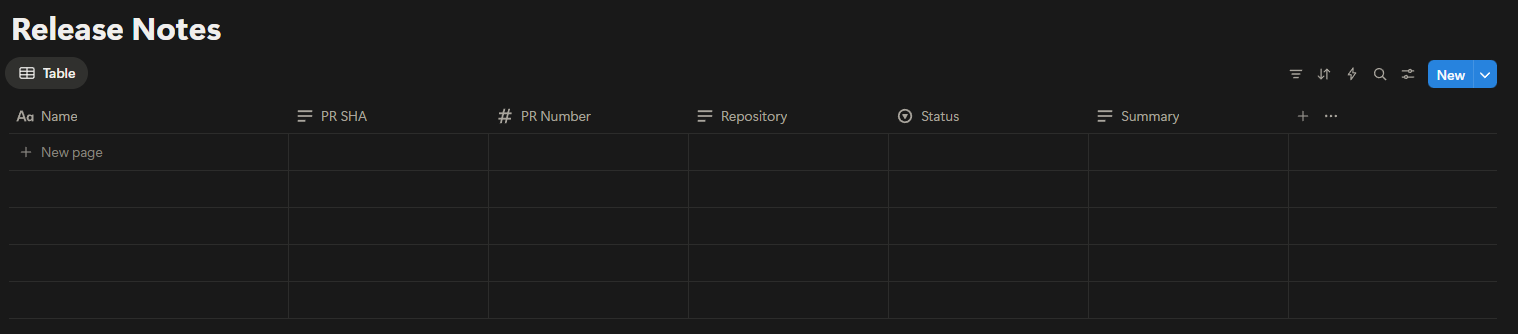
Technical notes:
Slack is used to send real-time notifications about newly generated release notes.
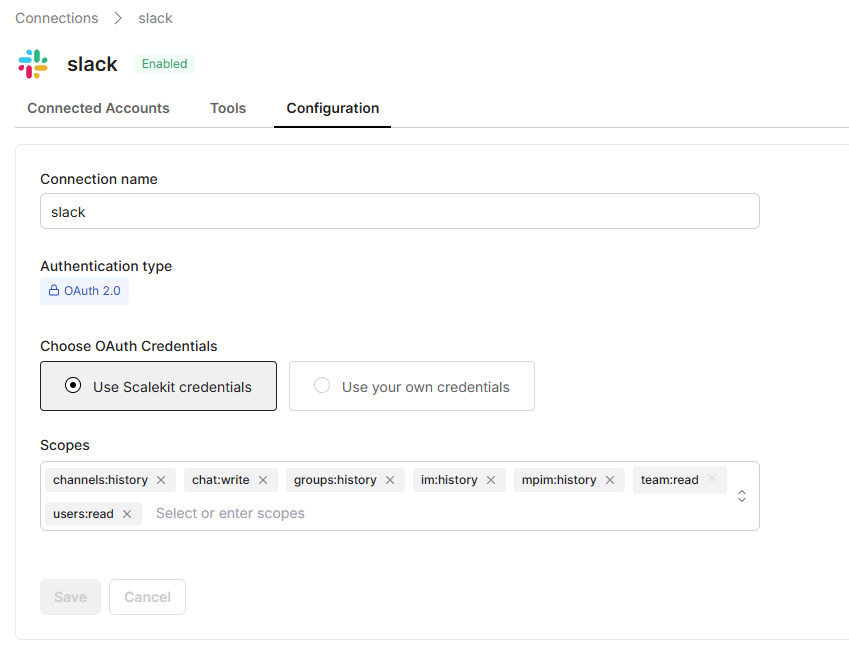
Setup Steps:
Why is user mapping needed?
All credentials and IDs are managed via a .env file to keep them out of source control:
Why is the environment config important:
Key takeaways for developers:
The agent is built around modular Python code, designed for clarity, maintainability, and integration with Scalekit. We’ll walk through the key modules, what they do, and how they interact with GitHub, Notion, and Slack. You can also refer to the sample app on GitHub for the full code.
settings.py manages all runtime configuration for the agent. It loads environment variables from .env (Scalekit credentials, GitHub repo info, Notion DB ID, Slack channel) and validates that required keys exist before execution. Flags like NOTION_VIA_SCALEKIT and ALLOW_LOCAL_TESTING control integration behavior and local testing.
Code snippet:
Explanation:
This module acts as a single source of truth for the agent, ensuring predictable behavior across polling, webhook, Notion, and Slack operations.
sk_connectors.py wraps the Scalekit SDK to simplify API interactions with GitHub, Notion, and Slack. Its responsibilities include executing tools, handling retries, and resolving user identifiers from Slack to Scalekit accounts. This abstraction allows developers to interact with multiple APIs reliably without managing OAuth tokens, retries, or error shapes manually.
Code snippet: Executing a tool with retries:
Explanation:
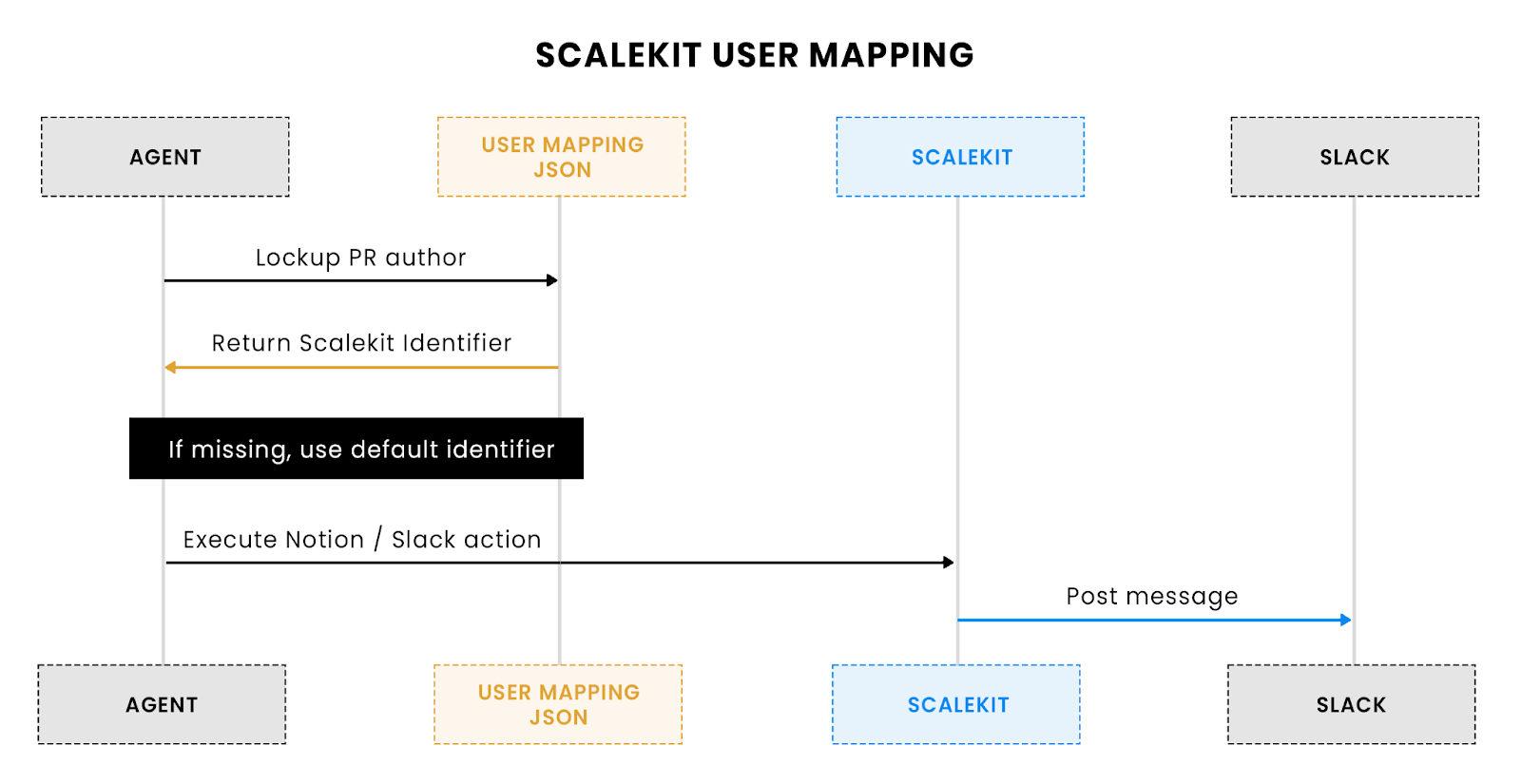
The above flow shows how the users are mapped in Scalekit.
Code snippet: Resolving a user identifier:
Explanation:
Developer perspective:
This module centralizes all API calls, retries, and user mapping logic, making the agent robust, idempotent, and easier to maintain. Developers don’t need to handle raw HTTP requests or token lifecycles, which significantly reduces boilerplate and potential errors.
notion_service.py is responsible for converting GitHub PR data into structured Notion pages. It handles the title, description, metadata, commits, and links, then calls Scalekit to insert the page into the configured Notion database.
Code snippet: Constructing the notion payload:
Explanation:
Developer perspective:
This module abstracts the complexity of building Notion pages from PR data. It allows developers to automatically generate structured, readable, and searchable release notes while maintaining idempotency by embedding the SHA in the content blocks.
polling_server.py is responsible for periodically checking GitHub for merged PRs and processing them. It is ideal for local development or environments without a public endpoint, ensuring release notes are generated even without webhooks.
Code snippet: Polling loop:
Explanation:
Developer perspective:
Polling mode provides a reliable, incremental mechanism for generating release notes without requiring a public server or webhook setup. It ensures that all merged PRs are captured while maintaining consistency and avoiding duplicate notifications.
webhook_server.py enables real-time processing of GitHub PR merge events. It is ideal for production or cloud environments where immediate release note creation is required. The module also provides endpoints for OAuth authorization and health checks.
Code snippet – Handling a PR merge webhook:
Explanation:
Code snippet – OAuth authorization endpoint:
Explanation:
Developer perspective:
Webhook mode eliminates polling latency, ensuring instant updates for merged PRs. The module also simplifies OAuth flows, enabling secure authorization of Slack and Notion accounts for multiple users without manual token management.
With integrations configured and core modules in place, the agent processes a merged PR from GitHub to Notion and Slack. The flow differs slightly between polling and webhook modes, but achieves the same goal: automated, idempotent release notes creation.
Polling mode periodically fetches closed PRs from GitHub and processes new merges.
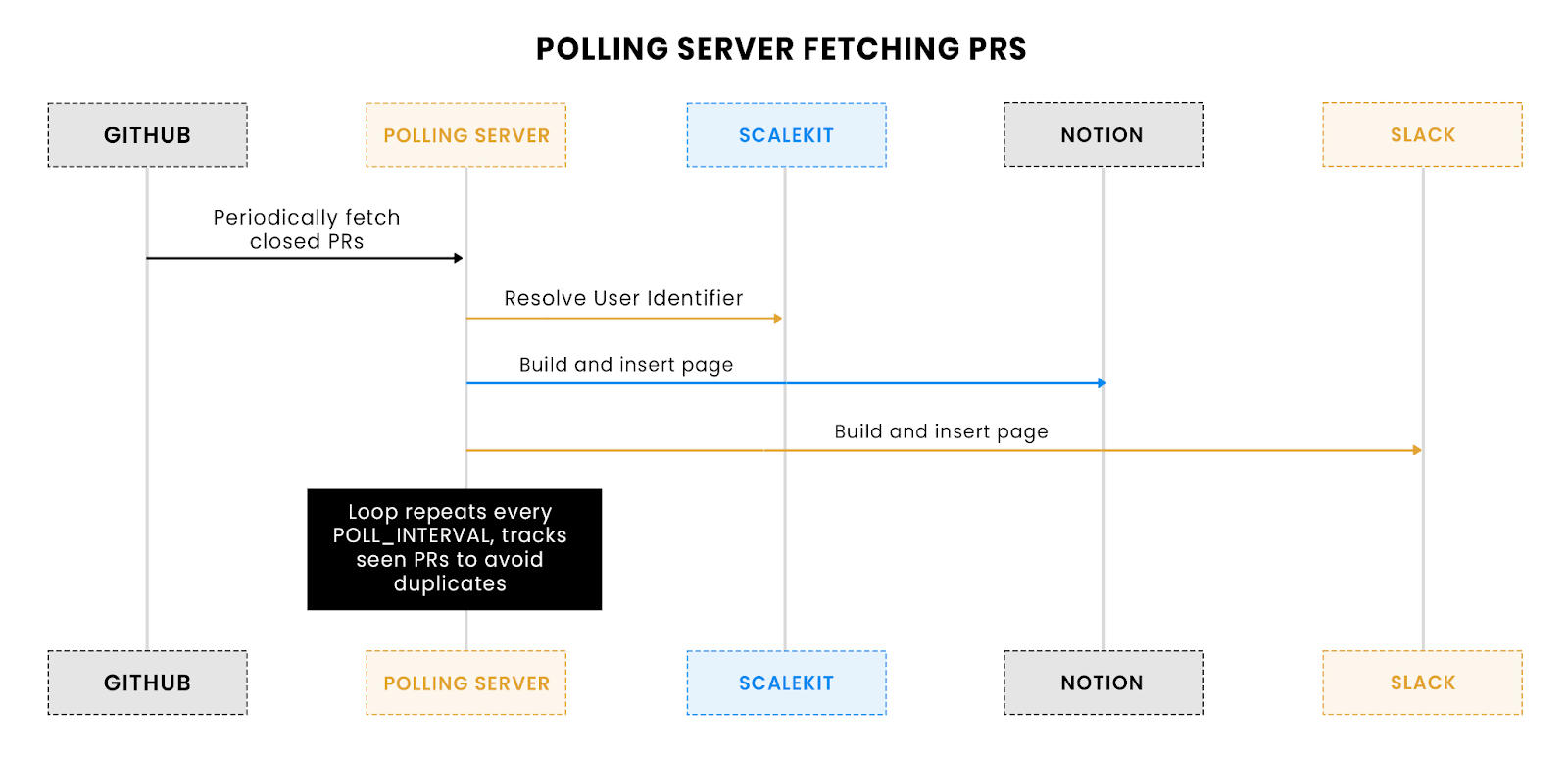
The above flow shows how the agent periodically fetches merged PRs and processes them in batches while maintaining idempotency.
Steps:
1. Fetch merged PRs:
2. Create Notion page:
upsert_release_notes(pr)
3. Send Slack notification:
post_slack_notification(pr)
4. Update local state:
seen_prs.add(pr["number"])
save_state(seen_prs)
5. Loop & sleep:
sleep(POLL_INTERVAL)
Developer perspective:
Polling mode provides a simple, reliable fallback where webhooks are unavailable. Incremental processing ensures all PRs are captured without duplication, and local state tracking guarantees consistent release notes.
Webhook mode enables real-time processing when GitHub sends PR merge events directly.
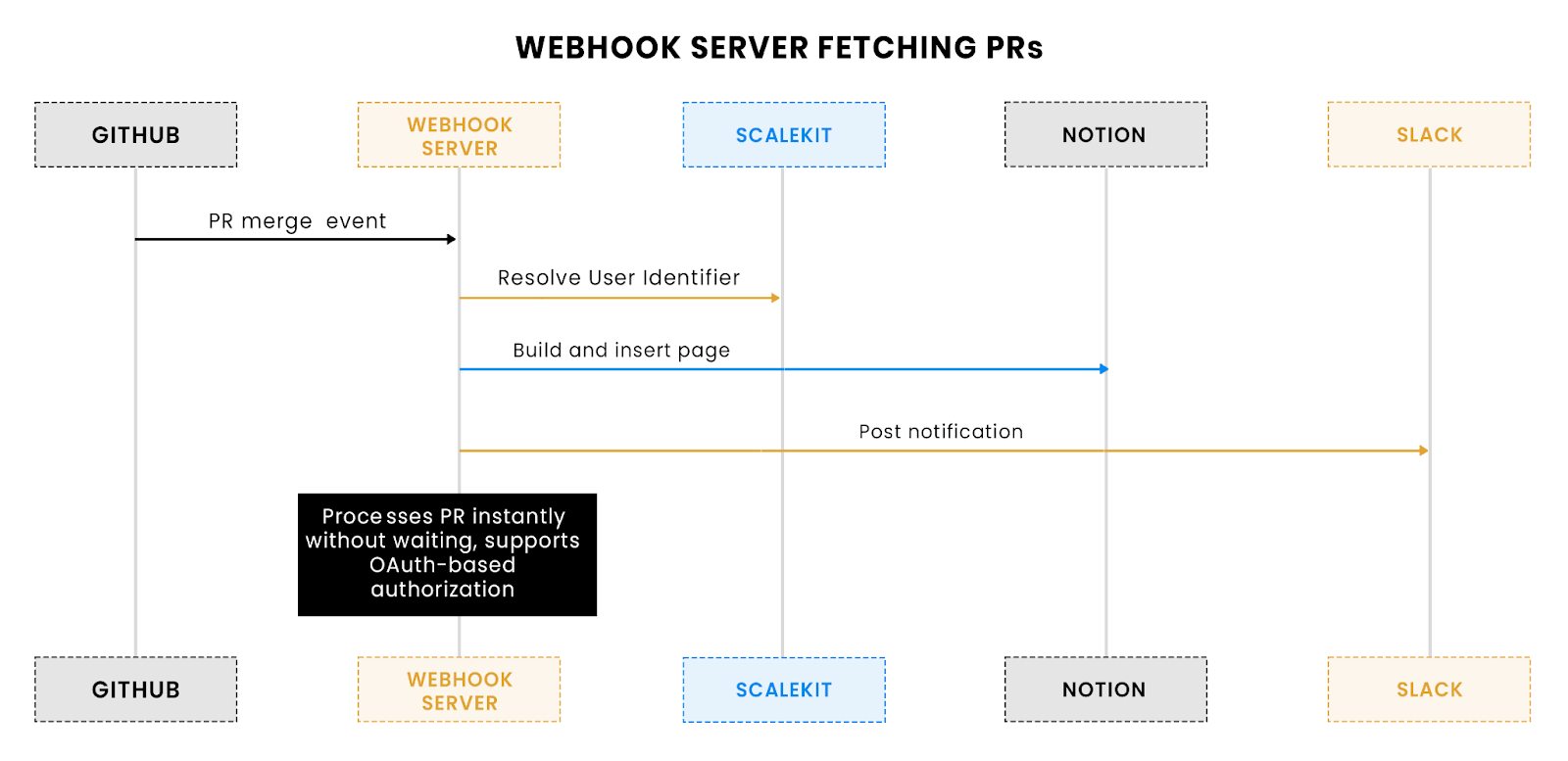
The above flow illustrates how the agent processes PR merge events immediately for real-time Notion page creation and Slack notifications.
Steps:
1. Receive webhook event:
2. Process PR:
3. Respond to GitHub:
return {"notion_page_url": notion_url}, 200
Developer perspective:
Webhook mode provides instant feedback for merged PRs, improving team visibility. It eliminates polling delays and leverages OAuth endpoints for secure, dynamic authorization of Notion and Slack accounts.
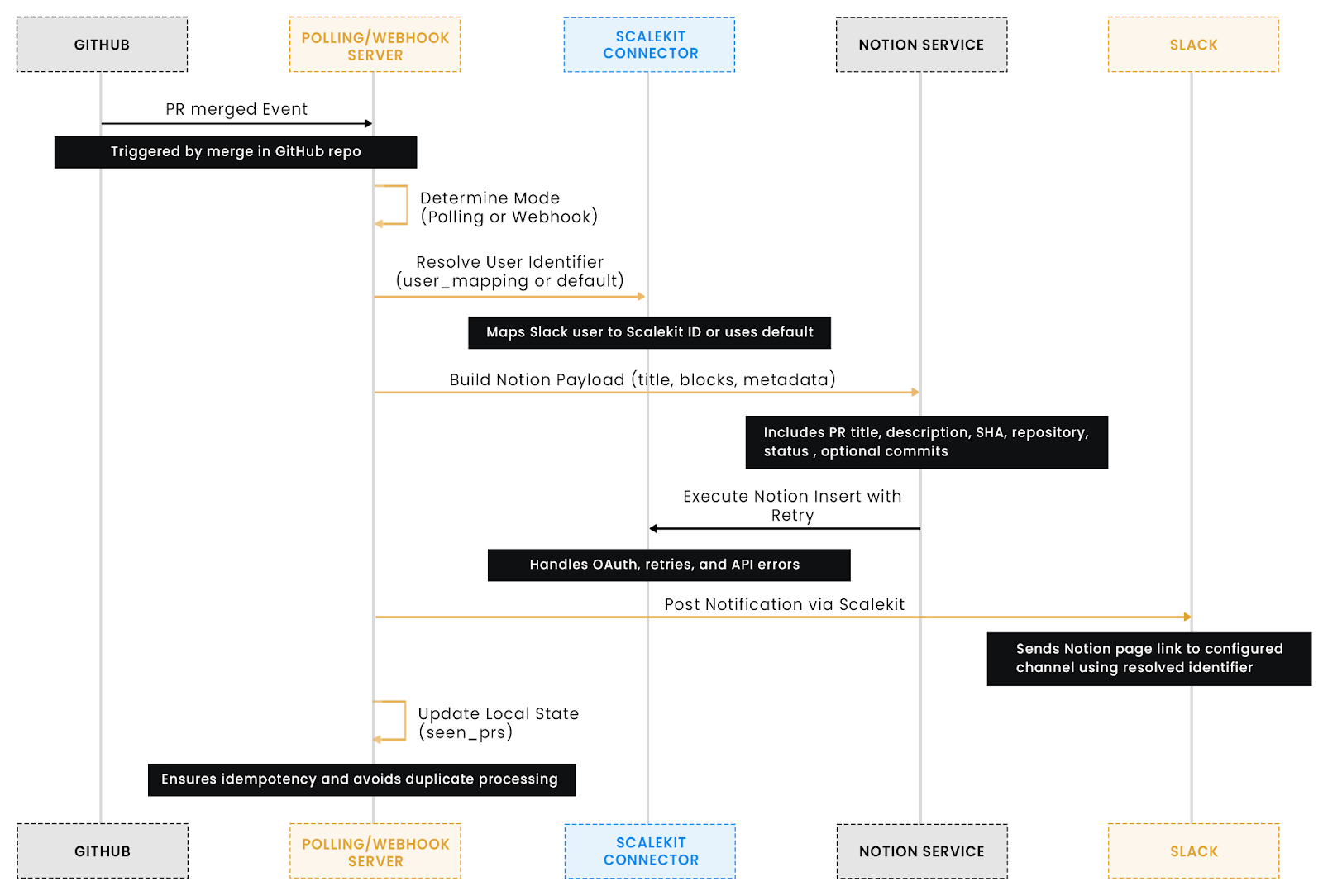
This flow ensures automated, reliable, and consistent release notes, visible to both developers and the team immediately.
With integrations configured and core modules understood, the agent can be run in polling or webhook mode. Testing and monitoring ensure reliable behavior in both local and production environments.
Developers can simulate a PR merge without interacting with real GitHub events:
Why: Safe end-to-end testing ensures payload formatting, block structure, and notifications work as expected before production deployment.
Polling mode periodically checks GitHub for merged PRs and processes them:
python polling_server.py
Flow highlights:
Webhook mode enables real-time PR processing:
python webhook_server.py
Flow highlights:
Common checks:
Best practices:
Developer perspective:
This step ensures that the agent runs reliably in both local and production setups. Polling mode provides a lightweight, offline-friendly solution, while webhook mode enables instant, real-time automation. Combined with robust monitoring and testing, the system guarantees consistent, idempotent release notes with minimal manual intervention.
Common checks:
Best practices:
Developer perspective:
This step ensures the agent runs reliably, whether locally or in production. Polling mode offers a lightweight, local-friendly solution, while webhook mode provides instant, real-time automation for production deployments. Proper monitoring and testing guarantee consistent, idempotent release notes with minimal manual intervention.
The GitHub → Notion Release Notes Agent doesn’t just automate tasks; it directly addresses common pain points in release management, improving productivity, accuracy, and team communication.
Impact: Saves hours of manual work, reduces errors, and ensures every PR is accurately documented.
Impact: Improves team visibility, reduces context switching, and accelerates decision-making during releases.
Impact: Builds trust in automation and supports adoption in large, active projects without duplicating work.
Impact: Minimizes boilerplate, reduces errors, and allows developers to focus on building features rather than managing integrations.
Impact: Encourages experimentation while reducing downtime and operational risk.
Developer perspective:
The agent translates technical automation into practical value, ensuring release notes are accurate, notifications are timely, and teams maintain focus on shipping features. The result is a predictable, scalable, and efficient release process that eliminates the stress of manual release note management.
Remember the scenario from the introduction: it’s the critical moments before a deployment, your team is merging the last PRs, and someone asks, “Do we have the release notes ready?” Traditionally, this question triggers hours of manual work, sifting through commits, drafting notes, updating Notion, and posting Slack messages, fragmenting attention and increasing the risk of errors.
The GitHub → Notion Release Notes Agent directly solves this problem. By automating the creation of release notes from merged PRs, inserting them into a structured Notion database, and posting notifications to Slack, the agent removes manual overhead, reduces context switching, and ensures consistent, accurate documentation. Whether running in polling mode or via webhook, it guarantees timely updates, handles retries and transient errors, and preserves idempotency to prevent duplicates, all while maintaining developer-friendly configurations and secure OAuth-based authentication.
Next steps for developers:
With the agent in place, your team can focus on shipping features, confident that every PR merge is automatically documented and communicated, eliminating the familiar stress of “Where are the release notes?” once and for all.
Scalekit acts as a unified integration layer, handling OAuth authentication, token refreshing, and API retries for GitHub, Notion, and Slack. Developers can securely execute actions like notion_database_insert_row or slack_send_message without managing raw API calls, rate limits, or credentials, ensuring reliable automation of release notes and notifications.
Yes. Scalekit provides robust retry mechanisms with exponential backoff for transient API failures (like 429 rate-limit errors) and ensures idempotent operations through local state management and user mapping. This prevents duplicate Notion pages or redundant Slack notifications when processing GitHub pull requests.
The agent fetches merged PRs using github_pull_requests_list and filters out previously processed PRs using polling_state.json. It then builds structured Notion payloads and posts Slack notifications in batches, maintaining idempotency and minimizing API calls to handle high-volume repositories without data loss.
A precise Notion database schema with properties like PR SHA, PR Number, Repository, Status, and Summary ensures that automated release notes remain searchable, structured, and consistent. Child blocks store metadata and descriptions, allowing queries and analytics on PR activity while overcoming API limitations of property-only updates.
Mapping Slack user IDs to Scalekit identifiers ensures that notifications are posted on behalf of the correct developer, maintaining accountability and context. This mapping also enables fallback to a default identifier, preventing failed message posts when an unmapped user triggers a pull request merge, ensuring consistent team communication.