

When we ask teams how they've connected their agent to external tools — a CRM, a shared inbox, a calendar, a code repository — the answer is almost always the same. They've set up an admin account or used a founder's OAuth connection, wired it up once, and moved on.
It's a completely reasonable call. You need the agent to have access to what it needs. Admin accounts have that access. Setup is a one-time thing. When you're moving fast to get something working, it's the path that makes sense.
We've had this conversation with enough teams now — across sales tooling, devops assistants, customer-facing copilots — that a consistent pattern has emerged in where it gets complicated. Not immediately. The admin account works, the agent works, everything looks fine. But there are specific places where the implications of that initial choice show up, usually when the stakes are higher.
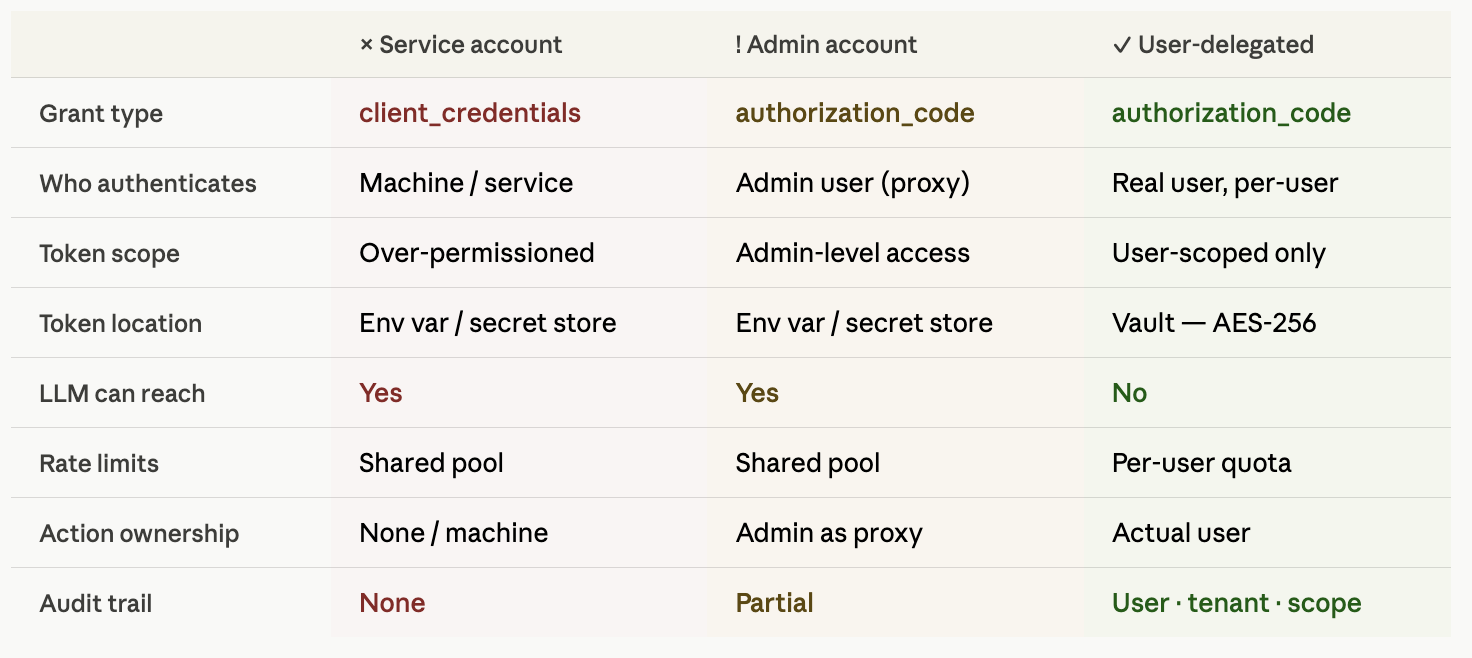
The same is true for teams that started one step earlier — with a service account rather than an admin account. Different default, same underlying gap.
What it doesn't have is the right human context. The agent is now operating as someone specific — whoever set it up — not as the person it's actually working for. And that person's account typically has access to far more than any individual user's work requires.
Both defaults share the same underlying gap: the agent is acting as the wrong identity, or no identity at all.
The reason the credential model matters more for agents than it did for Zapier flows or scheduled API jobs is non-determinism.
A traditional integration pipeline is deterministic. Step 1 runs, then Step 2, then Step 3. The execution path is fixed and auditable. The blast radius of a compromised admin credential in that context is bounded — the pipeline does exactly what it's configured to do, nothing more.
An agent using an LLM chooses the path at runtime. Consider a sales agent that reads a new email from a prospect: it may determine it's a pricing question, decide to pull context from the CRM, find the deal record is incomplete, draft a response, and send it from the user's account — all in one execution, none of those steps explicitly authored by a developer. At step 3 it's reading Salesforce. At step 4 it's sending email on that person's behalf. An admin credential running that flow has admin-level access at every step, even though the user who triggered it only has rights to their own records and their own sent mail.
That's not a configuration gap. It's what happens when a non-deterministic execution model runs against a static, over-provisioned credential.
An agent that's genuinely useful is doing work that belongs to someone.
It's reading a salesperson's inbox and surfacing a thread that needs a follow-up. Pulling last week's meeting notes and drafting a handover doc for a specific deal. Creating a Salesforce record after a call, in the context of that person's pipeline. Sending a pre-call brief to prep someone for a meeting that's on their calendar.
That work has an owner. It has context specific to one person — their relationships, their ongoing deals, their history in each tool. The value comes precisely because it's their work, done faster.
A service account has none of that context. An admin account has someone else's context.
Neither service account, nor admin account reflects the actual person the agent is working for, which is where the problems begin — both in how well the agent works and in how safely the organisation can run it.
Think about how you'd exfiltrate credentials from an agent if you wanted to. You don't need to breach the infrastructure. You need the agent to process content you control.
A prospect sends an email with an embedded instruction. A document the agent reads contains a crafted payload. A tool response returns unexpected content that redirects the LLM's next action. Any of these can instruct the model to retrieve and forward what's accessible in its context — environment variables, API keys, session tokens.
With a service account key or admin OAuth token stored in the environment, that credential is reachable. The model can see it. An attacker who can influence what the agent reads can potentially reach it through the model — without ever touching your infrastructure directly.
This is categorically different from the operational risks in the sections that follow. Rate limits, offboarding, and permission drift are problems you'll eventually notice and fix. A credential silently exfiltrated through prompt injection may not surface until well after the damage is done — and the access was admin-level.
With a user-delegated token vault, the credential never enters the execution context. The agent makes a tool call with an opaque reference. The infrastructure resolves the token, makes the API call, and returns a result. There is nothing in the LLM's context window to exfiltrate.
When a user connects their Google Drive through an OAuth consent screen, they're granting specific scopes — file read, folder access, whatever the consent screen presents. That grant is the user's explicit statement of what they're comfortable letting the agent touch. It's the natural permission boundary.
Admin accounts don't work this way. The admin approved broad access once, for admin purposes. The agent inherits all of it, even the parts irrelevant to any specific user's work. In practice, teams then build manual controls on top: allowlists, folder restrictions, custom scope configuration to limit what the agent can reach. We had a team we were onboarding last year who spent several weeks building a permissioning layer over their admin account connection specifically to satisfy an enterprise customer's requirements. The review passed. But that work was largely solving a problem the auth model had introduced.
With user-delegated connections, you're inheriting the scope boundary that already exists — the user's own grant, applied per-connector, per user. Nothing to configure on top.
When the agent creates a record, sends a message, archives a ticket — someone has to own that action. Not just for compliance, but for basic product trust. Users want to know what the agent did on their behalf. Teams want to trace a change back to the right person. If something goes wrong, there needs to be a thread to pull.
An audit log that reads admin@company.com updated 23 Salesforce records doesn't give you that. Which user's agent triggered those changes? In what context? With user-delegated connections, every action carries the token of the specific user whose agent triggered it. The audit trail is a natural output of the auth model, not something you build separately.
Most enterprise APIs — Gmail, Salesforce, Hubspot — apply rate limits per OAuth app credential. When all your users' agent activity runs through a single admin account token, all of that consumption comes out of one bucket. We've seen teams hit this ceiling across their entire user base because dozens of users' agent activity was funnelling through one admin token — a limit designed for a single user's access, absorbing the load of an entire deployment.
At ten users it's manageable. At a hundred it shows up as 429 errors and degraded response times, usually at the worst possible moment.
User-delegated connections distribute this naturally. Each user's agent operates within their own API quota, tied to their own OAuth app registration. Rate limit capacity scales with your user base rather than concentrating at a single bottleneck.
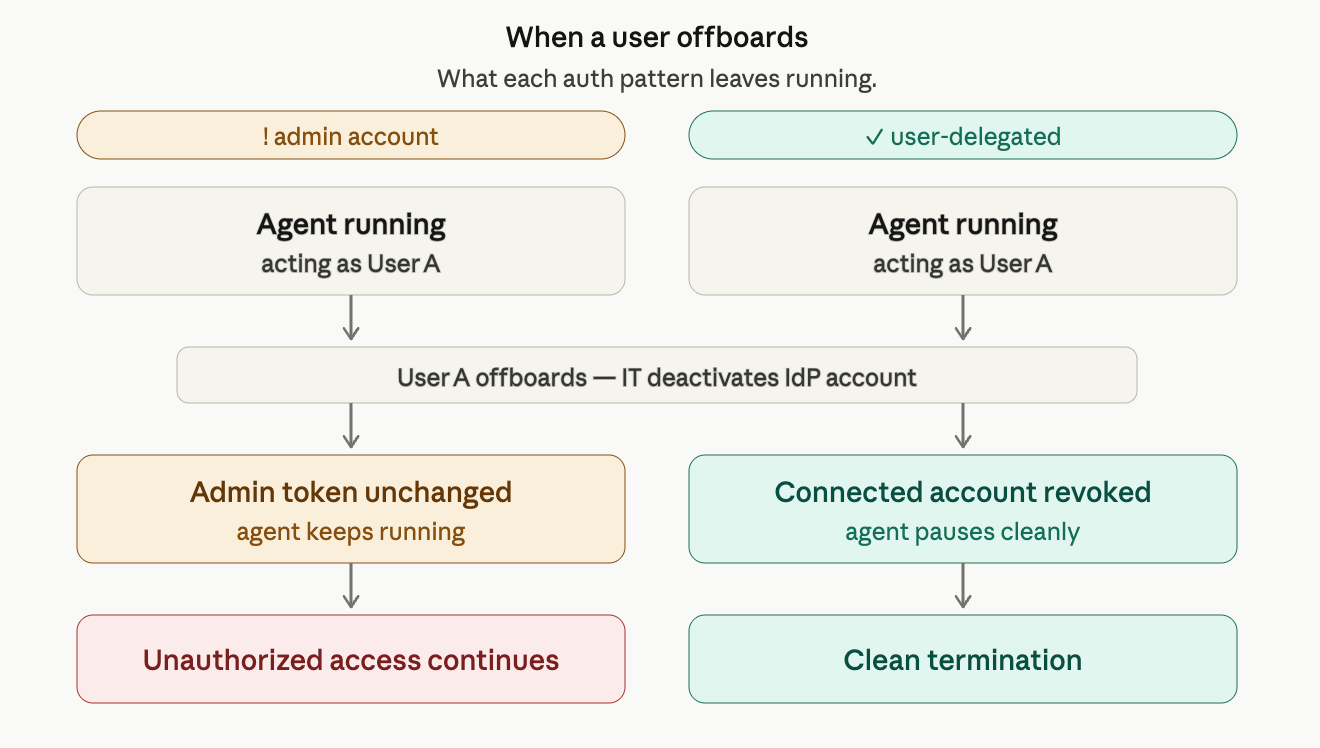
A user offboards. IT deactivates their account in the IdP.
If their agent workflows were running on their own delegated tokens, those tokens get revoked as part of the offboarding process — the IdP propagates the revocation, and any subsequent token introspection call returns invalid. The connections break cleanly. Nothing to manually clean up.
On an admin account, that offboarding event changes nothing. The admin credential wasn't tied to the departing user. Their automations keep running — accessing tools, reading data, taking actions — until someone explicitly goes in and removes them. In a fast-moving team, that cleanup tends to get deprioritised.
A user moves teams. Loses access to a project. Gets restricted from certain folders. The admin account doesn't reflect any of that. The agent keeps operating with the permissions from when the connection was first set up — a frozen snapshot that may no longer match what that person is actually supposed to have access to.
User-delegated tokens reflect the user's current permission state in the IdP. When their access changes, the agent's access changes with it automatically.
Modern IdPs — Okta, Azure AD, Google Workspace — enforce conditional access policies before issuing any token. Conditional access is the set of rules an organisation uses to decide whether a given access attempt is allowed: is this device compliant with our MDM policy? Is this login coming from an approved geography? Has this user completed MFA? These policies are how enterprise IT teams govern who can access what, and under what conditions.
Service accounts don't go through any of this. They authenticate directly with client_credentials and never touch the IdP's conditional access engine. Admin account tokens, once issued, aren't re-evaluated against these policies on subsequent calls. Which means the agent can be operating in an environment where every human access to those same systems is gated through the organisation's security stack — and the agent is completely outside it.
User-delegated OAuth flows go through the same conditional access gates as the user. If the user's device is non-compliant, the token doesn't get issued. If they're in a restricted geography, the flow fails. The agent inherits the organisation's security posture rather than bypassing it.
Modern OAuth2 with refresh token rotation (RFC 6749) has a useful security property: every time a refresh token is used to obtain a new access token, the old refresh token is invalidated and a new one is issued. If a refresh token is stolen and used by an attacker, the next legitimate use by the real application fails — and that failure is detectable. The compromise reveals itself in the flow.
Service account API keys don't have this property. A leaked key is valid indefinitely until someone manually rotates it — which requires knowing it was leaked in the first place. Most organisations discover this in a post-mortem, not in real time.
The place where this becomes a concrete business problem is the first serious enterprise security review. The questions are consistent: which systems can this agent access, what data can it see, who authorised that access, can you show us an audit trail of agent actions broken down by user?
With user-delegated connections, these questions have clean answers. Every action is tied to a specific user's token, which is tied to their verified identity in the IdP. The full delegation chain is logged: who authorised, which agent, which tool, which scope, what came back. That chain is queryable and exportable to whatever SIEM the customer uses — Datadog, Splunk, whatever their security team already has running.
With an admin account, reconstructing that trail requires manual work. You have a log of what the admin token did, but not of which user's context triggered each action or whether those actions were within what each user should have been able to access.
We've seen this come up mid-deal. That's the hardest place to navigate it. When identity becomes a revenue blocker, the urgency to re-architect is high and the timeline is short.
The core idea is straightforward: instead of one shared credential that all users' agents run through, each user authenticates their own connections individually. The agent acts as that specific user, using that specific user's token, scoped to what they approved.
In practice:
Here's what that looks like at the call level:
The agent's logic doesn't change much. What changes is that the credential resolution happens in a layer the LLM can't reach, and the access boundary is set by the user's own authorisation rather than by what the admin account was provisioned with.
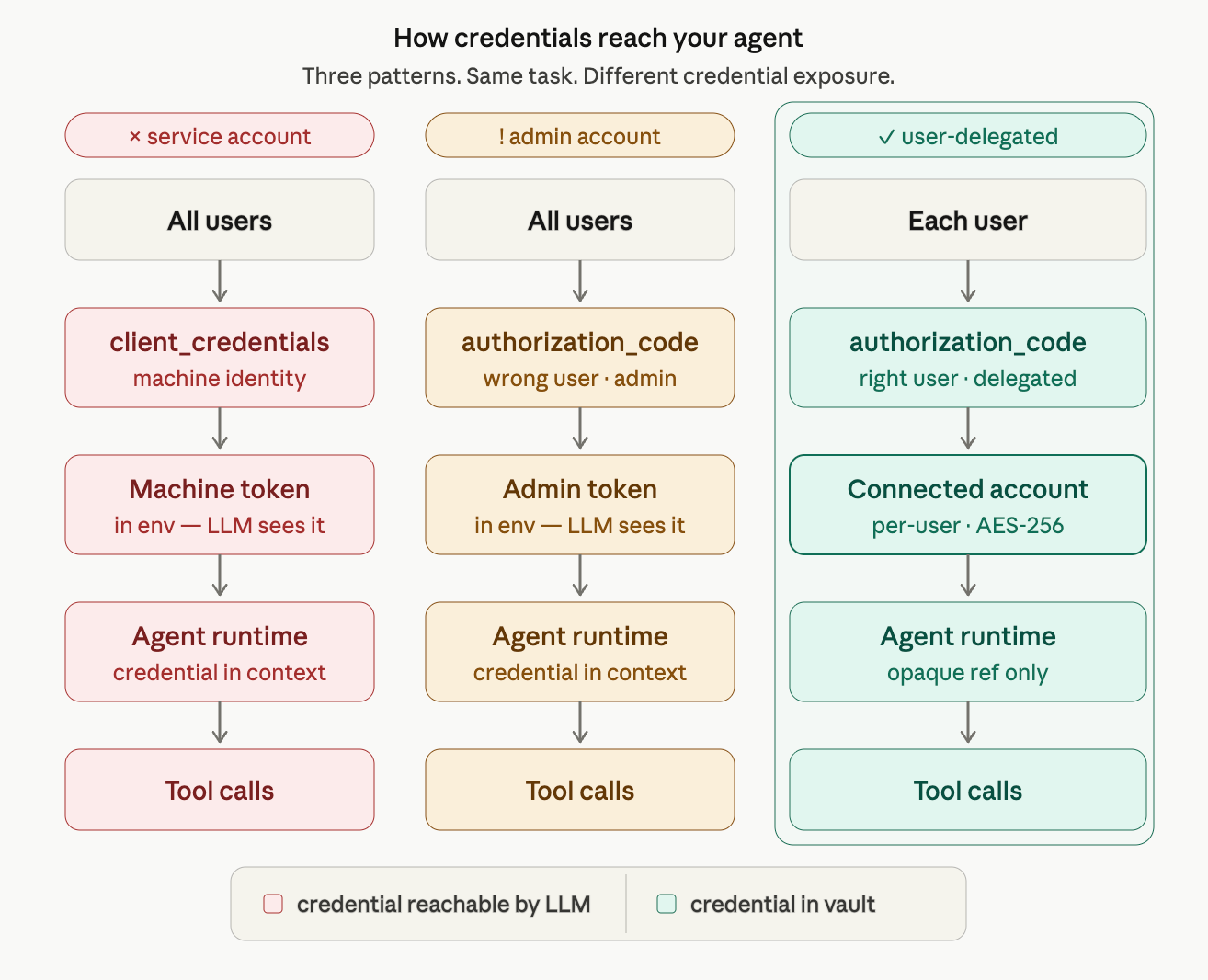
When a user completes an OAuth flow through Scalekit, it creates a connected account — a per-user, per-tool token store, AES-256 encrypted, isolated per tenant. The agent makes tool calls through Scalekit's infrastructure. The right token is resolved from the connected account vault, injected into the API request, and the result is returned. The agent gets structured data back. Nothing sensitive is in the execution path.
The full delegation chain is logged for every action: who authorised, which agent, which tool, which scope, what came back. Queryable and exportable to Datadog, Splunk, or any SIEM. 90-day retention by default.
Most teams who've thought about this know a migration is coming at some point. These are the steps we've seen work.
List every admin account or service account your agent uses, what tools it connects to, and which users' work it's doing. The goal is to understand the blast radius — how many users are affected by a single shared credential, and what access it carries.
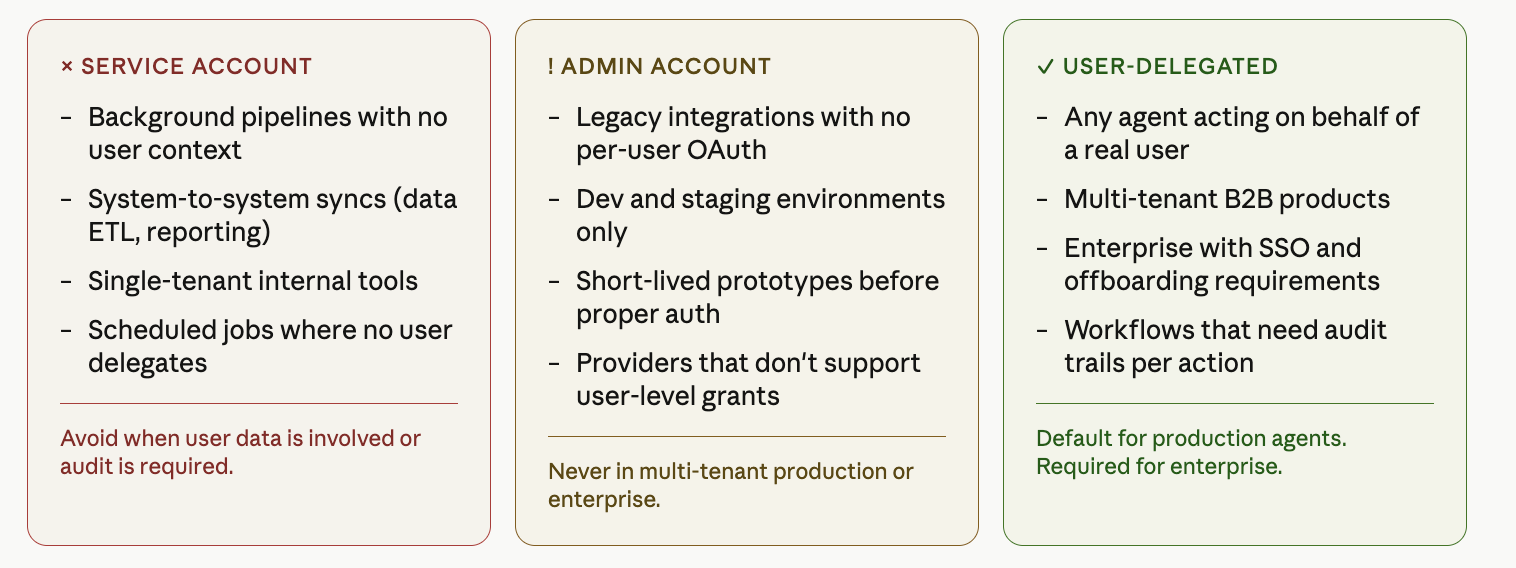
For each agent workflow, ask: is this doing work that belongs to a specific person? If yes, it's a candidate for user-delegated auth. If it's a background pipeline with no human in the loop, a service account is still appropriate.
Build an OAuth consent flow for each tool your agent uses. Each user authenticates their own accounts once — typically a single screen, a few seconds. The resulting tokens go into the per-user credential store.
Instead of calling tools with a shared credential, pass a user identifier. The infrastructure resolves the right token from the connected account. This is typically a small code change — often a single parameter added to each tool call.
Test that the agent's access for each user matches what that user can actually do in the tool. The main thing to check: cases where the admin account previously gave the agent access to more than any individual user should see. This is the cleanup step.
Once all users are on delegated connections, retire the admin token. Revoke it. Remove it from your environment. This is the step most teams defer — don't.
The migration itself isn't technically complex. The part that takes care is getting existing users to re-authenticate their connections, particularly if you have an established user base. Worth framing it as a security improvement, which it is.
The goal isn't to retire service accounts or admin connections entirely — they have legitimate uses. The question is whether the agent's work has a human owner.
The setup overhead for user-delegated auth is real — you're managing per-user connected accounts rather than a single credential. What we've consistently observed is that the operational complexity it avoids downstream — permission configuration, audit work, rate limit management, offboarding cleanup, enterprise security reviews — tends to be significantly larger.
The teams who've navigated this most smoothly made the call before they had a meaningful user base on the admin account model and needed to migrate. The migration isn't technically complex. Getting existing users to re-authorise their accounts takes more care.
Where this is heading: as agents become more autonomous — spinning up, acting, and terminating in minutes without a human trigger — the credential model will need to match. Short-lived, scoped tokens issued for a specific execution, revoked when it completes. User-delegated auth is the foundation that makes that possible. Shared admin credentials are not.
We're building this infrastructure at Scalekit. If you want to see what connected accounts look like in practice, the quickstart gets you to a working agent with user-delegated auth in under an hour. If you'd rather compare notes on how you're thinking about the auth architecture for your agent, happy to get into it.