Engineering teams increasingly deploy AI agents to automate operational workflows across SaaS systems. A common example is an internal Slack triage agent that listens for bug reports in Slack channels and automatically creates GitHub issues in the appropriate repository. The workflow appears straightforward: a developer posts a message in Slack, the agent processes it, and a GitHub issue is created. In small prototypes, this automation works reliably because authentication tokens remain valid during short test runs.
Production environments reveal a different reality. Automation agents often run continuously for hours or days while interacting with APIs that rely on OAuth authentication. Access tokens issued by providers such as Slack or Google expire periodically for security reasons. When a token expires while the agent is still running, the automation does not necessarily crash. Instead, API requests begin failing silently, causing workflows such as bug triage, ticket creation, or notification routing to stop functioning.
This article explores how to build a reliable token refresh strategy for AI agents using a real example: a Slack triage agent that integrates Slack and GitHub through ScaleKit connectors. It explains why refresh handling becomes complex in AI systems, how SaaS providers differ in their token refresh mechanisms, and what architectural patterns prevent automation from breaking when tokens expire.
Most SaaS APIs use OAuth 2.0 to authorize applications to act on behalf of users. In this model, an application receives credentials that allow it to call external APIs without storing a user's password. These credentials typically include two tokens that automation systems must manage: an access token and a refresh token. For a deeper overview of token lifecycle management for AI agents, see the ScaleKit guide on secure token management.
OAuth authentication issues two token types that every AI agent must manage:
In traditional web applications, this lifecycle is mostly invisible. Browsers redirect users through OAuth flows when tokens expire, prompting them to sign in again. The loop closes naturally through user interaction.
Automation systems operate differently. In the Slack triage agent example, there is no browser session and no user waiting to reauthenticate. The agent continuously polls Slack channels and creates GitHub issues from incoming bug reports. If the Slack access token expires mid-polling loop, the API returns a 401 error, and the agent stops retrieving messages even though the service itself continues running.
That gap between "the agent is running" and "the agent is working" is exactly what a proper token refresh strategy must close.
OAuth access and refresh tokens work well in interactive applications because users are present to reauthenticate when credentials expire. Automation systems operate under different conditions. AI agents often run continuously, executing background workflows without direct user interaction.
Consider a common enterprise workflow. Many organizations use Slack channels such as #bug-reports for internal issue reporting. An automation agent monitors the channel, extracts structured information from new messages, and automatically creates a GitHub issue in the appropriate repository. This removes the need for engineers to manually copy information between systems.
In this setup, the agent depends on multiple OAuth integrations. It must read messages from Slack and create GitHub issues. Each provider issues tokens with its own expiration rules. If the Slack token expires, the agent stops retrieving bug reports. If the GitHub token expires, creating an issue fails. In both cases, the automation workflow silently breaks even though the service itself continues running.

This creates a different operational challenge than traditional SaaS applications. In interactive systems, token expiration typically prompts users to log in. In automation systems, there is no active user session available to recover from authentication failures.
Several characteristics of AI automation make token lifecycle management significantly more complex:
Automation agents must also manage tokens from multiple SaaS providers simultaneously. Each provider defines its own expiration policies, refresh behavior, and error responses. Slack tokens may expire after several hours, while other APIs use different expiration windows or refresh mechanisms.
As a result, the agent must continuously track the authentication state of multiple credentials simultaneously. Each token has its own expiration timeline, refresh requirements, and failure conditions. There is no single unified signal indicating when credentials across all providers are about to expire.
This creates a state-management challenge: the automation system must track token validity across multiple integrations while ensuring workflows continue to operate without interruption.
When automation systems run without user interaction, token expiration becomes a reliability issue rather than a simple authentication event. If the system does not detect expired credentials and automatically refresh them, API requests begin to fail while the agent itself appears healthy.
In the Slack triage example, an expired Slack token prevents the agent from retrieving new bug reports. GitHub issues stop being created even though the automation service continues running. Without proper token lifecycle management, workflows fail silently.
Production systems, therefore, require mechanisms to detect token expiration, automatically refresh credentials, and retry failed operations.
Understanding how different SaaS providers implement OAuth refresh behavior is the next step in designing a reliable token lifecycle strategy for AI agents.
OAuth token refresh strategies vary significantly across SaaS providers. While OAuth defines a standard authorization framework, the way providers implement token expiration and refresh policies differs widely. AI agents that integrate multiple APIs must account for these differences to maintain reliable automation workflows.
The Slack triage agent illustrates this challenge clearly. The agent continuously monitors Slack channels for bug reports and creates GitHub issues in response. Although both integrations rely on OAuth authentication, the lifetimes of their tokens differ. Slack access tokens typically expire after several hours and must be refreshed automatically, while GitHub tokens often follow different expiration rules depending on the authentication method.
Without a unified refresh strategy, developers would need to implement provider-specific refresh logic for every integration the agent uses.
Understanding these differences is essential when designing token lifecycle management for AI agents. The table below summarizes how several common SaaS providers implement OAuth expiration and refresh behavior.
These differences introduce operational complexity for automation systems. An AI agent that interacts with Slack, GitHub, Google APIs, and other services must manage multiple token lifecycles simultaneously. Each provider defines its own expiration rules, refresh flows, and error responses.
Without abstraction, the agent would need to track token validity for every provider independently and implement custom refresh logic for each integration.
Platforms such as ScaleKit simplify this challenge by centralizing token lifecycle management.
ScaleKit connectors manage the OAuth integrations used by the Slack triage agent. Each connector represents an authorized connection to an external service such as Slack or GitHub.
Instead of the agent interacting directly with provider OAuth endpoints, it calls the connector layer when performing an API operation. The connector validates the credential, refreshes the token if necessary, and executes the request using valid authentication.

This abstraction allows the agent to interact with multiple SaaS platforms through a consistent interface, even though each provider implements token expiration differently.
Each OAuth integration is represented as a connected account, which stores the authorization context required for API access. These connections map an external service to a specific user or organization and maintain the credentials needed for authentication.
This model allows automation systems to manage multiple integrations simultaneously while keeping authorization boundaries clearly defined.
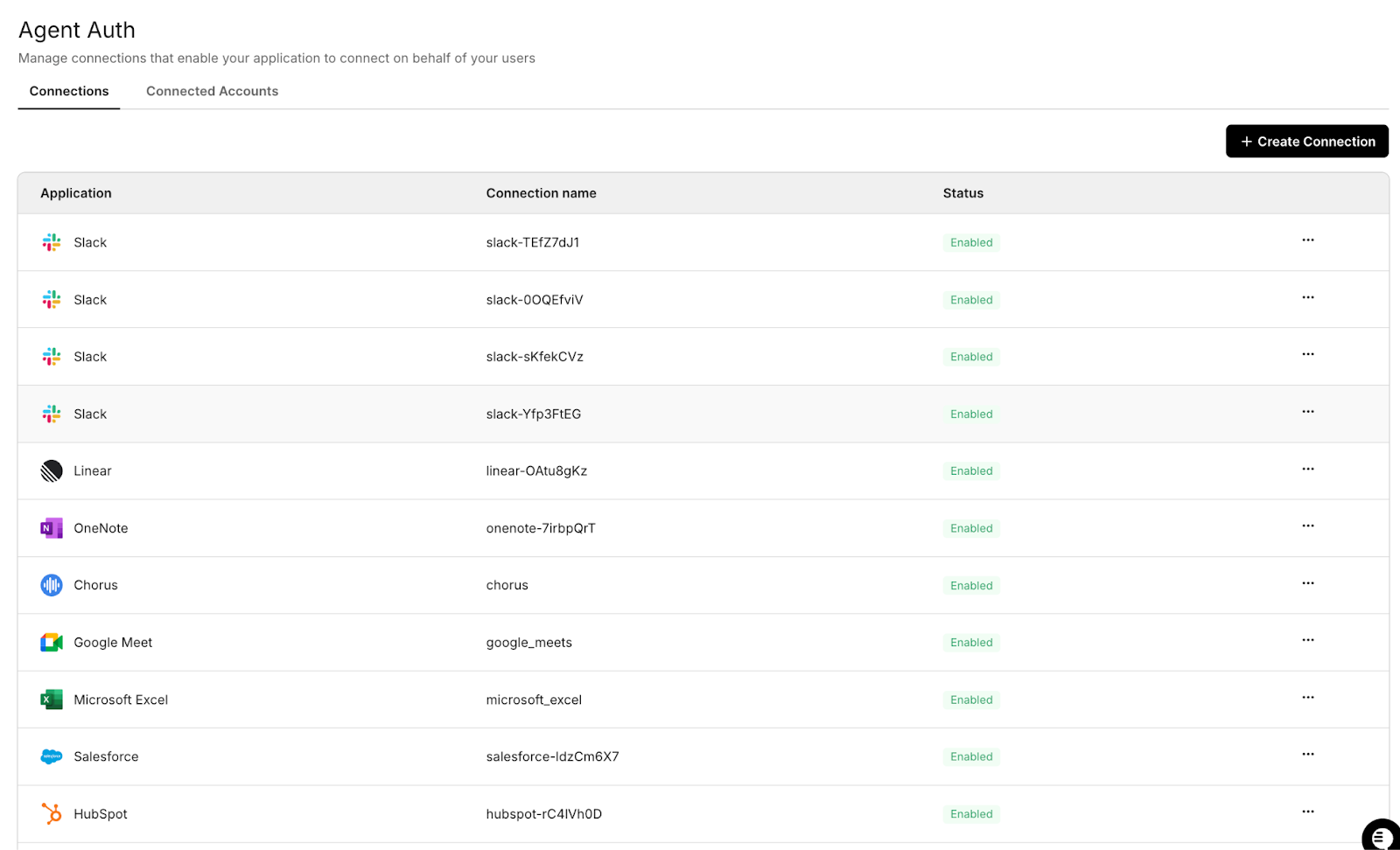
By separating authorization management from the agent's core logic, the system can monitor token state, refresh credentials when necessary, and maintain consistent authentication across services.
When the Slack triage agent performs an API action, the connector layer evaluates the associated credential before executing the request.
If the access token is still valid, the request proceeds normally. If the token has expired, the connector refreshes the credential using the stored refresh token and retries the request with the updated access token.

This workflow allows automation systems to recover from token expiration transparently without requiring additional logic inside the agent itself.
OAuth implementations differ significantly across SaaS providers, particularly in how tokens expire and refresh. AI agents that integrate multiple APIs must account for these differences to avoid authentication failures.
Using a centralized refresh strategy such as the connector-based approach described above allows automation systems to maintain consistent authentication behavior across services even when provider implementations differ.
Understanding how production systems proactively manage token expiration is the next step in designing reliable automation workflows, which is why background refresh patterns deserve closer examination.
Background refresh patterns allow AI agents to continue operating even when OAuth tokens expire during execution. Unlike interactive applications, agents cannot rely on users to re-authenticate when credentials expire. Instead, production systems must automatically detect token expiration and refresh tokens to keep automation workflows running without interruption.
The Slack triage agent illustrates this challenge clearly. The agent continuously polls Slack channels for new bug reports and creates GitHub issues in response. This polling loop may run for many hours, while the Slack OAuth token remains valid for only a limited period. If the token expires during execution, the Slack API returns an authentication error, and the agent stops retrieving messages even though the service itself continues running.
Production systems, therefore, treat token refresh as part of the agent's runtime infrastructure, rather than as a simple authentication detail.
Production systems typically combine two complementary refresh strategies: proactive refresh and reactive refresh.
Using both approaches ensures reliability: proactive refresh prevents most failures, while reactive refresh guarantees recovery if a token expires unexpectedly during execution.
Production AI agents typically implement several refresh safeguards to maintain stable integrations.
Together, these techniques ensure that authentication failures do not silently interrupt automation workflows.
Long-running AI agents must treat token lifecycle management as part of their runtime architecture. By combining startup validation, proactive refresh, and reactive refresh during API execution, systems such as the Slack triage agent can maintain reliable integrations across services like Slack and GitHub.
Another challenge emerges when automation systems scale across multiple workers. When several processes detect an expired credential simultaneously, they may attempt to refresh the same OAuth token concurrently, creating race conditions that can disrupt authentication.
Revoked refresh tokens represent a different class of authentication failure than token expiration. When an access token expires, the system can usually obtain a new one using the refresh token. If the refresh token itself is revoked, however, the automation system cannot recover programmatically, and the integration must be reauthorized by a user or administrator.
This scenario is common in enterprise environments, where users manage OAuth permissions through provider dashboards. For example, a developer might disconnect the Slack integration from their Slack security settings, or an administrator might rotate credentials during a security audit. When the Slack triage agent attempts to refresh a revoked refresh token, the OAuth provider rejects the request and returns an authentication error.
Instead of returning a new access token, the refresh request fails permanently. Without proper detection and monitoring, the agent may repeatedly attempt refresh operations without regaining valid credentials.
In practice, OAuth providers return different error codes when refresh operations fail, and each error requires a different recovery strategy. Treating all refresh failures as identical can lead to unnecessary reauthorization requests or repeated failed refresh attempts. Production systems should therefore inspect the provider's error response before deciding on a recovery strategy.
Common refresh failure responses include:
By inspecting the provider's error response, the automation system can determine whether the integration can recover automatically or requires operator intervention.
Revoked refresh tokens typically occur in several situations:
These events require a different recovery strategy than normal token expiration. The Slack triage agent detects these failures through refresh attempts and periodic token validation checks. When the system detects that the refresh token has been revoked, the agent logs the error and provides a re-authorization link that allows the operator to reconnect the Slack integration.
This approach ensures that revoked tokens do not create silent automation failures. Instead, the system surfaces the issue clearly and allows operators to restore access quickly. Enterprise AI systems must therefore combine refresh logic with monitoring and recovery mechanisms that allow operators to restore integrations when credentials are revoked. Understanding what happens when an employee leaves and their AI agent access must be revoked is a critical part of designing these recovery workflows.
In addition to refresh handling, AI agents must also account for temporary API failures. Retry logic allows the system to recover from issues such as rate limits, network interruptions, or token expiration without breaking the automation workflow.
Retry logic is an essential component of token-refresh strategies for AI agents. When automation systems interact with external APIs, temporary failures are common. Network interruptions, rate limits, token expiration events, or transient service errors may cause individual API calls to fail. Without a retry mechanism, these temporary failures could interrupt entire workflows even though the underlying issue resolves itself seconds later.
The Slack triage agent demonstrates this pattern in practice. The agent continuously polls Slack channels and creates GitHub issues for reported bugs. Each API request depends on OAuth authentication and network availability. If the Slack API returns a token-expiration error, the system attempts a refresh and retries the request. This allows the workflow to recover automatically without requiring human intervention.
Enterprise systems, therefore, implement structured retry strategies that distinguish between temporary failures and permanent authentication errors.
A robust retry strategy typically includes several safeguards that prevent automation systems from failing unnecessarily.
For operations that modify external systems, retry logic must also account for idempotency. If a write operation succeeds but the response is lost due to a network interruption, a naive retry can create duplicate records.
In the Slack triage agent example, creating a GitHub issue is a write operation. Production systems typically avoid duplication by:
This ensures that retries recover from transient failures without introducing inconsistent data.

Retry logic enables AI agents to recover from transient failures during API interactions. By combining exponential backoff, token refresh retries, and structured error handling, systems such as the Slack triage agent can maintain reliable automation even when external services experience short-lived disruptions.
Even with refresh-and-retry mechanisms in place, authentication problems can still occur. Monitoring patterns provide the visibility needed to detect token lifecycle issues early and prevent them from disrupting automation workflows.
Monitoring is a critical component of token lifecycle management for AI agents. Unlike interactive applications, automation systems often run without direct user supervision. When authentication fails, it may not immediately surface as a visible error. Instead, workflows can quietly stop processing events while the agent itself appears operational.
Monitoring mechanisms ensure that token expiration, refresh failures, and authorization issues are detected early before they disrupt automation workflows.
The Slack triage agent illustrates this challenge clearly. The agent continuously polls Slack channels and creates GitHub issues based on incoming bug reports. If the Slack OAuth token becomes invalid, the agent may continue running but fail to retrieve new messages. Without monitoring, this failure could go unnoticed until users realize that bug reports are no longer being converted into GitHub issues.
Enterprise automation systems, therefore, implement monitoring layers that continuously track token health and authentication state.
Effective monitoring strategies for AI agents typically track several authentication signals during execution.
Monitoring systems must distinguish between transient failures and sustained authentication problems. Not every refresh failure requires immediate intervention.
Typical alert thresholds include:
These thresholds help operators identify real authentication incidents while avoiding unnecessary noise from temporary API failures.
A monitoring framework for the Slack triage agent typically tracks the following token lifecycle events:
These signals allow operators to quickly identify authentication failures and understand how token refresh behavior affects automation workflows.
Monitoring provides visibility into the authentication state of long-running AI agents. By validating tokens at startup, logging API activity, performing periodic health checks, and triggering alerts when authentication failures occur, systems can prevent automation workflows from silently breaking.
Many production architectures implement a centralized authentication layer that manages token lifecycle operations across integrations. This approach allows developers to focus on building automation logic while ensuring that credential management remains observable and reliable.
Managing OAuth tokens across multiple SaaS providers quickly becomes operationally complex. Each service implements token expiration, refresh behavior, and credential rotation differently. When AI agents run continuously across several integrations, token lifecycle management becomes part of the system's runtime infrastructure rather than a simple authentication detail.
The Slack triage agent illustrates this challenge clearly. The agent continuously polls Slack channels for bug reports and creates GitHub issues in response. Each of these operations requires OAuth credentials, which may expire, rotate, or be revoked while the automation system is still running. Without centralized coordination, distributed workers attempting to refresh the same token can cause authentication conflicts or race conditions.
ScaleKit addresses this problem by introducing a connector layer backed by a centralized token vault. Instead of interacting directly with provider OAuth endpoints, the agent executes API actions through the ScaleKit execute tool API. This API retrieves the appropriate credential from the token vault, validates its state, refreshes it if necessary, and then performs the requested operation.
The token vault acts as a security and coordination boundary between automation logic and external APIs. OAuth credentials are encrypted and stored within the vault rather than inside agent processes or configuration files. Each credential is associated with a connected account, which scopes tokens to a specific user, organization, and integration connector.
This architecture ensures that automation workflows remain stable even when tokens expire or token rotation occurs.
The following diagram illustrates how distributed AI agent workers interact with ScaleKit when executing OAuth-authenticated operations.

ScaleKit connectors provide several capabilities that simplify token lifecycle management for AI agents:
Provider abstraction: Agents interact with a single connector interface while ScaleKit manages provider-specific OAuth flows across more than fifty SaaS integrations, including Slack, GitHub, Google, and Zendesk.
Token vault security: OAuth credentials are encrypted and stored in the ScaleKit token vault, not in agent processes or configuration files. This creates a clear security boundary between automation logic and sensitive credentials.
Connected accounts model: Each OAuth credential is scoped to a connected account, which associates tokens with a specific organization, user identity, and integration connector. This ensures that agent actions execute with the correct delegated permissions.
Atomic credential execution: The execute tool API performs credential retrieval, validation, and API execution in a single operation. Agents do not need to manually fetch or manage tokens.
Refresh token rotation handling: Some providers, such as Slack, issue single-use refresh tokens when token rotation is enabled. The token vault coordinates refresh operations so that only one refresh occurs for a connected account, while other workers receive the updated credentials.
Re-authorization workflows: If credentials are revoked or refresh tokens become invalid, automated recovery is not possible because the original authorization has been withdrawn. ScaleKit supports recovery via the magic_link API, enabling operators to restore integrations without redeploying the automation service.
The re-authorization flow works as follows:
For the Slack triage agent, this architecture keeps the automation logic simple. The agent focuses only on workflow logic: polling Slack messages, analyzing bug reports, and creating GitHub issues. Authentication complexity, including token storage, refresh token rotation, provider-specific OAuth behavior, and distributed refresh coordination, is handled entirely by the ScaleKit connector layer.
As a result, the automation workflow can run continuously without breaking when tokens expire, rotate, or require reauthorization.
Token refresh is a fundamental reliability challenge for AI agents operating across SaaS integrations. Unlike traditional web applications that rely on short-lived user sessions, automation systems run continuously and must manage OAuth credentials programmatically. When access tokens expire or refresh tokens are revoked, workflows can fail silently unless the system detects and handles authentication changes correctly.
The Slack triage agent illustrates how real-world automation systems address this problem. By combining proactive token validation, automatic refresh during API execution, retry logic with exponential backoff, and monitoring mechanisms, long-running agents can continue operating even when credentials change. These architectural patterns transform token lifecycle management from a fragile authentication detail into a reliable part of the system runtime.
Platforms such as ScaleKit simplify this process by centralizing token lifecycle management. Instead of implementing provider-specific refresh logic for every API integration, developers interact with connectors that automatically validate tokens, refresh credentials when necessary, and coordinate authentication state across distributed automation systems. This allows teams to focus on building reliable AI workflows while ensuring that authentication infrastructure remains secure and resilient.
AI agents typically run continuously without user interaction. When OAuth tokens expire, there is no login session available to trigger reauthentication. The system must therefore detect expiration and refresh credentials programmatically.
When an OAuth access token expires, API calls begin returning authentication errors (usually HTTP 401). If a valid refresh token is available, the system can obtain a new access token and automatically retry the request.
Token expiration behavior varies by provider. Many APIs issue short-lived tokens by default, while others, such as Slack, use long-lived tokens unless token rotation is enabled. When token rotation is configured, Slack access tokens expire periodically and must be refreshed through the OAuth refresh flow.
Many automation services run background workflows. When a token expires, API calls may fail while the service continues running. Without monitoring or retry logic, the workflow stops processing events even though the system appears operational.
Token expiration occurs when an access token reaches its configured lifetime. Revocation occurs when a user or administrator manually removes authorization or when the provider invalidates the refresh token.
Race conditions occur when multiple workers detect an expired token and try to refresh it simultaneously. Without coordination, refresh requests may conflict or leave workers using stale tokens. Systems typically prevent this with distributed locks or with a centralized credential service, such as Scalekit, that coordinates refresh operations.
Monitoring ensures that authentication failures are visible. Systems should track token health, refresh attempts, and authorization changes to help operators quickly detect and resolve issues.
Retry logic allows automation systems to recover from temporary failures such as network interruptions, API rate limits, or token expiration. Combined with refresh operations, retries allow workflows to continue without manual intervention.
ScaleKit connectors manage OAuth credentials and automatically refresh tokens when necessary. This removes the need for developers to implement provider-specific refresh logic for each integration.
Yes. ScaleKit centralizes token lifecycle management through its connector layer, ensuring that refresh operations are coordinated and that distributed agent instances always receive the latest valid token.
By managing authentication centrally, ScaleKit ensures that tokens are validated, refreshed, and securely stored. This allows AI agents to run continuously without breaking when credentials expire or rotate.