Wiring a daily developer standup digest sounds like an afternoon project. You fetch some PRs, query Jira, post to Slack. The auth layer is what turns it into a week.
When a single shared service account queries Jira for every engineer, "show me my issues" returns the service account's issues, not the engineer's. Every call runs with the wrong identity, and a per-engineer digest becomes tough.
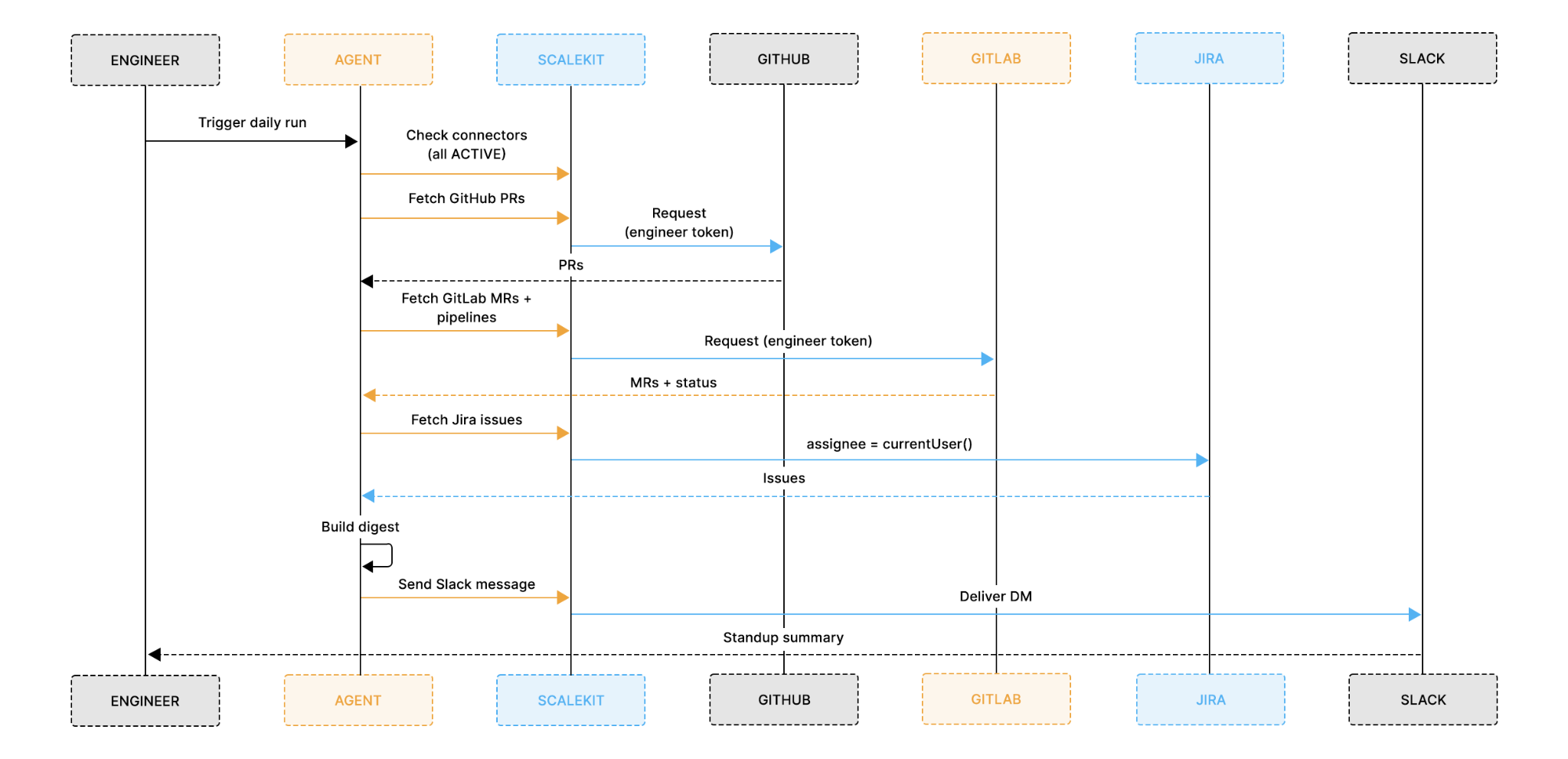
This agent queries GitHub PRs, GitLab MRs with live pipeline status, and Jira issues for each engineer using their own OAuth token, not a shared service account, then posts a structured standup digest to their Slack DM as them, not as an agent.
The hard part is not the formatting for the digest. It is wiring four different OAuth systems: GitHub, GitLab, Jira, and Slack, with per-engineer token isolation, automatic refresh, and zero credentials in the agent code.
The full code is on GitHub. Clone the repo, configure your connectors in Scalekit, and have it running in under 30 minutes.
What Is a Daily Standup Agent for Devs and Why Does the Auth Architecture Matter?
Most engineering teams at scale do not live in a single VCS; they use GitHub for greenfield projects and open-source repos, GitLab for CI/CD-heavy enterprise pipelines, and Jira for issue tracking, often long before any automation layer was introduced. Slack is the primary communication surface across all of these systems, making it the natural delivery point for a unified daily digest.
The naive automation attempt looks like this: a Python script that calls the GitHub API with a PAT, calls GitLab with another PAT, JQL queries Jira with basic auth, and posts to Slack with a bot token. It works for one engineer, but then you try to roll it out to a team of 30 and hit the actual problem:
PATs and basic auth do not scale to per-engineer identity: Either every engineer shares one PAT, meaning a single revocation kills the agent for all 30, or you use a service account whose assignee = currentUser() JQL resolves to the service account, returning its issues instead of the engineer's.
Token expiry without refresh logic means the standup bot posts nothing on Monday mornings: GitHub access tokens for OAuth apps can expire in as little as one hour. Nobody is awake at 9 am on Monday to restart the script.
Jira's cloud ID resolution means you cannot hardcode the endpoint: The API path is https://api.atlassian.com/ex/jira/{cloudId}/rest/api/3/..., where cloudId is per-Atlassian-account and changes between environments.
Service accounts see all issues:assignee = currentUser() in JQL resolves to the service account, not the engineer, so it either returns everything or nothing useful.
This is an auth architecture problem before it is an agent problem. Getting per-engineer, per-system OAuth right is the hard part. Once auth is solved, the agent logic is almost trivial; it is just five tool calls and a prompt.
How The Daily Standup Agent for Devs Work?
This agent is not an autonomous reasoning loop, but it is a deterministic, sequential pipeline that runs the same fixed steps for each engineer on every execution and exits cleanly:
Auth check: verifies all four connectors are active before touching any data. If a connector has been revoked or expired, it generates a magic link on the spot rather than failing silently mid-run.
GitHub PRs: fetches open pull requests authored by or assigned to the engineer. The head filter scopes the query to their branches only, not the org's 200 open PRs.
GitLab MRs and pipeline status: fetches open merge requests assigned to the engineer and the latest pipeline status for each active branch. A failed pipeline is a blocker worth surfacing.
Jira issues: queries using assignee = currentUser() in JQL. This only resolves correctly when the OAuth token belongs to the engineer, not a service account. Scalekit also automatically handles Atlassian's cloud ID resolution.
Digest and Slack post: synthesizes a structured three-line standup digest using an LLM (with automatic rule-based fallback), then posts it to the engineer's Slack DM as them, not as a bot.
Each run is independent, nothing is stored between executions, and the steps never change order. If the Jira query fails, the GitHub and GitLab steps already run cleanly, and you know exactly where to look.
The Impact and What to Expect from Daily Standup Agent for Devs
By the time each engineer opens Slack in the morning, the review work is already done, no manual Jira filtering, no opening five browser tabs, no copy-pasting PR numbers.
Every morning's digest gives the engineer:
A clear picture of open work across three systems: GitHub PRs, GitLab MRs, and Jira issues in one structured message, not three separate dashboards
Live pipeline status alongside each MR: the digest surfaces whether Alice's payment-service branch is currently failing, not just that the MR is open
JQL filtered to their identity:currentUser() resolves to Alice's Atlassian account because her own token is used, no manual filtering or username mapping required
A DM from their own Slack account: Alice can reply to herself, pin it, and share it in a thread. A message from your own account looks different in the notification list than a bot DM that gets batch-dismissed
The diagram above shows the core architecture: Scalekit's token vault sits between the agent and all four services. For each engineer, the vault holds four separate OAuth tokens, one per connector. Every execute_tool() call uses the token for that specific engineer, so GitHub sees Alice's identity, Jira sees Alice's Atlassian account, and Slack posts from Alice's own Slack user.
With that architecture clear, here is what each engineer actually receives in Slack every morning.
This message is designed so that an engineer can immediately understand their open work and blockers without opening GitHub, GitLab, or Jira. Each element is generated from real-life data in the pipeline:
GitHub PRs are fetched using the engineer's own GitHub token, with the head filter scoping results to their branches only.
GitLab MRs include the live pipeline status for each active branch, showing passed, failed, or running results fetched at the time of the run.
Jira issues are pulled using assignee = currentUser() in JQL, which resolves to that engineer's Atlassian account.
Stale flags are surfaced for PRs, MRs that have been open for more than 3 days, draft PRs, and P1 Jira issues automatically.
The same information is available in the terminal during each run, so you can verify what data was fetched before it reaches Slack.
What Are the Prerequisites Before You Deploy This Agent?
A Scalekit account (free tier is sufficient) with a new environment created for this project
A GitHub account with access to the repositories you want to pull PRs from
A GitLab account with access to the projects you want to check MRs and pipelines for
A Jira Cloud account with at least a few in-progress issues assigned to your user
A Slack workspace where you are a member, the agent posts to your own DM
An OpenRouter API key (optional; the agent falls back to rule-based formatting automatically if none is set)
Python 3.11 or newer is installed locally. Some dependencies have pinned versions that are incompatible with 3.9
Clone the repo and install dependencies. The entire agent lives in a single file called run_flow.py:
git clone https://github.com/scalekit-developers/workflow-agents-demos
cd workflow-agents-demos/engineering-context-agent
pip install -r requirements.txt
Then create a .env file in the project directory:
# Scalekit workspace credentials
SCALEKIT_ENV_URL=https://your-workspace.scalekit.dev
SCALEKIT_CLIENT_ID=skc_...
SCALEKIT_CLIENT_SECRET=test_...
# Single engineer mode
ENGINEER_ID=eng_alice_123
ENGINEER_NAME=Alice
GITHUB_USERNAME=alice
GITHUB_REPOS=acme-corp/api-gateway,acme-corp/frontend
GITHUB_ORG=acme-corp
GITLAB_PROJECT_PATH=acme-corp%2Fpayment-service
GITLAB_USER_ID=12345
SLACK_USER_ID=U0XXXXXXXXX
# Multi-engineer mode -- set ENGINEERS as a JSON array instead
# ENGINEERS=[{"id":"eng_alice_123","name":"Alice","github_username":"alice",...}]
# Connector names -- must match your Scalekit dashboard exactly
GITHUB_CONNECTOR=github
GITLAB_CONNECTOR=gitlab
JIRA_CONNECTOR=jira
SLACK_CONNECTOR=slack
# LLM (optional -- agent falls back to rule-based digest if not set)
OPENROUTER_API_KEY=sk-or-v1-...
OPENROUTER_MODEL=anthropic/claude-3-haiku
# Set to false to allow runs when a connector returns empty data
REQUIRE_NON_EMPTY_CONNECTOR_DATA=true
One detail to get right before moving on: GITHUB_CONNECTOR, GITLAB_CONNECTOR, JIRA_CONNECTOR, and SLACK_CONNECTOR must match the connector names in your Scalekit dashboard exactly, including any suffix added during setup (e.g. slack-sKfekCVz instead of slack). A mismatch causes execute_tool() to fail silently or return a not-found error.
Why Authentication Is the Hardest Part of Four-Connector Automation
Before any standup logic runs, all four services need to be authenticated and ready. In a typical setup, that means four separate OAuth implementations, each with its own quirks:
GitHub uses standard OAuth 2.0. Token scopes like repo and read:user are straightforward, but GitHub access tokens for OAuth apps can be configured to expire in as little as one hour. A scheduled agent that runs at 9 am after the token was last used at 7 am will hit a 401 before it can fetch a single PR.
GitLab uses OAuth 2.0, but scope selection matters. api gives full read/write access across all tools. read_api is the correct least-privilege scope for a digest agent; the agent never needs to create issues or push commits. Getting this wrong means the agent has more access than they should.
Jira uses OAuth 2.0 with Atlassian's three-legged OAuth (3LO). The token is scoped to a specific Atlassian cloud account, and the API path requires a cloudId UUID that varies per account. Without Scalekit, you would need to call https://api.atlassian.com/oauth/token/accessible-resources after OAuth to get the cloud ID, store it per user, and inject it into every subsequent API call.
Slack requires both chat:write and im:write scopes to post to a user's DM. Missing im:write means the post fails with a cryptic permission error even when the bot appears to have channel access.
Managing all four independently means building token storage, refresh logic, and error handling per service before a single line of standup logic can be tested. The scaffolding alone easily reaches 400 lines before any agent logic is written. This is where most multi-service agent projects stall.
How Scalekit Handles Auth Across All Four Connectors
Scalekit is an authentication layer designed for agents that need to interact with multiple services. Instead of implementing four separate OAuth flows and managing four sets of tokens per engineer, you configure each connector once in the Scalekit dashboard and interact with all of them through a single interface.
Configure once, run forever: each connector goes through its authorization flow exactly once per engineer. On the first run, Scalekit generates a magic link for any connector not yet authorized. Every subsequent run starts in ACTIVE status immediately.
One call pattern for everything: every API call to every service goes through the same connect.execute_tool() method, with only the connector name and tool name changing between calls. GitHub, GitLab, Jira, and Slack all use the same interface.
Token vault credentials never in the agent process: for a team of 30 engineers, this agent manages 120 OAuth tokens (four connectors × 30 engineers). None of those tokens appear in the agent code, environment variables, or application logs. Scalekit's token vault handles encrypted storage, rotation, and refresh. If the agent runtime is compromised, a leaked container image, or a debug log shipped to an external service, there are no credentials to extract.
Per-user delegated identity:currentUser() in Jira JQL, author-filtered PRs in GitHub, assignee-filtered MRs in GitLab. All of these only work because each tool call carries the engineer's own identity. With a service account, you would need to maintain a cross-system mapping of { engineer_email → github_username → gitlab_user_id → jira_account_id }. With per-user tokens, each system resolves identity natively using the token itself.
Zero token management: token expiry, refresh cycles, Atlassian Cloud ID resolution, and connection state are all handled automatically by Scalekit. The agent never stores a token, never catches a 401, and never silently sends an empty digest because a credential expired overnight.
With that in place, here is how to configure all four connectors in Scalekit.
How to Set Up Your Connectors in Scalekit
Set up all four connectors before writing any code. The agent checks the connector status at startup, and having all four active means you can test the full pipeline from the very first execution without interruption.
Step 1: Create Your Scalekit Account
Go to scalekit.com, create a free account, and create a new environment for this project. Copy the SCALEKIT_ENV_URL, SCALEKIT_CLIENT_ID, and SCALEKIT_CLIENT_SECRET from the environment dashboard into your .env file.
Step 2: Add the GitHub Connector
In the Scalekit dashboard, navigate to Agent Auth → Connections and search for GitHub. Complete the OAuth flow with repo and read:user scopes. The repo scope is required for private repositories; public_repo is not sufficient if your team's repos are private.
Note the exact connection name in the dashboard, including any suffix. Set this as GITHUB_CONNECTOR in your .env.
Step 3: Add the GitLab Connector
Add GitLab with read_api scope only, not api. The read_api scope gives the agent read-only access across all GitLab tools. Using api grants unnecessary write access and violates least-privilege principles for a digest-only agent.
If your team uses self-managed GitLab rather than gitlab.com, you will need to configure a custom OAuth endpoint. Scalekit supports this through the bring-your-own-connector pattern, where the connector configuration in the dashboard changes, but execute_tool() calls stay identical.
Step 4: Add the Jira Connector
Add Jira with read:jira-work and read:jira-user scopes. read:jira-work covers issue data; read:jira-user is required for currentUser() to resolve correctly in JQL queries.
After authorization, Scalekit automatically resolves the Atlassian cloud ID from the connected account configuration. The agent never constructs https://api.atlassian.com/ex/jira/{cloudId}/... manually; it calls jira_issues_search, and the correct URL is built behind the scenes.
Step 5: Add the Slack Connector
Add Slack with chat:write and im:write scopes. Both are required. chat:write allows posting messages; im:write allows opening DM channels. If im:write is missing, the agent will fail with a permission error when trying to post to a user's DM, and the error message will not clearly indicate which scope is missing.
The Slack connector posts messages as the authorized user, not as a bot. The engineer receives a DM from their own account.
Minimum scope configuration across all four connectors:
Connector
Required scopes
Why
GitHub
repo, read:user
repo for reading PRs on private repositories; public_repo is not sufficient for private repos; read:user for identity resolution
GitLab
read_api
Read-only access across all GitLab tools. Use read_api, not api; the agent never writes to GitLab
Jira
read:jira-work, read:jira-user
read:jira-work for issue data; read:jira-user for currentUser() to resolve correctly in JQL
Slack
chat:write, im:write
chat:write to post messages; im:write to open DM channels, both required
This is context-based least-privilege access: the agent requests only the scopes needed for this specific workflow. If the use case changes, for example, the agent needs to create Jira issues rather than just read them, the scope is explicitly upgraded with user re-consent. Engineers approve the specific access they are granting, not an open-ended service account.
Setting Up Auth with Claude Code
Now that the connectors are configured, you have two ways to get the pipeline code: clone the repo directly and use the code as-is, or use Claude Code to generate it from scratch with the Scalekit plugin handling the auth scaffolding automatically. Either way, the three foundational pieces below are what the entire pipeline depends on.
If you are using Claude Code, install the Scalekit plugin:
"Build a Daily Standup Agent for Devs: fetch each engineer's open GitHub PRs, GitLab MRs with pipeline status, and Jira issues using assignee = currentUser() in JQL, then synthesize a standup digest and post it to their Slack DM as them, not as a bot. Use Scalekit Agent Auth for all four connectors with per-engineer OAuth tokens."
Claude Code produces run_flow.py, which includes the full pipeline. The three foundational pieces it generates are the Scalekit client setup, the tool() helper, and the auth startup check. Each one is worth understanding before reading the pipeline steps.
The Scalekit Client and Connector Map
The client initialization connects to your Scalekit environment. The connector names are read from environment variables, so the exact dashboard names, including any generated suffixes, are passed without hardcoding them.
The tool() function is the single interface for every API call in the pipeline. It wraps connect.execute_tool() with the connector name, the engineer's identity, and the tool input, so that every service interaction follows the same pattern.
identifier=engineer_id is what makes per-engineer identity work. Scalekit uses the identifier to look up that specific engineer's OAuth token for the given connector, not a shared service account. A GitHub call for Alice uses Alice's token; a call for Bob uses Bob's token.
The ensure_authorized() Startup Check
The ensure_authorized() function runs once at startup for each connector and each engineer. It confirms the connection is in ACTIVE status. If a connector needs authorization, it generates a magic link on the spot; there's no need to go back to the Scalekit dashboard.
def ensure_authorized(connector: str, identifier: str) -> None:
resp = connect.get_or_create_connected_account(
connection_name=connector, identifier=identifier
)
if resp.connected_account.status != "ACTIVE":
link = connect.get_authorization_link(
connection_name=connector, identifier=identifier
).link
print(f"\n [{connector}] Not authorized for {identifier}. Open:\n {link}\n")
input(" Press Enter after authorizing in the browser...")
else:
print(f" ✓ {connector} ({identifier}) -- ACTIVE")
On the first run, this function pauses for any connector that needs authorization. On every subsequent run, all four connectors print ACTIVE and the pipeline proceeds immediately.
The Five-Step Agent Pipeline
Each step is scoped and independent. A failed Jira query for one engineer does not block GitHub or GitLab from running. The Slack post always runs last, regardless of whether any upstream step returned empty data.
Step 1: Auth Check
The agent validates all four connectors for each engineer before doing any real work. This prevents wasted API calls if a token has been revoked.
for connector in [GITHUB_CONNECTOR, GITLAB_CONNECTOR, JIRA_CONNECTOR, SLACK_CONNECTOR]:
ensure_authorized(connector, engineer_id)
get_or_create_connected_account() is idempotent. On the first call, it creates the account record in Scalekit. On every subsequent call, it returns the existing record with its current status. No API calls to GitHub, GitLab, Jira, or Slack are made at this step.
Step 2: Fetching GitHub PRs
The agent queries GitHub for open pull requests authored by or assigned to the engineer. GitHub's head parameter filters by branch name, not by author, so the correct approach is to fetch all open PRs per repo and filter locally by user.login and assignee.login.
def fetch_github_prs(eng: dict) -> list[dict]:
"""
Fetch open PRs authored by or assigned to this engineer across their repos.
GitHub's `head` parameter filters by branch name, not by author -- so we
fetch all open PRs per repo and filter locally by user.login / assignee.login.
"""
identifier = eng["id"]
username = eng["github_username"]
repos = eng.get("github_repos") or []
if not repos and eng.get("github_org"):
raw = tool(
GITHUB_CONNECTOR, "github_user_repos_list",
identifier, per_page=50, type="all")
repos = [
f"{eng['github_org']}/{r['name']}"
for r in (raw.get("repos") or raw.get("items") or [])
]
prs: list[dict] = []
for repo_path in repos:
try:
owner, repo = repo_path.split("/", 1)
except ValueError:
print(f" ⚠️ Skipping invalid repo path: {repo_path}")
continue
raw = tool(
GITHUB_CONNECTOR, "github_pull_requests_list",
identifier, owner=owner, repo=repo, state="open",
)
all_prs = raw.get("pull_requests") or raw.get("items") or raw.get("data") or raw.get("array") or []
batch = [
pr for pr in all_prs
if (pr.get("user") or {}).get("login", "").lower() == username.lower()
or (pr.get("assignee") or {}).get("login", "").lower() == username.lower()
]
for pr in batch:
pr["_repo"] = repo_path
prs.extend(batch)
return prs
Filtering locally is simpler and always correct. The GitHub API has no native author filter on the list endpoint — user.login on each returned PR is the authoritative check.
Step 3: Fetching GitLab MRs and Pipeline Status
GitLab's Scalekit connector is the richest connector surface in the catalog. For this agent, two are used: gitlab_merge_requests_list to get open MRs, and gitlab_pipelines_list to check the latest pipeline on each active branch.
def fetch_gitlab_mrs_and_pipelines(eng: dict) -> list[dict]:
identifier = eng["id"]
project_path = eng.get("gitlab_project_path", "")
gitlab_uid = eng.get("gitlab_user_id", "")
mr_params: dict = {"id": project_path, "state": "opened"}
if gitlab_uid:
mr_params["assignee_id"] = gitlab_uid
raw = tool(GITLAB_CONNECTOR, "gitlab_merge_requests_list", identifier, **mr_params)
mrs = raw.get("merge_requests") or raw.get("data") or []
enriched: list[dict] = []
for mr in mrs:
source_branch = mr.get("source_branch") or ""
project_id = mr.get("project_id") or project_path
pipeline_status = "unknown"
if source_branch:
# per_page=1 is intentional -- the agent only needs the most recent run
p_raw = tool(GITLAB_CONNECTOR, "gitlab_pipelines_list",
identifier, id=project_id, ref=source_branch, per_page=1)
pipelines = p_raw.get("pipelines") or p_raw.get("data") or []
if pipelines:
pipeline_status = pipelines[0].get("status", "unknown")
enriched.append({**mr, "pipeline_status": pipeline_status})
return enriched
The per_page=1 on the pipeline query is intentional. The agent only needs to know the current state of the latest run: success, failure, running, or pending. A failed pipeline on Alice's branch is a blocker worth surfacing in the digest. A long-running pipeline is a heads-up. Fetching the full pipeline history is unnecessary for this use case.
The GitLab surface means the agent can be extended without having to set up a new connector. gitlab_job_log_get retrieves the failure log for a failed job, and gitlab_commits_list shows what has been committed since the last standup. Those are additive, no auth changes required.
Step 4: Querying Jira for In-Progress Issues
This is the step that is technically impossible to do correctly at scale without per-user token management.
def fetch_jira_issues(eng: dict) -> list[dict]:
identifier = eng["id"]
raw = tool(
JIRA_CONNECTOR, "jira_issues_search",
identifier,
jql="assignee = currentUser() AND status NOT IN ('Done', 'Closed', 'Resolved', 'Canceled') ORDER BY updated DESC",
maxResults=10,
fields="summary, status, priority,issuetype, updated",
)
return raw.get("issues") or raw.get("data") or []
currentUser() is a Jira JQL function that resolves to the authenticated user at query time. It only works correctly when the OAuth token belongs to the engineer being queried. With a service account token, currentUser() returns the service account; you would get zero results, or you would need to rewrite the JQL to assignee = "alice@company.com" and maintain a cross-system identity mapping.
The Scalekit Jira connector also handles cloud ID resolution automatically. The raw Jira Cloud REST API path is:
That cloudId is a UUID tied to the engineer's Atlassian account. Without Scalekit, you would call the accessible-resources endpoint after OAuth to get it, store it per user, and inject it into every subsequent API call. Scalekit resolves {{cloud_id}} from the connected account configuration, the agent calls jira_issues_search, and the right URL is constructed automatically.
Step 5: Building the Digest and Posting to Slack
With data from all three sources, the agent builds a structured standup digest. When OPENROUTER_API_KEY is set, an LLM writes the digest from the raw data. When it is not set or the LLM call fails, the agent automatically falls back to a rule-based formatter.
def build_digest(eng: dict, prs: list, mrs: list, issues: list) -> str:
# Skip LLM if there's no real data -- prevents hallucinated content
if not prs and not mrs and not issues:
return _build_digest_rule_based(eng, prs, mrs, issues)
if os.environ.get("OPENROUTER_API_KEY"):
try:
return _build_digest_with_llm(eng, prs, mrs, issues)
except Exception as e:
print(f" LLM failed ({e.__class__.__name__}: {e}) -- using rule-based formatter")
return _build_digest_rule_based(eng, prs, mrs, issues)
The LLM prompt is deliberately minimal. The value of this agent is in the auth architecture, not in how clever the summarization is:
prompt = f"""You are a helpful engineering context assistant
Write a concise daily standup digest for {eng['name']}.
Use only the data from the JSON provided below.
Do NOT invent or add any PRs, issues, or MRs that are not in the data.
Keep it under 180 words. Flag failed pipelines, draft PRs, stale items (>3 days old), and P1 issues.
Format exactly as:
• Yesterday / merged or shipped
• Today / what I'm focused on
• Blockers / anything stuck or failing (use "None" if none)
GitHub PRs:
{json.dumps([pr_summary(p) for p in prs], indent=2)}
GitLab MRs and Pipeline Status:
{json.dumps([mr_summary(m) for m in mrs], indent=2)}
Jira Issues In Progress:
{json.dumps([issue_summary(i) for i in issues], indent=2)}
"""
When OPENROUTER_API_KEY is not set, or if the LLM call fails for any reason, the agent falls back to a deterministic rule-based formatter that requires no external calls. The output is less polished but structurally identical and never fails to post:
def _build_digest_rule_based(eng: dict, prs: list, mrs: list, issues: list) -> str:
lines = [f"*{eng['name']}'s Daily Standup -- {datetime.now(timezone.utc).strftime('%a %d %b')}*\n"]
if prs:
lines.append("*GitHub PRs*")
for pr in prs:
age = _days_open(pr.get("created_at"))
flags = (["draft"] if pr.get("draft") else []) + ([f"{age}d open"] if age > 3 else [])
flag_str = f" {', '.join(flags)}" if flags else ""
url = pr.get("html_url") or pr.get("url") or ""
iid = pr.get("number") or pr.get("iid") or ""
lines.append(f" • {pr.get('title','')[:60]} `{pr.get('_repo','')}`{flag_str}")
else:
lines.append("*GitHub PRs*\n No open PRs")
lines.append("")
if mrs:
lines.append("*GitLab MRs*")
for mr in mrs:
status = mr.get("pipeline_status", "unknown")
icon = {"success": "✅", "failed": "❌", "running": "🔄", "pending": "⏳"}.get(status, "⬜")
age = _days_open(mr.get("created_at"))
flag_str = f" ⚠️ {age}d open" if age > 3 else ""
url = mr.get("web_url") or mr.get("url") or ""
lines.append(f" • {mr.get('title','')[:60]} {icon} `{mr.get('source_branch','')}`{flag_str}")
else:
lines.append("*GitLab MRs*\n No open MRs")
lines.append("")
if issues:
lines.append("*Jira In Progress*")
for issue in issues:
fields = issue.get("fields") or {}
key = issue.get("key", "")
summary = fields.get("summary") or issue.get("summary", "")
status = (fields.get("status") or {}).get("name") or ""
priority = (fields.get("priority") or {}).get("name") or ""
p_flag = " 🔴" if priority and "highest" in priority.lower() else ""
lines.append(f" • *{key}* {summary[:60]} [{status}]{p_flag}")
else:
lines.append("*Jira In Progress*\n No in-progress issues")
lines.append("\n_Via Daily Standup Agent for Devs · Scalekit Agent Auth_")
return "\n".join(lines)
Once the digest is built, it is posted to the engineer's Slack DM using their own Slack token:
def post_digest_to_slack(eng: dict, digest: str) -> None:
identifier = eng["id"]
slack_user_id = eng.get("slack_user_id", "")
result = connect.execute_tool(
tool_name="slack_send_message",
identifier=identifier,
tool_input={"channel": slack_user_id, "text": digest, "mrkdwn": True},
connection_name=SLACK_CONNECTOR,
)
ts = (result.data or {}).get("ts") or ""
print(f" ✓ Posted to {slack_user_id} (ts={ts})")
The DM comes from Alice's Slack account, not a bot. Alice can reply to it (reply-to-self is how engineers often capture notes mid-day), react to it, forward it to a thread, or pin it. Slack treats it as her content. Bot DMs get ignored; engineers batch-dismiss them.
How to Run and Schedule This Agent
With connectors active and the .env file configured, run the agent:
python run_flow.py
The agent prints a live status update at each stage. Here is what a typical run looks like for a single engineer:
── Daily Standup Agent for Devs -- 2026-04-27 09:00 UTC ──
Engineers: 1
────────────────────────────────────────────────────────────────
Engineer: Alice (id=eng_alice_123)
Step 0: Checking connector auth
✓ github (eng_alice_123) -- ACTIVE
✓ gitlab (eng_alice_123) -- ACTIVE
✓ jira (eng_alice_123) -- ACTIVE
✓ slack (eng_alice_123) -- ACTIVE
Step 1: Fetching GitHub PRs
Found 2 open PR(s) across 2 repo(s)
#47 Add rate limiting to payments API
#52 Update auth middleware to use new session format ⚠️ 5d old
Step 2: Fetching GitLab MRs + pipeline status
Found 1 open MR(s)
!23 Refactor payment processor to handle retry logic pipeline: ❌ failed
Step 3: Querying Jira (assignee = currentUser())
Found 2 in-progress issue(s)
ENG-412: Implement rate limiting for external API calls [In Progress]
ENG-398: Debug flaky payment retry logic [In Review]
Step 4: Building a standup digest
(LLM digest ✓)
── Digest preview ──
• Yesterday / shipped: merged the auth middleware PR (#47) on api-gateway
• Today / focused on: rate limiting implementation (ENG-412), debugging failed pipeline on payment-processor (!23)
• Blockers: pipeline failing on payment-processor branch -- needs investigation before MR can merge
────────────────────
Step 5: Posting digest to Slack DM
✓ Posted to U0XXXXXXXXX (ts=1745750400.000100)
✓ Done. Ran for 1 engineer(s).
To run for a team, use the ENGINEERS env var with a JSON array. Each engineer goes through the same five steps independently: auth check, PRs, MRs, Jira, Slack post:
The agent runs each engineer sequentially, printing a separator between them. If REQUIRE_NON_EMPTY_CONNECTOR_DATA=true (the default), the run exits with code 2 if any engineer's connector returns 0 results, which helps catch misconfigured accounts before the cron schedule goes live.
For continuous daily operation, schedule the agent using cron on macOS or Linux:
Store your .env values as GitHub Actions secrets. The OAuth tokens stay in Scalekit's encrypted token store; only the Scalekit credentials and engineer identifiers are passed into the runner environment.
What Are the Common Failure Points to Address Before Production?
Most first-run failures are not logic errors; they are small setup mismatches that produce confusing output. Here is what to verify before scheduling the agent for daily use:
Connector name mismatch: the connector names in Scalekit may include generated suffixes like github-abc12345. The GITHUB_CONNECTOR, GITLAB_CONNECTOR, JIRA_CONNECTOR, and SLACK_CONNECTOR env vars must match those exact strings. A mismatch causes execute_tool() to fail with a not-found error or silently route to the wrong connection.
GitHub head filter returning empty: Some GitHub connector versions do not support the head parameter for filtering PRs by branch author. The agent handles this with an automatic fallback that fetches all open PRs and filters by user.login locally. If you see zero PRs when you expect some, check your connector version in the Scalekit dashboard and verify the fallback is running.
GitLab project path encoding: the id parameter for GitLab tools expects a URL-encoded project path. acme-corp/payment-service must be passed as acme-corp%2Fpayment-service. Passing the unencoded path results in a 404 response from the GitLab API.
Jira returning zero issues: if jira_issues_search returns zero results and you know there are in-progress issues, check that your JQL status values match exactly. Jira status names are case-sensitive and vary by project configuration. 'In Progress' in one project may be 'In-Progress' or 'Doing' in another. Verify against your Jira board before hardcoding.
Slack token expired on Monday mornings: GitHub and GitLab tokens have configurable TTLs. Scalekit refreshes them proactively before each tool call. But if a Slack token was explicitly revoked (e.g., the engineer changed their Slack password), Scalekit surfaces a re-auth prompt. The agent prints the magic link and waits for input. Check the terminal output if the Slack post does not arrive.
Python version: the requirements.txt pins packages that require Python 3.11 or newer. Running on 3.9 produces cryptic import errors from pinned transitive dependencies. If pip install -r requirements.txt fails, check your Python version with python --version before debugging anything else.
REQUIRE_NON_EMPTY_CONNECTOR_DATA=true exiting early: by default, the agent exits with code 2 if any connector returns zero results. This is intentional; it surfaces misconfigured connectors or empty accounts before the agent silently posts hollow digests. Set REQUIRE_NON_EMPTY_CONNECTOR_DATA=false to allow empty results and continue.
Conclusion
The standup digest looks simple from the outside: a Slack message with three bullet points. The hard part is everything underneath: four OAuth systems wired to per-engineer identity, token refresh that keeps running at 9 am Monday without anyone touching a credential, and currentUser() in JQL actually resolving to the right person because the right token was used. A service account breaks all of that before the agent logic even starts.
Scalekit handles the auth layer, so the agent code does not have to. The five-step pipeline — auth check, GitHub PRs, GitLab MRs, Jira issues, Slack post — stays focused on standup logic. Extensions like a new connector or a Slack slash command are additive, with no changes to how tokens are managed or refreshed.
Clone the repo, configure the four connectors in the Scalekit dashboard, drop your credentials into .env, and run python run_flow.py. The first run walks you through any connector that needs authorization. Every run after that starts immediately with all four connectors active.
Frequently Asked Questions
Do I need all four connectors, or can I use a subset?
No, all four are not required. Remove the connectors you do not use from the ensure_authorized() loop and drop the corresponding fetch steps. The agent is a sequential script; commenting out the GitLab and Jira steps leaves a working two-connector agent with no other changes needed.
Does this work with GitHub Enterprise or self-managed GitLab?
Yes. For GitHub Enterprise, point the connector at your enterprise endpoint in the Scalekit dashboard. For self-managed GitLab, use Scalekit's bring-your-own-connector pattern with a custom OAuth endpoint. The execute_tool() calls in the agent stay identical either way.
What if I do not want to use an LLM for the digest?
The LLM is entirely optional. If OPENROUTER_API_KEY is not set, the agent automatically falls back to a rule-based formatter, with the same structure, the same stale and failure flags, and no external dependencies.
How does Scalekit handle token expiry across four connectors?
Scalekit refreshes each token proactively before every execute_tool() call. The agent never sees a 401. Re-auth is only needed when an engineer explicitly revokes access from a service's settings. At that point, ensure_authorized() prints a magic link and waits.
Why did the Slack message come from a bot instead of me?
The connector was authorized with a workspace bot token. To fix this, delete and recreate the Slack connection in Scalekit; re-authorizing the existing connection won't help, as it reuses the same token type. When creating the new connection, authorize with your personal Slack account and ensure im:write is in the scopes, otherwise DM channel creation fails silently.