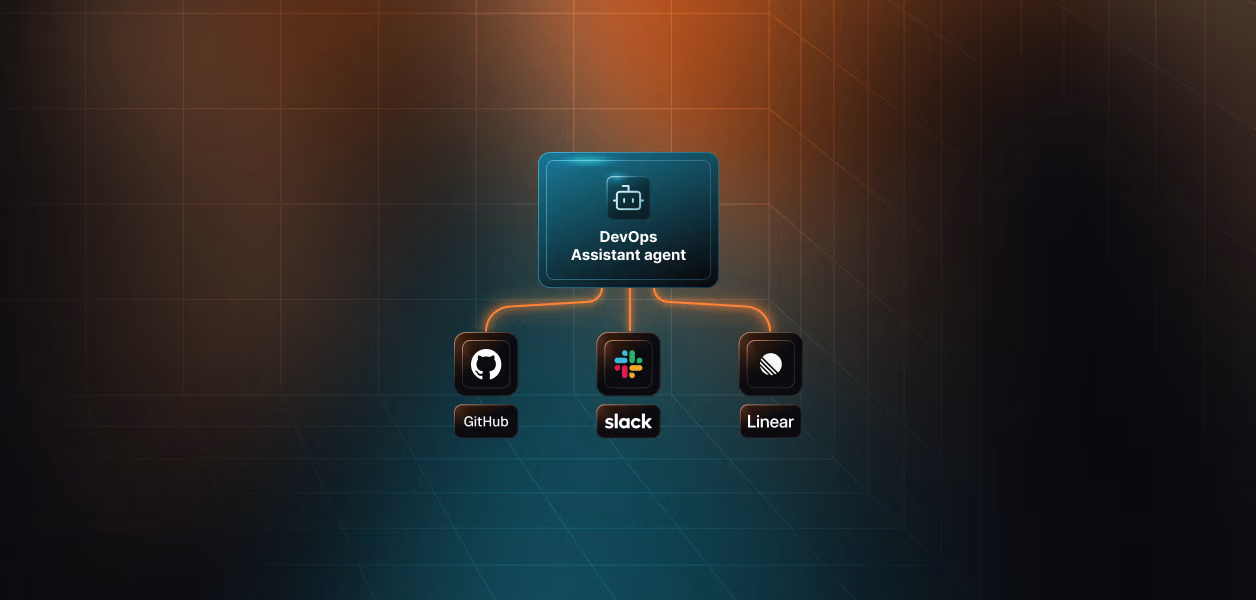


Modern software teams often rely on a scattered toolkit: GitHub to host code repositories, Linear for project management, Slack for communication. Individually, these tools are strong, but coordinating them becomes messy. PR labels need attention, issues must be created, reviewers need updates, and teams expect daily visibility. None of these tasks is difficult alone, yet together they create constant context-switching and repetitive manual work.
To solve this, we built a dedicated DevOps assistant that doesn’t just react to events but understands context. Instead of relying on fragile webhooks, custom servers, and scattered secrets, the agent uses Scalekit connectors, a way for your agent to talk to services like GitHub, Linear, and Slack through a unified, secure interface. Each connector exposes a set of tools that the agent can call, such as fetching pull requests, creating Linear issues, or sending Slack messages. With this model in place, the assistant polls GitHub, interprets PR state, creates Linear issues only when needed, and composes structured Slack digests. What used to be a mix of manual steps and brittle automation becomes a clean, predictable workflow that avoids duplication, reduces noise, and helps teams move faster.
In this blog, you’ll learn how the system is designed, how each component, GitHub, Linear, Slack, and Scalekit, fits together, and how the agent works end-to-end. You’ll see how to run it locally, how to extend it to multiple workflows, and how to maintain it safely as your engineering needs grow.
Before diving into code or automation logic, it is essential to establish a consistent environment that allows the DevOps assistant to interact reliably with GitHub, Linear, and Slack. The assistant itself is lightweight, but the configuration beneath it must be structured carefully so each connector has the information it needs and every action can be authenticated securely.
The setup follows a simple principle: treat each service as a capability, not a secret you manually manage. GitHub is the source of PR metadata, Linear is the destination for issue creation, and Slack is the communication channel for team updates. Scalekit binds these independent systems together by handling authentication, rate limits, retry behaviour, and connector-level isolation. All your assistant needs is a set of identifiers and parameters that enable tool execution.
The environment configuration revolves around a single .env file. This file stores runtime values such as your repository name, Linear team, Slack channel, and the Scalekit identifiers used to call each connector. It does not store long-lived credentials or raw API keys. Instead, it references identifiers generated inside Scalekit, which keeps sensitive credentials abstracted away from your local machine. This pattern allows you to focus on workflow logic while Scalekit manages token lifecycle, scopes, and secret governance behind the scenes.
With a correctly configured .env, you can run the agent locally without any additional infrastructure. The poller can authenticate with GitHub through the GitHub connector, create issues through the Linear connector, and send digests through the Slack connector, all without embedding personal access tokens, bot tokens, or client secrets in code. Once this foundation is in place, the rest of the system becomes predictable and easy to extend.
Each of the LINEAR_IDENTIFIER, SLACK_IDENTIFIER, and GITHUB_IDENTIFIER values is an identifier created inside Scalekit that represents a connector. It’s not a token or API key; it’s simply a reference that tells Scalekit which connector to use when the agent runs a tool. The real credentials stay inside Scalekit, and the agent only needs the identifier to invoke actions like “fetch PRs,” “create an issue,” or “send a message.
Before the assistant can poll GitHub, create Linear issues, or send Slack digests, you need to register and authorise each system inside Scalekit. This is needed because, without a unified setup, every tool would require its own token and manual scripts, making automation messy and unreliable. Scalekit brings everything under one secure place so the assistant can work smoothly across GitHub, Linear, and Slack.
This section walks through the complete setup from scratch, explaining how every identifier in your .env file is generated and how the assistant gains permission to act on behalf of your engineering team.
The goal is not just to “get a token” but to build a secure, auditable, and centralised authentication model. Scalekit handles OAuth, token rotation, and scoping, while GitHub, Linear, and Slack contribute the data and actions needed to power the DevOps workflow.
This centralised auth model ensures that every external service the assistant interacts with, whether fetching PRs, creating issues, or posting digests, is authorised, tracked, and governed from a single place instead of being scattered across scripts or developer machines.
Getting Client ID and Client Secret From Github:
GitHub → Settings → Developer settings → OAuth Apps → New OAuth App
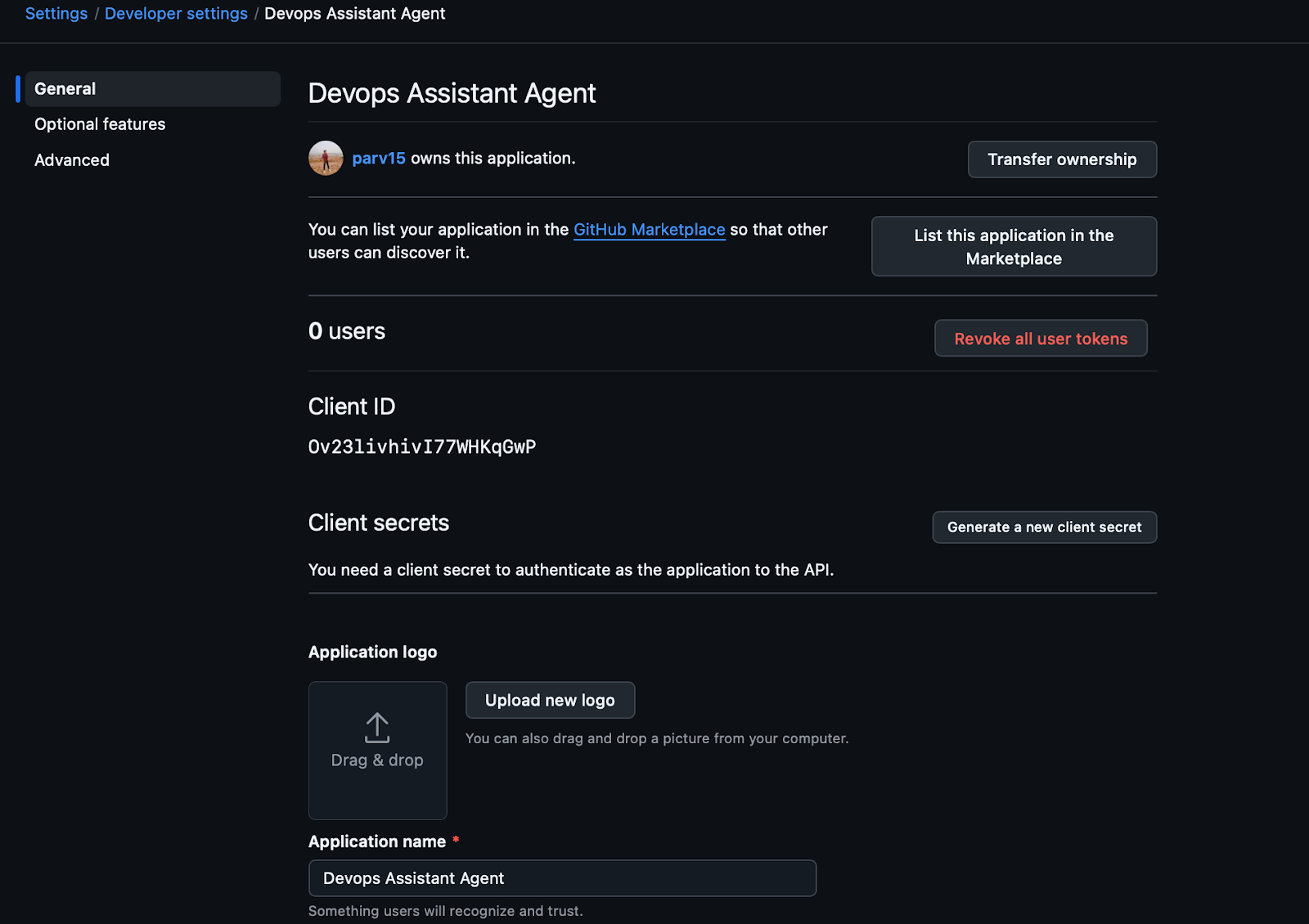
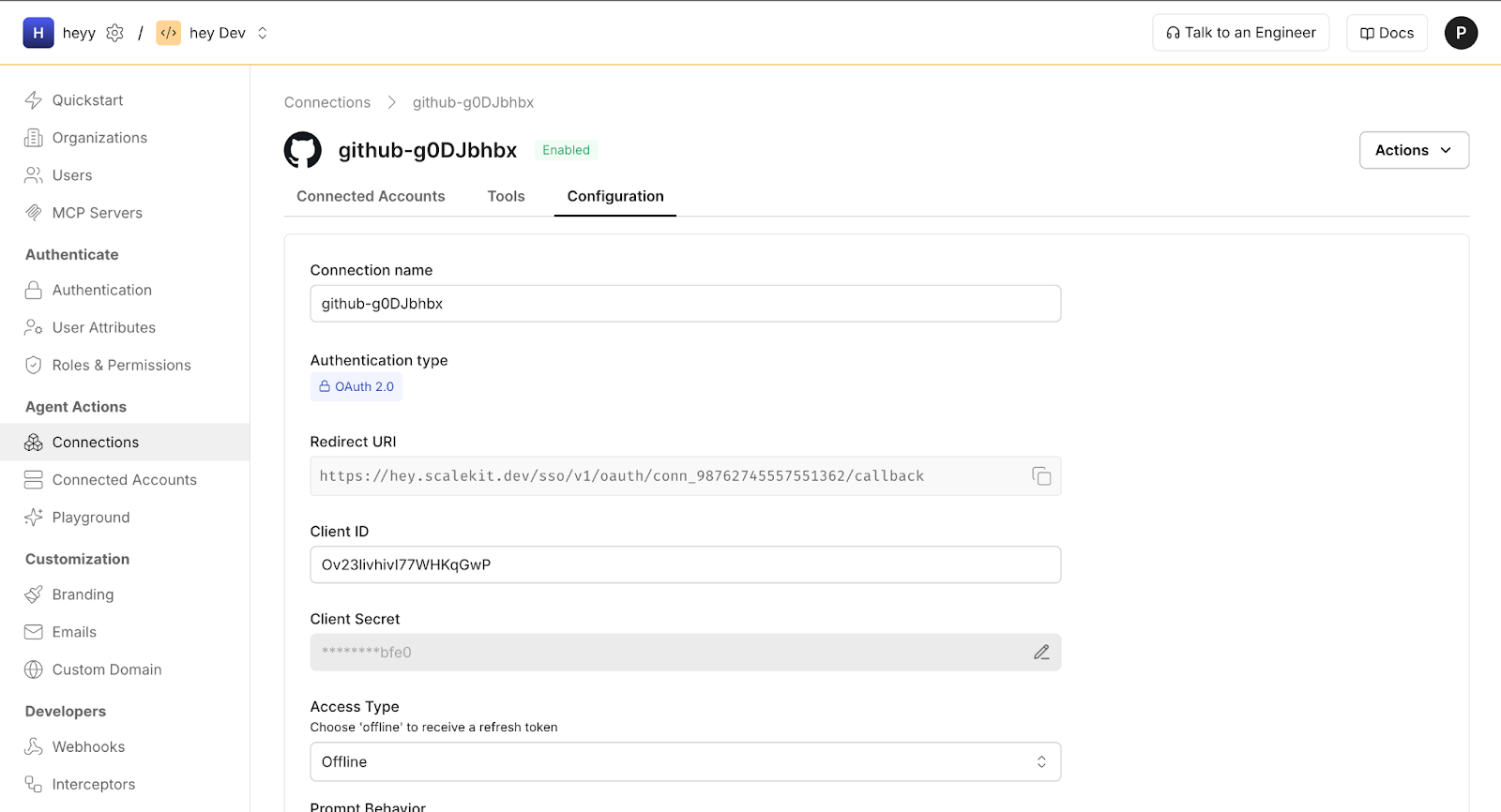
GitHub is the source of truth for pull requests. The assistant interacts with it through the Scalekit GitHub connector, which uses OAuth to authorise access to repository metadata.
Steps to configure GitHub:
This identifier goes directly into .env and tells your agent which GitHub identity to use for listing PRs.
Getting Client ID and Client Secret For Linear :
Linear > Settings > API > Create OAuth App > Copy Client ID and Client Secret.
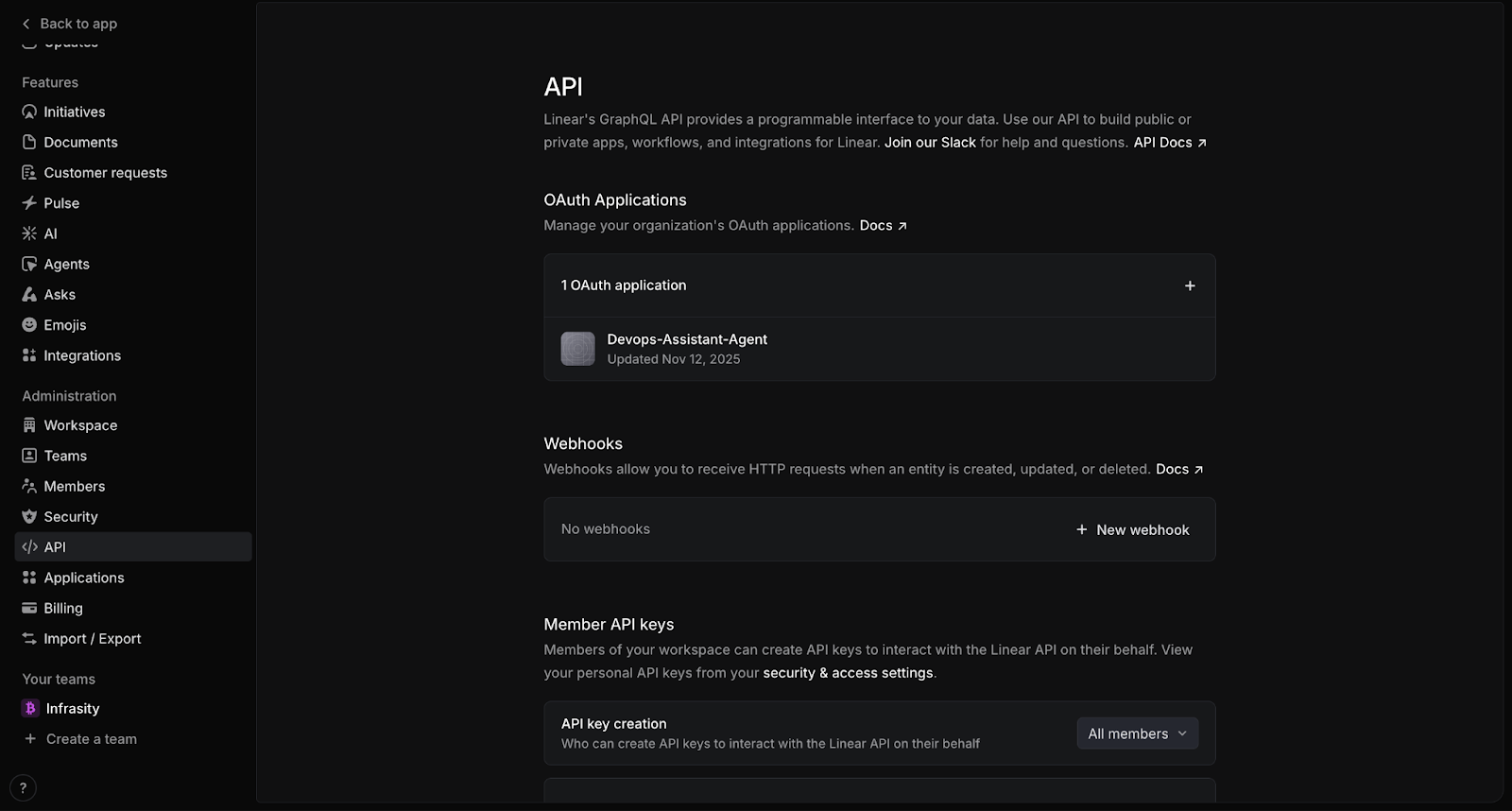
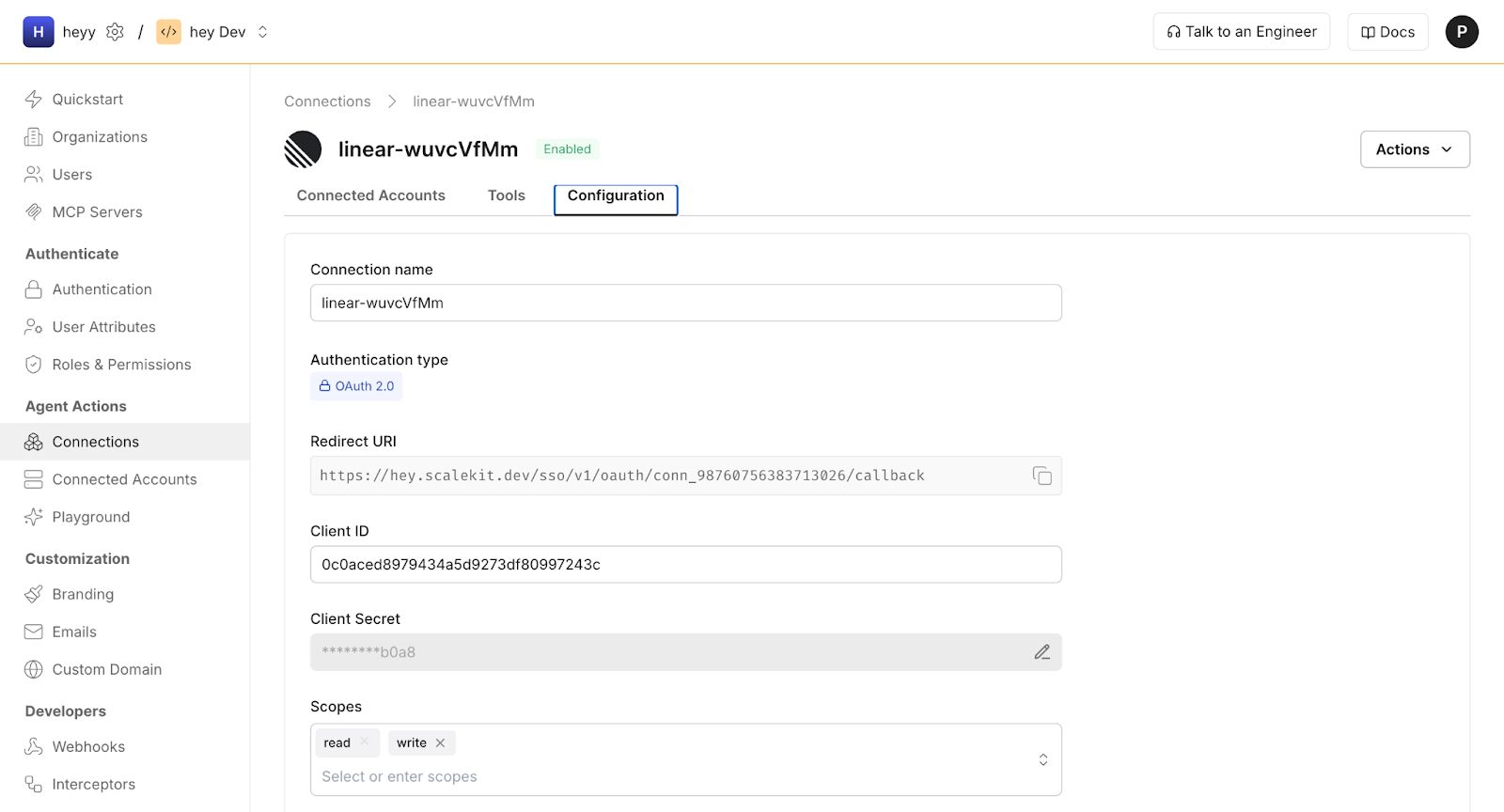
Linear issues are created whenever a PR receives a label. To automate this step, the assistant uses the Scalekit Linear connector.
Steps to configure Linear in Scalekit:
Slack is where the daily DevOps digest is delivered. The assistant uses the Slack connector to post messages securely.
Steps to configure Slack in Scalekit :
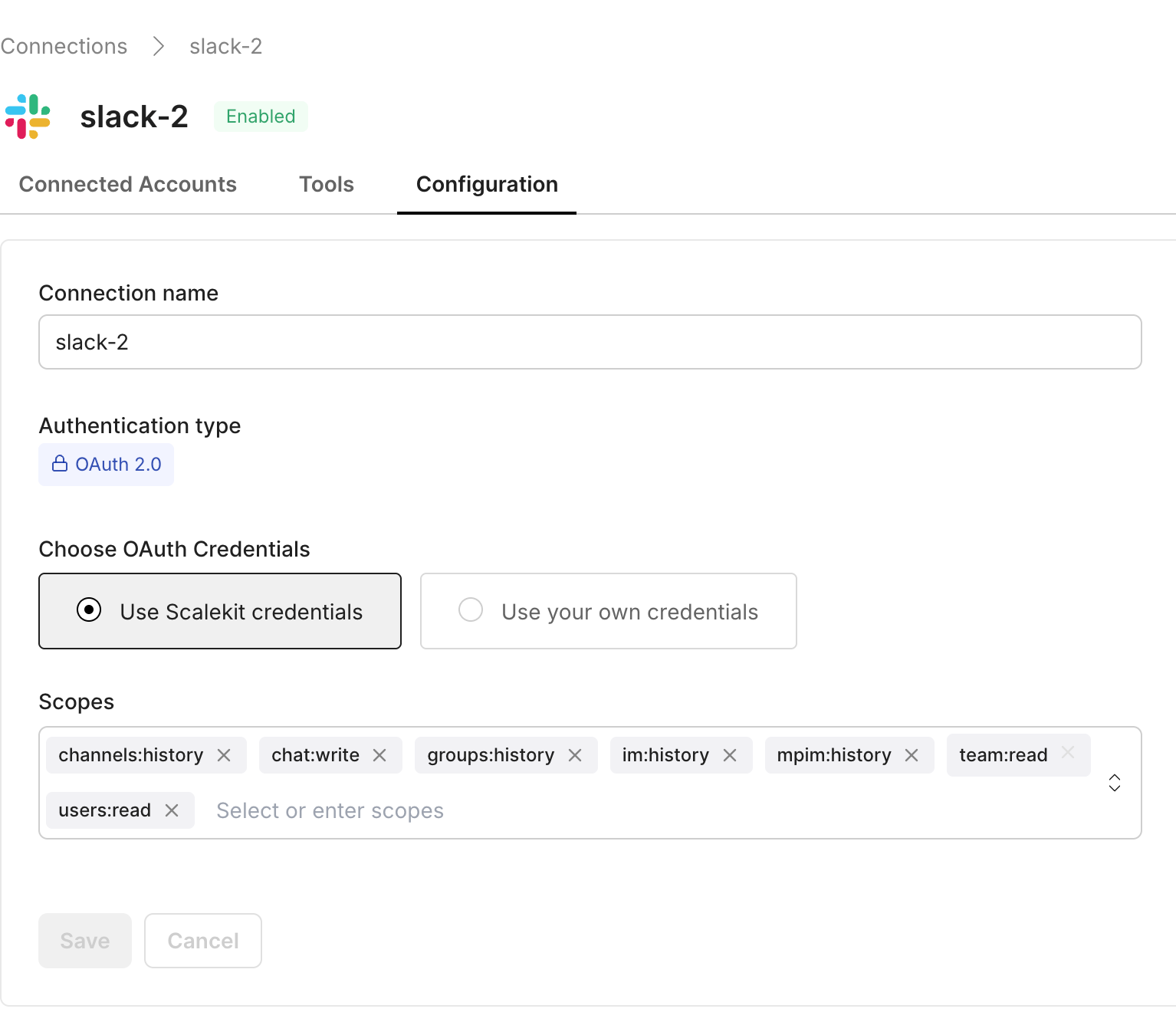
Your DevOps assistant communicates with Scalekit using the application’s client ID, client secret, and environment URL. You’ll find these in:
Scalekit → Profile Settings → Environment
These credentials authenticate your agent, while the three service identifiers (GitHub, Linear, Slack) authorise actions on each platform.
With all services connected and authorised in Scalekit, the assistant now has everything it needs to interact securely with GitHub, Linear, and Slack. The next step is to understand how these pieces work together during each cycle of the automation. Before diving into code, it helps to view the agent as a system and examine how the workflow moves from polling to processing to communication.
Before looking at code, it helps to understand how the DevOps assistant behaves as a system. Even though the implementation is compact, the agent performs several coordinated responsibilities that must remain consistent across every run. By breaking the workflow into clear stages, we can see why certain design choices were made and how each component contributes to the overall automation loop.
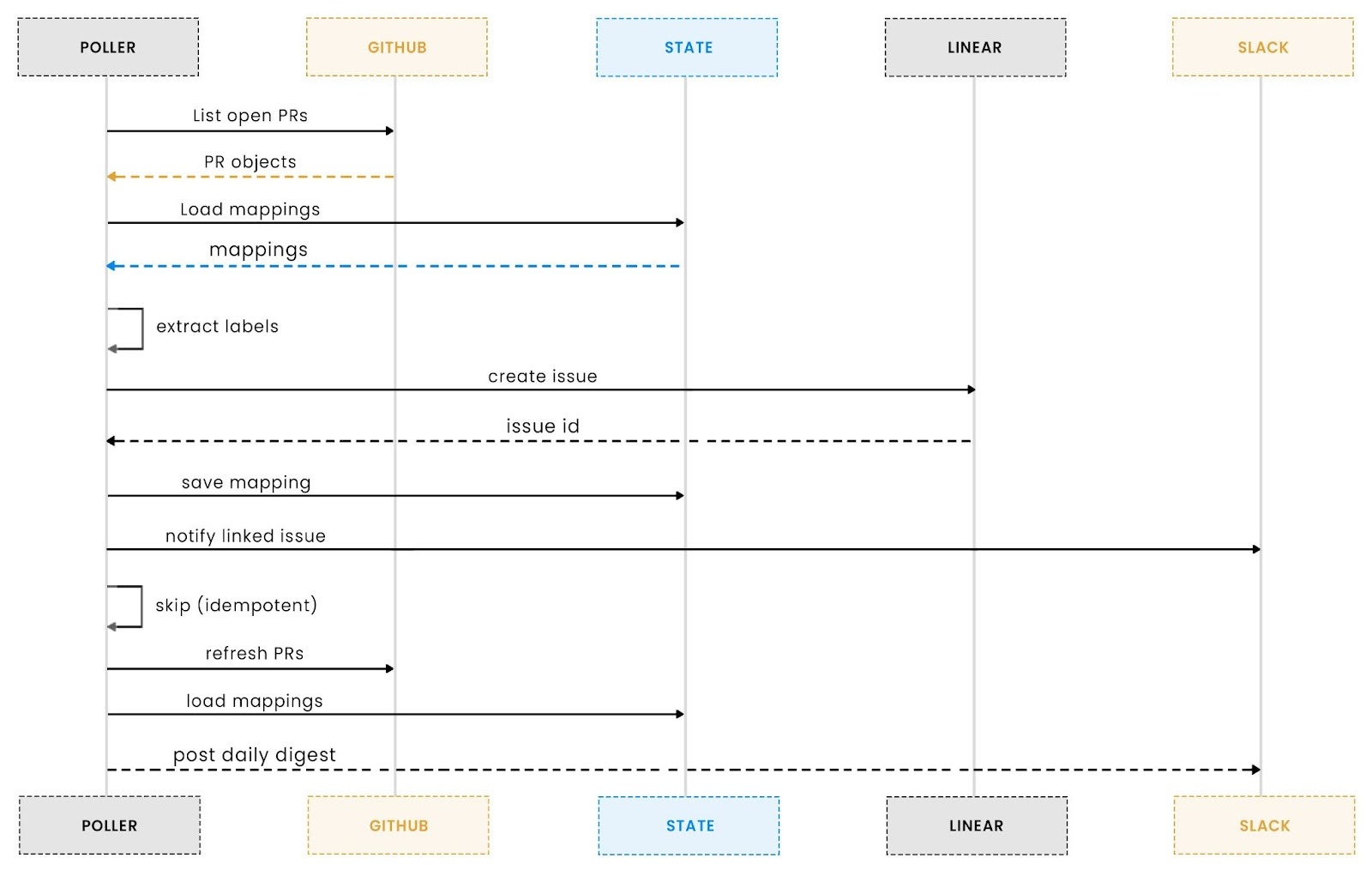
At its core, the agent works on a recurring cycle. Each cycle begins by polling GitHub for all open pull requests in the configured repository. This replaces webhook-driven event handling with a predictable polling model, which is easier to run locally, easier to test, and fully deterministic. The agent retrieves pull request metadata, including labels, reviewers, timestamps, and links, and prepares it for downstream logic. This initial fetch forms the raw input for everything that happens next.
Once the pull requests have been collected, the agent analyses their labels. Any label can act as a trigger for generating new Linear issues, creating a clean mapping between GitHub workflows and Linear task management. To avoid duplicates, the system checks whether a given pull request and label combination has already produced a corresponding Linear issue. If it has, the agent moves on; if it hasn’t, a new Linear issue is created and recorded in the idempotency store. This ensures that each labelled pull request produces exactly one Linear issue, no matter how many times the agent runs.
The final part of the architecture is how the assistant delivers information back to the team. At the start of each new UTC day or on the agent's first loop, the system compiles a daily digest summarising all open pull requests. This digest includes reviewer status, staleness indicators, Linked Linear issues, and a high-level overview of the repository’s activity. The message is formatted for readability and posted to Slack through the Scalekit connector. This daily snapshot keeps teams aware of outstanding work without flooding Slack with updates or requiring people to check multiple dashboards.
Together, these steps form a repeatable cycle: poll GitHub, process labels, update Linear, send digests, sleep, and repeat. The architecture is intentionally simple, but it brings structure and predictability to a workflow that can easily become chaotic as teams grow.
Once the high-level architecture is clear, the next foundation to establish is the configuration layer that supports it. Even the most well-designed workflow will break without stable settings, consistent environment variables, and validated identifiers. This is where the environment configuration comes in, ensuring that every run starts from a reliable, predictable baseline.
Every reliable automation agent begins with a stable configuration layer. Without predictable settings, clear validation, and scoped identifiers, even the most elegant workflow will fail at runtime. In the DevOps assistant, this foundation lives in settings.py, and it ensures that each run starts with fully verified credentials and repository metadata before any external APIs are touched.
The configuration process begins by loading environment variables through dotenv. This allows the agent to remain framework-agnostic while supporting both local development and production deployment. Instead of scattering environment lookups across multiple files, all configuration is centralised in one class, making it easy to reason about and audit.
Here’s how the settings are initialised:
Each variable reflects a distinct responsibility in the workflow. GitHub repository ownership ensures accurate polling, Slack identifiers define where digests are posted, and Linear team IDs control where newly created issues land. The optional LABEL_TO_LINEAR_TEAM mapping introduces flexibility by allowing specific labels to route issues to different teams.
Before the agent runs, every required variable is validated. This is intentional: API calls are expensive, and failing early prevents partial writes, broken digests, or half-created issues. Validation occurs through a compact but effective check:
This validation step becomes essential as the system scales. Once multiple repositories, teams, or environments are added, misconfiguration can easily creep in. By centralising validation, the agent guarantees that every run begins in a consistent, predictable state.
After validation, the configuration module prints a clear signal that the environment is ready:
This final touch ensures transparency. Developers know immediately whether the agent is ready to start processing PRs or whether an environment key needs to be corrected. In distributed or containerised environments, this upfront visibility saves time by surfacing problems before any downstream tasks begin.
With the configuration layer fully established, we can now move into the heart of the automation: building the connector interface that powers GitHub polling, Linear issue creation, and Slack digests. This becomes the focus of the next section.
Once the environment is configured, the next critical piece is the connector layer. This is where the DevOps assistant actually interacts with GitHub, Linear, and Slack all through a single, unified Scalekit client. Instead of juggling three different SDKs, each with its own authentication model and retry semantics, the connector provides a single, clean interface that the rest of the system relies on.
The primary goals of this layer are:
The connector starts by instantiating a single Scalekit client with credentials from the environment:
With this, every tool that calls GitHub, Linear, and Slack flows through the same client instance. This simplifies authentication and logging, ensuring that every action is traceable back to the same identity.
Because multiple labels, retries, or polling cycles can hit the same pull request, the connector keeps a small local state file to prevent duplicate Linear issues:
The connector loads the mapping into memory on startup:
Every time a new Linear issue is created for a PR+label combination, it is stored here. This single decision dramatically simplifies the workflow, with no need for complex database schemas or external caches. The automation remains lightweight while staying consistent across runs.
External APIs fail. Timeouts happen. Rate limits appear without warning. Instead of scattering try/except blocks throughout the codebase, the connector provides a single execute_tool method that wraps all tool calls:
If Scalekit returns a retryable error, such as a timeout or temporary unavailability, the connector automatically retries with exponential backoff:
Permanent failures are logged cleanly and returned as None, ensuring that the agent behaves predictably under failure conditions.
To balance visibility and noise, the connector prints previews of small responses while trimming larger JSON payloads:
This pattern makes it possible to debug workflows without drowning in raw API dumps, especially when working with large GitHub or Linear responses.
Finally, the module exposes a lightweight global accessor so that any part of the agent can obtain the same connector instance:
This ensures consistency across threads, polling loops, and digest generation.
With the connector layer in place, the DevOps assistant now has a reliable backbone. In the next section, we move to the operational layer, the polling engine that fetches open PRs, processes labels, and routes updates into Linear and Slack.
With the connector layer in place, the next step is the engine that continuously pulls GitHub data, reacts to changes, and fans out actions across Linear and Slack. This replaces the traditional webhook model with a simple, predictable polling loop ideal for environments where you want control, observability, and idempotency without deploying public endpoints.
The polling engine lives inside poller.py, and it is responsible for three primary tasks:
All of this runs on a lightweight loop that behaves like a background worker.
Every cycle begins by calling GitHub’s pull_requests_list tool via Scalekit:
GitHub responses vary depending on which integration path you're using, so the engine defensively normalises the response:
This makes the polling loop resilient across different GitHub repository settings or Scalekit response formats.
Once open PRs are fetched, the engine inspects each label and checks whether a corresponding Linear issue already exists. This ensures idempotency across runs and prevents duplicate tickets.
For each label, a unique key is constructed:
If this key already exists in pr_linear_links.json, the engine skips it, guaranteeing one Linear issue per PR per label, even if the polling loop runs hundreds of times.
When a new label is detected, the engine creates a Linear issue through the connector:
If Linear successfully returns an issue ID, the key is recorded:
Finally, the engine posts a Slack message notifying the team that a new issue has been linked to a PR:
This is where the GitHub → Linear → Slack automation really comes alive
Every 24 hours (tracked by UTC day), the polling loop sends a digest summarising PR activity:
Digest generation uses a helper:
The digest is concise yet informative, giving teams a daily snapshot of repository health.
The agent uses a simple recurring loop with configurable intervals:
Each iteration of this loop :
This architecture replaces complex webhook handlers with a single reliable loop.
A DevOps assistant is only useful if it keeps teams informed without overwhelming them.
The daily Slack digest is designed to do precisely that: a single, readable summary of what matters inside your repository. No noise, no endless notifications, no chasing down stale PRs. One clear signal each day.
This digest runs automatically within the polling loop and provides a snapshot of your GitHub repository's state.
Real-time notifications are great for incidents, not for PR reviews. Teams often face:
A daily digest solves all of these by bundling information into one well-structured message posted each morning (UTC), keeping the signal high and the noise low.
Inside run_forever() in poller.py, we compare the current UTC day with the last time a digest was sent:
This ensures:
PRs are fetched in the polling engine earlier, and the same function fetch_open_prs() is used to get PRs, which are utilised to generate the digest.
Here’s an example of the raw pull request data returned by the GitHub connector. Your agent receives structured metadata for each PR, which it later processes for label analysis, Linear issue creation, and Slack digest generation.
The digest’s readability is what makes it valuable.
This function adds rich context:
The result looks like:
The final step sends the digest to a designated Slack channel using Scalekit’s Slack connector:
Because this uses Scalekit:
You get Slack notifications without maintaining token lifecycles or OAuth tokens.
Teams benefit immediately because the digest:
Your PR hygiene improves automatically.
Automating DevOps tasks is easy when you only run them once. It becomes much harder when your agent runs every 30 seconds.
Without safeguards, you end up with:
Idempotency ensures that each PR-label pair is processed exactly once, no matter how often the poller runs. This section walks through how idempotency is implemented, why it matters, and how Scalekit ensures its reliability.
Because we are polling GitHub PRs continuously rather than reacting to webhooks, the agent will see the same PR data multiple times.
Here’s what can go wrong if idempotency is missing:
To avoid chaos, the DevOps agent must remember what it has already processed.
We model uniqueness using this key structure:
This ensures:
The logic is simple but powerful:
We store all processed PR-label combinations inside state/pr_linear_links.json.
Example snippet from sk_connectors.py:
Whenever we create a new Linear issue, we record it:
These two functions unlock the entire idempotency model.
Inside process_labels():
If the key exists, it skips; otherwise, create a new Linear issue and record it. This guarantees the agent never creates duplicates, even if:
A DevOps automation agent is only as reliable as its ability to handle the messy realities of real APIs. GitHub gets throttled. Linear rate-limits. Slack has brief outages. Network flakes happen.
Your assistant cannot crash or silently skip work; it must detect failures, retry intelligently, and continue running forever.
This section explains how your agent achieves this using Scalekit’s execution layer and your own retry logic.
All third-party API calls flow through ScalekitConnector.execute_tool(). This is where transient failures are detected and retried with exponential backoff:
This design makes the poller safe to run unattended.
Inside loop_once() and the main run_forever() loop, failures never stop execution:
Even if:
The agent catches the error and continues the next cycle. This is crucial for long-running automations.
PR creation, issue linking, and reviewer workflows must always run. A single failure should never break the loop.
The agent’s resilience guarantees:
This is the difference between a hobby script and real automation.
In your opening scenario, the team missed a high-value PR because it lacked reviewer attention. A well-formatted digest surfaces that PR at the top of the morning channel, along with a direct link and the reviewer list. That simple nudge closes the loop between detection and action.
By this point, the full lifecycle of the DevOps Assistant Agent is clear from polling GitHub and creating Linear issues to delivering structured Slack digests, all powered by Scalekit-managed connectors. This section distils the entire journey into a concise set of actionable takeaways that developers can apply to any automation system involving multiple services.
Every call in your workflow flows through Scalekit’s secure connectors, which means your agent never touches raw API keys. This keeps your local environment clean, prevents credential drift across machines, and avoids failure modes tied to expired or overwritten tokens.
GitHub polling may seem simple, but when structured well, it becomes a powerful alternative to webhook infrastructure. By shaping it into a loop that fetches PRs, analyses state, and executes actions, you get a deterministic flow that is easy to debug, replay, or extend.
Mapping PRs to Linear issues in a local state file prevents duplication and race conditions. This principle applies broadly: anytime your agent creates external objects, ensure the logic is idempotent so repeated runs don’t cause side effects.
Each connector: GitHub, Linear, Slack defines a clear capability surface. Your GitHub connector reads PRs, your Linear connector creates issues, and your Slack connector sends messages. This separation keeps responsibilities crisp and makes permission management trivial.
Because every request log, action preview, and error message is already printed with context, diagnosing failures becomes straightforward. The poller loop itself becomes an observability point, giving visibility into every PR processed and every action executed.
The architecture is intentionally simple, which makes it easy to layer new behaviour on top. Whether you add reviewer analytics, CI status, or Slack threading, the core loop remains unchanged, and the flow remains predictable.
You’ve built more than a simple automation script; this workflow forms a reliable DevOps loop that connects GitHub, Linear, and Slack through Scalekit’s secure execution layer. The assistant continuously polls pull requests, interprets labels, creates matching Linear issues, and posts Slack updates and daily digests. Each system plays a well-defined role: GitHub holds the source of truth, Linear structures the work, Slack communicates it, and Scalekit ensures authentication, token handling, and execution reliability.
What makes this architecture effective is its predictability and maintainability. Every operation is idempotent, preventing duplicate issues or repeated digests, and all state is tracked intentionally. The design keeps the core logic simple while ensuring the workflow behaves consistently in both development and production. More importantly, the structure is intentionally modular, making it easy to extend without refactoring the core polling loop or complicating the agent’s behaviour.
With the core GitHub → Linear → Slack loop running smoothly, you can naturally expand its capabilities. Add CI status visibility to include build results in the digest, introduce richer Slack interactions such as threaded updates or action buttons, analyse reviewer workload and stale PRs, support multiple repositories with separate routing, or plug in additional connectors like Jira, Notion, PagerDuty, or Datadog through Scalekit. These enhancements build on the existing foundation and let the assistant grow into a more comprehensive DevOps automation tool.
The agent uses a deterministic key format like owner/repo#123:label.
If a PR receives a label, the agent checks this key in its local idempotency store (pr_linear_links.json).
If the key doesn’t exist, it creates a new Linear issue; if it does, the agent skips it.
This ensures each PR–label pair maps to exactly one Linear issue with no duplicates across runs.
Standard GitHub notifications get noisy and fragmented across repos, teams, and reviewers. The digest consolidates all open PRs, stale items, requested reviewers, and any linked Linear issues into a single message delivered once a day. Teams get a predictable snapshot instead of scattered notifications, making planning and triage easier.
Instead of juggling API keys, OAuth tokens, or multiple SDKs, Scalekit exposes each integration as a secure connector.
Your code never touches raw credentials; the agent simply calls actions like
github_pull_requests_list, linear_issue_create, or slack_send_message,
And Scalekit handles scoped permissions, token refresh, and retries under the hood.
4. What reliability benefits do Scalekit connectors bring to this workflow?
Scalekit adds resilience by wrapping each API call in retry logic, handling transient failures, and abstracting rate limits.
If GitHub, Linear, or Slack throw intermittent network errors, Scalekit automatically retries safely without duplicating the action.
This means your agent keeps running smoothly even when downstream services aren’t perfectly stable.
Yes, the design is fully modular. You can iterate through multiple GitHub repositories, apply different label-to-team mappings, and route results to separate Slack channels.Nothing in the workflow is hard-coded to a single project, so expansion is just configuration, not refactoring.