Announcing CIMD support for MCP Client registration
Learn more

Automate HubSpot CRM Workflows with a Claude Agent

Saif Ali Shaik
Founding Developer Advocate

TL;DR

A complete working Python agent that creates HubSpot contacts, logs calls, and sweeps deal pipelines as individual users — not a shared integration account — using Scalekit to handle all auth.

  • User connects HubSpot once via OAuth (Scalekit vaults the token)
  • Your agent calls list_scoped_tools to get ~17 HubSpot tools in Anthropic's native format, no schema writing
  • Standard Claude tool-use loop: Claude picks the right tools, your code calls execute_tool with a user identifier, Scalekit makes the HubSpot API call as that specific user

Logging a call, updating a deal stage, creating a contact: these are the tasks that chip away at a sales rep's day. Your Claude agent can handle them. You describe what needs to happen in plain language, and the agent figures out which HubSpot tools to call and in what order.

This post shows a working Claude agent connected to HubSpot through Scalekit. You get copy-paste Python code, three workflow demos, and a full list of available HubSpot tools.

Prerequisites

  • Python 3.9+
  • pip install anthropic scalekit-sdk-python python-dotenv
  • A Scalekit account with a HubSpot connection configured (HubSpot connector setup)
  • A HubSpot account for testing

How It Fits Together

Your code only calls Scalekit. Scalekit handles HubSpot OAuth, token storage, and refresh on behalf of each user.

The Agent Script

The complete agent. Copy it, set your environment variables, and run it.

""" Claude agent with Scalekit-authenticated HubSpot tools. """ import os import anthropic import scalekit.client from dotenv import find_dotenv, load_dotenv from google.protobuf.json_format import MessageToDict load_dotenv(find_dotenv()) scalekit_client = scalekit.client.ScalekitClient( client_id=os.getenv("SCALEKIT_CLIENT_ID"), client_secret=os.getenv("SCALEKIT_CLIENT_SECRET"), env_url=os.getenv("SCALEKIT_ENVIRONMENT_URL"), ) actions = scalekit_client.actions client = anthropic.Anthropic( base_url=os.getenv("ANTHROPIC_BASE_URL"), api_key=os.getenv("ANTHROPIC_API_KEY"), ) identifier = os.getenv("USER_IDENTIFIER", "user_123") response = actions.get_or_create_connected_account( connection_name="hubspot", identifier=identifier, ) if response.connected_account.status != "ACTIVE": link = actions.get_authorization_link(connection_name="hubspot", identifier=identifier) print("Authorize HubSpot:", link.link) print("Re-run this script after completing the OAuth flow.") exit(0) scoped_response, _ = actions.tools.list_scoped_tools( identifier=identifier, filter={"connection_names": ["hubspot"]}, ) llm_tools = [ { "name": MessageToDict(tool.tool).get("definition", {}).get("name"), "description": MessageToDict(tool.tool).get("definition", {}).get("description", ""), "input_schema": MessageToDict(tool.tool).get("definition", {}).get("input_schema", {}), } for tool in scoped_response.tools ] print(f"Connected account for {identifier} is active.") print(f"Discovered {len(llm_tools)} tools") messages = [{"role": "user", "content": "Find all deals in the Proposal stage with no activity in the past 14 days"}] while True: response = client.messages.create( model=os.getenv("ANTHROPIC_MODEL", "claude-sonnet-4-6"), max_tokens=1024, tools=llm_tools, messages=messages, ) if response.stop_reason == "end_turn": print(response.content[0].text) break tool_results = [] for block in response.content: if block.type == "tool_use": result = actions.execute_tool( tool_name=block.name, identifier=identifier, tool_input=block.input, ) tool_results.append( { "type": "tool_result", "tool_use_id": block.id, "content": str(result.data), } ) messages.append({"role": "assistant", "content": response.content}) messages.append({"role": "user", "content": tool_results})

Run it

Environment variables:

SCALEKIT_ENVIRONMENT_URL=https://your-env.scalekit.cloud SCALEKIT_CLIENT_ID=skc_... SCALEKIT_CLIENT_SECRET=sks_... USER_IDENTIFIER=user_123 ANTHROPIC_API_KEY=sk-ant-...
python agent.py

Expected output:

Connected account for user_123 is active. Discovered N tools [Tool calls happen here] Found 3 deals in Proposal stage with no recent activity: ...

(Exact tool count and output will vary. Run against your HubSpot connection to see your data.)

What Your Agent Can Do

These three workflows show the range of tasks the agent handles. Each starts with a natural language prompt and ends with a concrete CRM action.

Qualify a lead

"Create a contact for Sarah Chen at Acme Corp and add her to the Q3 outreach list"

The agent calls hubspot_contact_create with name and company, then adds her to the specified list. You get back: "Contact Sarah Chen created at Acme Corp. Added to Q3 Outreach list."

Log a sales interaction

"Log a 20-minute call with Sarah Chen — we discussed pricing and she's ready to evaluate"

The agent calls hubspot_call_log with duration, subject, and the associated contact. You get back: "Call logged: 20 min, subject 'Pricing discussion', linked to Sarah Chen."

Pipeline sweep

"Find all deals in Proposal stage with no activity in 14 days and move them to Stalled"

The agent calls hubspot_deals_search to find matching deals, then hubspot_deal_update on each one. You get back: "Found 3 deals. Updated all to Stalled stage."

The pipeline sweep demo is also the default prompt in the agent script above. Change it to any of these or write your own.

Available HubSpot Tools

Category
Tool
Description
Contacts
hubspot_contact_create
Create a new contact
Contacts
hubspot_contact_update
Update contact properties
Contacts
hubspot_contacts_search
Search contacts by name, email, or property
Contacts
hubspot_contacts_list
List contacts with optional filters
Deals
hubspot_deal_create
Create a new deal
Deals
hubspot_deal_update
Update deal properties or stage
Deals
hubspot_deals_search
Search deals by stage, owner, or activity date
Deals
hubspot_deal_pipelines_list
List available deal pipelines and stages
Engagements
hubspot_call_log
Log a call with duration, subject, and contact
Engagements
hubspot_meeting_log
Log a meeting with attendees and notes
Engagements
hubspot_email_create
Create an email engagement on a contact or deal
Engagements
hubspot_note_log
Add a note to a contact, company, or deal
Tasks
hubspot_task_create
Create a follow-up task
Tasks
hubspot_task_complete
Mark a task as complete
Tasks
hubspot_tasks_search
Search tasks by owner, due date, or status
Companies
hubspot_company_create
Create a new company
Companies
hubspot_companies_search
Search companies by name or domain

Full list in the HubSpot connector docs.

Why This Already Handles Multiple Users

The USER_IDENTIFIER env var (the identifier variable in the code) is how this scales from one user to many. Change it per user and each person gets their own HubSpot connection with their own permissions. Scalekit stores and refreshes OAuth tokens separately for each identifier.

In production, resolve the identifier from your authenticated session: after your app verifies who is making the request via session cookie, JWT, or database lookup. Never accept it from client input. The same agent code serves every user without modification.
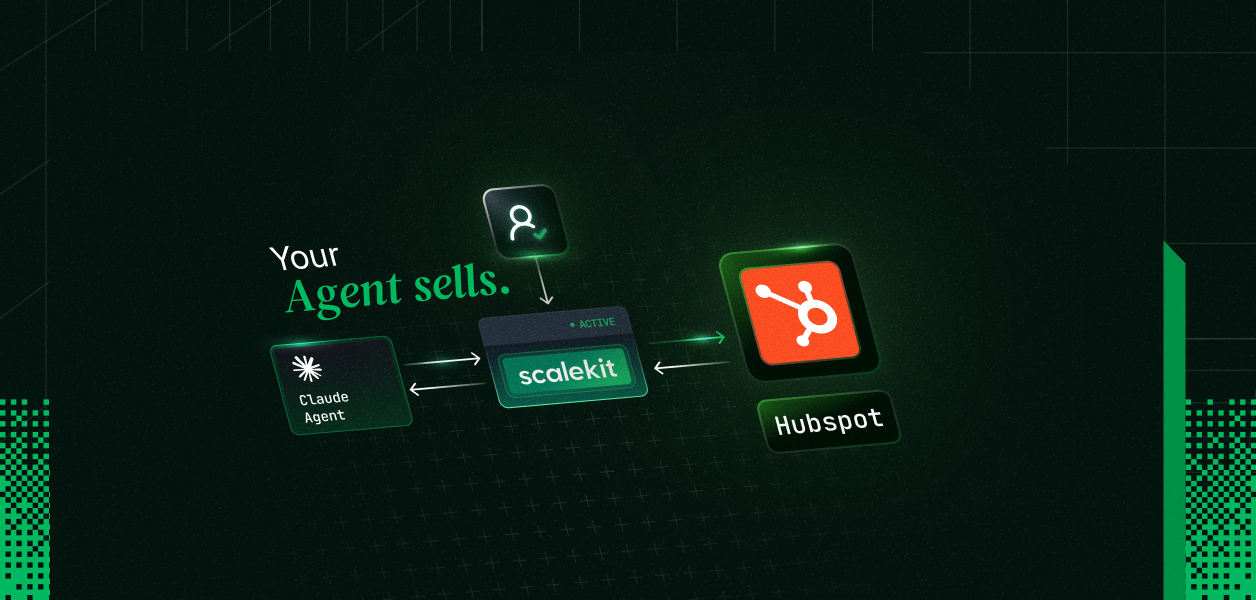

This pattern works whether you are building an internal sales tool used by multiple team members, or a product where your customers connect their own HubSpot accounts. For a full walkthrough of the multi-user setup, see access control for multi-tenant AI agents. You can also learn more about tool calling authentication for AI agents and how secure token management works at scale.

Explore More

Other connectors: Salesforce, Gmail, Slack, Linear, GitHub, Notion, and more: full connector list

Other frameworks: LangChain, Mastra, CrewAI, Vercel AI SDK, Google ADK: framework examples

No items found.
Agent Auth Quickstart
On this page
Share this article
Agent Auth Quickstart

Acquire enterprise customers with zero upfront cost

Every feature unlocked. No hidden fees.
Start Free
$0
/ month
1 million Monthly Active Users
100 Monthly Active Organizations
1 SSO connection
1 SCIM connection
10K Connected Accounts
Unlimited Dev & Prod environments