Most developers building with CrewAI hit a clean wall somewhere between their first successful demo and their first production deployment with real customers. The orchestration layer is fine; the agents collaborate correctly; the tools call the right APIs; and then, when a second customer is added, tokens start expiring unpredictably, and one customer's Salesforce data appears in another's workflow.
What follows is a breakdown of exactly why that happens, how the shared tool model creates the problem, what the existing solutions get right and where they fall short, and how Scalekit fixes it structurally without touching your crew.
CrewAI gave you something the other frameworks didn't: a way to think about agents as roles. A researcher, a writer, a publisher, each with their own goal, their own backstory, their own seat at the table. The crew metaphor isn't decorative; it's how you reason about responsibility when an agent system gets complex.
In production, two customers run the same crew at the same time, and each agent shares the same tool instances: the Salesforce tool, the Slack tool, and the Gmail tool, all instantiated once at Crew() construction and reused across every kickoff(). Your researcher is reading customer A's pipeline through the same Python object that your publisher uses to write to customer B's CRM.
The problem breaks down into three things that happen simultaneously:
Scalekit is what carries identity across 3000+ tools and 150+ enterprise connectors, with every agent in every crew acting as the right user with the right scope. The crew structure stays, and the credential sprawl goes away.
When you build a crew, you assign tools to agents, and those tools persist for the lifetime of the application. A BaseTool is initialized with its credentials at startup, attached to an agent during Crew() construction, and reused for every kickoff() that follows. The researcher and publisher don't think about which credentials they hold; they think about what they need to do. That's the bet CrewAI makes, and it's the right one.
This works beautifully in development: with one customer, one credential context, and one execution at a time, the tool's internal state stays stable and predictable. The complexity surfaces the moment that same crew starts running for multiple customers at once, because those shared tool instances now carry identity and credential state that must remain completely separate across executions.
The diagram below captures exactly where things start to diverge. In development, one kickoff() triggers one tool call, one Salesforce request, and the results come back cleanly.
In production, two customers trigger concurrent kickoff() calls, and the same tool instance must suddenly determine which customer's token to use. A refresh triggered by customer A's execution modifies the shared client object that customer B is reading from mid-flight, and customer A's data ends up in customer B's response chain.
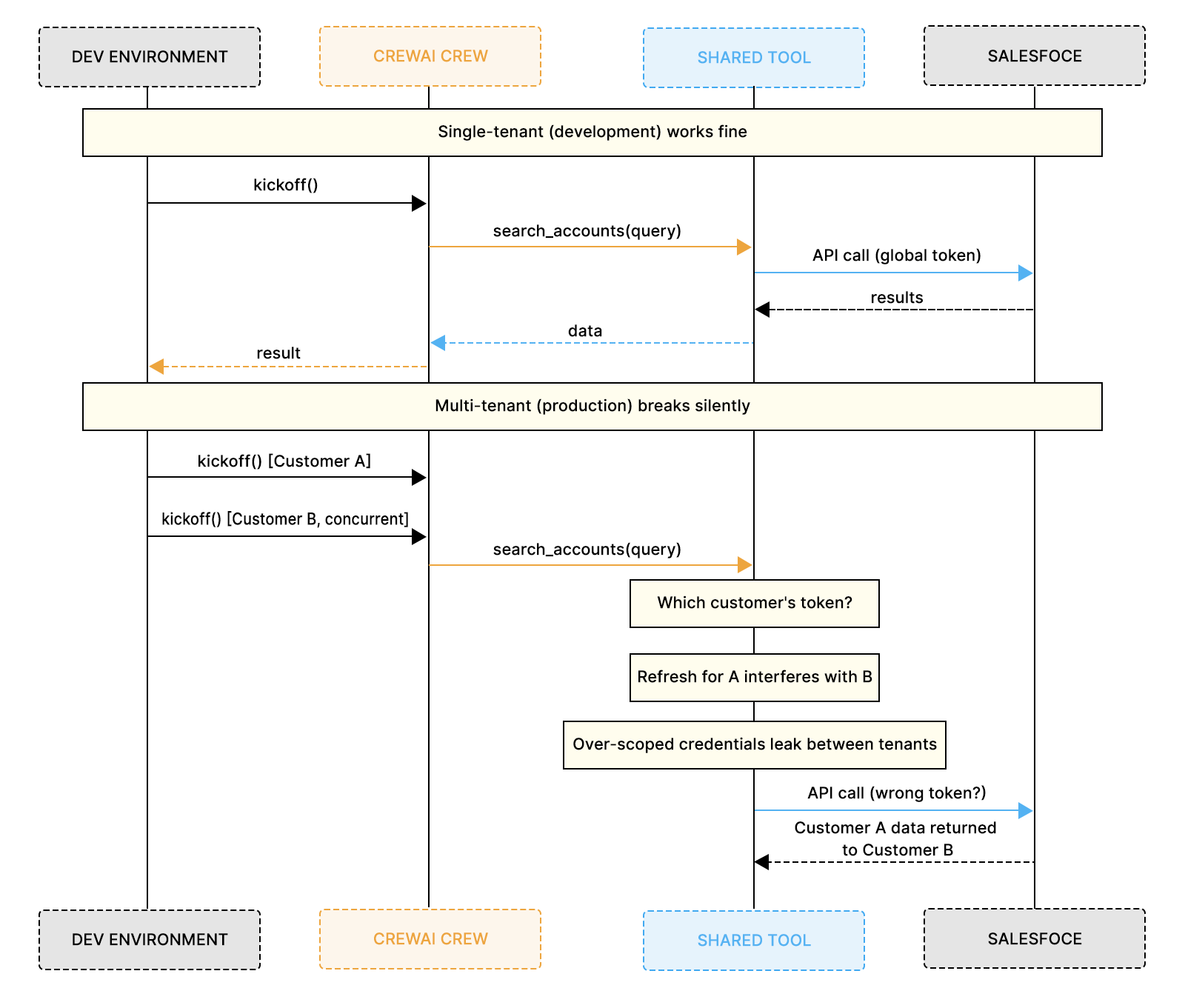
The tricky part is that the orchestration layer looks fine throughout all of this. Agents execute their tasks, tool calls go out, and workflows appear to run normally. The instability is completely beneath the surface, living in the shared-credential state that tools silently carry across concurrent executions. You won't see it locally, but you'll see it in production, under load, in ways that are frustratingly difficult to reproduce.
Several platforms have emerged to solve parts of this problem, and it's worth understanding what each one is actually optimizing for before explaining where Scalekit fits. This isn't a competitor comparison, it's an architectural conversation.
Each of these platforms makes sensible trade-offs for the use cases it was designed for. The challenge is that CrewAI introduced something none of them were built for: collaborative roles operating inside the same workflow, each needing a different scope against the same external systems, running concurrently for many independent customers.
That gap is precisely what Scalekit addresses with per-role connected accounts that map directly onto CrewAI's role abstraction, combined with per-customer session routing that keeps shared tool instances safe at concurrent scale.
Before diving into code, it helps to understand the boundary that Scalekit introduces. The diagram below shows it clearly: credentials never cross above the auth boundary line. Agents reason about tasks, not tokens, and everything credential-related, token storage, scope enforcement, and auto-refresh live in a dedicated layer beneath the crew.

Your crew stays exactly as you built it. Scalekit's token vault, scope enforcer, and auto-refresh layer sit below the boundary and connect to Salesforce, Slack, Gmail, and 150+ other systems on behalf of each role.
Without Scalekit, a three-role crew touching Salesforce, LinkedIn, Gmail, and Slack means every tool carries credentials directly in its closure. Because configuring per-role OAuth scopes manually across four connectors is genuinely painful, most teams end up giving every role the same broad scope. The credential management eventually spreads across tool wrappers, refresh handlers, and middleware, growing to around 500 lines of glue code that nobody wants to own.
Every customer's tool calls flow through these same four objects. When customer A triggers a token refresh, it modifies the shared client that customer B is concurrently reading from.
Notice that SearchAccountsTool and UpdateOpportunityTool both reference the same salesforce_client. That means the researcher and the publisher share identical Salesforce credentials with the same scope. There is no structural way to grant the researcher read-only access while the publisher has write access when both tools point to the same object.
Step 3: Agents and crew wired together
For one customer, this works fine. For two customers running concurrently, those shared clients are the failure surface.
The diagram below shows the architectural shift. On the left, tools are thin execution surfaces that just name an action and pass parameters. On the right, Scalekit owns the credentials, the token lifecycle, and the scope enforcement.
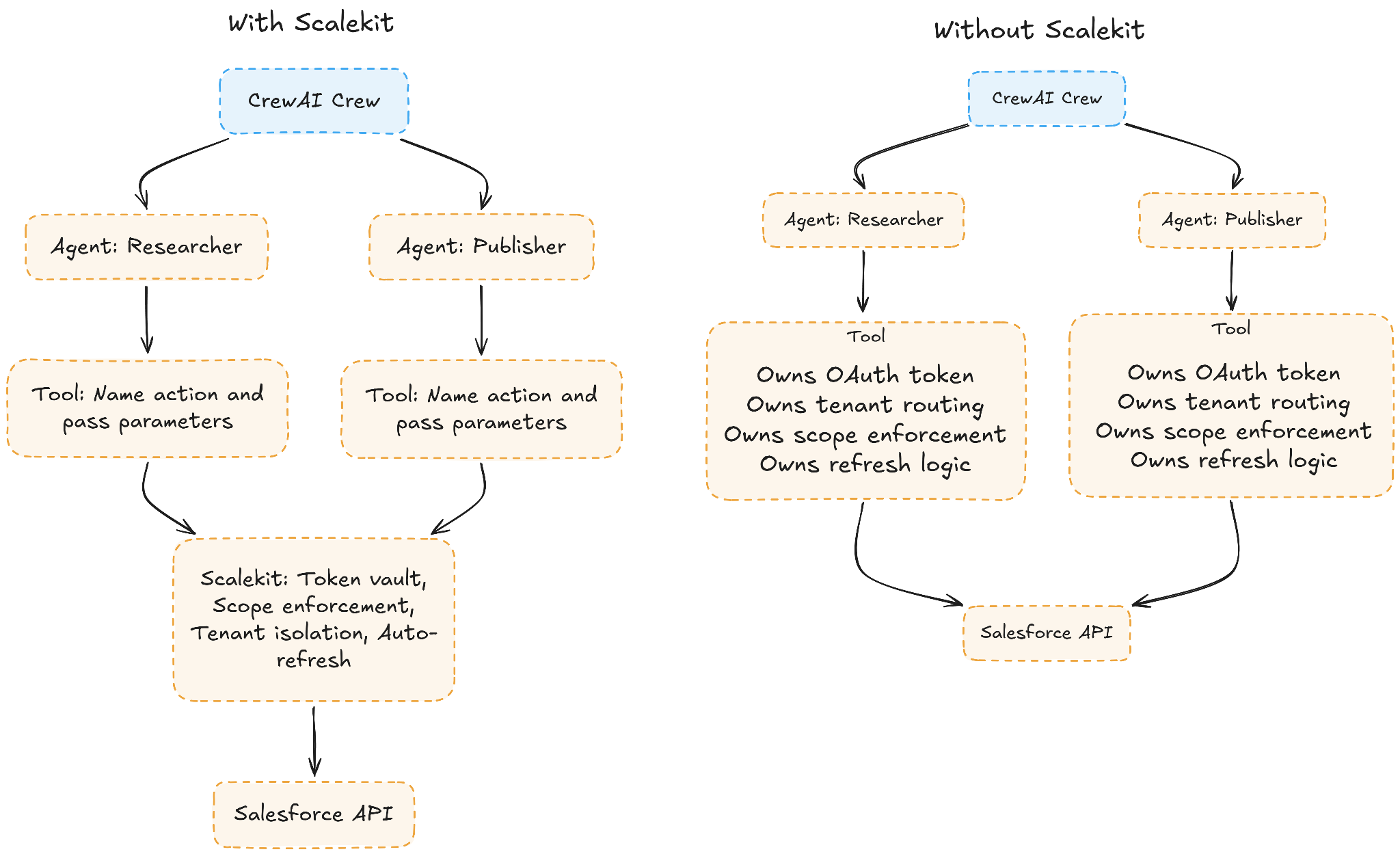
No Salesforce client, no Gmail client, no Slack token, one Scalekit client replaces all of them.
Each identifier maps to a role. The same user can hold user_123_researcher and user_123_publisher against the same Salesforce org, each with a completely different scope. This runs once during onboarding, and Scalekit handles everything from token storage to refresh from that point forward.
Every execute_tool() call tells Scalekit three things: which role is making the request, which action to run, and what parameters to pass. Scalekit resolves the correct connected account, validates the scope, checks the token, refreshes it if needed, and executes all of this before the request reaches the external API.
The crew, agents, and tasks are unchanged. The only thing that moved is the credential state, which left the tool wrappers and now lives entirely inside Scalekit's connected account layer.
Scalekit's catalog is built around agent intent rather than API surface area, which means narrower, more selectable tool interfaces with fewer parameters. The organization maps directly to how crews are typically structured in B2B products:
3000+ tools across 150+ enterprise apps, each scoped to what the role actually needs rather than what the full API exposes.
Every agent role in the crew gets its own Scalekit-connected account with role-appropriate scope. That scope is enforced at the connector layer, not in a system prompt, not in application logic, but in the credential itself. In practice, that looks like this:
["accounts:read", "opportunities:read"]["opportunities:read", "opportunities:write", "activities:create"]["incidents:create"]When a researcher agent hallucinates a write call, which LLMs will occasionally do when they reason that updating a record would help complete the task, that call is rejected at Scalekit's auth layer before it ever leaves the vault and reaches Salesforce. The LLM's reasoning doesn't matter. The credential doesn't have the scope, so the request fails structurally rather than silently.
A few things in this model are worth understanding explicitly:
This is where a senior CrewAI developer recognizes that Scalekit isn't a generic auth library bolted onto the outside of an agent framework. It's designed specifically for the role abstraction that CrewAI developers already think in terms of.
Three failure scenarios arise specifically because of how CrewAI constructs and shares tool instances, and each is difficult to reproduce without understanding the shared credential model underlying them.
When two customers trigger kickoff() simultaneously, shared tool instances mutate credential state mid-execution, and one customer's token refresh lands in the other's request chain. The Salesforce client that customer A's researcher just refreshed is the same object that customer B's publisher is writing to, so the write either fails or succeeds silently against the wrong org. This failure is invisible in development, intermittent in production, and near-impossible to reproduce because it only surfaces under concurrent load.
The diagram below shows how Scalekit handles the same scenario. Each kickoff() resolves tool calls to a separate identifier, Scalekit looks up the correct connected account for each customer, and a token refresh for customer A never touches customer B's execution.

With Scalekit, concurrency isolation is structural rather than behavioral, which means it doesn't depend on careful state management in your application code.
When a crew ships with a single OAuth scope covering all roles — which happens frequently because manually configuring per-role scopes across Salesforce, Gmail, Slack, and LinkedIn is genuinely painful — the publisher's write scope becomes the researcher's scope too, since they share the same initialized client.
The LLM reasoning about the researcher's goal may well decide that updating an opportunity would help complete the task, the credential doesn't prevent it, and the write succeeds silently against the customer's live data.
With Scalekit, per-role connected accounts make over-scoped roles impossible by construction because the scope is embedded in the credential itself rather than expressed through application logic or prompt instructions.
When a manager agent delegates to specialist agents within the same crew, and there is no explicit identity propagation, each specialist either re-resolves credentials from context, which is fragile, or operates under the manager's broader scope, which is dangerous.
With Scalekit, a single session threads through the crew's full execution so that when the manager delegates to a specialist, the specialist calls its tool with its own identifier and enforces its own scope at the call site, regardless of how execution reached that point.
The model that emerges from adopting Scalekit is a clean separation across three layers, each with a well-defined responsibility:
What changes in your codebase when you adopt this model are specific and contained: tool wrapper classes get thinner because they no longer own credential logic, credential state leaves the agent definition entirely, the role structure becomes the security model rather than just a documentation artifact, and the crew metaphor finally has the infrastructure to back it.
CrewAI changed how developers build agent systems by making multi-agent orchestration feel collaborative instead of procedural. Researchers gather context, writers synthesize information, publishers take action, and the framework coordinates how those roles work together throughout execution. That abstraction works extremely well, and it's genuinely one of the reasons the framework became popular so quickly.
The complexity arises when those same workflows operate across many customers and external enterprise systems simultaneously. Shared tools gradually take on responsibility for identity, authorization scope, token lifecycle management, and tenant routing — work they were never designed to do. Most production issues in large multi-agent deployments emerge from that boundary rather than from anything wrong with the orchestration itself.
Scalekit draws a clean line between orchestration and identity by moving connected accounts, OAuth lifecycle management, per-role authorization, and tenant isolation beneath the workflow layer. CrewAI continues handling what it was built for: collaboration and execution between agents. At the same time, Scalekit ensures those actions execute safely across external systems at runtime, and your application owns the business logic in between.
No. Your crew structure stays the same. You refactor your tool classes to call actions.execute_tool() instead of carrying credential objects internally, and you set up connected accounts per role during onboarding. The Crew, Agent, and Task definitions don't change.
Scalekit rejects the request before it reaches the customer's system. The agent receives a clear error, such as insufficient_scope: opportunities:write required, which it can reason about by delegating to a different role, skipping the action, or surfacing the issue to a human-in-the-loop.
Each agent uses its own identifier when calling execute_tool(), so when agent A delegates to agent B, agent B calls its tool with its own identifier, and its scope is enforced independently at the Scalekit layer, even within the same crew execution.
Yes, Scalekit is framework-agnostic, so any framework that makes tool calls can integrate with actions.execute_tool(). CrewAI is the primary use case this post covers, but the same pattern works with LangChain, Google ADK, and several other frameworks for which Scalekit provides native integrations.
During onboarding, you create separate connected accounts per role using get_or_create_connected_account() with different identifiers such as user_123_researcher and user_123_publisher, then direct each through its own authorization flow with the appropriate requested scopes. The customer completes OAuth once per connection, and Scalekit manages token storage and automatic refresh from that point forward.