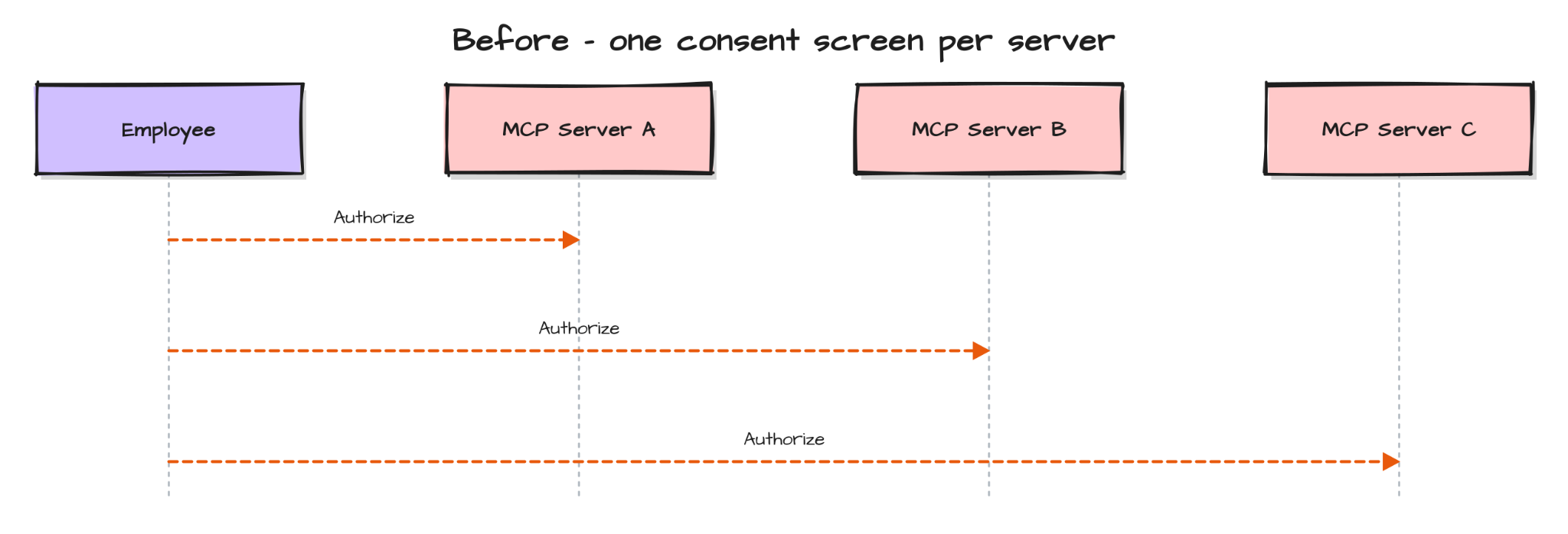
MCP servers that ask every user to click through their own OAuth consent screen got that design right for how MCP started: individuals and small teams connecting their own tools, one at a time. That stops working cleanly once the same server gets rolled out across an entire company. An IT admin now has to reason about a few thousand employees, dozens of connectors, and what happens the day someone leaves. Per-user consent was never built to answer that question, and it shouldn't have to.
Two extensions answer it instead-
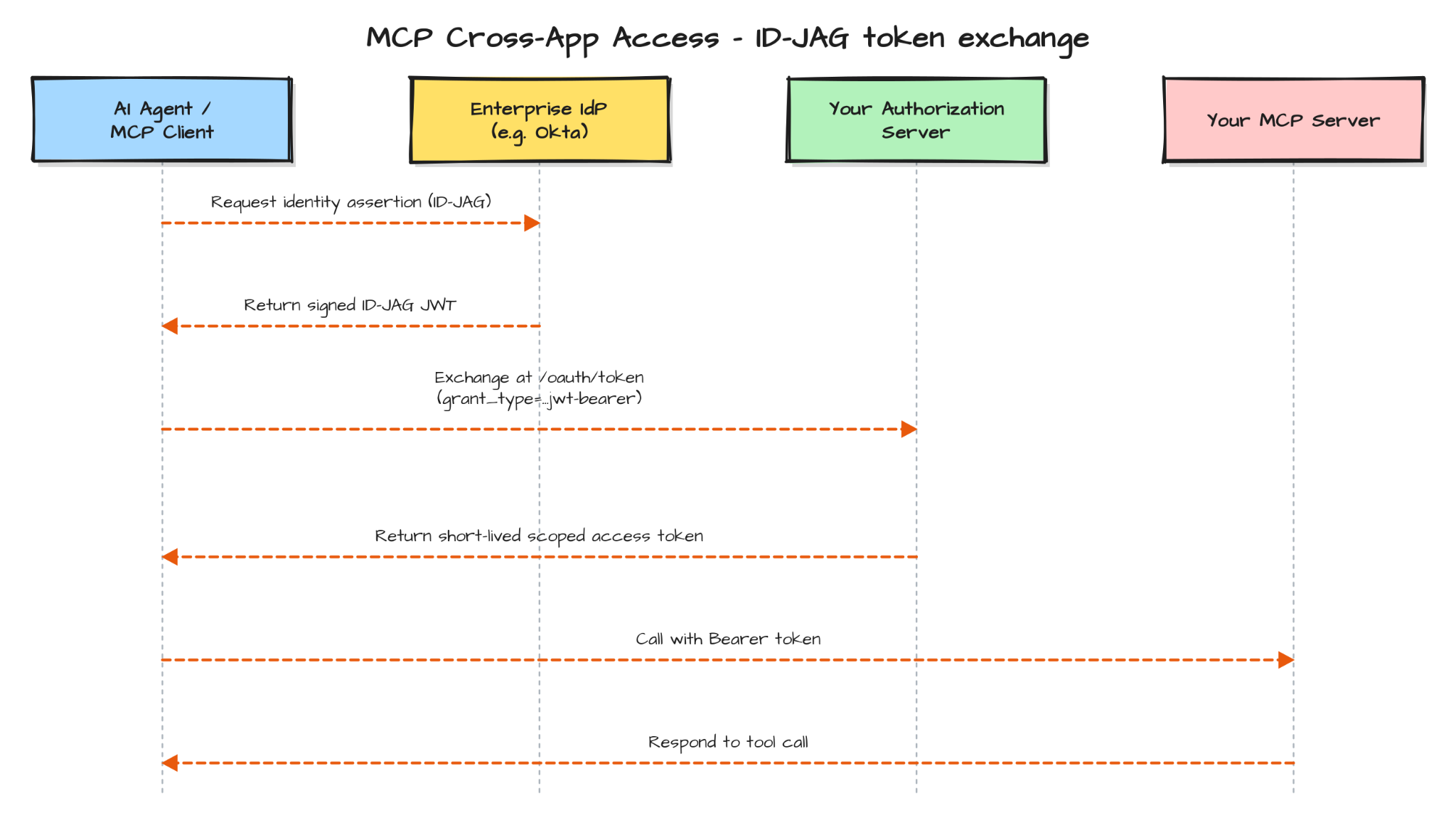
If you've read Okta's docs and Anthropic's docs on these separately, they read like two different things to build for. They aren't. Both sit on top of the same credential: the Identity Assertion JWT Authorization Grant, or ID-JAG — an IETF OAuth draft that defines how an enterprise identity provider issues a short-lived, signed assertion that one application can hand to another.
XAA is Okta's name for the identity-provider side of that handoff. EMA is the MCP protocol's name for the client and server side. Build your authorization server to issue and validate against this one credential, and you're compatible with both. Here's the full flow, end to end:
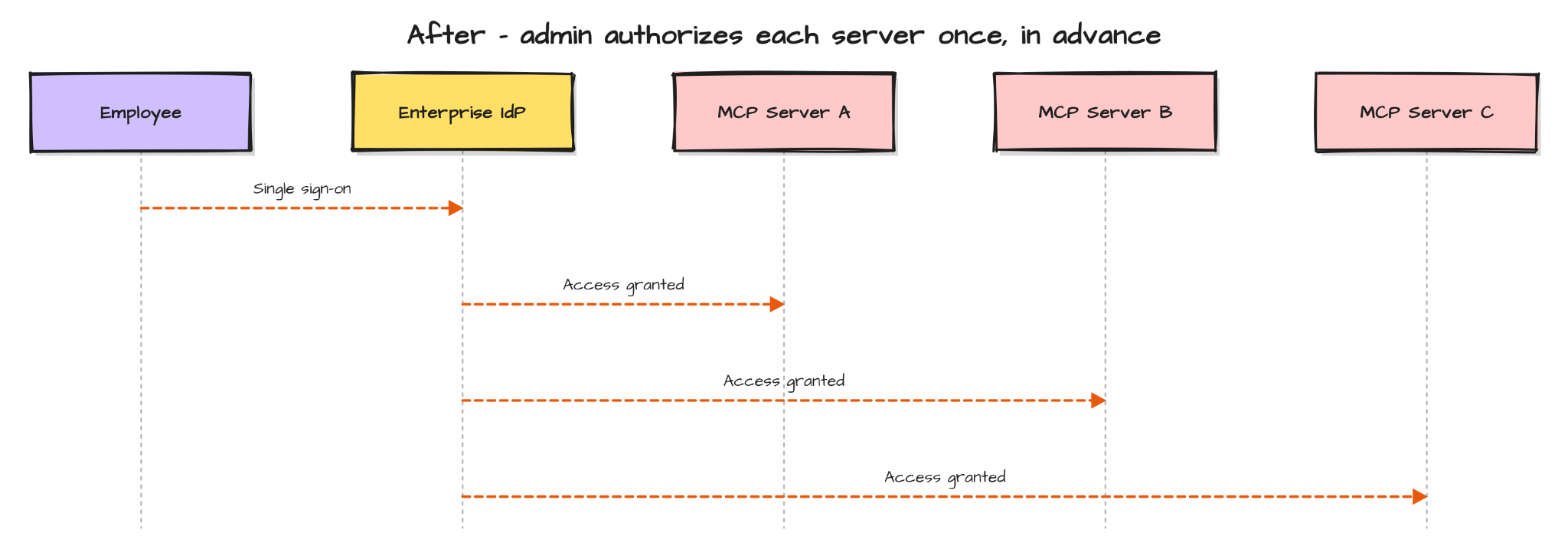
What that flow removes, concretely, is every consent screen after the first one:
None of this is hypothetical. EMA has been live since June 18, shipping inside Claude Enterprise, Claude Code, and Cowork, with VS Code also supporting it. HubSpot, Ramp, and Webflow are already running it. Asana, Atlassian, Canva, Figma, Granola, Linear, and Supabase are already connected, with Slack next.
That's the actual reason to do this now: get your server production ready, and it shows up in that same catalog, next to Figma and Linear, in every enterprise customer's Claude connector list, and it becomes listable on Okta's Integration Network. Skip it, and you're the connector that isn't there when an admin goes looking.
Most MCP servers today run one flow: a user authenticates, your authorization server issues a token, your server checks it. One trust relationship, one tenant assumption baked into however you built it.

XAA and EMA don't replace that. They add a second path into the same authorization server: a trust relationship with an IdP you don't operate, arriving as an ID-JAG instead of a normal login, and resolving to a tenant instead of a single user you already know.
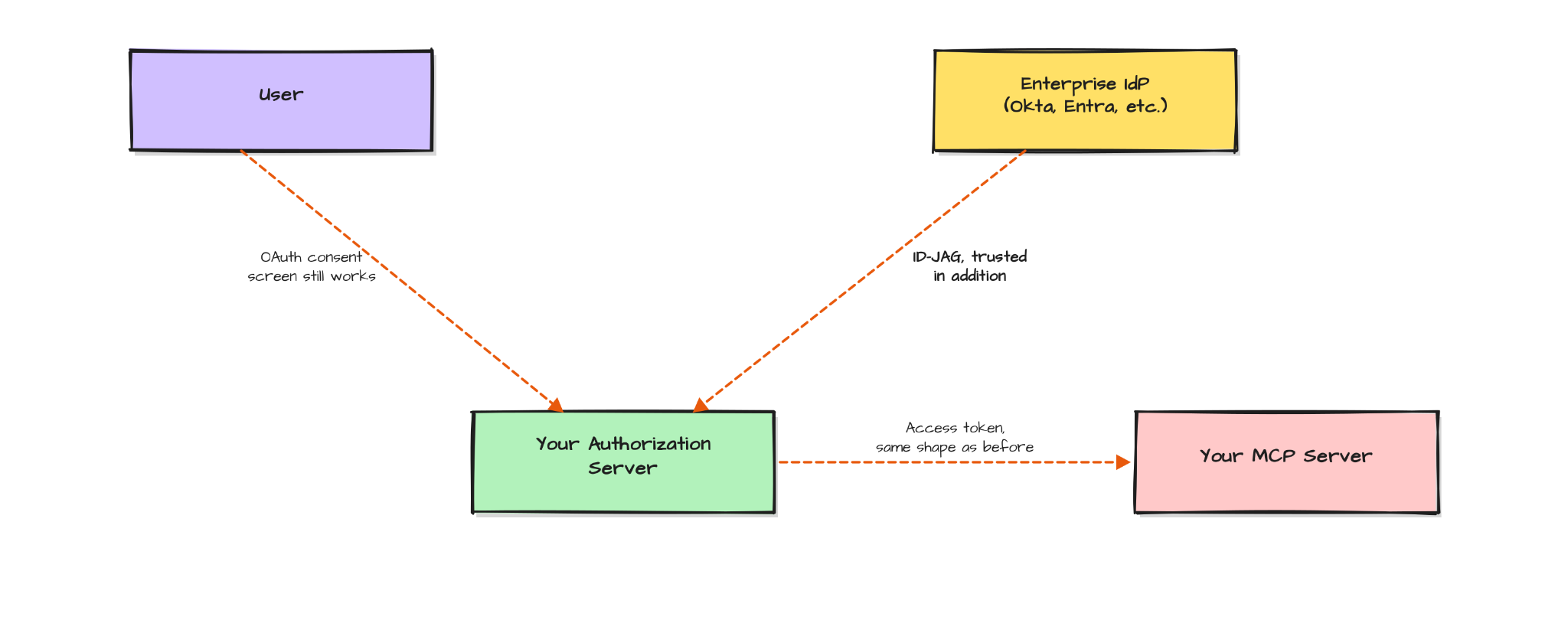
The output side doesn't change at all — your MCP server keeps validating the same kind of bearer token it validates today. Everything below is about that new arrow on the left: teaching your authorization server to trust it, validate it, and issue a token from it correctly.
If you're building that arrow yourself, steps 1 through 6 below are the work involved. Platforms that already sit in front of your MCP server as the authorization layer — Scalekit is one — handle most of this as configuration rather than new code, which is worth knowing going in, since it changes how much of what follows you actually need to build versus turn on. Each step notes what that looks like where it's relevant.
One more thing worth knowing before you start: you won't have a real enterprise IdP tenant or a live Claude Enterprise account to test against while you build this. Most teams verify the new arrow with a tool that stands in for both ends of it — MCPJam's XAA Debugger acts as the IdP that signs the ID-JAG and as the client that presents it, so you can run the whole flow locally before anyone at a customer touches it.
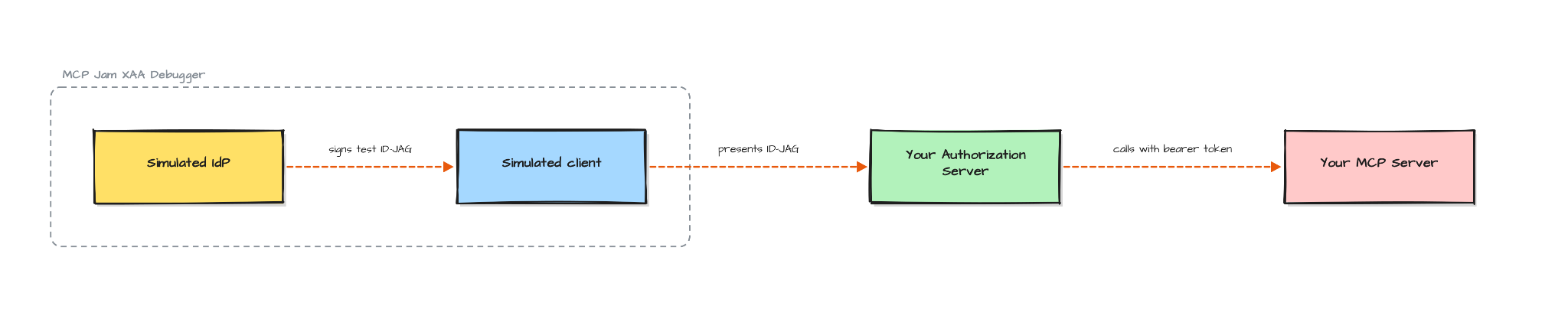
That's step 7 below. It's worth keeping in mind from the start, because it changes how you build the earlier steps — you're building toward something you can test locally, not something you can only find out is broken once a real customer connects it.
Seven steps, in order. Each one has a way to check you actually did it, and the mistake people usually make at that step.
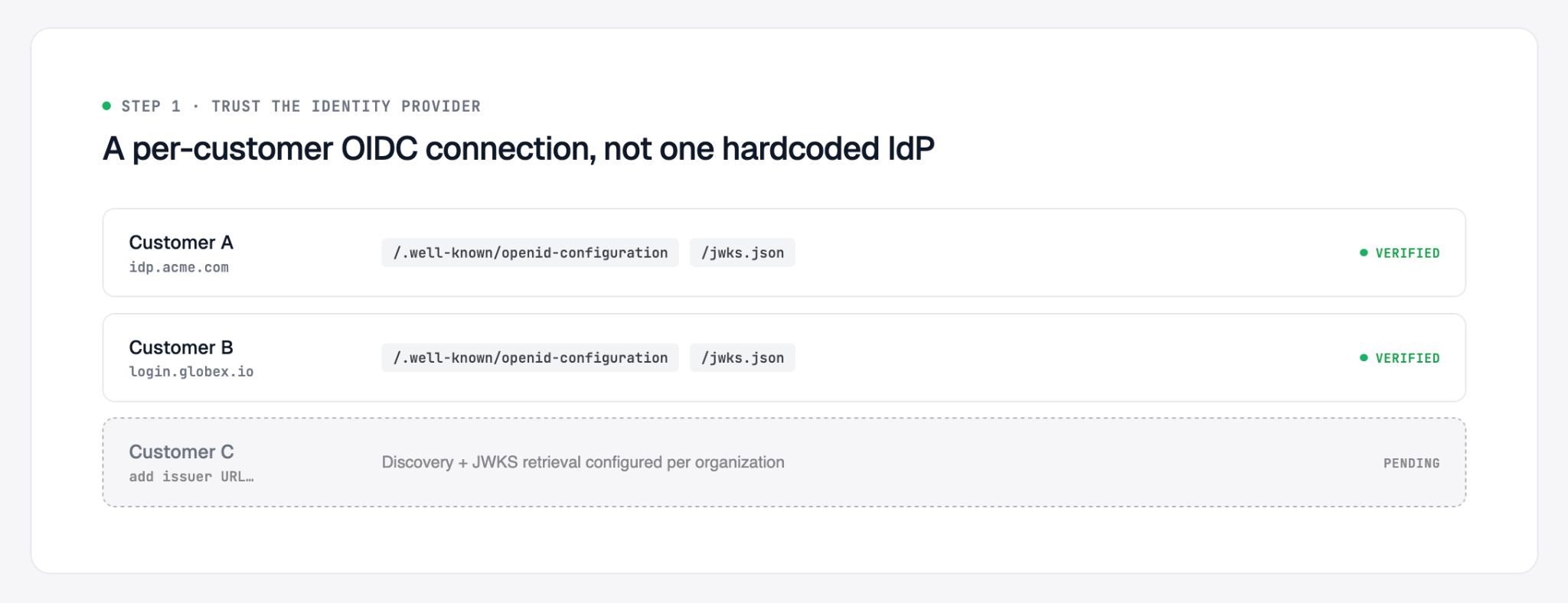
Fetch the customer's IdP's OpenID Connect discovery document and JWKS, and set up signature validation against those keys. This is the left-hand arrow in the diagram above, made of concrete.
Done when: you can take a token signed by a real (or test) IdP and confirm your server verifies the signature correctly.
Common mistake: hardcoding one customer's IdP details instead of building this as a per-customer configuration. You will have more than one customer's IdP to trust.
With Scalekit: this is a per-organization OIDC connection configured in the dashboard. Point it at the customer's IdP issuer URL, and discovery and JWKS retrieval happen automatically — nothing to implement for this step.
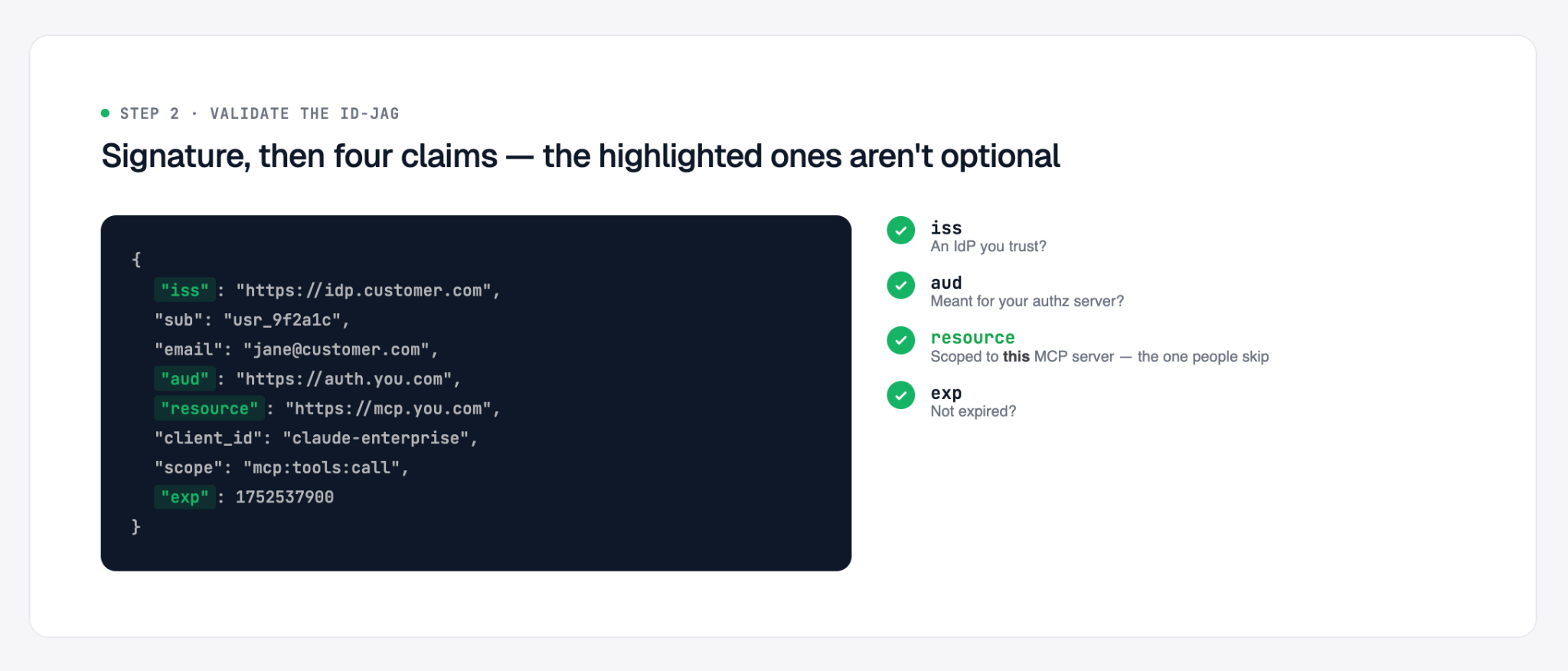
An ID-JAG is a signed JWT with a defined claim set:
(The claim set is defined by the spec; actual values depend on your IdP and authorization server.)
Check the signature against the IdP's public keys, then validate four claims:
Done when: your server rejects a token with any one of those four claims wrong, not just a token with a bad signature.
Common mistake: checking the signature and stopping there. resource is the one people skip — without resource, a valid ID-JAG issued for a different MCP server in the same organization will pass.
With Scalekit: signature, iss, aud, resource, and exp validation all happen in Scalekit's authorization server before your MCP server sees the request. Enabling XAA for a server is a single dashboard toggle; there's no validation code to write for this step.
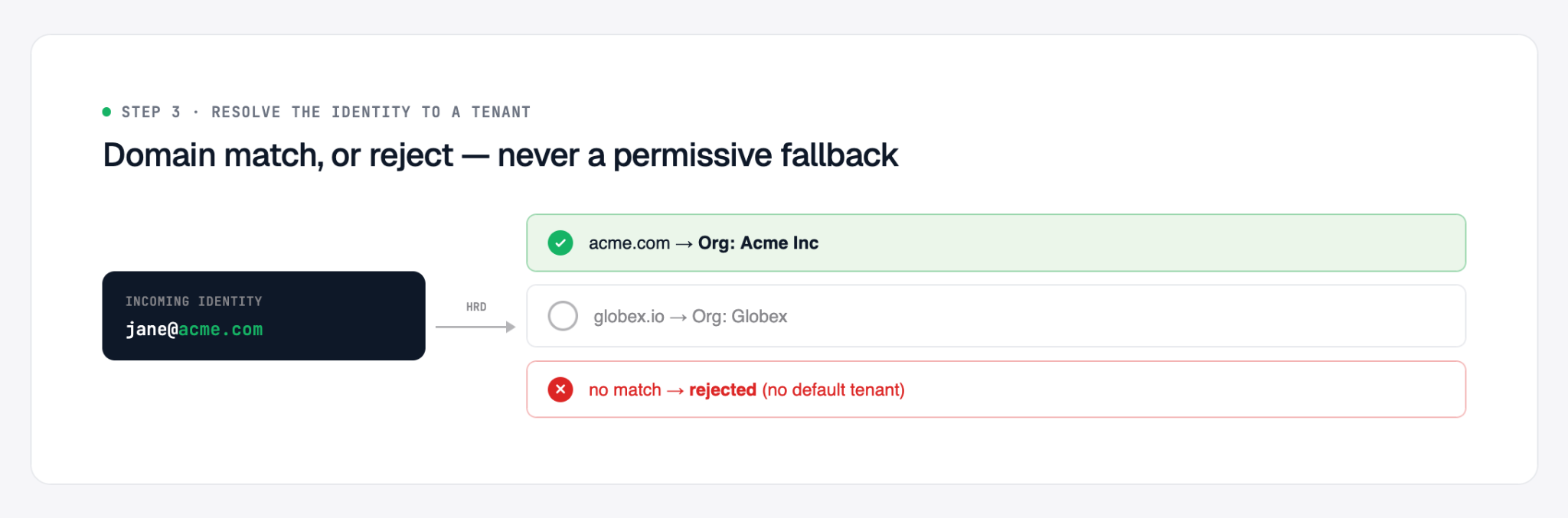
The ID-JAG carries a subject and usually an email. Your authorization server has to decide which customer this maps to, and what that user is allowed to do. The spec doesn't prescribe a mechanism for this. Some implementations match the email domain against a configured customer record, others use a static per-connection mapping. Use whatever fits your existing multi-tenancy model.
Done when: a token from Customer A's IdP cannot resolve to Customer B's tenant, even by accident.
Common mistake: a permissive fallback — if the email domain doesn't match anything, defaulting to some existing tenant instead of rejecting the request outright. This is the step most likely to introduce a real security bug, because it's the one part of the flow the spec leaves entirely up to you.
With Scalekit: resolution is handled via org-to-domain mapping (HRD) — an incoming identity's email domain is checked against the domains configured for each organization, and anything that doesn't match is rejected rather than falling through to a default tenant.
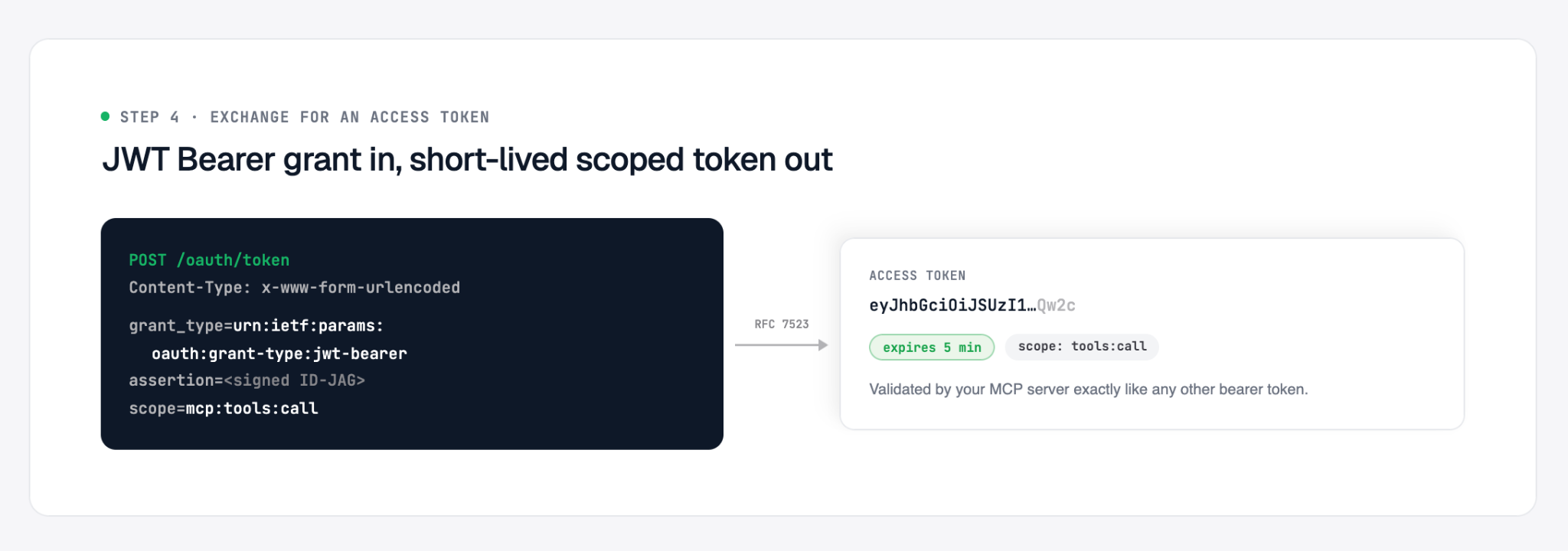
The client doesn't call your MCP server with the ID-JAG directly. It exchanges the ID-JAG for a normal access token first, using the JWT Bearer grant defined in RFC 7523:
Your authorization server runs steps 1–3 against the assertion, then returns a short-lived, scoped access token.
Done when: the token you return is scoped to the specific permissions requested, expires quickly, and your MCP server accepts it exactly the way it accepts any other bearer token today.
Common mistake: issuing a long-lived token here out of habit. The whole point of this flow is short-lived, scoped access — treat it differently from a standard OAuth token you'd hand out for a long session.
With Scalekit: the exchange happens against Scalekit's own /oauth/token endpoint using the JWT Bearer grant. Your MCP server receives a normal short-lived access token and validates it exactly as it does today — nothing changes on the server side for this step either.
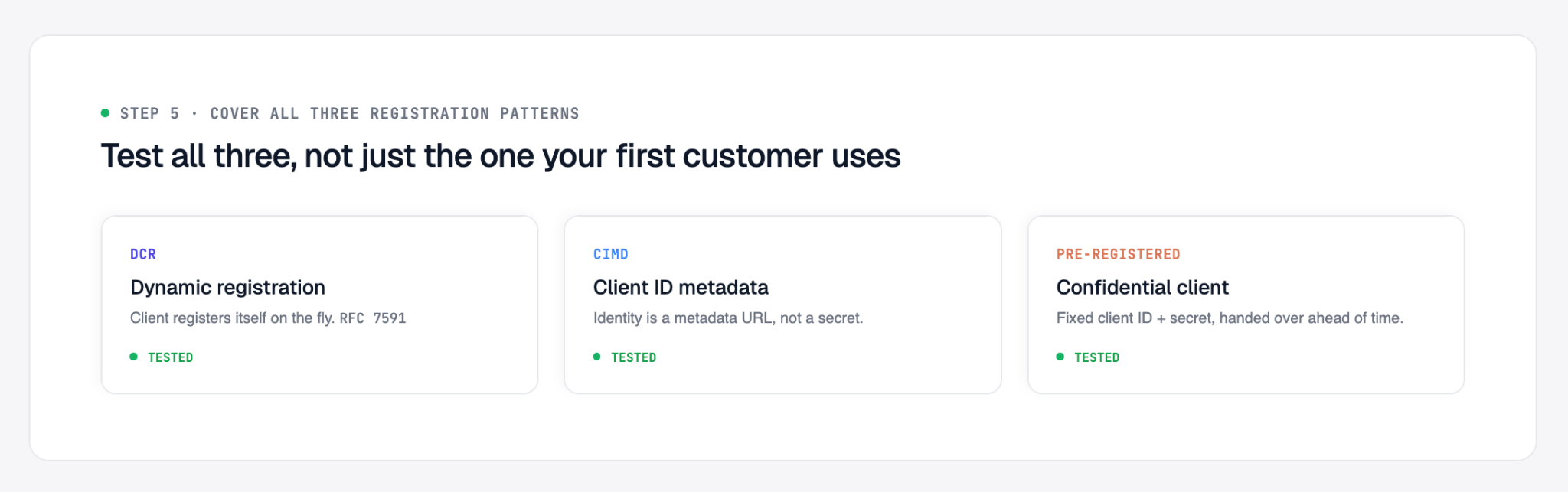
Depending on which MCP client connects, you'll see one of three patterns:
Done when: you've tested a connection using each of the three, not just the one your first customer happened to use.
Common mistake: building and testing against DCR only, because it's the one most client libraries default to, then discovering in a customer call that their client only supports CIMD or requires pre-registration.
With Scalekit: all three registration methods are supported without extra configuration — DCR and CIMD clients connect automatically, and pre-registered confidential clients are set up from the same dashboard.
Two related but separate changes land in the MCP spec on July 28 (already locked as of the release candidate, May 21, 2026). Neither is XAA/EMA-specific — they apply to any MCP authorization server — but if you're touching this code for steps 1–5, do these at the same time:
Done when: both are in place and covered by whatever test suite you used for step 5.
With Scalekit: since Scalekit operates the authorization server, hardening like this lands as a platform update rather than something you individually track and implement per customer.
Before you enable enterprise-managed auth for users, you need to verify that your authorization server can validate a signed ID-JAG, issue a correctly scoped token, and that your MCP server accepts that token. This test normally needs an enterprise IdP, an MCP client, your authorization server, and your MCP server. MCPJam's XAA Debugger supplies the first two so you can test the complete exchange against your own servers, even locally.
By the end of this setup and step-by-step, you'll have a trace of the flow, including the signed assertion's claims, each discovery request, the token exchange, and the authenticated MCP request. It also includes negative tests for the validation checks your authorization server should enforce.
Before you run, have the following ready:
The last item is the setup that most often blocks a first run. Your authorization server must retrieve the public key for the issuer that signed the ID-JAG. It must trust MCPJam's test issuer, not your production enterprise IdP.
For the usual development setup, your MCP server runs locally and the authorization server is hosted by a provider such as Scalekit, Okta, or Auth0. Open the Inspector's XAA Flow and turn on
Use hosted issuer. The header switches to an organization-scoped issuer and shows copyable Issuer URL, OpenID Config, and JWKS URL values. Register that issuer with your authorization server. If you use a pre-registered client, register the debugger's client ID there as well.
Only assertion minting uses app.mcpjam.com. The token request and the final request to your local MCP server still run from your machine. A tunnel is therefore unnecessary for this setup.
Use the hosted issuer only when the authorization server is publicly reachable over HTTPS. The hosted negative-test scorecard cannot call a loopback or plain-HTTP authorization server. For a local authorization server, leave the hosted issuer off and use the local issuer instead.
The hosted issuer is organization-scoped. It requires a signed-in MCPJam member of that organization to mint assertions. Prefer this scoped issuer when registering MCPJam with an authorization server. The legacy unscoped hosted issuer is intended for throwaway testing.
Before running the CLI flow, install the MCPJam CLI:
For a headless CLI run, start the local Inspector. It publishes issuer metadata and the matching signing keys from the CLI's local key directory:
Trust <issuer-base-url>/xaa in the authorization server and configure its JWKS URL as:
For example, with the local Inspector, use http://localhost:6274/api/mcp/xaa as the issuer and http://localhost:6274/api/mcp/xaa/.well-known/jwks.json as its JWKS endpoint.
If the authorization server is hosted, it cannot reach localhost; expose the Inspector through a public tunnel and use that public origin as --issuer-base-url.
The Inspector offers the same configuration in its server form. Choose a pre-registered client when you already have a client ID, DCR when the authorization server exposes an open registration endpoint, or CIMD when it supports client metadata URLs. Select OIDC or SAML for the simulated identity assertion as needed. The ID-JAG remains a JWT in either case.
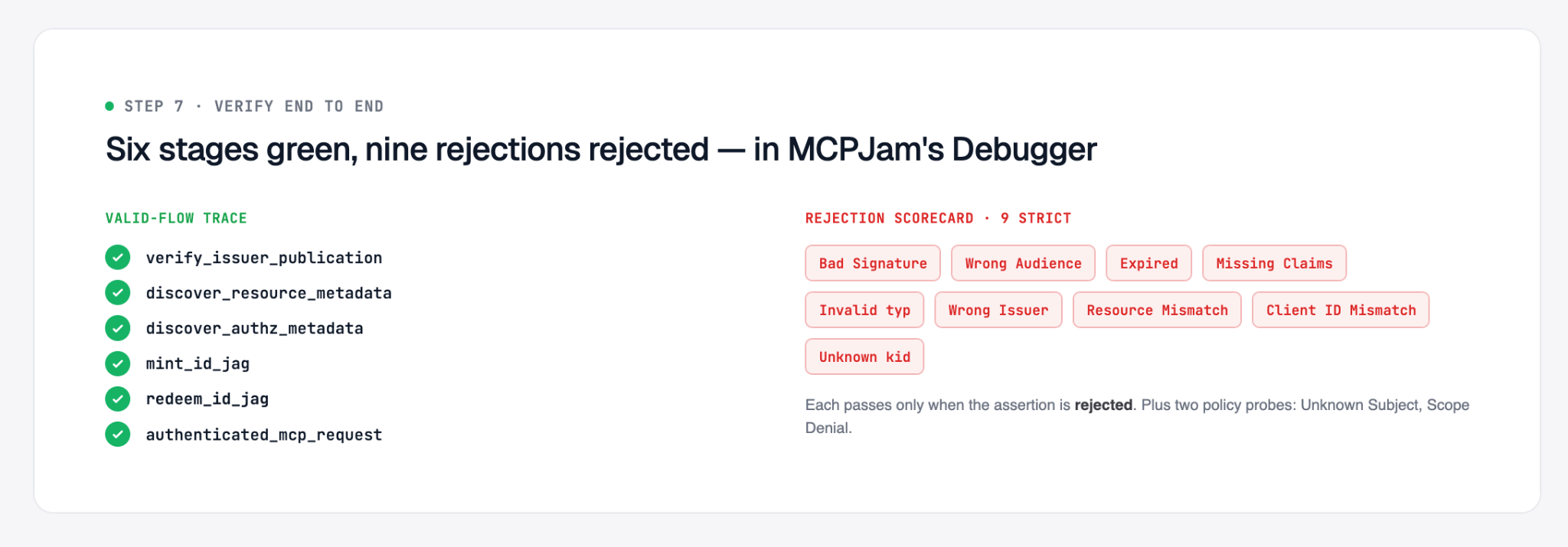
Each run records the stage that completed or failed:
Treat token redemption as the operational verdict. Metadata advertisement is supporting evidence. For example, an authorization server that does not advertise the expected ID-JAG grant profile can still redeem a valid ID-JAG. MCPJam records that discrepancy without failing an otherwise successful flow.
Capability evidence is reported as advertised, not_advertised (the metadata key exists without the expected value), or unknown (the key is absent). unknown is weaker evidence than not_advertised.
Before redemption, the Inspector opens the ID-JAG panel. Check the claims that bind the assertion to your deployment: iss, sub, aud, resource, client_id, scope, and exp. A wrong aud or resource is easier to correct before the assertion is sent. MCPJam redacts raw tokens, assertions, and secrets in its output.
Run the flow with identities that exercise the lookup rules in your system. Set --sub and, when relevant, --email to the identifiers your user and tenant mapper receives.
Run one identity for tenant A and another for tenant B. Confirm that each receives only its own tenant's data. Then try a subject your system has never seen. The Inspector reports that as the Unknown Subject policy probe. It has no universal pass or fail: your system may provision the user or reject the request. The useful result is whether it applies your intended policy.
A successful flow shows that the authorization server accepts one valid ID-JAG. It does not show that the server rejects invalid assertions. After a successful flow, select Run negative tests in the Inspector. Each strict check passes only when the authorization server rejects the malformed ID-JAG. These checks do not call the MCP server.
The strict checks cover:
Unknown Subject and Scope Denial are policy probes, not pass/fail checks. An authorization server may reject an unknown user, provision one, or grant fewer scopes than requested. Confirm that each outcome matches your policy. The scorecard is a targeted security and policy check. It is not a complete conformance suite.
Use failures to narrow the fix
Expand the failed step to inspect its request, response, decoded claims, and guidance. Common causes include:
The CLI writes a redacted JSON result to stdout and exits 0 when the flow completes or 1 when it does not. That makes the positive flow suitable for CI:
Give a coding agent the result JSON and the guidance from the failed step. The trace identifies the failed stage and the relevant claim or configuration boundary, which directs the investigation to the appropriate handler in the authorization server or MCP server.
The same workflow applies when a provider implements the authorization server. Point the debugger at the provider-backed endpoint and observe what the token endpoint actually accepts and issues. Provider configuration can establish the trust and token-exchange path, but the end-to-end flow and rejection checks still verify how your MCP server and authorization policies behave.
If you've enabled XAA through Scalekit, steps 1 through 6 are already configuration rather than code you wrote. This step is where the time actually goes: pointing MCPJam's debugger at your Scalekit-backed server and running the checks above before a real customer's IdP does it for you.
Done when: a valid assertion completes all six stages, each of the nine strict rejection checks is rejected, tenant tests remain isolated, and the two policy probes produce the behavior your team intends.
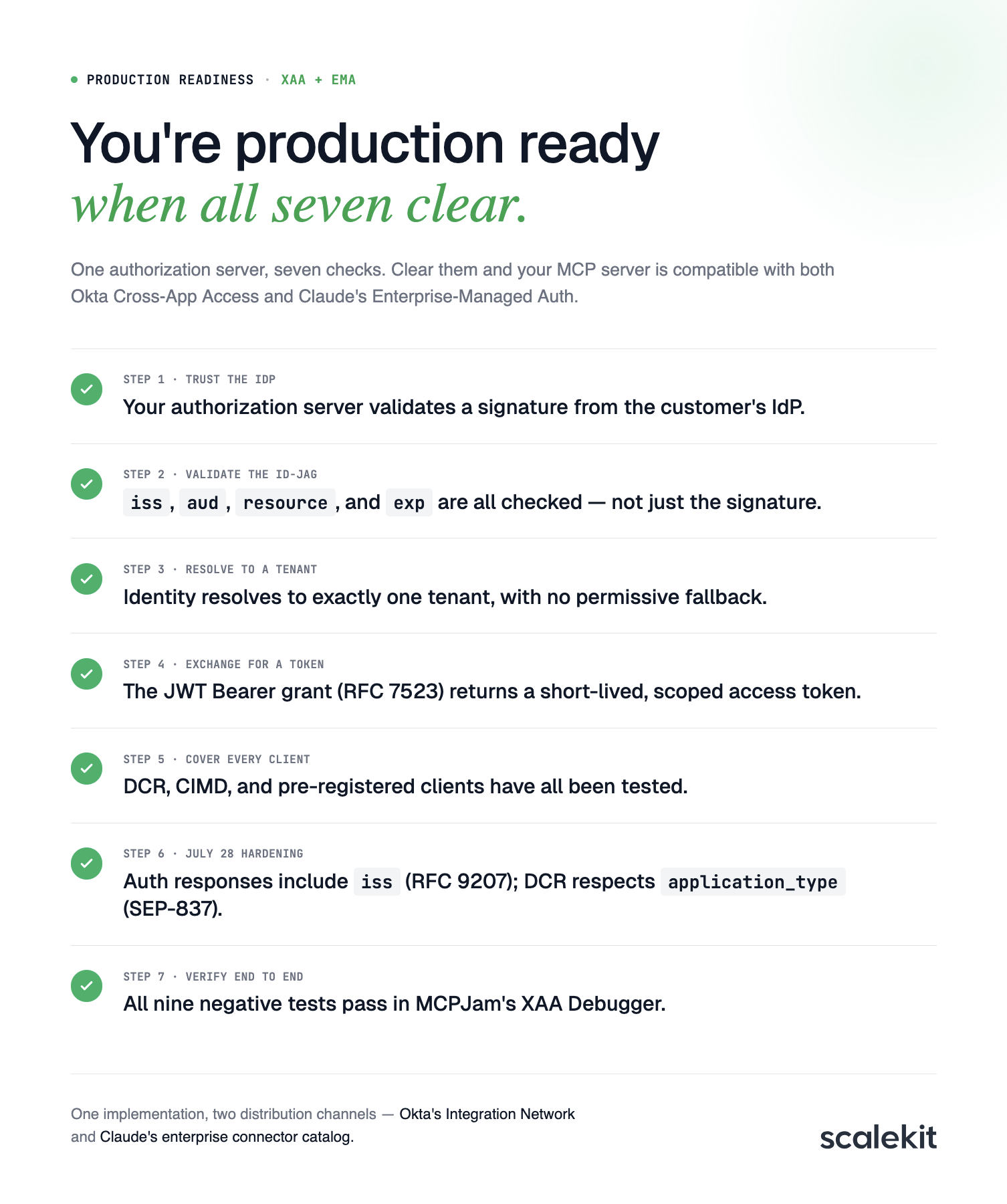
Every step above has a "done when," and together they're the checklist:
Clear all seven, and you're compatible with both Okta Cross-App Access and Claude's Enterprise-Managed Auth — one implementation, two distribution channels.