

Your agent needs to read and write Pipedrive. As of mid-2026 there are two ways to give it that access, and they are not the same object. Pipedrive shipped a native Model Context Protocol (MCP) server in June 2026, and it has offered a mature REST API for years. They differ on what your agent can actually do, on the auth path each one puts you on, and on how much operational surface area you own in production. This article is the decision framework for senior engineers building production Pipedrive agents, plus the exact code to wire either path up cleanly.
Both give an agent access to the same CRM data. They differ in how that access is packaged, authorized, and maintained. The MCP server is a newer, higher-level surface; the REST API is the full, versioned platform underneath it.
Pipedrive launched its native MCP server on June 30, 2026, and it is available on every Pipedrive plan. It is hosted and remote, built and maintained by Pipedrive, and an agent connects to it through a secure OAuth login with no code, middleware, or developer setup required.
The server respects the connecting user's existing Pipedrive permissions, and every action it takes is written to the Pipedrive change log for auditability. Usage draws against per-plan token limits. You can read the details on the official Pipedrive MCP server page.
The important structural fact: MCP here is a request/response surface inside an AI assistant. It has no triggers, and nothing runs when the conversation is closed. It is a doorway, not a background worker.
The Pipedrive REST API is the complete platform. It exposes deals, persons, organizations, leads, activities, notes, products and deal line items, files, saved filters, goals, users, webhooks, followers, participants, and pipeline analytics. The full reference lives on the Pipedrive Developer Hub.
Authentication has two paths. A personal API token is a static string passed in the x-api-token header; it is tied to a single user and company, and each user can have only one active token at a time. OAuth 2.0 is the path for Marketplace apps and issues scoped access_token and refresh_token pairs.
Two production realities shape any Pipedrive API integration. The API is split across v1 and v2, with v2 out of beta since 2025 but not yet covering every resource; leads, for example, remained v1-only into 2026. Rate limiting is token-based rather than a simple requests-per-second cap, and custom fields are addressed by 40-character hash keys rather than human-readable names.
The comparison that matters is not "which has more endpoints." It is which path gives your specific agent the right capabilities, the right auth model, and the lowest operational surface area. Four dimensions decide it.
The MCP server is deliberately narrow. It covers search, retrieval, and record management for the core sales objects, plus lead-to-deal conversion, which reads cleanly as natural-language actions. The REST API covers everything else the platform can do.
The gap is real and specific. The table below maps the agent-relevant actions across both surfaces. Full means first-class support, Limited means partial or read-only, and None means the surface does not expose it.
The pattern is consistent: if your agent only needs to find records, create them, and move deals along, the MCP surface is enough. The moment it needs line items, files, analytics, or webhooks, you are on the API.
MCP is OAuth exclusively. Connecting triggers a browser-based consent flow, and the agent acts with a token bound to the consenting user. That is the right model for an interactive assistant where a human is present to authorize.
The API adds a second option. Alongside OAuth 2.0, the personal API token lets an agent authenticate without a browser round-trip, which is what makes headless and background execution possible. That flexibility is also a liability: an API token is tied to one user and grants access to all of that user's data, so it is a broad, long-lived credential to hold.
Here is the structural point that holds on both paths. In a multi-tenant B2B agent, every user has their own Pipedrive credential. MCP's OAuth flow gives you a token per user; the API gives you a credential per user. Neither path solves storage, rotation, or revocation. Those are infrastructure problems regardless of which surface you pick.
The MCP server manages tool schemas, endpoint normalization, and some of the request shaping for you. What you still own is the part that breaks at 3am: token storage, refresh, revocation, and tenant isolation across every connected user.
With the direct API you own more. You own schema definitions for every tool your agent exposes, error handling, retries against token-based rate limits, the v1-to-v2 split, the 40-character custom-field hash mapping, and the full token lifecycle. The upside is total control; the cost is a maintenance obligation that runs parallel to your actual product.
The maintenance trajectories differ too. MCP schemas change when Pipedrive updates the server, and your agent inherits those changes without a code deploy. API contracts are versioned, so you migrate on your own schedule but you also carry the migration work.
Neither path is universally correct. Match the path to the agent.
Use Pipedrive MCP when:
Use the Pipedrive API when:
Both surfaces hand your agent a credential per user. Neither hands you a vault, a rotation policy, or a revocation flow. In a multi-tenant agent, that is not one credential; it is N credentials, one for every user who ever connected Pipedrive.
The problem is identical whether you chose MCP or the API. The token type differs — an OAuth token on one path and an OAuth token or API token on the other — but the infrastructure required is the same: encrypted per-tenant storage, proactive refresh, and event-driven revocation. A naive "store the token in a row and read it back" approach works in demos and does not survive production scale, because tokens expire mid-workflow, users revoke consent without telling your agent, and over-scoped credentials accumulate quietly until an audit surfaces them.
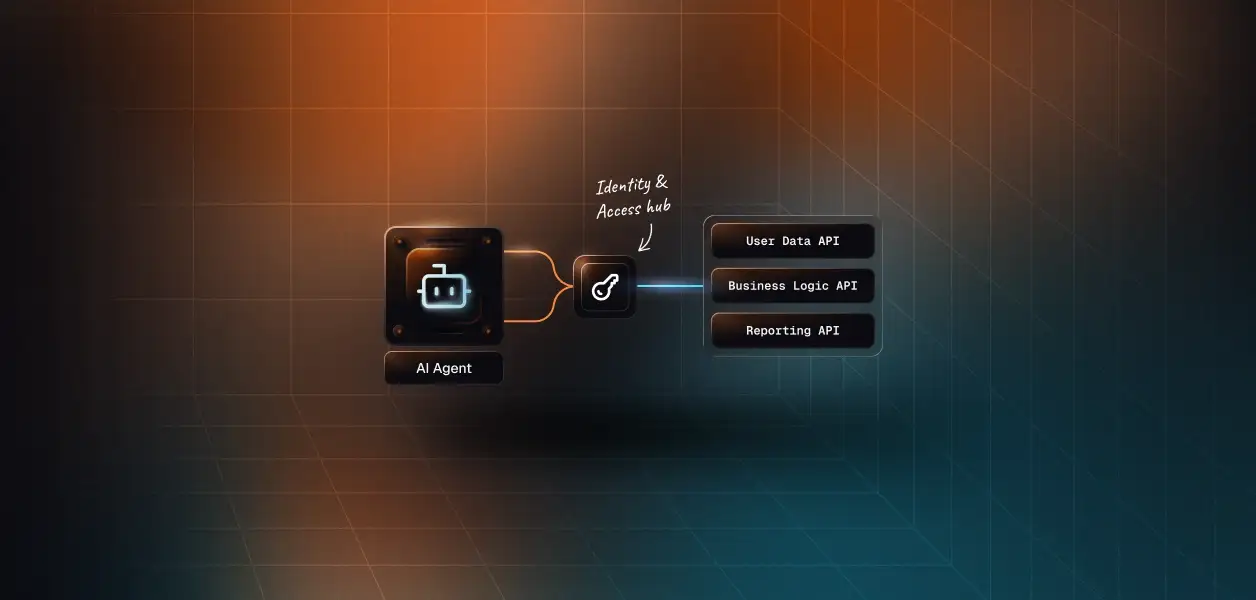
This is where Scalekit's Pipedrive connectors fit. Scalekit handles the OAuth flow, token vault, and rotation for both the REST API and the vendor MCP, so the MCP-versus-API decision does not change your auth infrastructure. Credentials never touch the agent runtime; the agent executes against scoped identifiers instead of raw tokens.
Scalekit exposes both surfaces as connectors, so you can pick per agent without changing how auth works. The Pipedrive REST connector ships 105 prebuilt tools over the full API using OAuth 2.0, and the Pipedrive MCP connector wraps Pipedrive's native server — about 32 tools — with OAuth 2.1 and Dynamic Client Registration (DCR).
The only thing that changes between the two paths is the connection_name you pass. For the REST surface, use pipedrive; for the vendor MCP, use pipedrivemcp. The value must match the connection you configured in the Scalekit dashboard exactly, including case; a mismatched connection name is the single most common integration error.
Prebuilt tools remove the hidden tax of writing and maintaining tool schemas per connector. Every connector you build by hand is a connector you now maintain across API versions and model upgrades. Scalekit's tools ship as LLM-ready schemas tested against the live Pipedrive API, so the team builds the agent, not the tooling. Browse the full setup for either surface on the Scalekit AgentKit SDK docs.
Start by making sure the current user has an active connected account. If they do not, send them through the OAuth consent link. This is the same pattern for both connectors.
With an active connected account, retrieve the tools that account is authorized to call. This is not a flat connector catalog; it is the scoped surface for this specific user, derived from what they individually authorized.
Handing an LLM the full catalog degrades tool selection and burns tokens before the agent does any work. A scoped surface is both an accuracy lever and a cost lever: the agent sees only what this user can do, which means what the user cannot do, the agent cannot do either.
Bind the scoped tools to your model and run the standard tool-calling loop. Scalekit returns native LangChain StructuredTool objects, so there is no schema reshaping.
For a deterministic pipeline where you do not want the model choosing tools, call one directly with execute_tool. The tool name comes from the connector's tool list.
To target Pipedrive's native MCP server instead of the REST surface, change the connector and the tool name. Here it is in TypeScript against the pipedrivemcp connection.
Because every execute_tool call runs against a specific connected account, each downstream action is attributable to the user it acted for. That gives you per-user agent auth logs of exactly what the agent did in Pipedrive, which is the observability enterprise security review asks for and which a shared service account cannot provide.
A standard MCP server exposes every tool it has, and a shared credential gives every user the same surface. For a multi-tenant agent, that is both a security failure and an accuracy failure. Scalekit's Virtual MCP servers fix both: you declare exactly which connections and tools an agent role can see, and each run receives a short-lived session token scoped to one user's connected accounts.
One server definition serves all users. You configure it once per agent role, and before each run you mint a token bound to the current user; the endpoint is static, the identity is not. That is what makes a Pipedrive agent that also touches Slack or a calendar safe to run across tenants without deploying a server per customer.
Recommended reading: the CRM AI agent development guide walks through the same connected-account model applied end to end for sales agents.
If your Pipedrive agent is an interactive assistant doing core CRM work with a user present to authorize, build against MCP; it is the faster path and Pipedrive maintains the surface for you. If your agent runs headless or on a schedule, reacts to webhooks, or needs products, files, analytics, or user management, build against the API directly.
Either way, the credential management problem is the same. Both paths give you a token per user and neither gives you the vault, rotation, and revocation that a multi-tenant agent requires. That is the part worth solving once, at the infrastructure layer, so it does not have to be re-solved every time you add a connector or move an agent from MCP to the API.
Compare plans on the Scalekit pricing page, or browse the Pipedrive connector to see the full tool surface.
Building a Pipedrive agent and want a second set of eyes on the auth model? Join the Scalekit Slack community, or talk to us for immediate help.


.png)