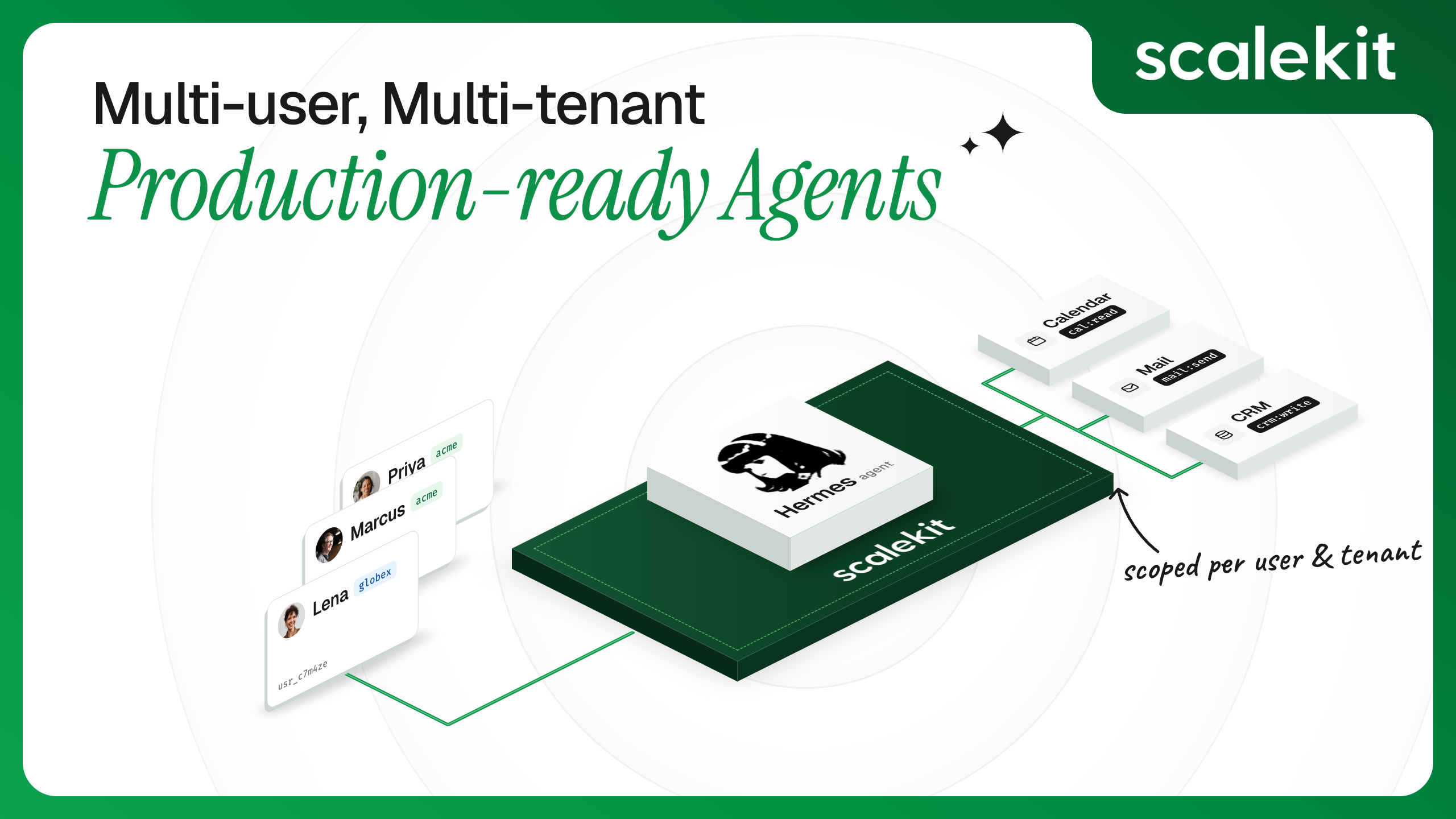


Hermes Agent is an open-source coding agent that can call real tools through MCP, either as a CLI you run yourself or, less commonly, in a bot mode that runs behind Telegram, Discord, or Slack so a whole team can message it directly.
If you've put Hermes behind a shared bot, you can already control who's allowed to message it. What you probably haven't checked is whether it can tell those people apart once they're talking to it, and it can't.
This post shows you exactly where that sits in Hermes's own code, what it actually breaks once your team is sharing one deployment instead of each running their own, and then walks through two ways to close it: the Virtual MCP gateway this post was originally built around, genuinely supported for one operator running their own Hermes host, and the pattern Scalekit's own Hermes docs recommend once that host has to stand behind a shared team bot instead.
Hermes has two separate systems here, and only one of them knows who's talking. The first system decides who can message the bot. It genuinely knows each sender's identity, remembers who's been approved, and can revoke that approval later. This isn't a workaround someone bolted on; it's a real access-control layer built into Hermes (gateway/pairing.py).
The second system is the one that actually calls GitHub, Slack, or whatever tool is wired in, and it has no idea who the first system just approved. It doesn't ask. It just reads one saved credential from one config file and uses it for every request, no matter which approved person triggered it (this lives in tools/mcp_tool.py, and a search of that file for anything resembling "which user sent this" comes back empty).
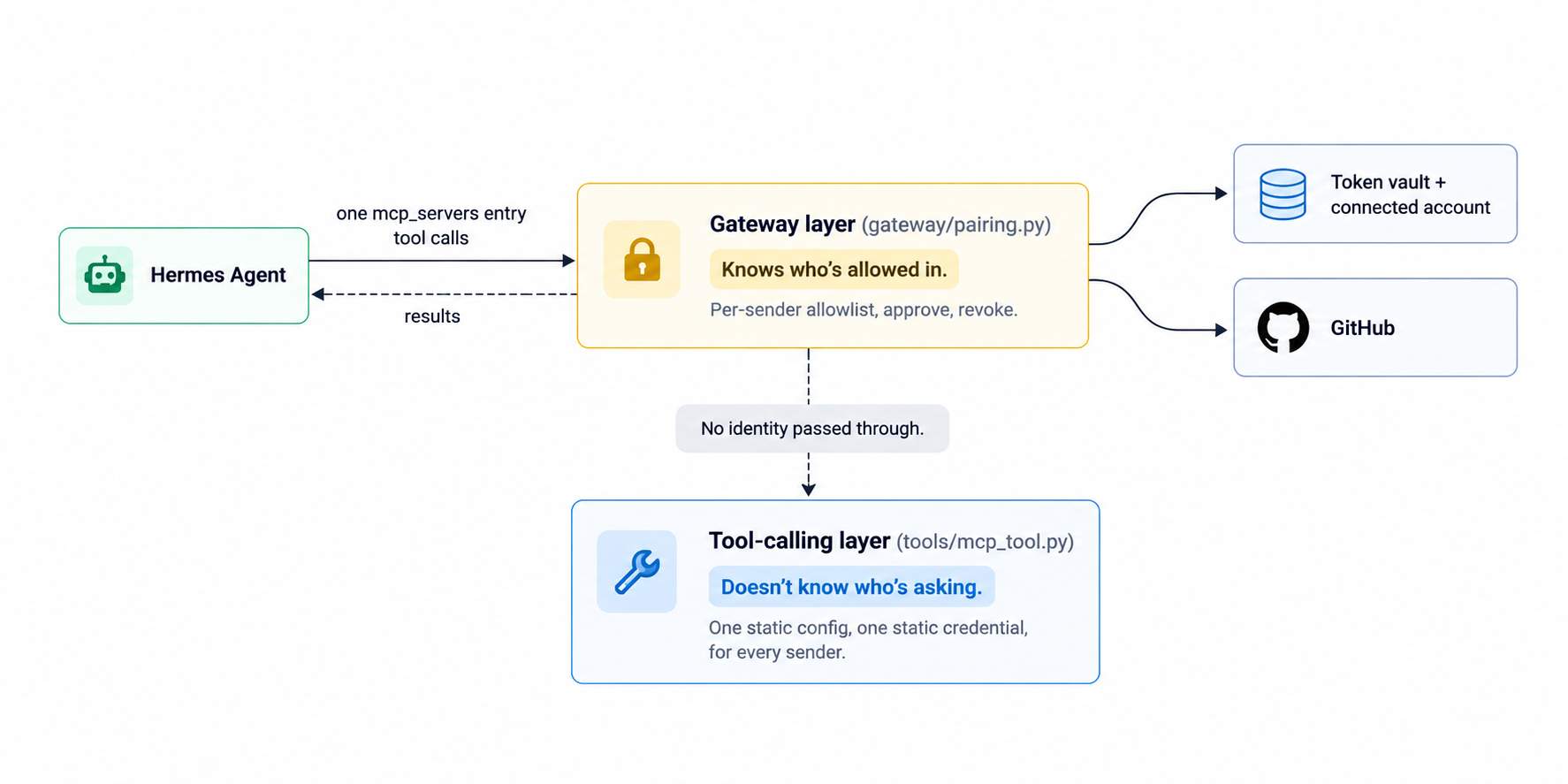
So the two systems don't talk to each other. Hermes can answer "is this person allowed in," but by the time that message turns into an actual tool call, it's already forgotten who asked. Every approved person ends up sharing whatever one credential happens to be sitting in that config file.
Say a team spins up one Hermes instance as a shared Slack bot. Whoever set it up ran through GitHub OAuth once, using their own account, and that credential landed in the bot's config.yaml. Every teammate approved through pairing.py's allowlist can now message the bot and ask it to search issues, label them, comment, or use whatever tools are wired in, and every one of those actions executes as the person who originally configured it.
That means:
None of this shows up in a personal, single-user Hermes setup. It only surfaces the moment a deployment is genuinely shared, which is exactly the point at which most teams reach for a bot in the first place.
Four things, and they map directly onto what a shared Hermes deployment is currently missing:
Scalekit AgentKit provides all four, sitting between Hermes and whatever tool it calls. It's used in connecting Hermes agent to your tools and APIs, which built the single-user version of this gateway. Every account, config, and credential from here on lives in a real Scalekit dashboard shared below. This mirrors the approach described in Access Control for Multi-Tenant AI Agents, where per-user identity becomes the foundation of a safe agent deployment.
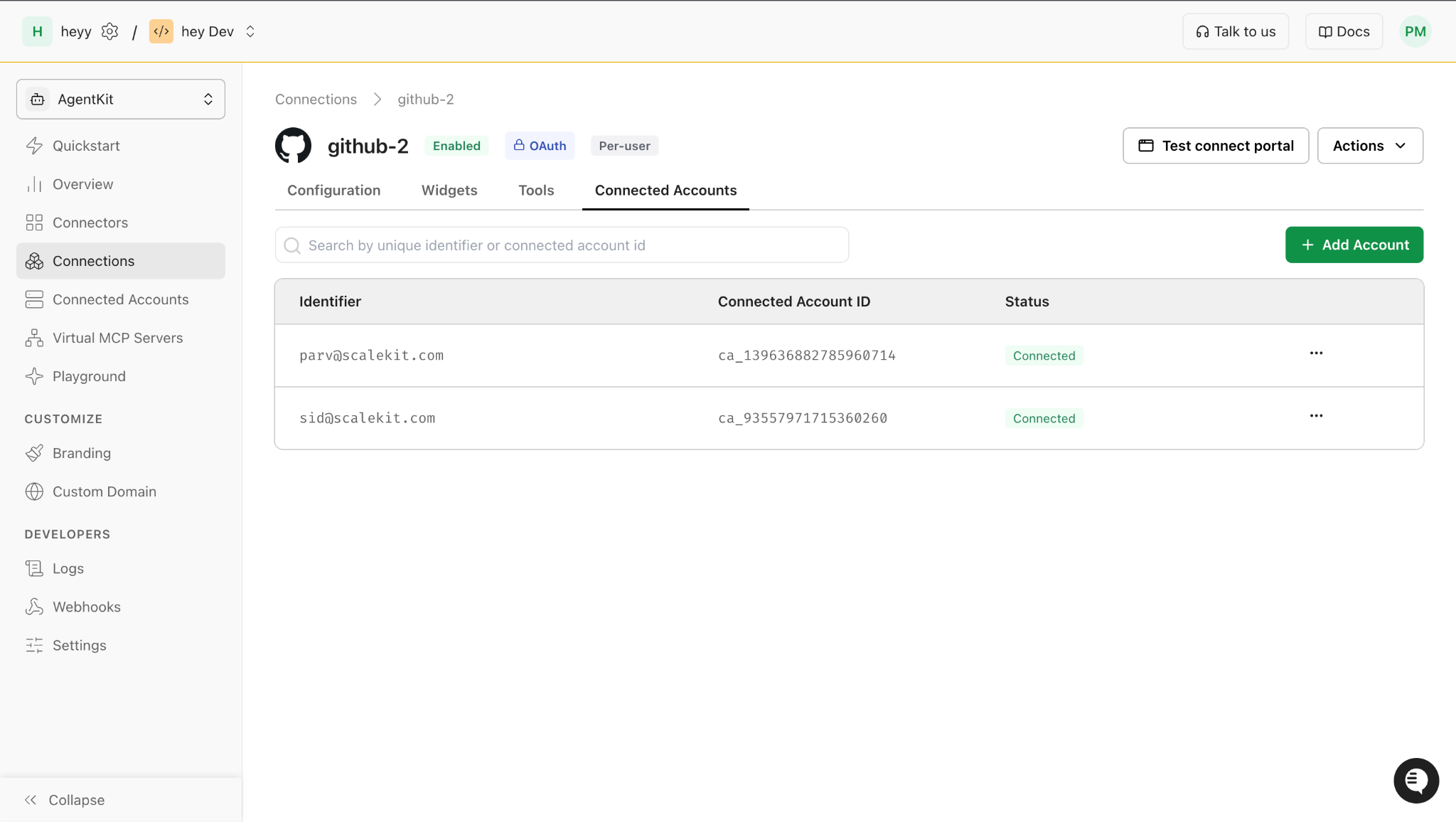
This is the part that's actually been run, not described. Starting from hermes-github-gateway-agent, the same project built in Connecting Hermes Agent to Your Tools and APIs, ScalekitGateway.provision(identifier) already takes a per-user identifier as its only required argument. That earlier piece ran it once, for one person. This section runs it twice, for two real, distinct identities, and proves they don't share anything.
On a first run for a new identifier, this behaves like the first setup: PENDING_AUTH, a printed authorization link, and a wait for that person to approve access.
The GitHub OAuth consent screen as it appears for the second identity's authorization link, showing this is a genuinely separate authorization step from the first person's.
Once that person approves access, re-running the same command against an already-active identity shows the real, load-bearing detail: both the config and its URL get reused as-is.
Once this is done, Hermes writes the config to: hermes_mcp_config.snippet.yaml
Compare config_id = cfg_141981117258400514 here to the first person's setup earlier: it's the same config. Both the config and its mcp_server_url are reused exactly as they were, nothing new is provisioned for the second person, only a new session token.
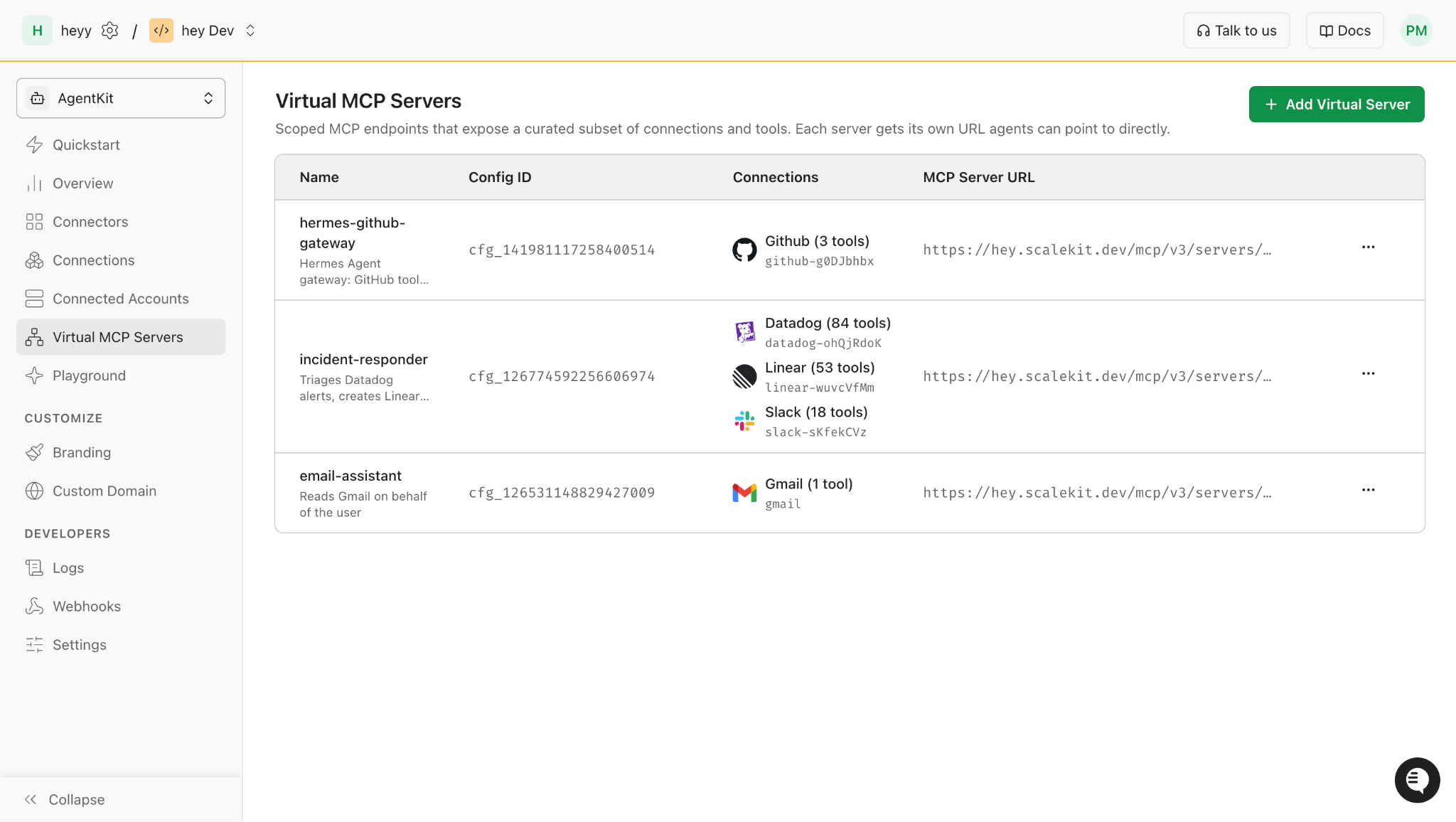
The Scalekit dashboard's Virtual MCP Servers page shows one config, one Config ID, one MCP Server URL, and that's the same URL both identities' tokens are minted against. There's no separate per-person URL to find here, the isolation lives entirely in the token each identity gets, not in the address it connects to.
Decoding the session token each identity gets shows the isolation is real, not cosmetic. Both tokens carry the same mcp_cfg, since they share a config, but a different sub and a different ca_ids:
ca_ids is the connected account ID, the specific GitHub authorization each token is scoped to. A token minted for one identity carries none of the other identity's ca_ids, so one person's session can't authenticate as the other, even though both point to the same underlying MCP config and tool list.
Both identities' gateways connect and work independently:
Deleting one person's access doesn't affect anyone else's, because nothing is shared. Removing an identity is one call:
If the identity does have a leftover instance from an older provisioning run, delete_connected_account fails with MCP_SERVER_EXISTS_FOR_CONNECTED_ACCOUNT, confirmed live against a real account. In that case, delete the instance first:
This doesn't affect any other identity's connected account or session token. This directly addresses the "someone left the team" scenario from earlier: instead of rebuilding the whole bot because one shared credential is gone, we remove one identity's connected account, and everyone else keeps working exactly as before.
Because each tool call now carries a real sub and ca_ids rather than a shared static header, the gateway's logs can distinguish who did what, instead of every action appearing to come from one account. For a deeper look at how these audit trails function in production, see Audit Trails for Agent Auth in B2B SaaS.
A GitHub issue-triage bot is a small, clear demo on purpose, but the same pattern — one config, one provision(identifier) call per person — applies to any shared deployment a team actually runs:
"Connecting Hermes Agent to Your Tools and APIs" already covered the baseline: per-user auth instead of a shared credential, revocation from one place, scoped tool access, an audit trail, a configurable token lifetime. Those apply the same way here: one gateway, real identifiers instead of a placeholder. What's specific to a genuinely shared, multi-person deployment is a level up from that:
None of this requires touching Hermes's own gateway or tool-calling code. It's the same provision(identifier) call from earlier in this post, run once per person and reviewed once by whoever owns the team's access policy. This approach directly mirrors the agent tool calling auth patterns recommended for production multi-user deployments.
Everything above is real, verified live against a real account, and it's a genuinely supported way to run Virtual MCP: one operator, one Hermes host, a session token they mint and remint themselves. It isn't built for many people sharing one long-running Hermes deployment without anyone remembering to remint a token before it expires.
For that case, Scalekit's Hermes docs point to a Hermes skill called hermes-delegated-auth, and switching users there is a config value, not a provisioning script.
Installing it is one command:
Configuration lives entirely in ~/.hermes/.env, and it holds only Scalekit's own client credentials, never a provider token:
SCALEKIT_IDENTIFIER is the default user the host acts as, and the docs are specific about its shape: an opaque id like usr_8f3a2c, not an email or a name. The reasoning is direct: SCALEKIT_CLIENT_SECRET lets anyone call tools as any ACTIVE identifier, so a guessable identifier widens the blast radius of a leaked secret. This is worth calling out plainly, since the walkthrough above uses email addresses (parv@infrasity.com, teammate@yourcompany.com) as identifiers, which is exactly the pattern the docs warn against for a real deployment. I chose these email-based identifiers for demo readability, not as a security recommendation to carry into production.
Under the hood, the skill's own script (scripts/tool_exec.py) doesn't call execute_tool blindly either — it first calls the same get_or_create_connected_account this post's gateway uses, checks the status is ACTIVE, and only then calls execute_tool(tool_name, identifier, connected_account_id, tool_input). So it's making the same underlying checks as the Virtual MCP flow, just per call instead of once at provisioning time, and it never mints or stores a bearer token anywhere on the host.
Switching who Hermes acts as doesn't provision anything new; it's a prompt:
You: As identifier usr_8f3a2c, list my unread Slack DMs
Hermes passes --identifier usr_8f3a2c to the skill, and Scalekit resolves that identifier's connected account fresh, on that one call. The same skill running on a cron job works the same way: each scheduled run re-checks the connected account and calls execute_tool directly, nothing to remint because nothing was minted in the first place. Though a 401 from the proxy fallback still means someone has to re-run the authorization step, the skill's own docs are explicit that it doesn't refresh tokens automatically either. For context on how token refresh should be handled at scale, see How to Handle Token Refresh for AI Agents.
Running Virtual MCP in production instead is also a real, documented path, just with an operational cost the skill doesn't have: create the config once and keep its mcp_server_url fixed, put the session token in config.yaml as an environment reference, keep the token's expiry comfortably longer than however often you plan to remint it, and have whatever reminting job you run call create_session_token again and trigger Hermes's /reload-mcp before the old token expires. An expired bearer fails the next tool call, but the gateway itself keeps running; it isn't a hard outage, just a stale credential until the next remint.
Which one to reach for comes down to one question: is this one person's Hermes host, or does it stand behind a bot for a team? One operator, Virtual MCP with a remint job is fine, and the walkthrough above is exactly that. A shared, long-running bot is what hermes-delegated-auth is built for.
Hermes's own gateway already solved the easier half of this problem: knowing who's allowed to talk to the bot. What it never solved, because it isn't really a credential problem for a messaging layer to own, is knowing whose authorization a tool call should run under. That's the seam AgentKit sits in, and the mechanics don't change between one user and many: ScalekitGateway.provision(identifier) is the same call whether it runs once for a personal setup or per person for a shared team deployment.
What's still open is where that identifier comes from in a real deployment. Here, I passed it in by hand twice to prove the isolation works. In a live shared bot, it needs to be resolved automatically from whoever's actually messaging Hermes, using the same per-sender tracking gateway/pairing.py already does for its allowlist. That's the last piece, and it's the subject of why you need a single MCP Gateway for Hermes agent.
The full walkthrough above already shows every command needed to run this yourself, from cloning hermes-github-gateway-agent through provisioning a second identity. From here, the AgentKit connected accounts docs are the reference for everything past this demo, roles, more than two people, and the identity-resolution question part 3 picks up. Understanding credential ownership across agent tool-calling patterns is the next conceptual step before scaling this architecture further.
No. Everything here runs through hermes-github-gateway-agent's existing provision(identifier) call and the Scalekit dashboard. Hermes's gateway and tool-calling layers stay exactly as they are; the per-user identity lives entirely in Scalekit, upstream of Hermes.
Yes, through tools.include in create_config(), the same scoping mechanism from the earlier piece. A team can create two configs against the same GitHub connection, one with github_search_issues only, another with the full write-capable set, and provision each teammate against whichever config matches their role.
Whatever your own system already uses as a stable, unique identifier per user: an email, an internal user ID, or in a shared-bot scenario, the platform's own sender ID (a Slack user ID, a Telegram chat ID) resolved through gateway/pairing.py's existing allowlist before it's passed into provision().
Yes, the mechanism is identical at any scale: provision(identifier) per person, each producing its own connected account and session token, all pointed at the same underlying config.









