

Every engineering team hits that moment when their automation stack quietly turns into a maze of frameworks. It starts harmlessly enough: someone prototypes a LangChain tool that files GitHub issues for customer bugs. Another teammate integrates it into a CrewAI workflow to assign ownership. Then the platform team exposes it through MCP so IDE users can trigger it directly. Within a sprint, one simple create_task function exists in three different forms, each wrapped in a different abstraction, each drifting slightly out of sync. A fix in one version does not reach the others.
For teams that build with multiple AI frameworks, this drift creates more friction than flexibility. LangChain favors decorators and Pythonic tooling, CrewAI demands structured handlers and multi-agent orchestration, and MCP expects JSON schemas and discovery metadata. Each framework has its strengths, but none of them agree on the same contract for calling tools. The result is fragmentation, duplicated logic, inconsistent authentication scopes, mismatched logs, and wasted debugging time when the same API call fails differently in each environment.
That is exactly the gap this article closes. Instead of rewriting tools for every framework, we will design a single shared core: one canonical create_task implementation that plugs cleanly into LangChain, CrewAI, and MCP. It keeps all validation, authentication, and API logic in one place, while each framework simply wraps it in its preferred interface. This approach eliminates parallel maintenance and prevents subtle divergences.
By the end of this write-up, you will see how to build that shared foundation from the ground up. We will start with a simple, schema-validated GitHub task creator, then progressively wire it into each framework. Along the way, you will learn how to manage authentication delegation between user and organization contexts, apply structured observability across environments, and design tool interfaces that remain portable no matter which agent framework your team adopts next.
Cross-framework agent workflows quickly become complex. When systems need to run across LangChain, CrewAI, and MCP, developers face multiple definitions for tools, inconsistent schema validation, and fragmented authentication logic. What starts as a simple “create task” helper often turns into a tangle of wrappers, decorators, and schema files that drift out of sync.
Each framework enforces its own rules for validation, execution, and authentication. As a result, teams end up maintaining duplicate implementations and managing separate tokens and credentials for each environment increasing both friction and risk.
A unified tool-calling pattern solves this by creating one canonical core function that validates inputs, handles authentication, executes the API call, and returns a clean, typed response. Each framework can then wrap it in its own interface without modifying the internals.
This approach shifts the focus from framework bindings to contracts. A single callable defines a predictable schema and consistent behavior, while LangChain, CrewAI, and MCP act as interpreters that execute it reliably in their respective contexts.
Once that shared tool exists, the boundaries between frameworks begin to fade. Instead of juggling three APIs, you now have a single entry point that behaves the same everywhere:
In practice, this means no more redundant definitions, token handling, or retry logic scattered across codebases. Your frameworks stop owning the logic; they simply route structured input to the shared core.
No framework bindings, no redundant initialization. Only one predictable interface that every agent and orchestration layer can rely on.
LangChain, CrewAI, and MCP share a foundational concept: tool calling. They allow agents and workflows to decide what to execute dynamically while maintaining control over how execution happens. LangChain uses reasoning to select tools intelligently, CrewAI adds structured task orchestration across agents, and MCP exposes the same logic as a discoverable, stateless API that can be accessed from IDEs, CI/CD systems, or any runtime environment.
A unified tool pattern removes framework-specific conditionals and duplicate logic. Instead of checking if framework == "crewai" or if provider == "mcp", your agent focuses on intent, the framework handles orchestration, and the shared core defines the actual execution. The framework’s role is to orchestrate behavior, not to implement it. Once that separation is established, portability becomes a built-in design feature rather than a post-hoc fix.
This unified model creates a consistent and predictable execution cycle:
Each framework handles what it’s best at while sharing the same validated, schema-driven core. LangChain never handles credentials, CrewAI never stores tokens, and MCP never reimplements logic. Every external call, retry, and structured input passes through one consistent path, keeping all systems aligned.
For developers, this approach results in a leaner architecture that is easy to audit, extend, and trust. What once required separate implementations across frameworks now becomes a single portable pattern that scales naturally from local testing to multi-agent production systems.
Before your shared task creation logic can talk to GitHub, it needs credentials and repository context. This setup ensures the environment is secure, reproducible, and works for both user- and organization-scoped execution.
Most setups use the public GitHub API:
If you’re on GitHub enterprise server, your admin can provide the API endpoint
(e.g. https://ghe.company.com/api/v3).
Next, define the target repository path, which is the same one visible in the browser’s URL bar
https://github.com/<owner>/<repo>
Example:
GITHUB_REPO=your-org/your-repo
You’ll need two tokens, one for user-scoped operations and one for organization-scoped actions.
User token (Personal access token)
Use this when actions should run under an individual user’s identity.
Add it to your environment:
GITHUB_USER_TOKEN=ghu_xxxxxxxxxxxxxxxxxxxxxx

Organization token (Recommended for production)
For service-level automation or shared agents, use a GitHub app or a fine-grained PAT under a bot account.
Set the token:
GITHUB_ORG_TOKEN=gho_xxxxxxxxxxxxxxxxxxxxxx
Create a .env file (or store these securely in your secret manager):
With authentication configured, the next step is to initialize the shared core that drives the entire “create task” operation. This core isn’t just a convenience layer, it’s the backbone of the agent’s integration logic. It ensures that all frameworks (LangChain, CrewAI, or MCP) call into the same trusted implementation of your task creation flow, enforcing validation, token resolution, and API uniformity in one place.
By abstracting these mechanics, you guarantee consistency, testability, and maintainability across all orchestration layers, which are critical traits when building production-grade agentic systems.
Every resilient agent architecture begins with a clearly defined data contract. The CreateTaskInput schema acts as that gatekeeper by specifying exactly which parameters can enter the system, what types and constraints they must satisfy, and enforces those rules before any network call, API request, or framework-level execution takes place.
Key implementation benefits:
In production environments, flexibility in how data enters the system is as critical as schema accuracy. Once the input schema defines the structure, the system must accept that data through multiple controlled paths supporting both live runtime input and static fallback configurations.
The shared input design implements a dual-mode model, enabling developers and automation pipelines to provide task definitions dynamically at runtime (through CLI flags, JSON payloads, or STDIN streams) while still retaining the ability to run local validation or smoke tests using a predefined payload. This ensures consistent execution behavior across development, CI, and production environments without any configuration drift.
All incoming data, regardless of source, is normalized into the same validated schema before being processed by the shared core. This approach guarantees that the framework integrations, including LangChain, CrewAI, and MCP, operate on identical input contracts, producing deterministic and predictable outcomes every time.
Authorization determines the execution identity of the agent, specifying whether it should operate in a user context (acting on behalf of an individual contributor) or an organization context (acting under a shared credential). The helper function abstracts this decision and automatically resolves the correct scope based on explicit request parameters or predefined environment configuration.
Why this matters:
In production-grade systems, secure credential management is non-negotiable. This helper dynamically resolves the appropriate GitHub token by selecting between user-level and organization-level authentication scopes, while ensuring that all sensitive credentials remain external to the codebase and are never hard-coded or exposed during execution.
Best practices:
When the agent executes, it resolves:
After validation and authorization are complete, the core executes a single idempotent call to the GitHub Issues API. This operation serves as the central component of the shared logic, converting structured, pre-validated input into a precise and authenticated API request ready for execution.
Design rationale:
A small wrapper unifies everything: it resolves the scope, generates a request ID, and delegates to the core logic.
This single function is what your frameworks will actually call.
This makes the shared core plug-and-play:
This design solves the exact problem we started with: the moment when one simple create_task function splinters into three versions across LangChain, CrewAI, and MCP. What begins as a small automation quickly turns into multiple code paths, each handling validation, authentication, and logging differently. The shared core eliminates that drift completely.
By centralizing validation, authentication, and API logic in one canonical implementation, every framework now communicates through a single contract. A fix in one place automatically applies everywhere, keeping behavior consistent across agents, workflows, and external clients.
In essence, this shared core acts as the integration control plane. It keeps your agent ecosystem stable even as new frameworks, tools, or environments are added. What started as a small fix for code drift becomes a scalable architecture that grows cleanly with your system.
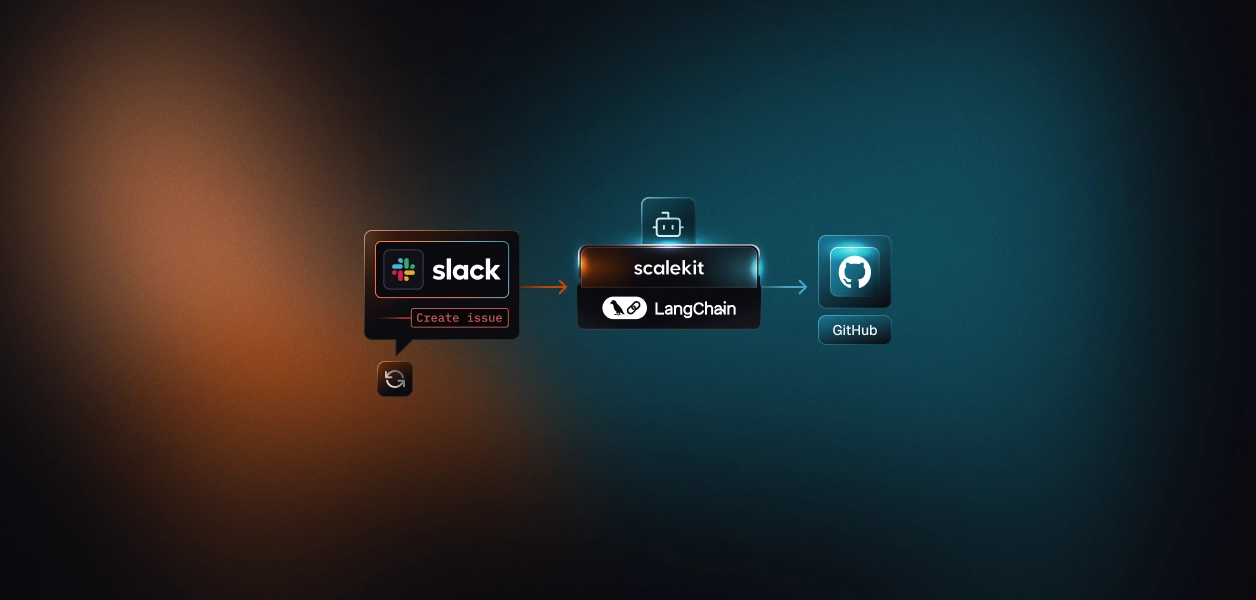
After untangling the problem of framework drift where one GitHub task function existed in three different forms the next logical step is to prove that the shared core (create_task_impl) can actually serve all frameworks without rewriting logic. LangChain becomes the first integration layer that puts this principle into practice.
By binding the shared core to LangChain’s tool interface, we turn it into a composable, schema-validated unit that agents, pipelines, or even CLI scripts can call directly. It keeps the same deterministic behavior while letting LangChain handle orchestration details like tool lifecycle, callbacks, and schema exposure. The shared core still owns validation, authentication, and the GitHub API call meaning the logic stays identical no matter where it runs.
1. Registering the Shared Core as a LangChain Tool
The @tool decorator provides LangChain’s canonical interface for registering callable actions that can be automatically invoked by LLMs or external clients.
Our goal here is to wrap create_task_impl without introducing additional logic keeping the LangChain layer declarative and disposable.
LangChain provides callback managers for tracing and telemetry. Rather than injecting logging into the core, use localized callbacks that wrap tool execution.
This keeps observability decoupled from the business logic, aligning with separation-of-concerns principles.
Design rationale:
The CLI interface enables developers to execute the same LangChain tool pipeline outside of an LLM runtime, ensuring deterministic local testing and full integration coverage. This is particularly useful in CI/CD pipelines or secure environments where invoking a LangChain agent directly isn’t practical.
By invoking create_task_tool.invoke(...), you trigger the exact same LangChain execution lifecycle that an agent would perform in production. This guarantees perfect parity between CLI-based validation, automated testing, and runtime orchestration ensuring that every environment executes the same schema-validated logic under identical conditions.
Exposing the shared core as a LangChain tool ensures every framework version communicates through the same stable interface. This design prevents schema drift, maintains reliability under scale, and simplifies debugging across environments.
Together, these safeguards create a robust contract between reasoning logic and real-world execution, forming a foundation that keeps multi-agent systems reliable even under heavy parallel workloads.
LangChain acts as the reasoning layer of this architecture, transforming natural-language intent into structured tool calls. It parses the agent’s instruction, validates inputs against the shared CreateTaskInput schema, and routes execution to the unified create_task_impl core without modifying its behavior. This ensures that reasoning and execution remain separate, consistent, and framework-agnostic.

Once invoked, LangChain hands control to the shared core, which handles validation, authentication, and GitHub API interaction. LangChain then manages context flow and chaining across tasks, keeping the logic centralized and portable. This design allows the same function to run identically across CrewAI and MCP, minimizing redundancy and ensuring consistent results.
After wiring the shared create_task_impl core into LangChain, we saw how it could be invoked as a lightweight, stateless tool within an agent’s reasoning loop. CrewAI takes the next step. Instead of treating the function as a one-off callable, it orchestrates it within a structured process — one where agents have roles, goals, and context.
Here, the same create_task_tool becomes part of a predictable, sequential workflow. Each step, from input parsing to execution, follows a clear path without branching or concurrency. This approach makes the system easier to test, replicate, and automate across CI/CD and production environments.
LangChain operates at the tooling layer , making it procedural, modular, and focused on invoking specific actions. CrewAI sits one level higher, introducing structure through roles (agents), tasks (goal-driven operations), and processes (execution sequences). Instead of redefining logic, we simply reuse the same create_task_tool through CrewTool.from_langchain(). This eliminates redundancy, ensuring that a single schema (CreateTaskArgs) and a unified execution path power both frameworks seamlessly. CrewAI becomes an orchestration boundary, not another logic layer.
Here, the agent is declarative, not conversational. It doesn’t decide what to create; it executes how to create, following a deterministic flow based on validated input.
This pattern works because:
Every CrewAI Task begins with a contract: an instruction to the agent that defines what it must do and what it must not do.
Because the goal here is execution, not reasoning, we keep it strict and machine-readable.
The dual layer of natural summary and canonical JSON keeps the LLM grounded. Even if future CrewAI versions introduce multi-turn reasoning, this prompt structure ensures deterministic tool usage.
CrewAI builds workflows declaratively, and in this implementation, we use a single-agent sequential process that represents the most deterministic and maintainable orchestration model. This approach removes unnecessary complexity from execution by avoiding dependency graphs, concurrent task handling, or emergent coordination. Each run follows a clear, predictable path from input parsing to task execution, ensuring reproducibility, traceability, and reliability across environments.
At runtime, CrewAI instantiates the agent, binds the tool, executes the task, and exits cleanly. There is no persistent loop or memory, making it ideal for stateless CI/CD jobs or ephemeral cloud workers.
How LangChain and MCP handle this pattern:
This contrast shows how the same shared create_task core behaves consistently across orchestration layers: sequential in CrewAI, callable in LangChain, and remotely discoverable through MCP.
This integration is not a demo, it's a production-grade orchestration contract.
Several design principles make it resilient in real environments:
This design can be extended into multi-agent systems later (for review or notification), but it starts with a stable, reproducible baseline.
In this implementation, CrewAI serves as the orchestration boundary that turns the shared create_task_tool into a structured, role-based execution process. The framework doesn’t reason or plan; instead, it defines a clear agent role (“Task Creator”) and binds it to a predefined task description that instructs the agent to execute the tool exactly once with validated input.
This creates a predictable, reproducible pipeline that translates structured task definitions into GitHub issues without requiring conversational reasoning or prompt-based decision-making.
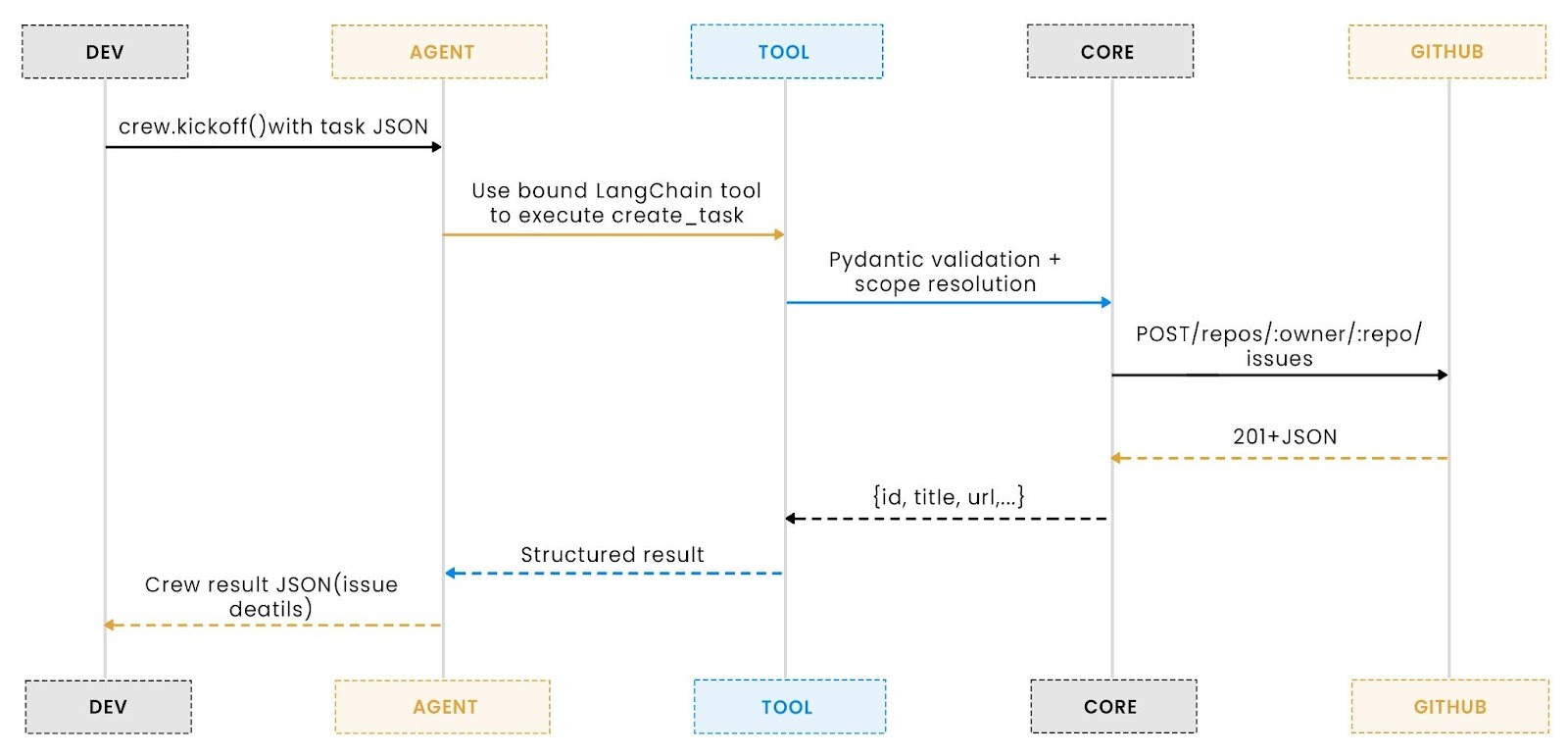
The workflow is intentionally narrow and deterministic: CLI or JSON input is parsed, converted into a structured payload, and passed to CrewAI’s agent, which invokes the create_task_tool under the same validation and authentication logic used across all frameworks. This keeps the entire process portable and testable ensuring that whether run locally, in CI, or as part of a larger orchestration graph, the behavior and output remain consistent across environments.
Both the LangChain and CrewAI adapters share the same CLI interface and accept identical input schemas. All invocations normalize into a validated CreateTaskArgs model before reaching the shared create_task_impl. The only difference is the script entry point:
You can substitute one script name for the other in any command without changing flags or payloads.
Each mode is designed for a specific automation or development workflow:
Use when testing interactively or running ad-hoc commands from the terminal. It’s ideal for quick issue creation or direct CI job triggers.
Perfect for automation pipelines or API integrations that can serialize task data into a JSON string on the fly.
Best for storing reusable templates or for version-controlled automation payloads.
Command and output (LangChain CLI): Run the tool locally or in CI using the same schema and flags you would in production.

The terminal output confirms successful execution and displays structured metadata returned from GitHub.
Created GitHub issue: The screenshot below shows the GitHub issue created by LangChain through the shared core, populated entirely from the validated schema.

Command and Output (CrewAI CLI): Run the tool locally with the same schema and flags you would in production.

Created GitHub issue: The screenshot below shows the GitHub issue created by CrewAI through the shared core, populated entirely from the validated schema.

After integrating the shared create_task_impl across LangChain and CrewAI, we’ve seen it operate inside reasoning and orchestration layers. The final step is to make it accessible beyond those frameworks.
In most real-world setups, not every task runs inside an agent graph. Some are triggered from CI pipelines, IDE extensions, or external automation layers that still need to follow the same contract and authentication model.
The Model Context Protocol (MCP) fills that gap. It exposes the same shared core as a discoverable, schema-validated capability that any compliant runtime can call. No SDKs, servers, or bindings — just a lightweight protocol interface that turns deterministic Python logic into a portable, callable service.
At the protocol layer, the MCP adapter acts as a translator between structured requests and the existing Python logic.
It does not re-implement any business logic or authentication handling it simply delegates to create_task_impl, validating input through the shared schema before invoking the core.
This adapter defines a single callable tool: create_tas MCP’s introspection mechanism automatically inspects the function signature, generating a typed schema that clients can query and validate against. No OpenAPI file, no manual binding, no external configuration just the function, the decorator, and the protocol runtime.
The MCP server translates every call into a direct invocation of the core function.
Inputs are strictly validated through the CreateTaskInput model, and outputs are serialized as JSON with deterministic structure.
Example request:
Example response:
Every field, type, and constraint originates from the same CreateTaskInput definition used in LangChain and CrewAI, ensuring a unified schema and eliminating integration drift.
When executed, the MCP server initializes a lightweight FastMCP instance and listens over stdio for structured requests.
The flow from client to execution path is completely linear:

There is no daemon, network socket, or async worker communication occurs over a bidirectional stream, making startup fast and termination clean. Each invocation is stateless and atomic: input in, output out.
You can start the MCP server locally like any other Python module:
Once launched, it listens for incoming MCP requests over stdio, allowing compatible environments such as Claude Desktop, Cline, or other MCP clients to connect automatically. This setup keeps the integration lightweight, schema-driven, and ideal for both local development and production pipelines.
Most MCP-compatible clients (like Claude Desktop) use a simple JSON configuration to register custom servers.
Here’s an example schema to register the create_task_mcp_server:
Once configured, your client will automatically discover and expose the create_task tool as a callable command. Configuration paths or formats may differ slightly across tools (Claude Desktop, VS Code MCP extension, or other clients). Refer to each client’s documentation for exact setup details.
Command and output (MCP Client): Run the tool through the MCP server using a structured request in the chat interface.
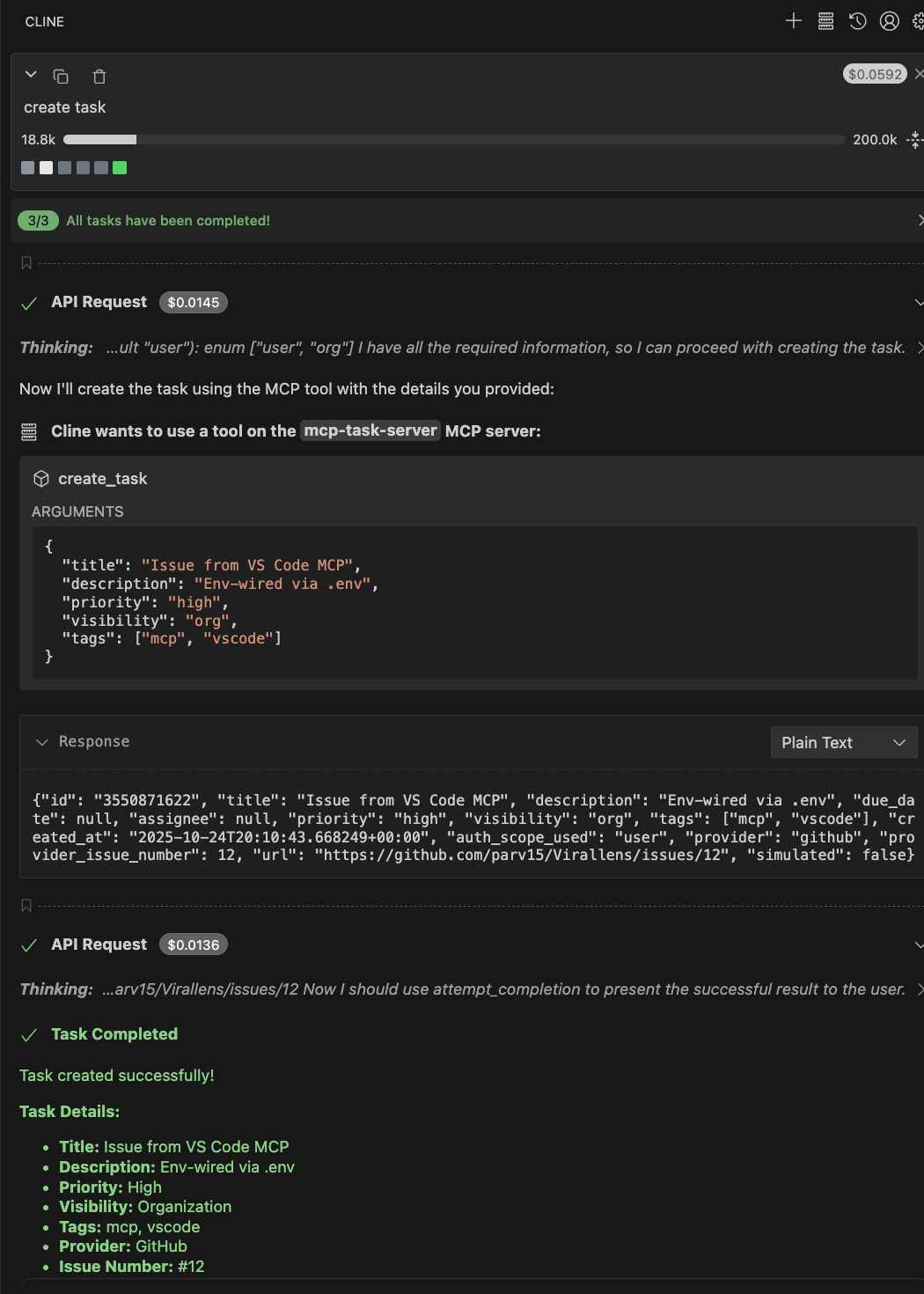
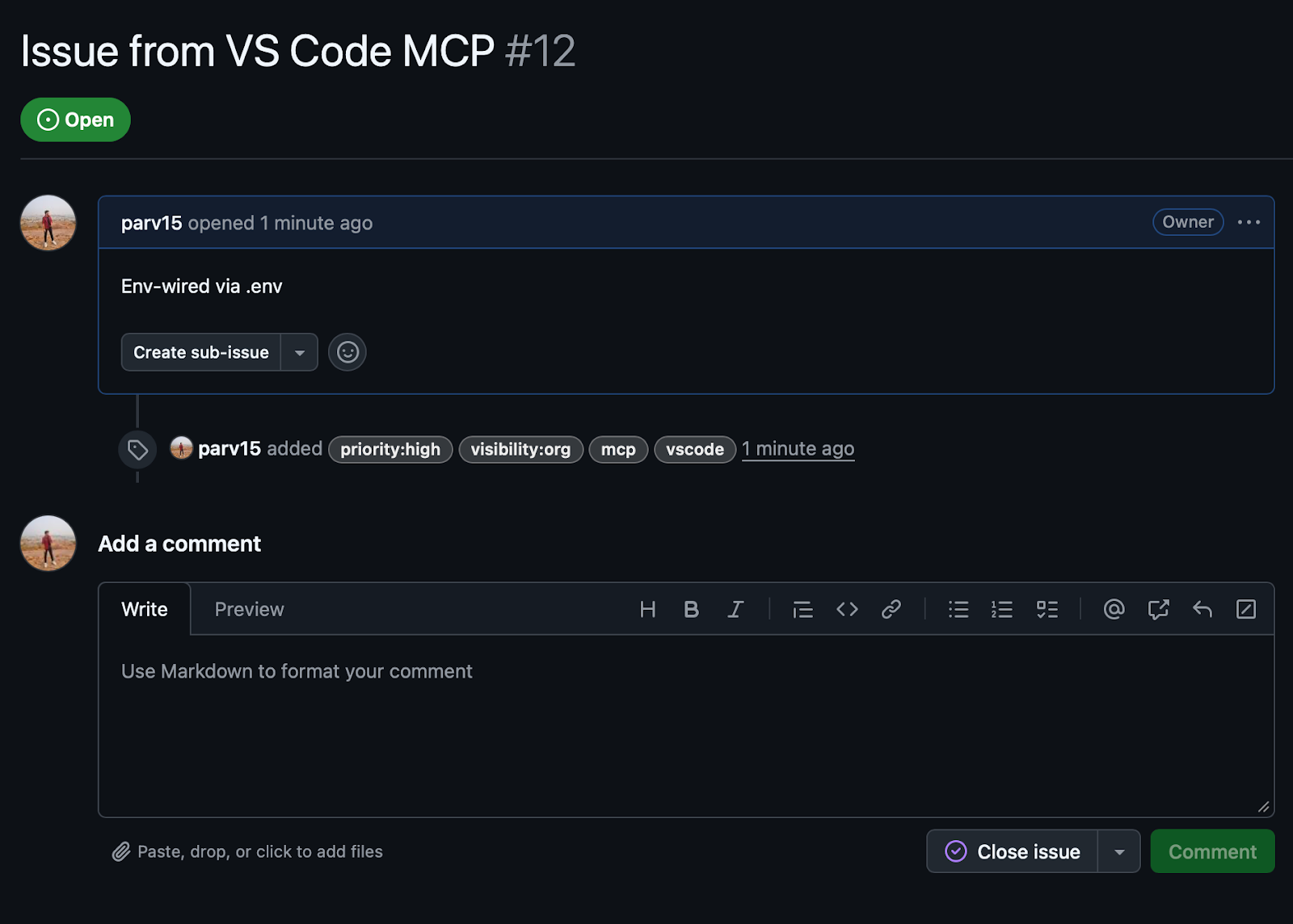
Created GitHub issue:
The screenshot below shows the GitHub issue created through the MCP layer, populated entirely from the same validated schema.
The MCP layer provides a universal bridge between deterministic Python logic and interactive developer environments.
It exposes the shared create_task_impl core as a discoverable, schema-validated tool that any MCP-compatible runtime can invoke.
With minimal setup, teams gain a stateless, type-safe, and framework-agnostic interface that scales seamlessly from local testing to multi-framework automation systems.
After implementing the shared create_task_impl across three integration layers, the distinctions between LangChain, CrewAI, and MCP become clear.
Each represents a different abstraction level within the modern AI-tooling ecosystem: one focuses on reasoning orchestration, another on structured collaboration, and the last on protocol-level interoperability.
Below is a breakdown through a developer’s lens.
On the other hand, MCP is inherently stateless.
Developers familiar with standard RPC or gRPC patterns find MCP refreshingly minimal.
Every great engineering solution begins with a simple pain point. Here, it was one create_task function duplicated across LangChain, CrewAI, and MCP each drifting out of sync, each breaking in its own way. The shared core design turned that chaos into clarity.
Throughout this walkthrough, we built a single canonical create_task_impl that acts as the foundation for all three frameworks. LangChain made it intelligent and reasoning-aware. CrewAI made it collaborative and process-driven. MCP made it universal and protocol-ready. Together, they show how a unified core can scale from an in-process tool to a cross-framework control plane without rewriting logic.
This walkthrough showed how to design, integrate, and scale a shared core that can:
For developers looking to go further, explore Scalekit’s design guides on tool abstraction and schema-first orchestration. Try extending this foundation by connecting new APIs like Jira, add reviewer agents, or expose your own tools over MCP.
This shared core is more than just an integration trick. It’s a pattern for building AI systems that stay stable as they grow one predictable foundation, many connected surfaces.
1. How does this architecture align with Scalekit’s modular design philosophy?
Scalekit emphasizes composability, building once and reusing across contexts. The unified create_task_impl core reflects that principle directly.
By decoupling logic from frameworks, Scalekit teams can integrate the same tool into multiple runtime environments such as LangChain, CrewAI, and MCP without fragmenting validation, schema, or authentication layers. It demonstrates how Scalekit promotes maintainable, multi-framework automation at scale.
2. Can Scalekit workflows leverage MCP for distributed or hybrid deployments?
Yes. MCP is ideal for Scalekit-style hybrid architectures where some workflows run locally (via CrewAI or LangChain) while others execute remotely. By exposing shared tools through MCP, Scalekit enables developers to distribute orchestration workloads while keeping all interfaces type-safe, discoverable, and environment-independent.
3. Why use MCP if LangChain and CrewAI already handle tool orchestration?
LangChain and CrewAI tools operate within their own runtimes, while MCP tools run independently. They can be called from editors, CI/CD pipelines, or other frameworks through a lightweight stdio protocol.
MCP serves as the final bridge between reasoning frameworks and real-world automation endpoints, making your tools universally accessible beyond their original environments.
4. How does authentication stay consistent across all three layers?
The shared core (create_task_impl) manages credentials directly, ensuring that every framework relies on the same token-resolution logic.
This approach prevents secret sprawl and enforces a single, consistent security model across all environments, whether the tool is called by an LLM, an orchestrator, or an external MCP client.
5. How should teams scale this approach for production-grade environments?
Start with a single validated core such as create_task_impl, expose it across multiple layers, and use MCP as the unifying access protocol. This allows Scalekit systems to scale horizontally as multiple agents, services, or users trigger the same capability without drift or redeployment.
When you later migrate from GitHub to Jira or add more tools, the schema and control plane stay consistent. Only the API adapter evolves.


.webp)




