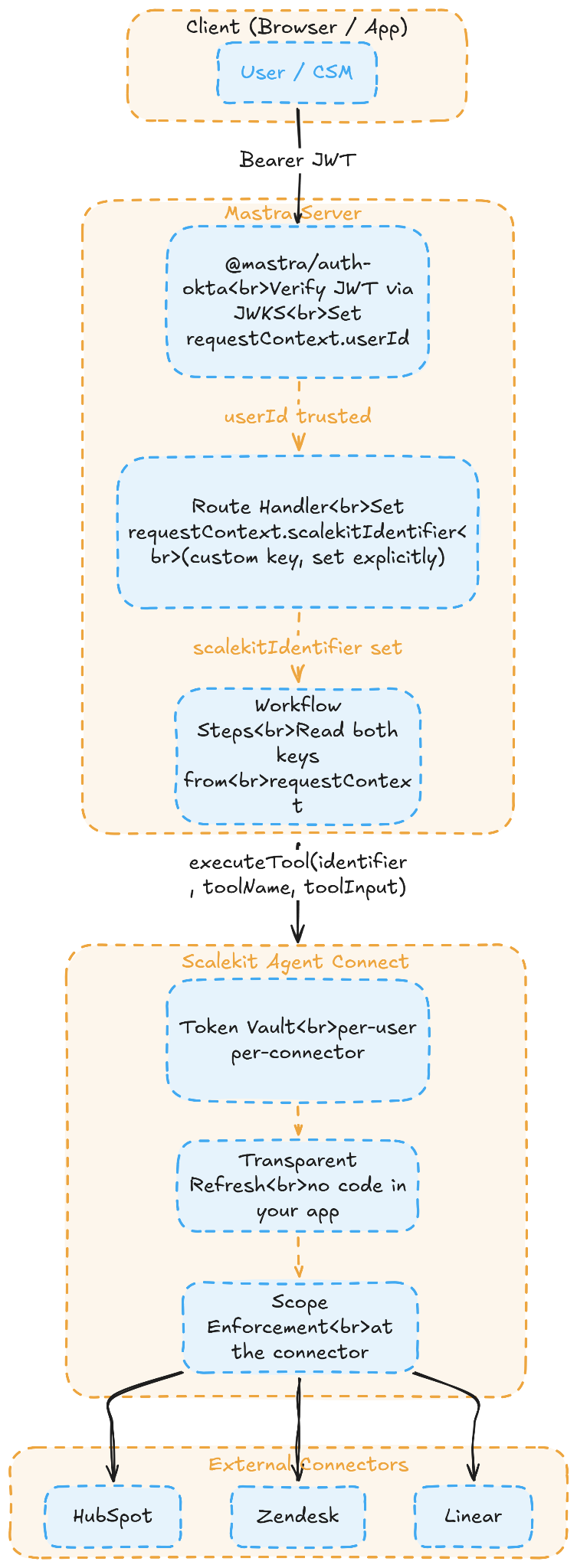
Mastra Auth verifies the caller of your server. It has no concept of what that user has connected in HubSpot, Zendesk, or any other external app. That gap requires a dedicated connector identity layer.
Identity data must never be part of what a tool asks the LLM to supply. It should travel through the runtime context separately, invisible to the model and the prompt.
Scalekit fills that connector identity layer: it stores per-user credentials, automatically refreshes tokens, and enforces the scopes each user originally granted. Your application never stores or touches a raw token.
In Mastra workflows, the shared state persists throughout the run, including any pause-and-resume cycles. Step output only flows to the immediately following step. These are different mechanisms for different purposes.
Auth failures in tool responses should be typed, named reasons your workflow can act on. A thrown exception gives the workflow nothing meaningful to branch on.
You've shipped a Mastra agent, but the moment a customer asks whether it can act on their behalf using their own HubSpot account, scopes, and token, you realize Mastra's auth only answers half the question. This post works through both halves using a real production workflow as the example.
By the end, you will know how to carry per-user identity through a Mastra workflow without it leaking into tool schemas, where Mastra's auth ends and Scalekit's connector identity layer begins, how to protect a long-running workflow from token expiry mid-execution, and how to design auth failures your workflow can actually branch on.
Mastra and Tool Calling: How It Actually Works
Mastra is a TypeScript-native agent framework built from the start for the Vercel and Cloudflare Workers deployment model. It is not a port from Python, nor a thin wrapper around another runtime. The entire framework is built around three primitives that you compose together to build agents:
createTool() defines a typed tool with an inputSchema, an outputSchema, and an execute() function. This is what an LLM calls when it decides an action is needed. The inputSchema is a Zod schema that shapes exactly what the model is expected to supply, nothing more.
createAgent() wraps an LLM with a set of those tools and a system prompt, and handles the reasoning loop that decides which tools to call and in what order, without you writing any dispatch logic.
createWorkflow() handles multi-step orchestration in which steps need to pass typed data to one another, share state across a long run, and survive suspension and resumption without losing context.
Tool calling in Mastra looks like this at its simplest:
import { createTool } from '@mastra/core/tools'
import { z } from 'zod'
export const getOnboardingContactsTool = createTool({
id: 'get-onboarding-contacts',
description: 'Fetch contacts currently in the onboarding stage',
inputSchema: z.object({
limit: z.number().default(50),
}),
outputSchema: z.object({
contacts: z.array(z.object({
id: z.string(),
email: z.string(),
daysInStage: z.number(),
})),
}),
execute: async ({ inputData }) => {
const { limit } = inputData
// fetch from somewhere
return { contacts: [] }
},
})
The LLM supplies limit, the tool returns typed contacts, and TypeScript enforces the contract at every boundary. Notice what is absent from inputSchema: no userId, no session token, no credential of any kind. Everything defined in inputSchema is visible to the model and shapes what it decides to pass at call time, which is exactly why identity has no place there.
So where does it go? Mastra provides a second argument to every execute() function called context, which carries a requestContext object. Think of this as a typed, per-request key-value store that travels alongside your tool call through every layer of the stack but is never serialized into the LLM prompt.
The model never sees it, it never appears in the context window, and it never influences what the model decides to pass as tool input. It is the correct place to carry runtime identity: user IDs, session references, tenant identifiers, anything that should inform execution without being exposed to the model.
execute: async ({ inputData }, context) => {
const { limit } = inputData
const userId = context.requestContext?.get('userId')
// userId is available, but was never part of inputSchema
// The LLM was never asked to supply it
}
You can also validate what requestContext must contain before execute() runs, using requestContextSchema. If the required keys aren't there, the tool returns a typed error rather than throwing:
This is the right primitive for the job. The question is what you put in it and, more importantly, what actually fills those values at runtime before your tools try to read them. That is the problem the rest of this post addresses.
What Mastra Auth Solves and What It Doesn't
Mastra ships its own auth system via provider packages: @mastra/auth-okta, @mastra/auth-workos, @mastra/auth-clerk. When you configure one, it:
Verifies the inbound JWT on every request against the provider's JWKS endpoint
Extracts the sub claim and sets userId in requestContext
Returns 401 if the token is missing or invalid
That's platform identity: the answer to who is calling your Mastra server. It's well-scoped; it does exactly what it says, and Mastra is deliberately not trying to go beyond this boundary.
What it does not touch is a completely separate question: what has this user connected downstream? Consider a CSM (Customer Success Manager) using your B2B SaaS product. They may have a live HubSpot token, limited-scoped Zendesk access from six months ago, and a Linear token that was revoked last week when their API key rotated. Mastra has no opinion on any of that, and by design, it should not.
This is not a limitation of Mastra's implementation, but a fundamental data gap: Okta's JWT tells you who Alice is within your application, but says nothing about whether she has authorized your app to act on her behalf in HubSpot. That is a separate OAuth grant made directly with HubSpot, stored nowhere near her Okta identity. No JWT verification system can surface it because the information simply is not in the token.
Most developers respond to this gap by building it themselves: a user_tokens table, refresh logic wired into each tool's execute function, and per-connector error handling for the different ways HubSpot, Zendesk, and Linear each signal an expired credential. It works, but it amounts to roughly 400 lines of credential plumbing inside your tool definitions that need updating every time you add a connector, and it tends to fail silently in production when a token is revoked without warning.
How Scalekit Fills the Connector Identity Gap
Scalekit's Agent Connect layer is purpose-built for this exact problem. It is not a general integration platform but rather the connector identity layer for agent tool calling, designed on the assumption that every action must be scoped to a specific user's authorized account. Here is what it handles so you don't have to:
Token vault: per-user, per-connector credential storage. You never write a token to your database.
Transparent refresh: when you call executeTool(), Scalekit checks whether the stored token is current, refreshes it if needed, and injects the fresh credential. Your code never touches the refresh logic.
Scope enforcement at the connector: a read-only HubSpot user's agent cannot write, regardless of what the LLM decides to try. The scope check happens inside Scalekit, not in your code.
3,000+ tools across 150+ connectors: CRM (Salesforce, HubSpot, Pipedrive), communication (Slack, Gmail, Outlook, Teams), project management (Linear, Jira, Notion, Asana), data (Snowflake, BigQuery), dev tools (GitHub, GitLab, Vercel). Each connector ships with ready-to-use tool definitions.
Scalekit resolves which credential belongs to user_alice for HubSpot, validates it against the scopes Alice originally authorized, executes the call against HubSpot's API, and returns the result. Alice's token never appears anywhere in your application code.
The two layers are additive, not overlapping:
Layer
Package
Answers
Platform identity
@mastra/auth-okta
Who is calling your Mastra server?
Connector identity
Scalekit Agent Connect
What has this user connected to, and which scopes are associated with it?
Mastra sets userId in requestContext from the verified JWT, your route handler sets scalekitIdentifier as a custom key pointing at that user's vault record, and every tool reads both from context.requestContext?.all. That's the complete bridge between the two identity layers.
A useful way to think about it: Mastra's auth is the keycard that gets you through the front door of your server. It proves who you are. HubSpot, Zendesk, and Linear each have their own lock, and your JWT does not open any of them. Scalekit holds those keys, one per user per connector, with the exact scopes that the user originally granted.
Why Most Connector Layers Fail the TypeScript Agent Stack
Before committing to any connector layer, it is worth being clear about what the alternatives actually offer and where their fit breaks down for a typed TypeScript stack built on Mastra.
Tool
What it does well
Where it breaks down for Mastra
Composio
Large catalog, TypeScript SDK now at feature parity with Python
Tool execution uses a framework adapter model. Tools don't produce native Zod createTool() definitions, requiring a translation layer for Mastra
Built around the MCP server model, tools are authored in Python with an Engine architecture that doesn't map to Mastra's TypeScript-native createTool() and requestContext patterns
Merge
Unified API abstraction across CRM categories
Not a tool-calling layer, no executeTool() interface, no per-user token vault, no discriminated output schemas
StackOne
Enterprise embedded integrations at the org level
Different use case entirely, not designed for individual users authorizing their own OAuth accounts
None of the first four were designed for the specific combination at play here: a TypeScript-native agent framework, per-user delegated OAuth across multiple connectors, Zod tool contracts, and stateless edge deployment. Scalekit is the only one built for exactly that intersection.
What We're Building: The Onboarding Health Agent
Consider a SaaS company with a dedicated customer success team managing 50 to 200 new accounts through onboarding at any given time. The first 30 days after a customer signs up are when churn decisions get made, often before the customer has said anything. By the time the CSM notices something is wrong, they're usually reading it from a support ticket or a declined renewal.
The problem is not a lack of data: the CSM has HubSpot showing relationship stage and days in lifecycle, Zendesk showing every open support ticket, and Linear showing what the customer's onboarding tasks look like. The problem is that these three signals live in three separate tools, with no single view of what they collectively say.
The Onboarding Health Agent is the daily workflow that drives those changes. Every morning before the CSM team starts their day, it reads across all three systems, computes a health score per customer from the combined signals, and takes automated action on anything that crosses an At Risk or Critical threshold.
Signal
Connector
What it reads
Relationship stage
HubSpot
Contact lifecycle stage, days in current stage
Frustration signal
Zendesk
Open ticket count, ticket age
Delivery signal
Linear
Onboarding task completion rate, overdue tasks
When a customer crosses the threshold into At Risk or Critical status, the workflow takes two actions without any human trigger:
Creates a HubSpot follow-up task for the CSM, titled with the customer name, health status, and the specific reason for the flag
Adds a comment on the stalled Linear issue so the engineering-side onboarding owner sees the flag inside their own tool without needing a separate notification
Both actions are executed through the CSM's connected accounts via Scalekit, so the HubSpot task appears in their personal queue under their name, and the Linear comment is attributed to them rather than to a generic service account.
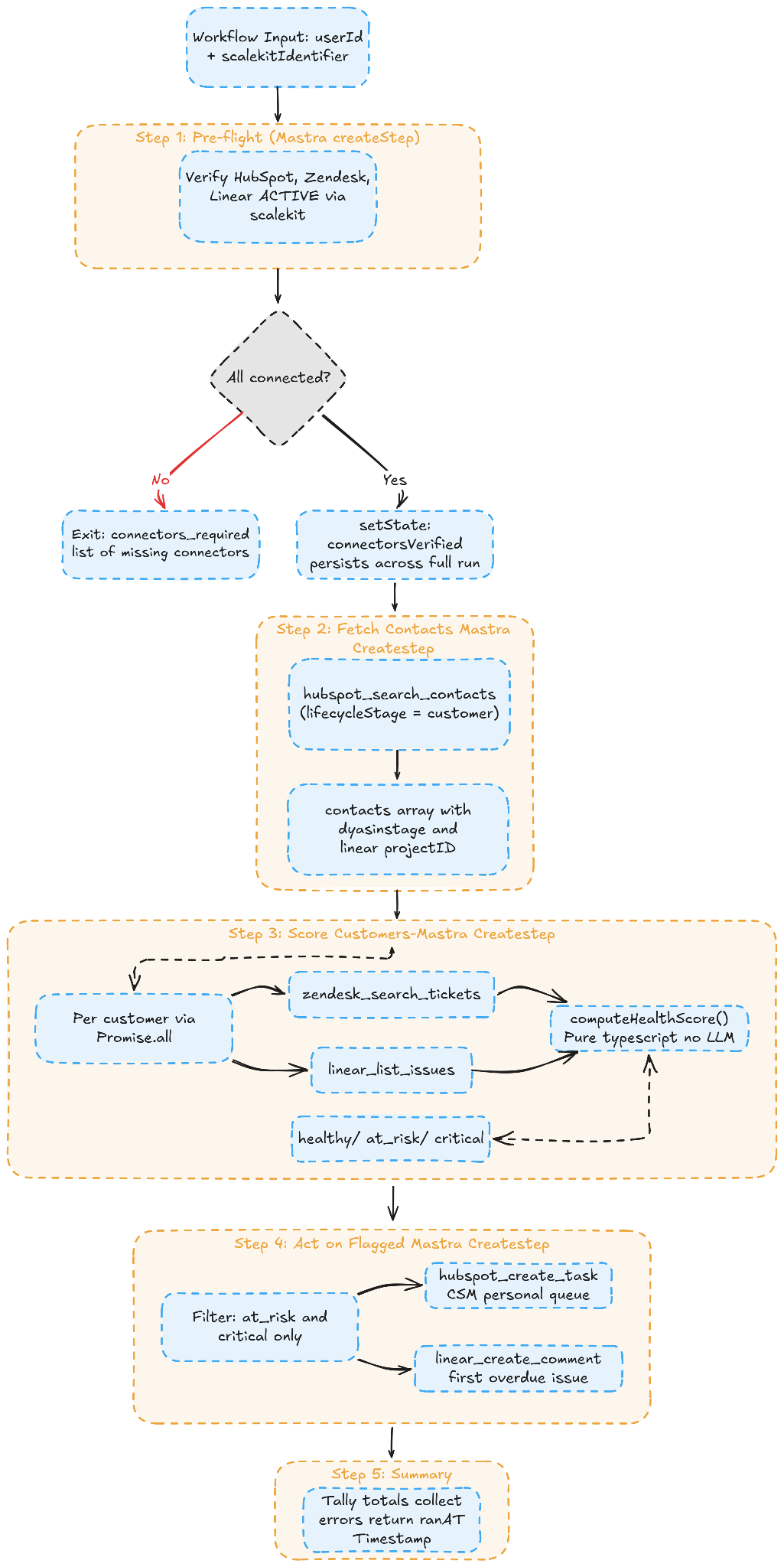
Here is how all five steps connect:
Before Scalekit: What Manual Credential Management Looks Like
Most teams arrive at this problem the same way: one tool, one connector, credentials fetched inline before making the actual API call. Here is what that looks like for a single HubSpot tool before any abstraction layer exists:
// hand-rolled HubSpot tool - the version everyone builds first
execute: async ({ inputData }, context) => {
const { limit } = inputData
const userId = context.requestContext?.get('userId')
// Step 1: load tokens from your database
const tokenRow = await db.query(
'SELECT access_token, refresh_token, expires_at FROM user_tokens WHERE user_id = $1 AND connector = $2',
[userId, 'hubspot']
)
if (!tokenRow) throw new Error('User has not connected HubSpot')
// Step 2: refresh if expired
let accessToken = tokenRow.access_token
if (new Date(tokenRow.expires_at) < new Date()) {
const refreshed = await fetch('https://api.hubapi.com/oauth/v1/token', {
method: 'POST',
body: new URLSearchParams({
grant_type: 'refresh_token',
refresh_token: tokenRow.refresh_token,
client_id: process.env.HUBSPOT_CLIENT_ID!,
client_secret: process.env.HUBSPOT_CLIENT_SECRET!,
}),
}).then(r => r.json())
accessToken = refreshed.access_token
await db.query(
'UPDATE user_tokens SET access_token = $1, expires_at = $2 WHERE user_id = $3 AND connector = $4',
[refreshed.access_token, new Date(Date.now() + refreshed.expires_in * 1000), userId, 'hubspot']
)
}
// Step 3: finally, the actual API call
const res = await fetch('https://api.hubapi.com/crm/v3/objects/contacts/search', {
method: 'POST',
headers: { Authorization: `Bearer ${accessToken}`, 'Content-Type': 'application/json' },
body: JSON.stringify({ filterGroups: [...], limit }),
})
return res.json()
}
That is one tool for one connector. The Onboarding Health Agent touches HubSpot, Zendesk, and Linear, each with its own OAuth token endpoint, token expiry behavior, and way of signaling an invalid credential. Multiply this pattern across three connectors, and you have roughly 400 lines of credential plumbing sitting inside your execute() functions before a single line of business logic appears.
After Scalekit: Clean, Credential-Free Tool Execution
With requestContext carrying scalekitIdentifier and Scalekit resolving the correct credential from its vault at call time, the same tool body collapses to this:
inputSchema stays domain-only, requestContextSchema validates that the required identity keys are present before execution begins, and outputSchema makes auth failures into typed, named variants the workflow can act on. The credential logic is gone entirely from your codebase.
The Connector Catalog: What's Available Out of the Box
The same executeTool() pattern works across every connector. Here's how it maps to typical B2B agent use cases:
Category
Connectors
CRM
Salesforce, HubSpot, Pipedrive
Communication
Slack, Gmail, Outlook, Microsoft Teams
Project management
Linear, Jira, Notion, Asana
Data warehouses
Snowflake, BigQuery
Developer tools
GitHub, GitLab, Vercel
Scalekit exposes over 3,000 tools across more than 150 apps, following a consistent {connector}_{action} naming convention: hubspot_search_contacts, zendesk_search_tickets, linear_list_issues, linear_create_comment. The same executeTool() call, the same auth pattern, and the same typed output structure apply across every connector. The only things that change between connectors are the toolName and the toolInput you pass.
End-to-End Request Flow Across Both Identity Layers
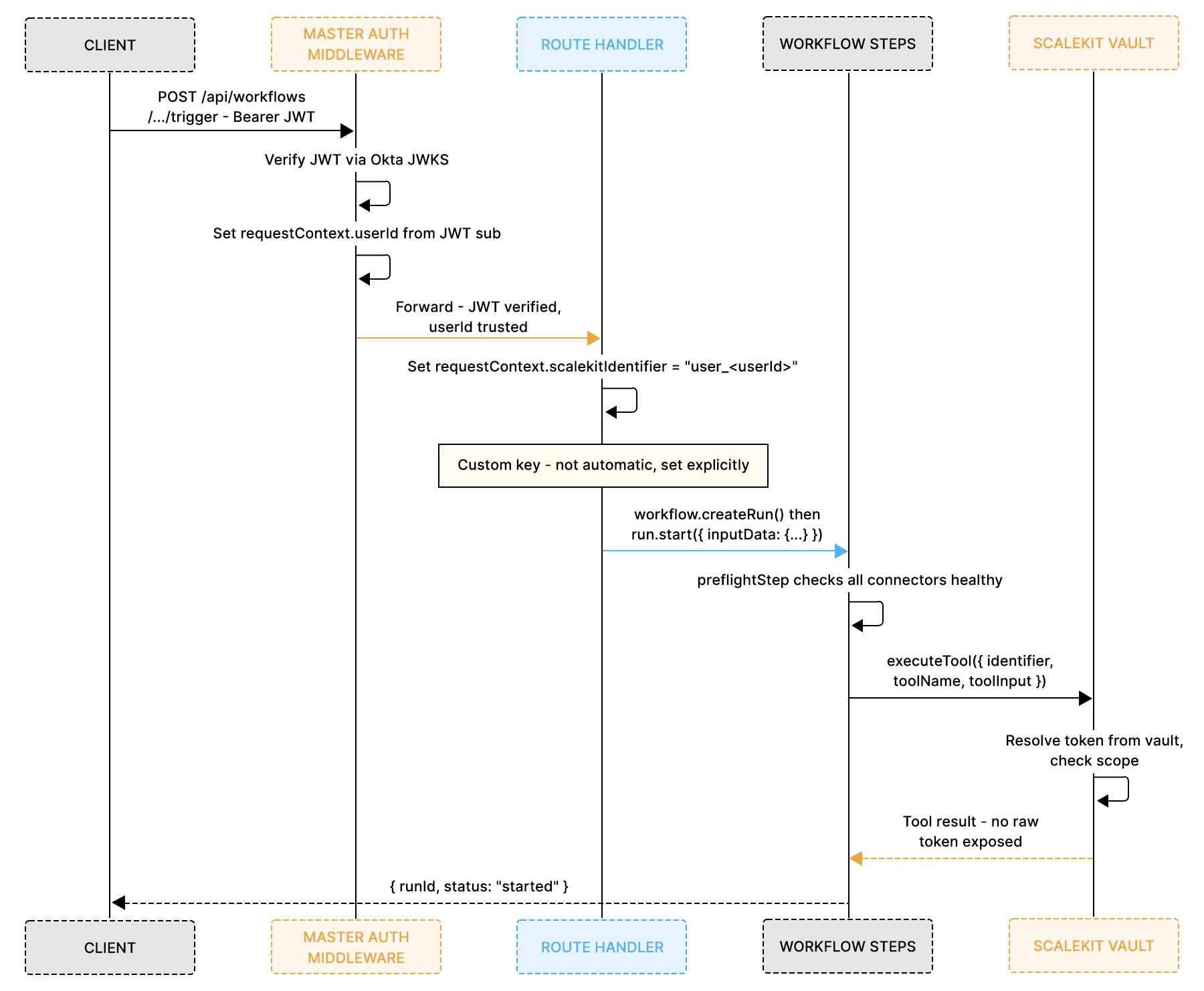
Before looking at the full code, the auth plumbing needs to be precise. Two separate identity moments occur on every request, and they happen in a fixed order that matters for security:
Okta never talks to Scalekit, and Scalekit never talks to Okta. The only connection between them is the string user_<userId>, set in one line of middleware and read by every tool call.
All tools and workflow steps import from a single shared Scalekit client, so there is one initialized instance per process and no risk of credential divergence across modules:
import { ScalekitClient } from '@scalekit-sdk/node'
export const scalekitClient = new ScalekitClient(
process.env.SCALEKIT_ENV_URL!,
process.env.SCALEKIT_CLIENT_ID!,
process.env.SCALEKIT_CLIENT_SECRET!
)
scalekitClient.actions.executeTool() is the single interface for all connector calls. scalekitClient.connectedAccounts handles OAuth link generation and account health checks.
How Scalekit Connects to a Mastra Tool
Every tool in this workflow follows the same three-part pattern. The shared schemas are defined once and reused:
// Auth failure shape -- same across all five tools
const authError = z.object({
status: z.literal('auth_error'),
reason: z.enum(['token_expired', 'scope_insufficient', 'account_revoked']),
})
// requestContextSchema -- validated by Mastra before execute() runs
const ctxSchema = z.object({
userId: z.string(),
scalekitIdentifier: z.string(),
})
Here is how a Scalekit executeTool() call is implemented within a Mastra tool. The HubSpot contacts tool shows the complete pattern:
export const hubspotGetOnboardingContactsTool = createTool({
id: 'hubspot-get-onboarding-contacts',
inputSchema: z.object({ limit: z.number().default(50) }), // domain data only -- no auth
outputSchema: z.discriminatedUnion('status', [ // auth failure is a named variant
z.object({ status: z.literal('success'), contacts: z.array(z.object({
id: z.string(), email: z.string(), daysInStage: z.number(),
})) }),
authError,
z.object({ status: z.literal('error'), message: z.string() }),
]),
requestContextSchema: ctxSchema, // Mastra validates this before execute()
execute: async ({ inputData }, c) => {
const { scalekitIdentifier } = c.requestContext?.all ?? {}
try {
// One call -- Scalekit resolves the credential, checks the scope, executes, and returns the result
const result = await scalekitClient.actions.executeTool({
identifier: scalekitIdentifier, // which user's vault record
toolName: 'hubspot_search_contacts', // which connector action
toolInput: { // domain inputs only
filterGroups: [{ filters: [{ propertyName: 'lifecyclestage', operator: 'EQ', value: 'customer' }] }],
properties: ['email', 'firstname', 'lastname', 'hs_lifecyclestage_customer_date'],
limit: inputData.limit,
},
})
return { status: 'success' as const, contacts: result.results ?? [] }
} catch (err: any) {
// Scalekit surfaces auth failures as typed error codes
if (err.code === 'TOKEN_EXPIRED') return { status: 'auth_error' as const, reason: 'token_expired' as const }
if (err.code === 'SCOPE_INSUFFICIENT') return { status: 'auth_error' as const, reason: 'scope_insufficient' as const }
return { status: 'error' as const, message: err.message }
}
},
})
Three things are happening here that matter:
inputSchema contains only what the LLM supplies. scalekitIdentifier is nowhere in it.
requestContextSchema tells Mastra what must be present in the request context before execute() runs. If it is missing, Mastra returns a typed error before the function is even called.
The outputSchema discriminated union means the workflow can branch on auth_error.reason explicitly. A thrown exception gives you nothing to branch on.
The Zendesk and Linear read tools follow the exact same shape, swapping toolName and toolInput. The two write tools (HubSpot task creation and Linear comment) follow the same shape with write-scoped toolName values. All five are in the project zip.
Deterministic Health Scoring Across Connected Systems
The scoring logic is a plain deterministic function, completely separate from both the workflow and the LLM. It takes raw signals from HubSpot, Zendesk, and Linear, weights each, and returns a named status with a score and human-readable reasons.
Why keep it separate and deterministic:
Testable in isolation: You call the function with known inputs and assert the output. No mocks, no API calls, no workflow to spin up.
No LLM needed: Health classification based on defined thresholds is not a reasoning task. Running it through a model adds latency, cost, and unpredictability to something that should be consistent and auditable.
Easy to tune: Adjust signal weights or thresholds as you learn which signals actually predict the outcomes you care about, without touching the workflow or the tools.
This pattern applies to any agent making structured decisions on aggregated data. Define your signals, weight them for your use case, set your thresholds, and let a pure function produce the classification. The workflow acts on that output.
Orchestrating the Daily Onboarding Health Workflow
The workflow comprises five steps, each with a single responsibility. Mastra's workflow engine requires that each step's outputSchema exactly match the next step's inputSchema, and this is how data flows through a .then() chain.
The scalekitIdentifier travels explicitly through each step's output, so the following step always receives it. Shared state via setState is used only for connectorsVerified, the one value that needs to outlive a single step and survive any suspend/resume cycle.
import { createWorkflow, createStep } from '@mastra/core/workflows'
import { z } from 'zod'
import { scalekitClient } from '../../lib/scalekit'
import { computeHealthScore, type HealthResult } from './scoring'
Step 1: Pre-flight
This step verifies that the CSM has active connections for all three connectors before any tool call is attempted. If any connector is missing or inactive, the workflow exits immediately with a typed connectors_required result that lists exactly which connectors need to be reconnected. On success, it stores connectorsVerified in the shared workflow state so every downstream step can guard on it, and passes scalekitIdentifier forward through its output so the next step can receive it.
const preflightStep = createStep({
id: 'preflight-connector-health',
inputSchema: z.object({ scalekitIdentifier: z.string() }),
outputSchema: z.discriminatedUnion('status', [
z.object({ status: z.literal('healthy'), scalekitIdentifier: z.string() }),
z.object({ status: z.literal('connectors_required'), missing: z.array(z.string()) }),
]),
// stateSchema required: this step writes connectorsVerified and verifiedAt to the shared state
stateSchema: z.object({
connectorsVerified: z.boolean().optional(),
verifiedAt: z.string().optional(),
}),
execute: async ({ inputData, setState, state }) => {
const missing: string[] = []
for (const connector of ['hubspot', 'zendesk', 'linear'] as const) {
try {
const accounts = await scalekitClient.connectedAccounts.listConnectedAccounts({
identifier: inputData.scalekitIdentifier, connector,
})
if (!(accounts.connectedAccounts ?? []).some((a: any) => a.status === 'ACTIVE')) missing.push(connector)
} catch { missing.push(connector) }
}
if (missing.length > 0) return { status: 'connectors_required' as const, missing }
await setState({...state, connectorsVerified: true, verifiedAt: new Date().toISOString() })
return { status: 'healthy' as const, scalekitIdentifier: inputData.scalekitIdentifier }
},
})
Steps 2 through 5 each call Scalekit's executeTool() in their execute functions using the same identifier and the relevant toolName. Step 3 runs the Zendesk and Linear fetches in parallel via Promise.all and falls back to a neutral value if either connector fails. Step 4 uses hubspot_create_task and linear_create_comment to write back through the CSM's own connected accounts. Step 5 tallies the results.
The workflow assembly is the same .then() chain regardless:
With a hand-rolled credential store, every cold start means reading tokens from your database, checking expiry, refreshing if needed, and only then making the API call. That is two to three sequential network calls before your tool does anything, adding hundreds of milliseconds per invocation.
With Scalekit, executeTool() resolves the credential internally as part of the same call. Your edge function makes one outbound call and gets back a result.
Token Expiry Mid-Workflow
A token valid at workflow start may have expired by the time a later step uses it. The pre-flight step guards against this by verifying all connectors are active before any tool call is made and storing the confirmation in a shared state via setState.
Scalekit handles any token refresh inline during executeTool(), so your steps never touch a refresh endpoint.
Untyped Auth Failures
Without a discriminated union outputSchema, an auth failure is thrown as an exception with no named reason. The workflow cannot branch on it. With { status: 'auth_error', reason: 'token_expired' } as a named output variant, the scoring step catches the failure on a per-customer basis, falls back to a neutral score, and continues. The summary step collects all errors for observability without aborting the run.
Configuring Your Identity Provider and Scalekit Together
This is the question that needs a direct answer: your identity provider and Scalekit run independently and serve different purposes. You configure them separately. A single middleware function is the only place they ever touch.
Here is how it works step by step:
Your identity provider (Okta, WorkOS, or Clerk) is configured in Mastra's server.auth. This tells Mastra to verify every inbound JWT before any request reaches your routes. It confirms who Alice is. That's all it does.
Scalekit is configured separately as a standalone client. It knows nothing about your identity provider. It doesn't care how Alice was authenticated on your server. It only cares about one thing: when you call executeTool({ identifier: 'user_alice', ... }), it looks up what Alice has connected and uses her credentials to make the call.
The bridge is one line in server middleware: after your identity provider confirms Alice's identity and sets her userId in requestContext, you immediately set scalekitIdentifier in the same requestContext. That string, user_alice, is the link between the two systems. Your identity provider knows her as a user on your server. Scalekit knows her by that identifier in its vault.
The CSM connects their apps separately via Scalekit's magic link flow, before the workflow ever runs. That connection happens once per connector. After that, every executeTool() call with identifier: 'user_alice' automatically uses the right credentials.
So the configuration is:
Identity provider (Okta, WorkOS, or Clerk): configured in Mastra, handles your server's authentication
Bridge: one middleware line that puts both pieces of identity into requestContext
Wiring Platform Identity Into Workflow Execution
Here is exactly what that configuration looks like. Mastra's auth middleware runs first, verifies the JWT, and sets userId into the requestContext. Your server middleware then sets scalekitIdentifier as a custom key alongside it. By the time the workflow starts, both keys are present in requestContext, and every tool can read them.
To trigger the workflow, pass the same identifier into inputData so workflow steps can also access it. requestContext flows through tools automatically, but workflow step inputData is a separate channel:
import { NextRequest, NextResponse } from 'next/server'
import { mastra } from '../../../../mastra'
export const runtime = 'edge'
export async function POST(req: NextRequest) {
// requestContext already has userId and scalekitIdentifier set by middleware
const requestContext = (req as any).requestContext
const userId = requestContext?.get(MASTRA_RESOURCE_ID_KEY)
if (!userId) return NextResponse.json({ error: 'Unauthorized' }, { status: 401 })
const workflow = mastra.getWorkflow('onboardingHealthWorkflow')
const run = await workflow.createRun()
await run.start({
inputData: {
userId,
scalekitIdentifier: `user_${userId}`,
},
requestContext,
})
return NextResponse.json({ runId: run.runId, status: 'started' })
}
Connecting Users: The Magic Link Flow
Before the workflow can act on behalf of a CSM, that user needs to authorize each of the three connectors through their own account. Scalekit handles the complete OAuth flow so your application never receives or stores a raw token at any point in the process.
import { NextRequest, NextResponse } from 'next/server'
import { MASTRA_RESOURCE_ID_KEY } from '@mastra/core/request-context'
import { scalekitClient } from '../../../lib/scalekit'
export async function POST(req: NextRequest) {
// userId set by Mastra auth middleware into requestContext - not on req.auth
const requestContext = (req as any).requestContext
const userId = requestContext?.get(MASTRA_RESOURCE_ID_KEY)
if (!userId) return NextResponse.json({ error: 'Unauthorized' }, { status: 401 })
const { connector } = await req.json() // connector: 'hubspot' | 'zendesk' | 'linear'
const link = await scalekitClient.connectedAccounts.getMagicLinkForConnectedAccount({
identifier: `user_${userId}`,
connector,
userVerifyUrl: `${process.env.NEXT_PUBLIC_APP_URL}/connect/callback`,
})
return NextResponse.json({ url: link.link })
}
The CSM clicks the returned URL, completes the OAuth consent screen in Scalekit's hosted flow, and is redirected back to your application's callback route. From that point forward, any call to executeTool({ identifier: 'user_<userId>' }) resolves their credential automatically from the vault without any further action from your application.
Running the Workflow in Production
# Install
npm install @mastra/core @mastra/auth-okta @scalekit-sdk/node zod
# Start dev server
npx mastra dev
# Playground at http://localhost:4111
# Connect test accounts (once per user)
# POST /api/connect {"connector": "hubspot"}
# POST /api/connect {"connector": "zendesk"}
# POST /api/connect {"connector": "linear"}
# Open each returned URL and complete OAuth
# Trigger the workflow
# POST /api/workflows/onboarding-health/trigger
# Returns: { runId: "...", status: "started" }
To run this on a schedule, add a Vercel cron in vercel.json:
This cron fires at 08:00 UTC every day, so the CSM team's HubSpot task queues are populated with flagged customers before anyone starts their working day, regardless of time zone.
Conclusion
Most B2B agent implementations fail at the same point: they treat auth as one problem when it is actually two. The first problem, verifying who is calling your server, is well-solved by Mastra's auth system through JWT verification and requestContext. The second problem, understanding what that user has connected downstream with which scopes and whether those connections are still valid, is an entirely different question, and it is the one that leads developers into building token databases, per-connector refresh logic, and OAuth callback handlers that accumulate inside their tool definitions over time.
The four layers that make this architecture work are Mastra core for execution and orchestration, Mastra's auth system for platform identity, Scalekit Agent Connect for connector identity, and your application for business logic. Each layer has exactly one job and a clearly defined boundary, so changes in one layer do not propagate complexity into the others.
When these four layers are in their correct positions, what changes is largely what disappears from your codebase. The token database table goes away, the per-connector refresh logic goes away, the OAuth callback handlers go away, and the error handling that was different for every connector goes away. What remains are workflow steps that contain only the business logic they were always supposed to, a TypeScript stack that stays TypeScript throughout, and an enterprise connector reach that sits cleanly underneath without touching the layers above.
FAQ
Does Scalekit work with Mastra workflows, or only with standalone tools?
Both. executeTool() calls are just async function calls. Use it inside createTool(), inside createStep(), or anywhere in your TypeScript code. The workflow in this post calls it directly inside the step execute functions.
What's the difference between setState and returning data from a step?
Step output reaches only the next step. setState persists across the entire run, including suspend and resume cycles. Use setState for values that need to be visible across all future steps, such as the connectorsVerified flag in the pre-flight step.
How does Scalekit handle token refresh?
Automatically. executeTool() checks whether the token is fresh, refreshes it if needed, and injects the current credential. If a token has been fully revoked, it throws err.code === 'TOKEN_EXPIRED', which your tool catches and returns as a typed auth_error variant.
Does @mastra/auth-okta require an enterprise license?
The auth provider itself does not. RBAC, which governs what authenticated users can do in Mastra, is available only in Enterprise Edition and requires a paid license for production. You can develop locally without one.
Can Scalekit connected accounts be scoped to an organization instead of a user?
Yes. Pass an org-level identifier instead of user_<userId>. The executeTool() call is identical. Only the identifier changes.
What happens if a user hasn't connected a required app yet?
The pre-flight step catches it. listConnectedAccounts returns an empty list or throws an error for a missing connector; the step returns { status: 'connectors_required', missing: ['zendesk'] }, and the workflow exits before any tool calls are made. Surface the missing connectors to the user with a reconnect link via getMagicLinkForConnectedAccount().