In this guide, you will build an agent that automates the sales prep process for AEs. The agent removes the need to jump between tools to manually gather context before every call. It automatically checks Google Calendar for upcoming meetings, pulls prior meeting history from Granola, retrieves deal context from Attio, and delivers a structured prep brief to the AE via Slack 15 minutes before the call.
If you've been building multi-service agents, you would know that every agent that touches more than one service runs into the same wall: authentication. Before you can read a calendar event, query Granola, or look up a deal, you need four separate auth implementations. Each has its own token format, refresh schedule, and silent failure mode. Most agent projects stall out here.
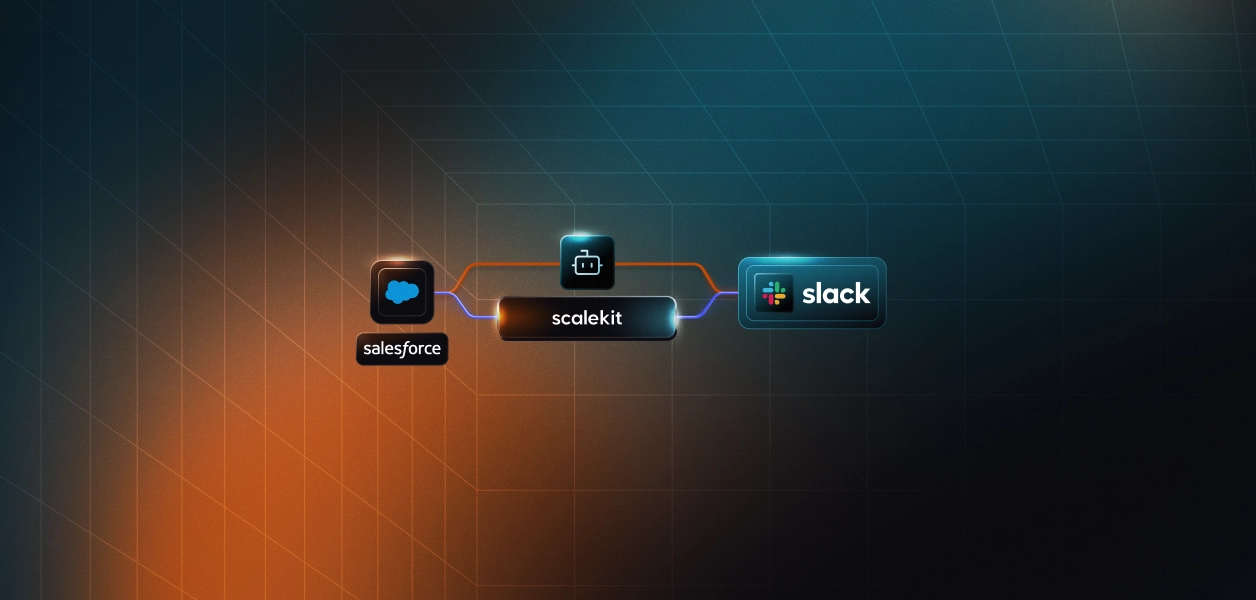
This guide builds a fully operational call prep agent and shows exactly how Scalekit's connector layer lets you skip the auth plumbing entirely. Scalekit connects Google Calendar, Granola, Attio, and Slack through a single interface, so everything runs without managing multiple auth flows.
This agent reconstructs call context from three independent data sources that have no native connection to each other:
Managing all three independently means building auth infrastructure before writing any pipeline logic. That's the part this guide solves for you.
Once set up, the agent runs the same call prep flow for every upcoming meeting. Here is how context moves from a calendar event to a Slack brief:
To make this more concrete, the next two diagrams break down how the agent decides when to generate a brief and how each service is called during a single run.
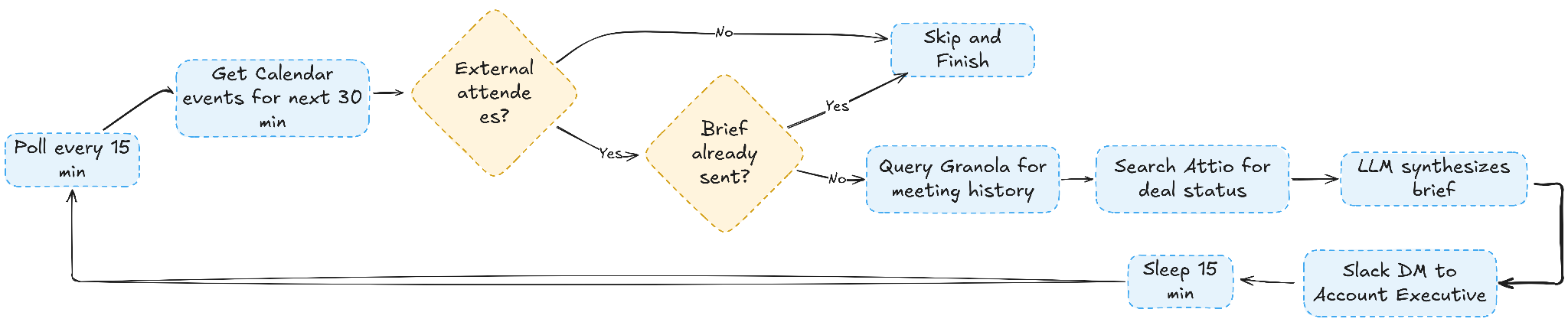
The diagram below shows how the agent determines whether a meeting qualifies for a prep brief, from calendar checks through deduplication and data retrieval to final delivery.
This sequence diagram shows how each service is invoked during a single run, from the initial auth check to the final Slack message being sent.

With this Sales Call Prep agent, the AE starts every call with a detailed brief with all the intel that's there in Granola and Attio, without wasting time and resources on manual resource retrieval and processing. Every section in the brief is grounded in actual data from Granola and Attio, so the AE is not relying on guesswork or incomplete notes. Here's an example:

Before starting, confirm the following are in place:
The project is one file: run_flow.py. Clone the repo and install dependencies:
Create a .env file in the project directory. All values come from your Scalekit dashboard and connected services:
Note: SLACK_CONNECTOR and GRANOLA_CONNECTOR must match the connector names in your Scalekit dashboard exactly. The connector name also sets the tool name prefix. A connector named granolamcp exposes tools named granolamcp_query_meetings and granolamcp_get_meeting_transcript.
This workflow connects four separate authentication systems. Each has its own token format, refresh schedule, and failure mode.
Managing all four independently means building token storage, refresh logic, scope validation, and error handling for each service before writing a single line of pipeline logic. This is where most agent projects stall out.
Scalekit provides a unified authentication layer for agent workflows that operate across multiple services. It removes credential management from the application layer entirely.
Rather than implementing four separate auth flows, Scalekit gives you three concrete advantages:
Set up all four connectors before writing any code so the pipeline can be tested end-to-end from the very first run.
Step 1: Create Your Scalekit Account
Go to scalekit.com and create a free account. Create a new workspace for this project. Your workspace generates a SCALEKIT_ENV_URL, SCALEKIT_CLIENT_ID, and SCALEKIT_CLIENT_SECRET. Copy these to your .env file.
Step 2: Add the Google Calendar Connector
In the Scalekit dashboard, navigate to Agent Auth > Connections, search for Google Calendar, and add it. Select the calendar.readonly scope for listing events.

Step 3: Add the Granola MCP Connector
Add the Granola MCP connector and configure it with your Granola instance. Scalekit handles the MCP protocol negotiation and session state, so your code only needs a single execute_tool() call.
Step 4: Add the Attio Connector
Add Attio with scopes for reading people and deals. Scalekit manages the Attio OAuth token lifecycle alongside Google's, with a single consistent interface.
Step 5: Add the Slack Connector
Add Slack with the chat:write scope to enable sending DMs.

Scalekit provides a Claude Code plugin that automatically bootstraps the full auth scaffold, with no manual OAuth flows, token refresh logic, or scope management.
Run these two commands in your Claude Code terminal to install the Scalekit authentication plugin:
Once installed, give Claude Code the following prompt:
Claude Code generates the client initialization, the CONNECTOR_USERS mapping, and the ensure_authorized() and tool() helpers that the rest of the pipeline calls.
Client and connector map initialize the Scalekit client with your workspace credentials and maps each service to the identity it should act on behalf of. Every execute_tool() call downstream uses this map to route requests to the right connected account.
The tool() helper is the single call pattern used across every connector in the pipeline. It wraps execute_tool() with the connector name, user identity, and input parameters so every service interaction follows the same three-line structure regardless of which API is being called.
The ensure_authorized() startup check runs once on agent startup to verify every connector is in the ACTIVE state before the pipeline begins. If any connector hasn't been authorized yet, it generates a magic link on the spot so you can complete OAuth without touching the Scalekit dashboard directly.
On the first run, Scalekit prints a magic link for any connector not yet authorized. Click the link, complete OAuth once, and every subsequent run proceeds directly to ACTIVE without prompting again.
The agent queries Google Calendar using googlecalendar_list_events with a 30-minute lookahead window:
The agent filters to meetings with external attendees by comparing email domains against the AE's domain and skips any event starting in fewer than 15 minutes:
Events that have already been briefed are tracked in _sent_event_ids. The same brief is never sent twice for the same meeting.
For each qualifying meeting, the agent queries Granola by attendee email and by company name. Running both queries catches meetings where the contact is the same, but the search string differs:
Transcripts are fetched for the two most recent meetings to give the LLM the richest possible view of the last conversation:
If Granola returns no prior meetings, the brief still generates — the LLM treats it as a first call and suggests discovery questions instead.
The agent searches Attio by company domain rather than filtering by person ID, which avoids Attio's complex nested filter syntax:
The parsed deal includes name, stage, value, and last activity date. If no deal is found, the LLM is informed and adjusts the brief accordingly.
With Granola notes, transcripts, and Attio deal data assembled, the agent sends a structured prompt to OpenRouter:
Use openai/gpt-4o-mini as the default model. It is fast, costs under a cent per brief, and reliably follows the structured output format.
The agent formats the brief and DMs it to the AE using slack_send_message. Pass a Slack user ID directly as the channel parameter to open a DM:
SLACK_DM_USER is the AE's Slack user ID (a U... string found under Profile > Copy member ID). The brief always goes directly to the AE, never to a channel or group.
With all connectors active and environment variables set, run the agent:
Once running, the agent prints a live status update for every step:
The full pipeline for one meeting, including the LLM call, runs in under 30 seconds.
Google Calendar: The time_min and time_max parameters must be in RFC3339 format with a Z suffix (e.g., 2026-04-07T12:00:00Z). All parameters must be in snake_case; using camelCase causes the filter to be silently ignored, which returns all calendar events, including birthdays and past events.
Granola: The connector name in your Scalekit dashboard must exactly match GRANOLA_CONNECTOR. If you created it as granolamcp, tool names must use that prefix: granolamcp_query_meetings and granolamcp_get_meeting_transcript.
Attio: Use attio_search_records to look up deals by company domain query. Avoid filtering attio_list_records by associated_people. The nested filter syntax is non-obvious, and a text query search is simpler and equally effective.
Slack: Make sure SLACK_DM_USER is your Slack user ID from the workspace your connector is connected to, not from a different workspace. User IDs start with U. If you have multiple Slack connectors in Scalekit with the same identifier, delete the stale one with connect.delete_connected_account() before running.
Scheduling: For continuous operation, set POLLING_MODE=true or use a cron job to run every 15 minutes during working hours:
Before this agent, an AE handling 15 external calls a week spent around 3–4 hours on pre-call prep, switching between Granola, Attio, and other sources to assemble context before each call. That prep was inconsistent, often missed action items from earlier conversations, and did not scale as call volume increased.
After the agent runs, that prep cycle takes zero AE effort. A brief arrives in Slack 15 minutes before each call with prior meeting context from Granola, deal stage and history from Attio, a suggested agenda, and targeted open questions. It takes two minutes to read.
The same architecture extends naturally to other pre-call workflows. Account expansion calls can pull contract renewal data. QBRs can include product usage metrics. First calls can use Apollo enrichment instead of Granola history. Once the Scalekit connectors are in place and the execute_tool() pattern is established, adapting to a new data source means updating which tools are called and what the LLM prompt asks for — not rebuilding the auth and orchestration layer from scratch.
Each service has its own OAuth flow, token format, and refresh schedule. Managing them directly means building four separate auth systems before writing any pipeline logic. Scalekit collapses all of it into one execute_tool() call per service, working with auth in minutes, not days.
Yes. It checks expiry on every execute_tool() call and refreshes using the stored refresh token if needed. No refresh logic in your code, no stale credentials mid-run, no token state to manage between polling cycles.
Yes. Each AE gets their own connected accounts in Scalekit, identified by their email. Add one entry per AE to CONNECTOR_USERS and loop process_cycle() over them. Scalekit manages each AE's tokens independently — no credential sharing, no token collision.
The brief still generates with whatever data is available. Granola down means no prior context; the LLM switches to first-call mode. Attio down means no deal data. Only Google Calendar is a hard dependency; if unavailable, the agent exits with a clear error.
The pipeline has three independent data slots: meeting notes, deal data, and attendee list. Replacing Granola means updating the Step 2 execute_tool() calls. Replacing Attio with Salesforce or HubSpot means updating Step 3. If your tool has a Scalekit connector, it's a field mapping change, not an auth rebuild.