

Customer support teams often close tickets without knowing what happens next, creating an awkward gap between “resolution” and “actual customer satisfaction.” Many teams describe the same recurring situation: an issue is marked resolved in Freshdesk, the conversation ends, and several days later, they discover the customer was unhappy or needed a follow-up. Engineers try to patch this gap manually, but as ticket volume grows, maintaining consistent follow-ups becomes impossible. This gap becomes even more painful when customers respond with CSAT feedback much later, completely outside the workflow.
The real problem is the lack of an automated path from “ticket resolved” to “customer follow-up action,” which forces developers to build brittle glue code. Freshdesk exposes powerful APIs and webhooks, but turning them into reliable follow-up logic requires event detection, deduplication, retries, and decision-making. At the same time, Google ADK can create tasks or run agents, but connecting it cleanly to Freshdesk state changes is far from trivial. Many teams never properly solve this integration, and support quality suffers.
This blog teaches how to build a complete Freshdesk and Google ADK customer follow-up automation agent using real production-grade techniques. You will learn how to capture “resolved” events, trigger ADK tasks, avoid duplicate actions, post useful updates back into tickets, and design a robust agent decision loop. Along the way, you will understand webhook design, scoped API keys, retry logic, polling strategies, deduplication, and how to structure a Python automation agent that runs reliably in real environments.
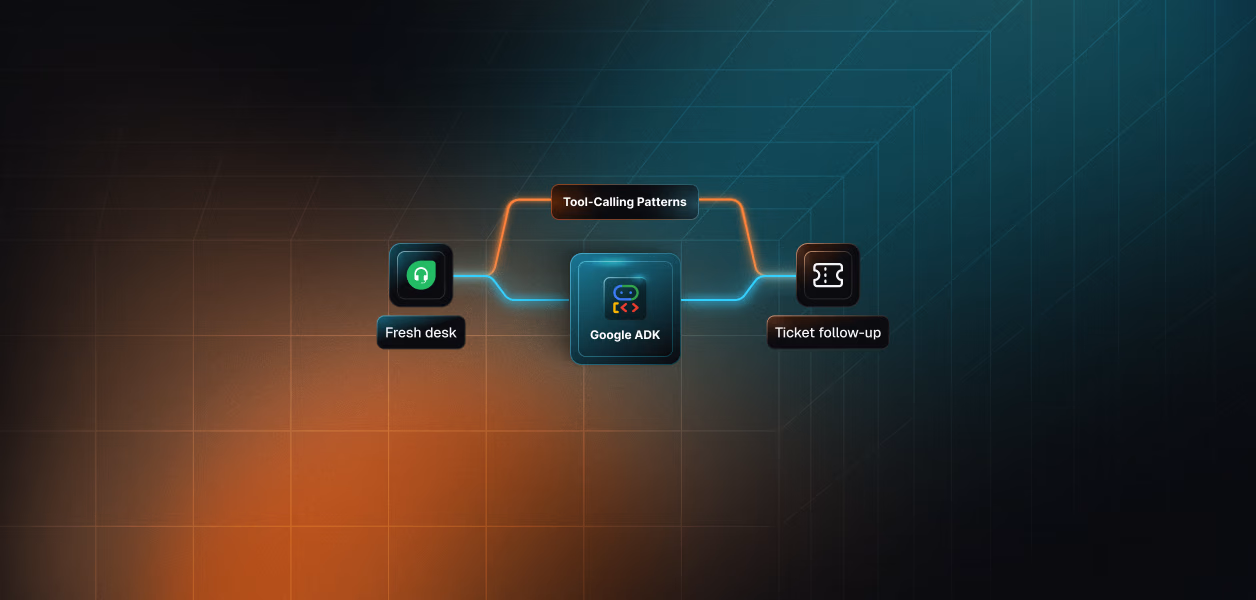
The follow-up automation behaves predictably when you view it as a continuous loop instead of a set of independent functions. Everything begins the moment a Freshdesk ticket enters the Resolved state. The poller or webhook captures this transition, checks that the ticket has not been processed earlier, and gathers essential context such as the requester’s email and the latest CSAT survey. This is the exact moment from our introductory story where the support team mistakenly assumed the follow-up had already happened. The automation removes that uncertainty by reliably detecting it every time.
Once the event is captured, the agent sends the ticket metadata and CSAT survey (if available) to Google ADK, which evaluates the response and determines the next step. The ADK agent may thank a satisfied customer, reopen the ticket for a negative experience, or take no action if no feedback was collected. This reasoning is deterministic because ADK produces a structured JSON output instead of free-form text. The agent then posts the appropriate reply in Freshdesk and updates the ticket state, ensuring the follow-up step is executed consistently rather than being forgotten as in the original scenario.
The cycle ends with deduplication and state persistence. Every processed ticket ID is stored, so the system never repeats actions even if the poller overlaps, a restart happens, or Freshdesk returns historical tickets again. The complete loop: detect → enrich → evaluate → act → update produces a stable, production-grade automation that eliminates missed follow-ups entirely. Developers can then extend this foundation with CRM updates, Slack triggers, escalation flows, or additional ADK reasoning steps without rewriting the core loop.

Freshdesk webhooks act as real-time triggers whenever important events occur, making them essential for automation that depends on ticket transitions. When a ticket is resolved, Freshdesk sends an event payload to the specified webhook endpoint. This is the moment that starts the automated workflow described in the intro, where support teams had assumed follow-ups were happening, but later discovered they were not.
Freshdesk ticket statuses define the workflow stages, and status 4 indicates that a ticket is resolved. Automation systems can use this signal to begin post-resolution tasks without interfering with customers or internal teams. This state marks the precise point in the story where the manual follow-up steps failed, leaving customers without acknowledgement or actionable next steps.
Webhook payloads deliver all necessary context for downstream automation. Each payload includes the ticket ID, requester information, status change details, and timestamps. This information allows the ADK agent to understand the change, fetch survey results if available, and choose an action based on structured reasoning. Integrating this webhook event into the workflow removes the dependency on human memory and ensures that every resolved ticket receives the appropriate follow-up path.
Before the automation loop can run, the system needs valid credentials for both Freshdesk and Google ADK. These credentials allow the agent to fetch tickets, read survey results, update statuses, and run decision pipelines. This configuration step was where teams at the start struggled the most: they wanted automation, but they never set up a clean, reliable way for their systems to communicate.
The automation system loads all secrets from a .env file using the dotenv library. Create a .env file at the root of your project. Here is the sample template:
This file must always stay private. Never commit it to GitHub.
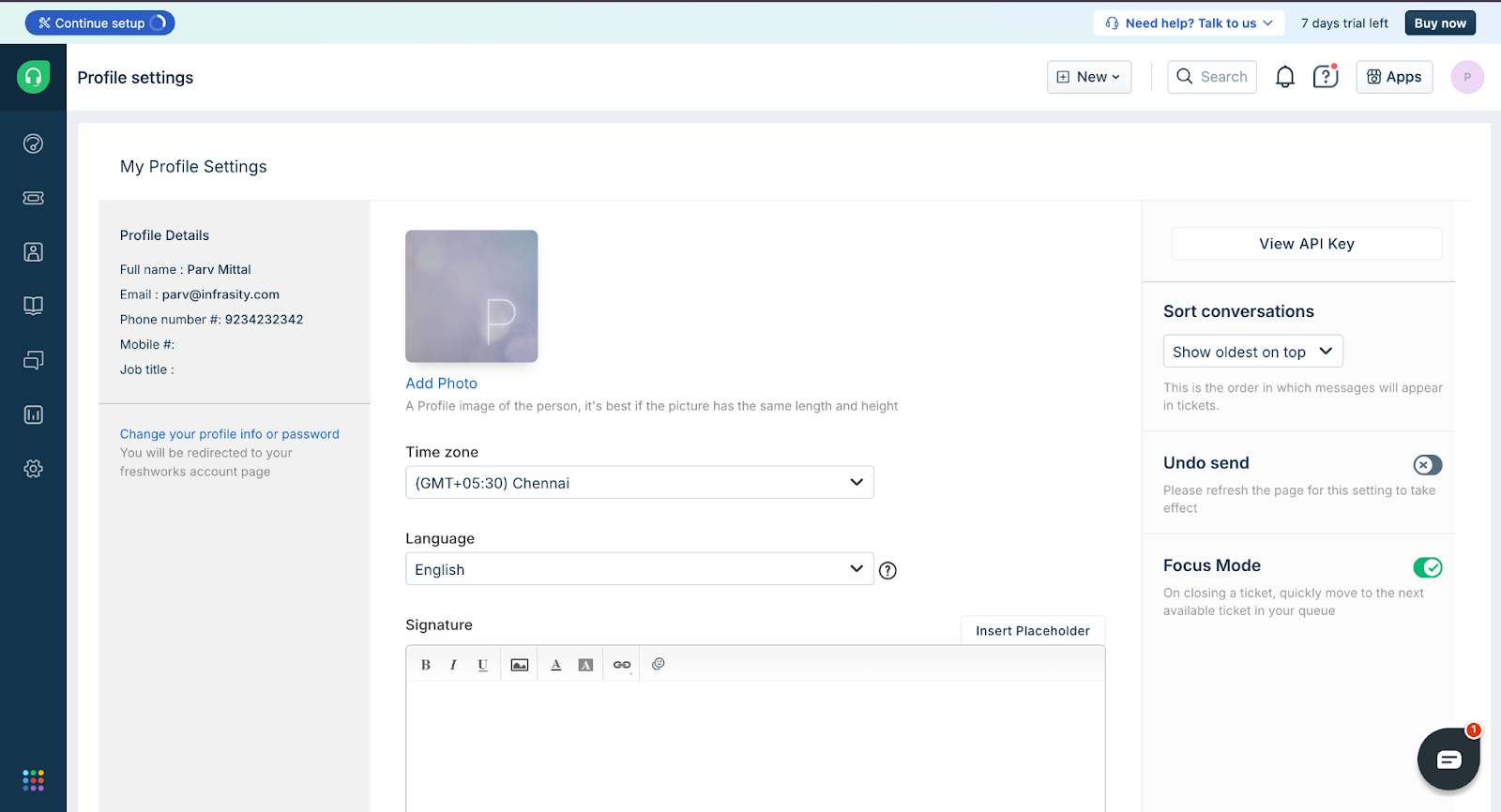
Go to My Profile > Profile Settings > Your API Key.
Every company has its unique Freshdesk Domain.
Example:
FRESHDESK_DOMAIN=mycompany.freshdesk.com
FRESHDESK_API_KEY=tzF0h1ExampleKey123
This key authorizes all API operations used in the follow-up automation: fetching tickets, replying, updating statuses, and reading surveys.
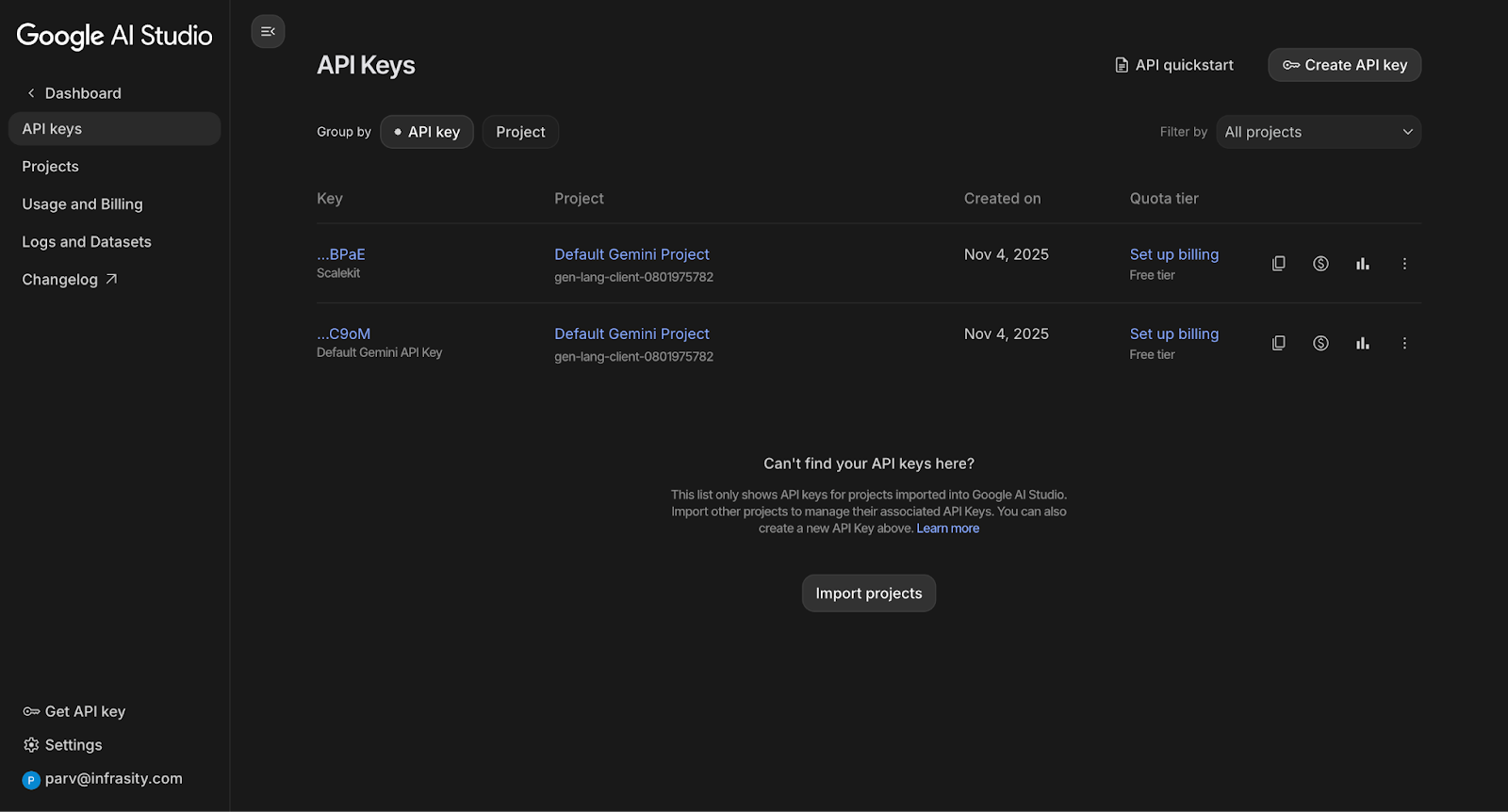
Google ADK uses the Google AI Studio key under the hood. You do not need OAuth, apps, or scopes, just a simple key.
Visit Google AI Studio > API Keys > Create API Key.
For teams not using real-time webhooks, the poller checks Freshdesk every few seconds.
POLL_INTERVAL=60
Guidelines:
In the intro story, the team missed follow-ups because no one checked Freshdesk frequently enough. This setting is what prevents that gap.
Freshdesk webhooks provide the event trigger that makes this entire automation possible. A webhook turns a support workflow into a real-time signal: “A ticket just changed its lifecycle.” Developers can subscribe to events like status updates, notes added, or agent replies. In our intro scenario, the team kept missing follow-ups because no one knew the exact moment tickets entered the resolved state. A webhook or polling loop bridges this exact gap by giving the automation agent a reliable way to detect that moment and start the follow-up process automatically.
Freshdesk APIs give developers structured access to ticket data. The automation uses these APIs to fetch core context: requester email, ticket status, and CSAT responses. This is the context ADK needs to decide whether to thank the customer or reopen the ticket. Here, the APIs replace the manual tabs, screens, and guesswork that created inconsistency in the original story. With predictable JSON structures, follow-ups become deterministic instead of relying on human judgment.
Webhook payloads supply almost everything the agent needs to act: ticket ID, requester details, and the updated status. The agent uses this ticket ID to fetch CSAT survey details and confirm whether the ticket should be processed. Below is the essential portion of the code that performs these API interactions. These helpers form the foundation of every later section in the automation pipeline:
This function retrieves tickets along with requester details. This becomes the moment the system discovers that a ticket has just entered the “Resolved” state, the same moment humans used to overlook.
This helper posts a reply to the ticket thread. When the ADK agent decides to thank a customer or send an apology, this is the mechanism that makes the follow-up visible to support teams and prevents tickets from silently ending the way they did in our opening scenario.
To complete the flow, the automation also relies on two additional Freshdesk helpers: updating the ticket state and retrieving survey data. These functions ensure that the follow-up logic acts on the current ticket information rather than stale assumptions.
This PUT call updates the ticket status (for example, closing it after thanking a satisfied user or reopening it after a negative survey). In the intro scenario, this is the missing action that support teams failed to perform consistently. Automating this step fixes the operational gap at the root of the storytelling problem.
This helper retrieves the CSAT survey submitted by the customer. Freshdesk often stores multiple survey entries, so the function sorts them and extracts the latest one. This mirrors the pain point from the intro: the team misinterpreted or missed the right survey because they were looking at outdated or inconsistent data. Automating this step ensures the decision agent always uses the most recent customer input before deciding what to do next.
Together, these four functions demonstrate how Freshdesk exposes clean building blocks for reliable automation. These APIs turn subjective manual follow-ups into structured, machine-driven actions, restoring the dependable workflow that the story’s support team lacked.
Google ADK agents handle the decision-making step that sits between a resolved ticket and the follow-up action. This part matters because Freshdesk itself cannot interpret CSAT surveys or choose actions based on the combination of requester identity, rating, and historical context. Google ADK fills that gap by letting developers build small reasoning workflows that evaluate structured input and return a consistent decision. This workflow gives predictable behaviour even when the survey responses vary in tone or structure, which brings reliability to the story’s original problem, where follow-ups were inconsistent and delayed.
Google ADK agents work by taking structured inputs, applying an instruction prompt, and producing a JSON output describing next actions. This structure helps reduce ambiguity because the agent communicates using clear keys such as rating, feedback_received, and action. Developers do not need to parse natural language responses or rely on keywords. The deterministic contract makes the automation easier to maintain, especially when new survey formats or variations appear in Freshdesk. This predictability is the piece that our intro scenario lacked before automation existed.
The decision agent returns three essential fields that our automation relies on.
This small schema captures the minimum logic required to decide how to reply and update a Freshdesk ticket. It stays simple, which helps ensure consistent handling across all tickets.
The core decision logic from your code looks like this:
The instruction ensures the agent avoids generating narrative text and instead outputs a machine-readable JSON object. This pattern is essential because consistent output allows the automation to proceed safely without requiring extra fallback logic. The story’s original challenge of unpredictable, manual follow-ups becomes more manageable because each step now follows a reliable contract.
Google ADK uses a SequentialAgent wrapper to run the LLM step in a controlled chain. The wrapper keeps the task simple and avoids branching logic that often complicates production workflows. The sequential format gives developers a clear mental model of what happens: a Freshdesk survey enters, ADK reasoning occurs, and a JSON decision exits. This clarity echoes the original scenario where engineers struggled to track responsibility for follow-ups.
The system extracts only the JSON from ADK output using _strip_code_fences and a normalisation layer. That step removes Markdown formatting and ensures that ratings such as "positive" or "103" are converted to consistent integers. Normalisation prevents silent bugs later in the pipeline. This design choice protects reliability when different team members add or modify survey types, which reflects the consistency that the intro scenario’s support team longed for.
Here is the normalization snippet:
This small block ensures the automation behaves uniformly across different survey formats. It shields the downstream Freshdesk actions from inconsistent data. That stability is exactly what the story’s support team needed, because their earlier manual process behaved differently depending on tone or wording.
The ADK decision agent enables Freshdesk to act with more empathy and accuracy. Positive ratings lead to a warm thank-you message and automatic closure. Negative ratings trigger an apology and reopen the ticket for a human to follow up. Neutral or missing ratings result in no action. This behaviour closes the loop that our story’s team struggled with, because every resolved ticket now receives a predictable follow-up without anyone manually checking survey screens.
The decision agent becomes the centre of the automation. It takes the ambiguity out of human-written survey responses and replaces it with a structured, deterministic decision. By connecting it directly into Freshdesk actions, developers create a pipeline that behaves consistently and scales with ticket volume. This structured decision model directly solves the problem introduced at the beginning, where important follow-ups were missed or delayed because no one had a unified system interpreting CSAT signals.
The Google ADK decision agent creates the “brains” of the workflow by deciding how the system should react once a Freshdesk ticket is marked resolved. The agent reads the survey response and ticket metadata, then produces a structured JSON action. This structured action ensures deterministic behaviour, which helps eliminate the chaos developers often face in follow-up flows. This mirrors the intro story because this is the layer that stops human follow-ups from being forgotten or delayed.
The decision logic depends on predictable outputs, so the agent receives a strict instruction template. The agent is asked to return only JSON with keys like feedback_received, rating, and action. Developers benefit from this strict output format because they no longer need to scrape or guess free-form LLM text. This structure makes it easy to plug the agent output into the rest of the automation pipeline that you built in earlier sections.
The implementation uses a small SequentialAgent setup from Google ADK. Below is the core part that matters for understanding the logic, without showing the full file:
This logic is worth understanding because it ensures that the feedback loop from the intro scenario becomes self-healing. Good feedback produces a thank-you closure, while negative feedback reopens the ticket and triggers a more empathetic message. The agent consistently makes follow-up decisions, is scalable, and is resistant to the mistakes that human agents make when juggling multiple tasks.
The final step is converting the model’s free-form output into normalised JSON. The code strips away markdown fences, parses the JSON output, normalises rating values, and ensures fallback handling for unusual cases. This data cleaning is crucial because predictable output leads to predictable automation. Here’s the essential snippet for that:
This normalizer closes the loop from the initial story. It transforms messy survey data into a clean, deterministic signal that the automation system can act on. Readers coming from the intro scenario now understand how the system avoids the classic “someone forgot to follow up” problem through consistent decision-making driven by ADK.
Google ADK brings decision-making into the automation flow, which solves the confusion from the intro scenario where the support team struggled to understand what to do once a Freshdesk ticket got resolved. This section explains Google ADK from the ground up and shows how an agent can read a survey result, choose the correct action, and drive a consistent follow-up every single time. The goal is to help developers understand how ADK fits into a support workflow rather than treating it like a standalone LLM wrapper.
Google ADK provides an agent framework that turns LLM responses into structured decisions. This matters because Freshdesk survey data is inconsistent across customers, products, and ticket types, and a simple “if rating == X” rule does not work reliably in the real world. Support teams often struggle because two agents can interpret the same survey differently, and historically, these inconsistencies have led to customer dissatisfaction. By connecting Freshdesk ticket events to a Google ADK SequentialAgent, the follow-up no longer depends on manual decisions or fragile inline condition checks.
The blog now shows how these ideas translate into practical implementation. Readers will see how to construct an ADK agent with clear instructions, feed survey JSON into it, and parse the structured response it generates. The logic stays easy to extend, allowing support teams to define custom rules like additional escalations or sentiment-specific replies. The examples that follow help developers understand how ADK simplifies decisions in the same way it clarified the ticket-resolution confusion in the opening story.
This section explains how the agent tracks processed ticket IDs, why this matters operationally, and how it connects back to our original scenario of a support team overwhelmed by repeated follow-ups.
Polling introduces the risk of processing the same event multiple times, since the Freshdesk API always returns historical tickets. Without deduplication, the automation could repeatedly reopen the same ticket or send multiple “thank you for your feedback” messages. This would recreate the exact support-noise problem described in the intro, where customers received duplicate emails and agents lost confidence in the automation. Deduplication provides a reliable guardrail so each resolved ticket triggers the follow-up workflow exactly once.
The agent stores processed ticket IDs in a simple JSON file, which acts as a lightweight state store. This is enough for small deployments and avoids external dependencies like Redis. The load_state function reads previously processed ticket IDs, and the save_state function commits updates after each successful ticket handling. This keeps the system consistent even across restarts. Developers reading the code can immediately trace how the state container prevents reprocessing and keeps the automation predictable.
The process_ticket function checks if a ticket ID is already in the state set before performing any action. Tickets that have not yet been processed continue through the workflow, while previously processed ones exit early. This simple condition plays an outsized operational role because it keeps your customer follow-up process clean and ensures Freshdesk agents see exactly one follow-up per ticket. This reinforces the reliability we want the engineering story to deliver from the introduction.
The automation becomes trustworthy once it avoids repeated actions on the same ticket. The team from our intro story can now rely on a system that sends exactly one customer follow-up without generating noise or re-opening tickets multiple times. By handling this detail cleanly, the workflow feels production-ready instead of experimental. Experienced developers will recognise that this is one of those small engineering decisions that deliver a disproportionately large improvement to system reliability.
The process_ticket function serves as the central coordinator for each ticket that enters the automation pipeline. Every resolved ticket passes through this function, which decides whether the agent should take action. To maintain predictable behaviour, the function performs four checks at the start: it verifies that the ticket has not been handled earlier, confirms that its status is “Resolved”, extracts the requester’s email, and fetches the latest CSAT survey. These checks protect the system from unnecessary work and address the same issues described in the introductory story, where the support team repeatedly missed timely follow-ups.
This initial logic is shown below:
Once the function gathers the ticket context, it forwards the information to the Google ADK decision agent. The ADK agent evaluates the survey result, determines the sentiment, and produces a structured JSON action such as thanking a satisfied user or reopening the ticket for an unhappy one. Instead of relying on a human agent to remember which customer responded, the system evaluates the outcome deterministically.
After receiving the decision, the function updates the ticket accordingly. Positive ratings trigger a thank-you reply and move the item to the “Closed” state. Negative ratings trigger an apology and a shift back to “Open,” ensuring a quick human follow-up. These steps restore the behaviour that the team in the introduction wanted: predictable, timely, and consistent follow-ups without depending on manual reminders.
The final step stores the ticket ID in a local state file. This deduplication layer ensures reliability even during process restarts or network delays. It prevents sending multiple replies or repeatedly reopening the same ticket, a problem that mirrors the operational inconsistency highlighted in the opening scenario.
This full cycle check, evaluate, act, persist creates the production-grade behaviour the blog aims to demonstrate. It turns the once unreliable follow-up routine into a deterministic automation loop that remains stable across reboots, retries, and edge cases.

Customer support systems often break down at the same point: the moment after a ticket is marked resolved. Teams intend to follow up, collect feedback, and reopen issues when customers respond negatively, but real life interferes. Busy queues, fast releases, and context switching turn “follow up later” into “follow up never.” By building a Freshdesk → Google ADK automation loop, we transformed this fragile, memory-driven workflow into a repeatable, verifiable system that takes care of itself.
This walkthrough showed how Freshdesk events, CSAT surveys, Google ADK agents, and lightweight state management can converge into a consistent follow-up engine. Instead of hoping that engineers notice bad feedback or manually send thank-you replies, ADK evaluates survey results, decides the correct action, and updates the ticket accordingly. The deduplication layer ensures stability. The polling loop enforces reliability. Each component stays transparent, measurable, and accountable, something every support engineering team struggles with at scale.
This foundation now enables deeper automation: connecting Freshdesk to CRM systems, triggering targeted workflows, escalating automatically when dissatisfaction rises, or enriching follow-ups with personalized LLM-driven messages. You can explore ADK’s branching agents, embed multistep reasoning for ticket triage, or integrate orchestration layers like LangGraph or CrewAI to handle richer support pipelines. The same pattern extends to other systems, Zendesk, HubSpot, Jira, and PagerDuty, making your customer feedback lifecycle fully agentic and fully dependable.
The agent receives structured survey data and runs a deterministic reasoning step inside a SequentialAgent. The model returns a JSON-only output that describes whether feedback was received, the rating, and the next action. No action is taken unless the JSON schema is valid, making the flow consistent and debuggable.
A deduplication set is persisted locally (or in Redis in more advanced deployments). Each ticket ID is marked “processed” once feedback has been handled. Even if the process restarts or Freshdesk returns the same ticket again, the agent maintains idempotent behavior.
The pipeline uses simple retry attempts with backoff and logs every failure transparently. In larger deployments, retries can be extended through a queue-based system like Pub/Sub or AWS SQS to guarantee durability under high throughput.
Scalekit abstracts OAuth credentials, refresh tokens, and scope management across providers. When connecting Google ADK with Slack, GitHub, Jira, or other APIs, Scalekit ensures that tokens remain valid and access is correctly scoped, so your agent remains focused on logic rather than authentication.
Yes. Scalekit’s connected-account layer acts as the backbone when you want to extend this follow-up automation into multi-tool workflows. You can add Slack notifications, log decisions in Notion, or open GitHub follow-up issues without storing credentials yourself. The Freshdesk → ADK pipeline becomes just one step in a larger, orchestrated system.