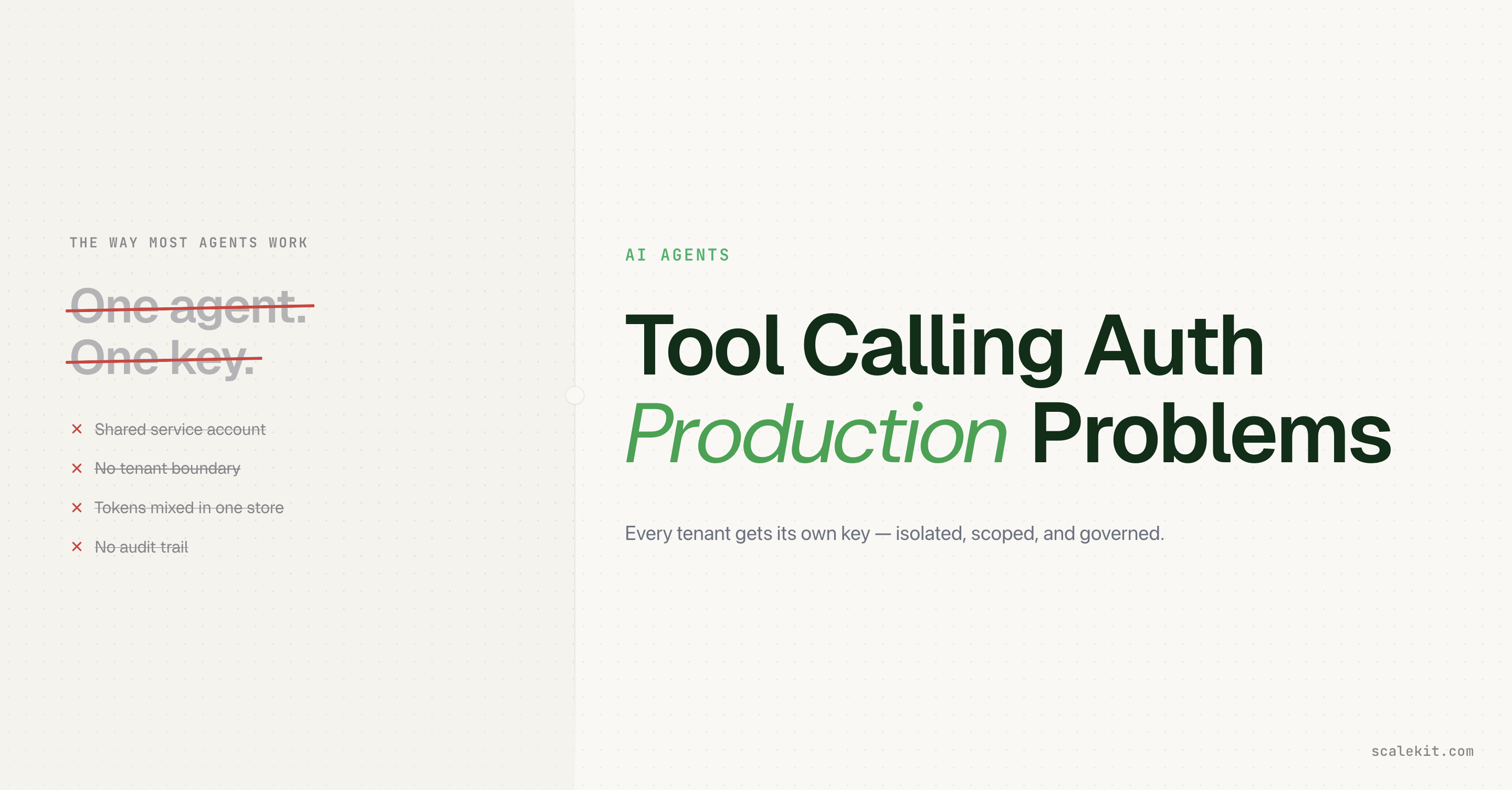
A shared Asana service account carries admin-level scope. Users querying through it see data they were never supposed to access. Shared credentials do not enforce per-user visibility.
The challenge is not tool schemas. It is ensuring every execute_tool call runs under the correct user's connected account, not an over-provisioned bot.
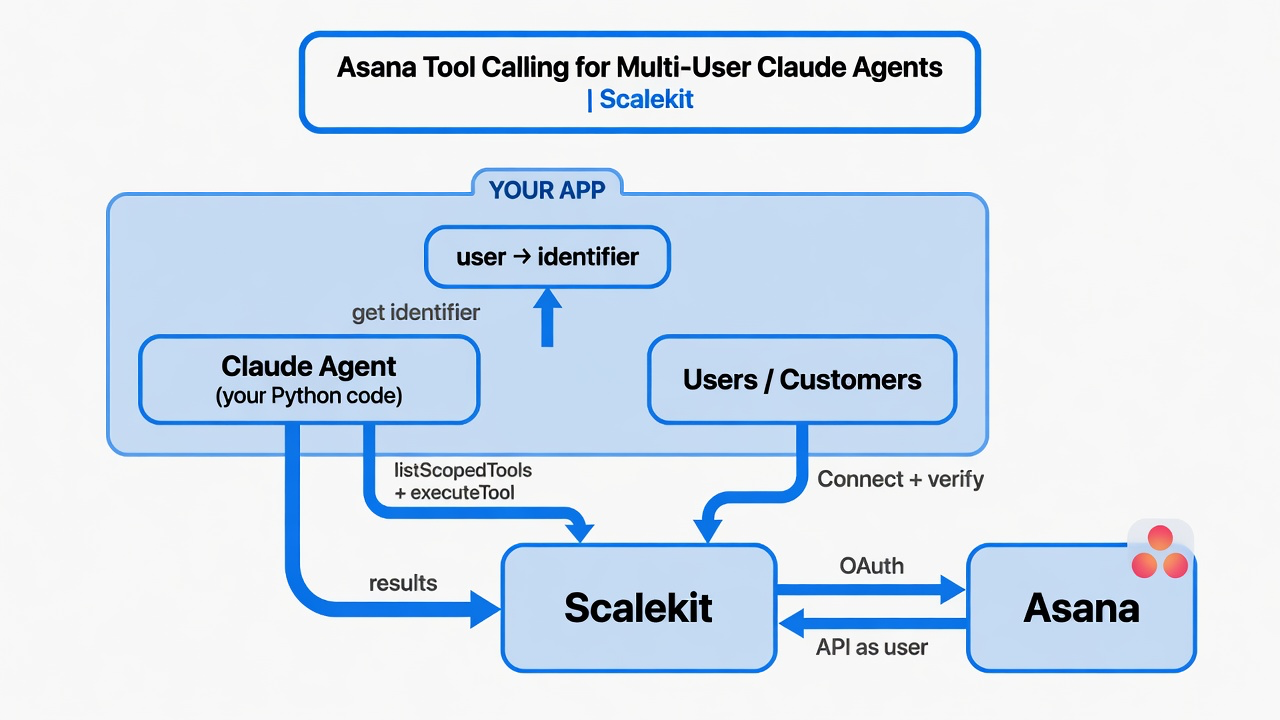
Scalekit handles the Asana OAuth per user, stores tokens per identifier, refreshes automatically, and surfaces only the tools that user is authorized to call.
"What the user cannot do in Asana, the agent cannot do." Scope is derived from identity, not connector configuration.
The identifier maps your user to their Asana connection. Resolve it server-side. Never from client input.
A user asks the agent: "What's in the Leadership OKR board?"
The agent retrieves it. Shares it in full.
The user has no access to that board. The service account does. The agent acted as itself, and surfaced data the person querying it could not have accessed directly in Asana.
This is the less visible failure of shared-credential agents. Wrong assignees are obvious. Scope inflation is not. A service account provisioned with admin access does not inherit the user's visibility boundaries. Every query runs with the bot's permissions, not the user's.
Connected accounts close this at the tool-execution layer. Queries run under each user's own Asana permissions. What they cannot see, the agent cannot retrieve on their behalf.
Why Scope Inflation Is the Harder Problem
Wrong assignees are fixable. Scope inflation is silent.
A service account provisioned with admin access lets every user query every project, retrieve every task, and read every comment — regardless of what they are actually allowed to see. The agent does not restrict. It inherits the credential's permissions wholesale.
The blast radius of one token is the entire workspace. No per-user visibility enforcement. No permission boundary the agent respects.
How execute_tool Knows Who Is Asking
In the Anthropic messages loop, every tool_use block Claude returns needs to be executed as someone. Without an identifier, that someone is always the service account.
Scalekit resolves the right connected account from the identifier, retrieves the correct OAuth token from the token vault, and executes the Asana call under that user's permissions. "Credentials never touch the agent runtime."
Recommended Reading:Scalekit AgentKit Quickstart — connected accounts, scoped tools, and the execution model in full.
Prerequisites
Python 3.10+
A Scalekit account with an Asana connection created under Agent Auth > Connections. The connection name must match exactly — for example, asana.
# agent.py
from scalekit import Scalekit
from dotenv import load_dotenv
import os
load_dotenv()
scalekit = Scalekit(
os.getenv("SCALEKIT_ENVIRONMENT_URL"),
os.getenv("SCALEKIT_CLIENT_ID"),
os.getenv("SCALEKIT_CLIENT_SECRET"),
)
# In production: resolve from your auth context, never from client input.
IDENTIFIER = os.getenv("USER_IDENTIFIER")
CONNECTION = "asana" # must match the connection name in your Scalekit dashboard
Step 2: Connect the User's Asana Account
get_or_create_connected_account returns the current state. If not active, generate a one-time authorization link for that user.
response = scalekit.connect.get_or_create_connected_account(
connection_name=CONNECTION,
identifier=IDENTIFIER,
)
if response.connected_account.status != "ACTIVE":
link = scalekit.connect.get_authorization_link(
connection_name=CONNECTION,
identifier=IDENTIFIER,
)
print("Authorize Asana:", link.link)
input("Press Enter after authorizing...")
First run prompts the user to authorize. Every subsequent run uses the stored, automatically refreshed connection.
Step 3: Retrieve the Authorized Tool Surface
The agent should not receive a flat connector catalog. list_scoped_tools returns only what this user's connected account is permitted to call, already formatted for Claude's native tool input.
scoped_response = scalekit.tools.list_scoped_tools(
identifier=IDENTIFIER,
filter={"connection_names": [CONNECTION]},
page_size=100,
)
llm_tools = [
{
"name": tool.definition.name,
"description": tool.definition.description or tool.definition.name,
"input_schema": tool.definition.input_schema,
}
for tool in scoped_response.tools
]
print(f"Discovered {len(llm_tools)} Asana tools")
"What the user cannot do in Asana, the agent cannot do." Scope is derived from their connected account, not a service credential with admin visibility across the entire workspace.
Typical tools surfaced for an active Asana connection:
asana_create_task — create a task in a project or workspace
asana_list_tasks — list tasks by assignee, project, or status
asana_update_task — update title, description, due date, or assignee
asana_add_comment_to_task — add a comment to a task
asana_get_project — retrieve project details and members
Step 4: Run the Agent Loop with Claude
The IDENTIFIER binds each tool execution to the correct user. Claude decides which tool to call; Scalekit determines whose Asana account to use.
import anthropic
client = anthropic.Anthropic(api_key=os.getenv("ANTHROPIC_API_KEY"))
messages = [
{"role": "user", "content": 'Create a high-priority task "Review Q3 roadmap" in the "Website" project and assign it to me'}
]
while True:
response = client.messages.create(
model=os.getenv("ANTHROPIC_MODEL", "claude-sonnet-4-6"),
max_tokens=1024,
tools=llm_tools,
messages=messages,
)
if response.stop_reason == "end_turn":
print(response.content[0].text)
break
tool_results = []
for block in response.content:
if block.type == "tool_use":
print(f" -> Calling: {block.name}")
result = scalekit.tools.execute_tool(
tool_name=block.name,
identifier=IDENTIFIER,
tool_input=block.input,
)
tool_results.append({
"type": "tool_result",
"tool_use_id": block.id,
"content": str(result.data),
})
messages.append({"role": "assistant", "content": response.content})
messages.append({"role": "user", "content": tool_results})
The Identifier Is Not Metadata
The identifier is the security control that determines which Asana account makes each tool call. Passing the wrong one does not produce an error. It silently acts as the wrong user.
# Correct: resolve from your session after authenticating the request
identifier = get_current_user_id_from_session(request)
# Incorrect: accept from anything the client controls
identifier = request.args.get("user_id") # never do this
"Credentials never touch the agent runtime." The identifier must come from your authentication layer: your session, your JWT claims, your verified database record. This is a fundamental principle of secure token management in agentic systems.
Running It
python agent.py
Or with a custom prompt:
python agent.py "List my open tasks and add a comment to the first one: 'Updated via agent'"
Expected output:
Authorize Asana: https://... # first run only
Discovered 12 tools
-> Calling: asana_create_task
Task created in project "Website". Task ID: 123456789. Assigned to you.
Tradeoffs
Dimension
Shared bot / service account
Build your own OAuth + vault
Scalekit connected accounts
Data visibility scope
Bot's permissions, often admin
User's permissions, if built correctly
User's permissions, always
Per-user permissions
No
Yes
Yes
Token maintenance
Manual
Owned by you
Automatic
Revocation per user
No — revoking breaks everyone
Yes
Yes
When to use
Prototypes only
Rarely worth the maintenance cost
Production multi-user agents
Troubleshooting
Why does my connection never become ACTIVE after the user finishes OAuth?
You probably skipped the verification step.
After the user completes the Asana consent screen, Scalekit redirects or you must explicitly verify in a protected endpoint that the current authenticated user owns the identifier.
If you never verify, or verify incorrectly, the account stays pending.
Why do the tools return permission errors or empty results?
The connected account either never received the required Asana scopes during OAuth, or the token was revoked/changed later.
Re-authorize with a fresh link for the same identifier.
Why is the identifier "not found" or list_scoped_tools empty?
No active connection for that identifier + connection name.
You are trusting an identifier from the client instead of resolving it server-side after your own auth check.
Call get_authorization_link again with the same connection_name + identifier. Scalekit handles re-authorize/refresh.
Can one user connect multiple services?
Yes. Same identifier, different connection_names in the filter.
What Correct Scoping Prevents
A shared-credential agent does not just use the wrong identity. It uses the wrong permissions. A service account with admin access silently makes every user an admin.
Per-user connected accounts enforce Asana's permission model exactly. No user sees data they shouldn't. Audit trails show real people. Revocation affects one account, not all.