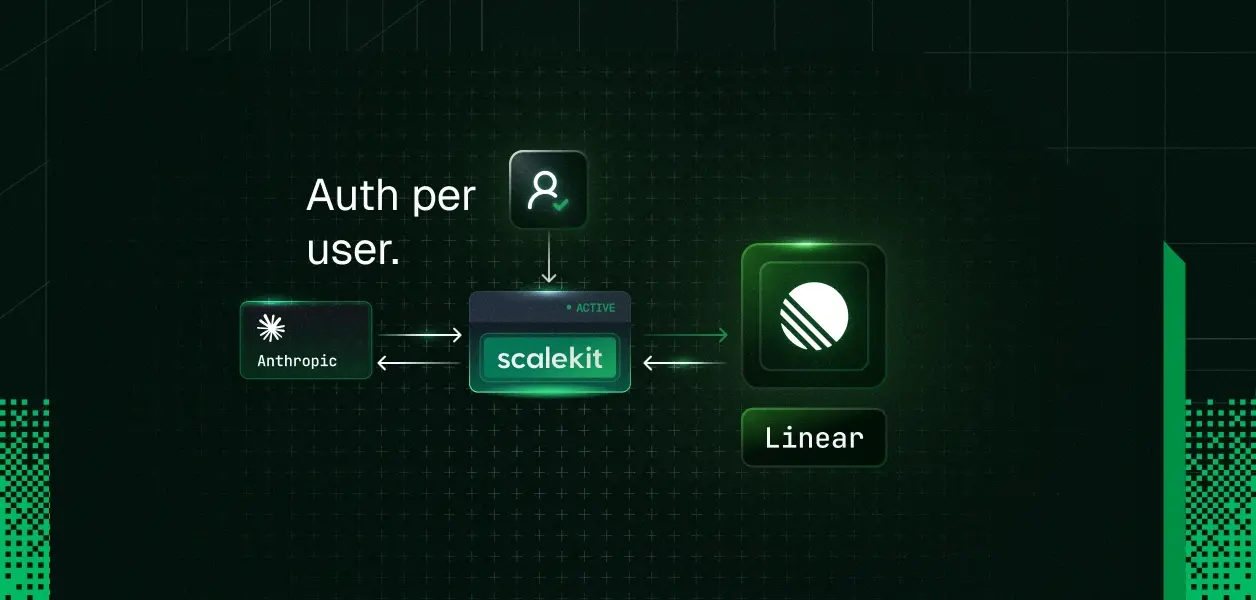


Your users expect the Claude agent you've built to create Linear issues, search their backlog, or pull team data using their own Linear identity and permissions.
When the second person starts using your agent, sharing one Linear connection immediately breaks: issues appear under the wrong name, searches leak data the current user shouldn't see, and actions run with the wrong permissions.
The usual path is painful: read Linear's GraphQL API, build an OAuth flow, store and refresh tokens for every user, and hand-write tool schemas. Scalekit lets you skip almost all of that.
Scalekit gives your agent authenticated access to Linear's API and returns tool definitions in Anthropic's native format. You don't write schemas, manage tokens, or build an OAuth flow. Here is the complete working example.
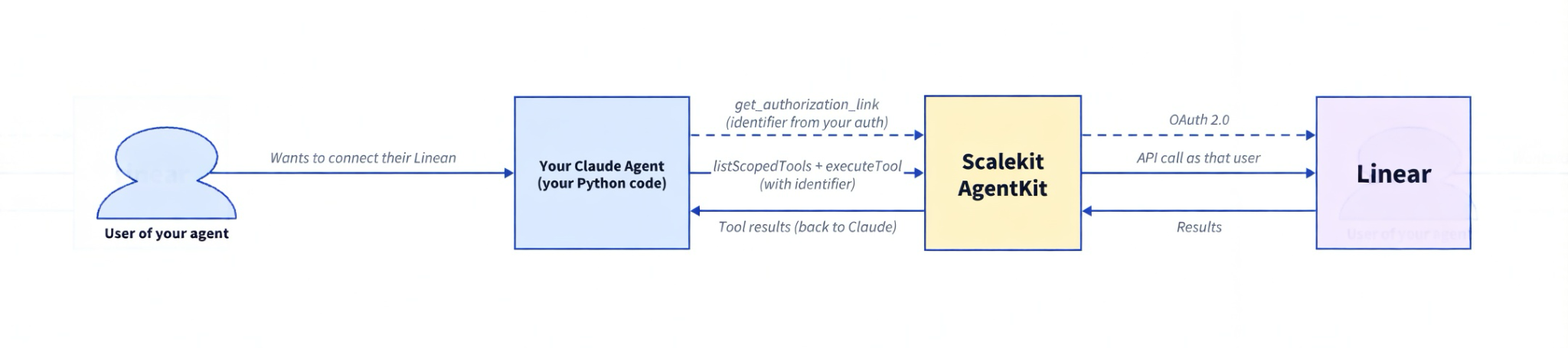
You are building a Claude agent in Python (using the Anthropic SDK). When one of your users chats with the agent and asks it to do something in Linear, your code calls Scalekit.
You pass an identifier that represents the current person in your own system. This identifier comes from your application's normal authentication (after you verify the user via session, JWT, database lookup, etc.). Never trust an identifier coming from the client.
Scalekit looks up the Linear connection that person previously authorized through your app. It then makes the actual Linear API call using their identity and permissions. Your code never sees or manages tokens.
The one-time connection step is also triggered from your app. When a user wants to link their Linear account so your agent can act on their behalf, you generate the authorization link using their identifier and guide them through the OAuth flow.
Or create a .env file in the same directory (the script loads it automatically via dotenv):
Critical: The value "linear" (in the filter={"connection_names": ["linear"]} call) must be the exact Connection name you entered when you created the Linear connection in the Scalekit dashboard (one-time step under Agent Auth → Connections). Names are case-sensitive.
You should see output like:
If this is the first run for the identifier you will instead see an authorization link printed. Open it, complete Linear OAuth, press Enter, and the script continues.
A .env file in the same directory is the most convenient way to manage the values (the script uses dotenv):
get_or_create_connected_account checks whether this identifier already has an active Linear connection. If not, get_authorization_link generates a URL the user opens to complete the Linear OAuth flow. In production, the identifier comes from your authenticated session. Never from the client.
list_scoped_tools returns the tools available for this user's Linear connection. The key part is the filter:
The name you put inside the filter (e.g. "linear") must exactly match the Connection name you created in the Scalekit dashboard. It is case-sensitive.
A mismatch here is the most common reason for an empty tool list.
This is the standard Anthropic tool-use pattern. Send messages to Claude, check if stop_reason indicates a tool call, execute the tool via Scalekit, and send the result back. The loop continues until Claude produces a final text response.
For a more robust version in production you usually add:
The simple while True loop in the example is enough to get started and works great for most internal tools.
execute_tool passes the tool name, user identifier, and inputs to Scalekit. Scalekit calls the Linear API using the stored token for that user. Your code never touches the token directly.
When you call list_scoped_tools, Scalekit returns each tool with a definition object containing name, description, and input_schema. Here is what a single tool looks like after extraction:
This is Anthropic's native tool format. You pass the array directly to client.messages.create() without any conversion.
The Scalekit Python SDK returns protobuf objects, which is why we use MessageToDict (from google.protobuf.json_format) to turn them into plain Python dicts that the Anthropic SDK accepts.
list_scoped_tools returns the full set of LLM-optimized tools available for the connected Linear account — typically 10 tools in practice. Here are the core ones grouped by capability:
Additional tools for projects, cycles, labels, and workflow states are usually present depending on the workspace. Scalekit maintains the connector. When Linear evolves their API or GraphQL schema, the tool definitions update behind the scenes — your agent code stays the same. The authoritative list is always in the Linear connector docs.
The script handles any prompt that maps to the available tools. Here are a few to try beyond the default:
Create an issue from a bug report: "Create a high-priority bug in the Backend team: 'API returns 500 on /users endpoint when email contains a plus sign'. Set priority to urgent."
Claude calls linear_issue_create with the title, description, and priority fields. It may call linear_team_get first to resolve the team ID from the name "Backend." You get back the issue ID and URL.
Update an issue and add a comment: "Mark issue ABC-142 as completed and add a comment saying the fix shipped in v2.4.1."
Claude calls linear_issue_update to change the status, then linear_comment_create to add the note. This is a multi-tool-call turn. Claude can request multiple tool calls in a single response, and the agent loop processes all of them before sending the results back.
Get a team overview: "Who's on the Platform team and what are their roles?"
Claude calls linear_team_get to find the team, then linear_user_get for the members. The response includes display names, roles, and admin status.
Link related issues: "Link issue ABC-142 as blocking ABC-155."
Claude calls linear_issue_relation_create to set up a "blocks" relationship between the two issues. Linear will show this dependency on both issue pages.
Get team + search recent work:
"Show me who is on the Platform team and what issues they closed in the last 7 days."
Claude will likely call linear_team_get first to resolve members, then linear_issue_search with appropriate filters (assignee + date range). This is a good test of multi-step reasoning across tools.
The identifier parameter ("user_123" in the example) is what makes this work for teams and products. Each user in your system gets their own identifier. When they connect Linear through the OAuth flow, Scalekit stores their token under that identifier. Every tool call runs with that specific user's permissions.
In production, you resolve the identifier from your authenticated session. After your app verifies who is making the request (via your own login system, session cookie, or JWT), you look up their Scalekit identifier and pass it to every Scalekit call. The same agent code serves every user. You never accept an identifier from the client directly.
If a user hasn't connected Linear yet, get_or_create_connected_account returns a non-ACTIVE status and you send them through the OAuth flow. Once connected, their token is stored and refreshed automatically. You never touch the token directly.
Here are the questions developers ask most often when wiring up their first Claude agent with Linear.
get_or_create_connected_account returns a status other than ACTIVE when the user hasn't finished (or hasn't started) the OAuth flow for that identifier. Print the authorization link, have the user complete it in their browser, then call get_or_create_connected_account again. In production, make sure your own auth has verified the user before you surface or accept the link.
The name you pass in the filter must exactly match the Connection name you created in the Scalekit dashboard (see the Critical note in the "Run it" section). Names are case-sensitive. An empty result is silent — no error is raised. This is the most common first-run problem.
The two most common causes are:
Wrap the execute_tool call and feed the error message back to Claude as a tool_result. Claude is usually good at correcting itself on the next turn.
Install the protobuf package explicitly with pip install protobuf. The scalekit-sdk-python package lists it as a dependency, but clean virtualenvs and some container images don't pull it in automatically.
The prompt was too vague for the available tools. "Get my Linear user profile and team" works much better than "Tell me about myself." Also double-check that llm_tools is not empty before the first messages.create() call.
Linear sometimes deprecates older GraphQL endpoints. Because Scalekit maintains the connector, the tool definitions are refreshed on their side without any code change on your end. Re-run list_scoped_tools (or restart the script) to pick up the current schema, and pass the exact error text back to Claude so it can adapt its next request.
Other connectors. The same code works with Gmail, Slack, GitHub, HubSpot, Notion, and dozens more. Change connection_name and the prompt. See the full connector catalog.
Other frameworks. The same connected-account pattern works with LangChain, CrewAI, Vercel AI SDK, Google ADK, and more. See all framework examples.
Source code. The complete examples live in the agent-auth-examples repo under python/frameworks/anthropic/ and javascript/frameworks/anthropic/.