A complete TypeScript script wiring Scalekit's HubSpot tools into a Mastra agent — contacts, deals, calls, pipelines — as individual users, no OAuth code required.
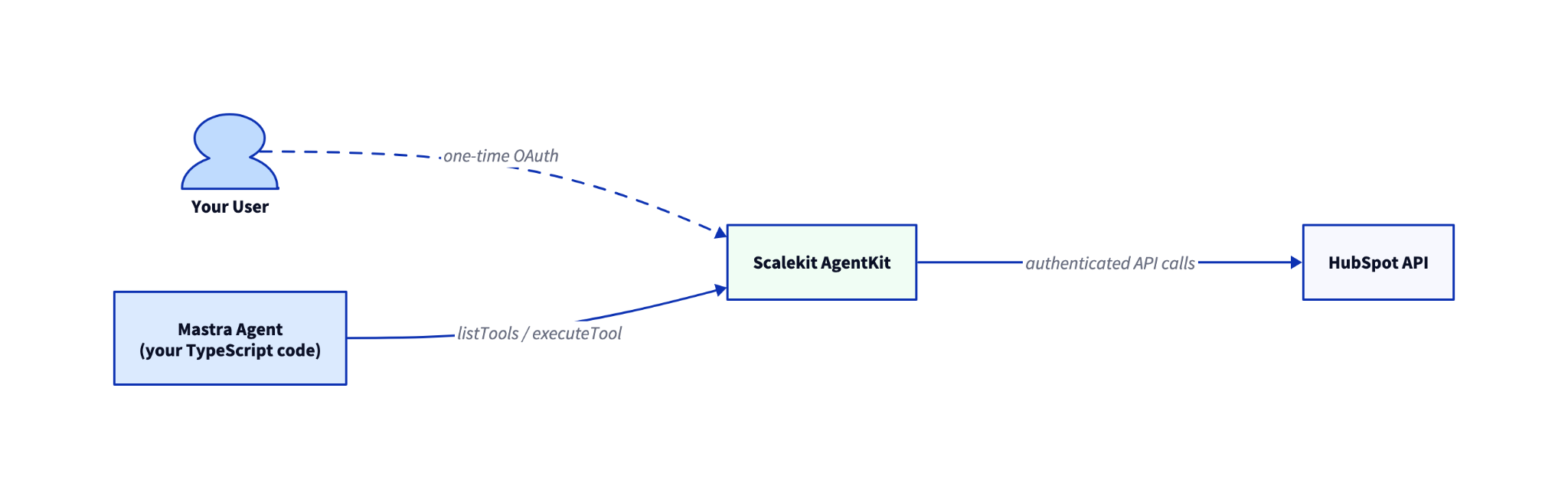
User connects HubSpot once via OAuth (Scalekit vaults the token)
listTools returns ~17 HubSpot tool definitions; a createTool loop wraps each for Mastra; an MCP alternative skips the loop entirely
agent.generate(prompt) drives the loop; tool calls hit scalekit.tools.executeTool with the user identifier; Scalekit makes the HubSpot API call as that specific user
You have a Mastra agent. Now you want it to create contacts, log sales calls, and sweep deal pipelines on behalf of your users, without building OAuth, storing tokens, or writing HubSpot API clients. This post shows a complete TypeScript script that wires Scalekit's authenticated HubSpot tools into a Mastra agent, then walks through three workflow demos that show what it can do.
An OpenAI API key (or swap the model provider. Mastra supports any AI SDK-compatible model)
How It Fits Together
Your code calls Scalekit; Scalekit handles HubSpot OAuth, token storage, and refresh on behalf of each user.
The Agent Script
The full TypeScript. Copy it, set your environment variables, and run it. The three workflow demos in the next section show what this agent can actually do once it is running.
/**
* Mastra agent with Scalekit-authenticated HubSpot tools.
*/
import { Agent } from '@mastra/core/agent'
import { createTool } from '@mastra/core/tools'
import { openai } from '@ai-sdk/openai'
import { ScalekitClient } from '@scalekit-sdk/node'
import { z } from 'zod'
import 'dotenv/config'
// --- Configuration -----------------------------------------------------------
const IDENTIFIER = process.env.USER_IDENTIFIER || 'user_123'
const CONNECTION = 'hubspot'
// --- Initialize Scalekit -----------------------------------------------------
// Never hard-code credentials — they would be exposed in source control.
// Pull them from environment variables at runtime.
const scalekit = new ScalekitClient(
process.env.SCALEKIT_ENV_URL!,
process.env.SCALEKIT_CLIENT_ID!,
process.env.SCALEKIT_CLIENT_SECRET!,
)
// --- Step 1: Ensure the user has a connected account -------------------------
const { connectedAccount } = await scalekit.actions.getOrCreateConnectedAccount({
connectionName: CONNECTION,
identifier: IDENTIFIER,
})
if (connectedAccount?.status?.toString() !== '1') {
// Status 1 = ACTIVE in the protobuf enum
const { link } = await scalekit.actions.getAuthorizationLink({
connectionName: CONNECTION,
identifier: IDENTIFIER,
})
console.log(`\nAuthorization required. Open:\n\n ${link}\n`)
console.log('Re-run after completing the OAuth flow.')
process.exit(0)
}
console.log(`Connected account for ${IDENTIFIER} is active.`)
// --- Step 2: Discover HubSpot tools from Scalekit ----------------------------
const toolsResponse = await scalekit.tools.listTools({
filter: { connector: CONNECTION, identifier: IDENTIFIER },
pageSize: 50,
})
console.log(`Discovered ${toolsResponse.tools.length} tools`)
// --- Step 3: Wrap as Mastra tools --------------------------------------------
const mastraTools: Record<string, ReturnType<typeof createTool>> = {}
for (const tool of toolsResponse.tools) {
const def = tool.definition as Record<string, any> | undefined
if (!def?.name) continue
const toolName: string = def.name
// Use a permissive Zod schema — Scalekit validates inputs server-side.
// For stricter client-side validation, convert def.input_schema to Zod.
mastraTools[toolName] = createTool({
id: toolName,
description: def.description || toolName,
inputSchema: z.object({}).passthrough(),
execute: async ({ context }) => {
return scalekit.tools.executeTool({
toolName,
identifier: IDENTIFIER,
params: context as Record<string, unknown>,
})
},
})
}
console.log(`Created ${Object.keys(mastraTools).length} Mastra tools.`)
// --- Step 4: Build and run the agent -----------------------------------------
const agent = new Agent({
name: 'hubspot-crm-agent',
instructions:
'You are a helpful HubSpot CRM assistant. Use the available tools to manage contacts, deals, companies, and engagements. Confirm what you did after each action.',
model: openai('gpt-4o'),
tools: mastraTools,
})
const prompt =
process.argv[2] || 'Find all deals in the Proposal stage with no activity in the past 14 days'
console.log(`\nPrompt: ${prompt}\n`)
const result = await agent.generate(prompt)
console.log(result.text)
npx tsx agent.ts "Create a contact for Sarah Chen at Acme Corp"
Expected output:
Connected account for user_123 is active.
Discovered 17 tools
Created 17 Mastra tools.
Prompt: Find all deals in the Proposal stage with no activity in the past 14 days
Found 3 deals in Proposal stage with no recent activity: Acme Corp ($45,000), Beta Inc ($12,000), Gamma Ltd ($67,500).
If this is the first run for the identifier, you will see an authorization link instead. Open it, complete HubSpot OAuth, then re-run the script.
What Your Agent Can Do
These three workflows show the range of tasks the agent handles. Each starts with a natural language prompt and ends with a concrete CRM action.
Qualify a lead
"Create a contact for Sarah Chen at Acme Corp and add her to the Q3 outreach list"
The agent calls hubspot_contact_create with name and company, then adds her to the specified list. You get back: "Contact Sarah Chen created at Acme Corp. Added to Q3 Outreach list."
To run this from the command line:
npx tsx agent.ts "Create a contact for Sarah Chen at Acme Corp and add her to the Q3 outreach list"
Log a sales interaction
"Log a 20-minute call with Sarah Chen — we discussed pricing and she's ready to evaluate"
The agent calls hubspot_call_log with duration, subject, and the associated contact. You get back: "Call logged: 20 min, subject 'Pricing discussion', linked to Sarah Chen."
npx tsx agent.ts "Log a 20-minute call with Sarah Chen — we discussed pricing and she's ready to evaluate"
Pipeline sweep
"Find all deals in Proposal stage with no activity in 14 days and move them to Stalled"
The agent calls hubspot_deals_search to find matching deals, then hubspot_deal_update on each one. You get back: "Found 3 deals. Updated all to Stalled stage."
This is also the default prompt in the script. Run it with no argument to try it against your own HubSpot connection.
If you prefer a shorter setup, @mastra/mcp lets Mastra auto-discover tools from the Scalekit MCP server. No createTool loop needed.
Install: npm install @mastra/mcp
import { MCPClient } from '@mastra/mcp'
import { Agent } from '@mastra/core/agent'
import { openai } from '@ai-sdk/openai'
import 'dotenv/config'
// Generate this URL per user from your backend using the Scalekit SDK.
// Never expose this URL on the client side.
const mcpUrl = process.env.SCALEKIT_MCP_URL!
const mcp = new MCPClient({
servers: {
scalekit: { url: new URL(mcpUrl) },
},
})
const tools = await mcp.getTools()
const agent = new Agent({
name: 'hubspot-crm-agent',
instructions: 'You are a helpful HubSpot CRM assistant.',
model: openai('gpt-4o'),
tools,
})
const result = await agent.generate('Find all deals in Proposal stage with no activity in 14 days')
console.log(result.text)
await mcp.disconnect()
Mastra fetches the tool schemas directly from the Scalekit MCP server, so you skip the discovery and wrapping steps entirely. To generate the per-user MCP URL from your backend, see the Scalekit MCP docs.
Why This Already Handles Multiple Users
The USER_IDENTIFIER env var (the IDENTIFIER constant in the script) is what makes this scale from one user to many. In production, swap it with the identifier from your authenticated session. Each user in your system gets their own identifier. When they connect HubSpot through the OAuth flow, Scalekit stores their token under that identifier. Every tool call runs with that specific user's permissions.
The same agent code serves every user without modification. Scalekit stores and refreshes OAuth tokens separately per identifier. Your code never sees a token directly.





.png)