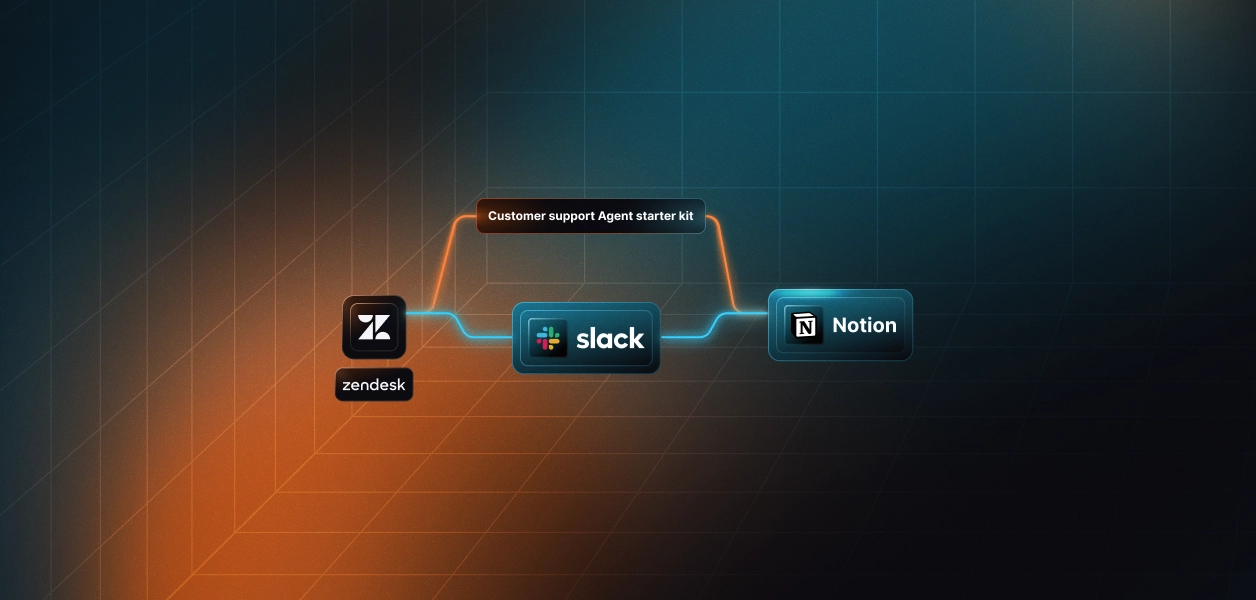


Every support team has lived through the same frustrating pattern: a customer reports a problem, an agent responds quickly, the ticket gets marked as resolved and yet the underlying issue isn’t actually fixed. Consider a common scenario: a new user tries to onboard into your product, but a signup validation step keeps failing silently. They raise a ticket, the support agent replies with a standard workaround, marks the ticket as solved, and moves on. The user tries again, still fails, and is now stuck with a “resolved” ticket and no working solution. This happens not because support teams are careless, but because context slips through the cracks across Zendesk, Slack, and Notion.
The root cause is fragmentation. Zendesk holds the ticket, Slack is where conversations actually happen, and Notion is where institutional knowledge is supposed to live, but none of these systems automatically update each other. As volume increases, teams copy-paste replies, search through scattered Slack threads for prior cases, and often forget to document resolutions. This disconnect leads to inconsistent replies, duplicated investigation work, and unresolved issues, such as an onboarding failure slipping through unnoticed.
The real problem isn’t the tooling, it’s the lack of a coherent workflow between them. Without automation, agents must manually relay information between platforms, remember to update knowledge-base articles, and re-check Zendesk for follow-ups. This human-driven process breaks under pressure, causing exactly the kind of scenario where a ticket is marked as solved while the actual bug persists.
This guide closes that gap by showing you how to build an automated support pipeline using Zendesk, Slack, Notion, and Google ADK. By the end, you’ll understand how new tickets are detected instantly, how LLM-generated suggested replies appear directly inside Slack for review, how resolved tickets automatically become Notion KB entries, and how the system stays reliable, traceable, and safe so real issues don’t get “resolved” before they’re actually fixed.
Before building the automation loop, it helps to understand how Zendesk, Slack, Notion, and Google ADK work together. Each system plays a distinct role in the customer support workflow, and clarity on these responsibilities reduces debugging time and keeps the architecture predictable.
Zendesk is the source of truth for customer issues. Every ticket enters the system with structured fields ID, subject, description, and status, and these become the raw inputs for the agent. The automation polls Zendesk for new tickets, extracts the context, and hands that information to the LLM for reply drafting.
Slack acts as the real-time communication surface for the support team. Instead of manually checking Zendesk dashboards, the team receives a digest containing new tickets enriched with AI-generated suggested replies. This puts the human-in-the-loop review step where support teams already live: Slack threads.
Notion becomes the long-term knowledge base. When a ticket is resolved, the system converts it into a structured documentation page that includes the issue, the resolution steps, and a link back to Zendesk. This creates an always-up-to-date internal KB without any manual writing.
Google ADK orchestrates the entire sequence with deterministic tool execution. It calls the poller, the reply generator, the Slack digest function, and the Notion updater in the correct order, ensuring each step runs without human intervention and with predictable behaviour.
Together, these four systems form a clear workflow backbone:
Zendesk supplies data > ADK processes it > Slack surfaces the actions > and Notion stores the knowledge.
After understanding the system powering workflow, it is important to set up an environment that allows the agent to communicate reliably with Zendesk, Slack, and Notion. The agent itself is lightweight, but the integrations beneath it must be carefully configured so each system can authenticate every request and return consistent data. A clean environment setup ensures that all downstream API calls behave predictably once the automation begins processing tickets.
The configuration relies on a simple idea: treat each external service as a capability the agent can call rather than a bundle of secrets the developer manually handles. Zendesk becomes the source of new tickets, Slack becomes the place where ticket summaries appear, and Notion becomes the workspace where resolved tickets are archived as knowledge base items. The automation layer coordinates these systems, while environment variables provide the minimal credentials required to perform these actions.
All configuration lives inside a single .env file. This file contains runtime values, such as your Zendesk domain, Slack bot token, Notion database ID, and the Google API key powering the ADK agents. No API keys are embedded directly in code, and nothing is stored in plain text outside this environment file. This separation allows you to iterate safely on your automation logic without exposing long-lived credentials in source control.
With a properly configured .env, the agent can run locally or in production without additional setup. It can fetch new tickets from Zendesk, generate suggested replies with Google ADK, post structured digests into Slack, and update the Notion knowledge base when tickets reach the solved state. This stable foundation makes the end-to-end workflow easier to extend and debug.
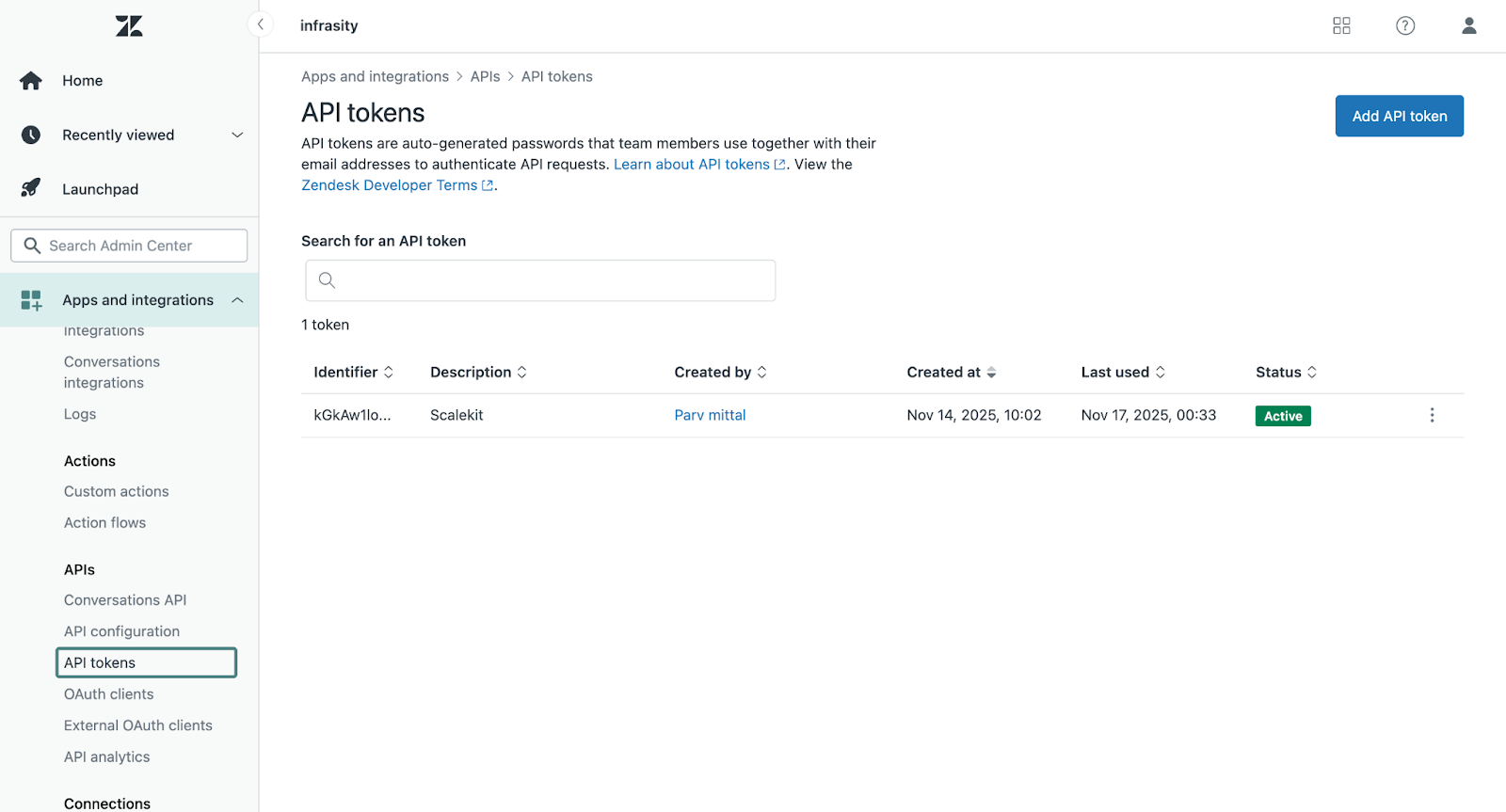
These values allow the agent to fetch new tickets and detect when tickets move from new > open > solved.
How to obtain:
See Zendesk API token setup guide: Zendesk API Docs
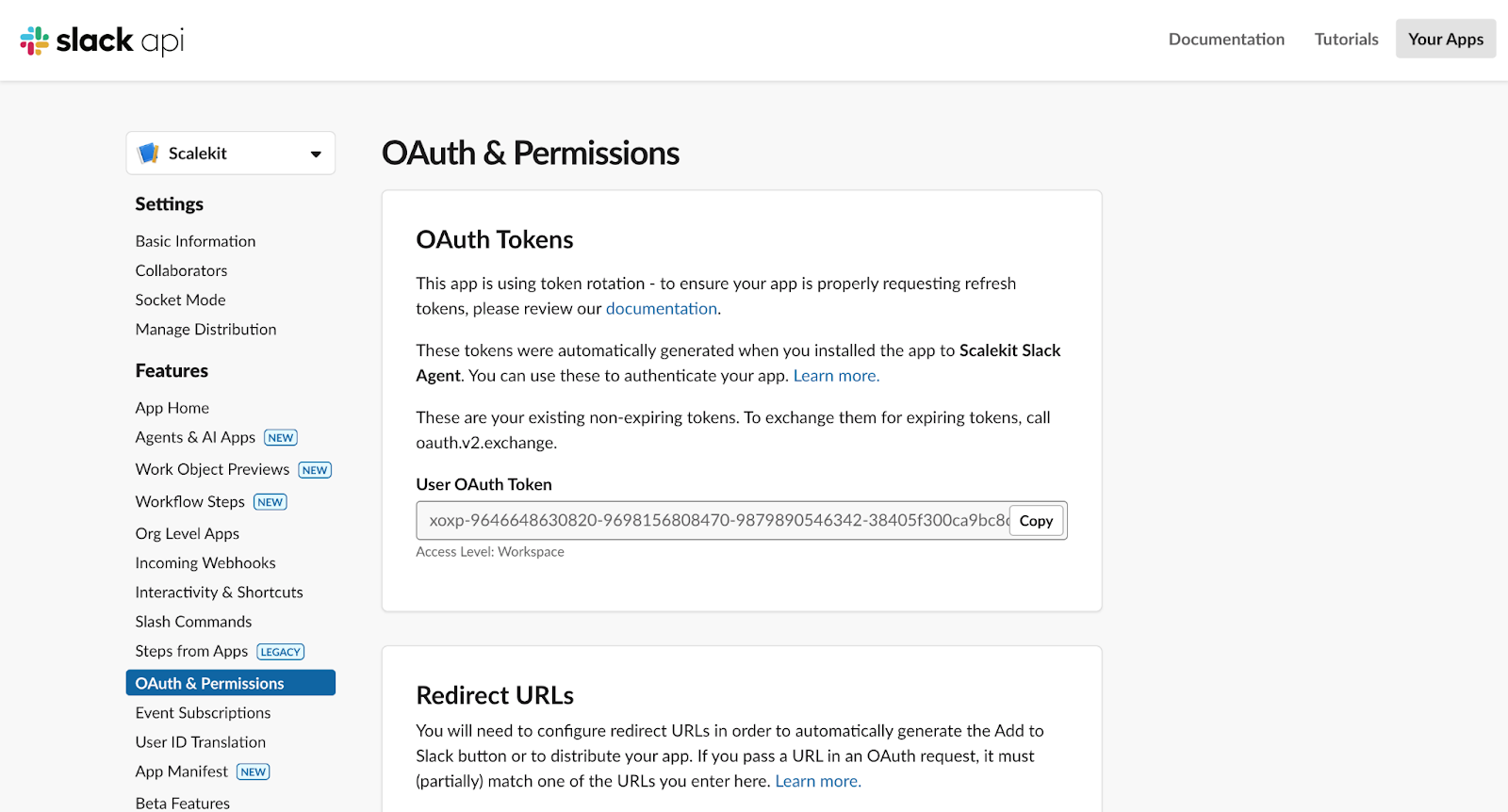
These values allow the agent to send the daily support digest summarising new tickets and their suggested replies.
How to obtain:
See Slack OAuth token documentation: Slack Auth Docs
These values allow the agent to store resolved tickets as structured KB entries.
How to obtain:
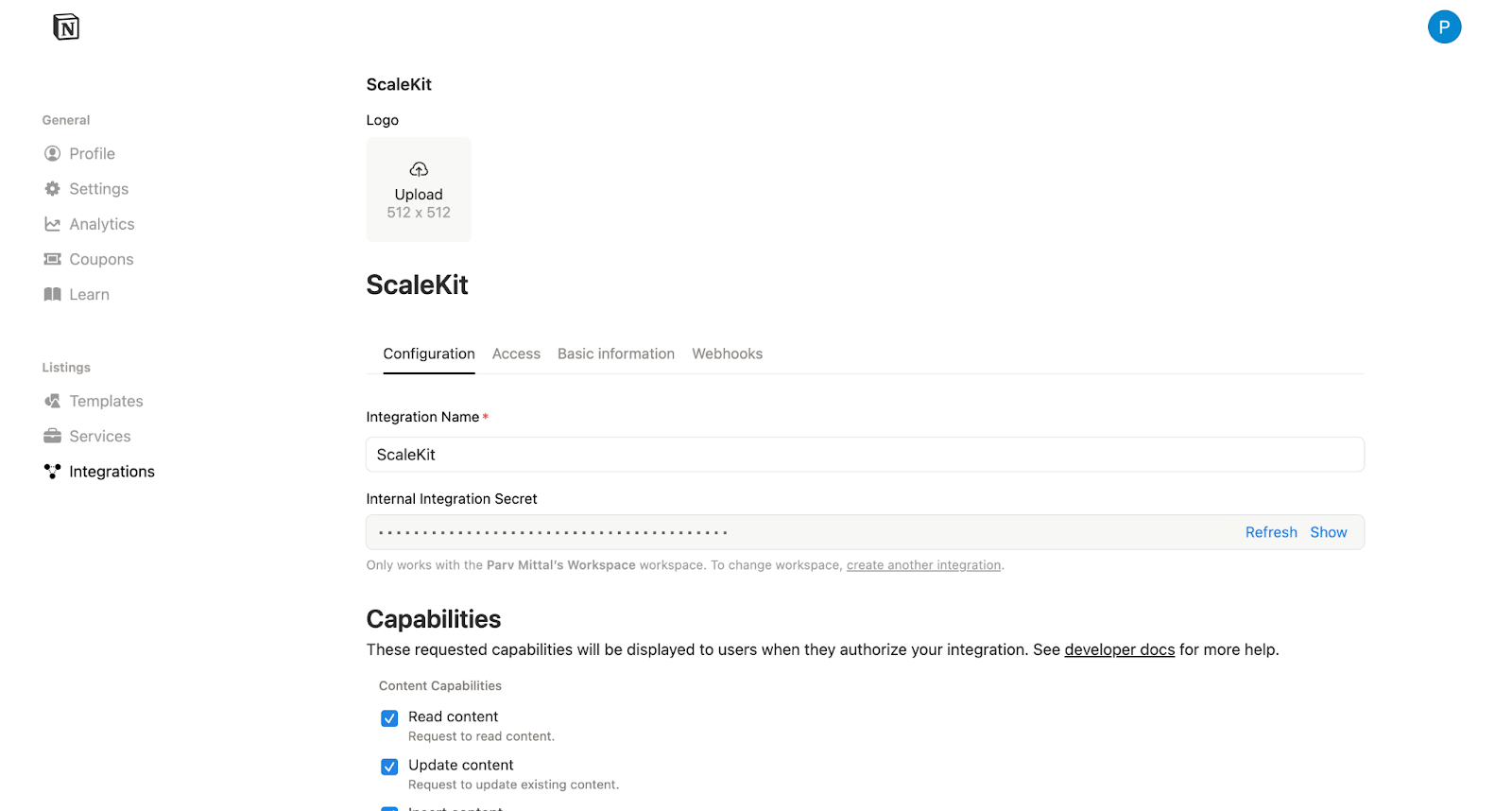
See Notion API getting started guide: Notion Developer Docs
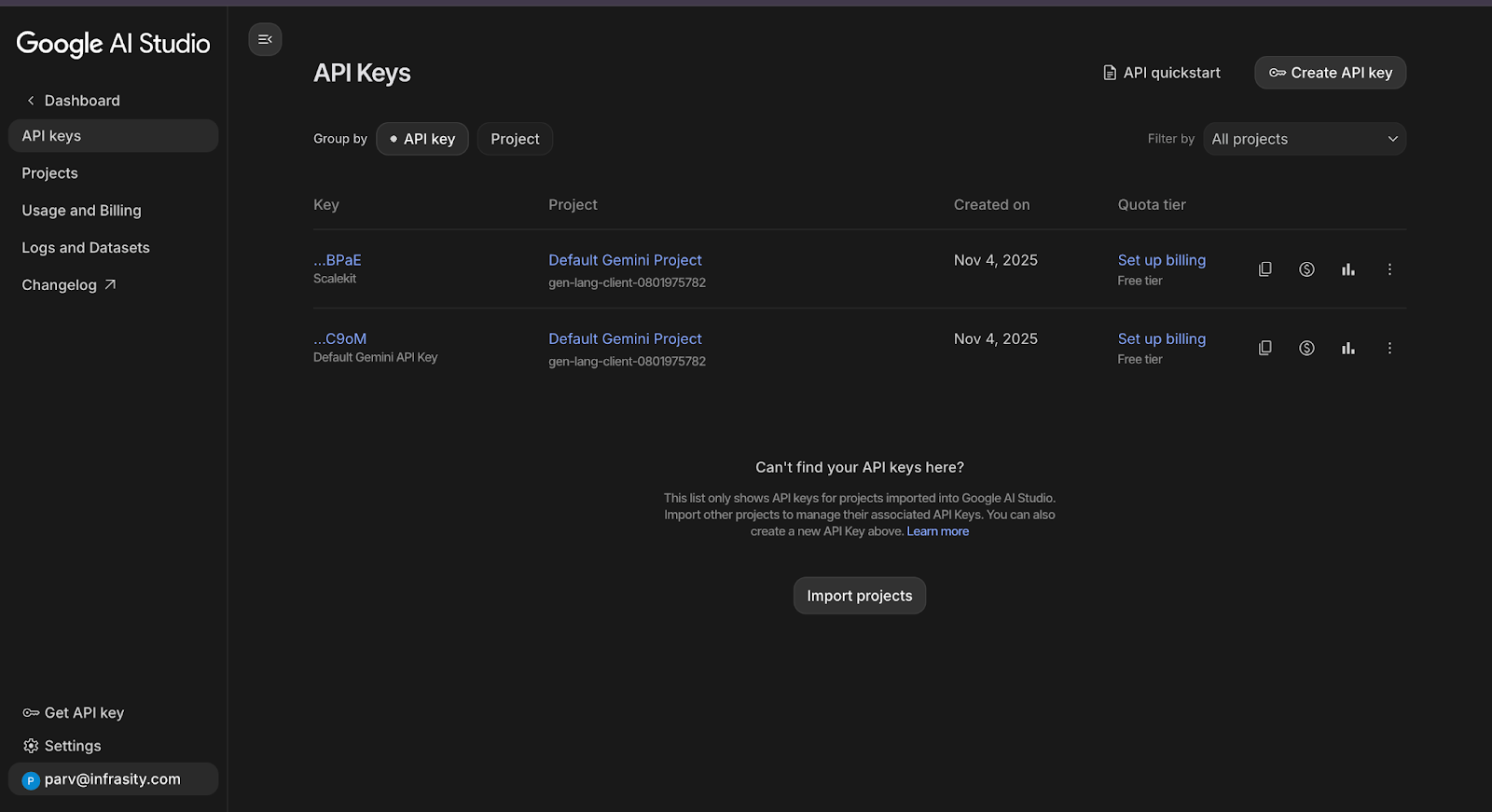
This allows ADK to call Gemini models to generate suggested replies and orchestrate the workflow.
How to obtain:
See Gemini API key documentation: Google AI Studio Docs
The automation behaves best when viewed as a single flow rather than isolated components. Everything begins when a new customer ticket appears in Zendesk. The agent polls for new entries, fetches their details, and immediately generates a suggested reply using an ADK-powered LLM. This keeps context fresh and gives support agents a strong starting point for responding.
Next, the enriched tickets are bundled into a Slack digest message. Each entry includes the subject, description, and generated reply. This acts as the approval layer, where humans review and decide whether to send or adjust the suggested response. The system prevents duplicates using a lightweight state map, ensuring each ticket appears only once.
Finally, when Zendesk marks a ticket as solved, the same automation updates the Notion knowledge base. A corresponding page is created with the issue summary, customer context, and resolution text. This closes the loop by turning every resolved ticket into documentation that improves future support and onboarding.
This merged flow reduces manual work at every stage while preserving human approval where it matters: reviewing replies and validating solutions.
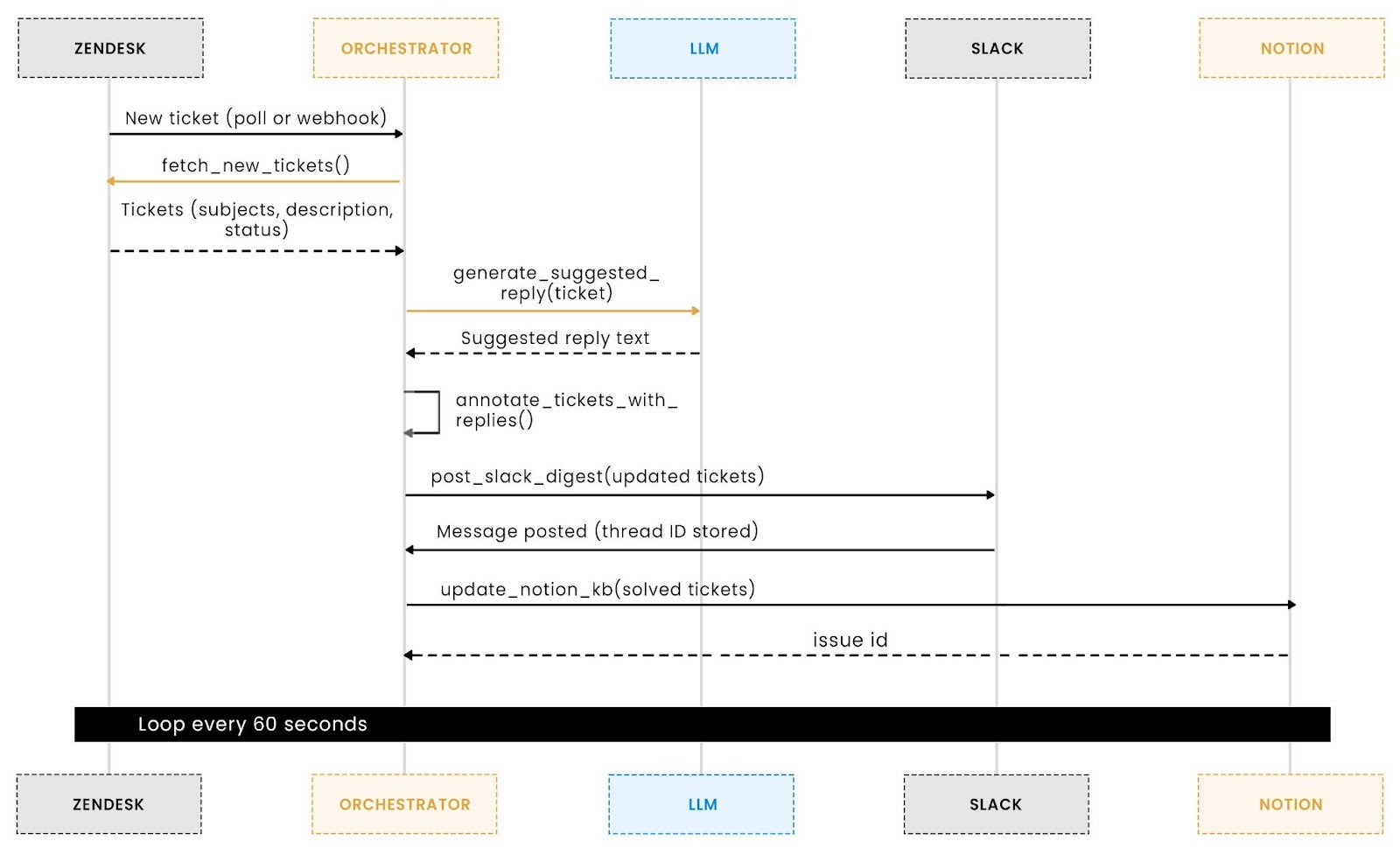
The automation loop begins with Zendesk, which acts as the entry point for all customer conversations. Every ticket created by a customer contains structured fields such as ID, subject, description, and status. To process these tickets automatically, the agent must retrieve them reliably and without duplication. This is where the fetch_new_tickets function comes in. It polls the Zendesk API at a fixed interval and fetches only the tickets currently in the new state.
This step is essential for two reasons. First, it provides the LLM with the raw context needed to draft a suggested reply. Second, it ensures predictable behaviour inside the orchestrator. The agent always receives a list of fresh, unprocessed tickets, which keeps the workflow deterministic and prevents missing or repeatedly processing the same requests. The function also includes error handling and logging, ensuring that temporary API failures do not break the rest of the pipeline.
Below is the Zendesk polling function used by the agent:
By keeping this function simple, predictable, and well-logged, the entire workflow becomes more stable. The orchestrator always starts from the same point: a clean list of new tickets, and every downstream action (LLM reply generation, Slack digest creation, Notion update) depends on this input being correct. This small function is therefore one of the critical pieces that keep the automation loop reliable.
Once the agent receives a new Zendesk ticket, the next step is to create a draft response that a support agent can quickly review and approve. This stage uses a lightweight Google ADK LLM agent whose responsibility is simple: read the ticket’s subject and description, then produce a concise, friendly reply that feels ready to send. The goal is not to replace human decision-making but to accelerate it by removing the repetitive drafting work that support engineers perform dozens of times per day.
The ADK agent is configured with a strict instruction that forces the model to output only the reply text, without narrative explanations or formatting. This constraint is important because support teams need consistent responses that do not vary in structure or tone. The pipeline wraps the model inside a Runner and session layer so the agent maintains stable behaviour across iterations. Whenever a new ticket arrives, the workflow serialises the subject and description into JSON, sends it to the agent, and extracts the final response from the event stream.
Below is the core function responsible for generating the reply:
This step ensures every ticket handed to Slack or a human reviewer already contains a high-quality draft. The output is intentionally minimal but context-aware, giving your team the advantage of speed without sacrificing clarity or tone. In many support environments, this single capability creates a measurable reduction in first-response times, which is why the suggested reply generator becomes a core part of the end-to-end workflow.
Once each Zendesk ticket has a suggested reply, the next step is to surface these updates where the support team already works. Slack becomes the human-in-the-loop layer: agents can see new tickets, review the LLM-generated suggestions, and respond without switching tools. This avoids context switching and helps teams catch issues before they escalate.
Your agent handles this through the post_slack_digest function. Instead of spamming Slack every minute, the system keeps a lightweight state file (ticket_thread_map.json) that tracks which tickets have already been posted. Only new tickets are pushed to Slack, ensuring clean, deduplicated digests.
The digest is delivered using rich Slack “blocks,” combining the ticket subject, link, description, and suggested reply into an easy-to-scan format. Support engineers get fast visibility and can override the suggestion if needed.
This Slack step acts as the midpoint of the workflow. Tickets leave Zendesk, are enriched via Google ADK, and land in a trusted team channel, where human approval is part of the flow. You now have an automation pipeline that supports your humans instead of replacing them, with ADK accelerating the parts that benefit from speed and consistency.
Once a ticket is resolved in Zendesk, the automation shifts to maintaining your internal knowledge base. Many support teams forget to document resolutions or update existing internal articles, leading to duplicate work and slow onboarding for new agents. This section explains how the workflow closes that gap by automatically sending resolved ticket summaries to Notion.
The agent checks every resolved ticket and determines whether it has already been synced. If not, it prepares a structured Notion page containing the ticket ID, subject, resolution details, and a direct link back to Zendesk. This ensures the knowledge base gradually evolves with each solved case, without manual effort. All entries are created inside a Notion database chosen through the NOTION_KB_DATABASE_ID environment variable.
Here is the exact code responsible for creating new Notion pages:
This integration guarantees that your knowledge base never lags behind real support activity. As your team continues to resolve issues, the system organically builds an updated, searchable repository of past resolutions that new agents can rely on without needing to ask senior team members for context.
Once the individual tools for Zendesk, Slack, and Notion are in place, the final step is to unify them into a predictable, repeatable workflow. Instead of stitching together custom logic or manually running each function, the system relies on a dedicated ADK orchestrator agent. This agent understands the full lifecycle of a support ticket and interacts with every tool in a controlled sequence. It ensures that new tickets are fetched, annotated with suggested replies, posted to Slack, and finally archived in Notion once resolved. The orchestrator sits at the centre of the automation, turning multiple isolated operations into a coherent, end-to-end pipeline.
The orchestrator is a standard LLM Agent configured with explicit instructions that describe the order of operations. By enforcing this structure, the workflow stays correct even as new tools or enhancements are added. This approach avoids the complexity of multiple cron jobs or ad hoc script chaining, providing developers with a single, reliable entry point into the entire system. Whenever the agent runs, the sequence is executed deterministically: fetch → annotate → publish → archive. If no tickets are available, the agent simply reports that there is nothing to process, keeping logs clean and preventing unnecessary API calls.
Below is the excerpt that defines the orchestrator and its operational instructions. It does not need modification when new tools are added; only the instruction string changes. This keeps orchestration logic close to the LLM's reasoning layer, rather than spreading it across multiple scripts.
Alongside the agent, the runner handles the loop that executes this workflow at regular intervals. It passes a simple instruction, “Run the end-to-end support workflow now”, and waits for the orchestrator to complete each step. This ensures that all ticket events are processed consistently, Slack digests are sent on time, and the Notion knowledge base remains accurate without manual updates. By delegating coordination to the orchestrator, the system remains easy to extend, debug, and maintain, even when teams grow or workflows evolve.
A support automation pipeline must maintain continuity across multiple systems. When a ticket appears in Slack or is saved in Notion, the system needs to remember that this has already happened; otherwise, it will generate duplicate posts, overwrite existing knowledge base entries, or spam the same digest repeatedly. To prevent this, the workflow uses a simple but reliable state-tracking layer built around a JSON file. This file records which Zendesk ticket IDs have already been posted to Slack and which have been committed to the Notion knowledge base.
The implementation is intentionally lightweight so developers can easily follow and extend it. When the orchestrator fetches new tickets, the pipeline checks the stored dictionary before performing any Slack or Notion actions. If a ticket ID exists in the map, it is skipped. If not, the action proceeds, and the ID is persisted to the state file. This prevents cross-system duplication even when the script restarts, crashes, or runs in multiple cycles throughout the day.
Below is the core state-management code:
This small persistence layer stabilises the workflow by ensuring every ticket is posted exactly once to Slack and written exactly once into Notion. It also makes the system easier to debug, since the JSON map provides a clear snapshot of what the automation has processed so far. Developers extending this starter kit, for example, by adding CRM sync or escalations, can follow the same state-mapping pattern to cleanly track cross-system relationships.
Before we look at how the system handles retries, race conditions, and multi-system updates, it is important to understand that a support pipeline is only reliable when every step produces effects exactly once. Zendesk may return the same ticket across multiple polls, Slack may delay responses during rate limits, and Notion may reject writes during traffic spikes. The next sections break down how the starter kit maintains this consistency through lightweight state tracking and predictable orchestration.
A multi-system support workflow is only dependable when every step behaves consistently across retries, restarts, and API failures. Zendesk may return the same ticket across multiple polls, Slack may throttle requests, and Notion may reject writes during traffic spikes. To keep the automation stable, the starter kit uses three reliability layers: persistent state tracking, controlled retry behavior, and safe fallbacks in the LLM and downstream APIs.
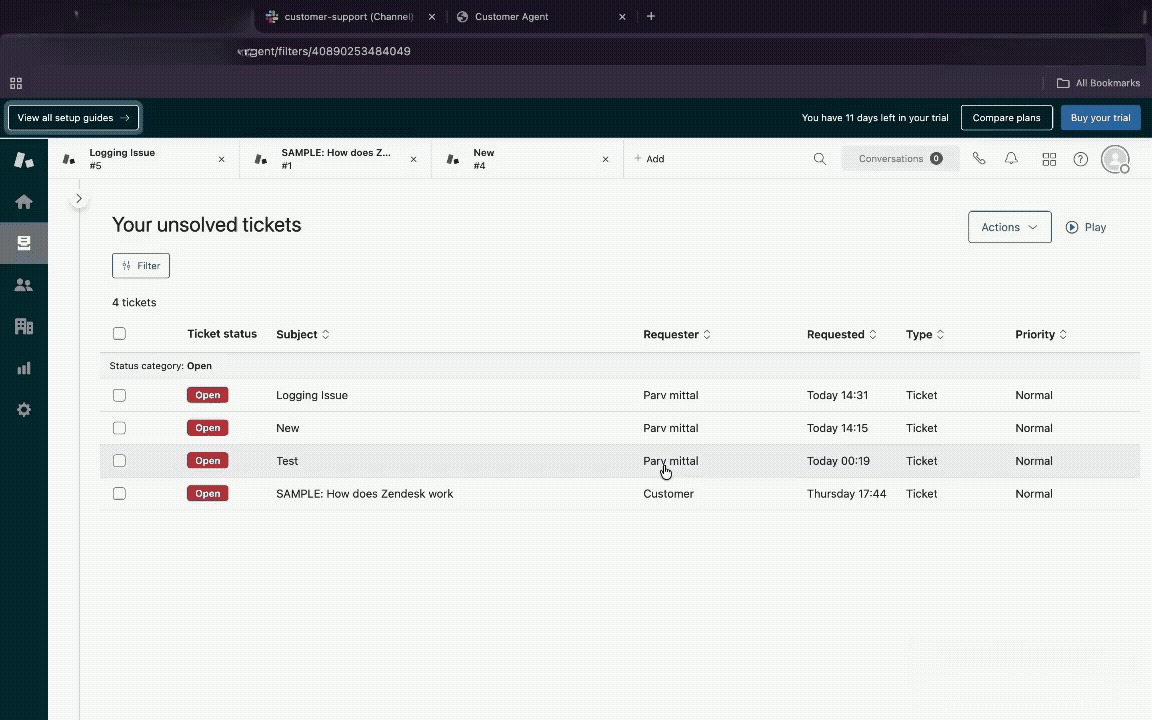
At the core of this reliability model is a lightweight state file (state/ticket_thread_map.json). Before posting a Slack digest or creating a Notion KB entry, the agent checks this map to see whether the action has already been performed. If the ticket ID is present, the step is skipped. If not, the action proceeds and the ID is saved. This simple persistence layer makes the workflow idempotent, preventing duplicate Slack threads, repeated Notion pages, or unnecessary LLM calls even if the script restarts or Zendesk returns the same ticket multiple times.
Rate limits and transient API errors are handled gracefully rather than aggressively. When Slack returns a 429, the agent records the event and waits for the next 60-second orchestration cycle instead of retrying immediately. Zendesk and Notion follow similar safe patterns: exceptions are logged, and the workflow continues, allowing the next loop to pick up any pending items using the saved state. This prevents runaway retries, API exhaustion, and partial writes.
The ADK reasoning layer also contributes to reliability through defensive fallbacks. If the LLM produces incomplete output or fails to return a final message, the system substitutes a safe, predefined reply. This ensures every ticket has a suggested message, and the orchestrator never stalls waiting for a perfect LLM response.
Together, these mechanisms, persistent state, predictable retries, rate-limit awareness, and LLM fallbacks turn the workflow from a fragile script into a stable automation loop. The pipeline processes each ticket exactly once, avoids noisy duplicates, and continues making progress even when individual services misbehave. This reliability foundation is what makes the Zendesk + Slack + Notion starter kit suitable for real support teams and lightweight production deployments.
Building a unified Zendesk → Slack → Notion workflow is ultimately about removing the friction that slows support teams down. By connecting a structured ticketing system, a real-time communication channel, and a knowledge base, the automation creates a repeatable loop that captures every ticket, surfaces it to humans quickly, and documents resolved issues without depending on manual effort. What began as a scattered set of API calls becomes a predictable pipeline once Google ADK handles reasoning, the tools return structured responses, and state tracking ensures every action runs exactly once.
This pattern is intentionally minimal but extensible. Developers can scale it by adding more tools, introducing richer approval steps, or branching the workflow using LangGraph-style control flows. More importantly, the system behaves consistently under load because each step ticket fetch, suggested reply generation, Slack summary, and Notion update runs inside a deterministic sequence with clear boundaries. Support teams benefit from faster turnaround, agents save time on repetitive responses, and knowledge bases stop drifting out of date.
As a next step, you can extend this starter kit with deeper automation patterns: integrate CRM enrichment, add approval workflows, or experiment with LangGraph and CrewAI for multi-agent coordination. You can also harden the system by adding secret rotation, retry logic, and rate-limit handling. Once the core loop is in place, these enhancements fit naturally without re-architecting the workflow.
The agent maintains a small local state file (ticket_thread_map.json) that records every ticket already posted to Slack or written to Notion. This ensures idempotency: new tickets are digested once, solved tickets are documented once, and no duplicate Slack messages or Notion pages are created, even across restarts.
Yes. The Slack digest acts as the human-in-the-loop review surface. Each ticket appears with a suggested reply generated by the LLM, but the support team decides whether to use, modify, or ignore it before responding in Zendesk. The workflow automates drafting and triage, not final delivery.
The system logs the error and simply avoids marking the ticket as processed. Because state updates only occur after a successful API call, the orchestrator retries the same ticket in the next cycle. This protects the pipeline from transient rate limits or network issues without requiring manual recovery steps.
Yes. Although this starter kit uses direct API keys, many teams later adopt Scalekit to centralise OAuth flows, automatically rotate secrets, and enforce connector-level permissions. The architecture already cleanly separates tools, so migrating to Scalekit requires minimal code changes.
Absolutely. Scalekit provides ready-made connectors for services like GitHub, Linear, Slack, Salesforce, and Notion. Once added, the ADK orchestrator can call them as new tools, enabling use cases such as incident escalation, CRM enrichment, auto-tagging, or cross-team alerting with almost no additional authentication setup.