

BambooHR now gives an AI agent two doors into a company's HR data: an official MCP server, in open beta, and a REST API with OAuth 2.0, API keys, and webhooks. They overlap on reading people and time off and diverge on writes, events, time tracking, and whose permissions each call runs under. This guide compares what each path lets an agent do, the credential each one puts you on, and how to run either across many users in production.
Your agent needs to work inside your customers' BambooHR accounts: tell a manager which direct reports are out the week before a launch, check whether a vacation request fits the employee's balance, pull headcount by department from a saved report, or cancel a departing employee's future time off. BambooHR now hosts an official Model Context Protocol (MCP) server and ships a Claude connector built on it. It also has a REST API with OAuth 2.0, API keys, and webhooks. They overlap on reading people and time off. They diverge on writes, event delivery, time tracking, and on whose permissions an action runs under. Here's how to pick.
The BambooHR MCP server is hosted by BambooHR at https://{your-subdomain}.bamboohr.com/api/mcp over Streamable HTTP. Nothing runs locally. BambooHR announced it on October 8, 2026 alongside a Claude connector, in open beta, and its MCP docs also describe a ChatGPT connector for beta participants. BambooHR calls the beta path "best-effort." The product update lists it for the Core, Pro, and Elite plans.
Clients authenticate with OAuth 2.0 Authorization Code: the user signs in on BambooHR's login page and approves access. An admin must first enable the AI Connectors app under Settings > Apps, and by default only admins may connect. The 56 tools use names such as list_whos_out, get_time_off_balance, create_time_off_request, update_time_off_request_status, get_report_by_id, and get_data_from_dataset_v2. Tool names switched from hyphenated to snake_case form on August 20, 2026, according to BambooHR's API changelog.
Before the official server, the community filled the gap with local servers. acalder-techpm/bamboohr-mcp, for example, runs as a local stdio process, advertises 74 tools, and reads a BAMBOOHR_API_KEY and BAMBOOHR_SUBDOMAIN from the environment. Servers like it are unofficial, and they run with one API key, so every request carries the permissions of whoever generated that key.
The BambooHR API is a REST API served from each company's subdomain, for example https://acme.bamboohr.com/api/v1/ for a company whose BambooHR address is acme.bamboohr.com. It covers employees and the directory, employee history tables such as jobInfo and compensation, time off requests, balances, and policies, time tracking and timesheets, custom reports and datasets, goals, applicant tracking, benefits and dependents, training records, files, and webhooks. There are two ways to authenticate:
The older OpenID Connect Login API, which let marketplace partners fetch a user's API key after an SSO sign-in, has been closed to new applications since April 14, 2025.
BambooHR frames its MCP server as a way to "read and act on HR data using plain language," and its own docs say "not every BambooHR capability is exposed yet." The server is built for a person asking questions in a chat window, with a human confirming each write. The API is built for systems that keep HR data in sync and run workflows without anyone watching.
Answering "how many vacation hours does each of my direct reports have left, and who is already out in December" on the raw API takes several calls. You resolve the caller's employee ID, list their direct reports, read the time off types to find the company's name for vacation, call the balance endpoint once per employee, and then pull the calendar. Each response lands in the model's context.
BambooHR MCP folds some of that into the server. calculate_date handles date arithmetic server side, so the model doesn't have to work out what "next Friday" means. get_data_from_dataset_v2 answers headcount and tenure questions as one query. The Claude connector lets each user turn off individual tools under Configure, and BambooHR recommends switching off write tools during the beta. Writing the schema is the hard part. Not the API call.
The tradeoff is that BambooHR owns the surface. Tool names have already changed once in the beta, and BambooHR's docs warn that older hyphenated names may linger in some clients until the connector is refreshed. An agent tuned against today's tool names can change behavior without a release on your side.
On the MCP path, auth is OAuth in the browser, and the result is a user-level identity. The server "enforces existing BambooHR permissions and can't grant access the user doesn't already have." Every client needs the mcp scope, and entity scopes such as employees, time_off, payroll, and benefits decide which data it can reach. Claude and ChatGPT use client credentials that BambooHR issues to beta participants. Any other MCP client, including your own agent, has to register an application in the BambooHR Developer Portal with an exact redirect URI, because Dynamic Client Registration is not supported. Admins control who can connect under Settings > Apps > AI Connectors, and disabling the app revokes every connection in the company.
On the direct API path, you choose between two credentials. An OAuth 2.0 app gives you per-user tokens that expire after an hour and refresh only if you asked for offline_access. An API key is a 160-bit hex string that a user generates from their own profile menu, if their permissions allow it. BambooHR shows it once and then stores it encrypted. It does not expire. Send an unknown key repeatedly and BambooHR temporarily disables API access with 403 Forbidden.
Both paths share one property: BambooHR authorizes every call as a specific BambooHR user. The difference is which user. On MCP, it's the person in the chat. On the API with a key, it's whoever generated the key, and that's often the HR admin who set up the integration. What the user can't do, the agent can't do. That holds only when the credential belongs to the user the agent is acting for.
BambooHR adds a twist that matters for agents: permissions fail quietly. get_employee drops fields the caller can't read without saying so. list_employees returns null for restricted values and can drop employees entirely when a filter field is unreadable. In BambooHR's words, an empty result means "nothing visible to this caller," not "nothing exists." A manager-level credential produces confident, incomplete answers.
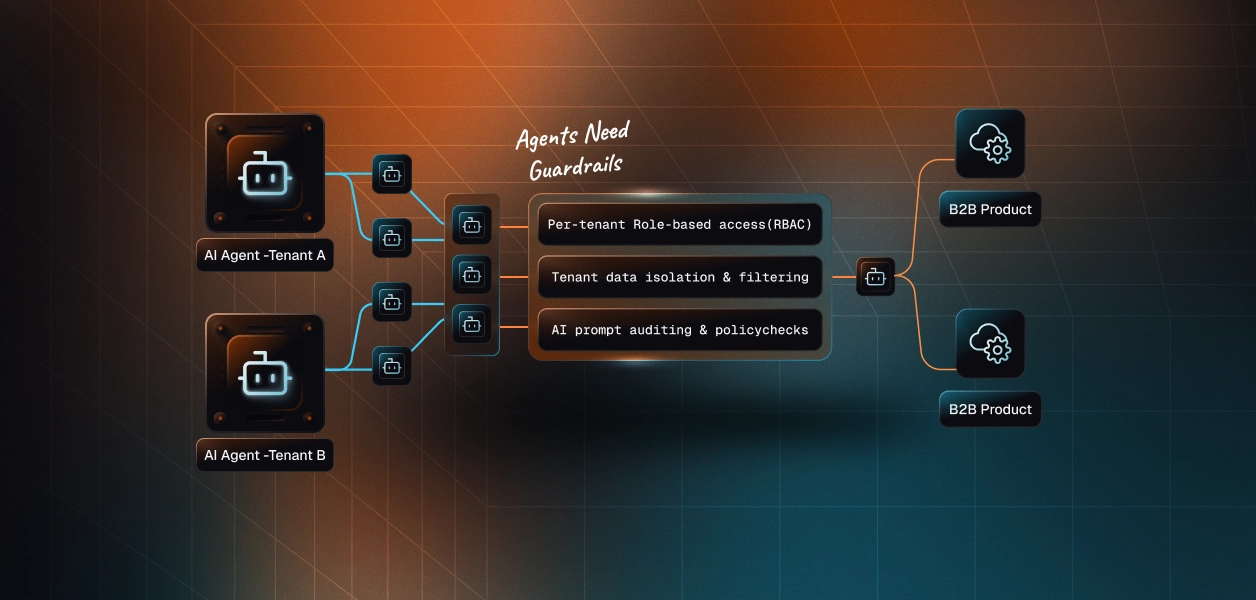
In a multi-tenant B2B agent, MCP gives you a credential per user and the direct API gives you a credential per user. In neither case does the path itself solve storage, rotation, or revocation; those are infrastructure problems regardless of which path you choose.
BambooHR makes the boundary sharper than most tools, because the data is personal: salaries, home addresses, dependents, and time off reasons. On the API path, the convenient setup is one admin key per customer company, and that key reads every record the admin can. Your app then has to filter by reports_to_id or department whenever an ordinary manager asks a question, because BambooHR answers for the admin. The safer setup is one key or OAuth grant per user, so BambooHR's own access levels do the filtering. That multiplies the credentials you hold.
Recommended reading: access control for multi-tenant AI agents
On the MCP path, BambooHR hosts the server, owns the tool schemas, and enforces each user's access level. You own each user's OAuth session in a client you may not control, plus a Developer Portal application and redirect URI if you bring your own client. You also own the gaps. Tools only run inside a conversation someone starts, so nothing happens when an employee's status changes. Time tracking, benefits, and training aren't reachable. Writes "may run through approval workflows that the connector doesn't bypass," so a created time off request sits in REQUESTED until a human approver acts.
On the API path, you own schemas, pagination, retries, and the credential lifecycle. BambooHR doesn't publish numeric rate limits. Since September 16, 2026, requests that exceed a limit return 429 with a Retry-After header instead of the 503 BambooHR returned before, so older retry code that only watched for 503 now misses throttling. The technical overview also tells you to expect dropped connections with no HTTP response at all. GET /api/v1/employees has used cursor pagination since October 2, 2025, but the directory and custom reports return everything at once, and a single employee read is capped at 400 fields.
Webhooks are how a headless agent learns that something changed, and BambooHR has two kinds. Global webhooks are configured by an admin in BambooHR settings and watch a fixed list of standard and custom fields. Permissioned webhooks are created through the API and can watch any field the creating user can read, which also means they see nothing that user can't. Both have been event-driven since August 5, 2025. Each delivery is signed with HMAC-SHA256 over the raw body concatenated with the X-BambooHR-Timestamp value, and the result arrives in X-BambooHR-Signature. Payloads batch several employees into one POST, each with id, changedFields, and fields. BambooHR retries up to 5 times on network failures or 5xx responses, at roughly immediate, 5, 10, 20, and 40 minutes, plus 0 to 30 seconds of jitter.
Use BambooHR MCP when:
Use the BambooHR API when:
Both paths hand you a BambooHR credential per user. Neither hands you a vault. A multi-tenant agent serving 60 customer companies, with 10 managers each, holds 600 credentials if it does isolation properly. On the API-key path, those are long-lived secrets that never expire, which BambooHR shows only once, and which can only be revoked by deleting the key in BambooHR. Each one reads salaries and home addresses for everyone its owner can see. Each must be stored encrypted, kept out of logs and LLM context, mapped to exactly one user and one company, and deleted when that user leaves or the customer churns. On the OAuth path, the secrets expire hourly instead, so you add refresh scheduling, offline_access handling, and a Developer Portal app with a client secret to protect.
The MCP path changes the count, not the problem: 600 OAuth sessions living in chat clients, each one gated by an admin setting you don't control. The tempting shortcut on the API path is one HR admin key per company. Fewer secrets, larger blast radius per secret: one leaked key exposes the whole company's HR data, and every manager using the agent can see what only HR should see.
Scalekit's bamboohr connector stores each user's BambooHR API key encrypted in the token vault and injects it into every call, so the MCP vs API decision doesn't change your auth infrastructure. Your agent passes an identifier; credentials never touch the agent runtime or the LLM context.
Recommended reading: OAuth vs API keys for AI agents
Scalekit's bamboohr connector is an API-path connector built by Scalekit with 89 tools: 54 read, 35 write, and none destructive. It covers employees and the directory, employee tables, fields and list fields, time off requests, balances, policies, and types, who's out and the company calendar, holidays, time tracking and timesheets, custom reports and datasets, goals, hiring, benefits, dependents, training records, files, users, and change feeds. It authenticates with API keys: each user connects their own BambooHR API key once, and Scalekit sends it with every call.
In the Scalekit dashboard, go to AgentKit > Connections and create a BambooHR connection. The name you give it is the connection_name your code passes, and the string must match the dashboard exactly. This is the most common integration error.
BambooHR keys carry their owner's permissions, so plan who generates them. For the examples below, each manager generates a key from their own BambooHR profile menu under API Keys. Balances need the Time Off view permission for each employee, and being someone's manager isn't enough on its own. Copy SCALEKIT_ENVIRONMENT_URL, SCALEKIT_CLIENT_ID, and SCALEKIT_CLIENT_SECRET from Developers > API Credentials into .env.
get_or_create_connected_account returns the connected account for an identifier. If it is not ACTIVE, get_authorization_link returns a link to Scalekit's Hosted Connect Widget. For an API-key connection like BambooHR, the widget shows a form where the user enters the credentials the connection requires, instead of an OAuth consent screen. Scalekit encrypts and stores what they enter; your code never receives the key. The identifier is your app's ID for the person, because a BambooHR key acts as exactly one BambooHR user.
This is not a catalog load. The agent asks for the tools this connected account is authorized to call, then narrows them to the six a time-off assistant needs. Loading all 89 BambooHR tools would put bamboohr_employee_update, bamboohr_time_off_balance_adjust, and bamboohr_application_status_update in front of a model whose job is to answer coverage questions. None of the six below changes anything in BambooHR.
The loop runs until the model stops requesting tools. Every call runs with this manager's BambooHR permissions, so the system prompt tells the model how to resolve "my team" and how to read BambooHR's quiet permission gaps.
For pipelines, skip the model. execute_tool runs one tool with a fixed input and returns data plus an execution_id you can log. This handler runs when a BambooHR permissioned webhook reports a change to an employee's status field. It verifies X-BambooHR-Signature, confirms the employee is now inactive, and cancels any of their requested or approved time off that hasn't started yet, leaving a comment on each request first. The connected account here should belong to an HR user who can see and cancel everyone's time off.
The webhook itself is not a connector tool. An HR admin creates a global webhook in BambooHR settings, or you create a permissioned webhook through the API with that user's credential, which Scalekit can send on the connected account's behalf through proxied API calls. Store the webhook's private key per customer. Because BambooHR retries failed deliveries and batches several employees into one POST, make the handler idempotent: canceling an already canceled request should be a no-op on your side. The BambooHR MCP server has no equivalent for either step.
Two other writes show where the API path earns its place. bamboohr_timesheet_approve takes a timesheet_id and the timesheet's hoursLastChangedAt, and returns 409 if hours changed since you read them, which is the guard a payroll-close pipeline needs. bamboohr_employee_table_row_create writes a dated jobInfo or compensation row, which is how a promotion lands in BambooHR's history. Neither belongs in a model's default tool set; both fit a pipeline with a human approval step in front of them.
The bamboohr connector has 89 tools. At roughly 200 tokens each, that is about 17,800 tokens of tool definitions before the agent does any work, and BambooHR's own MCP server adds about 11,200 for its 56. A model choosing among bamboohr_whos_out_list, bamboohr_calendar_events_list, bamboohr_time_off_requests_list, and bamboohr_holidays_list picks the wrong list more often than a model holding only the one it needs. Overreach is the bigger risk in HR: a coverage assistant that also holds bamboohr_employee_update and bamboohr_time_off_balance_adjust can edit a record or change a balance on a bad inference. The fix is not better prompting. It is surface reduction. A Scalekit virtual MCP server declares exactly which tools an agent role can see, and session tokens keep each run bound to one user's connected accounts. Docs: set up a virtual MCP server.
One server definition serves every manager at every customer. Before each run, check that the user's accounts are active and mint a short-lived session token scoped to them. Any MCP client that speaks Streamable HTTP can connect; this example uses langchain-mcp-adapters (pip install langchain-mcp-adapters) and passes the token as a Bearer header.
The agent sees six tools instead of 89. The endpoint is static; the identity is per user. Unlike BambooHR's own MCP server, this endpoint can include tools BambooHR MCP doesn't offer, such as bamboohr_timesheet_approve, for the one payroll role that should hold it, and leave them out of every other role.
Every execute_tool call returns an execution_id, and every execution is attributed to a connected account, which maps to one user at one customer. When an HR director asks which agent run canceled 12 time off requests overnight, or who changed a department on Saturday, the answer is a lookup, not an investigation. BambooHR's bamboohr_employees_changed_list takes a since timestamp and lists every employee inserted, updated, or deleted after it, so you can reconcile what your execution log says the agent did against what changed in BambooHR.
Attribution is also where the paths differ. MCP calls run as the employee who signed in. API-key calls run as whoever generated the key, so if one admin key serves a whole customer, every action runs as that admin, and your execution log is the only place that records which of your users asked for it. A BambooHR key can't reach a second company, but an admin key shared by everyone inside one company still collapses all of them into one identity with one permission set. Shared credentials work for a single user. They do not survive a second user.
Recommended reading: audit trails for agent auth
If your agent is an HR lead's or manager's assistant in Claude or ChatGPT, answering who's out, checking balances, summarizing saved reports, and submitting requests with a person confirming each write, BambooHR's official MCP server is a good fit, with the caveat that it is still in beta and its tool names are still moving. If your agent runs unattended, reacts to webhooks, approves timesheets, writes job and compensation history, or serves many customer companies at once, build against the BambooHR API, where you choose the credential, the tools, and the retry behavior. Either way, you hold a BambooHR credential per user that carries that user's HR permissions, often a key that never expires, and that's what needs production-grade infrastructure.
Yes. BambooHR hosts an MCP server on each company's own subdomain at https://{your-subdomain}.bamboohr.com/api/mcp over Streamable HTTP. It launched in open beta on October 8, 2026 alongside a Claude connector, exposes 56 tools, and authenticates with OAuth 2.0 Authorization Code only. An admin must enable the AI Connectors app under Settings > Apps before anyone in the company can connect.
The published tool list has no time tracking, timesheet, benefits, dependents, or training tools, and no change feed or triggers. On employee records its only write is update_employee, with no create. The hiring tools read applications and add comments but cannot move a candidate between stages. It also does not support Dynamic Client Registration, so a custom MCP client has to register an application in the BambooHR Developer Portal with an exact redirect URI.
The permissions of the user who generated it. BambooHR authorizes requests as if the key's associated user were making them. The key never expires, is shown once, and can only be revoked by deleting it in BambooHR. If one HR admin's key is wired into an agent that many people use, every one of those users gets that admin's reach into compensation, dependents, and documents.
When the agent runs without a person in the loop: reacting to a permissioned webhook when an employee's status changes, approving timesheets, writing a promotion into jobInfo or compensation history, or serving many customer companies with a credential per user and retries that respect 429 and Retry-After. The API is also the only path for time tracking, benefits, training records, employee creation, and hiring stage changes.
Quietly. get_employee drops fields the caller cannot read without saying so, list_employees returns null for restricted values and can drop employees entirely when a filter field is unreadable, and an empty result means nothing is visible to this caller rather than nothing exists. A manager-level credential produces confident but incomplete answers, so the agent's prompt should treat missing data as not visible, not absent.
Through the bamboohr connector, which exposes 89 tools over the BambooHR API. Each user enters their own BambooHR API key once in Scalekit's Hosted Connect Widget. Scalekit stores it encrypted in the token vault and injects it into every call, so the key never reaches the agent runtime or the model. A virtual MCP server then narrows the 89 tools to the ones an agent role needs, session tokens bind each run to one user, and every execution returns an execution_id attributed to that user's connected account.
Browse the Scalekit BambooHR connector and the BambooHR connector docs with the full tool list. See Scalekit pricing, or talk to us.