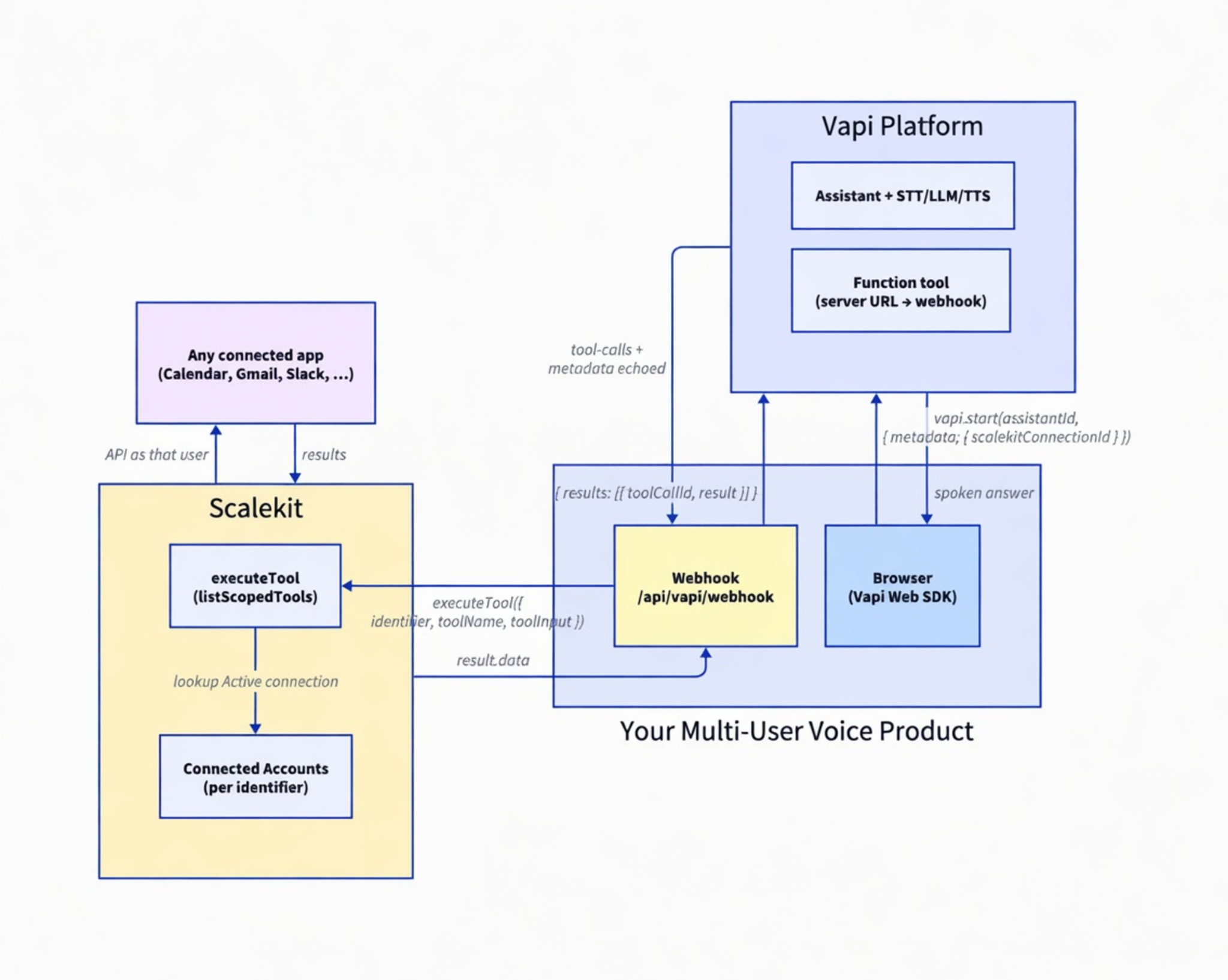
A Vapi voice agent that can call authenticated tools for any Scalekit-connected app, scoped to the current user. Google Calendar is the live example; the same bridge works for other connectors.
Start the call with scalekitConnectionId in Vapi metadata (an identifier, not a token)
Vapi invokes your Function tool → your webhook calls Scalekit executeTool
Scalekit runs the real API call with that user's connected account
The model only sees tool names and results; never OAuth tokens
Getting a Vapi assistant to talk is the easy part. The hard part starts when that voice agent needs to act on real apps—Calendar, Gmail, Slack, CRM—as each of your users, not as one shared bot account.
If you hard-code a single Google or Slack credential, every caller sees the same data. If you try to pass OAuth tokens into the assistant or the model, you have built a security product by accident. This post shows how to keep Vapi as the voice layer and use Scalekit for authenticated tools, so every tool call runs with the correct user's identity and scopes.
Two common setups are internal team voice agents and customer-facing voice products. An internal agent used by sales or support lets each teammate ask about their calendar or their Slack without sharing credentials. A customer-facing product can run a voice session that reads or updates apps the customer has connected: only after that customer has authorized those accounts through your app.
If you are evaluating Vapi native integrations, wiring custom Function tools yourself, or building multi-user voice agents that need many apps, the tool schemas are rarely the real problem. The hard part is per-user OAuth, token vault, and making sure every tool call uses the right identity. Scalekit handles that plumbing; your webhook only ever passes an identifier.
By the end of this tutorial:
A browser voice call that starts with a per-user identifier in metadata.
A public webhook that maps Vapi tool calls to Scalekit executeTool.
An Active Google Calendar connection used as the proof tool (googlecalendar_list_events).
A way to discover tool names for any other app with the same identifier.
A cloneable demo you can extend to Gmail, Slack, GitHub, or any Scalekit connector.
Architecture overview
Vapi owns speech, the assistant, and the decision to call a tool. Scalekit owns OAuth, the token vault, and the actual third-party API call. Your Next.js app is the bridge: it starts the call with identity metadata and runs a webhook that executes tools as that user.
You control the mapping from your users to Scalekit identifiers. Vapi never sees third-party tokens. The model only sees tool definitions and opaque results.
Key point: The identifier (passed as scalekitConnectionId in call metadata) is the secure key that tells Scalekit which user's connections to use. In production, resolve it server-side from your authenticated session. Never trust a raw identifier from the client without your own auth check.
Who is this for
This post is for developers and teams building multi-user voice agents with Vapi, either internal tools (each teammate connects their own apps) or a product feature where customers connect their accounts so the voice agent can act with their permissions.
You are the builder of the agent. The "multiple users" are your users or customers. A personal single-user demo is possible with the same pieces, but the point of this pattern is scaling identity safely.
The Problem
Vapi makes it easy to ship a voice UI and an assistant that can call tools. As soon as those tools touch real third-party data, identity shows up:
A shared bot or service account means every caller shares permissions and data.
Putting long-lived tokens in prompts, tool configs, or client code is a security failure waiting to happen.
Vapi's built-in integrations can be a good fit for a few fixed apps. When you need many apps, per-user OAuth, and one consistent auth model across connectors, you want a dedicated identity and tool layer under the voice stack.
Each user (or customer) connects the apps they need through Scalekit (OAuth, vault, refresh).
When a voice call starts, your app passes that user's Scalekit identifier in Vapi metadata as scalekitConnectionId.
You define a Function tool on the assistant whose Server URL points at your webhook.
On tool call, Vapi POSTs to your webhook with the tool name, arguments, and the same metadata.
The webhook calls scalekit.actions.executeTool({ identifier, toolName, toolInput, connector? }) and returns Vapi's expected { results: [...] } shape.
The assistant and model never hold OAuth tokens. Only server-side code constructs a ScalekitClient (the tool webhook and optional debug routes)—never the browser or the Vapi model. Swap the tool name (and connector when needed) and the same bridge works for any Scalekit connector—not only Calendar.
git clone https://github.com/scalekit-developers/vapi-scalekit-voice-demo.git
cd vapi-scalekit-voice-demo
npm install
cp .env.example .env.local
Fill at least:
Variable
Where it runs
Purpose
NEXT_PUBLIC_VAPI_PUBLIC_KEY
Browser
Vapi Web SDK
NEXT_PUBLIC_VAPI_ASSISTANT_ID
Browser
Which assistant to start
SCALEKIT_ENV_URL / CLIENT_ID / CLIENT_SECRET
Server only
Scalekit client
TEST_IDENTIFIER
Server
Default Scalekit identifier for the demo
NEXT_PUBLIC_TEST_SCALEKIT_CONNECTION_ID
Browser
Same identifier so the UI can put it in metadata (demo only)
AgentKit demos and this post use SCALEKIT_ENV_URL. Some older SaaSKit samples use SCALEKIT_ENVIRONMENT_URL—same value, different name; keep one name consistent in your project.
In production, the identifier comes from your logged-in user after your own auth check—not from a public env var.
What a real voice agent can do (example workflows)
With the right apps connected for a given identifier, natural voice prompts can drive real tools:
"What's on my calendar?" → googlecalendar_list_events
"Find emails from Acme about the renewal" → Gmail tools (once connected and mapped)
"Summarize recent messages in #product" → Slack tools
"Show my open pull requests" → GitHub tools
The demo wires Calendar end-to-end so you can hear a real result quickly. The identity and webhook pattern is the same for every other connector.
Step 1: Clone the demo and set env
The reference app is a small Next.js project:
app/page.tsx - Vapi Web SDK, start/stop call, transcript UI
app/api/vapi/webhook/route.ts - tool-call bridge to Scalekit
app/api/debug/tools/route.ts - list tools available to an identifier
Start the app and expose it:
npm run dev
# other terminal
ngrok http 3000
Copy the https://…ngrok… URL. You will paste it into the Vapi Function tool as …/api/vapi/webhook.
Step 2: Connect a user's apps in Scalekit
For the demo, create or reuse a Google Calendar connection in the Scalekit dashboard (AgentKit → Connections), authorize it for the same value you put in TEST_IDENTIFIER, and confirm the connection is Active.
For a production multi-user product you would typically:
Call getOrCreateConnectedAccount / getAuthorizationLink for the current user.
Send them through OAuth.
On your callback, call verifyConnectedAccountUser after confirming they own that identifier.
Store your_user_id → identifier in your own database (protected by your auth).
The voice path only needs an Active connection and a stable identifier. It does not need tokens in the browser.
Step 3: Start the Vapi call with identity metadata
In the browser, start the assistant with metadata. Pass the assistant ID as the first argument (a string). Putting assistantId inside the options object causes a confusing Vapi validation error.
// app/page.tsx (critical path)
import Vapi from '@vapi-ai/web';
const vapi = new Vapi(process.env.NEXT_PUBLIC_VAPI_PUBLIC_KEY!);
const metadata = {
// Demo only. In production, resolve from your authenticated session server-side
// and pass a short-lived value you already trust-not a raw client-supplied id.
scalekitConnectionId:
process.env.NEXT_PUBLIC_TEST_SCALEKIT_CONNECTION_ID || 'demo-connection',
};
// Correct: assistant id first, then options
vapi.start(process.env.NEXT_PUBLIC_VAPI_ASSISTANT_ID!, { metadata });
Vapi forwards this metadata on tool-call webhooks. That is how the server learns which user's Scalekit connections to use without ever receiving an OAuth token from the client.
Step 4: Configure the Function tool on the assistant
In the Vapi dashboard:
Create a Function tool.
Set Name to a real Scalekit tool name. For the calendar proof, use googlecalendar_list_events exactly.
Set Server URL to https://<your-ngrok-host>/api/vapi/webhook.
Add parameters the model may send (for calendar: calendar_id, optional max_results, time bounds, etc.).
Attach the tool to your Assistant.
Give the assistant a system prompt that tells it to use the tool for schedule questions, and to keep answers short for speech.
If the tool is not attached, or the prompt never mentions it, Vapi will never hit your webhook.
Step 5: Build the webhook bridge (reusable for any tool)
This is the core of the "any app" pattern. Vapi POSTs tool calls; you execute them with Scalekit as the identifier from metadata; you return the shape Vapi expects.
// app/api/vapi/webhook/route.ts (simplified critical path)
import { NextRequest, NextResponse } from 'next/server';
import { ScalekitClient } from '@scalekit-sdk/node';
function getScalekit() {
return new ScalekitClient(
process.env.SCALEKIT_ENV_URL!,
process.env.SCALEKIT_CLIENT_ID!,
process.env.SCALEKIT_CLIENT_SECRET!
);
}
export async function POST(req: NextRequest) {
const body = await req.json();
const message = body.message || body;
const toolCalls =
message.toolCallList || (message.functionCall ? [message.functionCall] : []);
if (toolCalls.length === 0) {
return NextResponse.json({ success: true });
}
const metadata = message.metadata || {};
const identifier =
metadata.scalekitConnectionId ||
process.env.TEST_IDENTIFIER ||
'test-user';
const scalekit = getScalekit();
const results = [];
for (const toolCall of toolCalls) {
const toolName = toolCall.name || toolCall.function?.name || '';
const args = toolCall.arguments || toolCall.parameters || {};
// Prefer Vapi tool names that already match Scalekit (e.g. googlecalendar_list_events).
// Optional connector helps when one identifier has many apps; derive it or omit if
// toolName + identifier alone resolve the connected account in your env.
const connector =
typeof toolName === 'string' && toolName.includes('_')
? toolName.split('_')[0] // googlecalendar_list_events → googlecalendar
: undefined;
const result = await scalekit.actions.executeTool({
...(connector ? { connector } : {}),
identifier,
toolName,
toolInput: args.toolInput || args,
});
results.push({
toolCallId: toolCall.id || toolCall.toolCallId,
result: result?.data ?? result,
});
}
// Exact shape Vapi expects-wrong shape shows "Tool Result Still Pending"
return NextResponse.json({ results });
}
To support another app, you typically:
Ensure the user has an Active connection for that connector.
Discover the tool name (next step).
Create or attach a Vapi Function tool with that name (or map names in the webhook).
Call executeTool with the same identifier and the new toolName (and connector if needed).
One webhook can serve many tools. The demo hardcodes Calendar during early development and includes a small name fallback for typos; in production, prefer exact Scalekit names and explicit routing.
Step 6: Discover tools for any app
Before you configure Vapi, list what Scalekit actually exposes for your identifier:
# with npm run dev running
curl -s http://localhost:3000/api/debug/tools | jq .
The demo route tries listScopedTools (which requires a filter such as toolNames, connectionNames, or providers), falls back to listAvailableTools when the filter is empty or the call fails, and normalizes names you can copy into Vapi. Use those names for Function tools (or for Virtual MCP scoping) so the model and Scalekit agree.
Say something like: "What's on my calendar?" (the demo tool lists events; the model summarizes what Scalekit returns).
In the Next.js terminal you should see webhook logs for googlecalendar_list_events and your identifier.
The assistant should speak a concise summary of real events.
If the call connects but no tool runs, re-check tool attachment and the system prompt. If the tool runs but Scalekit errors, re-check Active connection and identifier match.
The identity contract
Layer
May know
Must not hold
Browser
Identifier for the current user (demo: public env)
That split is what makes "tools for any app" safe under multi-user voice.
Scaling to many tools (Virtual MCP)
A handful of Function tools is fine for a focused agent. When you want Vapi to discover a larger set of Scalekit tools dynamically, use a Scalekit Virtual MCP server and Vapi's native MCP tool:
Scope tools and connections once in Scalekit.
Mint a short-lived per-user session token (demo scripts: scripts/generate-mcp-token.js / .py).
Configure the Vapi MCP tool with the MCP server URL and Authorization: Bearer <token>.
In production, mint that token in your backend when the call starts (see app/api/scalekit/mcp-session in the demo) and inject server config via the Vapi API—not by hand-editing the dashboard per call. The webhook bridge remains the clearest path for learning the identity contract; MCP is the scale path for large tool catalogs.
Why this already handles multiple users
The only value that must change per user is the identifier:
User A connects Calendar (and optionally Gmail, Slack) → you store their identifier.
User B connects their own accounts → different identifier.
Each Vapi call carries that user's identifier in metadata.
Scalekit executes tools against the Active connections for that identifier only.
Vapi and the model never learn whose OAuth tokens are in use. Your app enforces who may start a call as which identifier.
Troubleshooting
401 Invalid Key
You mixed Vapi public and private keys. Only the public key belongs in NEXT_PUBLIC_VAPI_PUBLIC_KEY.
assistant.property assistantId should not exist
You called vapi.start({ assistantId, … }). Use vapi.start(assistantId, { metadata }) instead.
Tool call never hits the webhook
The Function tool is not attached to the assistant, the system prompt never steers the model to call it, the tool name does not match what the model emits, or ngrok is not pointing at the running app.
"Tool Result Still Pending" in Vapi
Your webhook did not return { results: [{ toolCallId, result }] } in the shape Vapi expects, or it timed out / errored before responding.
Scalekit "failed to get tool" or empty calendar
The Vapi tool name does not match a tool on the connector for that identifier, the Google Calendar connection is not Active, or calendar_id / scopes are wrong. Hit /api/debug/tools and re-authorize if needed.
Wrong user's data
You are reusing one demo identifier for everyone, or accepting an identifier from the client without binding it to your authenticated session. Resolve the identifier only after your own auth check.
Tradeoffs & Limitations
Approach
Pros
Cons
Best for
Shared bot / service account
Simple
No per-user permissions or audit
Prototypes only
Vapi native integrations only
Fast for a few apps
Not a unified multi-connector OAuth vault
Narrow product scope
DIY OAuth + custom Function tools
Full control
You own token lifecycle for every app
Rarely worth it at scale
Scalekit + Vapi webhook (this post)
Any connector, per-user identity, full observability