The Stripe MCP server is Stripe's official MCP server, hosted at https://mcp.stripe.com. It lets an agent search Stripe's documentation and read and write account data through the Stripe API. It acts as whoever authorized it: you, signed in with OAuth from a client such as Claude Code, or an agent API key you create for an autonomous agent.
One command connects it to an editor. The harder questions come after: which keys Stripe accepts after November 2026, which writes need a person's approval, and how a product's agent reaches many customers' Stripe accounts, which needs a different design from single-user MCP integrations.
TL;DR
- Stripe hosts one remote server at https://mcp.stripe.com. Use OAuth for interactive clients and an agent API key for autonomous agents. From December 2026 the server stops accepting full-access secret keys and restricted keys without the Agent tag, so migrate by November 30, 2026.
- Money moves through stripe_api_write, so set up approvals before you connect live mode. With OAuth, Stripe asks a person to confirm certain writes such as refunds. With an agent API key, approval rules send refunds and subscription cancellations to a reviewer by default.
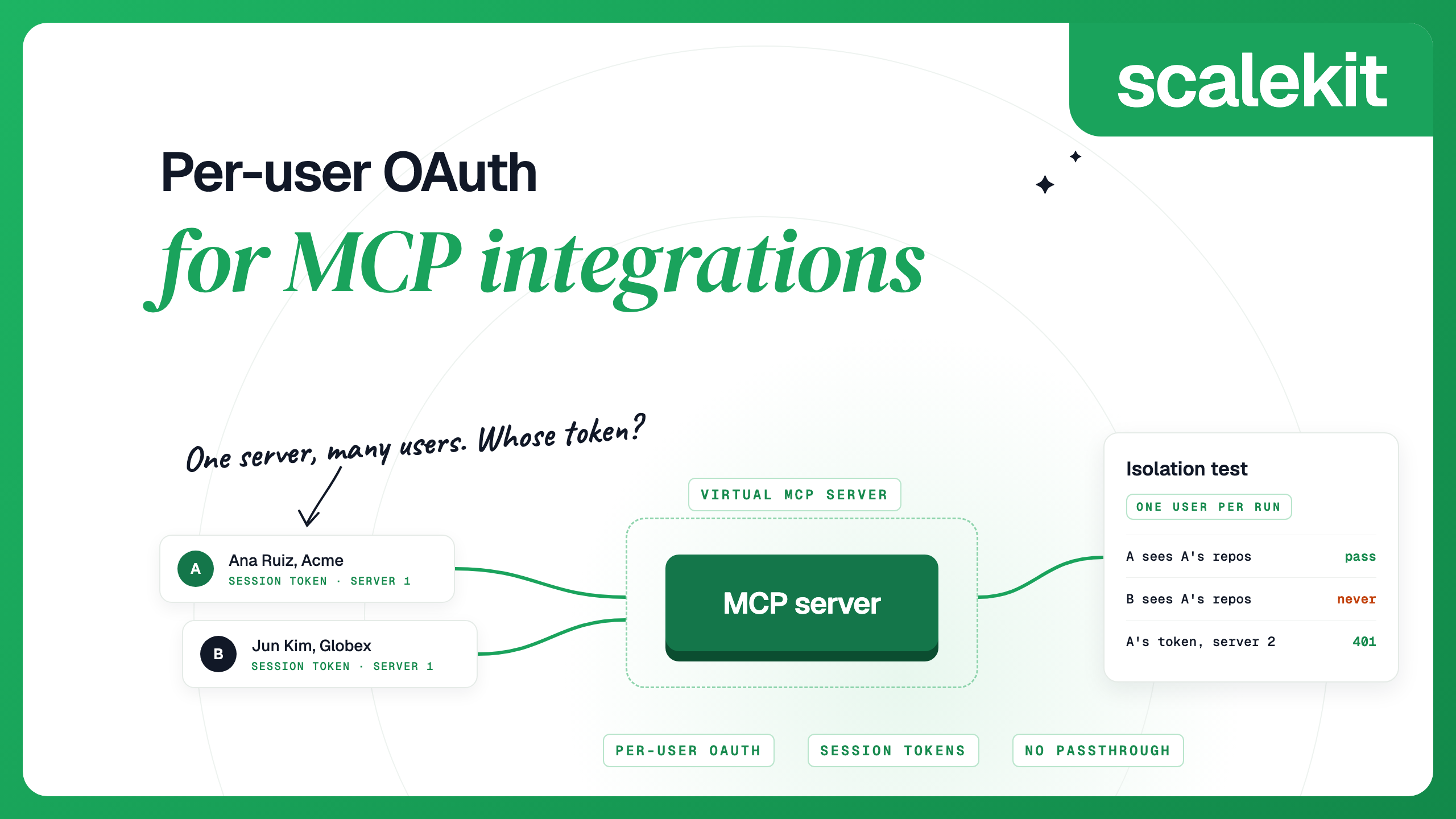
- A product acting in many customers' Stripe accounts needs one authorization per account. Scalekit AgentKit's Stripe MCP connector runs each user's OAuth sign-in to Stripe's server, stores their tokens, and serves the tools from one Virtual MCP server URL with a short-lived token per user.
What the Stripe MCP server does
Stripe routes most work through four generic API tools. The full list is in Stripe's MCP documentation:
- API tools. stripe_api_search finds Stripe API methods by keyword, stripe_api_details returns the parameters for one method, stripe_api_read runs any supported GET method, and stripe_api_write runs supported POST, PATCH, PUT and DELETE methods.
- Account and analytics. get_stripe_account_info retrieves the account. stripe_analytics, in preview, queries metrics, analyzes subscriptions and billing, and runs financial reports; building SQL from natural language requires Sigma.
- Atlas. atlas_company_formation starts or resumes a Delaware C corporation or LLC formation.
- Treasury, in public preview. Tools such as send_money, transfer_money and convert_currency move funds between Treasury accounts, balances and recipients.
- Guidance. search_stripe_documentation searches the docs, stripe_implementation_planner guides a user through choosing Stripe products for an integration, and send_stripe_feedback sends feedback to Stripe.
The read and write tools reach a published list of methods covering customers, refunds, invoices, subscriptions, payment links, payouts and more, without loading a tool definition per endpoint into the model's context.
How the server authenticates
A request without credentials gets a 401 whose WWW-Authenticate header points to the server's protected resource metadata. That metadata names https://access.stripe.com/mcp as the authorization server and mcp as the only scope. The authorization server supports the authorization code grant with PKCE, refresh tokens, dynamic client registration and token revocation.
During OAuth consent you choose one or more live mode accounts or sandboxes and set different permissions for each environment. Stripe's two methods fit different callers:
The Stripe user who signs in, on the live accounts and sandboxes they select
Interactive clients such as Claude Code, Cursor and Codex
Stripe asks a person to confirm certain writes, such as refunds and outbound payments, through a link the agent shows
A restricted key tagged for agent use, with only the permissions you grant it
Autonomous agents and background jobs
Approval rules send actions such as refunds to a designated reviewer before they take effect
Stripe asks you to migrate key-based access by November 30, 2026, because starting in December its MCP server will "stop accepting full-access secret keys and restricted API keys without the Agent tag." Replace those keys with newly created agent API keys, or reconnect with OAuth. A request with an unsupported key receives a 401 with an OAuth discovery challenge. When you replace a key, test the new configuration in a sandbox, then expire the old one.
To create an agent API key, open the API keys page in the Dashboard, choose Create restricted key, set each resource to None, Read or Write, and select Authorizing agent access to your account when Stripe asks for the key's intended use. The key then carries an Agent badge in the Dashboard.
Add the Stripe MCP server to Claude Code
Stripe recommends its agent plugin, which configures the server, installs Stripe's skills and keeps both up to date. The Stripe CLI detects which agents you use and runs the right install commands:
npm install -g @stripe/cli@latest
stripe agent setup
To install only the Claude Code plugin, run this in your project directory:
claude plugin install stripe@claude-plugins-official
To add the server by hand, run the following, then start Claude Code and use /mcp to sign in to Stripe with OAuth:
claude mcp add --transport http stripe https://mcp.stripe.com/
For an agent API key, add the server to your project's .mcp.json and reference an environment variable that holds the key, so the key stays off the command line and out of version control. Claude Code expands ${STRIPE_AGENT_KEY} from your shell when it loads the file:
{
"mcpServers": {
"stripe": {
"type": "http",
"url": "https://mcp.stripe.com",
"headers": {
"Authorization": "Bearer ${STRIPE_AGENT_KEY}"
}
}
}
}
Add it to Cursor
Run /add-plugin stripe in Cursor's chat to install the plugin, or use the Install in Cursor link on Stripe's MCP page. To configure the server by hand, add this to ~/.cursor/mcp.json and sign in when Cursor prompts you:
{
"mcpServers": {
"stripe": {
"url": "https://mcp.stripe.com"
}
}
}
Add it to Codex
The plugin installs with codex plugin add stripe@openai-curated. To add the server alone, run the commands below; the second one starts the OAuth sign-in. The ChatGPT desktop app, the Codex CLI and the Codex IDE extension share this configuration:
codex mcp add stripe --url https://mcp.stripe.com
codex mcp login stripe
For an agent API key, set bearer_token_env_var in ~/.codex/config.toml to the name of the variable that holds the key. Setting default_tools_approval_mode to writes makes Codex prompt you before any tool the server does not mark read-only:
[mcp_servers.stripe]
url = "https://mcp.stripe.com"
bearer_token_env_var = "STRIPE_AGENT_KEY"
default_tools_approval_mode = "writes"
VS Code and other clients
In VS Code, add the server to .vscode/mcp.json in your workspace:
{
"servers": {
"stripe": {
"type": "http",
"url": "https://mcp.stripe.com"
}
}
}
Other clients use the same URL, with OAuth where supported and an agent API key as a bearer token otherwise. On a managed network, ask IT to allow mcp.stripe.com if the connection fails.
Start in a sandbox
Every Stripe request runs in a sandbox or in live mode. Each mode has its own API keys, and objects in one mode are not accessible from the other. In a sandbox, card networks and payment providers do not process payments, so a mistaken write moves no real money. Sandbox restricted keys start with rk_test_ and live ones with rk_live_.
Three settings keep early testing out of live mode:
- At OAuth consent, grant the client access to a sandbox only. You can add a live account later with its own permissions.
- Create the agent API key in a sandbox first, read its request logs to see which resources it touched, and create the live key with the same permissions.
- As an administrator, turn MCP access on or off for the whole team in the Dashboard settings. Live mode and sandboxes are configured separately.
One tool crosses modes: the description of atlas_company_formation says its create action always creates a new live Stripe account, even when called from a sandbox.
The local server and the agent toolkit
Stripe's open-source stripe/ai repository, MIT-licensed, holds two other ways to reach Stripe's tools. Both packages connect to mcp.stripe.com and send the key you give them as a bearer token in the Authorization header.
The @stripe/mcp package runs over stdio on your machine and forwards every message to the remote server. It reads the key from a --api-key flag or the STRIPE_SECRET_KEY variable, accepts --stripe-account for a connected account, and warns when you pass a full secret key. Use it for a client that only runs local servers:
{
"mcpServers": {
"stripe": {
"command": "npx",
"args": ["-y", "@stripe/mcp"],
"env": {
"STRIPE_SECRET_KEY": "rk_test_..."
}
}
}
}
The Stripe agent toolkit gives framework code Stripe's tools as function calls: stripe-agent-toolkit on PyPI for the OpenAI Agents SDK, LangChain and CrewAI, and @stripe/agent-toolkit on npm for LangChain and the Vercel AI SDK. Since version 0.7.0 of the Python package, initialization connects to mcp.stripe.com and fetches the tool list, and the permissions on your restricted key decide which tools appear.
Stripe's infrastructure at mcp.stripe.com
Your OAuth sign-in or an agent API key
People work in their own MCP client, or one agent works in your own account
Your machine over stdio, forwarding to mcp.stripe.com
A restricted key in an environment variable
Your client only runs local stdio servers
Your agent process, with tools fetched from mcp.stripe.com
You build on one Stripe account with the OpenAI Agents SDK, LangChain, CrewAI or the Vercel AI SDK
The vendor's infrastructure
Each end user's OAuth tokens or key, stored by the vendor
Your product's agent works in many customers' own Stripe accounts
The remote server is the right default for a person in their own client, since Stripe maintains the tools, plugin, skills and confirmations. Composio lists 428 Stripe tools and 40 triggers and provides a managed Stripe OAuth app, so it is the better fit when your agent also needs to react to Stripe events or you do not want to register an app of your own.
Use it with Stripe Connect accounts
By default, tools act on the account behind your OAuth session or key. A Connect platform can also retrieve or update resources on its connected accounts. MCP does not support OAuth when acting on behalf of connected accounts. Authenticate with your platform's agent API key, grant only the connected-account permissions the agent needs when you create the key, and pass the connected account's ID in the Stripe-Account header:
{
"mcpServers": {
"stripe": {
"type": "http",
"url": "https://mcp.stripe.com",
"headers": {
"Authorization": "Bearer ${STRIPE_AGENT_KEY}",
"Stripe-Account": "acct_123"
}
}
}
}
The header fixes one connected account per server entry, which suits an internal tool scoped to one seller. If your product lets each connected account run its own agent through your platform, set the header per request in your back end, and check that the signed-in seller owns the account ID before every call.
Connect your own agent for many users
Some products act in Stripe accounts that are not their connected accounts, such as a finance assistant that customers point at their own Stripe. Each customer's account needs its own authorization, and three routes are available:
- OAuth to the MCP server. Each user signs in through the server's authorization flow and picks the accounts and permissions to grant. Your product registers as a client, stores each user's tokens and refreshes them. Writes that need confirmation return an approval link, which your agent has to show the user.
- A Stripe App with OAuth, for the REST API. Your back end exchanges the authorization code from the install link, which is single-use and valid for 5 minutes. Access tokens expire in one hour and refresh tokens after one year. Each refresh returns a new refresh token and expires the previous one, so serialize refreshes per user or concurrent workers will invalidate each other. OAuth apps are public apps, which pass Stripe's app review before they are published.
- A Stripe App with restricted key authentication. Installing the app generates a restricted key with only the app's permissions, and the user pastes it into your product. Stripe suggests it for software that cannot support OAuth or that customers run on-premise.
Each route leaves you holding one credential per customer account, encrypted, keyed to your user and tagged with its mode, to delete when the customer disconnects. Stripe MCP vs Stripe API compares which surface covers events, Connect onboarding and other platform work, and per-user OAuth for MCP integrations covers the token design in depth.
With Scalekit AgentKit
AgentKit is an MCP gateway that runs each user's authorization, stores their credentials encrypted, refreshes them and calls tools as that user. It has two Stripe connectors:
- The Stripe MCP connector, stripemcp, routes tool calls to Stripe's own MCP server. Each user signs in to Stripe once with OAuth. It lists 12 tools: 6 read, 5 write and 1 destructive, stripemcp_stripe_api_write.
- The Stripe connector, stripe, calls the REST API with a key each user connects, and lists 178 tools. Ask users for a restricted key, which limits the agent to the permissions they chose.
The Stripe MCP connector's tools take a stripe_context and a livemode value, which stripemcp_list_available_accounts_or_orgs returns for each account the user granted, and its description tells the agent to warn before switching between test mode and live mode.
You create a Virtual MCP server once per agent role and choose its tools. All users share its URL. Before each run, your back end mints a session token for one user, and the agent connects with that token. Scalekit checks the token, finds that user's Stripe connection and makes the call with it, so your agent never receives the user's Stripe credentials.
Create the server:
import os
from scalekit import ScalekitClient
from scalekit.actions.models.mcp_config import McpConfigConnectionToolMapping
actions = ScalekitClient(
env_url=os.environ["SCALEKIT_ENVIRONMENT_URL"],
client_id=os.environ["SCALEKIT_CLIENT_ID"],
client_secret=os.environ["SCALEKIT_CLIENT_SECRET"],
).actions
server = actions.mcp.create_config(
name="stripe-billing-support",
connection_tool_mappings=[
McpConfigConnectionToolMapping(
connection_name="stripemcp", # your Stripe MCP connection
tools=[
"stripemcp_list_available_accounts_or_orgs",
"stripemcp_stripe_api_search",
"stripemcp_stripe_api_read",
"stripemcp_stripe_api_write",
],
)
],
).config
print(server.id, server.mcp_server_url)
Before each run, check the user's account and mint a token. This lookup run only reads, so the token is read-only:
from datetime import timedelta
user_id = "user_123" # your app's stable ID for this user
accounts = actions.mcp.list_mcp_connected_accounts(
config_id=server.id, identifier=user_id, include_auth_link=True
)
for account in accounts.connected_accounts:
if account.connected_account_status != "ACTIVE":
print("Send the user this link:", account.authentication_link)
session = actions.mcp.create_session_token(
mcp_config_id=server.id,
identifier=user_id,
expiry=timedelta(minutes=15),
access_level="READ_ONLY", # leave out for a run that may write
)
During the run, connect any MCP client with the server URL and the session token as a bearer header. With the Python MCP SDK, version 2:
import asyncio
import httpx2
from mcp import Client
from mcp.client.streamable_http import streamable_http_client
async def run():
headers = {"Authorization": f"Bearer {session.token}"}
async with httpx2.AsyncClient(headers=headers, timeout=30) as http:
url = server.mcp_server_url
transport = streamable_http_client(url, http_client=http)
async with Client(transport) as mcp:
tools = await mcp.list_tools()
print([tool.name for tool in tools.tools])
result = await mcp.call_tool(
"stripemcp_list_available_accounts_or_orgs", {}
)
print(result.is_error, result.content)
asyncio.run(run())
How session tokens behave:
- A token is bound to one user and one server. Sent to any other server URL, it returns 401.
- It lasts one hour by default, and you can set anything from 60 seconds to 24 hours.
- It is short-lived by design and is not refreshed. Mint a new one per run or chat session; a new token does not revoke earlier ones.
- With access_level="READ_ONLY", only tools marked read-only are listed, so stripemcp_stripe_api_write is left out, and a call to it is refused before it reaches Stripe. Mint a full token only for a run where the user has asked for a change.
By default, tools/list also includes a connect_account tool, so the agent can fetch an authorization link for a user who has not connected Stripe yet. To revoke one user, delete their connected account; other users keep working:
actions.delete_connected_account(
connection_name="stripemcp", identifier=user_id
)
Security notes
- Match the credential to the caller. Use OAuth for people and agent API keys for autonomous agents. Every permission on a new restricted key starts at None. Grant Read on what the agent looks up and Write only on what it must change, since Write includes Read; a support lookup agent needs no Write at all. Use one key per service.
- Turn on client approvals. Stripe asks you to turn on your client's tool-approval setting. Cursor asks before MCP tool calls by default, Codex asks in writes mode, and in Claude Code an ask rule for mcp__stripe__stripe_api_write under /permissions makes every write to a server added as stripe wait for you. Servers added by a plugin use the plugin-scoped rule name.
- Know the server-side checks. With OAuth, Stripe requires confirmation for certain stripe_api_write actions, such as refunds and outbound payments; an unapproved request expires after 24 hours. With agent API keys, Stripe's approval rules apply. Default rules cover refund creation and subscription cancellation; a call that triggers a rule returns approval_required, and the request expires after 14 days. A rule can require approval or block the action, with amount, rate or actor conditions. Payment link creation is not among the actions a rule can cover, so keep payment links at Read or None on the key and keep the client approval on stripe_api_write.
- Watch for prompt injection. Customer names, invoice memos and dispute evidence are text written by other people. Stripe advises caution when combining its server with other MCP servers, and a read-only token removes the write tool from any run that does not need it.
- Review what ran. Workbench in the Dashboard lists the calls made to Stripe's MCP server, with each call's status, arguments and response.
- Know how to revoke. Revoke a client under OAuth sessions in your user settings; administrators can revoke a team member's sessions from Team and security. Revocation applies only to the account and environment you are viewing. Expire keys on the API keys page, and with Scalekit, delete one user's connected account.
FAQs
Is there an official Stripe MCP server?
Yes. Stripe hosts it at https://mcp.stripe.com, and its agent plugins for Claude Code, Codex, Cursor and other agents configure it for you. It accepts OAuth for interactive clients and agent API keys for autonomous agents.
Can I use a restricted API key with the Stripe MCP server?
Yes, if it was tagged as an agent key when you created it. Stripe's docs say that starting in December 2026 the server stops accepting full-access secret keys and restricted keys without the Agent tag, so replace them with new agent API keys or reconnect with OAuth by November 30, 2026.
Does the Stripe MCP server work in test mode?
Yes. During OAuth consent you can grant access to sandboxes with their own permissions, and an agent API key created in a sandbox only reaches sandbox data.
Can an agent issue refunds through Stripe MCP?
Yes, through stripe_api_write, which can call Create refund. With OAuth, Stripe asks you to confirm the refund through a link and you then tell the agent to retry. With an agent API key, Stripe's default approval rule sends refund creation to a designated reviewer.
How do I use Stripe MCP with Connect connected accounts?
Authenticate with your platform's agent API key and pass the connected account's ID in the Stripe-Account header. OAuth is not supported when acting on behalf of connected accounts, so grant the key only the connected-account permissions the agent needs.
What is the difference between @stripe/mcp and mcp.stripe.com?
mcp.stripe.com is the hosted server. The @stripe/mcp package runs locally over stdio and forwards each request to mcp.stripe.com with your key as a bearer token. It suits clients that only run local servers.
How do I revoke an AI client's access to Stripe?
Open OAuth sessions in your Stripe user settings, find the client and choose Revoke access. Administrators can revoke other team members' sessions from Team and security, and keys can be expired on the API keys page.
Details checked October 2026.