Salesforce's official MCP server is Salesforce Hosted MCP Servers: Salesforce-managed endpoints under https://api.salesforce.com/platform/mcp/v1/ that became generally available on April 29, 2026. Each server acts as the signed-in user through OAuth 2.0 with PKCE and an External Client App, so that user's object permissions, field-level security and sharing rules apply to every tool call.
Salesforce also published a local server for developers, the Salesforce DX MCP server, which reaches end of life on November 2, 2026. A product whose own agent works in many customers' orgs has to hold a Salesforce authorization for every user, which single-user MCP integrations never have to handle.
Salesforce ships standard servers, each with a fixed set of tools from one product area, and lets admins build custom servers. An admin can enable a standard server but cannot change its tools. The servers reference lists the current set:
The SObject server paths are platform/sobject-reads, platform/sobject-mutations, platform/sobject-deletes and platform/sobject-all. SObject Reads offers getObjectSchema, soqlQuery, find, getUserInfo, listRecentSobjectRecords and getRelatedRecords. The other three add create and update tools, delete tools, or both. The tool descriptions state limits: soqlQuery returns at most 50,000 records per transaction and find at most 2,000, and deleted records stay in the Recycle Bin for up to 15 days with no undelete tool.
A custom server combines tools from several standard servers under one URL and adds tools backed by your own logic: Autolaunched Flows, Apex methods annotated with @InvocableMethod, @AuraEnabled or @RestResource, Named Queries and endpoints in the API Catalog. Salesforce recommends one curated server per persona, because beyond a few dozen tools an AI client struggles to pick the right one.
Salesforce's general availability announcement describes the servers as production-ready for every Enterprise Edition org and above. The developer docs add that they are intended only for customers with Flex Credits, available through your account executive or Salesforce Foundations, and that server usage may be billed. Tools can change between releases, so re-check the servers you rely on after each Salesforce release.
Salesforce allows only the OAuth authorization code flow with PKCE, with no service accounts or machine-to-machine flows, so every tool call traces to a named user. Without dynamic client registration, an admin registers each client in advance. The mcp_api scope grants access to MCP servers but not to Salesforce's REST APIs.
The servers publish OAuth protected resource metadata, so a client that has your consumer key can find the rest on its own. Production URLs point to https://login.salesforce.com as the authorization server. Sandbox and scratch orgs use the same path with /sandbox/ inserted after /v1, and those URLs point to https://test.salesforce.com. To get a server ready:
Salesforce matches the callback URL exactly, so add the one for each client your team uses to the External Client App before anyone signs in:
The examples below use the read-only SObject server in a production org. Replace YOUR_CONSUMER_KEY with your app's consumer key, and change the path to use another server or a sandbox.
Salesforce documents the Claude route: in Claude, open Customize, then Connectors, click Add and choose Add custom connector. Enter the server URL, choose Use your own OAuth client, paste the consumer key, leave the secret blank and click Connect. Claude Code picks up claude.ai connectors when you sign in with a claude.ai subscription, but not when an API key or a provider such as Amazon Bedrock is active.
To add the server to Claude Code directly, register http://localhost:8080/callback on the External Client App and pass the consumer key and the same port:
Then sign in from your shell, or type /mcp in a session, select salesforce and follow the browser sign-in:
Leave out --scope user to add the server to the current project only.
Open Cursor Settings, then Tools & MCP, and click New MCP Server, which creates mcp.json. Cursor reads the client ID from an auth object, as Salesforce's Cursor instructions show:
Cursor's desktop app uses the localhost callback, and web and Cursor Agents sign-ins use https://www.cursor.com/agents/mcp/oauth/callback, so register both if your team uses both. Put the entry in ~/.cursor/mcp.json for every project or .cursor/mcp.json for one.
Codex supports pre-registered OAuth clients. By default it listens on whichever local port is free and puts that port into its callback URL, while Salesforce expects the exact URL registered on the app, so fix the port first. Add these two lines at the top of ~/.codex/config.toml, above any table:
Then add the server with the consumer key:
Codex prints an OAuth callback URL that ends in a server-specific ID; add that exact URL to the External Client App. Codex then starts a sign-in, so press Ctrl+C until the app accepts the new callback. Then add two lines under the [mcp_servers.salesforce] table the command wrote, so Codex requests only the MCP scopes and prompts before any tool not marked read-only:
Sign in when you are ready:
In VS Code, run MCP: Open User Configuration and add the server with an oauth object. Register both of VS Code's redirect URLs on the External Client App. VS Code opens the browser sign-in on first use:
Agentforce Vibes, Salesforce's VS Code extension, needs no External Client App or consumer key. Servers your admin has enabled appear under Toolkit, MCP Servers, in the Salesforce Platform group, where you turn each one on.
The Salesforce DX MCP server (@salesforce/mcp) runs locally against orgs you have authorized with the Salesforce CLI, with more than 60 tools grouped into toolsets. Salesforce has announced its end of life for November 2, 2026. After that date its repositories become read-only and the npm package is marked deprecated, although pinned installs such as version 0.30.15 keep working. Salesforce now delivers its developer tooling as skills in forcedotcom/sf-skills, which install into Claude Code, Codex and Cursor with npx skills add forcedotcom/sf-skills.
tsmztech/mcp-server-salesforce is MIT-licensed, needs Node.js 22 or later, and signs in with a Salesforce CLI login, a username with password and security token, OAuth client credentials, or an access token. Its tools include querying and changing records, managing objects and fields, and reading and writing Apex. With the CLI option, it reuses the org the Salesforce CLI is already authenticated to:
A self-hosted server acts as whichever credential you configure, so everyone using that setup shares its access. Some of these tools, such as running anonymous Apex, can change an org in ways a record tool cannot, so vet a third-party server before you give it an org login.
The hosted servers are the right default for people working in their own MCP client against their own org, and for a product whose customers can set them up. Salesforce maintains the tools and enforces each user's permissions.
The Salesforce MCP vs API comparison concludes that interactive assistants fit the hosted MCP servers, background jobs fit the REST, Bulk and Metadata APIs, and most production agents end up using both. A product that acts for many users needs a token for each of them.
Salesforce's best practices advise using the hosted server rather than a custom proxy layer around the REST APIs, since the hosted server handles authentication, authorization and observability, and custom agents are among the clients it supports. Where your customers can do the setup, follow that advice: each customer's admin enables the servers and creates an External Client App with your callback URL, you keep that app's consumer key, and each user signs in. Salesforce enforces each user's permissions and logs every call under the hosted MCP client category.
That setup repeats in every customer org. Each org needs Enterprise Edition or above and Flex Credits, and Salesforce notes that ISV managed packages cannot yet include MCP server configurations, so each customer's admin builds any custom server. Because mcp_api excludes the REST APIs, an agent that also calls REST, Bulk or Metadata APIs needs the api scope as well.
Where that setup isn't possible, the agent calls the REST API as each user through one OAuth app that every customer org installs. Salesforce's security guide describes MCP calls as inheriting the access a user has over the REST API, so a REST call with that user's token gets the same object, field and sharing limits. Server enablement and the hosted MCP log category don't apply, so your product curates the tools and logs the calls. Built by hand, the REST path looks like this:
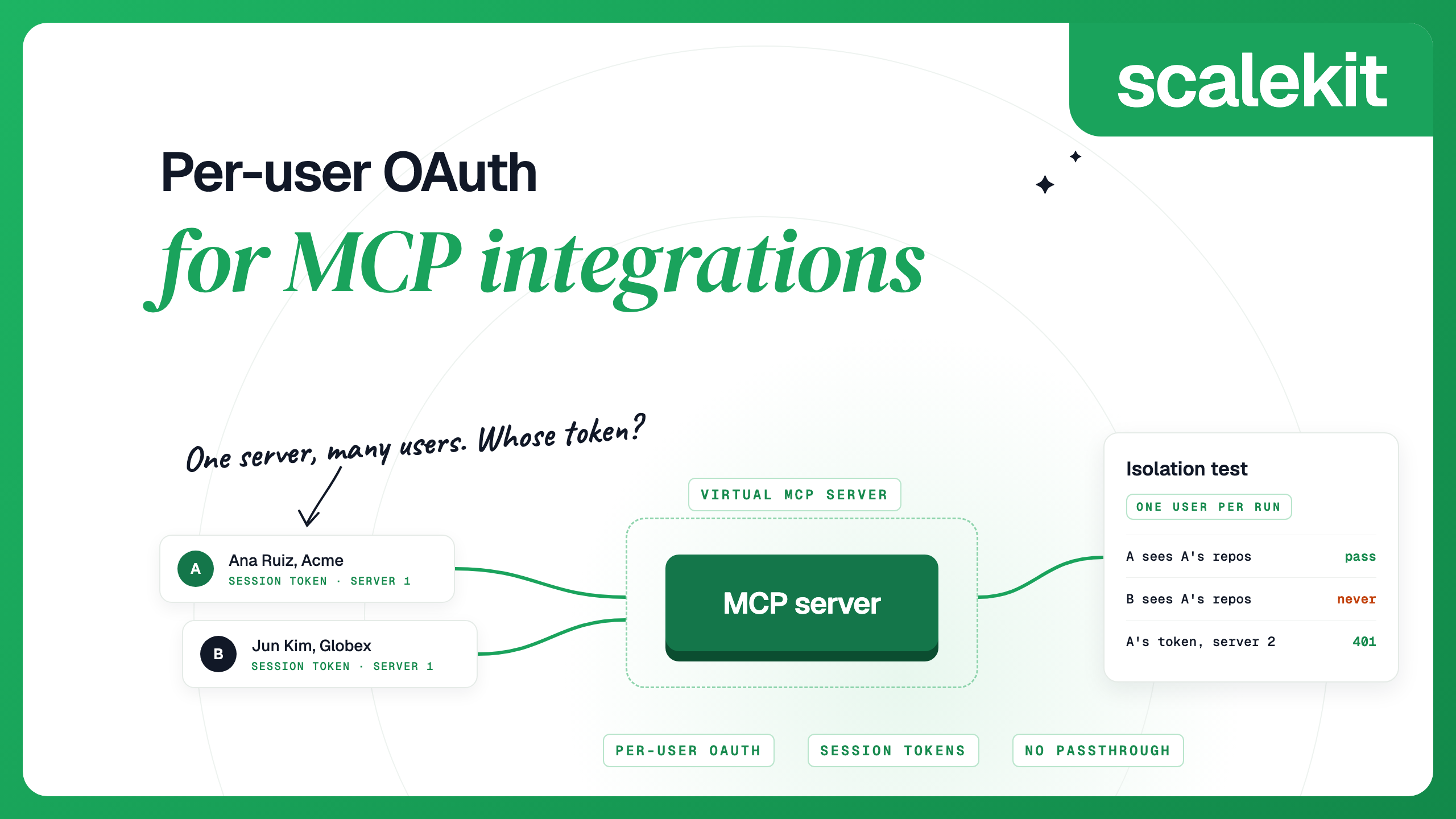
Per-user OAuth for MCP integrations covers this design and its failure modes in more depth.
AgentKit is an MCP gateway that runs each user's OAuth flow, stores their tokens encrypted with AES-256, refreshes them and calls tools as that user. Its Salesforce connector uses OAuth 2.0 with your own External Client App and lists 74 tools: 35 read, 28 write and 11 destructive. They cover CRM records, SOQL and SOSL, reports, dashboards, Chatter and Tooling API queries.
A user's authorization link opens on an install screen: an admin installs your package, and later users in that org confirm it is installed and sign in.
You create a Virtual MCP server once per agent role and choose its tools. All users share its URL. Before each run, your back end mints a session token for one user, and the agent connects with that token. Scalekit checks the token, finds that user's Salesforce account and calls Salesforce as that user, so your agent never sees their Salesforce token. AgentKit logs every tool call with the tool name, user identifier and status for 90 days.
Once per agent role: create the server.
Before each run: check the user's account, then mint a token. This run only reads, so the token is read-only:
During the run: connect any MCP client with the server URL and the session token as a bearer header. With the Python MCP SDK (version 2):
How session tokens behave:
For an agent that should see every Salesforce tool, skip the Virtual MCP server and use the connection's own MCP server, whose URL is your environment URL followed by /mcp/v3/connections/salesforce, minting the token with connection_name="salesforce". To revoke one user, delete their connected account; their next call fails until they authorize again, and other users keep working:
Yes. Salesforce Hosted MCP Servers became generally available on April 29, 2026, at URLs under https://api.salesforce.com/platform/mcp/v1/. Admins enable standard servers and can build custom ones from Flows, Apex and Named Queries.
Salesforce's general availability announcement says they are available for every Enterprise Edition org and above. The developer docs say they are intended only for customers with Flex Credits and that server usage may be billed.
No. Salesforce supports only External Client Apps for MCP authentication, and dynamic client registration is not supported. An admin creates the app with the mcp_api and refresh_token scopes and adds each client's callback URL.
No. The servers accept only the OAuth authorization code flow with PKCE, with no service accounts or machine-to-machine flows, so every call runs as a named user who signed in. For scheduled jobs, the Salesforce MCP vs API comparison recommends Salesforce's REST, Bulk and Metadata APIs.
The local @salesforce/mcp server reaches end of life on November 2, 2026. Salesforce now ships developer tooling as skills in forcedotcom/sf-skills.
Either add the server as a custom connector in Claude with your External Client App's consumer key, which Claude Code picks up when you sign in with a claude.ai subscription, or run claude mcp add with --client-id and --callback-port, register http://localhost:8080/callback (or your chosen port) on the app, and run claude mcp login salesforce.
Details checked October 2026.


.png)