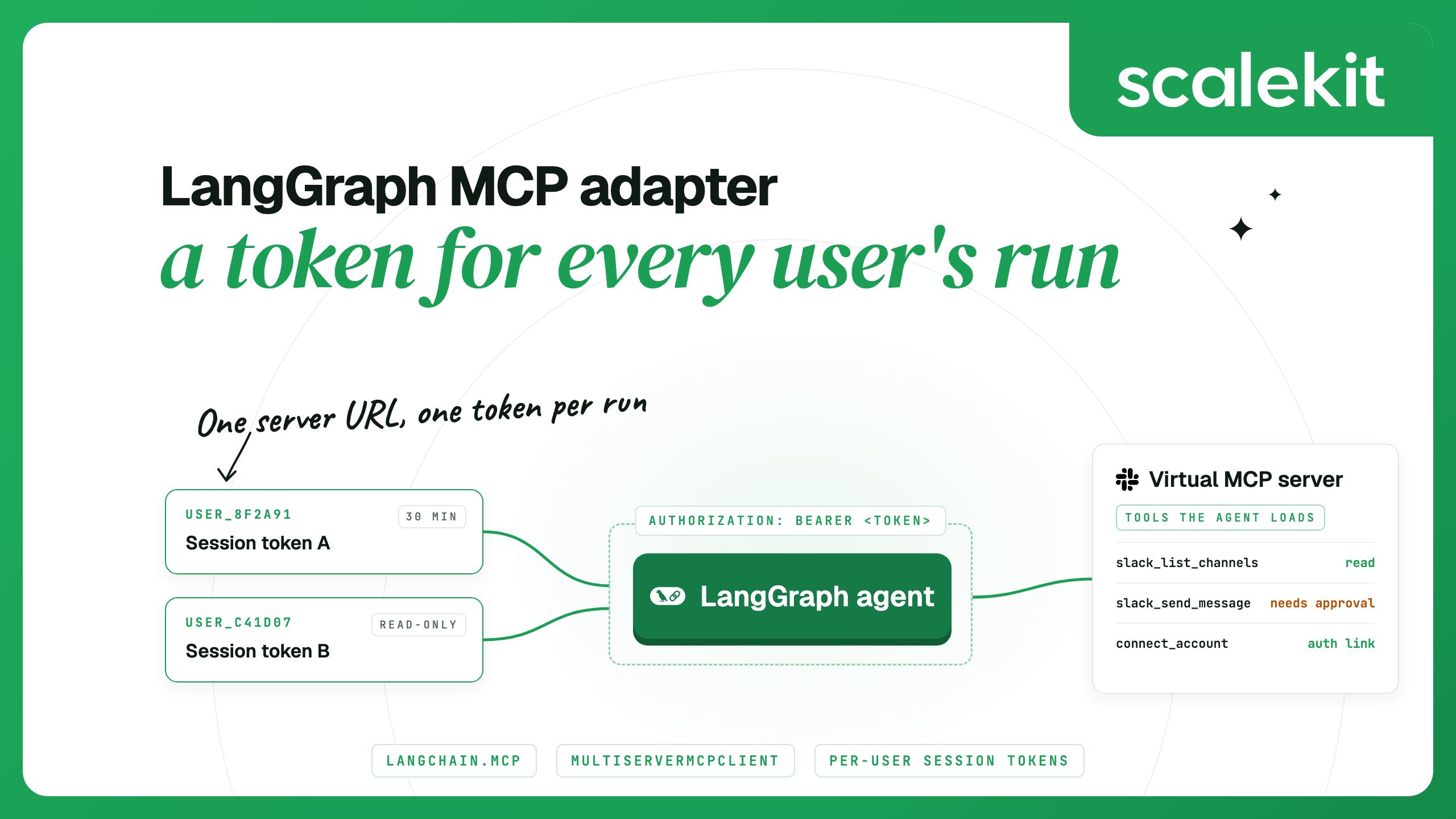
To use MCP tools in a LangGraph agent, load them with LangChain's MCP adapter and pass the list to create_agent or a ToolNode. Since LangChain 1.4, the adapter is MCPAdapter in langchain.mcp. The standalone langchain-mcp-adapters package and its MultiServerMCPClient still work, though LangChain no longer actively maintains them. In both, the credential sits on the connection, so an agent that serves many users needs a credential minted for each user's run.
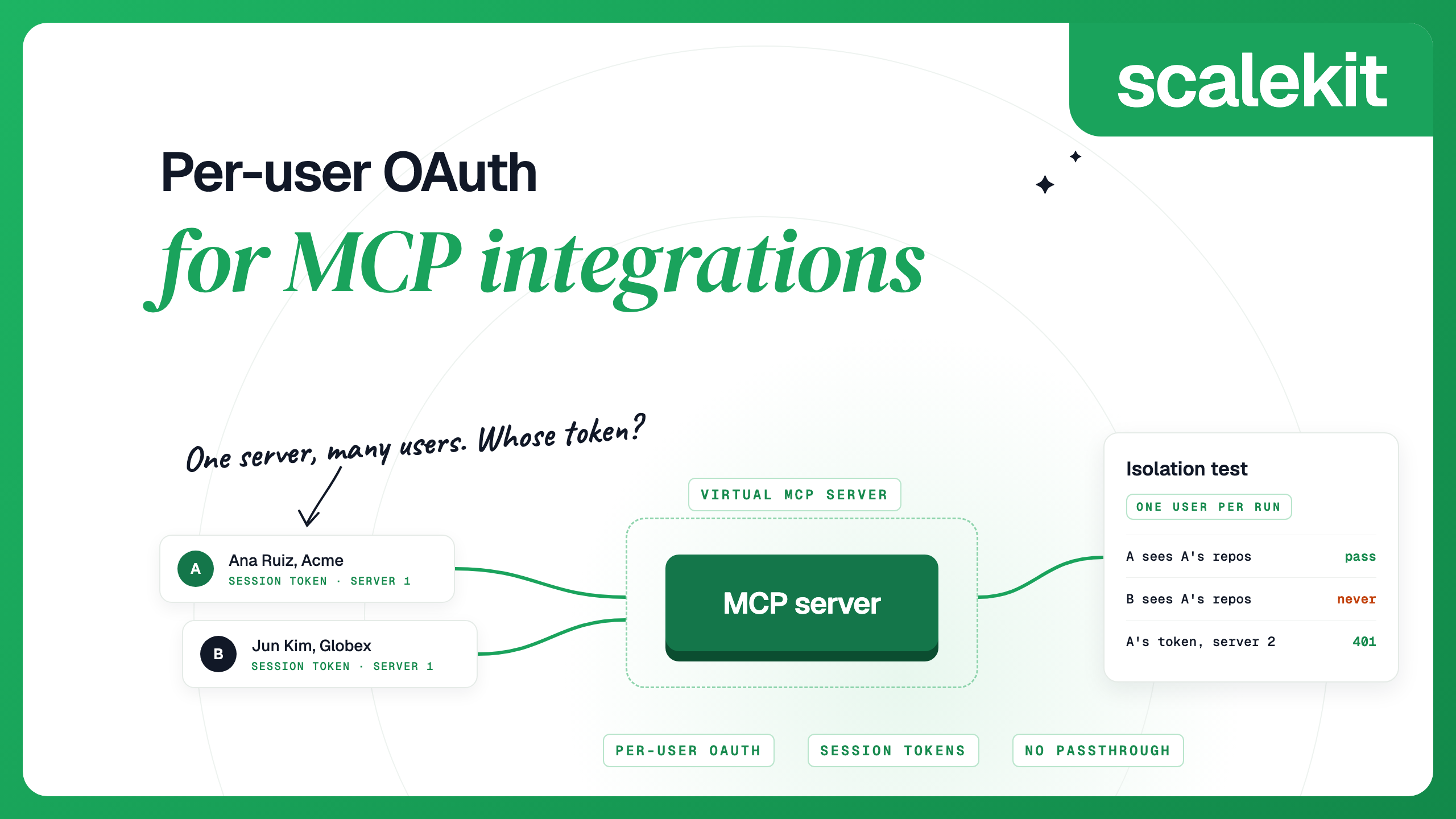
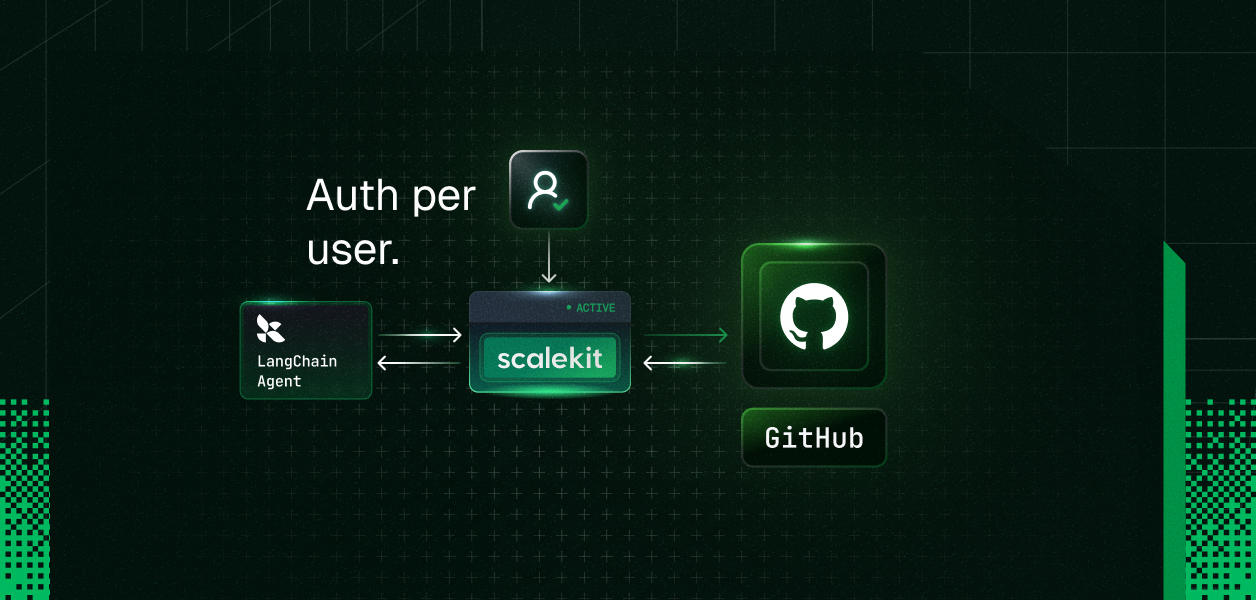
The credential on the connection decides whose account every tool call uses. Build the client once with one token, and every user's run acts as that one account. A managed MCP integration layer avoids this by holding each user's app tokens and issuing a short-lived credential per run. The examples below use Scalekit AgentKit with Slack: one Virtual MCP server that all users share, a session token minted per user per run, and both LangChain adapters. For the same kind of agent built on Scalekit's tool-calling API instead of MCP, see GitHub OAuth in a multi-user LangChain agent.
TL;DR
- MCPAdapter (beta, in langchain[mcp] 1.4.0 and later) is the current way to load MCP tools into LangChain and LangGraph agents. It takes a FastMCP Client whose auth can be a bearer token. MultiServerMCPClient takes the token in a headers dict.
- Load the tools inside each run, with that user's token. The tools keep the client, and every tool call opens a new session with the same credential, so a client shared across users gives them all one identity.
- With Scalekit, create one Virtual MCP server, mint a session token for the user before each run (one hour by default, 60 seconds to 24 hours, minted again rather than refreshed), and put tools that write behind LangChain's human-in-the-loop middleware.
Which LangChain MCP adapter to use
LangChain moved MCP support into its main package in September 2026. The old repository now opens with a notice that it is no longer actively maintained and links to the migration guide. The two adapters differ in where the credential goes:
pip install "langchain[mcp]" (LangChain 1.4.0 or later)
pip install langchain-mcp-adapters
Beta; LangChain says the API may change
Repository archived; no longer actively maintained
FastMCP 4 and the 2.x MCP Python SDK
The 1.x MCP Python SDK (it requires mcp below 2.0)
auth on a fastmcp Client: a token string, the literal "oauth", or any httpx.Auth
headers, or auth as an httpx.Auth, in each server's connection dict
await adapter.list_tools()
Agent middleware such as @wrap_tool_call and human-in-the-loop
tool_interceptors on the client
Start new code on MCPAdapter. Code that already runs on MultiServerMCPClient keeps working, and the guide maps each part of it to the new API. To migrate, uninstall langchain-mcp-adapters, install langchain[mcp], and replace each client with an MCPAdapter around a fastmcp Client, as in agent.py below. Switch in one step rather than installing both: the old package needs the 1.x MCP Python SDK and langchain[mcp] needs 2.x, and when both are requested pip picks an older langchain-mcp-adapters release that fails with an ImportError. Both adapters load and call the same Scalekit server with the same token, so the Scalekit side does not change when you migrate.
Where the user's credential goes
LangChain's MCP authentication docs describe per-user auth in two halves. First, authenticate the caller at the LangGraph server, so each run knows its user. Second, mint or exchange a credential for that user and build the MCP client with it. Their example calls a placeholder, token_for(user), which stands for an OAuth gateway that exchanges the session for a per-user token. A Scalekit session token can fill that function: each run carries one user's token, and the agent never holds the user's Slack token.
LangChain also has Agent Auth in LangSmith, currently in beta. You register an OAuth app for each provider, call authenticate() with a user ID, and get that provider's access token back; inside LangGraph the SDK pauses the run with an interrupt until the user finishes the OAuth flow, and LangSmith stores and refreshes the token. It is the better fit when you deploy on LangSmith and want to call a provider's API yourself with the raw token. A Virtual MCP server is the better fit when the agent should get ready-made tools over MCP and never see the user's tokens. Per-user OAuth for MCP integrations compares the URL and token designs in more depth.
Create the Virtual MCP server once
A Virtual MCP server is one URL per agent role that exposes only the tools you choose, from one or more connections. Every user shares the URL. This example uses a Slack connection named slack in the Scalekit dashboard, and the tool names are the ones the Scalekit Slack connector lists. One server can combine tools from several of Scalekit's 500+ connectors.
import os
from scalekit import ScalekitClient
from scalekit.actions.models.mcp_config import (
McpConfigConnectionToolMapping,
)
actions = ScalekitClient(
env_url=os.environ["SCALEKIT_ENVIRONMENT_URL"],
client_id=os.environ["SCALEKIT_CLIENT_ID"],
client_secret=os.environ["SCALEKIT_CLIENT_SECRET"],
).actions
response = actions.mcp.create_config(
name="langgraph-slack-assistant",
description="Slack tools for the LangGraph support agent",
connection_tool_mappings=[
McpConfigConnectionToolMapping(
connection_name="slack",
tools=[
"slack_list_channels",
"slack_fetch_conversation_history",
"slack_get_conversation_replies",
"slack_send_message",
],
),
],
)
print("SCALEKIT_MCP_CONFIG_ID=" + response.config.id)
print("SCALEKIT_MCP_SERVER_URL=" + response.config.mcp_server_url)
Save it as create_server.py and run it once. It prints the server ID and the URL; put them in SCALEKIT_MCP_CONFIG_ID and SCALEKIT_MCP_SERVER_URL next to your Scalekit client credentials.
Mint a session token for each run
Before each run, check that the user's connected accounts are active, then mint a token for that user on that server. Save this as scalekit_session.py; the agent files below import it.
import os
from datetime import timedelta
from scalekit import ScalekitClient
actions = ScalekitClient(
env_url=os.environ["SCALEKIT_ENVIRONMENT_URL"],
client_id=os.environ["SCALEKIT_CLIENT_ID"],
client_secret=os.environ["SCALEKIT_CLIENT_SECRET"],
).actions
CONFIG_ID = os.environ["SCALEKIT_MCP_CONFIG_ID"]
MCP_SERVER_URL = os.environ["SCALEKIT_MCP_SERVER_URL"]
class NeedsAuthorization(Exception):
"""The user still has to connect one or more apps."""
def __init__(self, links: dict[str, str]):
super().__init__("Connect first: " + ", ".join(links))
self.links = links
def session_token_for(user_id: str, read_only: bool = False) -> str:
"""Mint a session token for one user on the Virtual MCP server."""
accounts = actions.mcp.list_mcp_connected_accounts(
config_id=CONFIG_ID,
identifier=user_id,
include_auth_link=True,
)
links = {
a.connection_name: a.authentication_link
for a in accounts.connected_accounts
if a.connected_account_status != "ACTIVE"
}
if links:
raise NeedsAuthorization(links)
session = actions.mcp.create_session_token(
mcp_config_id=CONFIG_ID,
identifier=user_id,
expiry=timedelta(minutes=30),
access_level="READ_ONLY" if read_only else None,
)
return session.token
user_id is your app's ID for the person, the same value they used when they authorized Slack. Use an ID that is stable and hard to guess, not an email address. Resolve it on your backend from your own session, never from a request body or model output. If the user has no Slack account yet, the check creates one in PENDING_AUTH and returns an authorization link, which expires five minutes after it is created by default, so generate it right before you show it. How the token behaves (from Mint session tokens):
- It is bound to one user and one server. Used on any other server URL, it is rejected.
- It lasts one hour unless you set an expiry between 60 seconds and 24 hours.
- It cannot be refreshed or extended. Mint a new one instead. Minting a new token does not revoke earlier ones, so concurrent runs each get their own.
- With access_level="READ_ONLY", the run sees only the server's read-only tools; the others are left out of the tool list and refused if called.
Load the tools into a LangGraph agent
Install LangChain with the MCP extra, a model provider and the Scalekit SDK. LangGraph comes with LangChain.
pip install "langchain[mcp,openai]" scalekit-sdk-python
Save the agent as agent.py. AGENT_MODEL takes any provider:model string that create_agent accepts; the default needs OPENAI_API_KEY.
import asyncio
import os
from fastmcp.client import Client
from langchain.agents import create_agent
from langchain.mcp import MCPAdapter
from scalekit_session import MCP_SERVER_URL, session_token_for
MODEL = os.environ.get("AGENT_MODEL", "openai:gpt-5.5")
async def load_tools(token: str):
# A string auth value is sent as "Authorization: Bearer <token>"
client = Client(MCP_SERVER_URL, auth=token)
async with MCPAdapter(client) as adapter:
return await adapter.list_tools()
async def build_agent_for(user_id: str, read_only: bool = False):
token = session_token_for(user_id, read_only=read_only)
return create_agent(MODEL, await load_tools(token))
async def main():
agent = await build_agent_for(os.environ["APP_USER_ID"])
result = await agent.ainvoke(
{"messages": [{"role": "user", "content": "Summarize #support today"}]}
)
print(result["messages"][-1].text)
if __name__ == "__main__":
asyncio.run(main())
FastMCP sends a string auth value as an Authorization: Bearer header. Importing langchain.mcp prints a LangChainBetaWarning once per process. list_tools() returns LangChain tools that hold the client, so they keep working after the async with block closes, and each tool call opens its own session with the same token. create_agent returns a compiled LangGraph graph with a model node and a tools node, so you can stream it, checkpoint it and add middleware like any other graph.
The tool list also contains connect_account. When a user has not connected an app yet, the agent can call it to get an authorization link and show it to the user. A read-only token lists the three Slack read tools plus connect_account, and leaves out slack_send_message.
With your own StateGraph
If you build the graph yourself, the same tools go into a ToolNode. Save this as graph.py and call build_graph(await load_tools(token)):
from langchain.chat_models import init_chat_model
from langgraph.graph import START, MessagesState, StateGraph
from langgraph.prebuilt import ToolNode, tools_condition
from agent import MODEL
def build_graph(tools):
model = init_chat_model(MODEL).bind_tools(tools)
async def call_model(state: MessagesState):
return {"messages": [await model.ainvoke(state["messages"])]}
builder = StateGraph(MessagesState)
builder.add_node("agent", call_model)
builder.add_node("tools", ToolNode(tools))
builder.add_edge(START, "agent")
builder.add_conditional_edges("agent", tools_condition)
builder.add_edge("tools", "agent")
return builder.compile()
With MultiServerMCPClient
On langchain-mcp-adapters, the token goes into the connection's headers. get_tools() opens a new session for every tool call using that dict, so the token is fixed when you build the client, just as with MCPAdapter. Save it as agent_adapters.py:
import os
from langchain.agents import create_agent
from langchain_mcp_adapters.client import MultiServerMCPClient
from scalekit_session import MCP_SERVER_URL, session_token_for
MODEL = os.environ.get("AGENT_MODEL", "openai:gpt-5.5")
async def build_agent_for(user_id: str):
token = session_token_for(user_id)
client = MultiServerMCPClient(
{
"scalekit": {
"transport": "streamable_http",
"url": MCP_SERVER_URL,
"headers": {"Authorization": f"Bearer {token}"},
}
}
)
tools = await client.get_tools()
return create_agent(MODEL, tools)
Serve many users from one process
Each user gets their own token, tools and agent, so one user's run never holds another user's credential. Save this as multi_user.py:
import asyncio
from agent import build_agent_for
from scalekit_session import NeedsAuthorization
async def answer(user_id: str, question: str) -> dict:
try:
agent = await build_agent_for(user_id)
except NeedsAuthorization as e:
# Show these links in your UI; they expire after one minute
return {"user": user_id, "connect": e.links}
result = await agent.ainvoke(
{"messages": [{"role": "user", "content": question}]}
)
return {"user": user_id, "answer": result["messages"][-1].text}
async def main():
# Two users, two tokens, two agents, run at the same time
replies = await asyncio.gather(
answer("user_8f2a91", "What changed in #support today?"),
answer("user_c41d07", "Which channels am I in?"),
)
for reply in replies:
print(reply)
if __name__ == "__main__":
asyncio.run(main())
A few rules keep the runs separate:
- Build the MCP client and tools inside the run. A client created at import time with one token makes every user act as that account.
- Mint one token per run. Tokens are independent, so two runs for the same user can overlap safely.
- If you turn on FastMCP response caching for tool lists, partition the cache per user, as LangChain's auth docs advise, so one user never sees another's cached list. The examples above do not configure a cache.
- A user whose Slack account is not connected gets an error tool message on any Slack tool call, telling the model to call connect_account. The call never falls back to another user's account.
Ask before tools that write
LangChain's HumanInTheLoopMiddleware pauses the run before a gated tool call and waits for a decision. MCP tool annotations arrive on each tool's metadata under mcp, and LangChain's own example gates on destructive_hint. On this server, slack_send_message is marked neither read-only nor destructive, so a destructive-only gate would let it through. Gate on read_only_hint instead: anything the server does not mark read-only waits for a person. connect_account stays ungated so the agent can hand a user an authorization link without a review step. Save this as gated_agent.py:
from langchain.agents import create_agent
from langchain.agents.middleware import HumanInTheLoopMiddleware
from langgraph.checkpoint.memory import InMemorySaver
from agent import MODEL, load_tools
from scalekit_session import session_token_for
def writes(tool) -> bool:
"""True unless the server marks the tool read-only."""
mcp = (tool.metadata or {}).get("mcp", {})
hints = mcp.get("tool", {}).get("annotations", {})
return hints.get("read_only_hint") is not True
async def build_gated_agent_for(user_id: str):
tools = await load_tools(session_token_for(user_id))
review = {"allowed_decisions": ["approve", "reject"]}
interrupt_on = {
t.name: review
for t in tools
if writes(t) and t.name != "connect_account"
}
# "batched": one interrupt per model turn, the shape approve.py reads
hitl = HumanInTheLoopMiddleware(
interrupt_on=interrupt_on, interrupt_mode="batched"
)
return create_agent(
MODEL, tools, middleware=[hitl], checkpointer=InMemorySaver()
)
The run stops with an interrupt that lists each pending call's name and arguments. Show them to the user and resume with a decision. Save this as approve.py:
from langgraph.types import Command
from gated_agent import build_gated_agent_for
async def run_with_review(user_id: str, prompt: str, approve) -> dict:
"""approve(request) shows one pending call to a person, returns a bool."""
agent = await build_gated_agent_for(user_id)
config = {"configurable": {"thread_id": f"{user_id}-support"}}
result = await agent.ainvoke(
{"messages": [{"role": "user", "content": prompt}]}, config
)
while "__interrupt__" in result:
pending = result["__interrupt__"][0].value["action_requests"]
decisions = [
{"type": "approve"}
if approve(request)
else {"type": "reject", "message": "Not approved"}
for request in pending
]
result = await agent.ainvoke(
Command(resume={"decisions": decisions}), config
)
return result
A rejected call never runs; the model gets an error tool message with your reason. Read tools on the same server run without a pause. For runs that should never write at all, a read-only session token is simpler: the write tools are not in the list, and Scalekit refuses them if called.
Deploy on a LangGraph server
On a LangGraph server, a custom auth handler identifies the caller, and a graph factory rebuilds the graph for each run with access to that user. Save this as deploy.py:
from datetime import timedelta
from langchain.agents import create_agent
from langgraph_sdk.runtime import ServerRuntime
from agent import MODEL, load_tools
from scalekit_session import CONFIG_ID, actions
async def make_graph(runtime: ServerRuntime):
# The server calls this for runs and for state and schema reads.
# Build the same graph each time so the topology always matches.
user_id = runtime.ensure_user().identity
session = actions.mcp.create_session_token(
mcp_config_id=CONFIG_ID,
identifier=user_id,
expiry=timedelta(minutes=30),
)
return create_agent(MODEL, await load_tools(session.token))
Point langgraph.json at the factory and at the custom auth handler, kept here in auth.py:
{
"dependencies": [
"."
],
"graphs": {
"slack_agent": "./deploy.py:make_graph"
},
"auth": {
"path": "./auth.py:auth"
}
}
ensure_user() returns the user your auth handler set and raises PermissionError when there is none. Its identity goes to Scalekit as the identifier, so your handler must return the same ID the user authorized Slack with. The server also calls the factory for state reads and schema requests, and LangChain's docs say the graph should keep the same topology in every context. create_agent with no tools builds a graph without a tools node, so this factory loads the user's tools every time instead of passing an empty tool list outside runs. It mints without the connection check, because a user who has not connected Slack still gets the tool list and the agent can hand them a link through connect_account.
Token lifetime and errors
Set the expiry a little above the longest run you expect. For a chat, mint when the session starts, and mint again if the session outlives the token. The tools hold the token, so a new token means a new agent: keep the checkpointer outside the agent, and a rebuilt agent with the same checkpointer and thread_id continues the conversation. On a LangGraph server, the graph factory already rebuilds the agent for every run. For scheduled jobs, mint at the start of each run and do not store tokens between runs. The full HTTP contract, including error bodies, is in Connect any MCP client.
NeedsAuthorization from session_token_for
The user has not connected Slack, or the account is no longer active
Show the authorization link from the exception, then run again
MCPError with “Server returned an error response” while loading tools or during a run
The token expired, was minted for another server, or was copied incompletely; the run raises instead of returning a tool message
Mint a new token and rebuild the agent; raise the expiry if long runs hit it
A tool message with status error that says the account is not connected
The token was minted without the connection check and the account is not active
Let the agent call connect_account, or check accounts before the run
A successful tool message whose data holds an error from Slack
Slack rejected the request inside a 2xx response, which Scalekit passes through under data
Read the error; for an auth error, ask the user to reconnect the account
FAQs
What is the LangGraph MCP adapter?
It is the LangChain code that turns an MCP server's tools into LangChain tools a LangGraph agent can call. Since LangChain 1.4 it is MCPAdapter in the langchain.mcp namespace, built on FastMCP and currently in beta. Before that it was the separate langchain-mcp-adapters package with MultiServerMCPClient.
Is langchain-mcp-adapters deprecated?
Its GitHub repository is archived and marked as no longer actively maintained, and LangChain points users to langchain.mcp and a migration guide. The package still works on the 1.x MCP Python SDK, but it cannot share an environment with langchain[mcp], which needs the 2.x SDK. New code should use MCPAdapter.
How do I pass an Authorization header to MultiServerMCPClient?
Add a headers dict to the server's connection config whose Authorization value is the word Bearer followed by the token, and set transport to streamable_http. The adapter sends those headers on every request, and each tool call opens a new session with them. With MCPAdapter, pass the token as auth on a fastmcp Client instead.
How do I give each user their own MCP credentials in LangGraph?
Mint a credential for the user before the run and build the MCP client, the tools and the agent inside that run. Never create the client once at import time with a single token. With Scalekit, every user shares one Virtual MCP server URL and each run sends a session token minted for that user.
Can LangGraph run the MCP OAuth sign-in for each user?
FastMCP's auth="oauth" option runs discovery, dynamic client registration, a browser redirect and the token exchange, and keeps tokens in memory unless you give it a token store. That fits one person on their own machine. A deployed agent serving many users should get each user's credential from your backend instead.
How long does a Scalekit session token last?
One hour by default. You can set the expiry anywhere from 60 seconds to 24 hours, and the token cannot be refreshed, so you mint a new one for the next run. A token works only on the server it was minted for, and minting a new one does not revoke earlier ones.
Details checked October 2026.