Suppose we have a company that sells a customer support platform to enterprise teams. It ships an AI assistant inside the product, and each customer's support engineers connect their own Slack and GitHub accounts so the assistant can file bugs and post incident updates.
The first build gives the assistant every tool those two apps offer. In our Scalekit catalog that is 98 Slack tools and 217 GitHub tools, so 315 definitions ride along with every message. It works in the demo, and then real customers start using it.
This post follows that team from the first week of trouble to a setup that holds up across hundreds of customers. Along the way, it covers how many tools a model can handle, how tool search and defer_loading work in the OpenAI and Claude APIs, five strategies for loading tools dynamically, and the code the team ships with Scalekit.
TL;DR
Give an agent only a handful of tools per turn. Scope tools by the agent's role, filter them by what the current user has connected and may do, and search for the rest on demand.
Tool lists get expensive fast. Anthropic measures about 55,000 tokens of definitions for a five-server setup, vendors see accuracy slip between 30 and 50 tools, and May 2026 research found about 7 well-chosen tools matched the coverage of 50.
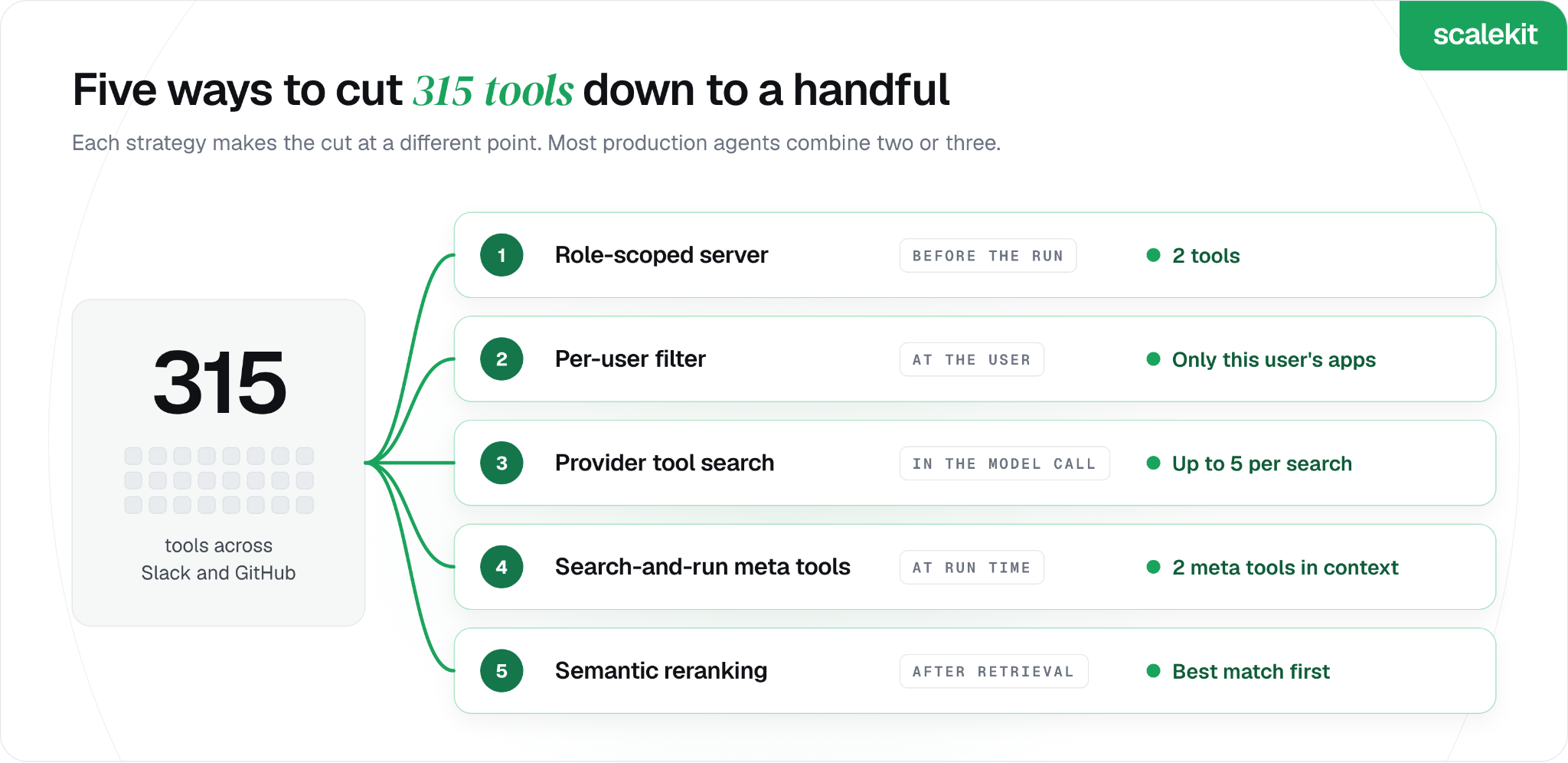
Five strategies keep the list short: role-scoped servers, per-user permission filters, provider tool search with defer_loading, search-and-run meta tools, and semantic reranking. Most production agents combine two or three.
Provider tool search can't tell which apps your user has connected. For a customer-facing agent, the per-user filter keeps searches useful and runs safely.
Scalekit covers three of the five: Virtual MCP servers scope tools per role, read-only session tokens filter by permission, and the Search Tools API ranks tools by intent and marks which ones this user can call right now.
What Goes Wrong When an Agent Sees All the Tools
The first week surfaces three problems, and none show up in a demo with one test account. Each one traces back to the same cause: the model sees every tool on every turn.
Wrong tool, plausible result. An engineer asks the assistant to post the outage summary to #incidents, and it reaches for a Slack search tool first, because the word "outage" matches search descriptions better than the send tool does.
A bill that grows with the catalog. Every request carries all 315 definitions before the assistant reads a word of the user's message, so adding Jira next quarter would raise the cost of every single turn.
A security review the team can't pass. One customer asks whether the assistant could delete a repository. With every GitHub tool loaded, the honest answer is yes, since our catalog marks 35 of the 217 GitHub tools as destructive.
The team's next question is how many tools are too many. The public evidence lands in a fairly tight range.
A shortlist averaging 7 tools nearly matched the coverage of showing 50 (90.3% vs 90.8%)
The research result points to the design goal. In the same paper's tests with Claude Sonnet 4.6, shorter adaptive lists raised correct tool selection to 93.1%, against 87.1% when the model always saw five tools, so the target is a short list chosen for the request in front of the agent.
What Tool Search and Deferred Tool Loading Mean
Tool search lets an agent find the tools it needs at runtime, instead of receiving every definition up front. Deferred tool loading is the mechanism behind it: tools are registered with the model but held back from its context until a search asks for them.
Both major model APIs now offer this, and both use a flag called defer_loading:
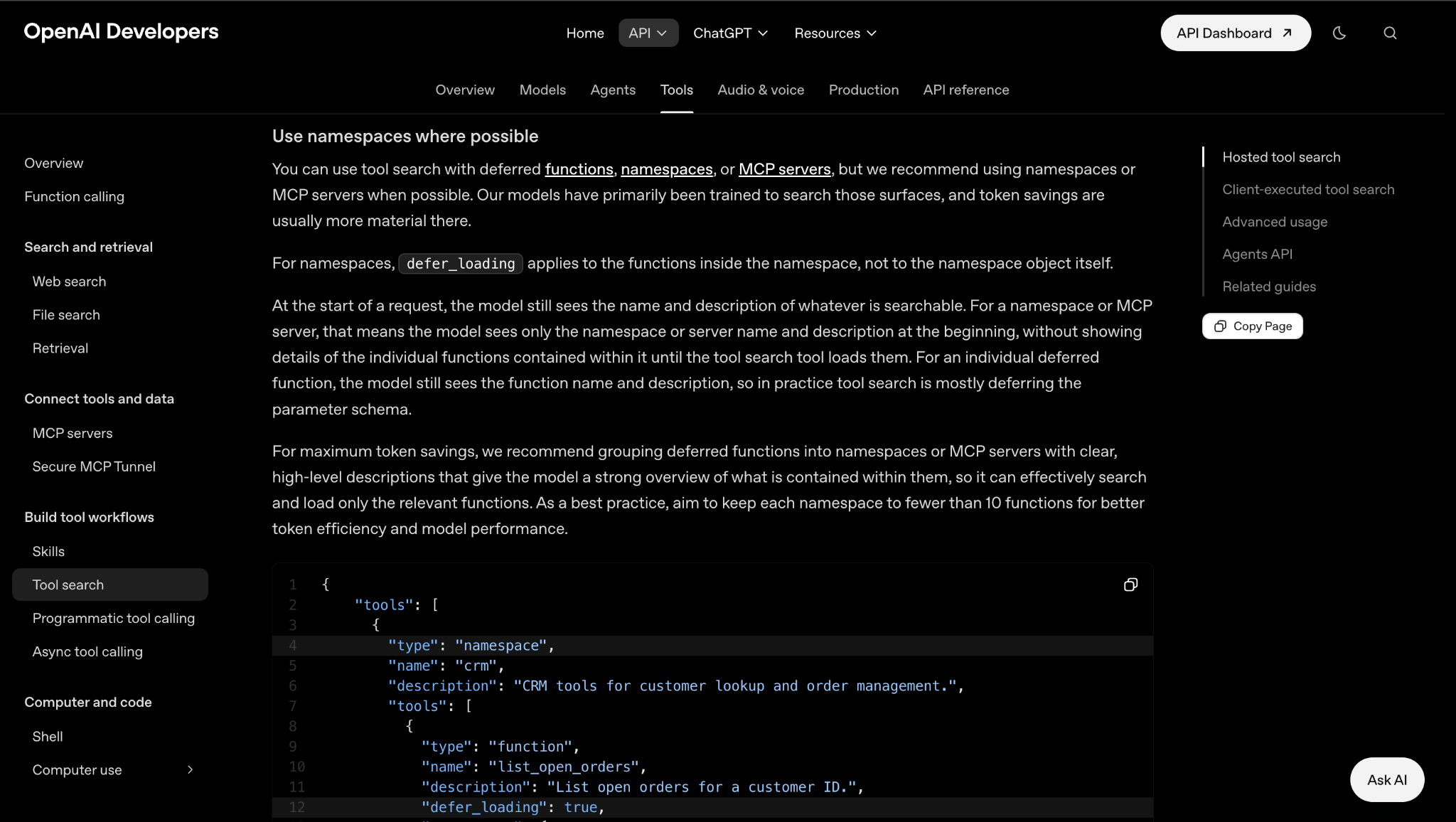
OpenAI: you add tool_search to the tools array and mark functions with defer_loading: true. The OpenAI tool search guide suggests grouping deferred functions into namespaces or MCP servers with clear descriptions, since the model only sees those names and descriptions at the start.
Anthropic: you add a tool search tool, in a regex or a BM25 variant, and set defer_loading: true on the tools to hold back. Each search returns up to five matching tools by default, which the API expands into full definitions.
The same mechanism applied to MCP servers is what most people mean by MCP tool search. In Claude Code and the Claude Agent SDK, it is on by default for supported models and loads up to five matching tools per search, and OpenAI's Agents API defers MCP tools on its own when the model supports tool search.
Agent platforms offer the same idea as meta tools. Composio sessions give the agent a small set of meta tools for finding, connecting, and running app tools, and Nango sessions expose a nango_tool_search meta tool that keeps searchable tools out of the listed set.
For the support team, this is the first real option on the table. It is also where they learn that hiding tools is only half the job.
Five Strategies for Loading Tools Dynamically and What Each One Fixes
The team doesn't pick one strategy and stop. Each fix below solves one of the week-one problems, and each exposes the next gap, which is how most production agents end up combining two or three of them.
1. Role-scoped servers that expose only one job's tools
The first fix is the simplest. Most requests the assistant handles are triage, so the team defines a triage role that gets two tools, github_issues_list and slack_send_message, and the other 313 never reach the model.
What it solves: the wrong-tool problem for everyday requests, and a small, predictable token cost on every turn.
What it leaves open: requests outside the role, such as "what changed in the billing repo last week", now have nowhere to go.
2. Per-user filters that drop what this user can't call
The security review is next. The team removes tools based on who the assistant is acting for: a customer who never connected GitHub sees no GitHub tools, and the nightly incident digest runs with read-only tools only.
What it solves: the delete-a-repository question, since a tool that isn't listed can't be called.
What it leaves open: it only trims lists, so it needs role scoping or search underneath it.
3. Provider tool search with defer_loading
For requests outside the triage role, the team tries the model provider's tool search. Every definition goes into the request with defer_loading: true, and the API searches them and loads the matches.
What it solves: reach, with very little code, across hundreds or thousands of tools.
What it leaves open: with Anthropic's tool search and OpenAI's hosted tool search, every definition still goes out on each request, and the search has no idea which of the company's customers connected which app.
4. Search-and-run meta tools that find and call tools in one step
A platform-side alternative gives the model two or three generic tools, such as "search tools" and "execute tool", with the whole catalog behind them. Composio sessions, Nango's nango_tool_search and Docker's experimental Dynamic MCP gateway all follow this pattern.
What it solves: the model's tool list stays tiny no matter how many apps the company adds.
What it leaves open: each task gains a search round trip, and the model has to phrase a good query.
5. Semantic reranking of search results before the model sees them
The last fix targets near misses, where search returns the right tool but not first. In our own reranking experiment with Jev, a tool that ranked fifth in the first-pass results moved to the top after semantic reranking, with the full path staying around 200 ms.
What it solves: the classic word-match miss, where "email my manager" pulls up tools that read email ahead of the one that sends it.
What it leaves open: an extra model call and some latency. The Jev reranker is still an experiment and isn't part of the Scalekit API yet.
Which Combination of Tool Loading Strategies Fits Your Agent
The support team's final setup uses three of the five: a role-scoped server for triage, a per-user filter on every run, and search for everything else. Your mix depends on how predictable the agent's job is and how many people it acts for.
If your agent...
Start with
Then add
Does one job with fewer than about 20 tools
Role-scoped server
Nothing else needed
Does one job but acts for many users or customers
Role-scoped server
Per-user filter on every run
Handles open-ended requests across many apps
Search-and-run meta tools
Per-user filter, then reranking
Runs on one model API you control end to end
Provider tool search with defer_loading
A per-user filter before you build the tools array
Picks the wrong tool among close matches
Your current setup
Semantic reranking
Two rules hold across every row. Filter by the user before the model sees anything, and keep write tools out of runs that only need to read.
Why Tool Search Needs to Know Which User It Is Acting For
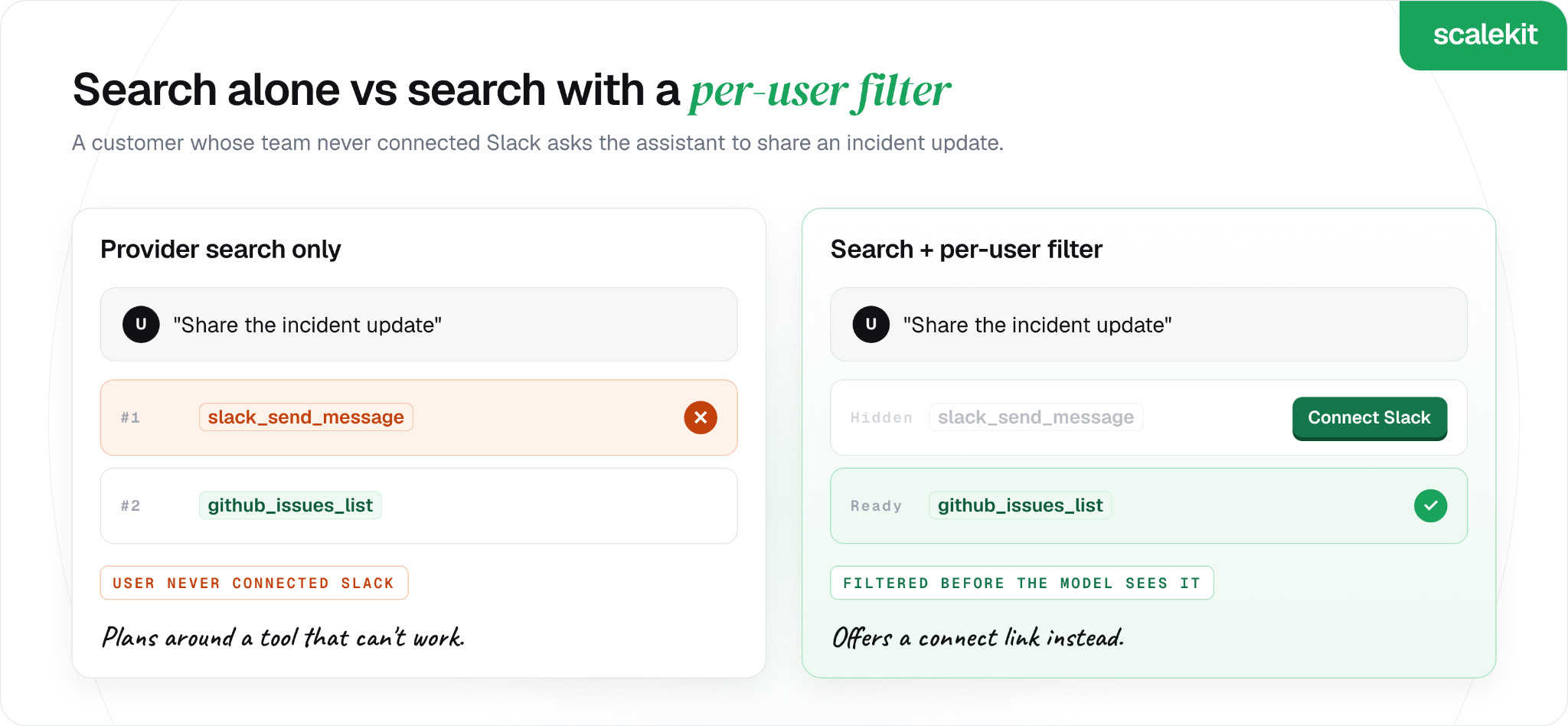
The gap shows up with a customer whose team uses GitHub but never connected to Slack. An engineer there asks the assistant to share an incident update, and provider tool search, doing its job well, returns slack_send_message as the best match. The assistant plans around a tool that can't work for this user, and the turn ends in an error.
Provider tool search ranks tools by how well they match the request. It has no view of your users, so a per-user filter has to answer three questions before any tool reaches the model:
Has this user connected the app? Tools for unconnected apps should be hidden, or swapped for a prompt to connect.
Is the connection still valid? An expired grant should trigger re-authorization before the agent plans around that tool.
Is this run allowed to write? A nightly digest or a summarizer should see read-only tools only.
The third question also limits prompt injection. The assistant reads tickets and messages written by other people, and a hidden instruction in one of them can ask it to close an issue or post somewhere it shouldn't. If write tools aren't in the run's list, that instruction has nothing to call, which is the core idea in our guide to least privilege for AI agent tool calls.
This per-user layer belongs to the platform that holds each user's connections. Our guide to what an agent tool calling platform is covered where it sits in the wider stack.
How the Team Builds It With Scalekit
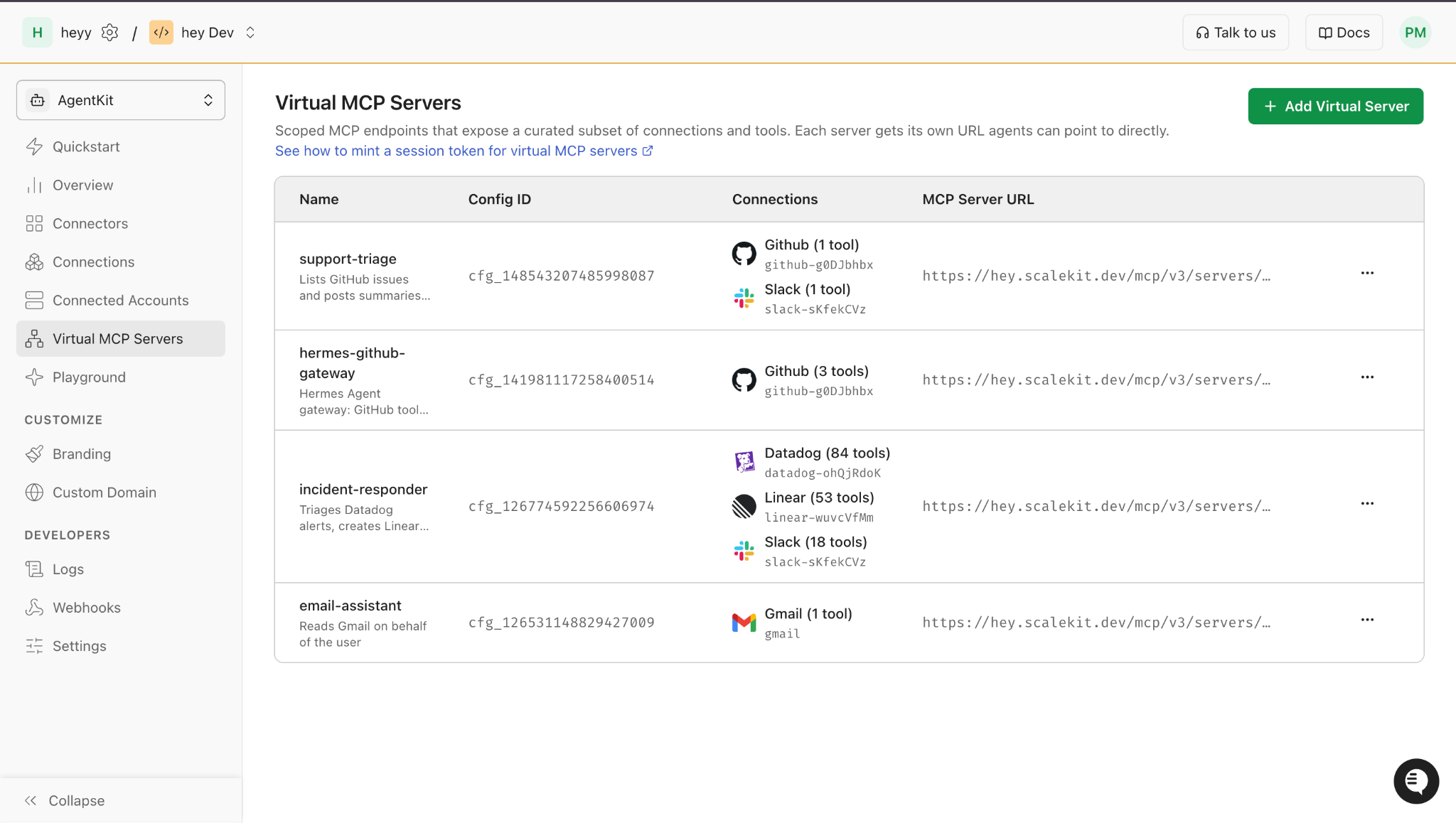
Scalekit covers three of the five strategies in one place: role-scoped servers, per-user filtering, and search-and-run. The support team's build has three pieces, each mapped to a problem from week one.
The triage role becomes a Virtual MCP server created with create_config, exposing just github_issues_list and slack_send_message. Every customer's assistant shares its URL.
The security review answer is a session token from create_session_token, bound to one user and that one server. With access_level set to READ_ONLY, the nightly digest sees github_issues_list only, and a call to slack_send_message is refused before it reaches Slack.
The open-ended requests go through search_tools, which ranks tools across every connection by intent and returns each tool's readiness_state for this user. The assistant keeps only tools marked TOOL_READINESS_STATE_READY.
Both samples below read SCALEKIT_ENVIRONMENT_URL, SCALEKIT_CLIENT_ID and SCALEKIT_CLIENT_SECRET, and assume a GitHub connection named github-connect and a Slack connection named slack.
Python
import os
from datetime import timedelta
from scalekit import ScalekitClient
from scalekit.actions.models.mcp_config import McpConfigConnectionToolMapping
from scalekit.v1.tools.tools_pb2 import ToolReadinessState
scalekit_client = ScalekitClient(
env_url=os.environ["SCALEKIT_ENVIRONMENT_URL"],
client_id=os.environ["SCALEKIT_CLIENT_ID"],
client_secret=os.environ["SCALEKIT_CLIENT_SECRET"],
)
actions = scalekit_client.actions
user_id = "user_123" # your app's internal user ID, from the server session
# Once per agent role: a Virtual MCP server that exposes only two tools
config = actions.mcp.create_config(
name="support-triage",
description="Lists GitHub issues and posts summaries to Slack",
connection_tool_mappings=[
McpConfigConnectionToolMapping(connection_name="github-connect", tools=["github_issues_list"]),
McpConfigConnectionToolMapping(connection_name="slack", tools=["slack_send_message"]),
],
).config
# Before each run: a short-lived token for one user. READ_ONLY hides slack_send_message.
session = actions.mcp.create_session_token(
mcp_config_id=config.id,
identifier=user_id,
expiry=timedelta(minutes=30),
access_level="READ_ONLY",
)
print(config.mcp_server_url, session.token) # pass both to your MCP client
# For open-ended requests: search by intent and keep only tools this user can call now
results, _ = actions.tools.search_tools(query="post the outage summary to Slack", identifier=user_id, top_k=5)
ready = [
(tool.name, conn.connected_account_id)
for tool in results.tools
for conn in tool.connections
if conn.readiness_state == ToolReadinessState.TOOL_READINESS_STATE_READY
]
print(ready)
TypeScript
import { ScalekitClient, ToolReadinessState } from '@scalekit-sdk/node';
const scalekit = new ScalekitClient(
process.env.SCALEKIT_ENVIRONMENT_URL!,
process.env.SCALEKIT_CLIENT_ID!,
process.env.SCALEKIT_CLIENT_SECRET!,
);
const userId = 'user_123'; // your app's internal user ID, from the server session
// Once per agent role: a Virtual MCP server that exposes only two tools
const { config } = await scalekit.actions.mcp.createConfig({
name: 'support-triage',
description: 'Lists GitHub issues and posts summaries to Slack',
connectionToolMappings: [
{ connectionName: 'github-connect', tools: ['github_issues_list'] },
{ connectionName: 'slack', tools: ['slack_send_message'] },
],
});
// Before each run: a short-lived token for one user. READ_ONLY hides slack_send_message.
const session = await scalekit.actions.mcp.createSessionToken({
mcpConfigId: config!.id,
identifier: userId,
expirySeconds: 30 * 60,
accessLevel: 'READ_ONLY',
});
console.log(config!.mcpServerUrl, session.token); // pass both to your MCP client
// For open-ended requests: search by intent and keep only tools this user can call now
const { tools } = await scalekit.tools.searchTools('post the outage summary to Slack', {
identifier: userId,
topK: 5,
});
const ready = tools.flatMap((tool) =>
tool.connections
.filter((conn) => conn.readinessState === ToolReadinessState.READY)
.map((conn) => ({ tool: tool.name, connectedAccountId: conn.connectedAccountId })),
);
console.log(ready);
Three details make this hold up across hundreds of customers:
Tokens are short-lived by design. Session tokens last one hour by default and can be set anywhere from 60 seconds to 24 hours, so the assistant mints a fresh one per run.
Unconnected apps come back empty. A tool whose app this user never connected returns an empty connections list, which is the assistant's cue to offer a connect link instead of a call.
Smaller tool sets cost less. Giving an agent a curated tool set instead of a whole catalog cuts token cost by up to 80%.
What a Small Test of Three Loading Setups Showed
We ran 8 tasks against our real Scalekit environment, with GitHub and Slack connected, on gpt-4o-mini, in three setups: every tool loaded, the support-triage Virtual MCP server from the code above, and the Search Tools API returning the top 5 per request. One note before the numbers: our account's real catalog across GitHub and Slack came to 313 tools, not the 315 we expected, and OpenAI's own API caps a single tool-calling request at 128 tools, so "every tool loaded" is 128, not 313, with the task's correct tool always forced into that pool so the cap itself didn't decide the result.
Setup
Right tool chosen (of 8)
Input tokens per turn
What we saw
Every tool loaded (128, API-capped from 313)
6
4,522
The model found the right tool most of the time, but twice it reached for the general github_issues_list instead of a more specific tool (github_workflow_get, github_pulls_list) that was sitting right there in the same list. Every turn costs about 4,500 input tokens before the model reads the user's actual request.
Role-scoped Virtual MCP server (2 tools)
5
112
Cheap and fast, 40x fewer input tokens than loading everything, but only as good as the two tools it was given. Three tasks (checking a workflow's status, listing pull requests, enabling a workflow) have no match in this role's tool set, so the model fell back to the one GitHub tool it had every time, github_issues_list, and answered confidently instead of saying it couldn't.
Search Tools API, top 5
1
40
This is the result we didn't expect. Natural-language task prompts like "post the outage summary to #incidents" and "list open bugs in the api repo" returned zero matching tools in our account, not a bad match, no match at all. The only task it got right was the one we expected it to fail cleanly on (the Gmail task, correctly surfacing nothing). Short, keyword-style queries like "slack" or "list issues" worked fine; the gap is between how people phrase requests and how our tools are described.
The clean story would be "role-scoped wins." The real one is messier: role-scoping is the cheapest and fastest of the three, but it quietly picks a wrong tool instead of admitting it has none, which is its own operational risk. Search-by-intent was the weakest of the three on exactly the tasks it's supposed to help most with, open-ended requests, because it depends on the task's wording actually resembling the tool's stored description. Neither of the more surgical setups beats "load everything" outright; they trade accuracy on some tasks for a large, real cost reduction on every turn.
Four Things to Watch After Your Agent Goes Live
Any setup that hides tools can also hide the right one. These are the four issues the support team keeps an eye on once the assistant is in front of real customers.
Vague tool descriptions. Search matches words, so "email my manager" can surface tools that read or search email ahead of the one that sends it. Descriptions that open with the action, such as "Send an email to a recipient", fix most misses, and reranking handles the rest.
Role definitions that drift. A role-scoped list is a snapshot. On a Scalekit Virtual MCP server, a connection added with all of its tools keeps the set it had at creation, and tools added to the connector later aren't included until you update the server, so the team reviews roles whenever connectors change.
The extra round trip. Search-and-run adds at least one model turn before the real call. Keeping the two or three tools a role uses most in its fixed list lets common requests skip the search step.
Filters that are too strict. An assistant without the tool it needs may answer from memory instead. Give it a way out, such as a prompt that asks the user to connect an app, and log every search that comes back empty.
Conclusion
The support team's assistant started with 315 tools on every turn and ended with a handful. Each change along the way fixed one problem from the first week, and together they turned a demo that worked into an assistant customers could trust.
Triage requests run on a role-scoped server with two tools, so the model picks the right one and every turn stays cheap.
The nightly digest runs on a read-only token, so a hidden instruction in a ticket has no write tool to call.
Open-ended requests go through a search that knows the user, so the assistant only plans around apps that user has connected to.
The research and the vendor guidance both point toward short tool lists chosen for the request in front of the agent. For a customer-facing agent, the step that keeps those lists safe is filtering by the user before the model sees anything.
To try it, create a scoped Virtual MCP server with the two tools your agent's first role needs. Then mint a read-only session token for one user, list the tools it sees, and compare that list with your full catalog.
FAQs
How many tools can an LLM handle before accuracy drops?
There is no fixed limit, but Anthropic's documentation reports accuracy degrading past 30 to 50 tools, and GitHub's Copilot CLI switches to tool search above roughly 30. Research on adaptive shortlists found that showing about 7 well-chosen tools matched the coverage of showing 50.
What is deferred tool loading, or defer_loading?
Deferred loading registers a tool without putting its full definition in the model's context. OpenAI and Anthropic both use a defer_loading: true flag, and the model loads a deferred tool only after a tool search returns it.
How do I cut the token cost of tool definitions?
Send fewer definitions per turn. Scope tools per agent role, drop tools the user can't call, and defer the rest behind tool search, which Anthropic says typically cuts definition tokens by over 85 percent.
Does tool search respect per-user permissions?
Provider tool search doesn't, since it only matches the request against the tools you send. Per-user filtering has to happen before the search, or in a search that knows the user, such as Scalekit's Search Tools API, which returns a readiness state for each of the user's connections.
Is tool search the same as RAG over tools?
They are close cousins. RAG over tools embeds tool descriptions and retrieves the nearest ones for a query, while tool search can also use keyword or regex matching and lets the model run the search itself, often more than once per task.
Do OpenAI and Claude support tools search natively?
Yes. OpenAI's Responses API offers tool_search on GPT-5.4 and later models, and Anthropic offers regex and BM25 tool search tools on Claude Opus 4.5, Sonnet 4.5, Haiku 4.5, and later models.
What is MCP tool search?
MCP tool search is tool search applied to tools that come from MCP servers. The client holds the server's tool definitions back and lets the model search for the ones it needs, which Claude Code, the Claude Agent SDK and OpenAI's Agents API all do automatically on supported models.