

It usually happens in the first security review. Your agent product has passed the demo, the champion is sold, and the customer's security architect asks the question you knew was coming: “Can this run in our VPC?” Sometimes it is phrased as “we cannot have credentials for our systems sitting in a third-party database.” Sometimes it is “our network has no outbound internet.” The question is the same each time. They want the part of your product that touches their systems to live where they can see it.
This post is about that part. It explains what the agent integration layer does, why it is the piece customers want inside their boundary, the three deployment modes you can offer, what crosses the boundary in each, and the two operational changes that catch teams by surprise. It uses Scalekit's self-hosted deployment as the worked example because that is what we build, and it compares how other vendors approach the same problem near the end.
Four things have to happen around every action an agent takes in another app. A user authorizes the agent through the app's OAuth flow. The access and refresh tokens that come back are stored, encrypted and refreshed before they expire. When the agent picks a tool, a service looks up that user's credential, attaches it to the request and calls the app's API. And something records who did what.
People call this layer different names depending on where they sit: AI agent integration middleware, a tool-calling gateway, an auth layer for agents. Whatever the name, it has three parts:
The model, the orchestrator and the agent's memory sit elsewhere. They come up in a deployment review too, but they are usually already inside the customer's application boundary or covered by a model provider's contract. The integration layer is different. It is the piece most often bought as a third-party service, and it holds standing access to everything the agent connects to. That combination is why a review of AI agent integration architecture starts here.
The request comes from one of four places, and it helps to know which one you are dealing with because each points to a different deployment mode.
Many buyers who start with one of these are satisfied by a managed region in the right jurisdiction, and self-hosting would be more than they need. The EU-hosted agent integrations post in this series covers that case. This post is for the buyers a region does not satisfy.
Scalekit's self-hosted deployment runs in three modes, and they map directly onto the four reasons above. You can run different modes for different customers from the same codebase.
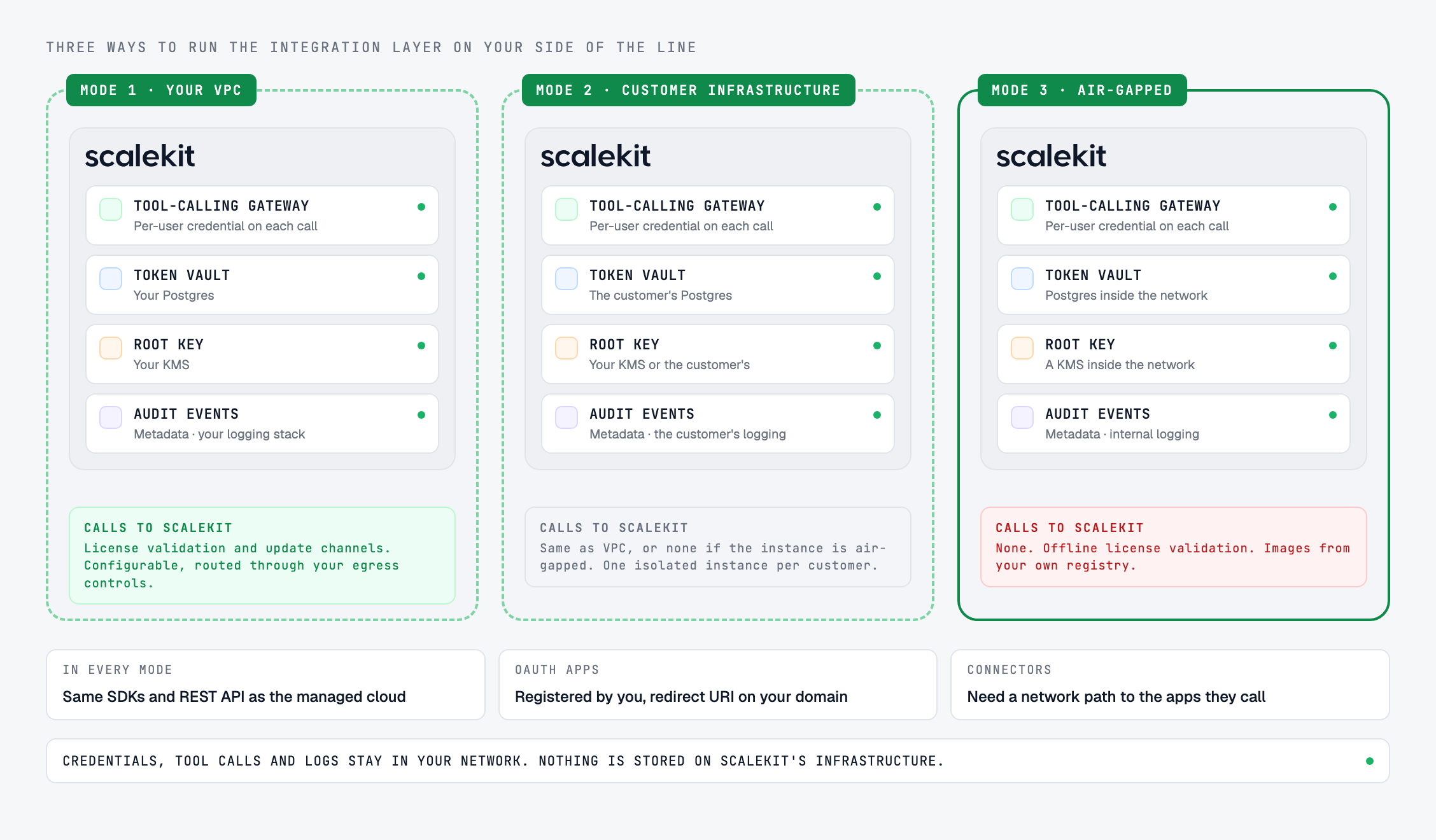
The integration layer runs inside a VPC in your own cloud account on AWS, GCP or Azure. Your team operates it, and the token vault lives in your Postgres. This is the usual answer when your own company has the requirement, or when your customers will accept a single-tenant deployment inside your account instead of a shared multi-tenant service.
What still crosses the boundary here: calls from the gateway to each connected app's API and OAuth endpoints, which is the whole point of the layer, and, depending on the vendor, license validation and software updates. In Scalekit's VPC mode, license validation and update channels may call out, both are configurable, and both can be routed through your egress controls so your network team sees exactly what leaves.
You deploy one isolated instance into each end customer's environment. The customer gets a single-tenant stack inside their own boundary. You, the agent vendor, hold the license keys and control upgrades. This is the mode for selling to banks, health systems and agencies that will not accept any multi-tenant component in the path, and it is the one most vendors have never had to think about until a large deal depends on it.
The cost scales with customers. Fifty customers in this mode means fifty deployments, each with its own upgrade schedule, its own OAuth app registrations and its own license key, because Scalekit licenses per deployment. A customer instance can also be air-gapped. That is the usual pattern for defense and other sealed networks: one isolated instance per customer, with no route out.
The network has no route to the internet, or none to the vendor. Three things have to be true before any software can run there.
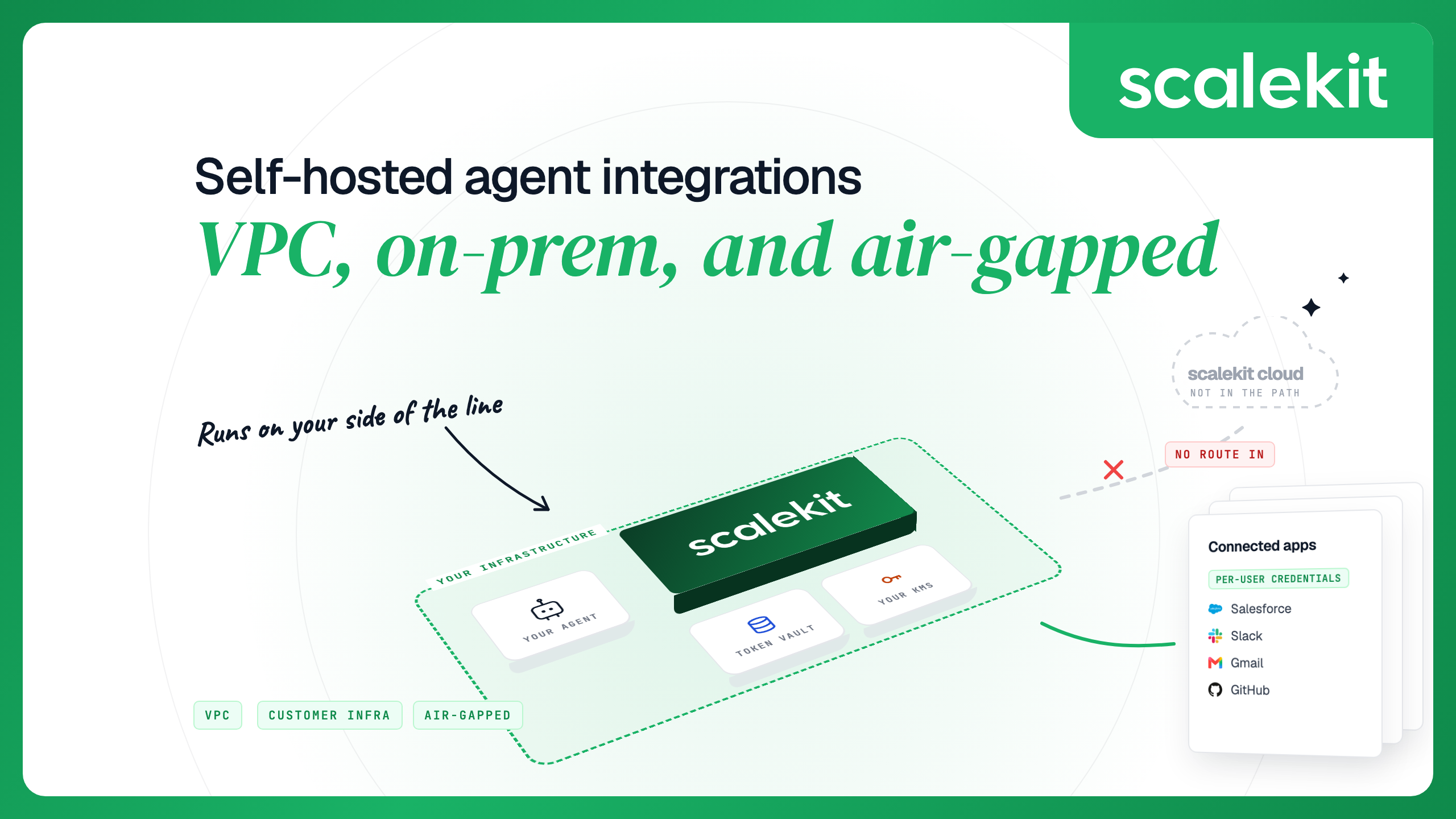
Scalekit's air-gapped mode is built to those three conditions. It makes no outbound calls to Scalekit, validates the license offline, and pulls images from your own registry. Once installed, the instance has no connection to Scalekit's infrastructure: credentials, tool calls and logs stay in your network. Installation, configuration and upgrade guides come with the license.
One consequence of an air gap is easy to miss until the first connector fails: a connector only works if the cluster can reach the app it calls. In a fully sealed network that means internal apps and the custom connectors you build for internal APIs. A connector to a public SaaS app needs a route to that app. A deployment that is air-gapped from the vendor but still reaches Salesforce has a narrow, controlled egress to Salesforce, and the customer's review will treat that differently from a network with no egress at all. Describe it that way from the start.
In every self-hosted mode, user records, sessions, OAuth tokens and access keys live in your Postgres, not on Scalekit's infrastructure. There is no default outbound metrics channel, and logs reach Scalekit for support only if you decide to share them; by default, Scalekit has no log access.
In a managed cloud, many integration vendors offer their own OAuth app for popular providers so you can test without registering anything. Scalekit's managed cloud does this too: pick “Use Scalekit credentials” when you create a connection and you are testing against Gmail in a few minutes. That app belongs to Scalekit's cloud, and its redirect URI points at Scalekit's domain.
A self-hosted instance cannot use it. You create an OAuth app with each provider and register the redirect URI your instance shows in the connection form, which is on your own domain. Plan for this early, because some providers review apps that request sensitive scopes before external users can authorize them, and that review can take weeks. In customer-infrastructure mode, decide up front whether each customer registers their own OAuth apps, which puts the customer's name on the consent screen, or whether you register one set per instance.
A self-hosted gateway calls each connector's API and OAuth token endpoint directly. The cluster needs outbound HTTPS to every provider your agents use: Google, Slack, Salesforce, whichever apps your product connects to. Separately, your users' browsers need to reach each provider's consent screen when they authorize a connected account. That page loads in the user's browser, so a locked-down cluster does not block authorization as long as users can reach the provider.
Connectors for apps inside your network, including the ones you define for internal APIs, need no internet access at all. In an air-gapped deployment, those are the connectors that work without any exception being written.
Teams build against the managed cloud first, often for months, before a customer's security review asks for a private deployment. If the self-hosted edition has a different API surface or a smaller feature set, that review becomes a rewrite, and you maintain two integrations for the life of the contract.
Scalekit's SDKs and REST API work the same way in the managed cloud and in a private deployment. Moving an app to a self-hosted instance is a configuration change: point it at the instance's environment URL and use credentials from that instance's own dashboard. The code you built against the cloud runs in your cluster instead of ours. The self-hosted AgentKit docs walk through the switch.
Before a deal depends on it, run your integration tests against the self-hosted instance as well as the cloud. You want any surprise in your own test run, not the customer's deployment.
Moving the gateway inside the boundary answers the “where does it run” question. A security architect will ask three more.
You provide the infrastructure; the platform ships as a Helm chart.
Kubernetes with Helm is the recommended production setup. Docker Compose packaging exists for development, testing and small deployments. Installation, configuration and upgrade guides come with the Enterprise license.
The pattern above is Scalekit's. Here is how the other platforms in this category describe their own self-hosting, from their own pages as of October 2026. For the full side-by-side, including key custody and compliance, see Best self-hosted agent integration platforms.
Scalekit AgentKit runs as a managed cloud with US (Los Angeles) and EU (Frankfurt) regions, and as a self-hosted deployment in all three modes above on the Enterprise plan. The full stack self-hosts: auth, sessions, the token vault and the tool-calling gateway, with the same SDKs and APIs you built against in the cloud. The catalog covers 500+ connectors and 20,000+ actions, plus custom connectors for internal APIs that never leave the network. Scalekit holds SOC 2 Type II and ISO 27001 and signs a HIPAA BAA on Enterprise, and in a self-hosted deployment Scalekit is not a sub-processor, because customer data stays in your deployment. If a customer has asked you the question this post opened with, Scalekit self-hosted is where to start scoping the answer.
The deployment questions here are one of three groups a regulated buyer's review covers. The security questionnaire for AI agent vendors has all three, with Scalekit's answers.
A VPC deployment runs the integration layer in a cloud account you control, usually the agent vendor's own AWS, GCP or Azure account. An on-prem or customer-infrastructure deployment runs a separate, isolated instance inside each end customer's environment. With Scalekit, the agent vendor holds the license keys and controls upgrades for each instance. Air-gapped is an on-prem deployment on a network with no outbound route to the vendor.
Yes, if the license validates offline, images come from an internal registry and nothing calls home at runtime. Scalekit supports this mode. Connectors still need a network path to the apps they call, so a fully sealed deployment works with internal apps, and SaaS connectors need an allowlisted route.
The integration layer: the token vault and the tool-calling gateway. It holds OAuth tokens for every connected app and executes every action. The model can usually stay with a cloud provider under that provider's contract.
The gateway needs to reach the APIs and OAuth endpoints of the apps it calls, and users' browsers need to reach each provider's consent screen. Calls to the vendor depend on the mode. In Scalekit's VPC mode, license validation and update channels may call out and can be routed through your egress controls. In air-gapped mode, nothing calls Scalekit.
It should not. With Scalekit, the SDKs and REST API work the same way in every deployment mode. You point your app at the self-hosted instance's environment URL and use credentials from that instance.
For Scalekit, no. In an on-prem deployment customer data stays in your deployment, so Scalekit is not listed as a sub-processor. A HIPAA BAA is still available on Enterprise if your compliance team wants one in place.