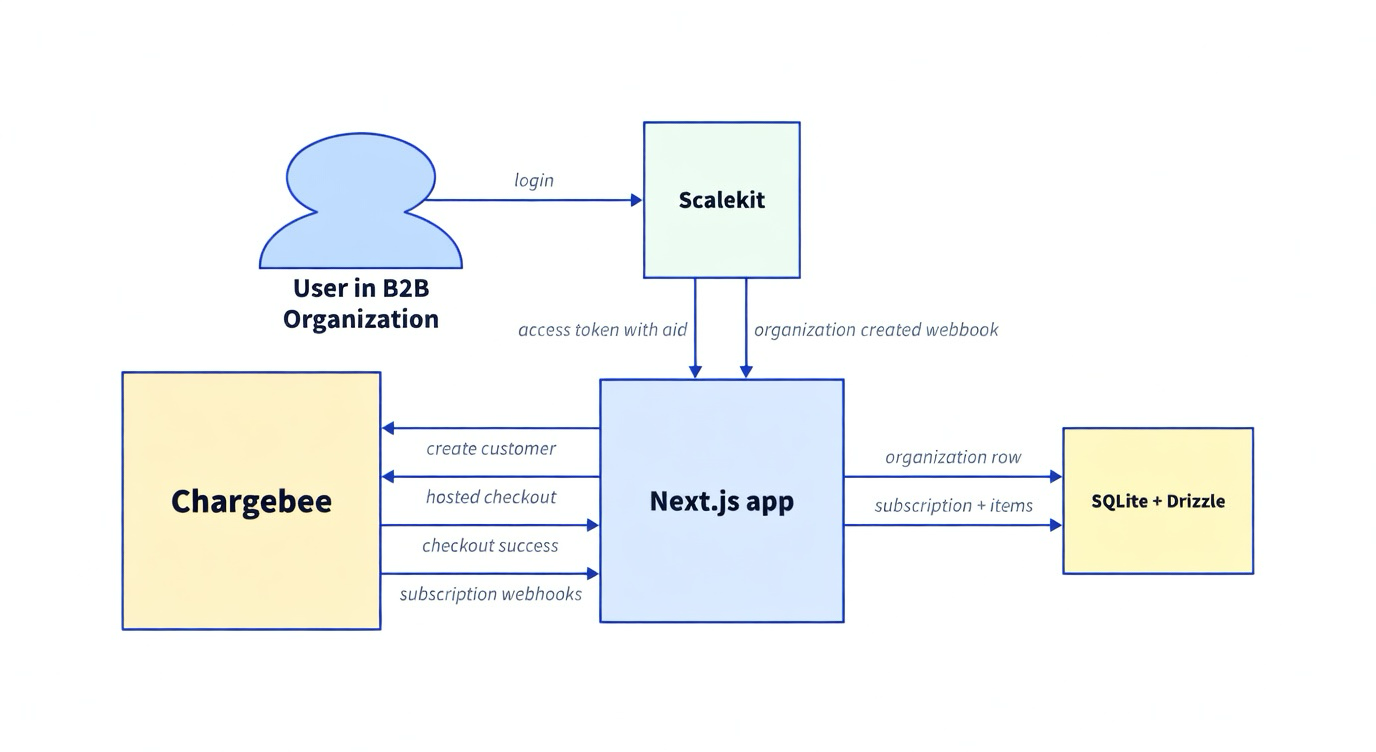
A working app wires Scalekit to Chargebee organization billing: Scalekit provides the authenticated organization context, Scalekit webhooks create Chargebee customers, Chargebee hosted checkout creates subscriptions, and Chargebee webhooks sync subscription rows back into SQLite.
Scalekit OID becomes the billing reference for each organization.
organization.created provisions a Chargebee customer for the org.
/api/subscription/create creates a local future subscription row and opens hosted checkout.
Chargebee subscription webhooks update local subscription and subscription_item tables.
Business-to-business billing gets messy when authentication, organizations, customers, checkout, and subscription state live in separate systems. This post shows a practical Next.js example app that uses Scalekit for organization-mode auth and Chargebee for subscription billing, with webhook sync keeping local billing state current.
Prerequisites
Node.js 18+
A Scalekit environment with organization support, so access tokens include oid
A Chargebee sandbox site using Product Catalog 2.0
A Chargebee test payment gateway for hosted checkout
LocalTunnel, ngrok, or another public tunnel for local webhook testing
How it fits together
Scalekit x Chargebee
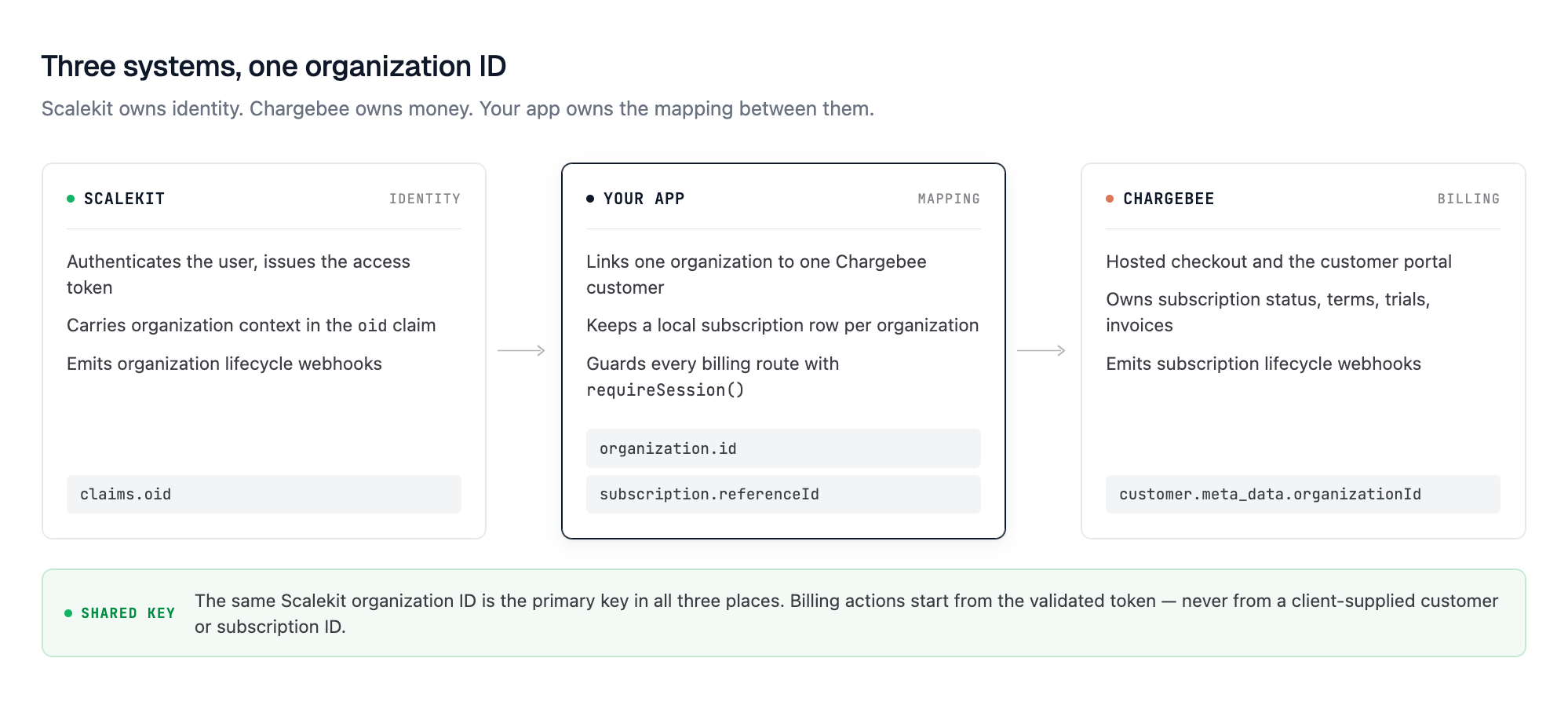
Scalekit owns identity and organization context. Chargebee owns checkout, subscription lifecycle, and billing portal flows. Your app owns the local mapping between the Scalekit organization and Chargebee customer/subscription state.
Scalekit x Chargebee Architecture Flow Diagram
The important design choice is that the app uses the Scalekit organization ID as the billing reference. Billing route handlers call requireSession(), validate the Scalekit access token, read the oid claim, and use that organization ID when creating checkout sessions or listing subscriptions.
Clone and run the app
The app is a Next.js 14 project with the App Router, TypeScript, the Scalekit Node SDK, Chargebee SDK v3, Drizzle, and SQLite.
cp .env.example .env
npm install
npm run db:push
npm run dev
Open http://localhost:3000, sign in with Scalekit, then open /guide for the local integration walkthrough.
Start with these environment variables before running the full billing flow:
organization.id is the Scalekit organization ID. organization.chargebeeCustomerId stores the linked Chargebee customer. subscription.referenceId stores the organization ID used by checkout, list, portal, and cancel routes.
The reference app starts with one Growth plan. The plan item price comes from CHARGEBEE_PLAN_ITEM_PRICE_ID, has a 25-seat limit, and includes a 14-day trial.
Authenticate with Scalekit
Login starts at /api/auth/login. The route creates an OAuth state value, stores it for cross-site request forgery (CSRF) protection, and returns the Scalekit authorization URL. The excerpt below shows the core call:
The callback route validates the state, exchanges the code, validates the access token, and stores a single HttpOnly scalekit_session cookie.
Billing routes do not trust the cookie contents alone. They call validateToken() and require oid before any billing action. The excerpt below shows the guard:
const claims = await client.validateToken(accessToken);
const organizationId = claims.oid;
if (!organizationId) {
throw new SessionError(403, 'Organization context required for billing');
}
That check keeps billing tied to a Scalekit organization, not a user-supplied referenceId. This is the same principle behind API authentication in B2B SaaS — every action must be traceable to a verified identity and organization context.
Create Chargebee customers from Scalekit organizations
The Scalekit webhook route reads the raw body and verifies the signature with verifyWebhookPayload. After verification, it dispatches the event asynchronously and returns 200. The excerpt below shows the raw-body verification:
That metadata gives webhook handlers another way to resolve Chargebee events back to the right organization. For a deeper look at how organization-scoped service accounts work as a billing reference pattern, the same principle of anchoring every external resource to the org ID applies.
Open hosted checkout
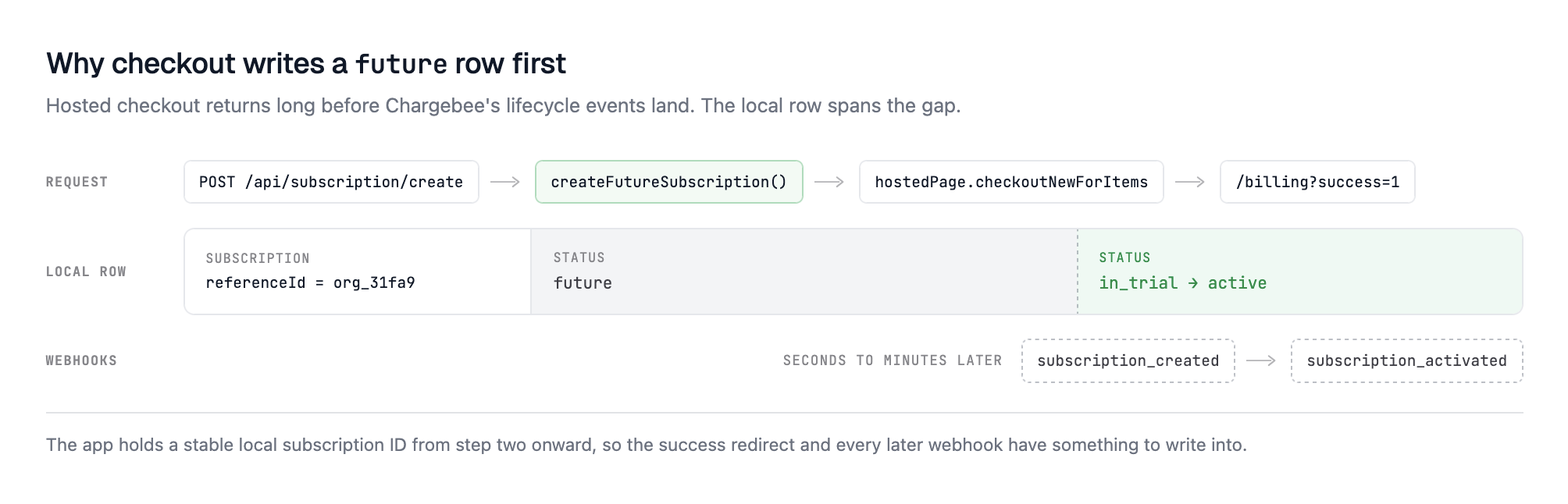
The billing UI calls POST /api/subscription/create with an item price ID. The route:
Requires a Scalekit session with oid.
Defaults referenceId to the authenticated organization ID.
Calls authorizeReference() so apps can deny cross-org billing actions.
Gets or creates the Chargebee customer for that organization.
Creates or reuses a local future subscription row.
Stores pending subscription metadata on the Chargebee customer.
The local future row is useful because hosted checkout and webhooks are asynchronous. The app has a local subscription ID before Chargebee sends the final subscription lifecycle event. The excerpt below shows the local row creation:
When checkout succeeds, Chargebee redirects to /api/subscription/success. The route attempts to sync the latest Chargebee subscription into the local row, then redirects back to /billing?success=1.
Sync subscription lifecycle events
Chargebee webhooks are the source of truth for subscription state. The webhook route parses the raw event payload and dispatches supported lifecycle events:
subscription_created
subscription_activated
subscription_started
subscription_changed
subscription_renewed
subscription_scheduled_cancellation_removed
subscription_cancelled
Customer_deleted
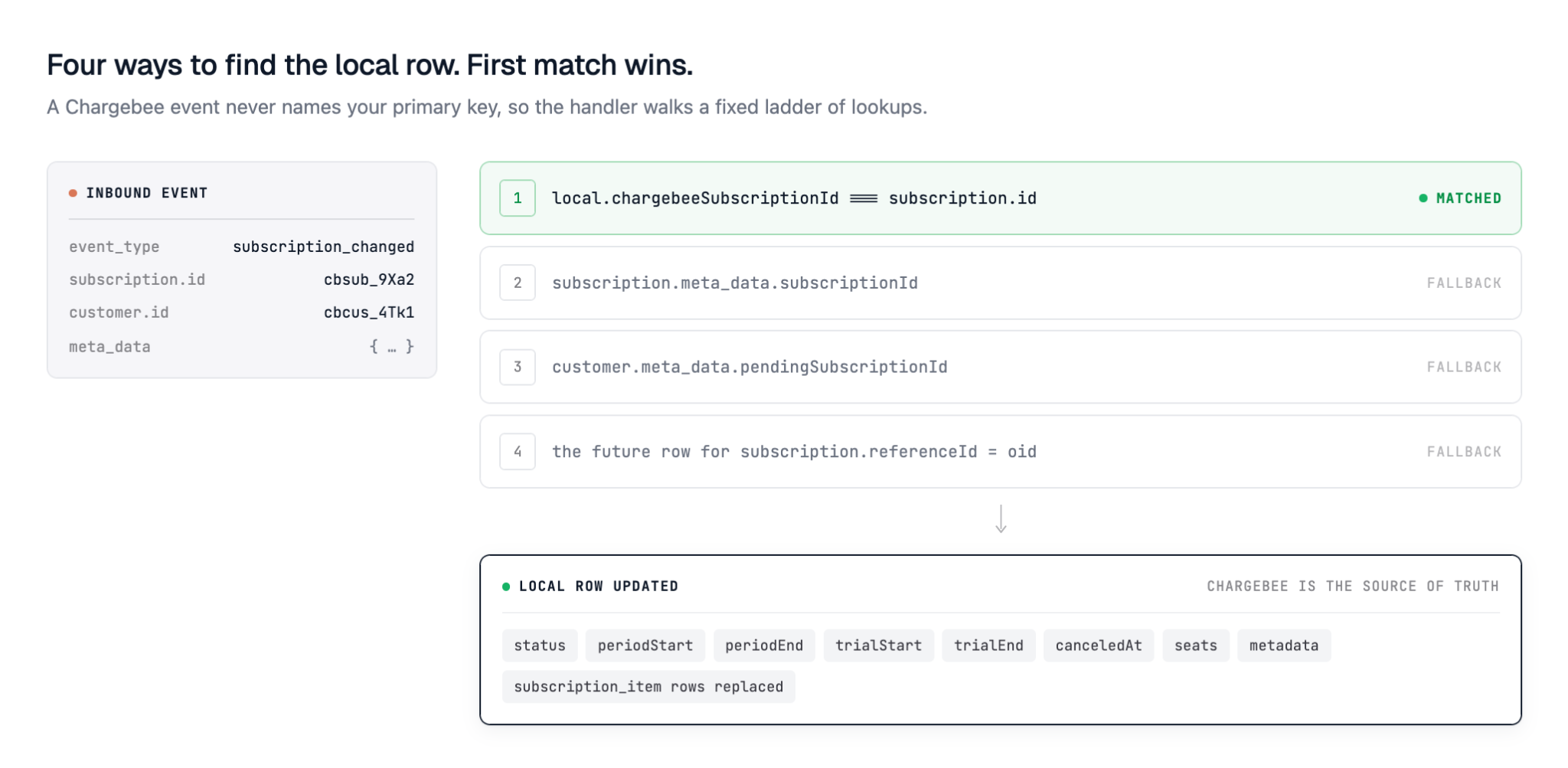
The lifecycle handler resolves the local subscription in a few ways:
Existing chargebee_subscription_id on the local row.
subscription.meta_data.subscriptionId.
customer.meta_data.pendingSubscriptionId.
The future row for the organization reference.
After resolution, the app copies Chargebee state into local tables. The excerpt below shows the mapped fields:
The handler also replaces the local subscription_item rows with the current Chargebee subscription items. That gives the billing UI a clean local read path. Understanding user lifecycle management is critical here — subscription events mirror the same offboarding and state-change patterns that govern user access.
Build the billing UI around local state
The /billing page loads the current session from /api/session, then loads active or trialing subscriptions from /api/subscription/list.
If the Scalekit token has no oid, the UI shows an organization-required state. If the organization has no active subscription, the UI shows the Growth plan and calls hosted checkout. If a subscription exists, the UI shows the current subscription and opens Chargebee portal flows for management or cancellation.
The middleware only checks whether the scalekit_session cookie exists for protected pages such as /dashboard and /billing. Real authorization happens inside route handlers through requireSession() and authorizeReference().
Customize lifecycle hooks
The app keeps application-specific behavior in lib/subscription-hooks.ts. Replace the demo console.log hooks with your own logic:
onCustomerCreate
onSubscriptionCreated
onSubscriptionComplete
onSubscriptionUpdated
onSubscriptionDeleted
onSubscriptionCancel
onTrialStart
onTrialEnd
onAuthorizeReference
For example, a production app might grant features after onSubscriptionComplete, send analytics events after onTrialStart, or deny billing actions from onAuthorizeReference unless the user has an admin role. Access control for multi-tenant applications follows the same pattern — each action must be evaluated against the user's role and organization membership before execution.
API routes to fork
Route
Purpose
GET /api/session
Return the authenticated user, organization ID, and available plans
POST /api/subscription/create
Create a local future subscription and open Chargebee checkout
GET /api/subscription/success
Sync the checkout result and redirect back to billing
GET /api/subscription/list
Return active or trialing subscriptions for the organization
POST /api/subscription/portal
Open the Chargebee customer portal
POST /api/subscription/cancel
Open the cancellation flow
POST /api/webhooks/scalekit
Verify Scalekit webhooks and sync organization lifecycle
POST /api/webhooks/chargebee
Process Chargebee billing lifecycle events
Run the 5-minute test
Create an organization in Scalekit, or trigger the organization.created webhook.
Confirm the local organization row exists and has a Chargebee customer ID.
Log in at /login with a user in that organization.
Open /billing and subscribe to the Growth plan.
Complete Chargebee hosted checkout with a sandbox card.
Confirm the redirect to /billing?success=1.
Wait for Chargebee webhooks, then refresh /billing.
Confirm the active or trialing subscription appears.
Production notes
The reference app is intentionally small, so the important boundaries are visible. Before using the pattern in production, tighten these areas:
Configure CHARGEBEE_WEBHOOK_USERNAME and CHARGEBEE_WEBHOOK_PASSWORD. The current route logs a warning and skips Basic Auth when those variables are missing.
Keep SCALEKIT_WEBHOOK_SECRET required. The Scalekit webhook route returns an error if the secret is missing.
Replace the demo lifecycle hooks with feature gating, analytics, customer success, or entitlement logic.
Add database migrations. The sample uses Drizzle db:push and does not include migration files.
Add automated tests for auth, checkout, webhook replay, and authorization failures.
Avoid exposing raw tokens in production debugging pages. The sample includes developer-oriented session inspection.
Why this pattern works
Scalekit and Chargebee each stay responsible for the system they are best suited to own. Scalekit validates the user identity and organization membership. Chargebee manages customer billing, checkout, subscription state, and portal flows. Your app ties the two together with an organization reference and a small local subscription model.
That split keeps the most important invariant clear: every billing action starts from the authenticated Scalekit organization, not from a client-supplied customer or subscription ID. This is the same architectural boundary described in when to build authentication into your B2B SaaS — identity decisions made early prevent expensive re-architecture later.
Explore more
Quickstart adding auth to your SaaS and extend billing out of the box.
Extend lib/subscription-hooks.ts with the product behavior your app needs after subscription events.
Use the same organization-reference pattern when you add more plans, portal flows, or entitlements.