
Announcing CIMD support for MCP Client registration
Learn more

How to Build a Multi-User Monday.com Agent with Mastra and Scalekit

Saif Ali Shaik
Founding Developer Advocate

TL;DR

  • A shared Monday.com bot token works in demos, but does not survive production scale. It fails the moment a second user needs their own workspace access, board permissions, or audit trail.
  • The challenge is not Monday.com's tool schemas. It is ensuring the agent always acts with the correct user's connected account — not a credential that bypasses the permission model entirely.
  • Scalekit handles the Monday.com OAuth per user, stores tokens per identifier, refreshes automatically, and surfaces only the tools that user's connected account is authorized to call.
  • What the user cannot do in Monday.com, the agent cannot do. Scope is derived from identity, not from connector configuration.
  • The identifier maps your user to their Monday.com connection. Resolve it server-side after authenticating the request. Never accept it from client input.

Your Mastra agent creates Monday.com items on command. One bot token, five minutes of setup. The demo lands.

A week later, your ops lead wants their board included. Then marketing. Then a customer asks if the agent can update items inside their own Monday.com workspace.

Here is what you find: every one of those requests has the same answer, and it is the wrong one. The agent is not acting as users. It is acting as a credential. One credential, one scope, no boundaries between workspaces — nothing that maps to how Monday.com actually enforces access for humans.

The hard part is not the tool schemas. It is the credential architecture.

A shared service account bypasses Monday.com's permission model entirely. It is provisioned with admin-level access for convenience, which means the agent ends up with more access than any individual user would have. When that token is rotated or revoked, every user's agent breaks simultaneously.

The fix is not writing more auth code. It is removing per-user credential management from the agent entirely.

Why the Shared Token Breaks in Production

A single Monday.com API token or bot account creates a set of compounding failures. They surface in sequence.

The token belongs to whoever created it — usually the developer who built the agent. Every item creation, board query, and status update runs with that developer's workspace access, not the actual user's. A marketing manager creating campaign items lands them in the wrong workspace. A customer using your embedded project agent touches your internal Monday.com account, not theirs.

Service accounts are typically over-provisioned. Admin credentials get used because they are convenient at setup time. The blast radius of a single token leak is the entire workspace. No per-user revocation path exists. No per-user audit trail. No per-user scope.

Teams that try to solve this themselves quickly own a secondary product: OAuth flows for Monday.com, a token table per user, refresh scheduling, error handling for revoked tokens, and a mapping layer between internal user IDs and Monday.com identities. That is not the product they are building.

How the Two Flows Work: Connection Time and Runtime

There are exactly two moments that matter in a multi-user Monday.com agent.

  • Connection time
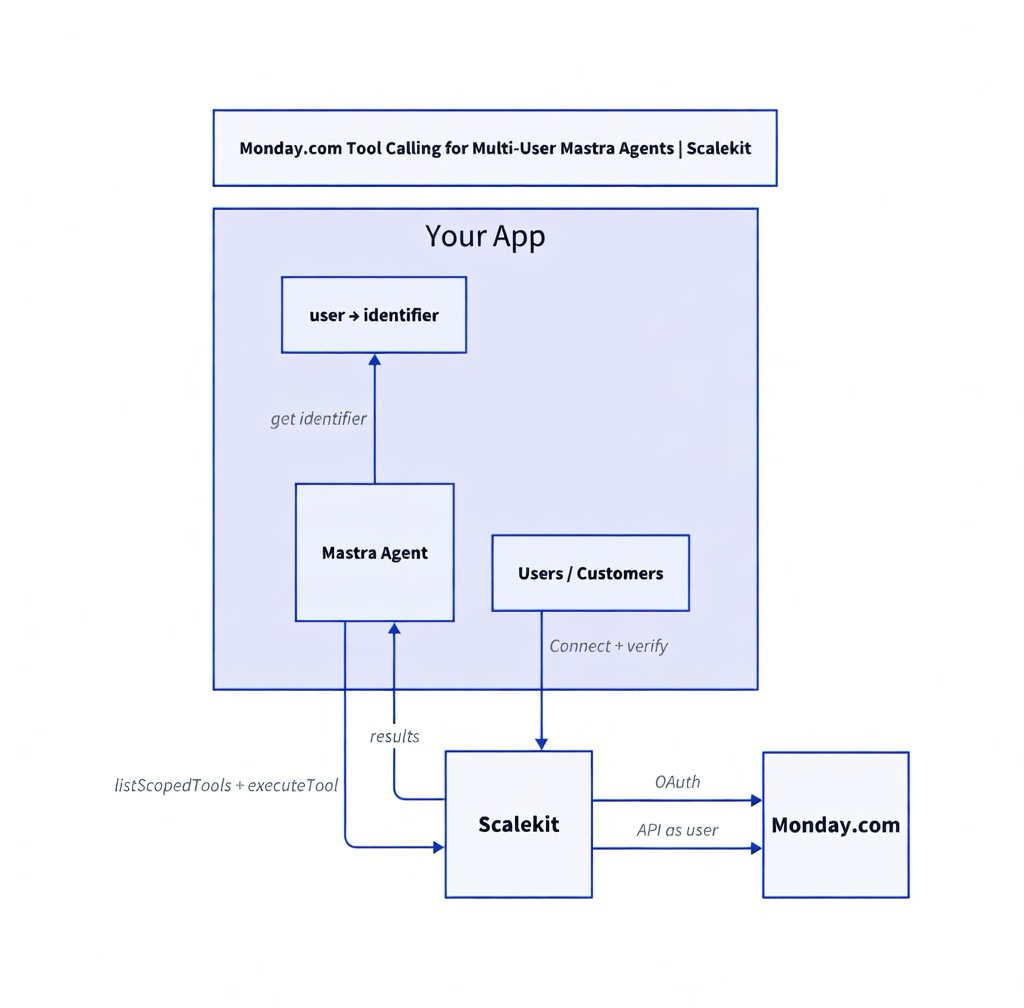
    The user authorizes Monday.com through Scalekit's OAuth flow. Scalekit stores the token under a stable identifier you control — your user ID, session token, or any string that identifies that user in your system. You verify server-side that the authenticated user in your system completed the OAuth. After that, Scalekit owns the token lifecycle: storage, refresh, revocation handling.
  • Runtime
    When the agent runs for a user, your code resolves the identifier for the currently authenticated user from your session or database. Scalekit uses it to surface only the tools that the user's connected account is authorized to call. Credentials never touch the agent runtime.

You control the identifier-to-user mapping. Scalekit controls the Monday.com token, refresh logic, and authorized tool surface. Your agent only ever uses the identifier.
Recommended Reading: Scalekit AgentKit Quickstart — connected accounts, scoped tools, and the execution model in one place.

Prerequisites

  • Node.js 18+
  • A Scalekit account with a Monday.com connection created in the dashboard under Agent Auth > Connections. The connection name must match exactly — for example, monday.
  • Mastra installed (npm create mastra@latest or an existing project).
  • An OpenAI API key (or swap for your preferred LLM provider).
  • Working familiarity with Mastra agents and tools.

Step 1: Install Dependencies and Set Up the Scalekit Client

npm install @scalekit-sdk/node @mastra/core zod dotenv

Create a .env file:

SCALEKIT_ENV_URL=https://your-env.scalekit.cloud SCALEKIT_CLIENT_ID=skc_... SCALEKIT_CLIENT_SECRET=sks_... USER_IDENTIFIER=user_123 OPENAI_API_KEY=sk-...

Initialize the Scalekit client in a shared module:

// lib/scalekit.ts import { Scalekit } from '@scalekit-sdk/node'; import 'dotenv/config'; export const scalekit = new Scalekit( process.env.SCALEKIT_ENV_URL!, process.env.SCALEKIT_CLIENT_ID!, process.env.SCALEKIT_CLIENT_SECRET! ); // In production: resolve this from your auth context, never from client input. export const IDENTIFIER = process.env.USER_IDENTIFIER!; export const CONNECTION = 'monday'; // must match the connection name in your Scalekit dashboard

Step 2: Connect the User's Monday.com Account

Before the agent can act, the user's Monday.com account must be connected. getOrCreateConnectedAccount returns the current connection state. If the account is not yet active, generate a one-time authorization link.

// agent.ts import { scalekit, IDENTIFIER, CONNECTION } from './lib/scalekit'; async function ensureConnected() { const account = await scalekit.tools.getOrCreateConnectedAccount({ connectionName: CONNECTION, identifier: IDENTIFIER, }); if (account.connectedAccount.status !== 'ACTIVE') { const link = await scalekit.tools.getAuthorizationLink({ connectionName: CONNECTION, identifier: IDENTIFIER, }); console.log('Authorize Monday.com:', link.link); console.log('After completing OAuth, re-run this script.'); process.exit(0); } console.log(`Connected account for ${IDENTIFIER} is active.`); return true; } await ensureConnected();

The first run prompts the user to authorize. Every subsequent run uses the stored, automatically refreshed connection. You do not touch the token.

Step 3: Retrieve the Authorized Tool Surface

Do not pass the full Monday.com connector catalog to the model. Pass only the tools this user's connected account is permitted to call. listTools returns exactly that surface — nothing more.

const toolsResponse = await scalekit.tools.listTools({ filter: { connector: CONNECTION, identifier: IDENTIFIER }, pageSize: 50, }); console.log(`Discovered ${toolsResponse.tools.length} tools`);

What the user cannot do in Monday.com, the agent cannot do. Scope is derived from their connected account — not from a shared service credential provisioned for convenience.

Typical tools surfaced for an active Monday.com connection:

  • monday_create_item — create an item in a board or group
  • monday_list_items — list items filtered by board, group, or status
  • monday_update_item — update column values, status, or assignees
  • monday_get_board — retrieve board details and structure
  • monday_add_update — add a comment or update to an item

See the authoritative list for your live connection in the Scalekit dashboard.

Step 4: Wrap as Mastra Tools

Mastra requires tools to be registered with its createTool interface. This step wraps each Scalekit tool into a native Mastra tool that executes through the token vault — the agent calls a tool, gets a result, and never sees a credential.

import { createTool } from '@mastra/core'; import { z } from 'zod'; const mastraTools: Record> = {}; for (const tool of toolsResponse.tools) { const def = tool.definition as Record | undefined; if (!def?.name) continue; const toolName: string = def.name; mastraTools[toolName] = createTool({ id: toolName, description: def.description || toolName, inputSchema: z.object({}).passthrough(), // Scalekit validates inputs server-side execute: async ({ context }) => { return scalekit.tools.executeTool({ toolName, identifier: IDENTIFIER, params: context as Record, }); }, }); } console.log(`Created ${Object.keys(mastraTools).length} Mastra tools.`);

Every executeTool call resolves back to that user's token inside Scalekit's vault. The agent runtime never sees a credential.

Step 5: Build and Run the Agent

import { Agent } from '@mastra/core'; const agent = new Agent({ name: 'monday-agent', instructions: 'You are a helpful Monday.com assistant. Use the available tools to manage items and boards. Confirm what you did after each action.', model: 'openai/gpt-4o', tools: mastraTools, }); const prompt = process.argv[2] || 'Create a new item "Q3 Campaign Launch" in the Marketing board and set status to In Progress'; console.log(`\nPrompt: ${prompt}\n`); const result = await agent.generate(prompt); console.log(result.text);

The Identifier Is the Security Boundary

This is not a footnote. It is the architectural line that separates a secure multi-user agent from one with the exposure surface of a shared service account.

The identifier is the key that maps your user to their Monday.com connection. If an attacker can supply an arbitrary identifier — from client input, from an unvalidated cookie, from any untrusted source — they can call Monday.com tools with another user's credentials. No OAuth bypass required. No token theft needed. Just the wrong identifier in the right place.

// Correct: resolve the identifier server-side after authenticating the request const identifier = getUserIdFromSession(req); // Incorrect: accept it from anything the client controls const identifier = req.body.userId; // never do this

The identifier must come from your authentication layer: your session, your JWT claims, your database record for the authenticated user. Credentials never touch the agent runtime. Handle the identifier accordingly.

Running It

npx tsx agent.ts

Or with a custom prompt:

npx tsx agent.ts "List items in the Sales board and update the first one's status to Done"

Expected output:

Connected account for user_123 is active. Discovered 11 tools Created 11 Mastra tools. Prompt: Create a new item "Q3 Campaign Launch" in the Marketing board and set status to In Progress Item created successfully in board "Marketing". Item ID: 987654321. Status set to In Progress.

The full code is on GitHub. Clone the repo, configure your .env, and have it running in under 30 minutes.

Tradeoffs

Dimension
Shared bot / service account
Build your own OAuth + vault
Scalekit connected accounts
Per-user permissions
No — all users share one scope
Yes, if implemented correctly
Yes — scope derived from each user's authorization
Token maintenance
Manual
Owned by you
Automatic
Cross-workspace safety
No — one credential reaches all workspaces
Yes, if built correctly
Yes — tokens isolated per identifier
Revocation per user
No — revoking breaks everyone
Yes
Yes
When to use
Prototypes only
Rarely worth the maintenance cost
Production multi-user agents

Troubleshooting

Why does my connection never become ACTIVE after the user finishes OAuth?

You probably skipped the verification step.

After the user completes the Monday.com consent screen, Scalekit redirects to the userVerifyUrl you provided (or you call the equivalent in a protected endpoint). You must then call verifyConnectedAccountUser({ authRequestId, identifier }) after confirming (via your own auth) that the current logged-in user actually owns this identifier.

If you never call the verify step, or you call it with the wrong values, the account stays in a pending state.

Why do the tools return permission errors or empty results?

The connected account for that identifier either never received the required Monday.com scopes, or the token was later revoked / the scopes were changed on the Monday.com side.

Re-authorize the same identifier by generating a fresh link with getAuthorizationLink. The user will see the current consent screen based on the scopes you configured on the "monday" connection in the Scalekit dashboard.

Why is the identifier "not found" or why does listTools return an empty list?

Two very common causes:

  • The identifier you are using has no active connected account for the connection you asked for.
  • You are accepting the identifier from the client (e.g. from req.body or localStorage) instead of resolving it server-side after authenticating the request.

Rule: The identifier is sensitive. Always look it up from your database or session after you have verified that the current caller is allowed to act as that user. Never trust an identifier supplied by the frontend.

How do I handle re-auth or expired connections?

Just call getAuthorizationLink again with the same connectionName + identifier. Scalekit will detect the existing account and let the user re-authorize (or refresh) it. The identifier stays the same.

Can one user connect multiple services (Monday.com + Asana, etc.)?

Yes. Use the exact same identifier value but pass different connectionNames when calling listTools / executeTool (or filter in the Mastra agent).

What the Right Credential Model Actually Enables

Fixing the credential model is not a security nicety. It determines whether the agent is usable as a product.

An agent operating on a shared Monday.com token cannot express per-user workspace access. It cannot be individually revoked without breaking every other user. It cannot enforce the permission boundaries Monday.com already enforces for humans. The agent becomes less capable than a logged-in user. It bypasses the permission model entirely.

Per-user connected accounts invert this. The agent inherits each user's permissions exactly — nothing more, nothing less. Users can connect and disconnect their Monday.com on their own. Token refresh runs automatically. You do not write the refresh logic that silently breaks at 3am when six customer workspaces stop updating.

The same identifier, the same pattern, the same architecture — across every connector Scalekit supports.

Browse all AgentKit connectors

What's Next

No items found.
Agent Auth Quickstart
On this page
Share this article
Agent Auth Quickstart

Acquire enterprise customers with zero upfront cost

Every feature unlocked. No hidden fees.
Start Free
$0
/ month
1 million Monthly Active Users
100 Monthly Active Organizations
1 SSO connection
1 SCIM connection
10K Connected Accounts
Unlimited Dev & Prod environments


