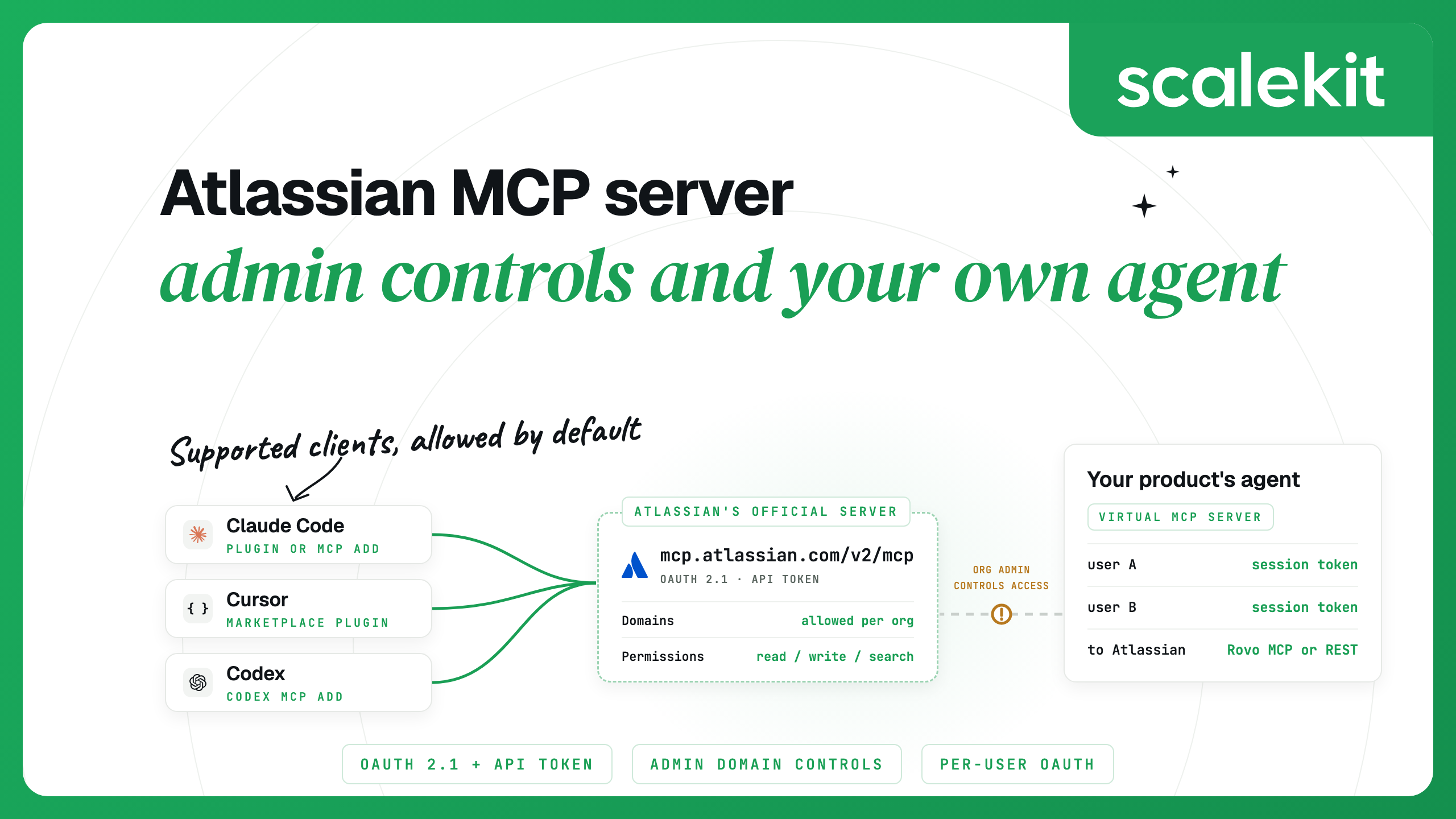


The Atlassian MCP server is Atlassian's official remote MCP server for Jira, Confluence, Compass and other Atlassian Cloud apps. It runs at https://mcp.atlassian.com/v2/mcp, signs you in through OAuth 2.1 or an admin-enabled API token, and acts as you, so an agent only reaches the Jira work items and Confluence pages you can already see.
For one person in Claude Code, Cursor or Codex, setup is one command and a browser sign-in. The harder parts are the admin controls that decide which AI tools may connect, and giving your own product's agent Jira access for many customers, which needs a different design from single-user MCP integrations.
Atlassian's docs and the MCP Registry list it as the Atlassian Rovo MCP Server. It is hosted on Atlassian Cloud and needs an Atlassian Cloud site. Version 2, the current release, adds more tools and products: besides Jira and Confluence, its tool list includes Jira Service Management, Bitbucket Cloud, Loom, Goals, Projects, Teams, Assets, Focus, Talent and the Teamwork Graph.
Tools are grouped into permission groups by product and intent, and admins grant or revoke access per group. The supported tools page lists each tool and the OAuth scope its group needs, such as read:jira:agent-interface.
Atlassian's GitHub repository lists Compass under OAuth 2.1 only. Bitbucket and Loom tools need their workspaces linked to your Atlassian organization or site.
The server does not send every tool definition when a client connects. It exposes a small set of primary tools, such as getJiraIssue, createJiraIssue and searchConfluence, plus a discover tool that searches the rest of the catalog and three execution tools, executeRead, executeWrite and executeDestructive, that run what discover finds. Splitting execution by type lets clients apply confirmation per type. Gateways that need a flat list can use https://mcp.atlassian.com/v2/mcp?tools=all, which returns every tool as a paginated list.
Every tool call needs a cloudId, so agents usually call getAccessibleAtlassianResources first. Atlassian suggests putting your site URL, Jira project key and Confluence space ID in AGENTS.md to skip that call.
Atlassian's getting-started guide says calls through the server that retrieve data or generate insights consume Rovo credits from the organization-wide pool shared with Rovo Chat, Studio, Agents and the Teamwork Graph. Larger data pulls and more complex queries use more.
OAuth 2.1 is the default and recommended method. A request without a token gets a 401 whose WWW-Authenticate header points to protected resource metadata at mcp.atlassian.com, which names an auth.atlassian.com authorization server. That server supports dynamic client registration, Client ID Metadata Documents and PKCE with S256, so clients register themselves and run the browser consent flow. An OAuth token is typically consented for a specific site, and the server checks that each request targets that site's cloudId.
API tokens are the headless option, and an organization admin has to turn them on first. A client sends either a personal API token as Authorization: Basic with the base64 of email:api_token, or a service account API key as a bearer token. Atlassian lists three trade-offs:
With a service account key, the audit log shows the service account, not each person who used the tool.
Most of the settings live in Atlassian Administration under Connectors, then Atlassian MCP server. Atlassian's settings guide covers each tab. For a call to succeed, the client's domain must be allowed (for OAuth 2.1), the request must come from an allowed IP address (if you use IP allowlists), and the authentication method must be enabled.
A separate Connected apps setting for each site can stop users installing any OAuth app at all.
Atlassian's plugin is in Anthropic's official marketplace and bundles the server settings with Atlassian's skills, such as triaging an issue or turning a spec into a backlog:
To add only the server, use the command from Atlassian's guide, then start a session, run /mcp, select atlassian and sign in through your browser:
Add --scope user to make it available in every project. If you added a v1 URL earlier, remove that entry with claude mcp remove and add the v2 URL. Atlassian treats v2 as a separate OAuth resource, so you sign in again.
The Atlassian plugin for Cursor includes the server and Atlassian's skills; open it and select Add to Cursor. To add the server by hand, put this in ~/.cursor/mcp.json for every project or .cursor/mcp.json for one project, then sign in when Cursor prompts you:
By default, Cursor asks for approval before it uses an MCP tool.
In the Codex desktop app, open Plugins or Connectors and install Atlassian Rovo. In the Codex CLI, add the server and complete the browser sign-in:
Here is the same server in ~/.codex/config.toml, set to prompt before any tool the server does not mark read-only:
Run codex mcp login atlassian to sign in again later.
In VS Code, open the Extensions view, search for @mcp Atlassian and select Install. You can also run MCP: Add Server, choose HTTP and enter the v2 URL.
For a CI job with no browser, ask your admin to enable API token authentication and create a service account API key with only the scopes the job needs. Codex can read the key from an environment variable so it stays out of the file:
Clients that take a headers map, such as Cursor's mcp.json, send the same key as an Authorization: Bearer header.
The official server is the right default for anyone working in their own client: Atlassian maintains the tools, and your admin's controls apply automatically.
The community server sooperset/mcp-atlassian is MIT-licensed and published on PyPI as mcp-atlassian. It covers Jira and Confluence on Cloud and on Server or Data Center (Jira 8.14 and later, Confluence 6.0 and later), with 98 tools, and it states that it is not an official Atlassian product. The quick start runs it over stdio with an API token:
On Server or Data Center, set JIRA_PERSONAL_TOKEN instead of the username and API token. Run with --transport streamable-http, it can also serve many users: each request carries the user's own OAuth token and an X-Atlassian-Cloud-Id header, and requests without user credentials are rejected unless you set ALLOW_GLOBAL_CRED_FALLBACK=true. You still issue and refresh those user tokens yourself.
A product that runs its own agent for its customers has two ways in. It can connect to Atlassian's MCP server as an OAuth client, or call the Jira and Confluence REST APIs through an OAuth 2.0 (3LO) app. Atlassian Rovo MCP vs Atlassian API compares what each surface can do; for issue workflows in depth, see Jira MCP vs Jira API.
On the MCP route, your agent receives OAuth redirects on your own domain. Unless that domain is on Atlassian's supported list, each customer's organization admin has to add it before any of their users can connect, and their Permissions tab, IP allowlists and data security policies all apply to your calls. On the REST route, you register one OAuth 2.0 (3LO) app in the Atlassian developer console and each user consents to it. Built by hand, that route looks like this:
Per-user OAuth for MCP integrations covers this design and its failure modes in more depth.
AgentKit is an MCP gateway that runs each user's OAuth flow, stores their tokens encrypted with AES-256-GCM under a key per environment, refreshes them and calls tools as that user. It supports both Atlassian routes:
Choose the Rovo MCP connector when you want Atlassian's own tools and want each customer's MCP controls to govern your agent. Choose the Jira and Confluence connectors when you need REST operations that the MCP server does not expose.
You create a Virtual MCP server once per agent role and choose its tools. All users share its URL. Before each run, your back end mints a session token for one user. Scalekit checks it, finds that user's Jira and Confluence accounts and calls Atlassian with them, so your agent never holds Atlassian tokens.
Once per agent role: create the server.
Before each run: check the user's accounts, then mint a token.
During the run: connect any MCP client with the server URL and the session token as a bearer header. With the Python MCP SDK (version 2):
To give an agent every tool of the Rovo MCP connector, use the connection's own MCP server instead. Every connection has one, at your environment URL followed by /mcp/v3/connections/atlassianmcp, and you mint the token for the connection:
How session tokens behave:
By default, tools/list also includes a connect_account tool, so an agent can fetch an authorization link for a user who has not connected yet. To revoke one user, delete their connected account; their next call fails until they authorize again, and other users keep working:
Use https://mcp.atlassian.com/v2/mcp for new setups. The v1 endpoints, /v1/mcp and /v1/mcp/authv2, remain supported, and on March 1, 2027 existing v1 connections start using v2 tools. The legacy /v1/sse endpoint is no longer supported after June 30, 2026.
Calls that retrieve data or generate insights consume Rovo credits from your organization's shared pool, the same pool Rovo Chat, Studio, Agents and the Teamwork Graph use. Admins can see credit usage under Insights, then Platform usage in Atlassian Administration.
No. The official server needs an Atlassian Cloud site. The community server sooperset/mcp-atlassian supports Jira 8.14 and later and Confluence 6.0 and later on Server or Data Center, using personal access tokens or mTLS.
Yes, if your organization admin enables API token authentication. Send a personal API token with Basic auth or a service account API key as a bearer token. Some tools are unavailable with tokens, calls must pass the cloudId, and domain allowlists do not apply.
Common causes are an IP allowlist that excludes your AI client's outbound addresses, a permission your admin has blocked, or missing scopes. A blocked permission returns an "Access denied" message that names it. A 403 can also point to app permissions or another access policy, so confirm the reason before changing an IP allowlist.
Yes. The server supports dynamic client registration and Client ID Metadata Documents, so any MCP client can register. Each customer's organization admin must allow your redirect domain first, unless it is an Atlassian-supported domain. Scalekit's Atlassian Rovo MCP connector handles registration and per-user tokens, and its Jira and Confluence connectors use Atlassian's REST APIs instead.
Details checked October 2026.


.webp)
.webp)




