A LiveKit voice agent worker that calls authenticated tools for any Scalekit-connected app, scoped per session via dispatch metadata.
Google Calendar is the live example; the same llm.tool pattern works for other connectors.
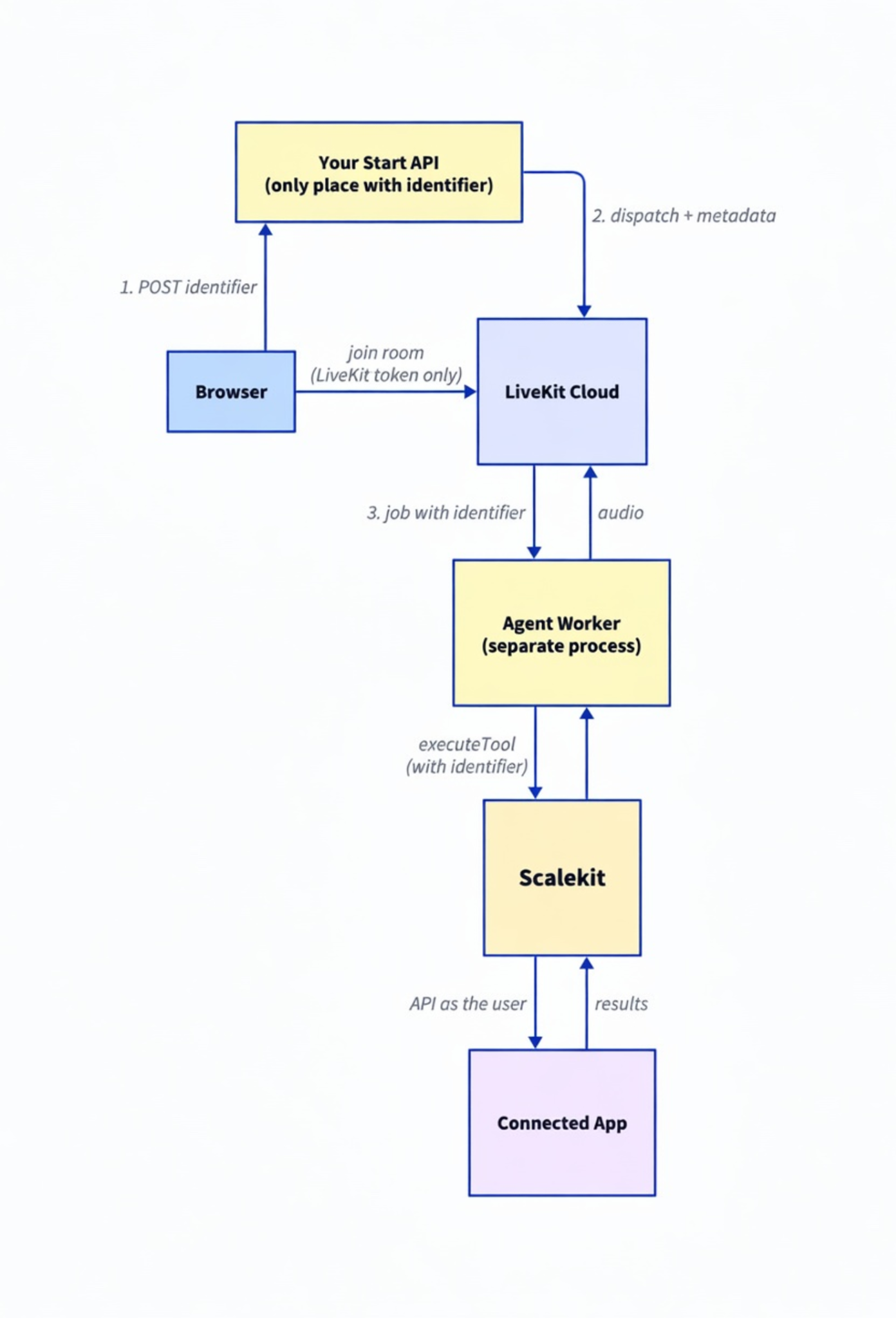
Browser asks your API to start a room with a Scalekit identifier
API dispatches agent job with metadata: { scalekitConnectionId } and mints a room token
Worker parses metadata, registers tools, runs executeTool as that identifier
LiveKit Inference handles STT/LLM/TTS—no separate provider API keys required in the demo
LiveKit Agents make real-time voice straightforward: a room, a worker, STT/LLM/TTS. The hard part starts when that agent must act on Calendar, Gmail, Slack, or CRM as each of your users—not as one shared service account baked into the worker.
If every session uses the same Google credential, callers share data and permissions. If the worker holds long-lived user tokens in env files or prompts, you have turned tool calling into an auth liability. This post shows how to keep LiveKit as the real-time voice runtime and Scalekit as the authenticated tool layer, so every tool call runs with the correct user's identity and scopes.
Two common setups are internal team voice agents and customer-facing voice products. An internal agent lets each teammate ask about their schedule or their inbox. A product agent can act inside the customer's connected apps after that customer has authorized those accounts through your app.
If you are wiring llm.tool handlers by hand, evaluating LiveKit Inference, or comparing hosted voice platforms, the schemas are rarely the blocker. The hard part is per-user OAuth and making sure job metadata carries identity—not tokens—into the worker. Scalekit owns the vault; your worker only passes an identifier into executeTool.
By the end of this tutorial:
A Next.js start route that dispatches a named agent with per-user metadata.
A standalone agent worker that registers Scalekit-backed tools.
Calendar as the proof tool (googlecalendar_list_events).
A path to discover and add tools for any other connected app.
A cloneable two-process demo you can extend beyond Calendar.
Honesty note: The reference demo is fully wired and statically verified (typecheck, lint, build, SDK type-checks). Run the real-key checklist in the repo README against your LiveKit Cloud project and Scalekit environment before treating a live call as proven on your machine.
Architecture overview
Unlike a hosted assistant that POSTs tools to your webhook, LiveKit runs your agent worker. Tools execute in that process. Identity still must not be a token: it travels as job metadata set only by your server when the room is created.
If you already read the Vapi sibling post, the identity contract is the same; only the runtime differs. Vapi invokes tools through an inbound webhook. LiveKit invokes tools inside your worker after agent dispatch.
Key point: The identifier in dispatch metadata is the secure key that scopes every executeTool call. The browser receives a LiveKit room token only—not Scalekit secrets. In production, resolve the identifier from your authenticated session before calling /api/livekit/start.
Who is this for
This post is for developers and teams building multi-user voice agents on LiveKit Agents—internal tools or customer-facing products—who want to own the agent process (WebRTC rooms today, telephony later) without owning OAuth for every connector.
You are the builder of the agent. The "multiple users" are your users or customers. Personal single-user demos work with the same primitives; the design point is safe multi-user identity.
The Problem
LiveKit gives you rooms, participants, and an agent framework with first-class function tools. As soon as those tools touch third-party APIs:
A single service account in the worker means no per-user permissions or revocation.
Storing each user's refresh tokens in your process becomes an auth product.
The LLM in AgentSession should never see raw OAuth credentials.
Each user connects the apps they need through Scalekit (OAuth, vault, refresh).
When a call starts, the browser POSTs an identifier to your/api/livekit/start route (demo: from env; production: from session).
That route is the only place that builds agent-dispatch metadata: JSON.stringify({ scalekitConnectionId: identifier }), creates the dispatch for agent name scalekit-voice-agent, and mints a participant AccessToken with roomJoin.
The agent worker connects to the job, reads ctx.job.metadata, and registers llm.tool handlers that call scalekit.actions.executeTool with that identifier.
STT/LLM/TTS use LiveKit Inference model strings so you are not managing separate provider keys for the demo path.
Register another tool the same way—new llm.tool, same identifier from metadata—for Gmail, Slack, or any Scalekit connector.
git clone https://github.com/scalekit-developers/livekit-scalekit-voice-agent.git
cd livekit-scalekit-voice-agent
npm install
cp .env.example .env.local
Variable
Used by
Purpose
SCALEKIT_ENV_URL, CLIENT_ID, CLIENT_SECRET
Next.js routes + worker
Scalekit client (server only)
TEST_IDENTIFIER
Start route, worker fallback
Demo Scalekit identifier
NEXT_PUBLIC_TEST_SCALEKIT_CONNECTION_ID
Browser
Demo identifier to POST (not a secret)
LIVEKIT_URL, API_KEY, API_SECRET
Start route + worker
LiveKit Cloud project
AgentKit demos and this post use SCALEKIT_ENV_URL. Some older SaaSKit samples use SCALEKIT_ENVIRONMENT_URL—same value, different name; pick one and stay consistent.
No ngrok is required: the worker dials out to LiveKit Cloud; tools run locally in your process.
What a real voice agent can do (example workflows)
With the right apps connected for an identifier:
"What's on my calendar?" → googlecalendar_list_events (demo passes calendar_id; the model summarizes returned events)
After you register more tools: email search, Slack summary, open PRs—same metadata identity
The demo ships Calendar only so the first success is clear. The pattern is deliberately connector-agnostic.
app/api/debug/tools/route.ts — tool discovery for an identifier
lib/scalekit.ts — Scalekit client for Next.js only (worker builds its own)
# Terminal 1 — UI + API
npm run dev
# Terminal 2 — agent worker (must load .env.local)
npm run dev:agent
dev:agent runs tsx watch --env-file=.env.local agent/src/agent.ts dev. A plain Node process does not load .env.local unless you pass --env-file.
Step 2: Connect a user's apps in Scalekit
Create or reuse a Google Calendar connection, authorize it for the same value as TEST_IDENTIFIER, and confirm Active.
Production multi-user flow is the same as the rest of this series: authorization link, user OAuth, verifyConnectedAccountUser on your callback after you confirm ownership, store your_user_id → identifier under your own auth. The voice worker only needs an Active connection and the identifier on the job.
Step 3: Start a room and dispatch the agent with identity
// app/api/livekit/start/route.ts (critical path)
import { randomUUID } from 'node:crypto';
import { NextResponse } from 'next/server';
import { AccessToken, AgentDispatchClient } from 'livekit-server-sdk';
const AGENT_NAME = 'scalekit-voice-agent'; // must match worker ServerOptions.agentName
export async function POST(req: Request) {
const livekitUrl = process.env.LIVEKIT_URL!;
const apiKey = process.env.LIVEKIT_API_KEY!;
const apiSecret = process.env.LIVEKIT_API_SECRET!;
const body = await req.json().catch(() => ({}));
// Production: resolve identifier from session after your auth check—never trust raw client input alone.
const identifier = body.identifier || process.env.TEST_IDENTIFIER || 'demo-connection';
const roomName = `voice-${randomUUID()}`;
const metadata = JSON.stringify({ scalekitConnectionId: identifier });
const dispatchClient = new AgentDispatchClient(livekitUrl, apiKey, apiSecret);
await dispatchClient.createDispatch(roomName, AGENT_NAME, { metadata });
const at = new AccessToken(apiKey, apiSecret, { identity: `user-${randomUUID()}` });
at.addGrant({ roomJoin: true, room: roomName });
const token = await at.toJwt();
return NextResponse.json({ roomName, token, url: livekitUrl, identifier });
}
This route is the privilege boundary for which Scalekit user the job may act as. The browser only gets a room-scoped LiveKit JWT.
The demo UI logs room lifecycle events (connected, participant joined). It does not yet stream a full spoken transcript over a data channel—that is a follow-on, not required for tool calling.
Step 5: Implement the agent worker
// agent/src/agent.ts (structure)
import { ScalekitClient } from '@scalekit-sdk/node';
import { cli, defineAgent, llm, ServerOptions, voice, type JobContext } from '@livekit/agents';
import { z } from 'zod';
const entry = async (ctx: JobContext) => {
await ctx.connect();
const metadata = JSON.parse(ctx.job.metadata || '{}') as {
scalekitConnectionId?: string;
};
const identifier =
metadata.scalekitConnectionId ||
process.env.TEST_IDENTIFIER ||
'demo-connection';
console.log(
`[scalekit-voice-agent] job=${ctx.job.id} room=${ctx.room.name} identifier=${identifier}`
);
// tools registered below...
const agent = new voice.Agent({
instructions:
'You are a helpful voice assistant. Use tools for calendar and other connected apps. Keep replies short for speech.',
tools: { googlecalendar_list_events /* , more tools */ },
});
const session = new voice.AgentSession({
llm: 'openai/gpt-4o-mini',
stt: 'assemblyai/universal-streaming',
tts: 'cartesia/sonic-2',
});
await session.start({ agent, room: ctx.room });
await session.generateReply({
instructions: 'Greet the user and offer to help with their calendar.',
});
};
export default defineAgent({ entry });
cli.runApp(
new ServerOptions({
agent: import.meta.filename,
agentName: 'scalekit-voice-agent',
})
);
Notes that bite in practice:
Use new voice.Agent({ … })—there is no voice.Agent.create in @livekit/agents@1.4.x.
Tool name is the key in the tools object, not a name field on llm.tool.
agentName in ServerOptions must exactly match createDispatch(..., AGENT_NAME, …).
// Inside entry(), after identifier is resolved
const googlecalendar_list_events = llm.tool({
description:
"List events from the user's Google Calendar via Scalekit. Use when the user asks about schedule, meetings, or events.",
parameters: z.object({
calendar_id: z
.string()
.optional()
.describe("Calendar to read from. Defaults to 'primary'."),
}),
execute: async ({ calendar_id }) => {
// Worker-local ScalekitClient (separate process from Next.js lib/scalekit.ts)
const scalekit = getScalekit();
const result = await scalekit.actions.executeTool({
connector: 'googlecalendar', // calendar proof; other tools use their connector slug
identifier,
toolName: 'googlecalendar_list_events',
toolInput: { calendar_id: calendar_id ?? 'primary' },
});
return result.data ?? result;
},
});
To add another app:
User has an Active connection for that connector under the same identifier.
Discover the exact tool name (next step).
Add another llm.tool with a clear description (voice models need good descriptions).
Put it on the tools object and mention it in instructions.
Same identifier from job metadata—no new auth path in the voice layer. Calendar is the shipped proof tool; the bridge is the same for any toolName / connector.
The demo tries listScopedTools (needs a non-empty filter: toolNames, connectionNames, or providers) and falls back to listAvailableTools. Use the returned names when registering tools or updating prompts. Empty list usually means the identifier has no Active connection or SCALEKIT_* env vars are missing in the Next.js process.
In the worker terminal, confirm a log line like [scalekit-voice-agent] job=… room=… identifier=<your-id> matching what the start route used.
Ask: "What's on my calendar?"
You should hear a short spoken summary of real events (with live credentials). The demo tool lists events for calendar_id (default primary); time filtering is left to the model summarizing Scalekit's response unless you pass richer toolInput.
If the agent never joins, check agentName match and that the worker process is up. If tools fail, check Active Calendar connection and identifier.
The identity contract
Layer
May know
Must not hold
Browser
Identifier to POST (demo); LiveKit room token
Scalekit secrets, OAuth tokens
/api/livekit/start
LiveKit API secret, builds dispatch metadata
— (privileged)
Agent worker
Scalekit credentials, job metadata identifier
— (privileged; separate process from Next.js)
LiveKit Cloud / Inference
Media, model I/O, tool schemas/results via agent
Your users' third-party OAuth tokens
Model
Tool names, descriptions, results
Tokens
Two Scalekit clients (Next.js lib/scalekit.ts vs worker module) are intentional: two processes, no shared memory.
Why not MCP (yet)
The Vapi sibling can evolve toward Scalekit Virtual MCP because Vapi supports MCP tools natively. In @livekit/agents@1.4.x for Node, there is no MCP client/toolset surface in the installed SDK types. Direct llm.tool + executeTool is the correct production path today—not a temporary hack. Revisit MCP when the Node agents SDK exposes it.
Why this already handles multiple users
Each call creates a room and a dispatch with that request's identifier in metadata.
The worker binds tools to the identifier parsed for that job.
User A and user B in two tabs get isolated calendar data when their identifiers and connections differ.
LiveKit and the model never see OAuth tokens; Scalekit maps identifier → Active connection → API call.
Troubleshooting
/api/livekit/start returns 500 about missing LIVEKIT_*
Fill LIVEKIT_URL, LIVEKIT_API_KEY, and LIVEKIT_API_SECRET from LiveKit Cloud → Settings → Keys, restart npm run dev.
Agent never joins the room
agentName mismatch between createDispatch and ServerOptions, or npm run dev:agent is not running.
Worker missing SCALEKIT_* / LIVEKIT_* even though .env.local is filled
The worker is not Next.js. Use npm run dev:agent (includes --env-file=.env.local) or export vars in that shell.
Empty tools from /api/debug/tools or calendar errors
Identifier has no Active Google Calendar connection, or wrong identifier string. Align dashboard identifier with env values.
Agent is silent or only errors on calendar questions
Confirm the metadata log shows the expected identifier, the tool is registered on voice.Agent, and Scalekit returns data for that connection. Check worker logs for executeTool failures.
Tradeoffs & Limitations
Approach
Pros
Cons
Best for
Shared credentials in the worker
Simple
No per-user security
Prototypes only
DIY OAuth inside the worker
Full control
You own token lifecycle
Rarely worth it
Scalekit + LiveKit Agents (this post)
Any connector, per-job identity, you own the process
Two processes to run in dev
Production multi-user voice on LiveKit
Hosted voice + webhook (e.g. Vapi path)
Single web process, dashboard tools
Inbound public URL / different ops model
Teams that prefer hosted assistants
Other demo limits: room-lifecycle UI log only (not full transcript); Calendar is the only registered tool out of the box; live end-to-end validation depends on your keys.