A working Mastra agent that fetches, summarizes, and extracts action items from personal Granola meeting notes. Scalekit handles OAuth, token storage, and refresh. Your code resolves the identifier and calls scoped tools.
User connects their Granola account once (you verify ownership)
Call listScopedTools with the identifier to get Granola tools, then wrap them with createTool
Plug the tools into a Mastra Agent. It automatically acts with the connected user's meeting data.
Getting a Mastra agent to pull from Granola feels simple in a demo. The moment it has to work for different people on a team or for customers, one shared account creates problems you didn't plan for.
Everyone wants the agent to see their meetings and notes. A shared login means everyone sees the same thing, which defeats the point. You don't want to roll your own auth for Granola.
This post shows how to give a Mastra agent access to personal Granola meeting notes without handling the OAuth yourself. Scalekit manages the connections. The agent gets tools that belong to the right person's meetings.
Internal team agents and customer-facing products are the two main patterns. With an internal agent, teammates access their own meetings. For customer-facing, the agent works with the end customer's meeting data once they connect Granola.
If you're adding Granola to a multi-user Mastra agent, the schemas are rarely the hard part. The real work is making sure the agent always uses the correct user's credentials and permissions without you writing and maintaining all the OAuth plumbing.
By the end of this tutorial you will have:
A way for users to connect their own Granola account.
A secure OAuth flow handled by Scalekit.
Per-user Granola connections stored safely via identifiers.
A Mastra agent that calls Granola tools scoped to the current user.
Complete working code for per-user Granola access in Mastra agents that you can extend to fetch notes, summarize meetings, extract action items, and other workflows.
Architecture overview
When you're building a Mastra agent for multiple users, the challenge is letting each person bring their own Granola account without sharing credentials.
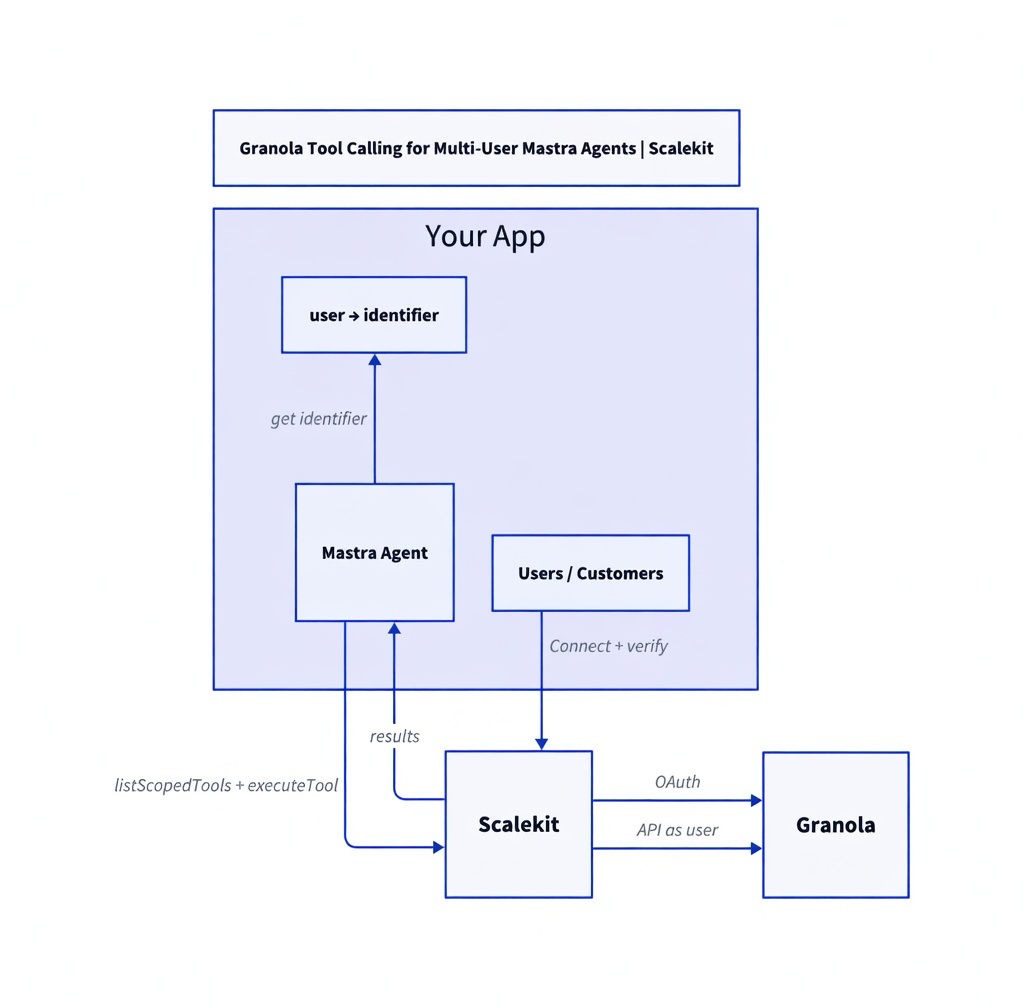
You map your users to Scalekit identifiers. Scalekit handles the Granola OAuth, stores the tokens, and refreshes them. Your agent only passes the identifier when it calls tools.
The two key flows are:
Connection time: The user connects their Granola through Scalekit. You verify that the authenticated user owns the identifier.
Runtime: After your own auth check, you resolve the identifier and call listScopedTools and executeTool with it.
Here's the architecture:
The identifier is the secure key. Resolve it server-side after you authenticate the request, and always authorize before using it.
Who is this for
This is for developers building Mastra agents that multiple people will use.
It could be an internal agent for your sales or product team so each person gets their own notes. Or it might be a feature where customers connect their own meeting data.
You'd rather not also become responsible for managing Granola OAuth and tokens. This approach keeps the focus on the agent itself.
One shared account breaks down quickly
Granola is great at capturing notes. The moment you want an agent to use those notes for different people, the identity problem shows up.
One shared account means the agent sees the same meetings no matter who is asking. Handling the integration yourself means writing OAuth, storing tokens per user, managing refreshes, and mapping your users to their Granola accounts.
Most teams would rather spend that energy on what the agent actually does with the meetings.
Let Scalekit handle the identity
Scalekit manages getting people connected to their own Granola and keeps the tokens tied to the identifier you control. Your agent receives tools that are already scoped to the right person's notes.
When it needs to fetch something, you execute with that identifier. The model and Mastra stay out of the auth details.
Prerequisites
Node.js 18+
A Scalekit account with a Granola connection (connection name e.g. granola).
@mastra/core, @scalekit-sdk/node, zod
An LLM provider key.
Basic familiarity with Mastra.
What becomes possible with the right notes
Once it's the right person's notes, a few prompts start delivering real value:
"Find my last meeting with Acme and summarize the action items." "List this week's meetings and pull out the decisions we made." "Search my notes for anything about pricing and surface the key quotes."
All of it runs against that specific user's meetings and notes. No one else's data mixed in.
const agent = new Agent({
name: 'meeting-notes-agent',
instructions: '...',
model: openai('gpt-4o'),
tools: mastraTools,
});
const result = await agent.generate('Summarize my last meeting with the Acme team');
granola_notes_get or similar for fetching content and action items.
Check the Scalekit Granola connector docs for the current set.
The identifier does the heavy lifting
The identifier you use when you ask for tools or run them decides exactly whose meetings show up. Mastra and the model get schemas and results. That's it.
Your app turns the logged-in user into the correct identifier after it has already done its own auth check. Never take it from the frontend.
The same rule appears across the rest of this series. The framework changes, but the identity handling stays the same.
Troubleshooting
Connection not ACTIVE?
Verify the callback and call verifyConnectedAccountUser.
Empty results or permission issues?
Re-authorize the identifier with the current scopes.
Acting as the wrong user?
You are resolving the identifier incorrectly (must be server-side after your auth check).
Tradeoffs & Limitations
Approach
Pros
Cons
When to use
Shared bot / service account
Simple
No per-user permissions, audit, or revocation
Prototypes only
You roll your own OAuth + vault
Full control
You now own a security product
Rarely worth it
Scalekit Connected Accounts
Fast, secure, automatic refresh, one integration for many providers




.png)





