Agent Templates
Email-to-Calendar Agent

Scheduling agents that book meetings on-behalf-of your users

Connect two real services, delegate OAuth to your users, and ship a working agent in minutes. Clone the sample, swap in your tools, and go from zero to multi-connector in a single afternoon.

Email-to-Calendar Agent
Sample Agent for Acme
May 22 · 10:00 AM ·
47s
Book all pending meeting requests from my inbox
J
Scanning Gmail for scheduling requests
Scan inbox for intent
gmail_list_messages
Check calendar free/busy
calendar_get_freebusy
Create event + draft reply
calendar_create_event
Scheduling run: 5 emails
Booked (first available slot)
"Product sync with Acme - Thu Jun 19, 2pm PT"
Confirmation draft saved to Gmail, attendees added
Result
4 meetings booked, 1 skipped (no mutual availability)
4 confirmation drafts ready to send
Message Claude...
Trusted by teams shipping agents to production
Email-to-Calendar Agent
Sample Agent for Acme
May 22 · 10:00 AM ·
47s
Book all pending meeting requests from my inbox
J
Scanning Gmail for scheduling requests
Scan inbox for intent
gmail_list_messages
Check calendar free/busy
calendar_get_freebusy
Create event + draft reply
calendar_create_event
Scheduling run: 5 emails
Booked (first available slot)
"Product sync with Acme - Thu Jun 19, 2pm PT"
Confirmation draft saved to Gmail, attendees added
Result
4 meetings booked, 1 skipped (no mutual availability)
4 confirmation drafts ready to send
Message Claude...

How the agent reads scheduling emails and creates calendar events in four steps

A real working agent you can deploy

This repo uses a single SCALEKIT_USER_ID env var to simulate one user. In production, pass each user's real ID as the identifier on every Scalekit call, and send them an authorization link whenever their connector status is not ACTIVE.

01
Authorize, then orchestrate
main.py
Every connection is authorized once via a one-time link. Scalekit refreshes tokens for Gmail and Google Calendar automatically. main.py polls Gmail on a configurable interval and runs the scheduling pipeline for any email that matches scheduling intent.
main.py
import os
from scalekit import ScalekitClient
from langchain.agents import create_tool_calling_agent

client = ScalekitClient(
    env_url=os.environ["SCALEKIT_ENV_URL"],
    client_id=os.environ["SCALEKIT_CLIENT_ID"],
    client_secret=os.environ["SCALEKIT_CLIENT_SECRET"],
)

# LangChain-compatible tools scoped to this user
tools = client.actions.langchain.get_tools(
    identifier="user@example.com",
    connection_names=["gmail", "googlecalendar"],
)

agent = create_tool_calling_agent(llm, tools, prompt)
02
Scan Gmail for scheduling requests
scan_gmail.py
03
Extract time slots with LLM
extract_slots.py
04
Check Calendar availability
check_calendar.py
05
Create event and send confirmation
create_event.py
Why choose Scalekit

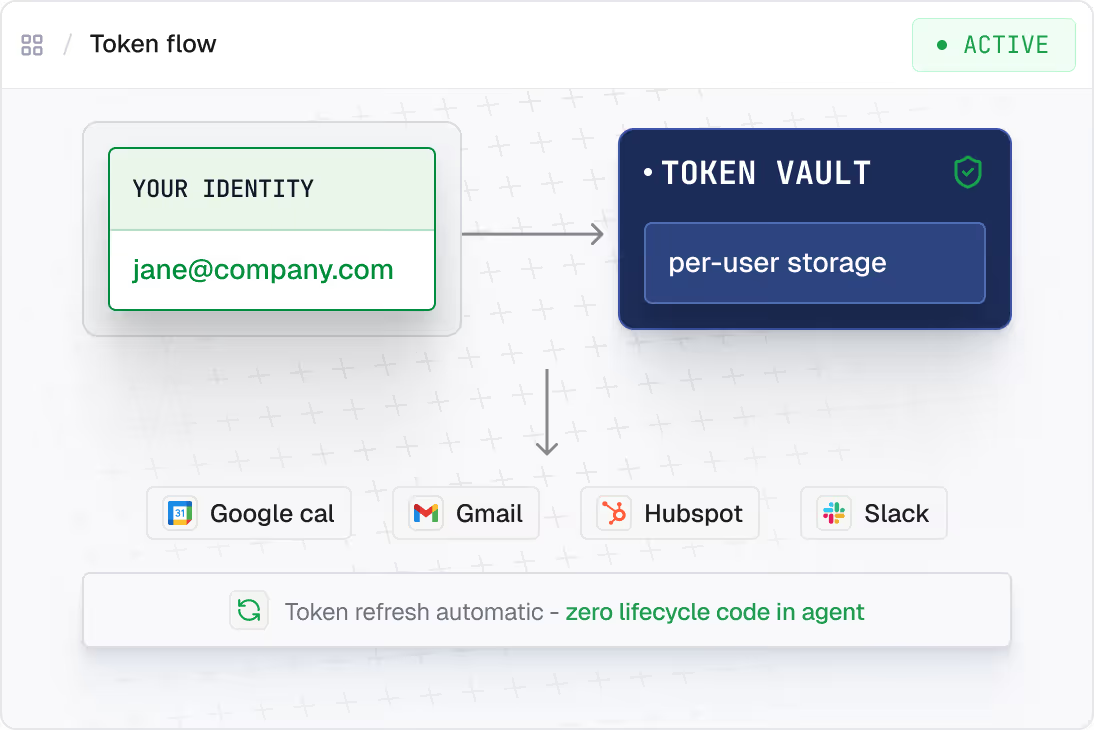
Delegated identity. Not service accounts.

Credentials never touch agent code or LLM context. The agent acts as the user, not as a shared bot.
Delegated OAuth - Agent reads your calendar, your inbox — scoped to the authorizing identity, not org-wide.
Credentials outside agent runtime  -  Tokens never touch agent code or LLM context. Both failure modes covered.
Token lifecycle automatic  -  Refresh, expiry, rotation across all connectors. One SDK call. Zero management code.
200+ prebuilt connectors  -  Google, Slack, HubSpot, GitHub, Jira, Notion, Salesforce — same auth pattern everywhere.

Agents that book meetings from email, without the auth plumbing

Two things you'd otherwise build: Gmail OAuth with read+send scopes and Google Calendar credentials with free/busy + write access. Handled.

OAuth flow per connector
One SDK call returns a delegated token for any connector. Google, HubSpot, Slack, same pattern across all 200+ connectors
tools = client.actions.langchain.get_tools(
    identifier=user_id,
    connection_names=["gmail", "googlecalendar"],
)
agent = create_tool_calling_agent(llm, tools, prompt)
Secure token vault  
Scalekit stores OAuth credentials outside agent code and outside LLM context. Both are separate failure modes. Both covered
client = ScalekitClient(
    env_url=os.environ["SCALEKIT_ENV_URL"],
    client_id=os.environ["SCALEKIT_CLIENT_ID"],
    client_secret=os.environ["SCALEKIT_CLIENT_SECRET"],
)
# Credentials never in agent code or LLM context
Token refresh logic
Token lifecycle handled automatically — expiry, rotation, re-auth — across every connector. Agent runs in 6 months. Same call works
# Day 1 or day 180 - same call works
tools = client.actions.langchain.get_tools(
    identifier=user_id,
    connection_names=["gmail", "googlecalendar"],
)
Try other Agent Templates

Prebuilt agents you can ship today

Each one runs on delegated identity, scoped per user.

OPS
Email-to-calendar scheduling agent
Parse scheduling intent from Gmail threads and create Google Calendar events with the right attendees and timezone.
SUPPORT
Support triage agent
Read Zendesk tickets, fetch runbooks from Notion, and route to the right Slack channel with a drafted response.
GTM
CRM AI agent
Log calls, update opportunity stages, and surface stalled deals across HubSpot or Salesforce. No manual data entry.
SALES
Sales call prep agent
Pull Granola notes and Attio contact history to draft a pre-call brief before every sales meeting. Zero rep input.
GTM
HubSpot to Slack updates agent
Watch HubSpot deal stage changes and post structured updates to the right Slack channel. Reps stop checking the CRM all day.
SUPPORT
Freshdesk CSAT follow-up agent
Google ADK agent that watches low CSAT scores in Freshdesk and drafts personalised follow-ups for support leads.
Customize the sample

Clone it and own it with connectors you choose

Don't sweat the integration. Point a coding agent at the repo. It clones, swaps in your connectors, and adds new steps for you.

1
Install a coding agent
terminal

claude "Set up an email-to-calendar scheduling agent using Gmail and Google Calendar via Scalekit"

terminal

codex "Set up an email-to-calendar scheduling agent using Gmail and Google Calendar via Scalekit"

terminal

gh copilot suggest "Set up an email-to-calendar scheduling agent using Gmail and Google Calendar via Scalekit"

terminal

Open Cursor Composer (Cmd+Shift+I) Paste the prompt from the Prompt tab

terminal

npx skills add scalekit-inc/skills --skill setup-scalekit

2
Give it this prompt

Clone github.com/scalekit-inc/python-connect-demos/langchain. Set connection_names = ["gmail", "googlecalendar"]. Build a scheduling agent: poll Gmail for unread emails with scheduling intent, extract time slots and attendees with the LLM, check Google Calendar free/busy, create the event as the authenticated user, save a confirmation draft to Gmail. Set SCALEKIT_ENV_URL, SCALEKIT_CLIENT_ID, SCALEKIT_CLIENT_SECRET in .env.

Build your own
multi-connector agent

Add connectors. Change the LLM. Same delegated auth pattern.