

Enterprise teams often learn the importance of SAML certificates only after an outage catches them unprepared. Imagine a SaaS platform where thousands of users suddenly cannot sign in on a Monday morning. Support tickets spike, access dashboards fail to load, and executives escalate the issue within minutes. All logs point to the same root cause: “SAML signature validation failed.” The IdP quietly rotated its signing certificate over the weekend, but the service provider never updated theirs. A single mismatch in a single certificate brought the authentication pipeline to a halt.
SAML certificates sit at the core of enterprise login trust. They verify that a SAML response truly comes from the IdP, hasn’t been tampered with, and, when required, can be decrypted safely. Yet these certificates are often treated as copy-paste configuration steps rather than security assets that must be monitored, rotated, and validated. Expired certificates, incorrect uploads, or mixing up signing and encryption keys are enough to silently and completely break SSO.
This blog helps developers understand SAML certificates without the usual ambiguity. You’ll learn what a SAML certificate is, how signing and encryption certificates differ, where certificates appear in the SAML authentication flow, and how to inspect and validate them locally. You’ll also see common failure cases, learn best practices for certificate rotation, and review diagrams that demystify how certificates influence the SAML pipeline end-to-end. By the end, you will be able to prevent exactly the kind of outage we started with.
A SAML certificate is a cryptographic identity used by Identity Providers (IdPs) and Service Providers (SPs) to sign and validate SAML messages during Single Sign-On.
It ensures that authentication responses are authentic, untampered, and, when required, decryptable by the intended service.
SAML certificates act at the message layer rather than the network layer. When an Identity Provider signs a SAML assertion, it uses the private key linked to its certificate. The Service Provider then validates that signature using the corresponding public key embedded in the certificate. If these keys don’t align, authentication fails instantly even if the application code and infrastructure are healthy.
A SAML certificate follows the X.509 format and typically appears as a long base64 block inside IdP metadata files. Behind this text block is a structured document containing a public key, validity period, issuer information, and key-usage constraints. Developers often treat these blocks as configuration artifacts, but they are actually the foundation of trust across the SAML authentication pipeline.
Before trusting or uploading a certificate, inspect its fields locally to confirm validity dates, key usage, issuer details, and the signing algorithm in use.
Example output :
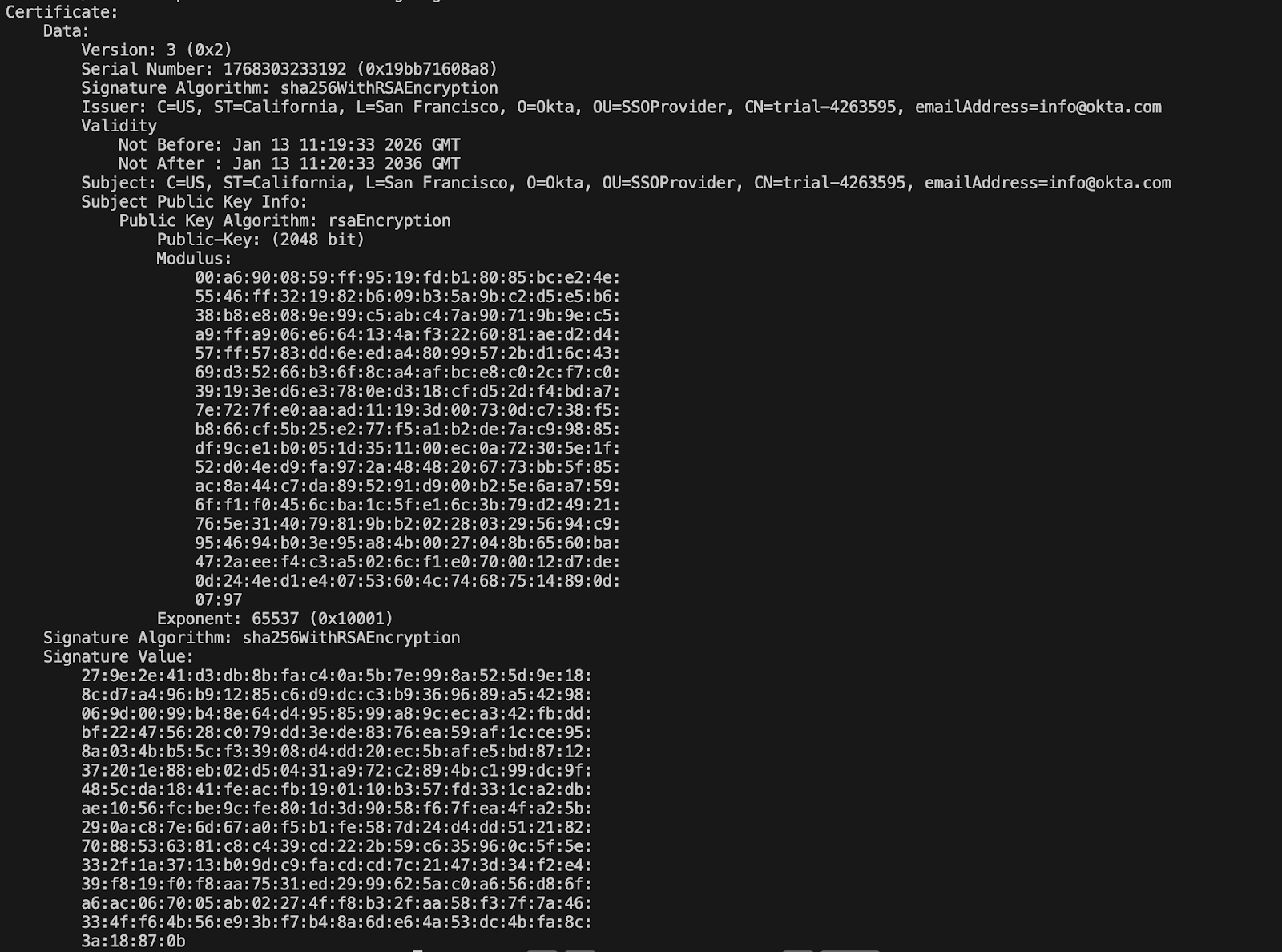
Key Fields to Verify in the Certificate Output (see the Step-by-Step SAML Implementation Guide for B2B SaaS apps for full details):
Identity Providers publish certificates directly inside their metadata. Service Providers consume this metadata to verify signatures and, when needed, decrypt user attributes.

Typical metadata snippet:
The certificate inside this block is the exact one the SP must use to validate SAML signatures. Any mismatch results in immediate authentication failures.
Signing certificates secures the authenticity and integrity of SAML responses. When an Identity Provider issues a SAML assertion, it uses a private key associated with its signing certificate to generate a digital signature. The Service Provider then validates that signature using the public key inside the matching certificate. If even one byte of the response is altered or the certificate does not match, the SP rejects the login. This is why signing certificates are the most critical part of the SAML trust chain.
Encryption certificates protect the confidentiality of user attributes inside a SAML assertion. Instead of verifying the IdP’s identity, these certificates enable the SP to decrypt sensitive data such as email addresses, groups, or custom attributes. Some IdPs reuse the same certificate for both signing and encryption, while others generate independent certificates. Mixing them up leads to errors that are often difficult to diagnose.
Use this command to verify the certificate’s key usage flags before assigning it to signing or encryption roles.
Some certificates contain both, but enterprise IdPs often separate them.
Expect to see digitalSignature (signing) and/or keyEncipherment (encryption). If nothing appears, the certificate doesn’t advertise key-usage extensions common with some IdP-provided SAML certs, so rely on how the cert is provisioned/used rather than the missing flag.
The sequence below shows how signing and encryption certificates are applied at different stages of a single SAML login. The Identity Provider signs the assertion to guarantee authenticity and integrity, and optionally encrypts attributes to protect sensitive data. The Service Provider must successfully validate the signature and decrypt attributes before granting access.
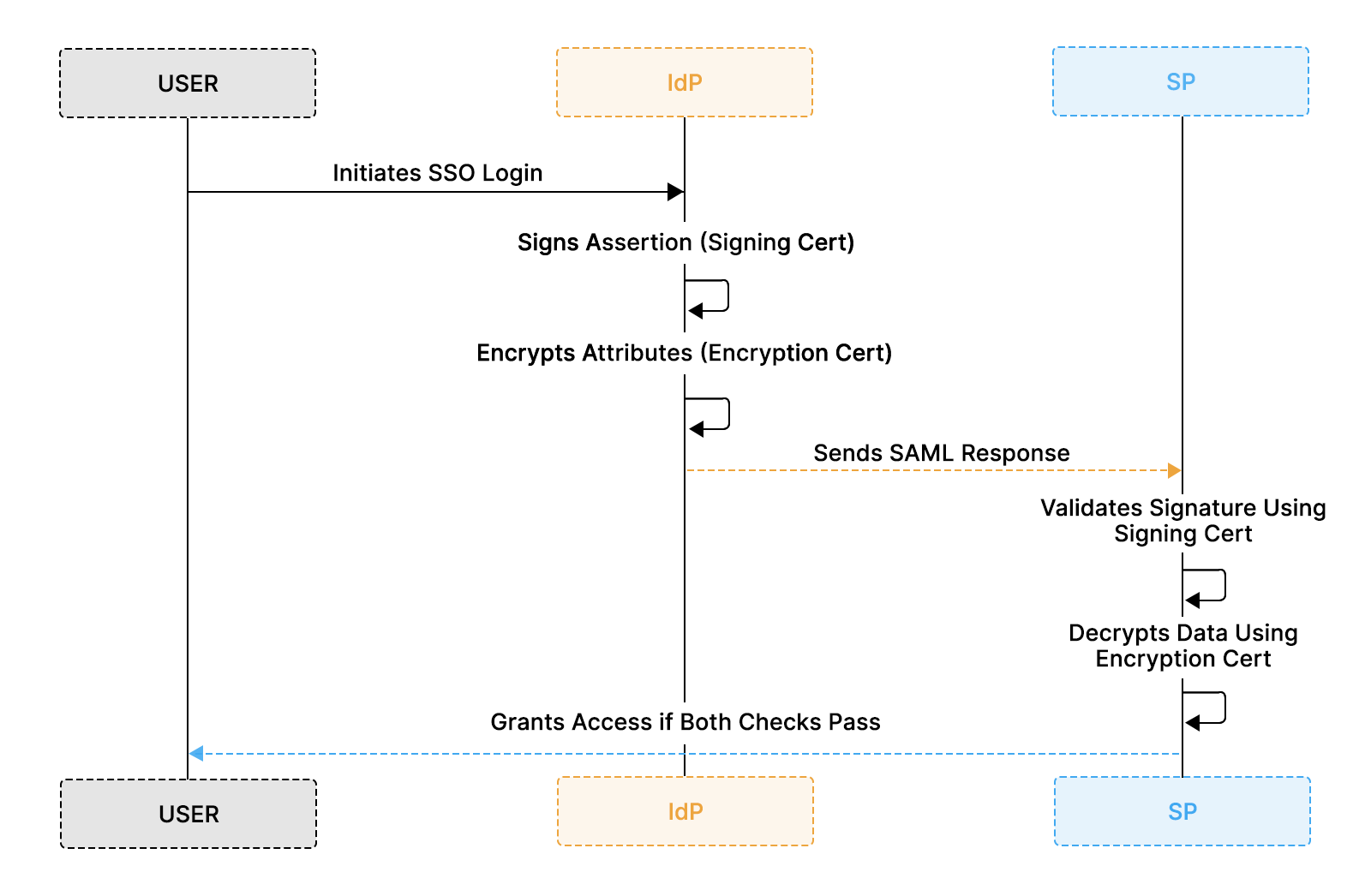
Step-by-Step Certificate Usage in a SAML Login
Both certificates must align correctly for login to succeed. A mismatch in either one results in authentication or attribute-processing failures.
This flow highlights an important distinction: signature validation and attribute decryption are independent checks. A login can fail even if authentication succeeds, for example, when the signing certificate is correct, but the encryption certificate is outdated or misconfigured.
SAML certificates participate in several stages of the SSO login lifecycle. Each stage relies on the IdP and SP agreeing on the same public keys. When a certificate mismatch occurs at any point, authentication fails regardless of user credentials or session state. This makes certificate alignment one of the most critical dependencies in enterprise SSO.
SAML messages travel through the system as signed or encrypted XML payloads. The IdP signs the assertion using its private key, and the SP verifies the signature using the public key published in metadata. When encryption is enabled, the IdP also encrypts user attributes using the SP's public key. These steps determine whether the SP can trust or decrypt the incoming data.
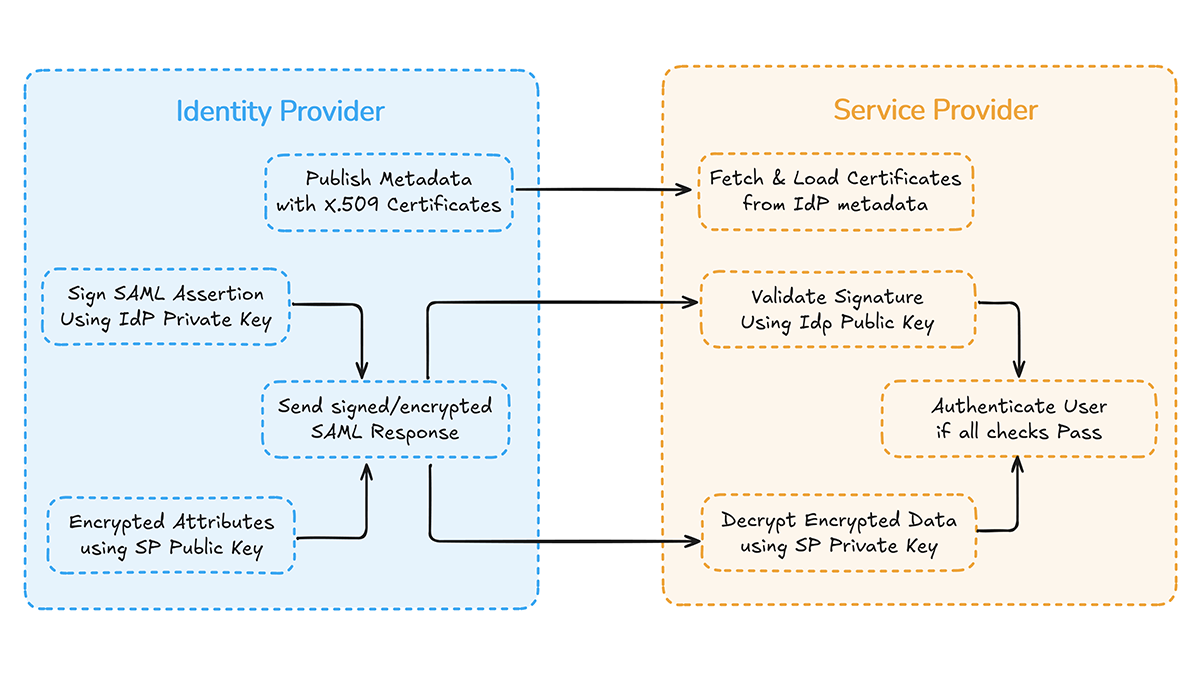
SAML authentication depends entirely on matching key pairs between the IdP and SP. A rotated, expired, or incorrectly uploaded certificate results in failures that are often difficult to trace without proper logging. In many enterprise incidents, there is no code change or infrastructure outage, only a silent certificate rotation at the IdP while the Service Provider continues to trust the old key. The result is immediate login failure across the organization, often surfacing as vague “Invalid SAML Response” errors that take hours to diagnose.
Certificate misalignment is particularly disruptive because authentication breaks before business logic or authorization checks even begin. A single outdated certificate can simultaneously halt access to dashboards, APIs, and internal tools, even if the application itself is healthy.
Real production environments have experienced SSO outages rooted in certificate problems rather than code or infrastructure defects. For example, FileCloud documented an outage where an expired built-in SAML certificate prevented users from signing in until it was replaced. Community discussions from Microsoft Entra administrators also describe authentication failures linked to expired or mismatched certificates that required corrective action before SSO worked again
Common outcomes when certificates fall out of sync:
Correct handling at each touchpoint, metadata synchronization, overlap support, expiry alerts, and structured logging prevent these production issues and keep authentication stable even as certificates evolve.
SAML certificate issues are responsible for a large share of SSO login failures in production systems. These failures are often subtle, and their error messages vary across IdPs and libraries, but they almost always trace back to certificate mismatch, expiry, or incorrect usage. Because SAML responses rely on tight cryptographic alignment, even small variations in metadata or configuration can cause the entire authentication flow to fail.
Most certificate-related failures occur during signature validation or decryption. When the SP cannot validate a signature, it rejects the SAML response entirely. When the SP cannot decrypt encrypted attributes, downstream authorization logic fails even though authentication appears successful. Recognizing these patterns makes it easier to debug issues quickly across environments and tenants.
Debugging certificate-related SAML failures often begins by verifying that the SAML response signature matches the SP's trusted certificate. A few lightweight local checks can confirm whether the issue is caused by an expired certificate, a mismatched fingerprint, or a signature generated with a certificate your system does not yet trust. These checks help isolate the source of failures without relying on IdP dashboards or waiting for administrator responses.
The core idea is simple: extract the SAML response, load the certificate the IdP claims to use, and verify that the signature matches the certificate. If validation fails locally, it will also fail within your service provider. These quick checks often surface common issues, such as expired or invalid certificates or signature mismatches introduced during key rotation.
These quick local checks help determine whether a failure is caused by a certificate mismatch, expiry, or an invalid signature before diving into the IdP dashboards.
If signature verification fails here, the SP will not authenticate the user.
Most issues trace back to certificate mismatch, expiry, or a rotated certificate that the SP hasn’t yet loaded.
If you need deeper debugging steps, including checking notBefore, notAfter, full fingerprints, and interpreting IdP rotation timelines, you can refer to the SAML debugging handbook 2026.
Certificate management is one of the highest-risk areas because certificates expire, rotate, and change independently of application code. Identity Providers routinely update certificates for security, compliance, and cryptographic hygiene, while Service Providers often rely on manual uploads or stale metadata. When these two sides fall out of sync, authentication fails instantly. A safe certificate lifecycle requires overlap support, automated metadata ingestion, early alerting, and strong visibility into certificate status.
SAML responses remain valid only if the Service Provider trusts the certificate used to sign them. During rotation or renewal, the IdP may introduce a new certificate while continuing to support the old one for a transition period. If the SP trusts only a single certificate, any time the IdP changes its active signing key, logins will fail. Supporting multiple certificates and using metadata-driven updates creates a predictable trust lifecycle that protects authentication availability across tenants.
Certificate overlap ensures that the Service Provider accepts signatures generated with either certificate. During this transition period, the IdP may still sign responses with the old key while preparing to switch to the new one. Without overlap, the SP rejects any response signed with a certificate it does not yet trust. This mismatch is a primary cause of SSO outages, especially in multi-tenant environments where each customer integrates with a different IdP and rotation schedule.
Certificate-related failures often appear as vague or generic SAML errors. Without structured logging, developers struggle to determine whether an expired certificate, a rotation mismatch, a metadata parsing issue, or an altered signature in transit caused a failure. Detailed logging gives developers immediate visibility into what failed, why it failed, and which certificate was involved, removing guesswork during SSO incidents.
SAML flows produce multiple checkpoints where certificates are validated or applied. Logging at each point ensures developers can trace the lifecycle of a SAML response from metadata ingestion to signature validation. This visibility is especially important in multi-tenant SaaS systems, where each customer may have different IdPs, different certificate rotation schedules, and different metadata URLs.
Logs should typically be retained for at least 90 days to support compliance reviews, delayed incident investigations, and audit requirements.
This type of log allows developers to diagnose the failure almost instantly: the IdP used a certificate that the SP has not yet trusted. Logging at these checkpoints ensures developers can pinpoint the exact stage and cause of a certificate failure, even for complex, multi-step authentication paths.
Scalekit eliminates the operational burden of managing SAML certificates by automating rotation, validation, metadata ingestion, and alerting. Instead of having every engineering team maintain independent logic for tracking IdP certificates, Scalekit centralizes this process with consistent security rules across all tenants. This removes the single biggest source of SSO outages: stale or incorrect certificates.
Scalekit monitors the entire lifecycle of certificates from publication in IdP metadata to runtime signature validation. By supporting multiple active certificates, detecting rotations early, and continuously syncing metadata, it ensures SAML authentication remains stable even when IdPs update their keys without notice. These safeguards are especially important for SaaS platforms integrating with hundreds or thousands of customer IdPs, each operating on its own rotation schedule.
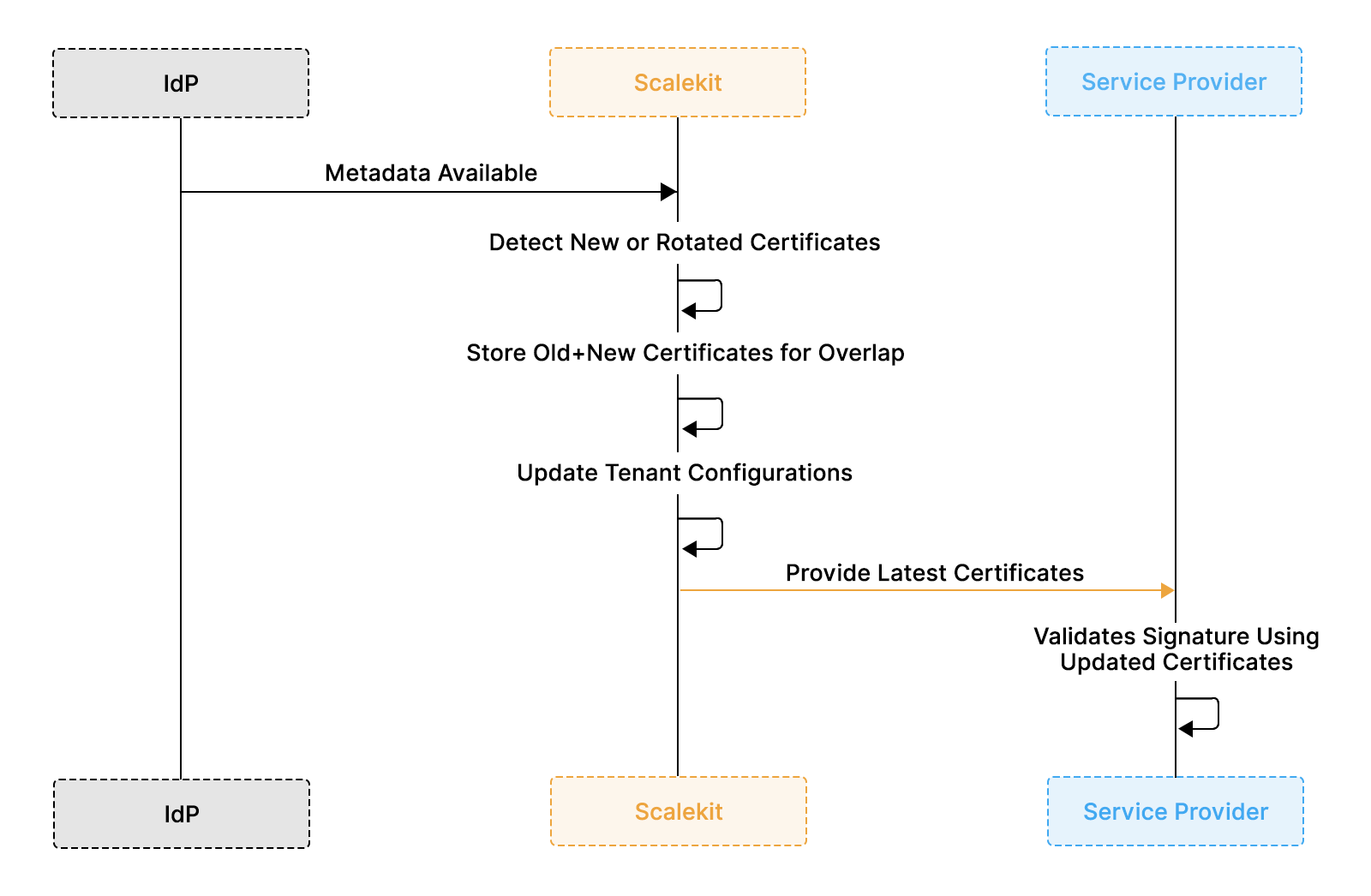
Capabilities Scalekit Brings to SAML Certificate Workflows
The section illustrates how an enterprise SAML trust relationship is established in Scalekit, where Scalekit acts as the Service Provider and relies entirely on the organization’s existing Identity Provider for authentication. No users, passwords, or MFA rules are duplicated; identity remains fully owned and governed by the IdP.
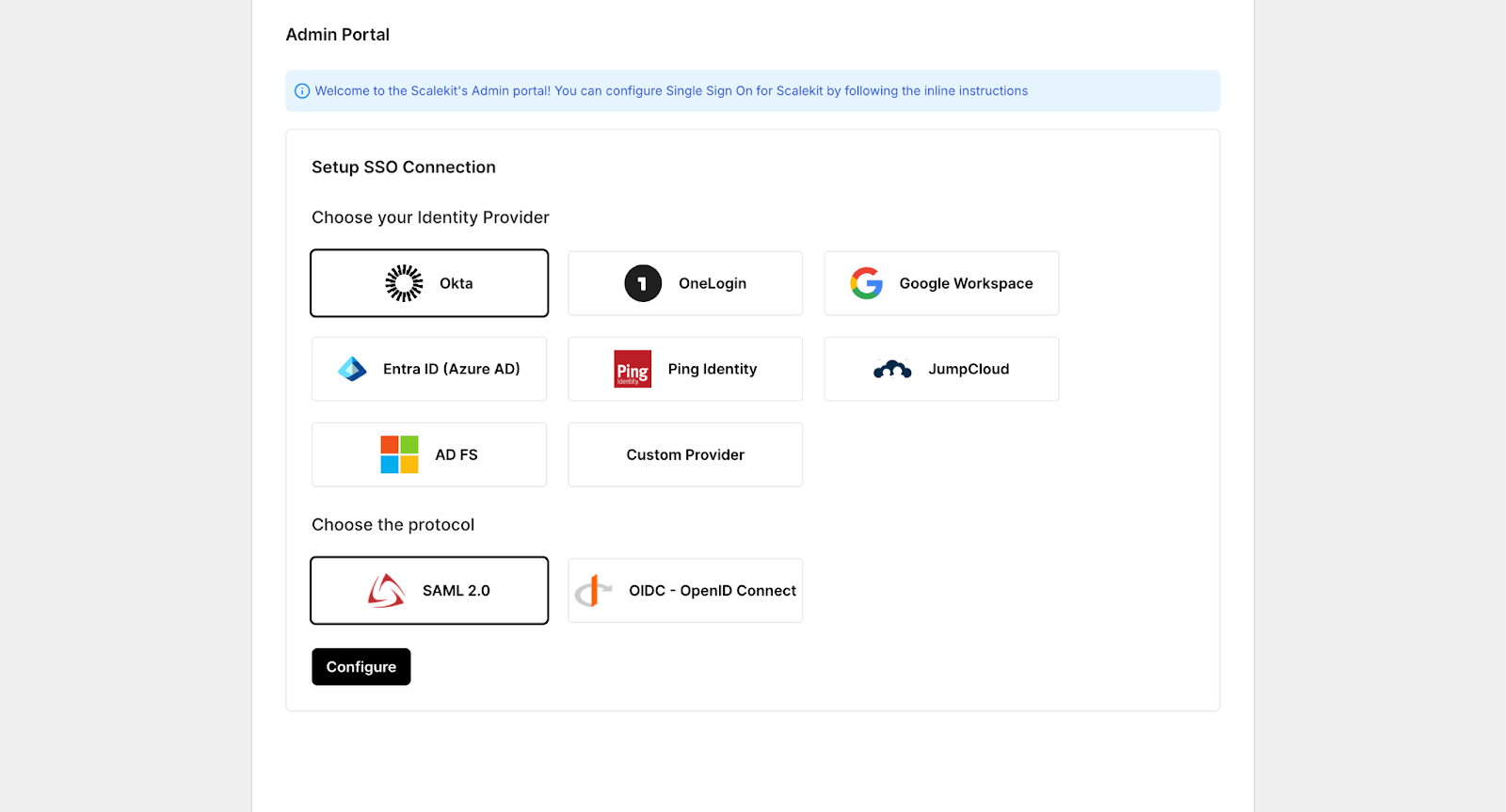
Select the enterprise Identity Provider and the federation protocol, typically SAML 2.0 or OIDC. This step defines how identity assertions will be exchanged between the IdP and Scalekit. Scalekit does not store user credentials; it simply consumes identity claims from the IdP.
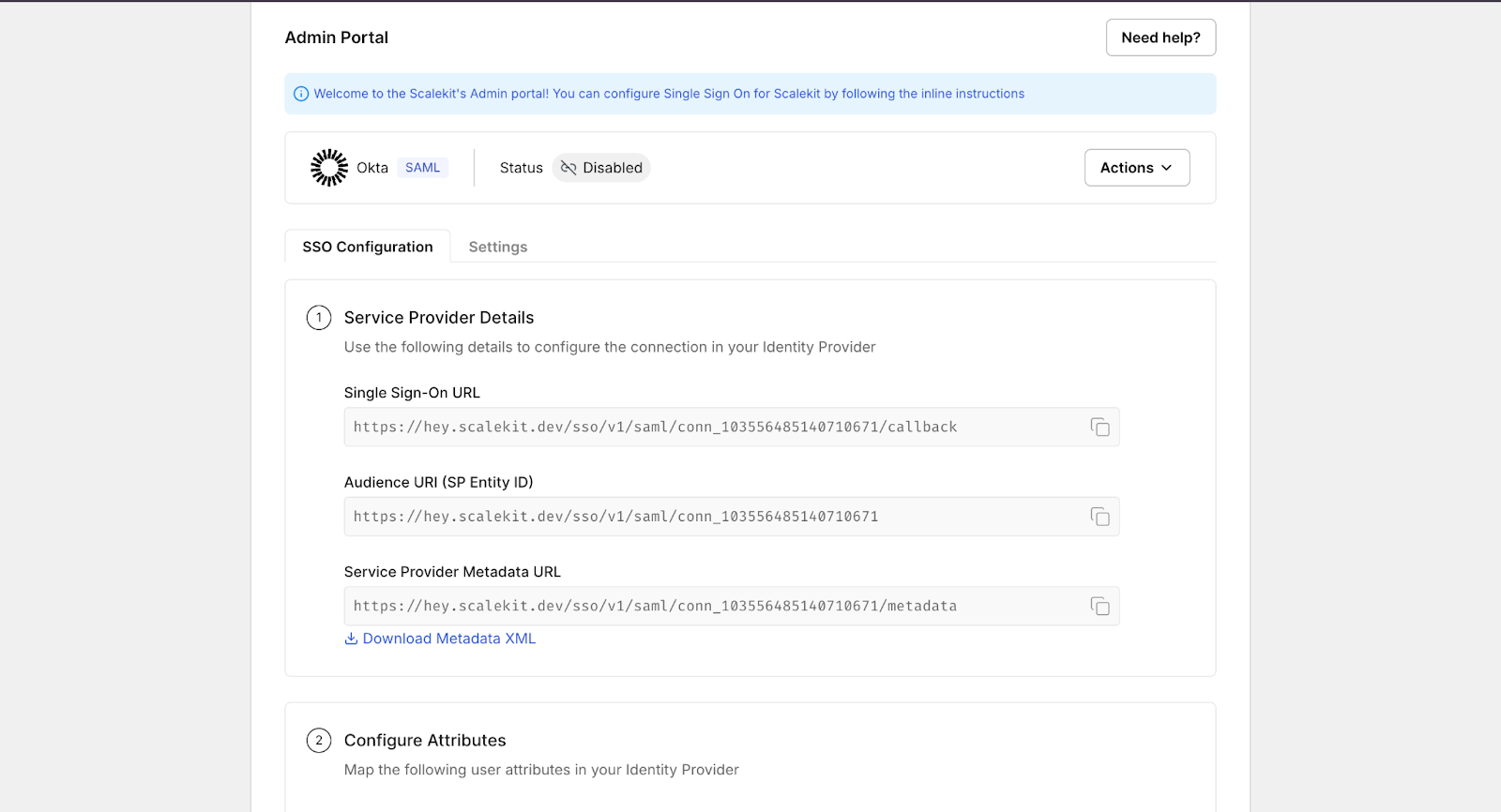
Scalekit exposes standard Service Provider (SP) configuration values such as the SSO Callback URL, Entity ID (Audience URI), and Metadata Endpoint. These values are copied into the enterprise application configuration within the IdP (for example, Okta, Entra ID, or Google Workspace).
This step establishes the initial technical trust link and ensures the IdP knows where and how to send signed SAML responses.
After configuring the IdP, its metadata URL or XML file is linked back into Scalekit. This metadata contains signing certificates and endpoint definitions. Attribute mapping ensures that required identity fields, such as email, name ID, or employee number, are correctly passed within SAML assertions.
At this stage, Scalekit begins monitoring the signing certificate lifecycle, including expiry dates, rotations, and fingerprint changes, so authentication continues uninterrupted even when the IdP updates its keys.
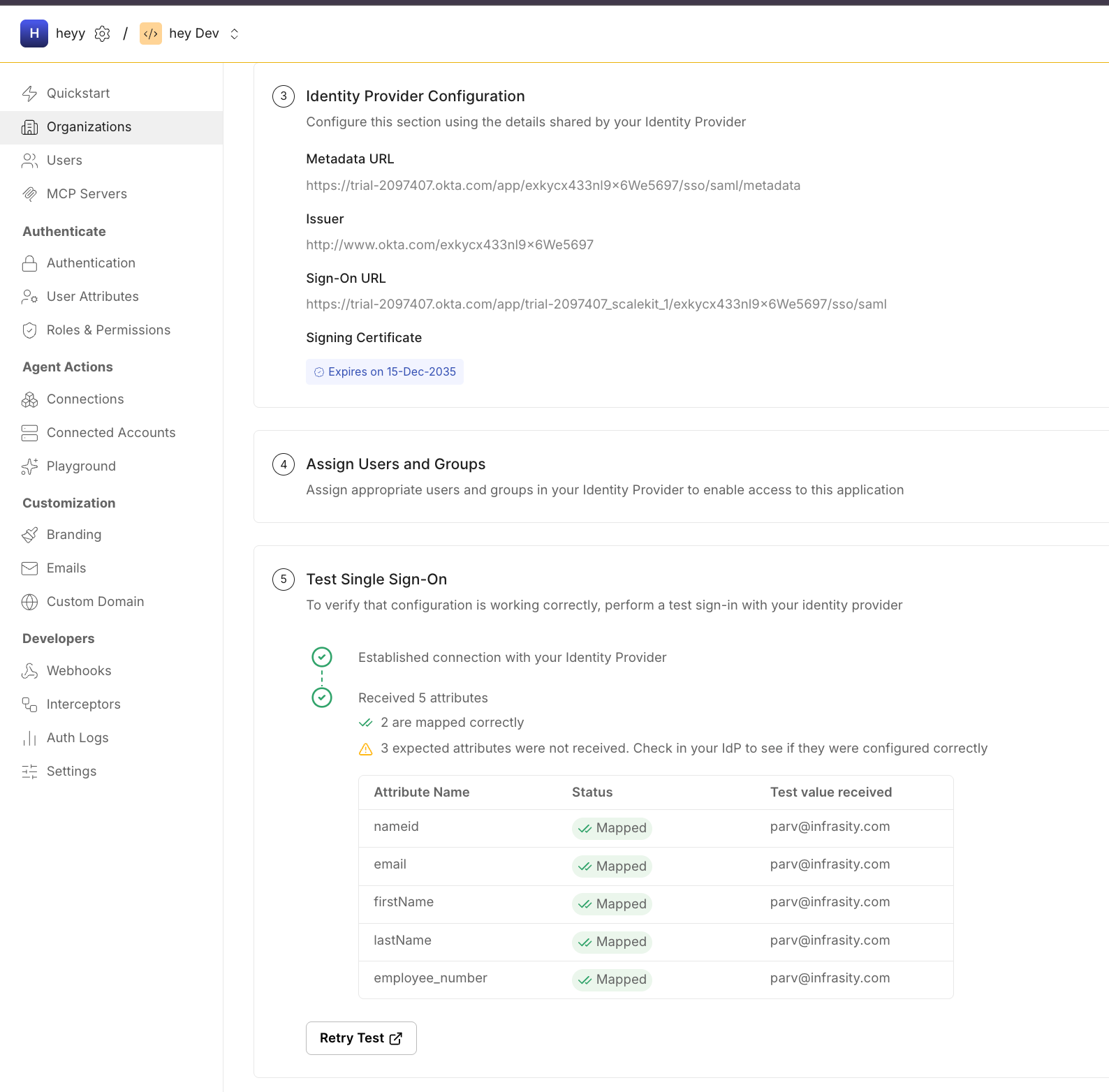
Once metadata is linked and validated, the trust relationship is fully established. From this point forward, Scalekit automatically synchronizes certificates and configuration updates, preventing silent IdP certificate rotations from breaking enterprise SSO flows.
In the scenario that opened this blog, the IdP silently rotated its signing certificate while the Service Provider continued trusting the old one. With Scalekit in place, metadata would have been fetched automatically, the new certificate added to the active trust set, and an alert triggered before expiry. The rotation would have completed with zero downtime, and users would never have noticed the change.
This protection is not limited to a single incident pattern. The same automation prevents other common enterprise failures, such as:
Scalekit gives engineering teams confidence that SAML authentication remains stable even as IdPs evolve their security posture. Instead of reacting to certificate failures after they disrupt logins, teams maintain trust and compliance proactively with minimal operational effort.
SAML certificates form the trust backbone of enterprise SSO, and most authentication failures occur when these certificates expire, rotate without overlap, or no longer match the Service Provider’s configuration. This guide covered how signing and encryption certificates differ, where they operate in the SAML flow, common failure patterns, and the rotation practices that prevent downtime.
For engineering teams, the key takeaway is that certificate management is not a one-time configuration task. It is an active lifecycle that requires metadata refresh, overlap support, fingerprint validation, and structured logging. When these practices become part of your workflow, certificate rotations no longer disrupt your workflow, and SSO remains stable across tenants and identity systems.
From here, the most practical next steps are to review how your SP fetches IdP metadata, confirm that logs capture certificate fingerprints and assertion IDs, and practice local signature and expiry checks in staging environments. If your current setup still relies on manual certificate uploads, moving toward automated metadata synchronization or a centralized SSO management approach can significantly reduce future risk. For a hands-on walkthrough of configuring enterprise SAML SSO end-to-end, you can refer to Scalekit’s official SSO Quickstart and Enterprise SSO documentation
1. Why do SAML certificates expire so frequently?
IdPs rotate keys to enhance security, meet compliance requirements, and maintain cryptographic hygiene. Many enterprise IdPs publish new certificates weeks before rotation, expecting SPs to trust both old and new keys during an overlap window.
2. What breaks if the SP does not update its certificate during rotation?
If the IdP switches to a new signing key and the SP still trusts only the old one, signature validation fails, and all SSO logins can break immediately.
3. Can signing and encryption certificates be the same?
Yes. Some IdPs reuse one certificate for both signing and encryption, but many provide separate certificates. SPs must honor key-usage flags to avoid validation or decryption errors.
4. Does the SP always need to decrypt SAML assertions?
No. Many SAML flows do not enable encryption. If encryption is used, the SP must provide its public key to the IdP and securely maintain the corresponding private key.
5. Why do fingerprint mismatches occur so often?
Fingerprints mismatch when IdPs rotate keys and SPs retain stale metadata, or when certificates are copied incorrectly from metadata files.
6. How long should a certificate overlap window last?
Typically, 7–14 days for automated metadata sync. Manual processes may take 30+ days, depending on enterprise release cycles and change management speed.
7. What’s the fastest way to debug a certificate error?
Extract the SAML response, load the IdP’s signing certificate, and verify the signature locally (for example, with xmlsec1). If it fails locally, it will fail in production.
8. Does Scalekit replace SP-side certificate handling?
Scalekit centralizes metadata sync, rotation handling, and signature validation. SPs integrate once and inherit consistent certificate lifecycle management across tenants.
9. How do you rotate a SAML certificate safely?
Publish the new certificate in the IdP metadata, allow an overlap window during which both theold and new certificates are trusted, notify SPs in advance, and remove the old certificate only after successful validation and rollout.
10. What’s the difference between a SAML certificate and an SSL certificate?
A SAML certificate signs or encrypts SAML messages at the application/message layer for identity trust. An SSL/TLS certificate secures network transport (HTTPS) between browsers and servers. They serve different layers and are not interchangeable.