

Enterprise companies run dozens, often hundreds, of internal and external applications: CRMs, ERPs, HR systems, data tools, and SaaS platforms that their teams use every day. As usage scales, managing identity across this entire stack becomes unmanageable. To solve this, IT teams standardize on authentication via identity providers (IdPs) such as Okta, Microsoft Entra ID, Ping, or Google Workspace. These systems centralize login, MFA, password resets, and access policies in one place.
For SaaS vendors moving upmarket, this centralization directly shapes customer expectations. During early security reviews, enterprises assume your product will integrate with their existing IdP without requiring separate credentials or manual onboarding. This is where SAML becomes essential. It allows the customer’s IdP to authenticate the user and securely pass identity information to your application, enabling seamless sign-in without storing passwords.
For customers, this provides predictable governance and consistent MFA enforcement. For B2B SaaS teams, a lack of SAML support slows proofs of concept, complicates onboarding, and often becomes a blocker during enterprise procurement.
This guide builds the foundation you need to support enterprise SSO correctly. It explains how SAML differs from SSO, how IdPs and Service Providers (SPs) communicate, and how the complete flow works in practice. From core concepts to attributes, metadata, assertions, and ACS endpoints, you’ll have the background needed to follow the hands-on Okta example later and to design multi-tenant SSO integrations that scale.
Many teams assume SAML is SSO, but they solve different problems.
SAML is a protocol. SSO is an experience.
Here’s the relationship in one table:
This understanding prevents common mistakes, like treating SAML as a login method rather than what it actually is, a federation protocol used by IdPs and SPs to establish trust and exchange identity assertions.
As soon as teams understand that SAML is a protocol and SSO is an experience, the next question becomes: Which standard should a SaaS product support, SAML, OIDC, or both?
Although both enable Single Sign-On, they were built for different environments and technical requirements. Understanding these distinctions helps product and engineering teams make the right decision for their architecture and customer base.
SAML is the prevailing choice in enterprise workforce identity, especially when integrating with providers such as Okta, Ping Identity, and Microsoft Entra ID. It fits well when:
This is why most B2B SaaS products selling to mid-market and enterprise buyers are expected to support SAML out of the box.
OIDC (OpenID Connect) is more common in modern web and mobile applications, developer tools, and consumer-facing products. It is preferred when:
OIDC is generally simpler to configure and integrates naturally with modern architectures.
The decision for SaaS vendors often aligns with customer profile and technical architecture:
Most mid-market and enterprise SaaS companies eventually implement both to avoid friction during customer integrations.
SAML operates on a simple but powerful architectural model built around two systems: the Identity Provider (IdP) and the Service Provider (SP). Every SAML authentication flow depends on the trust established between these two components through metadata, certificates, and signatures.
In web-based SSO flows, the IdP authenticates the user and issues a signed SAML Assertion. The SP validates this assertion using the IdP’s certificate, processes user attributes, and establishes an authenticated session.
This trust relationship is established through metadata exchange, where each side publishes its configuration:
Both systems rely on this metadata to securely route requests, validate signatures, and ensure messages originate from trusted sources.
Enterprise organizations standardize authentication across multiple applications. When your SaaS product integrates with a customer’s IdP:
This pattern aligns directly with enterprise expectations, reduces support burden, and enables a scalable, secure authentication model for multi-tenant SaaS platforms.
How SAML Fits Into B2B SaaS Multi-Tenancy and User Access Models
B2B SaaS applications almost always operate in a multi-tenant environment, where each platform serves multiple customer organizations with their own users, roles, and policies. SAML fits naturally into this model because every tenant can connect its own Identity Provider (IdP), such as Okta or Entra ID.
When a user signs in through SAML, the Service Provider (SP) determines:
SaaS apps typically map SAML attributes such as:
This lets enterprises manage identities and roles centrally while the SaaS product keeps authorization lightweight and consistent.
More mature B2B setups extend this further by supporting:
These patterns allow SaaS teams to deliver seamless onboarding, strong governance alignment, and scalable multi-tenant authentication, without managing separate passwords for every user.
SAML (Security Assertion Markup Language), finalized in 2005 by OASIS, is an XML-based standard that allows an Identity Provider (IdP) to authenticate a user and securely pass identity information to a Service Provider (SP). It enables Single Sign-On without shared passwords and lets enterprises centralize authentication while SaaS applications focus on authorization and session management.
At a high level, SAML relies on a trust relationship between the IdP and the SP. The IdP authenticates the user and issues a signed SAML assertion; the SP validates this assertion using metadata (certificates, endpoints, identifiers) exchanged between the two parties. This metadata-driven trust ensures secure, interoperable communication across different providers and applications.
Before implementing SAML, let’s review its components and concepts:
Authentication defines how a user is identified and validated using credentials, typically a username and password, during the sign-in process. Authorization, in contrast, defines which resources users have access to. The SAML protocol facilitates this data exchange between an Identity Provider (IdP) and a Service Provider (SP).
This section uses the same IdP and SP roles described above but shifts focus to their responsibilities within the SAML flow. The SP is the application the user wants to access, while the IdP manages user identities and attributes such as firstName, nickname, profileURL, and more.
A typical SAML authentication workflow involves the following steps:
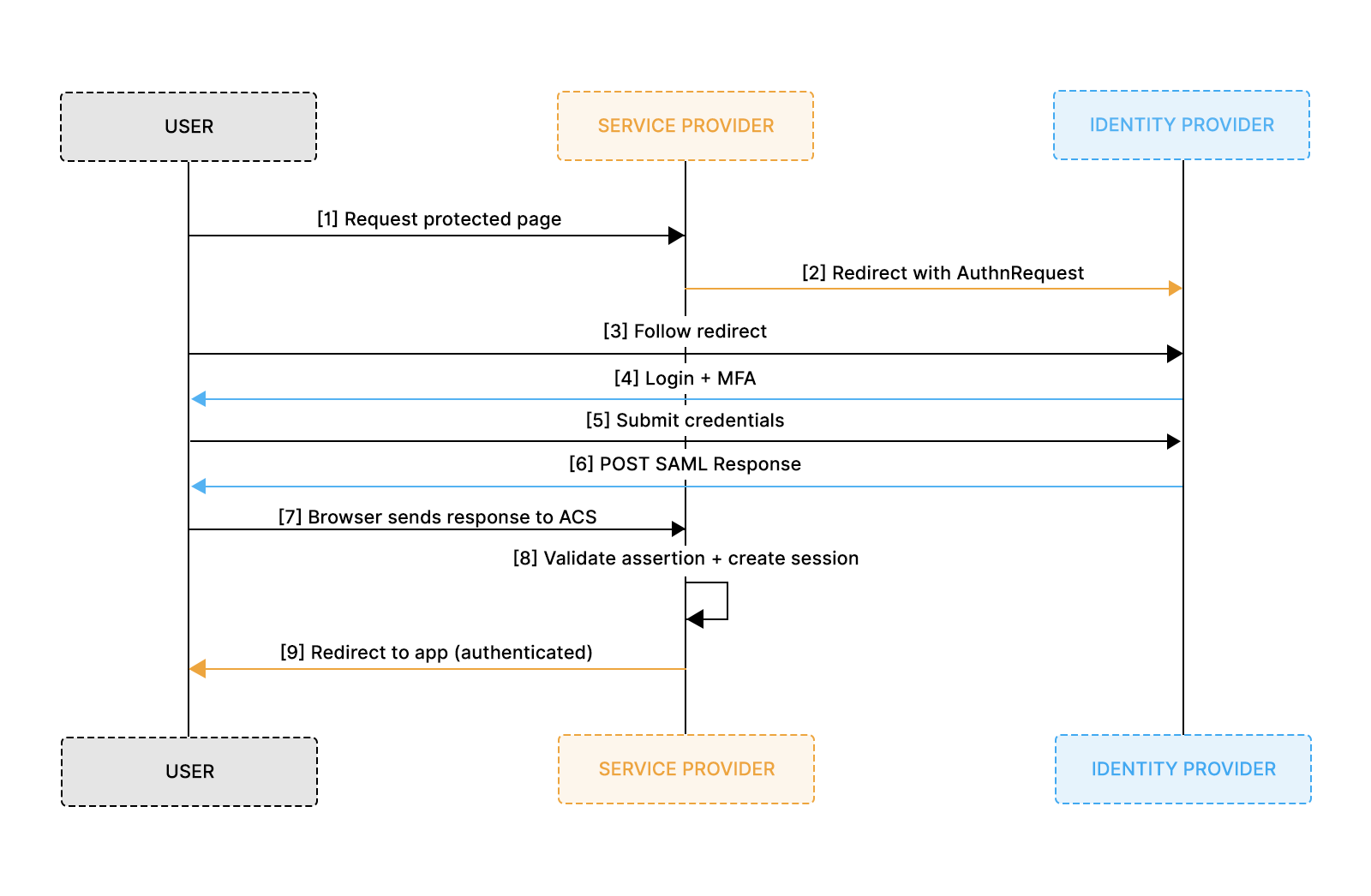
SP accomplishes this using the following three components:
These elements ensure that the SP can securely receive and process SAML assertions, enabling seamless user authentication.
A SAML Request is generated by the SP to ask the IdP to authenticate the user.
A SAML Response is generated by the IdP and contains the signed SAML Assertion.
Example of a SAML Request
To view the complete request, refer to the sample_request.xml file.
Example of SAML Response from IdP for authentication with additional attributes.
To view the complete request, refer to the sample_response.xml file.
SAML Assertions are XML documents issued by the IdP that contain statements about a user. The SP uses these assertions to grant or deny access to resources. Assertions consist of:
Assertions serve as the core of SAML authentication, enabling the secure transfer of user identity and attributes between IdP and SP, facilitating Single Sign-On.
SAML Attributes carry additional user information within assertions. Common attributes include
Attributes enable SPs to enforce fine-grained access control and customize user experiences based on identity information.
XML Signature ensures the integrity and authenticity of SAML messages. It uses digital signatures to verify that the message has not been altered and comes from a trusted source.
SAML Metadata provides configuration details about the IdP and SP. The IdP metadata includes entity ID, Single Sign On (SSO), and Single Logout (SLO) endpoints. For the SP, it includes details like the Assertion Consumer Service (ACS) endpoints, entity ID, and certificates. It facilitates interoperability by allowing entities to share and understand each other's configuration.
Example SAML Metadata of IdP.
To view the complete request, refer to the sample_idp-metada.xml file.
Bindings specify how SAML messages are transported between IdP and SP. Common bindings include
In the above example, IdP SAML Metadata, HTTP POST, and Redirect bindings are defined for specific URLs for SingleSignOnService and SingleLogoutService.
Profiles define specific use cases for SAML, detailing how assertions, protocols, and bindings should be used together. Common profiles include:
Relay State is an optional parameter that maintains state information between the IdP and SP during authentication. It typically contains a URL or a reference that the SP will redirect to after authentication. This helps users return to the exact page they came from or continue a flow seamlessly after SSO.
Most enterprise IdPs also impose strict size limits on RelayState values (commonly 80–1024 bytes), so it should always be an opaque, short identifier rather than a long encoded URL or user-specific payload. RelayState must also never contain sensitive data, since it is passed through the browser and can be tampered with. Instead, the SP should store any needed information server-side and reference it via a short token in RelayState.
SAML 2.0, standardized by OASIS in 2005, remains one of the most widely used authentication protocols in enterprise environments. Many organizations run identity systems like Okta, Microsoft Entra ID, OneLogin, or PingFederate, making SAML SSO support essential for B2B SaaS applications.
In this section, we walk through integrating Okta as an Identity Provider (IdP) and building a working SAML SSO flow using a simple sample application. The hands-on example mirrors what typically happens during enterprise onboarding: the customer configures your application inside their IdP, and your application consumes the SAML assertion to authenticate users.
We’ll build a simple web application with two pages: login and profile. The login page will feature a "Login with SAML SSO" button. The profile page will display user details such as email, name, and photo, as well as the SAML Response Attributes and the SAML Response itself.
We will use Okta's SAML 2.0 Integration to configure our application for Single Sign-On. In this setup, our application will require a login, and Okta will serve as the IdP, providing authentication details via SAML SSO and our application acts as the Service Provider (SP).
Building a SAML SSO Flow using Okta requires the following prerequisites:
Two configurations are needed to build this flow:
The following sections will describe them.
To integrate SSO with Okta, we must first create a new application from the Okta Dashboard.
This setup establishes the trust relationship between your application (SP) and Okta (IdP), which is required before SAML requests and responses can be exchanged.
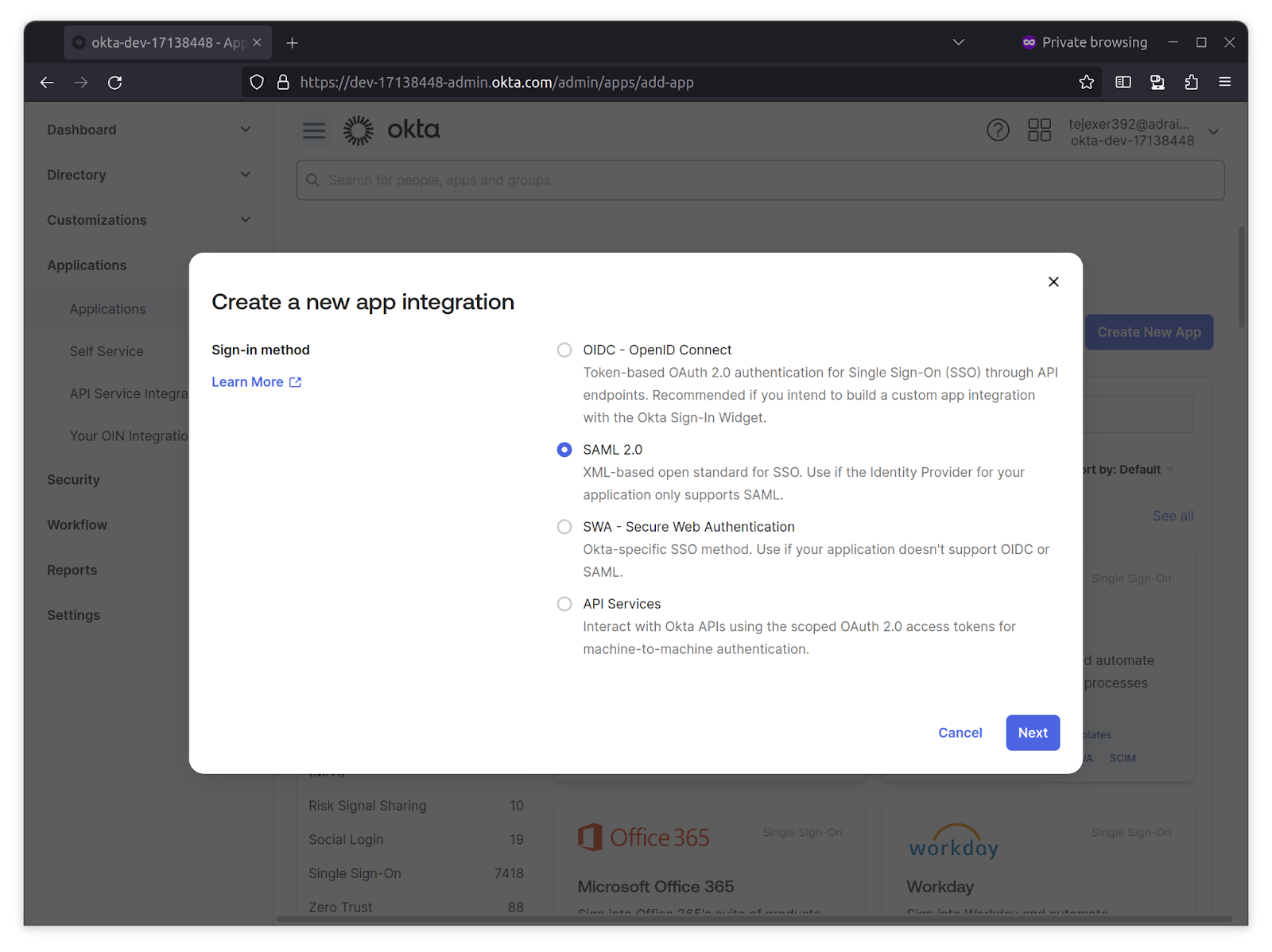
1. Log in to your Okta Developer account, go to Applications from the Okta sidebar, click Create New App, select SAML 2.0, and click Next.
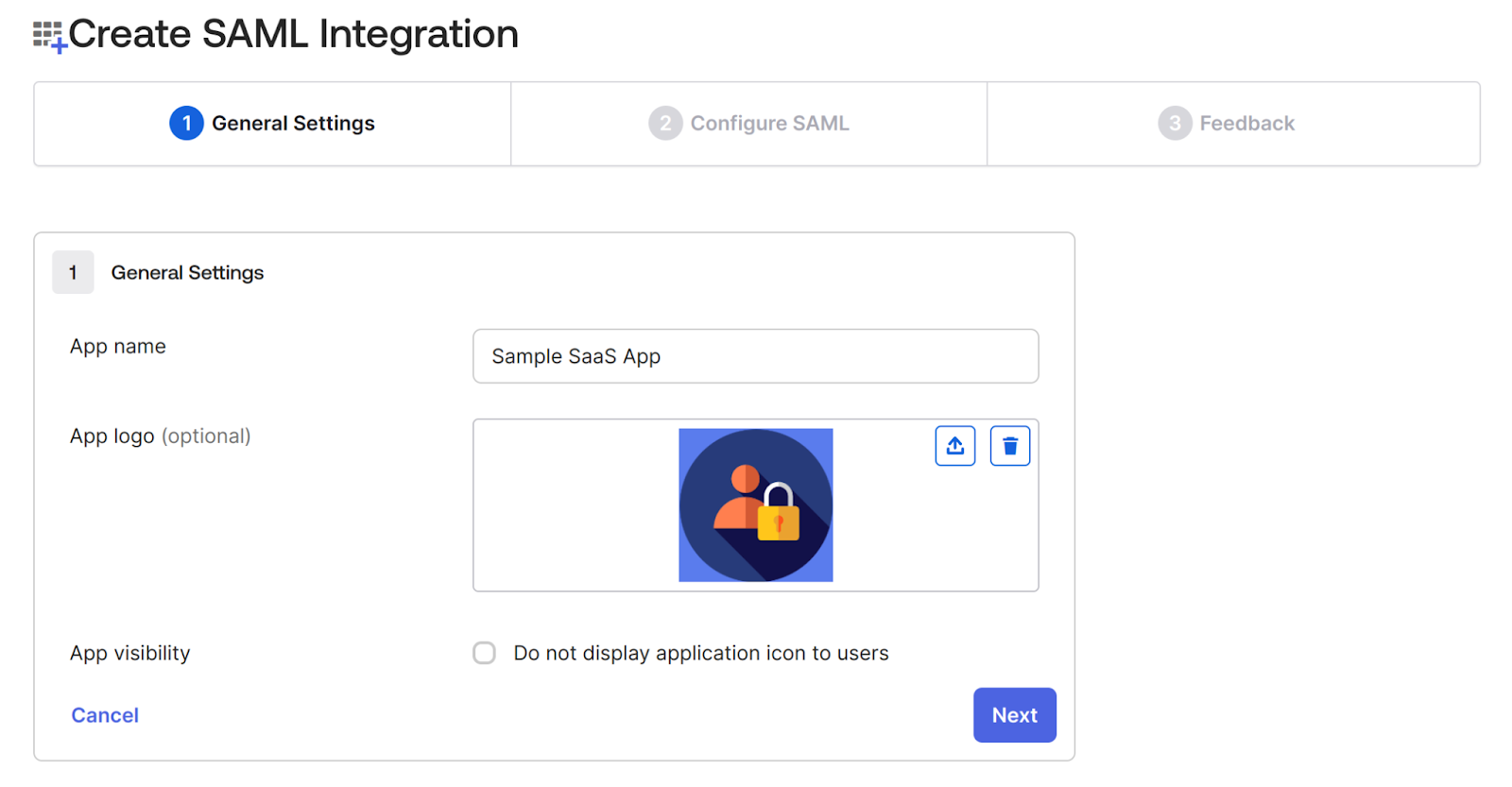
2. On the next screen, provide a name for the application.In this case, we’re adding a Sample SaaS App. You can add a logo to customize the login logo. This step creates the IdP-side representation of your SaaS product.
3. In the Configure SAML tab, configure the following:
In our sample app, the ACS URL is: /saml/acs/
These two fields are the core of the trust configuration. The IdP must know where to send the response and in what format user identifiers should be passed.
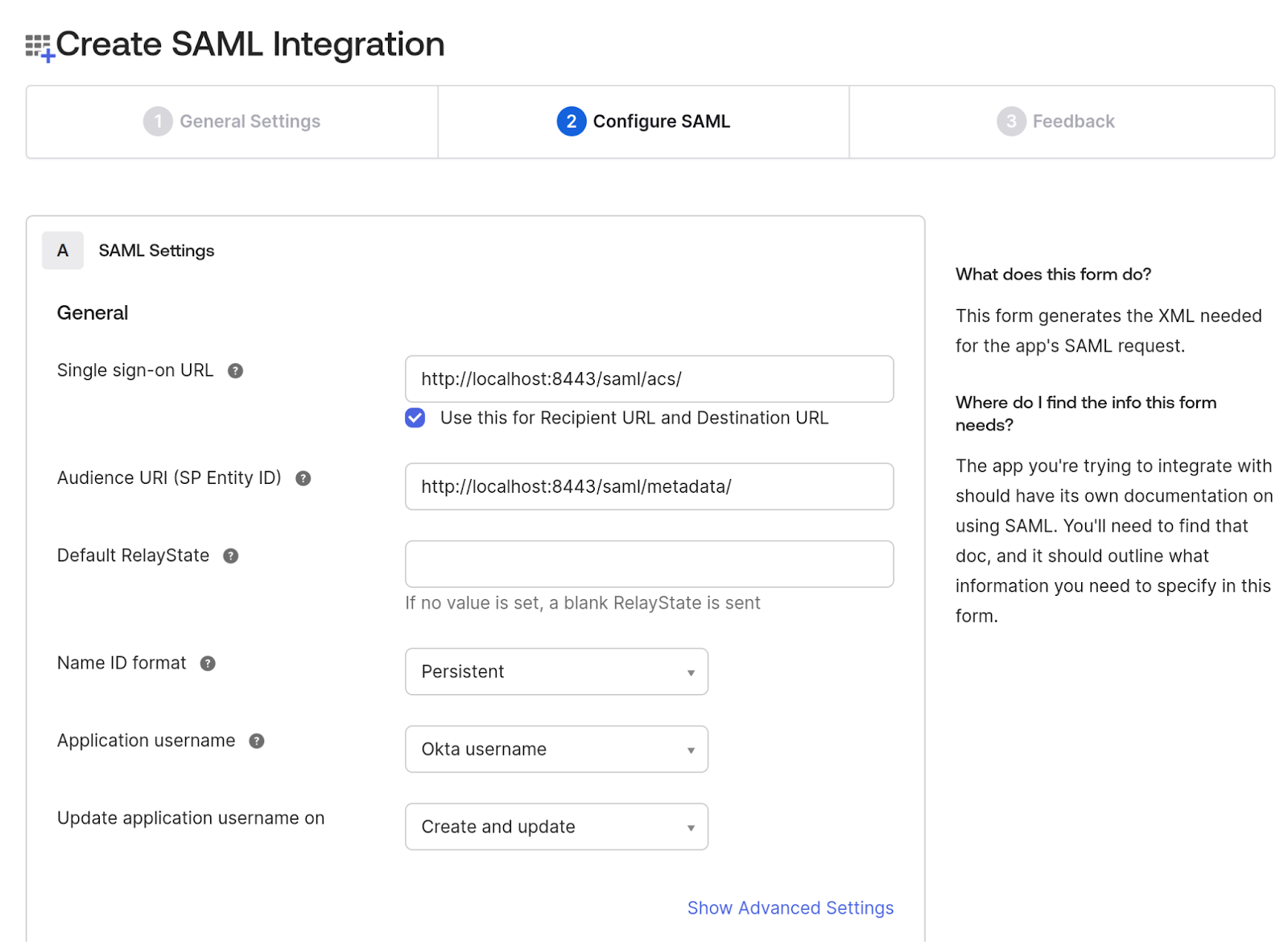
4. On the same page, navigate to the Attributes Statements section to configure the following attributes and group attribute statements to be sent when the authentication is successful. These attributes will later map to user profiles and permissions on the SP side.
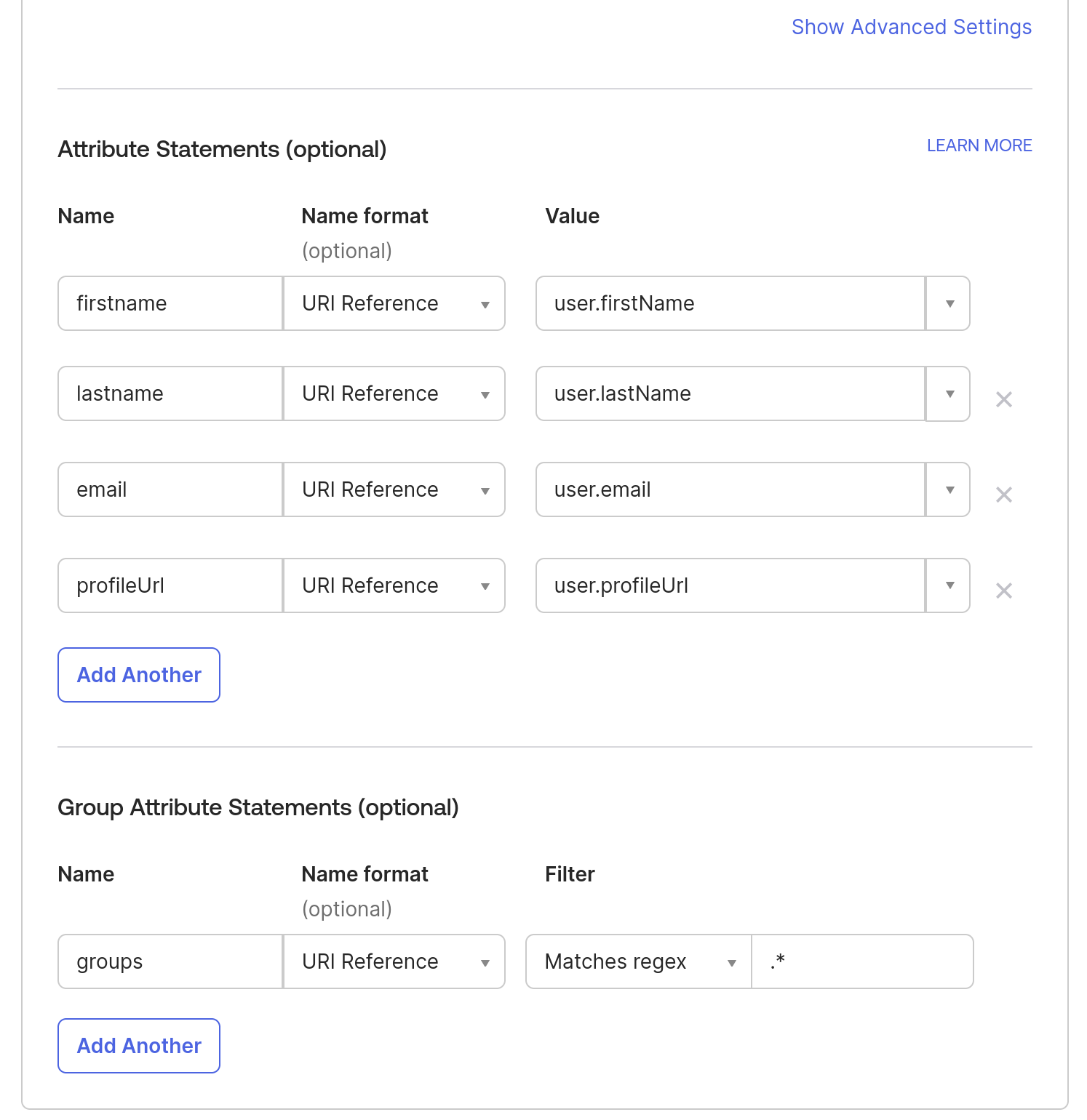
Note: To add more attributes to a User profile, you can go to Directory in the Okta sidebar- > click on Profile Editor -> All User -> Click on Okta User -> Click on Add Attributes.
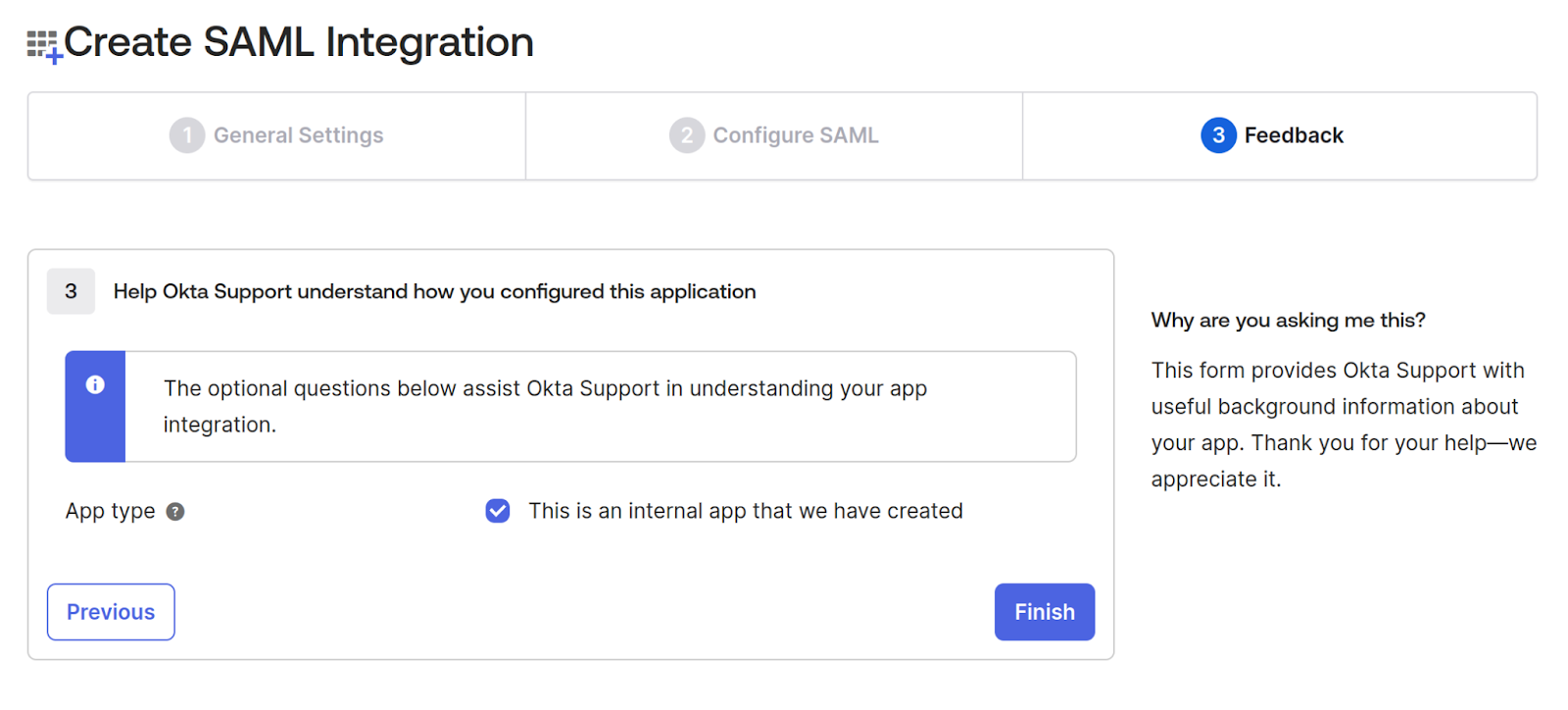
5. In the Feedback tab, check the App type checkbox “This is an internal app that we have created” since we’re testing it and not releasing it publicly. Click Finish.
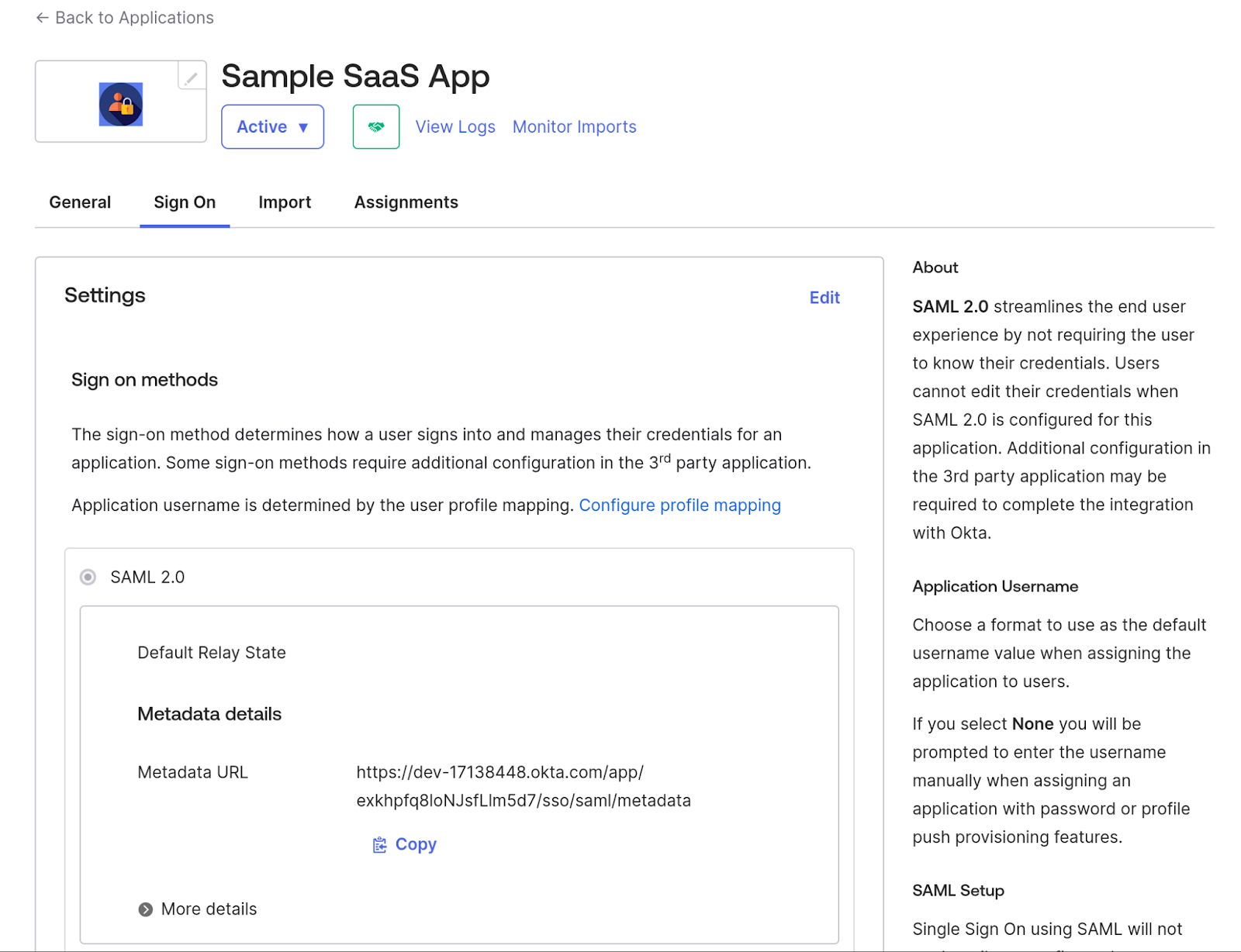
After finishing the application creation, it should show you the Metadata URL, which will have all the details of IdP metadata that we will use in the next step, so download the content from that link and save that XML as idp-metadata.xml.
This metadata file is essential because it contains certificates and endpoints that your SP uses to validate signatures and route SAML traffic.
Once the application is created, assign users or groups who will use it. In this case, we'll use the same user who created the Okta account.
6. Go to Sample SaaS App -> Assignment -> Assign -> Assign to People -> Select your user -> click on the Assign button next to your user -> Save and go Back. -> Done.
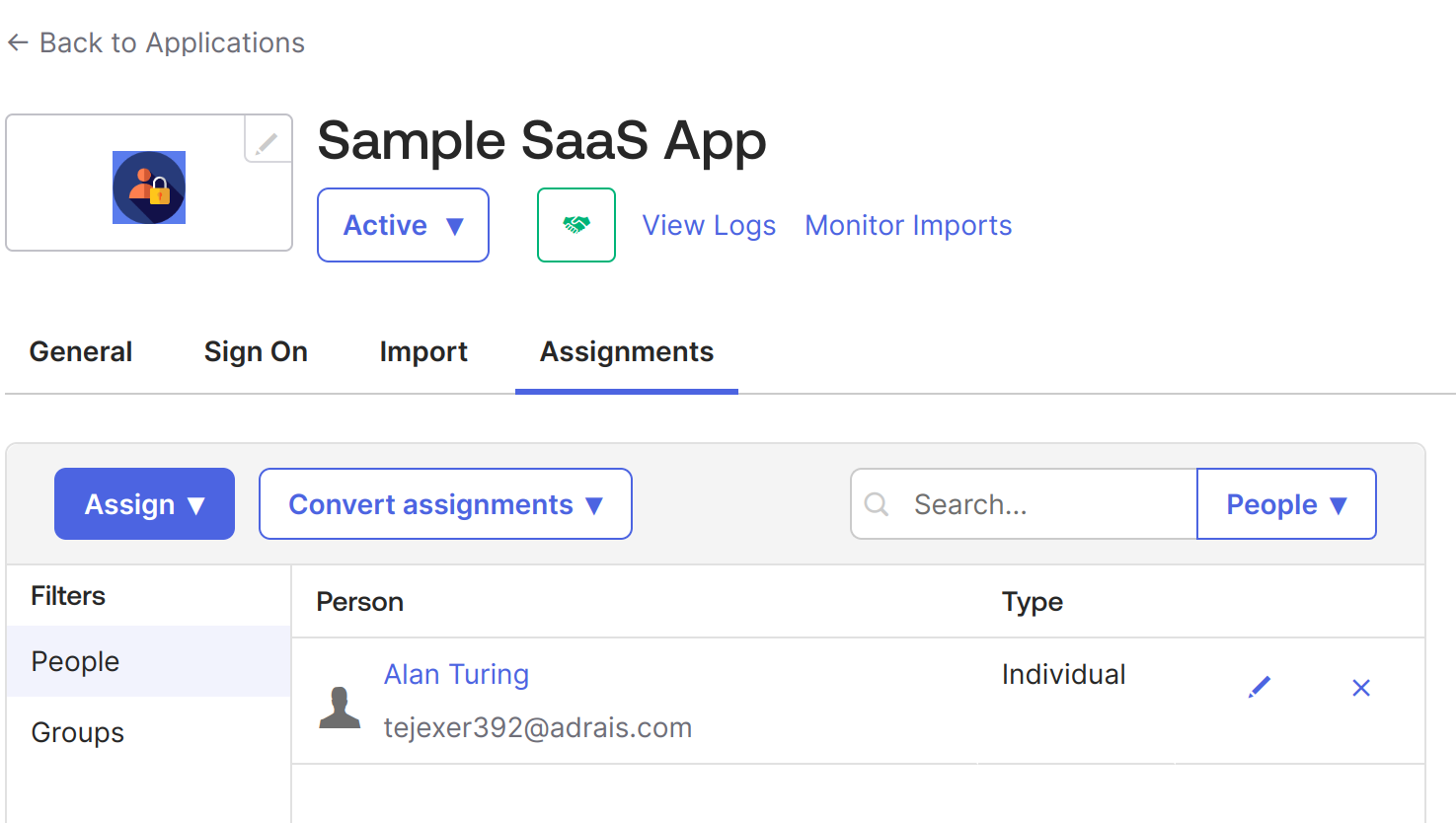
7. Now, do the same for groups. Go to Sample SaaS App -> Assignment -> Assign -> Assign to Groups > click on the Assign button next to your Groups -> Done.
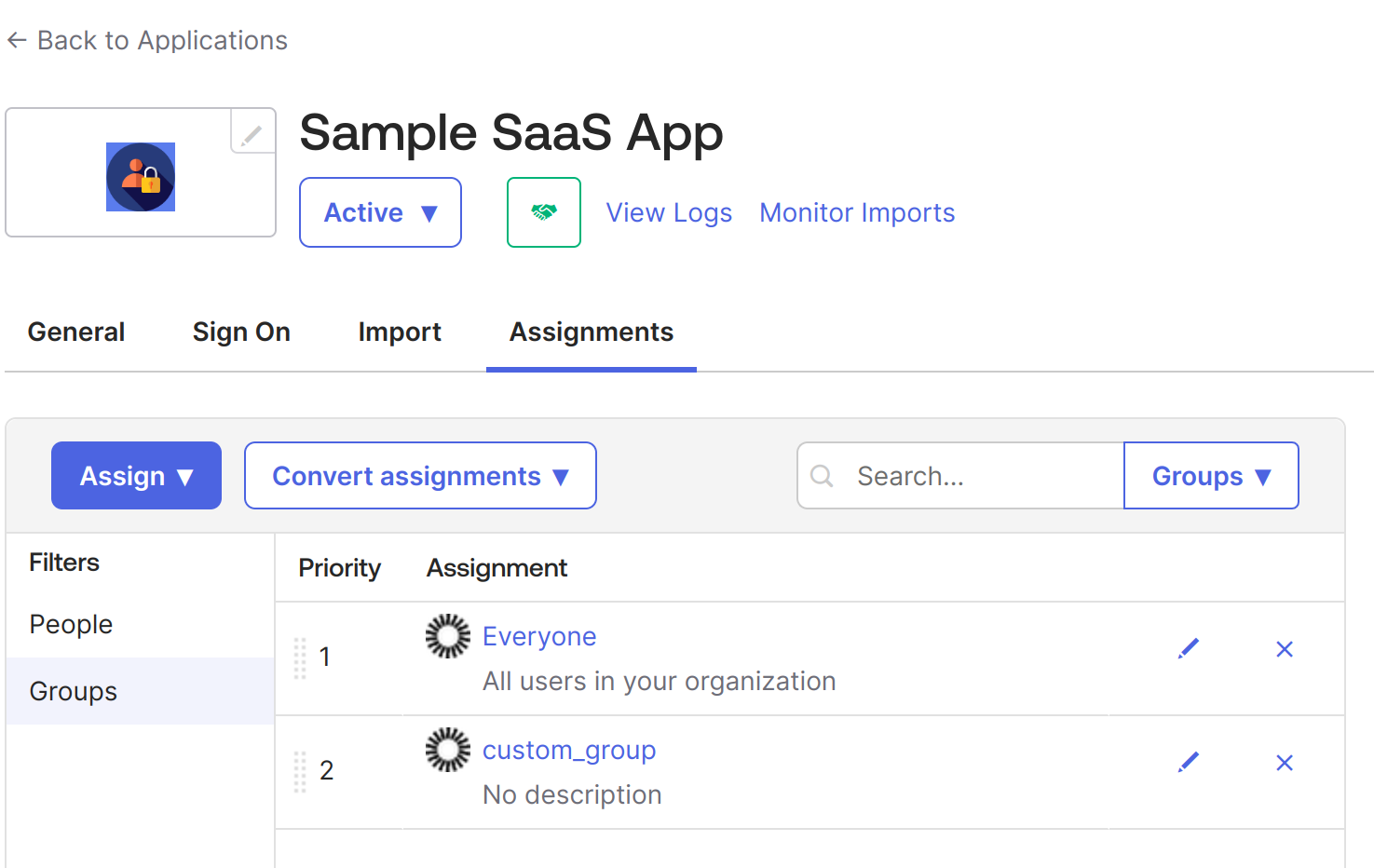
At this point, we have created an application in Okta for SSO configuration using SAML 2.0. It is an internal application, but we can make it public later as required. When public, it can be made available like all other applications in Okta integrations, such as Google Workspace and Salesforce.
This completes the IdP-side setup. The next step is configuring your application (the SP) to accept and validate SAML responses from Okta.
As mentioned, we have built a simple web application using Python and Flask. The app uses the PySAML2 library, which provides the core SAML 2.0 functionality required for acting as a Service Provider (SP). This section demonstrates how your SP consumes the metadata configured in Okta and completes the authentication flow.
Below is the repository structure
Move the idp-metadata.xml file we downloaded from Okta into the conf directory. After moving the file, the folder should look like this. SP can now automatically fetch IdP metadata from a remote URL and gracefully fall back. This is required for production setups where enterprises rotate certificates or publish dynamic metadata.
Now, we configure the sp_conf.py file, which contains all SAML settings for the SP application. This is where the SP declares its ACS endpoint, metadata URL, certificates, and expected bindings.
Security Note on ‘allow_unsolicited’ = True
Since the sample sets allow_unsolicited = True, the SP accepts IdP-initiated SSO flows (responses without a prior AuthnRequest). This is common in enterprise setups but requires careful handling:
If your application does not need IdP-initiated SSO, set: 'allow_unsolicited': False
This restricts the SP to only SP-initiated authentication flows.
In this configuration:
Note: If you change your port, domain, or metadata file location, update both your SP configuration and your Okta application settings accordingly.
The automated metadata handling ensures your application remains stable even when IdPs rotate certificates, issue new metadata, or require dynamic updates.
In addition to supporting local metadata files, the sample application includes optional automatic metadata retrieval. If an environment variable such as IDP_METADATA_URL is provided, the app will fetch and cache the IdP’s metadata at startup. This makes the integration more resilient to IdP certificate rotations and configuration changes, removing the need to manually download or replace idp-metadata.xml. If a local file exists, it is used by default unless FORCE_REMOTE is set.
Next, in main.py, we configure a helper function that loads the SAML configuration and returns a ready-to-use PySAML2 client:
When a user visits the login page and clicks Login with SAML SSO, the /login route generates an authentication request and redirects the user to the Okta-hosted login page:
This request is what initiates the SAML authentication cycle and sends the user to the IdP.
Once the SAML Authentication Request is sent to the IdP, a SAML response is returned to the Assertion Consumer Service.
Below is our ACS service, which handles the SAML response coming from the IdP. In our case, the ACS service also sets the session details if the auth response is successful and redirects to the dynamic profile page.
Now that authentication is complete, we add a simple logout endpoint:
This clears the local session on your SP. For full SAML Single Logout (SLO), the IdP-initiated flow can also be added later.
Finally, the home page renders the user profile after login. This endpoint displays:
The complete main.py file can be found here.
The application’s UI is an HTML page with a “Login with SAML SSO” button that lets users log in to the application via Okta.
To execute this app, start the Flask server:
With this, your application will be available at https://localhost:8443/.
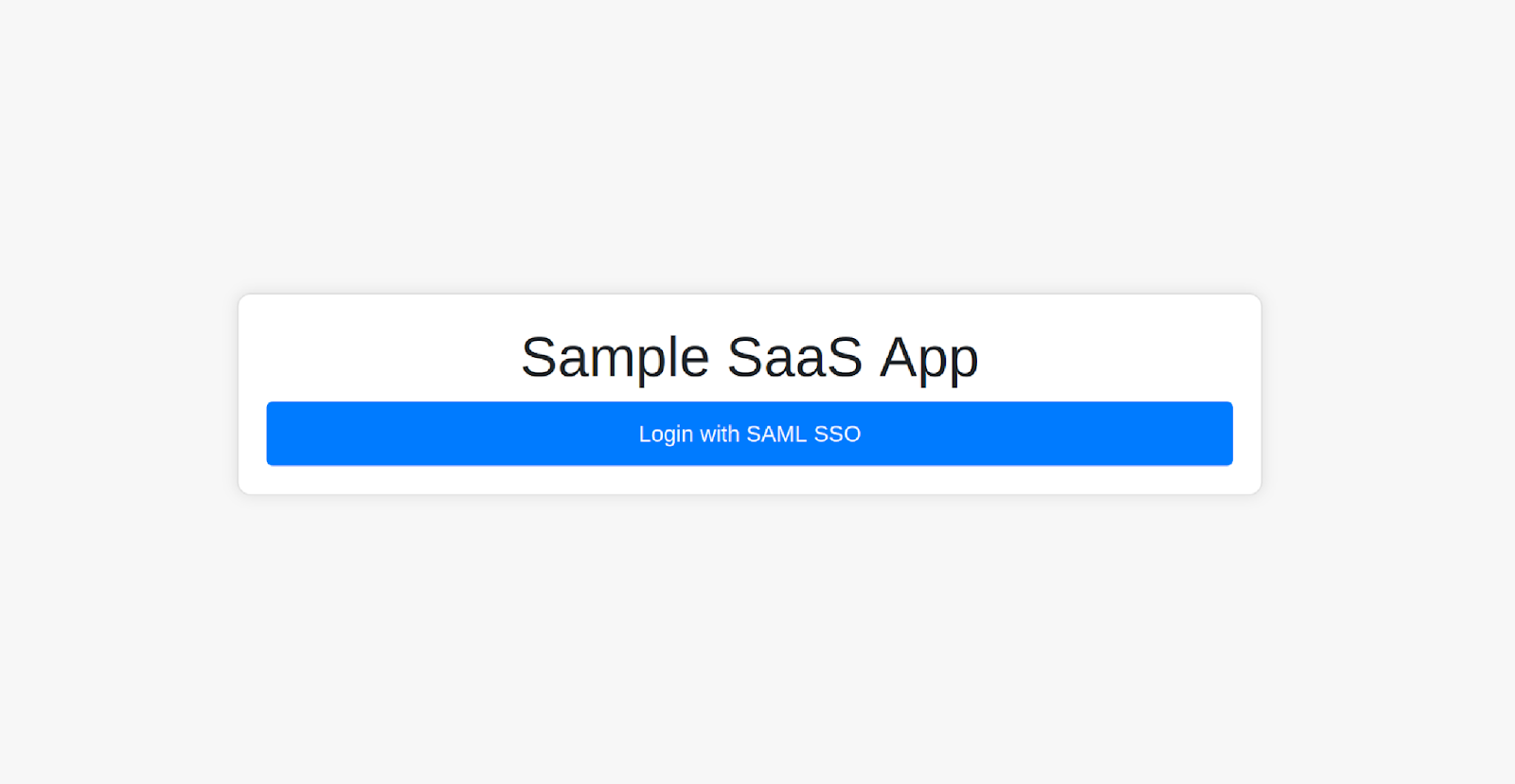
You can log in to the app by clicking the Login with SAML SSO button; it should redirect you to the Okta login page.
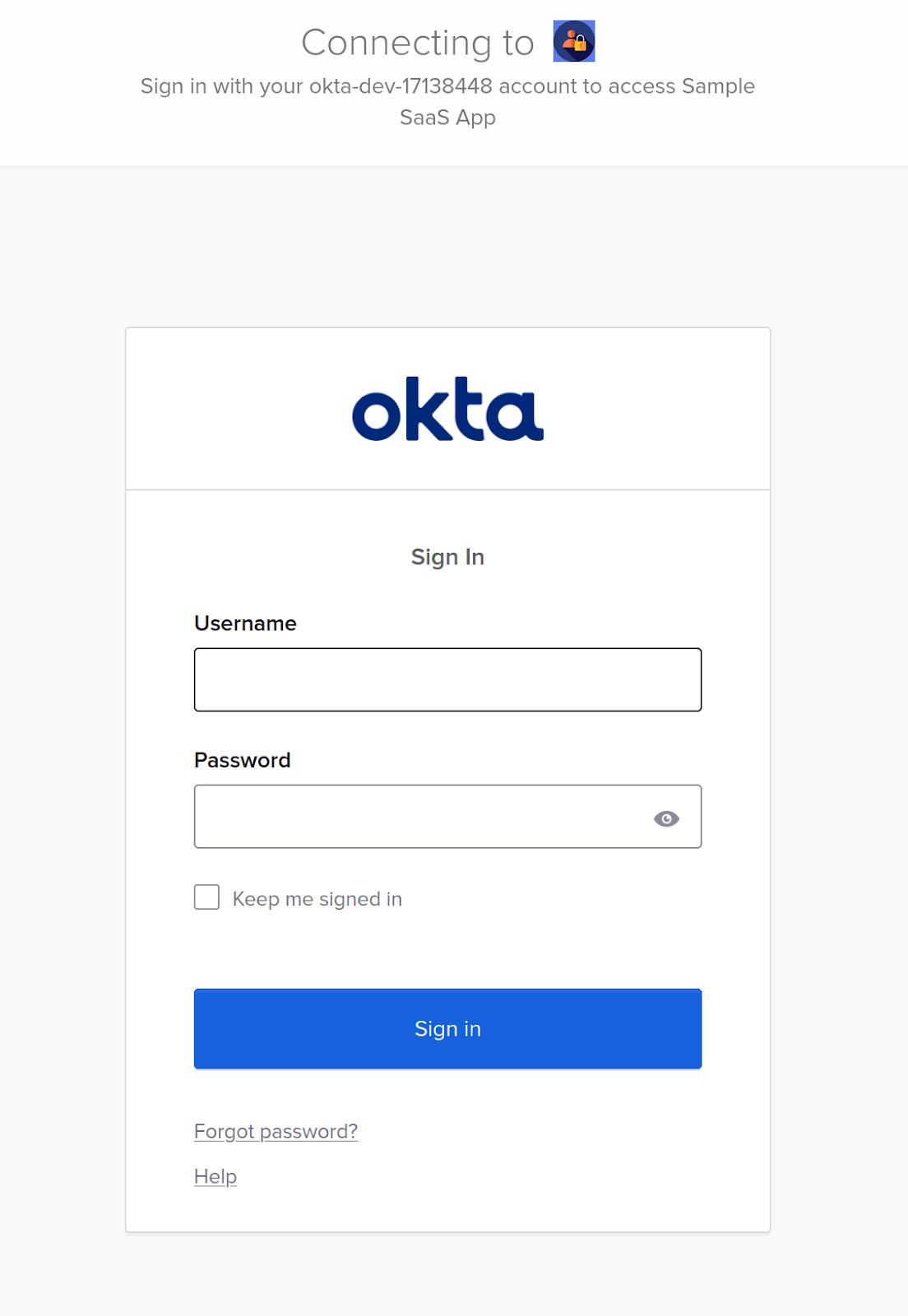
Use the credentials of the user who was assigned to the application.
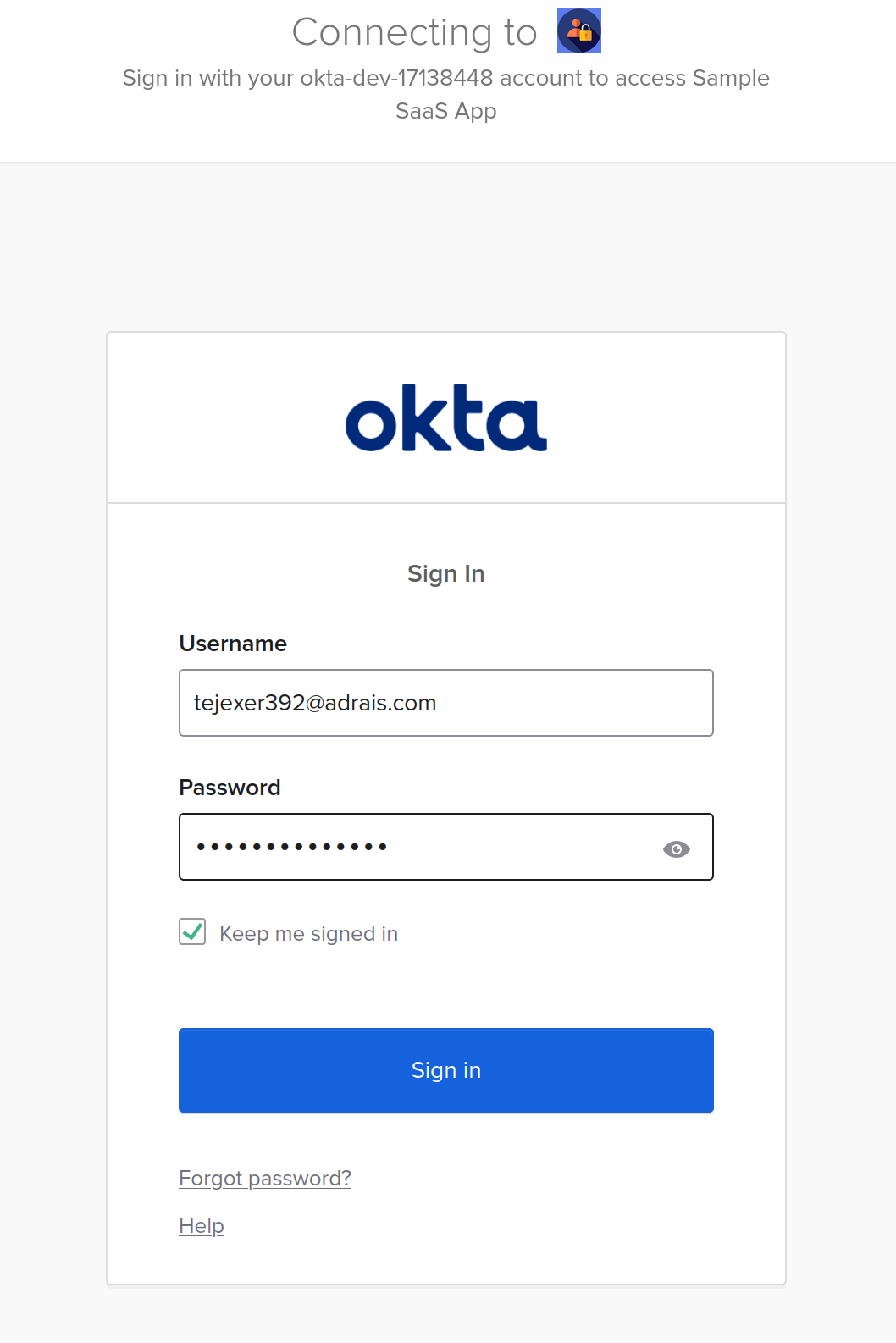
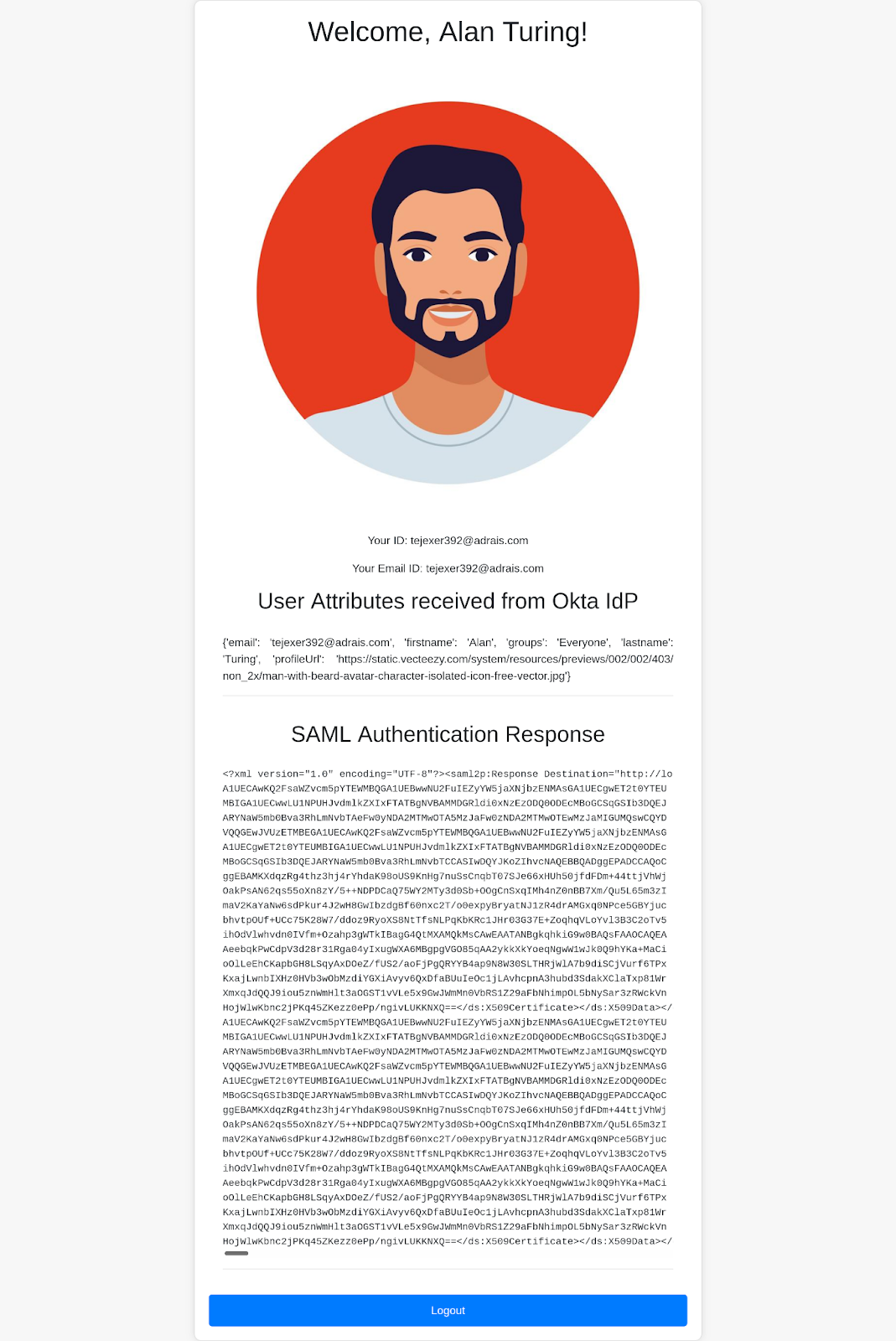
After authentication, Okta will send a SAML Response to the SP application's ACS endpoint. If the response is valid, the ACS endpoint will create the session and redirect you back to the home page, where the logged-in user's details will appear.
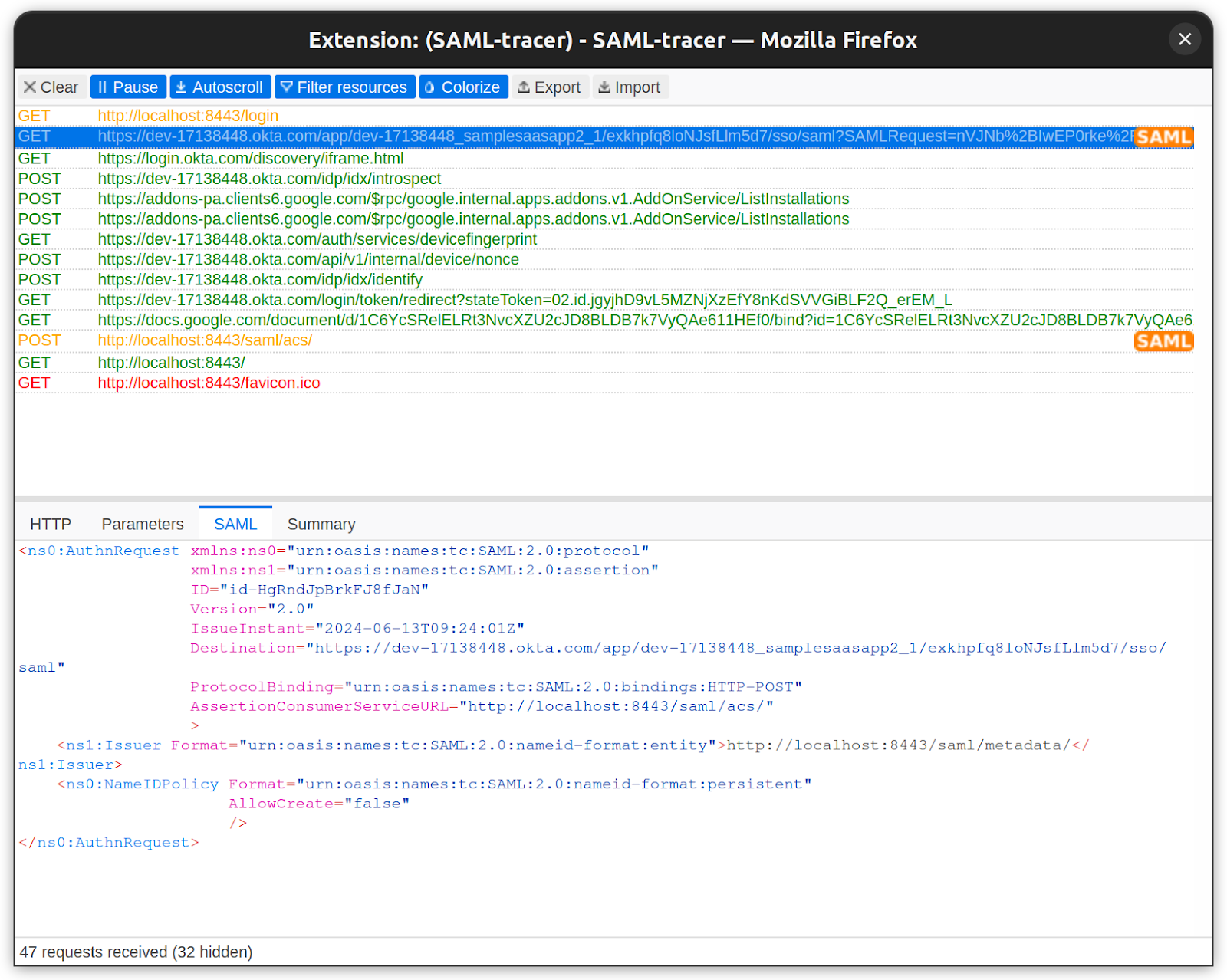
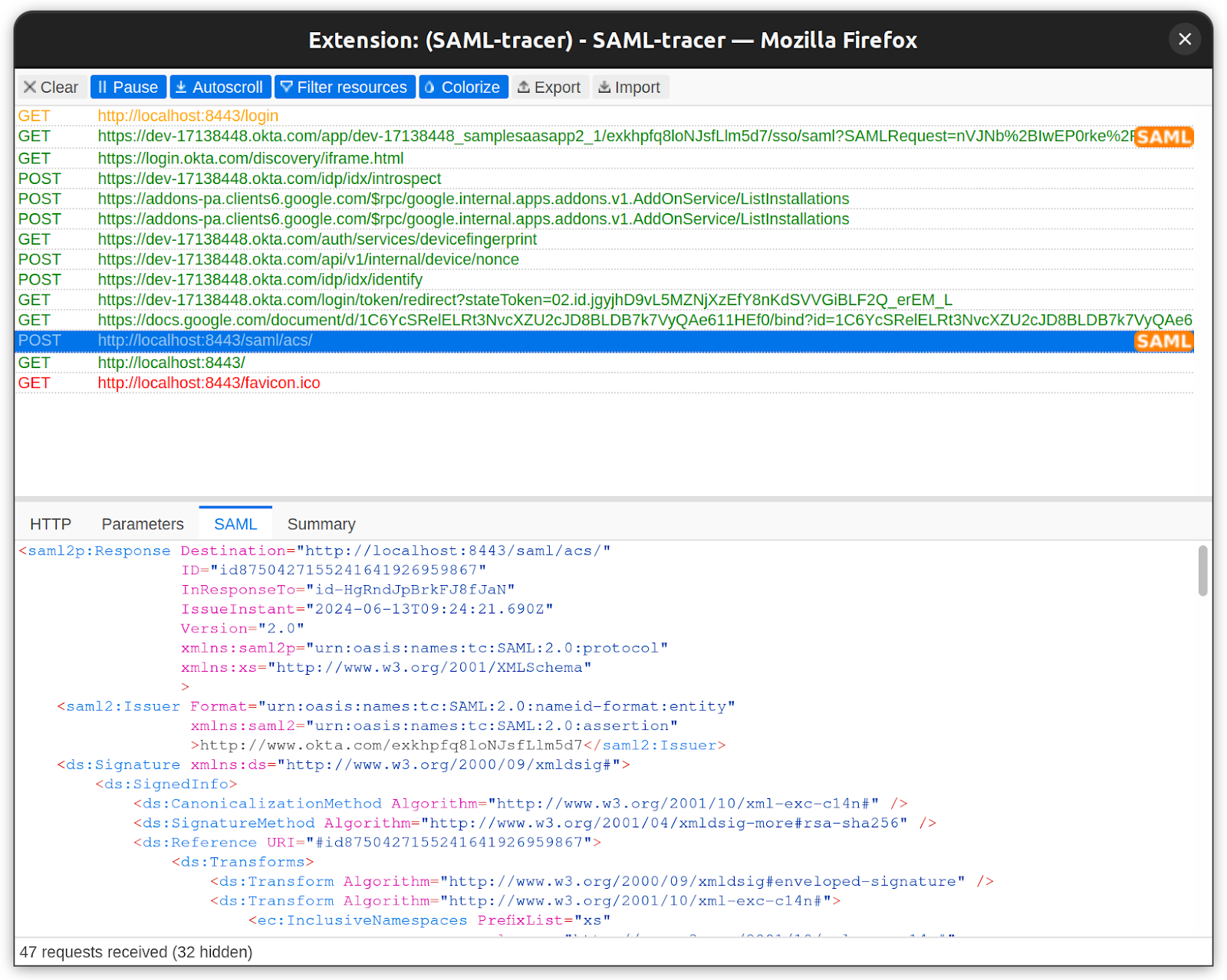
To understand what is happening behind the scenes, tools like SAML-tracer (available for Firefox and Chrome) allow you to inspect the raw SAML Request and Response exchanged during login.
Below is the SAML Request sent to IdP:
Below is the SAML response from IdP:
After a successful login, you can see the full name, first name, last name, email ID, and user profile picture.
That’s how you configure Okta SSO using SAML for a web application. The same approach can be applied to any other site or SaaS application that requires SAML-based authentication.
SAML integrations often fail not because the protocol is complex, but because different IdPs send slightly different metadata, certificates, and attributes. When onboarding enterprise customers, clear error handling helps diagnose issues quickly and avoid long support cycles.
Most SAML failures trace back to a few categories:
These tend to surface when integrating a new IdP or during certificate rotation.
SAML integrations can fail for subtle reasons, such as incorrect metadata, mismatched certificates, expired assertions, or binding errors. A reliable debugging workflow helps teams quickly identify where failures occur and why authentication breaks.
Use SAML-tracer to inspect SAML traffic.
Browser extensions like SAML-Tracer (Chrome/Firefox) let you capture and inspect:
This is often the fastest way to diagnose missing attributes, wrong URLs, or misconfigured IdP bindings
Enable verbose logging on the Service Provider.
Your application (the SP) should log signature validation, audience checks, assertion windows, and attributes whenever it processes a SAML response. Turning silent failures into explicit logs dramatically reduces debugging time.
This snippet demonstrates how to capture raw XML, log validation results, detect assertion time issues, and isolate signature errors.
Compare IdP and SP metadata carefully.
Most SAML configuration issues stem from subtle metadata mismatches. Always verify:
Metadata drift is common after certificate rotation, IdP admin changes, or directory syncs.
Use SAML validators to inspect XML and signatures.
Online validators such as SAMLTool, OneLogin XML Validator, and samltool.com help check:
These tools are especially useful when working with custom or legacy IdPs that deviate from the SAML spec.
Verify time and clock synchronization.
SAML assertions rely heavily on strict time windows:
Even a 5–10 second clock drift can cause intermittent authentication failures.
Ensure:
This eliminates one of the most common production-only failures.
The earlier example showed a development-friendly SAML integration. Production SSO for enterprise customers requires stronger guardrails around security, metadata reliability, and multi-tenant configuration. The checklist below captures the essentials.
Enterprise SaaS products must integrate with customer identity providers such as Okta and Microsoft Entra ID. Centralized authentication is now a baseline expectation for mid-market and enterprise buyers, and SAML SSO remains the most widely used standard for workforce applications. Supporting it ensures predictable onboarding, unified MFA enforcement, and lower security risk.
Implementing SAML manually is possible, but in production environments, you'll encounter metadata variations, certificate rotations, signature validation issues, and IdP-specific quirks. These edge cases often slow down engineering teams and introduce failure points across environments. A reliable approach requires handling assertions, ACS endpoints, and bindings securely and consistently.
Scalekit helps SaaS teams ship enterprise-grade authentication without maintaining custom SAML plumbing. Its SDKs and APIs simplify integrations across IdPs and also support OIDC and SCIM when your customers request them. If you want to accelerate enterprise onboarding or extend your SSO support, Scalekit’s Core Auth is a natural next step to explore.
Yes. SAML remains the dominant standard for enterprise workforce SSO because it integrates deeply with legacy infrastructure, HR systems, governance tools, and established IdPs like Okta and Entra ID. OIDC is growing, but does not replace SAML in many enterprise IT environments.
If you sell to mid-market or enterprise organizations, the answer is usually yes. Many customers use SAML internally, while some modern platforms use OIDC. Supporting both avoids deal blockers during integrations.
Scalekit removes the complexity of manual SAML setup by handling metadata parsing, certificate management, assertion validation, ACS routing, IdP differences, and error handling. You integrate once using an SDK and get a consistent SAML experience across all IdPs.
Yes. Scalekit provides unified support for SAML, OIDC, SCIM, and other enterprise auth requirements. Teams avoid building multiple authentication pipelines and instead rely on a single API surface that supports current and emerging standards.
They look for correct assertion validation, secure certificate handling, signed responses, configurable ACS endpoints, JIT/auto-provisioning behavior, IdP mapping options, and reliable error reporting. Passing these checks significantly reduces onboarding friction.






