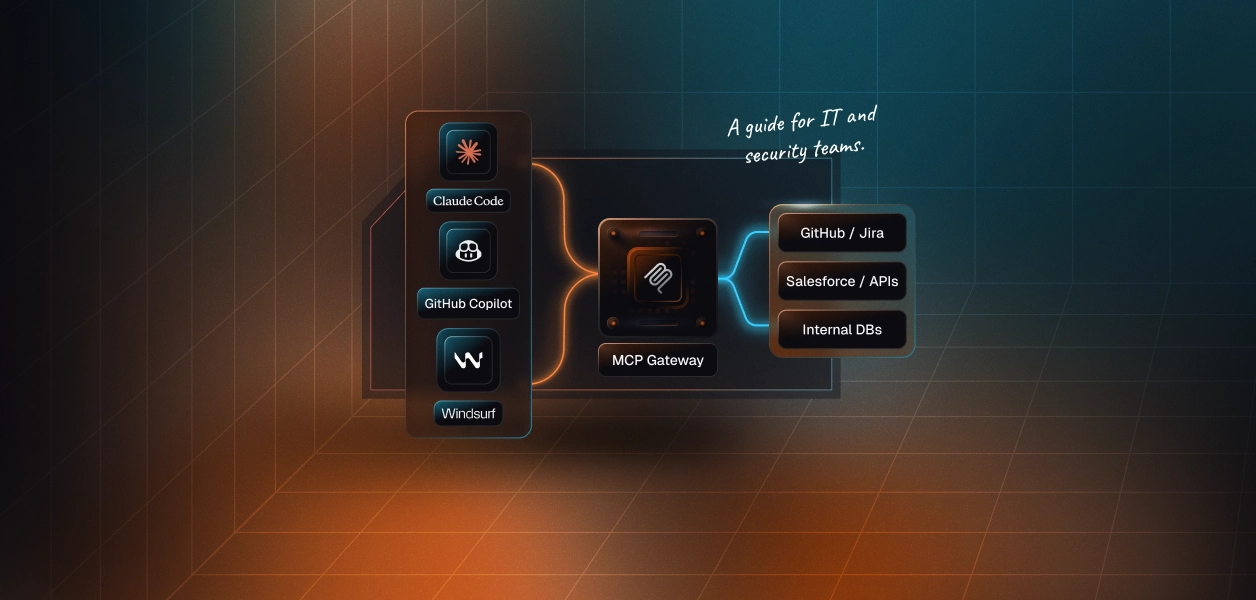
Most enterprise IT teams running Microsoft environments have a consistent answer to "how do we manage identity": Microsoft Entra. Active Directory for on-prem. Entra ID (formerly Azure AD) for cloud and SaaS. Conditional access policies that enforce MFA and device compliance. Entra ID Governance for access reviews and lifecycle management. Privileged Identity Management for just-in-time elevation.
It's a mature stack, and for managing human access to applications, it works well.
But the question arriving in IT teams right now isn't about human access to applications. It's about AI agents — GitHub Copilot Agent Mode, Claude Code, Microsoft 365 Copilot — connecting to internal systems through MCP and taking actions inside those systems on behalf of your employees. And whether the Entra stack you've built covers that model of access.
The short answer: Entra covers the identity layer. It doesn't cover the action layer. Here's what that means in practice, and how an MCP gateway bridges the gap.
This matters more for Microsoft-heavy organisations than it might seem at first, because so many of the AI tools you're already licensed for are converging on MCP.
• Microsoft 365 Copilot is gaining MCP connectivity — meaning it will connect to third-party systems beyond the M365 suite
• GitHub Copilot Agent Mode shipped with MCP support, allowing it to connect to Jira, Salesforce, internal APIs, and any system with an MCP interface
• Claude Code (available on Teams and Enterprise plans) uses MCP as its primary mechanism for external connections
• Cursor and Windsurf — which many developers already run — both support MCP natively
None of these require new procurement. The capability appeared in tools you already licensed, and it's actively expanding. Engineers who discovered MCP support weeks ago may already have 10–15 connections configured to internal systems that IT has no visibility into.
Here's what those connections can do. A developer using GitHub Copilot Agent Mode with MCP enabled can:
• Query your internal databases — run queries, retrieve records, export results
• Read and update project management systems — Jira, Linear, Azure DevOps — read ticket details, update status, create new issues, link to PRs
• Browse full repository contents — read any file, access commit history, branch configs, and repository secrets
• Interact with your internal APIs — any system your team has built an MCP interface for
• Search documentation — Confluence, SharePoint, internal wikis
• Execute multi-step workflows — research, draft, create PR, link ticket, all in one session
For individual developers, this is genuinely powerful. For IT, the question is: what policy governs what those agents can do — and does your current Entra configuration answer that question?
Entra's role in an MCP deployment is the same role it plays everywhere: managing the authenticated identity that authorises access.
When an employee's AI tool connects to an MCP-enabled system, the authentication can and should flow through Entra. The employee's group memberships, conditional access policies, and application entitlements all apply at the authentication layer. If Entra says the employee can access Salesforce, the agent inherits that access.
Where Entra's reach ends is inside the application, at the tool level. Here's where the boundary sits for each major Entra capability:
Conditional access policies govern whether an authentication request is approved. They apply at login. They don't govern which specific tools an MCP-connected agent can call once that authentication is established.
Entra ID Governance access reviews ask: does this employee still need access to this application? They don't ask: should the employee's AI agent be able to bulk-export from that application, or only read and update individual records?
Privileged Identity Management provides just-in-time elevation for privileged roles. The equivalent for AI agents — time-bounded, scope-limited access to sensitive tool sets — requires a separate layer that sits between the agent and the tools it can reach.
SCIM provisioning handles application assignment lifecycle. It tells each system "this user has access." It doesn't tell any system "this user's agent can create pull requests but not delete branches, read records but not bulk-export them."
These aren't Entra failures. The product was built for a specific access model: humans authenticating to applications. It handles that well. The agent-to-tool access model is structurally different, and it requires different infrastructure.
Here's what the Entra coverage gap looks like in practice for a Microsoft-shop engineering team.
A senior developer is in the "Senior Engineers" group in Entra. They have access to GitHub — assigned at the application level, correctly governed by Entra. Their conditional access policy requires MFA on every new login. Everything is in order.
That developer connects GitHub Copilot Agent Mode to the GitHub MCP server. The agent inherits the developer's credentials. The GitHub MCP server exposes:
The developer's intent: use Copilot Agent Mode to help review a PR, pull context from related tickets, and suggest test improvements. Reasonable, well-scoped.
But the agent has every tool in that list available. If the model decides "cleaning up the branch structure" helps with the task, it can delete branches. If it decides secrets are relevant context, it can read them. It won't pause to ask "should I be doing this?" the way a developer would.
Entra said: "this user has access to GitHub." The MFA requirement was enforced at login. Nothing else was said — because Entra has nothing else to say about tool-level agent behaviour.
The MCP gateway sits between employees' AI tools and the systems they connect to. It enforces action-level access policy and produces a unified audit log. It integrates with Entra using the same protocols Entra uses for everything else.
Entra pushes lifecycle events to the gateway through SCIM, the same way it provisions access to any connected SaaS application. This means your existing Entra lifecycle processes extend automatically to AI agent access:
• New hire: Employee is added to the "Junior Engineers" Entra group. SCIM provisions their gateway access with the Junior Engineers tool set. When they open Claude Code or GitHub Copilot, they add the gateway URL once, authenticate with their Entra credentials, and immediately have access to the tools configured for their role.
• Role change: Employee moves from the sales team to sales management. Entra group membership updates. SCIM propagates the change to the gateway. Their AI agent's tool access updates on the next session — the manager sees the additional tools configured for that role.
• Offboarding: IT disables the employee's Entra account. SCIM propagates the event to the gateway. Gateway access is revoked. Every downstream MCP connection — GitHub, Jira, Salesforce, internal APIs — stops. One event. Complete effect.
The offboarding scenario is where this architecture matters most. Without a gateway, disabling the Entra account doesn't touch the locally-stored API keys on the employee's laptop, which may still authenticate directly to GitHub or Salesforce. With a gateway, Entra account disable = gateway revoked = all agent access stopped.
Employees authenticate to the gateway using their Entra credentials. The gateway uses Entra as its identity provider — no separate credentials, no separate user database. An employee subject to a conditional access policy requiring compliant device authentication has that policy enforced at gateway login, the same way it's enforced for any other Entra-integrated application.
Entra group membership drives tool access policy in the gateway. You define which groups get which tool sets at the action level:
When group membership changes in Entra, tool access updates automatically in the gateway. No manual reconfiguration. No stale permissions persisting from a previous role.
For organisations deep in the Microsoft ecosystem, a few scenarios come up specifically:
Microsoft 365 Copilot MCP connections. M365 Copilot is gaining MCP connectivity, which means it will be able to connect to third-party systems beyond the M365 suite — Jira, Salesforce, internal APIs. When Copilot connects to these systems via MCP, those connections need the same governance treatment as connections from any other AI tool: tool-level access policy, centralised authentication, audit logging. The gateway handles this the same way for M365 Copilot as for GitHub Copilot or Claude Code.
The Microsoft Graph MCP server. Microsoft is developing MCP exposure for the Graph API, which means AI tools could access Exchange calendar data, SharePoint documents, Teams message history, OneDrive files, and other M365 content through MCP tool calls. For IT teams, this is significant: Graph API access surfaces data from across the M365 estate. The same gateway governance infrastructure that applies to third-party SaaS needs to apply to Graph-based connections, with tool-level scoping that reflects what agents should and shouldn't reach within M365.
Entra app registrations for MCP servers. Third-party MCP servers that authenticate via OAuth often use Entra as the identity provider for user-delegated access. Without a gateway, this means creating a separate Entra app registration for each MCP server that needs OAuth, managing consent separately per application, and maintaining that registration lifecycle when the integration changes. A gateway simplifies this: the gateway registers as the single OAuth client in Entra. One app registration, one consent flow, one token lifecycle to manage. The gateway handles downstream system auth internally.
Conditional access gaps for agent traffic. Standard Entra conditional access evaluates authentication requests — it applies at login. Agent traffic flowing through the gateway after authentication doesn't pass through conditional access on each individual tool call. This is expected and correct — conditional access isn't designed for per-action evaluation. It means the enforcement at the action level happens in the gateway, not in Entra. Both layers are doing the right thing for their scope; understanding which scope each covers matters for getting the security model complete.
For an Entra admin now being asked to govern AI agent access, here's how the work maps onto familiar patterns:
Scenario: New internal tool gets MCP exposure. The DevOps team builds an MCP server for the internal deployment system. IT adds a connector in the gateway, maps it to the appropriate Entra groups (senior engineers can read pipeline status and trigger builds; junior engineers can read only), and it becomes available in the right employees' AI tools on their next session. No new Entra app registration needed beyond the existing gateway OAuth client.
Scenario: SOC 2 audit asks about AI agent controls. The auditor asks: what controls govern what AI agents can do when accessing your internal systems? IT pulls the gateway audit log and access policy configuration. Specific tool allow-lists per group, every tool call logged, DLP redaction on sensitive data in tool responses. The audit artifact exists because all agent traffic flows through a single point.
Scenario: Employee departs on bad terms. Legal advises IT to immediately revoke all access. IT disables the Entra account. SCIM propagates to the gateway. Gateway access revoked. Every agent connection that employee had — GitHub, Jira, Salesforce, the internal API, whatever they'd configured — stops. No gap between Entra disable and agent access revocation. No window where locally-stored API keys remain valid.
Scenario: Developer team expands to 50 engineers. Without a gateway, each new engineer self-configures MCP connections, generating their own API keys and choosing which MCP servers to connect to. IT has no visibility. With a gateway, each new engineer gets the gateway URL in their onboarding package, authenticates with their Entra credentials, and gets the tool access appropriate for their Entra group. IT provisions nothing per-user; the access policy does the work.
The reality for most Microsoft-shop IT teams: there are already MCP connections running in the environment that aren't governed by Entra or any centralised system. Developers have connected Claude Code or GitHub Copilot directly to MCP servers using locally stored API keys. These connections exist outside Entra's visibility. Disabling the Entra account doesn't touch them.
Getting to a fully governed state doesn't require immediate revocation of everything in flight. The practical approach:
1. Establish the gateway and connect it to Entra via SCIM and OIDC — same integration pattern used for any SaaS application
2. Map Entra groups to gateway access policies — define tool-level allow-lists per role, starting with the highest-risk group (engineers with broadest system access)
3. Migrate credentials to the gateway — service credentials for MCP-connected systems move from employee device configs into the gateway, making Entra lifecycle events meaningful
4. Communicate the gateway URL to the engineering team — the change from individual MCP server configs to the gateway is a one-field update in their AI tool settings
5. Validate audit coverage — confirm that tool-level activity appears in the gateway audit log, and that those logs feed into your SIEM or log aggregation stack
The governance architecture for AI agents in a Microsoft environment is buildable right now, with infrastructure that works the same way Entra works for everything else. The organisations that build it during adoption — rather than after an incident makes the gap visible — avoid the catch-up work that's much harder to do at scale.
One. The gateway registers as a single OAuth client in Entra — covering authentication for all MCP-connected systems that flow through it. This replaces what would otherwise be a separate app registration per MCP server (one for GitHub, one for Jira, one for Salesforce, and so on). One registration, one consent flow, one token lifecycle for IT to manage.
Not directly through PIM, but the gateway supports the equivalent pattern. You can configure time-bounded or approval-required access to sensitive tool sets at the gateway level — for example, access to secrets management tools requires temporary elevation that auto-expires. The mechanism lives in the gateway rather than PIM, but the governance pattern (just-in-time, scoped, logged access) translates.
Yes, when M365 Copilot connects to third-party systems via MCP, those connections should route through the same gateway as any other MCP-compatible AI tool. The gateway is tool-agnostic — it speaks MCP and integrates with Entra. The specific tool (Copilot, Claude Code, GitHub Copilot) doesn't matter to the gateway; what matters is the MCP connection.
Gateway admin consent follows your standard Entra app consent process. An Entra admin grants consent for the gateway's required permissions during initial setup. This is the same flow used for any enterprise app registration requiring delegated or application-level Graph permissions. If your organisation uses admin consent workflows to review and approve third-party app registrations, the gateway goes through that process like any other app.
Service accounts (non-user-initiated agent workflows, scheduled automation) should be registered as service principals in Entra rather than using a human user's delegated identity. The gateway supports service principal-based authentication — the service account authenticates to the gateway with its own Entra-managed identity, gets its own configured tool allow-list, and its activity is logged separately from user-initiated sessions. This is particularly important for automated agents, which have no human in the loop to notice unexpected behaviour.
Not directly in today's gateway implementations. Entra Verified ID is primarily a credential presentation protocol for identity verification scenarios — presenting claims from verifiable credentials for high-assurance authentication. Current MCP gateway integrations use standard Entra OIDC/SCIM flows. For high-security MCP access scenarios (e.g., agents accessing sensitive financial or HR systems), the practical control is PIM-style elevation configured at the gateway level rather than Verified ID-based identity assertion.