

Single Sign-On (SSO) isn't a monolithic authentication problem—it's a modular capability that evolves differently than the rest of your auth infrastructure.
Here's how it usually goes: You built on AWS Cognito because it was there, it was easy, and it worked. Your first enterprise customer asked for SSO. You configured it. Then another. By the fifth one, you're thinking "there has to be a better way to do this." Or maybe you started with Auth0 when you had 10 enterprise customers, and now at 50 customers their per-connection pricing is making your CFO wince every time they review the bill. You don't want to rip out your entire auth system—your password flows work fine, your MFA is solid—you just need SSO to make economic sense.
SSO should be modular. Swap it out like you'd swap any other dependency. Simple, right?
Except it's not. Because SSO isn't just code on your end.
Every single one of your enterprise customers has someone in IT who carefully configured their Okta tenant or Azure AD to talk to your app. They added your Entity ID (auth.yourapp.com), plugged in your callback URL, uploaded certificates. It probably took them three tries to get it right because of a trailing slash somewhere. They documented it. They moved on with their lives.
Now you want to change providers. Which means every one of those carefully configured setups needs to change. New Entity IDs. New callback URLs. New certificates.
You know what happens next: scheduling calls across time zones and change freeze windows. Walking someone through SAML configuration while they share their screen and you pray they don't typo the URL. Coordinating deployments with customers who need board approval for infrastructure changes. And when something breaks—because something always breaks—entire organizations lose access to your app.
One team told us they got through 23 migration calls before giving up and staying on their expensive provider for another two years. The migration cost was just too high.
Quick sidebar on why this is so complicated: SSO works by establishing trust between your application (Service Provider) and your customer's identity system (Identity Provider). That trust is built on predetermined parameters.
For SAML, it's Entity IDs, callback URLs, and certificates. For OIDC, it's Client IDs, Redirect URIs, and Discovery endpoints. Your customers configure these once in their IdP. From then on, authentication flows smoothly—users log in through their IdP, assertions flow to your app, everyone's happy.
The problem? All those parameters are tied to your current provider. To switch, every customer needs new values. And you can't automate that—each customer must manually update their IdP, which means coordination, testing, and deployment windows on their side.
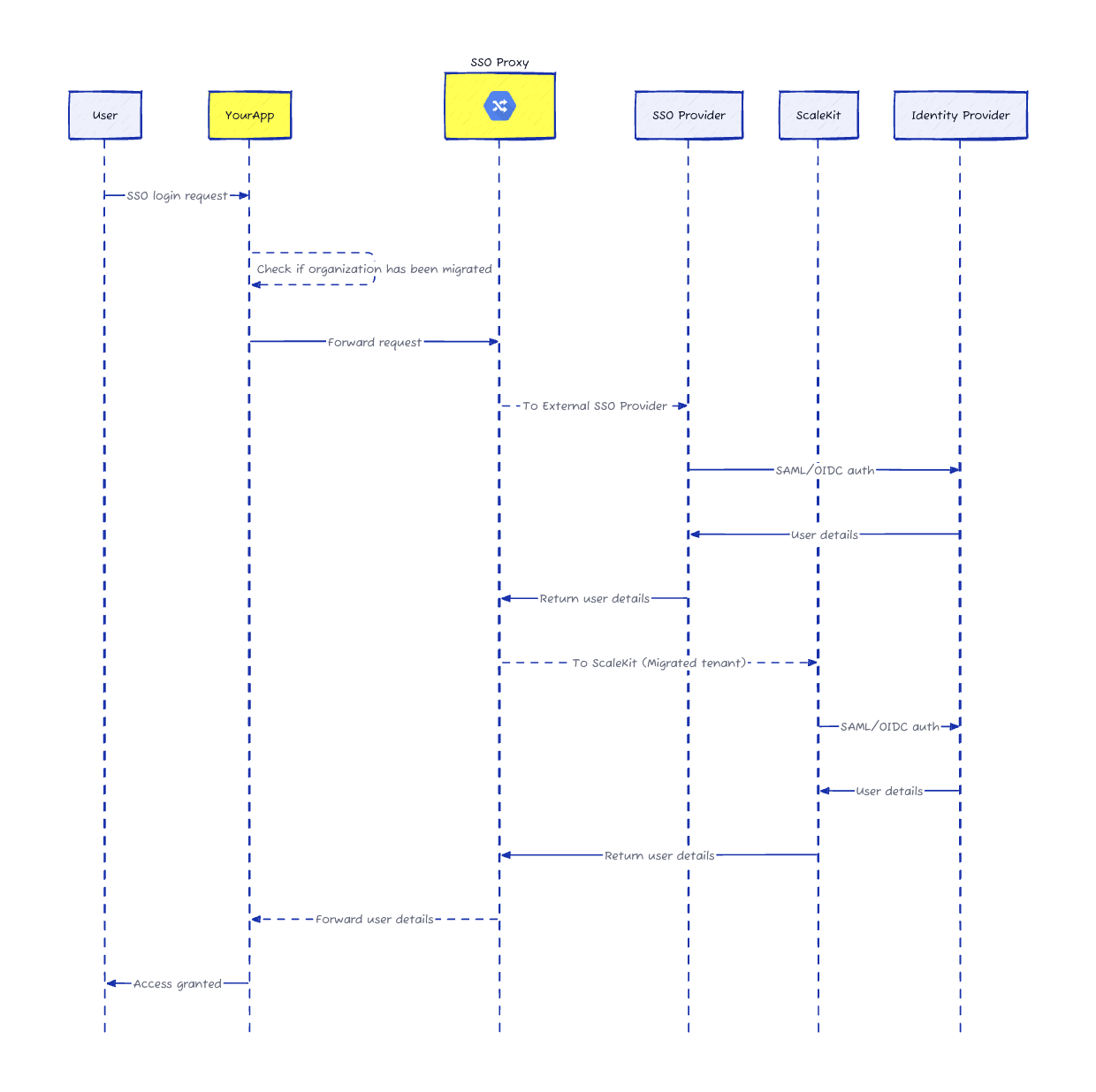
We built a migration approach that eliminates customer-side reconfiguration entirely. Through DNS redirection and smart proxying, you can move from Auth0, WorkOS, Firebase, or AWS Cognito to Scalekit while your customers' IdP settings stay exactly the same.
The DNS redirect layer: Your auth domain (auth.yourapp.com) already points to your current provider. Add a lightweight proxy that examines each authentication request and routes it to the right place.
Smart organization mapping: Keep a simple mapping of who's migrated and who hasn't. The proxy checks it on every request.
Transparent routing: When someone logs in, the proxy sends migrated organizations to Scalekit and unmigrated ones to your old provider. Same login flow, same experience, zero user-visible changes.
Preserved IdP configuration: Scalekit accepts the same Entity IDs and callback URLs your customers already configured. Their SAML or OIDC responses flow through the proxy to Scalekit exactly as they did before.
Let's say you're ExampleCorp with 50 enterprise customers on Auth0. Everyone's configured their IdP to send SAML assertions to auth.examplecorp.com/saml/callback.
Step 1: Configure Scalekit to accept the same Entity ID and ACS URL that Auth0 uses. When a customer's IdP sends a SAML response, Scalekit processes it with the exact parameters already in their IdP.
Step 2: Deploy a lightweight proxy at your auth domain. We provide ready-to-use implementations for AWS Lambda, Cloudflare Workers, or your existing infrastructure.
Step 3: Route authentication requests. When someone from acmecorp.com logs in, your app initiates SSO as usual. The proxy checks the mapping and routes to the right provider.
Step 4: Handle IdP responses. After authentication, the SAML response returns to auth.examplecorp.com/saml/callback. The proxy examines it, sees it's from a migrated org, and forwards it to Scalekit.
Step 5: Complete authentication. Your callback handler exchanges the authorization code for user details—exactly as before, just from a different provider.
Here's the best part: you control everything. Migrate one organization at a time. Test thoroughly. Roll back instantly if something's off. No coordination calls. No implementation meetings. No customer-side changes.
Start with internal test accounts. Move a few friendly customers. Gradually work through your customer base at whatever pace makes sense—days, weeks, months. Both providers run in parallel the whole time. Once everyone's moved, remove the proxy and point your auth domain straight to Scalekit.
Ready to migrate? Talk to our team or check out our migration documentation.
Traditional migrations require every enterprise customer to manually update their Identity Provider settings such as Entity IDs and Assertion Consumer Service URLs. This process involves scheduling coordination calls across various time zones and navigating complex change management windows within the customer IT organization. Even a minor configuration error like a trailing slash or a typo in the certificate can break the authentication flow for an entire company. Consequently engineering teams often feel locked into expensive legacy providers because the operational overhead and risk of forcing customer side reconfigurations are simply too high to justify the move.
Scalekit utilizes a lightweight DNS redirection layer and a smart proxy to intercept authentication traffic. By configuring Scalekit to accept the exact same Entity IDs and callback URLs already present in your customers existing Identity Provider setups the migration becomes invisible to the end user and the IT admin. The proxy identifies the organization making the request and routes it to either the legacy provider or Scalekit based on a mapping configuration you control. This approach ensures that the trust relationship established between the customer and your service provider remains intact throughout the transition.
You have complete control over the migration pace and can transition organizations individually rather than performing a risky wholesale cutover. The smart proxy allows both your legacy authentication provider and Scalekit to run in parallel checking a mapping table for every request to determine the correct destination. This granular approach lets you start with internal test accounts move to friendly beta customers and eventually migrate the rest of your user base at your own speed. If any issues arise with a specific organization you can instantly roll back their configuration without affecting other customers.
For the best balance of performance and ease of management the migration proxy should be deployed at the edge of your network. Ready to use implementations are available for serverless environments like AWS Lambda or Cloudflare Workers which provide global scalability and minimal latency. Alternatively you can integrate the proxy logic directly into your existing infrastructure or API gateway if you prefer to maintain tighter control over the traffic flow. The key is to place the proxy at your custom authentication domain where it can effectively inspect incoming SAML and OIDC requests before they reach the provider.
This migration strategy is specifically designed to leave existing SAML and OIDC configurations entirely untouched on the customer side. Because Scalekit is configured to mirror the parameters of your previous provider the Identity Provider continues to send assertions and tokens to the same endpoints as before. The proxy handles the logic of forwarding these responses to the correct backend system. This preserves the hard earned trust between your application and the enterprise IT departments eliminating the need for them to generate new metadata or upload fresh certificates until their next scheduled maintenance window.
While the blog focuses on SSO the proxy architecture is extensible to machine to machine and agent to agent authentication flows. Modern B2B applications often require robust M2M capabilities for AI agents and automated services. By using a similar routing logic you can migrate client credentials and API keys between providers without breaking existing integrations. This is particularly relevant for businesses adopting MCP servers or AI agent architectures where consistent authentication is critical. Scalekit provides the flexible foundation needed to manage these complex B2B auth patterns while ensuring architectural integrity and security across all your service layers.
DNS redirection serves as the entry point for the entire migration architecture. By pointing your dedicated auth domain to the migration proxy instead of directly to a specific provider you gain the ability to inspect and route traffic programmatically. This layer acts as a traffic controller that determines whether an authentication request should be handled by the legacy system or directed to Scalekit. Once the migration for all customers is complete and verified you can update the DNS records to point directly to Scalekit effectively removing the proxy layer and finalizing your transition to a more scalable solution.
CISOs typically favor this approach because it reduces the risk of accidental downtime and security misconfigurations that often occur during manual migrations. The proxy handles traffic transparently and does not store sensitive user credentials maintaining the security posture of the existing OIDC or SAML flows. Furthermore because the migration can be done incrementally security teams can conduct thorough audits and monitoring on a per organization basis. This controlled transition ensures that all security assertions and user attributes remain consistent across providers satisfying compliance requirements and internal governance standards during the architecture shift.
Scalekit supports advanced B2B authentication features including Dynamic Client Registration and Client Initiated Backchannel Authentication. During a migration these capabilities allow you to programmatically manage OIDC clients and ensure that automated registration flows remain functional. This is especially useful for complex A2A and M2M environments where manual configuration is not feasible. By leveraging Scalekit for these sophisticated workflows developers can build more robust AI agent platforms and enterprise integrations. The platform ensures that as your auth needs evolve from simple SSO to complex authorization architectures the underlying infrastructure can scale and adapt without requiring significant re engineering.