

Six months ago, when we brought up our first MCP server at Scalekit, it felt like we were working at the edges of a spec that was still finding its shape.
Most servers were running on localhost. Most “auth” looked like, either a hardcoded Authorization: Bearer <api-key> in a config file or no auth at all because the client and server lived on the same machine.
That was fine when your MCP server was basically a dev helper.
In the last six months, MCP exploded from mostly local experiments to thousands of servers listed in registries, with remote deployments surging since mid-2025. At that point, MCP stopped behaving like a toy protocol and suddenly we were dealing with redirects, secrets, tokens, and multi-tenant configs — not just tool definitions.
And production surfaces always force the same question: “Who is calling this tool, exactly — and what are they allowed to do?”
When MCP is remote, the API key approach breaks in predictable ways — so you end up inventing scopes, inventing per-tenant keys, and building your own rotation logic.
This is the problem OAuth 2.1 in MCP is designed to solve.
But once you decide “okay, we’re doing OAuth”, you hit the real wall: sometimes, it fails annoyingly.
With MCP, you don’t just have one OAuth shape — you have different client models (static, DCR, CIMD), and each one introduces its own class of bugs.
Here’s the stuff we keep seeing in real MCP OAuth rollouts:
scope="org:write env:read" but your server expects a different delimiter/formatorg:write, but the tool actually checks orgs:writescope=... but your authorization server silently drops unknown scopes, so you get a token that looks fine but can’t call anythingNone of these are conceptual OAuth problems. These are debugging problems.
At Scalekit, we spend a lot of time validating OAuth flows because we power auth for a lot of MCP servers in production. The pattern is consistent: teams don’t get stuck on the spec — they get stuck on figuring out what actually happened when a real MCP client runs the full flow.
So we started caring a lot about MCP debugging tooling and the ecosystem is catching up.
First came, the MCP Inspector, it is almost the obvious baseline: introspect your tools, schemas, prompts, and manually trigger calls without pulling in an agent loop.
But where MCPJam stood out for us was, it can drive the whole handshake and show you exactly where it breaks.
MCPJam has a broader dev surface with three standout features:
We use it mostly for #2.
Because when you’re debugging OAuth in MCP, the biggest time sink is reproducing the failure with the exact client model that’s failing in production. But the good part is you can point MCPJam at your MCP server, switch between registration styles, and observe how each one behaves against the same backend and authorization server configuration.
.png)
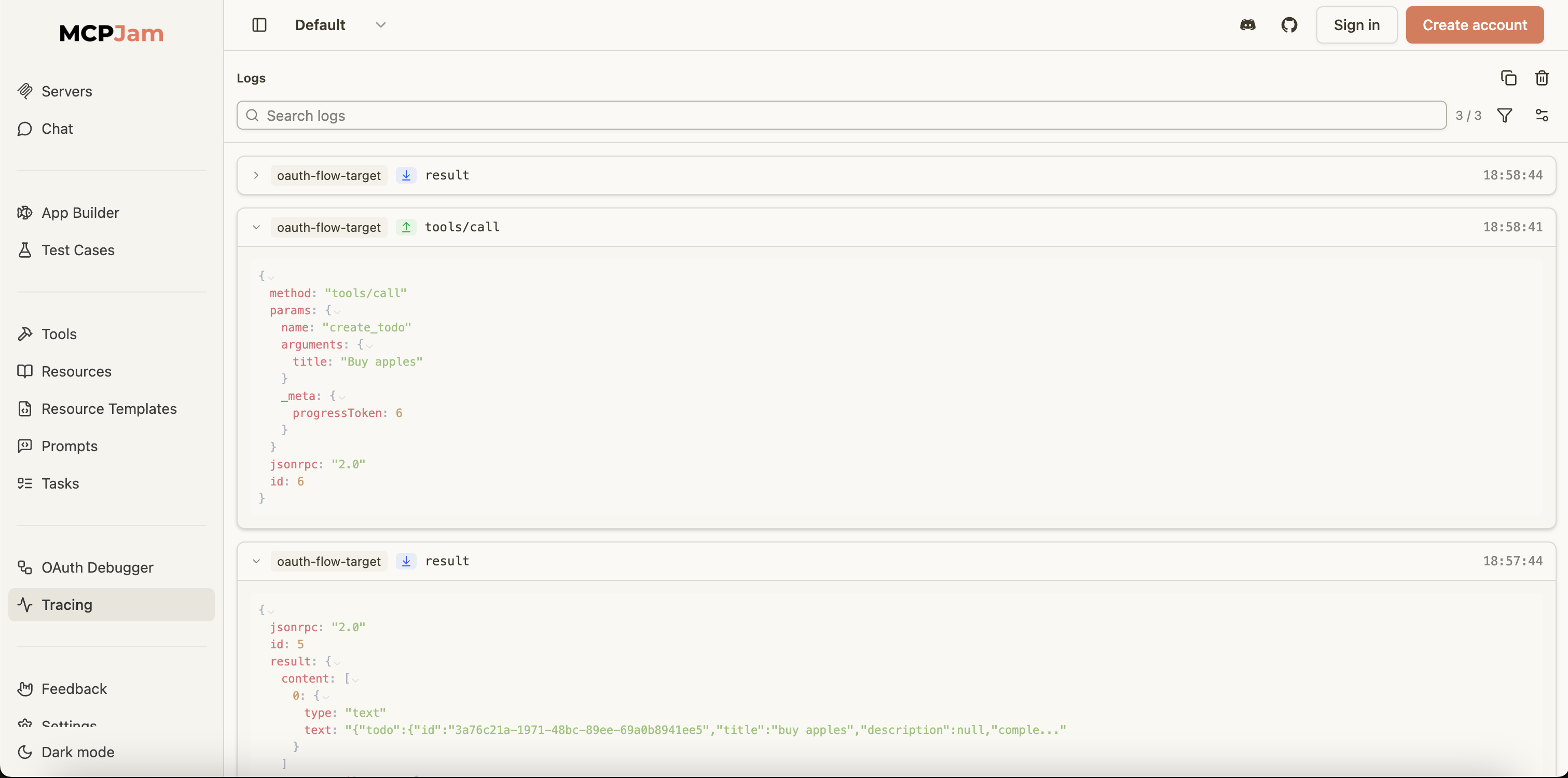
When something goes wrong in an MCP OAuth flow, you often need to see the raw messages, not just the high‑level steps. MCPJam gives you detailed logging of the JSON‑RPC traffic and server logs around your OAuth flow, so you can line up “OAuth looked fine” with “the MCP call still failed” in one place.
That kind of message‑level visibility is especially useful when you are trying to understand whether a failure is in your auth wiring, your MCP server logic, or the downstream API it’s calling.
If you’re building remote MCP servers, OAuth edge cases aren’t hypothetical — you’ll run into them as soon as real clients start talking to your server. Issues around client registration, scope handling, metadata discovery, and token validation don’t show up in isolation; they surface when the full MCP flow runs end to end, often in ways that are hard to reason about from logs alone.
If you’re implementing MCP auth in-house, tools like MCPJam become critical. They let you debug MCP OAuth at the level it actually fails; tracing how OAuth handshakes line up with MCP JSON-RPC calls; and running evals to see how the same server behaves across different MCP clients and environments. That visibility is what turns opaque OAuth failures into something you can actually fix.
Or you can decide not to build any of this yourself and focus entirely on tools and agent behavior — in that case, Scalekit provides a drop-in module for MCP servers with built-in support for all types of client registration.
So, in practice, it means you can take a remote MCP server from “running” to production-ready in about 20 minutes, in four straightforward steps. To get started, follow the quickstart guide.
Transitioning from hardcoded API keys to OAuth 2.1 is essential as MCP servers move from local environments to remote deployments. API keys fail to scale in multi tenant architectures because they lack robust rotation logic and granular scope management. OAuth provides a standardized framework to handle redirects, secrets, and tokens securely. By adopting OAuth, engineering teams can ensure that remote tool calls are properly authenticated, allowing for precise control over who is accessing specific tools and what actions they are permitted to perform within a production environment.
OAuth failures in MCP often stem from subtle configuration errors rather than conceptual flaws. Frequently encountered issues include redirect URI mismatches caused by trailing slashes or port differences, and PKCE code exchange failures where the verifier pairing is incorrect. Additionally, developers often face challenges with scope handling, where the authorization server issues valid tokens that the MCP server rejects due to delimiter mismatches or naming inconsistencies. These debugging hurdles highlight the need for specialized tooling to visualize the handshake and identify exactly where the authentication flow breaks during runtime.
Dynamic Client Registration, or DCR, enables a self service model for MCP client onboarding, which is critical for scaling remote deployments. Instead of manually pre registering every client, DCR allows clients to register themselves with the authorization server automatically. This approach simplifies the management of multi tenant configurations and reduces administrative overhead. However, it introduces additional complexity, such as managing registration endpoints and validation rules. Using a debugger like MCPJam helps architects visualize this flow, ensuring that registration policies are correctly enforced and that error messages remain helpful for client developers.
The Client Identity Metadata Document, or CIMD, acts as a discovery mechanism that allows authorization servers to read and verify client metadata. In the context of MCP, CIMD ensures that client configurations are transparent and easily propagatable across the ecosystem. It allows for a more automated trust relationship between the MCP client and the auth provider. Implementing CIMD effectively requires verifying that the metadata document is discoverable and that changes are correctly interpreted by the authorization server. This standard is particularly useful for maintaining consistency in complex, high scale B2B agent environments.
Standard logs often fail to capture the nuances of an MCP OAuth handshake, making it difficult to diagnose why a technically valid token results in a 401 error. Specialized tools like MCPJam and MCP Inspector provide visibility into the JSON RPC traffic and raw wire messages. This level of tracing allows developers to align OAuth steps with specific MCP call failures. By simulating different registration styles and LLM conditions, these tools turn opaque failures into actionable insights. For CISOs and engineering managers, this visibility is crucial for maintaining the security and reliability of production AI agents.
Scalekit offers a drop in module designed specifically for MCP servers, eliminating the need for teams to build complex authentication infrastructure from scratch. It provides native support for various client registration models, including static, DCR, and CIMD. By offloading the intricacies of OAuth 2.1, PKCE, and scope validation to Scalekit, developers can focus entirely on building tool logic and agent behaviors. This approach reduces the time to market for production ready remote MCP servers to approximately twenty minutes, ensuring that security best practices are baked into the architecture from the very beginning.
Scope failures often occur when there is a disconnect between what the authorization server issues and what the MCP server expects. For instance, an auth server might provide a space delimited list of scopes while the tool expects a different format. In other cases, the MCP client may request specific scopes that the authorization server silently drops if they are unrecognized, resulting in a token that lacks the necessary permissions. These practically wrong configurations are difficult to detect without message level visibility into the JSON RPC traffic, which specialized MCP debuggers are designed to provide.
Static clients rely on pre registered credentials, such as a known client ID and secret, which are manually configured in the identity provider. This model is straightforward but lacks the scalability required for broad multi tenant applications. In contrast, dynamic clients utilize Dynamic Client Registration to automate the onboarding process. While DCR offers greater flexibility and supports self service workflows, it requires more sophisticated handling of registration endpoints and validation logic. Architects must choose between these models based on their deployment scale and the level of administrative control required for their specific B2B authentication use case.
The MCP ecosystem is rapidly maturing from local development experiments toward robust, remote first architectures. As deployments surge, the focus has shifted from simple API keys to standardized OAuth 2.1 implementations that handle multi tenancy and secure agent to agent communication. The emergence of sophisticated debugging tools and purpose built auth providers like Scalekit indicates a professionalization of the stack. This evolution ensures that AI agents can interact with enterprise data and tools securely, with clear visibility into identity and authorization, meeting the stringent requirements of modern CISOs and engineering leaders.



.webp)




