

Early MCP deployments often start small: one internal service, one IDE integration, and a handful of developers. At this stage, client identity rarely feels like a problem. The friction appears later, when MCP becomes part of a broader internal platform and more tools begin interacting with it.
A typical example is an internal ticketing system exposed via MCP, allowing developers to create and update tickets directly from their IDEs. Cursor is often the first IDE teams integrate with. The prototype works locally, but as adoption grows, new questions surface. How does the MCP server determine that requests originate from Cursor rather than another tool? Where does that client identity live? What happens when a second IDE, a CI pipeline, or an experimental agent is introduced next week?
Teams quickly discover that this is not a user authentication problem. Enterprise SSO already handles user identity, MFA, and access policies. The real challenge is client identity. MCP clients are not stable applications with long-lived credentials. IDE extensions reload, agents are ephemeral, and local tools appear and disappear constantly. Manually registering each client or issuing shared secrets does not scale and introduces operational and security risk.
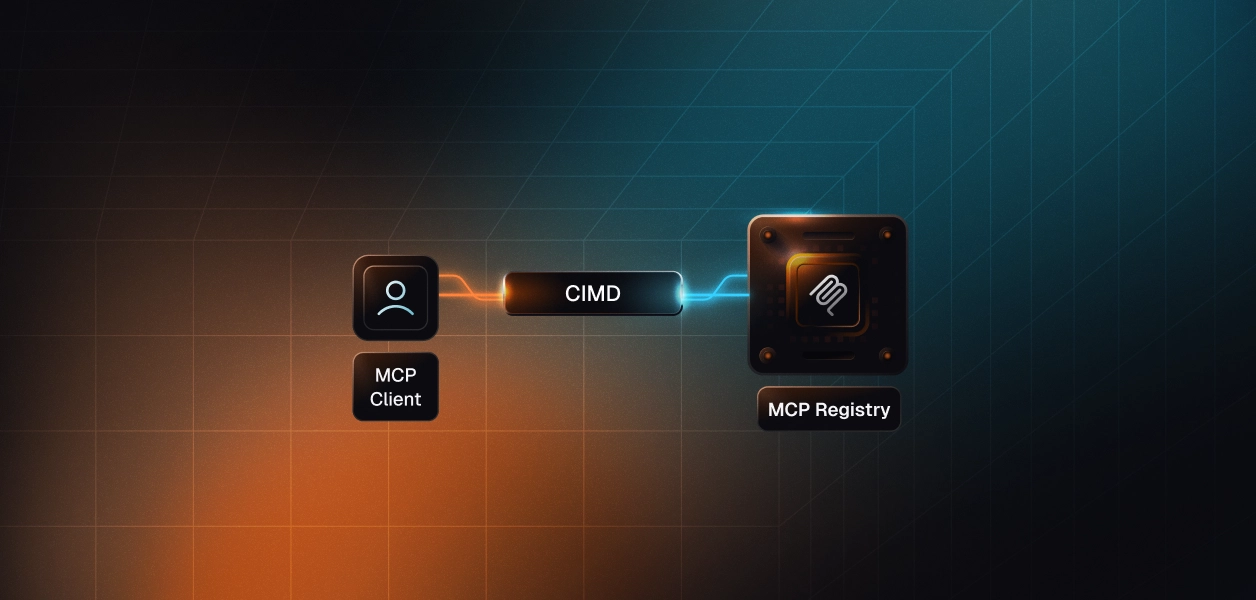
This is the gap that Client ID Metadata Documents (CIMD) are designed to fill. CIMD allows MCP clients to identify themselves using a public, fetchable metadata document instead of preregistration. In the rest of this blog, we follow a concrete enterprise scenario that integrates Cursor with an internal MCP server to show how this model works in practice, where it fails, and how it scales when paired with standard OAuth infrastructure such as Scalekit.
In MCP, client registration is about software identity, not people. When an MCP server evaluates a request, it assumes that user authentication and consent have already been handled upstream via enterprise SSO or OAuth. Registration exists to answer a narrower question: what kind of client is calling this server, and what behavior should the server expect from it?
In the Cursor integration scenario, the ticketing MCP server does not need to know the developer's identity. It needs to know whether the caller is a trusted IDE client, a CI worker, or an experimental agent. These clients are often ephemeral and may not exist when the server is deployed. Treating them like traditional OAuth clients pre-registered, manually approved, and tied to stored secrets quickly becomes an operational bottleneck.
CIMD keeps registration deliberately narrow and mechanical. Instead of creating a client record in advance, the client provides a client_id that references a metadata document it controls.
The server fetches that document and evaluates it against its own policy:
If the metadata passes validation, the server proceeds. If it does not, the request stops immediately. This separation between client identity and user identity enables MCP servers to support dynamic tools such as IDEs and agents without sacrificing control or introducing manual workflows.
CIMD was introduced in response to practical questions teams encountered as MCP moved beyond small prototypes. As MCP servers began serving IDEs, CI runners, browser extensions, and short-lived agents, existing client registration models struggled to map cleanly onto these environments.
This shift was formalized in the MCP authorization specification.CIMD was introduced to give MCP a client identity model that reflects how modern tools actually behave: dynamic, decentralized, and often short-lived.
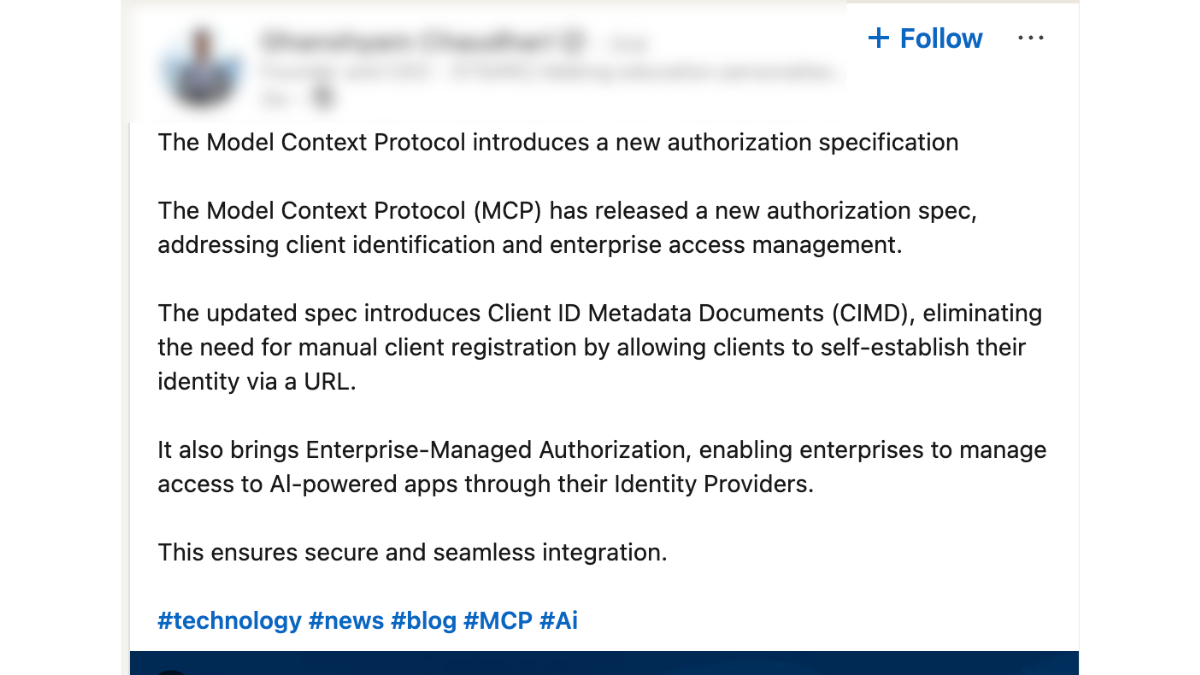
Once CIMD was added to the MCP authorization specification, platform and identity engineers began evaluating how it fit alongside existing OAuth patterns. In particular, they compared CIMD with Dynamic Client Registration (DCR) and discussed where each approach is most appropriate in real MCP deployments.
That discussion played out openly across MCP-related threads and community forums. Rather than positioning CIMD as a replacement for DCR, platform and identity practitioners focused on practical trade-offs: when metadata-based identity avoids unnecessary client state, and when per-client registration remains appropriate.
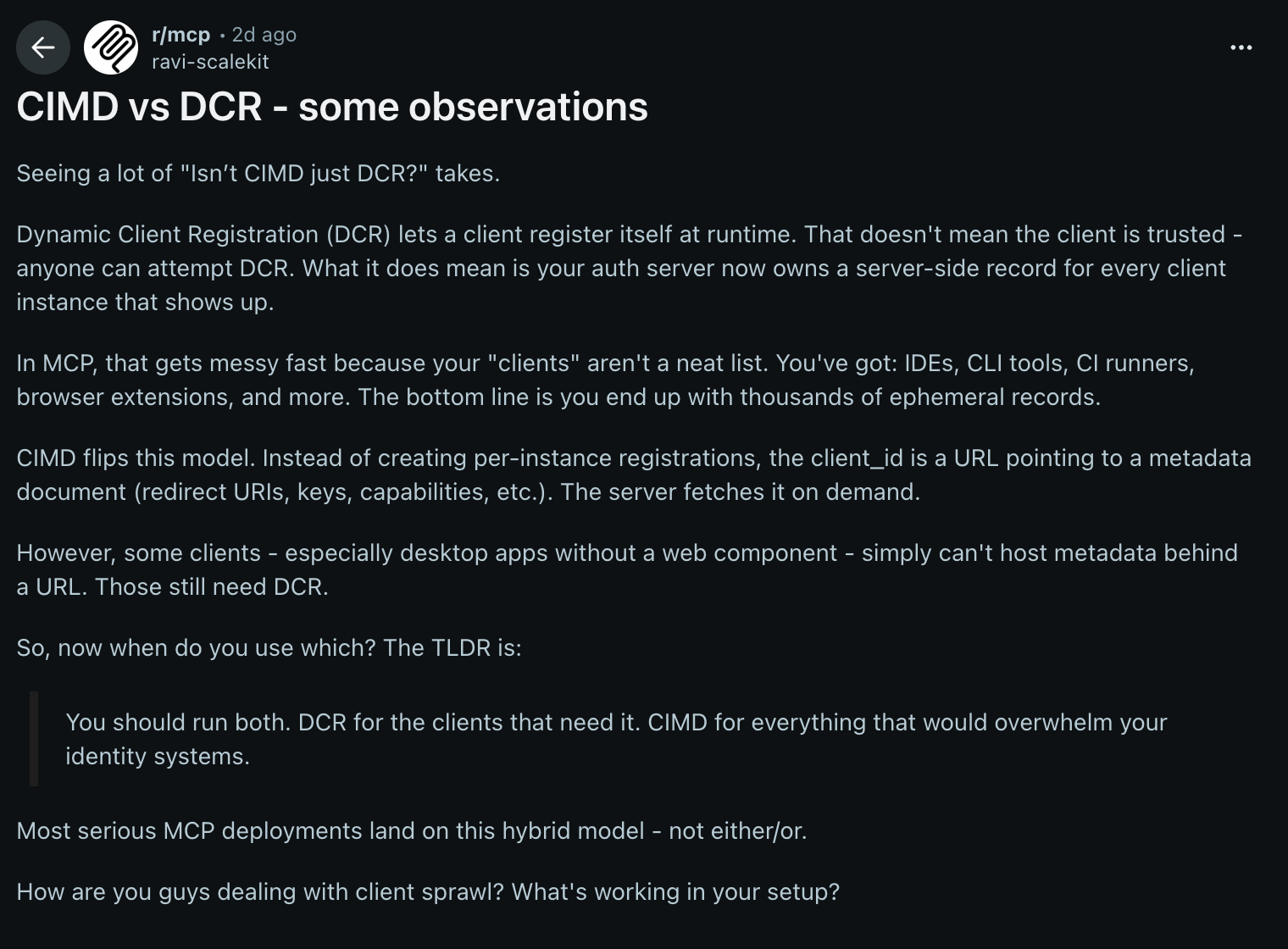
The outcome of these discussions is practical. Teams are less focused on differences in theoretical models and more on running MCP at scale without accumulating long-lived client state. For high-churn clients such as IDEs and agents, metadata-based client identity more closely aligns with how these tools behave in real-world deployments.
With that context, this blog focuses on CIMD and follows how it works end-to-end in an MCP environment. We begin with the single artifact that enables this model: the Client ID Metadata Document.
When the developer team enables Cursor to call the ticketing MCP server, there is precisely one artifact the server relies on to understand the client: the Client ID Metadata Document. There is no registration UI, no secret exchange, and no manual approval step. When a request arrives, the server fetches and inspects this document, then accepts or rejects it.
Below is the actual CIMD document used by the team while integrating an IDE-style client during development. It reflects how real MCP clients behave: local callbacks, public-client semantics, and explicit scopes.
This document does not grant access on its own. It only describes what the client is and how it intends to behave. The client_id serves as the fetch URL, providing the server with a canonical endpoint to retrieve metadata. Redirect URIs allow the server to reject unexpected callbacks early. Declaring token_endpoint_auth_method: "none" signals that this is a public client relying on PKCE rather than a stored secret. Optional fields such as client_uri and logo_uri exist purely for display and do not affect validation.
The important property is that this document is public, fetchable, and authoritative. If the server cannot retrieve it over HTTPS or the contents violate policy, the request fails before any OAuth flow begins. In the next section, we’ll follow a single request from Cursor and trace exactly how the MCP server evaluates this metadata before deciding whether to proceed.
Once the development team publishes the CIMD document, the MCP server requires no further client-specific configuration to evaluate incoming requests. The next interaction is simply a request from Cursor. When a developer triggers ticket creation inside the IDE, Cursor sends a request to the ticketing MCP server and includes a single identifying value: the client_id. That value is the HTTPS URL where Cursor’s metadata is hosted.
Cursor configured with an MCP server and a CIMD-based client ID, without embedding secrets or preregistered client details.
client_id is not a lookup key. It is a declaration. Cursor indicates to the server where its public description resides. At this point, the server has not trusted the client, issued tokens, or evaluated scopes.
The MCP server treats the client_id as a fetch target and performs an HTTPS GET. The response is the CIMD document describing:
This fetch happens before any OAuth redirect or tool execution. The server is still answering a single question: Is this a client I understand?
With the document in hand, the server validates it mechanically:
If any check fails, the request stops immediately. No OAuth flow begins.
Once validation succeeds, the server has a trusted model of the client’s behavior. At that point, it proceeds to user authorization and enforces the requested scopes. At this point, Cursor is no longer an unknown IDE on the network; it is a well-described client operating within declared constraints.
This same evaluation flow applies to every future client. The server does not special-case Cursor. It applies the same rules to IDEs, CI jobs, and experimental agents alike.
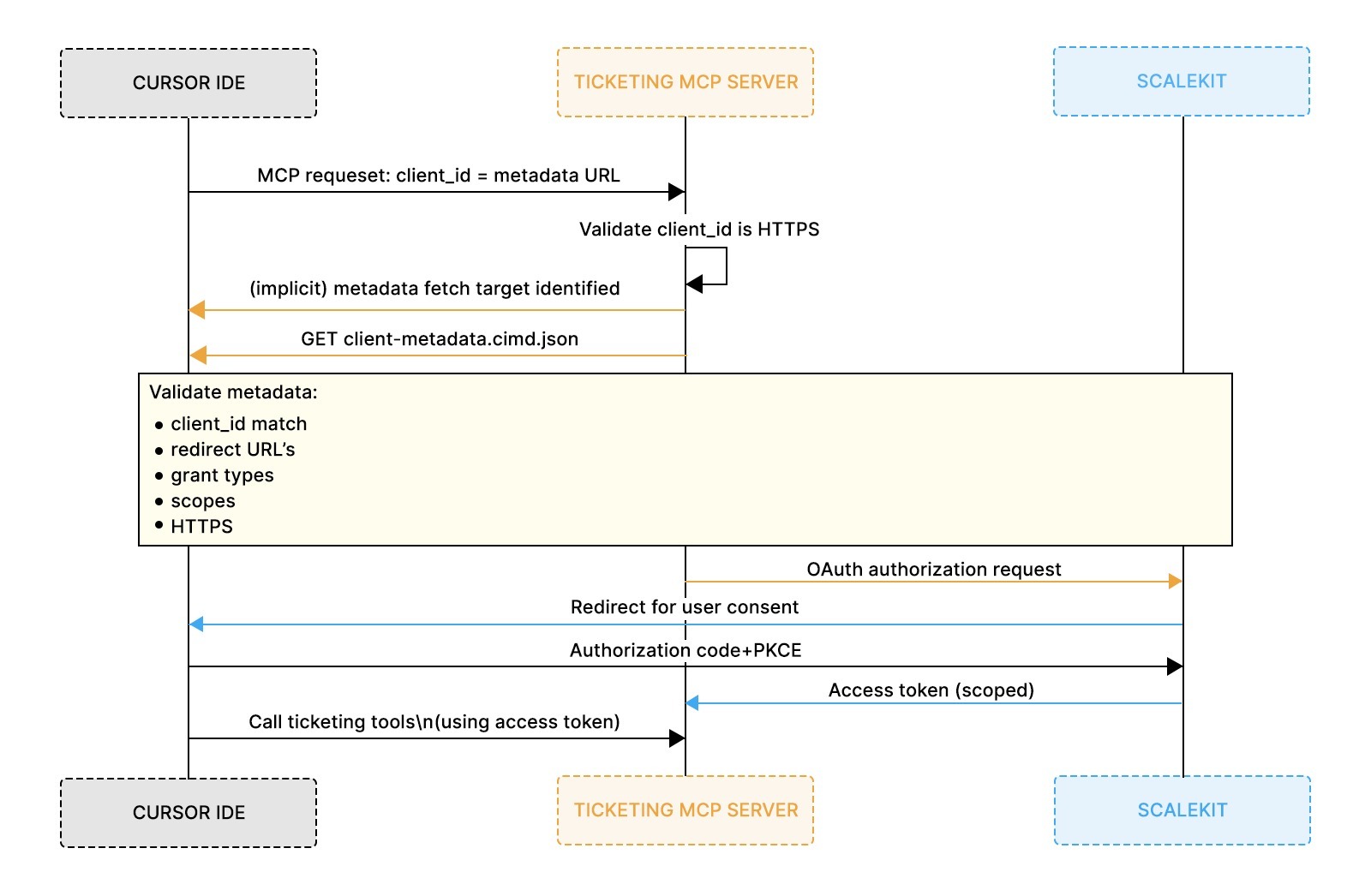
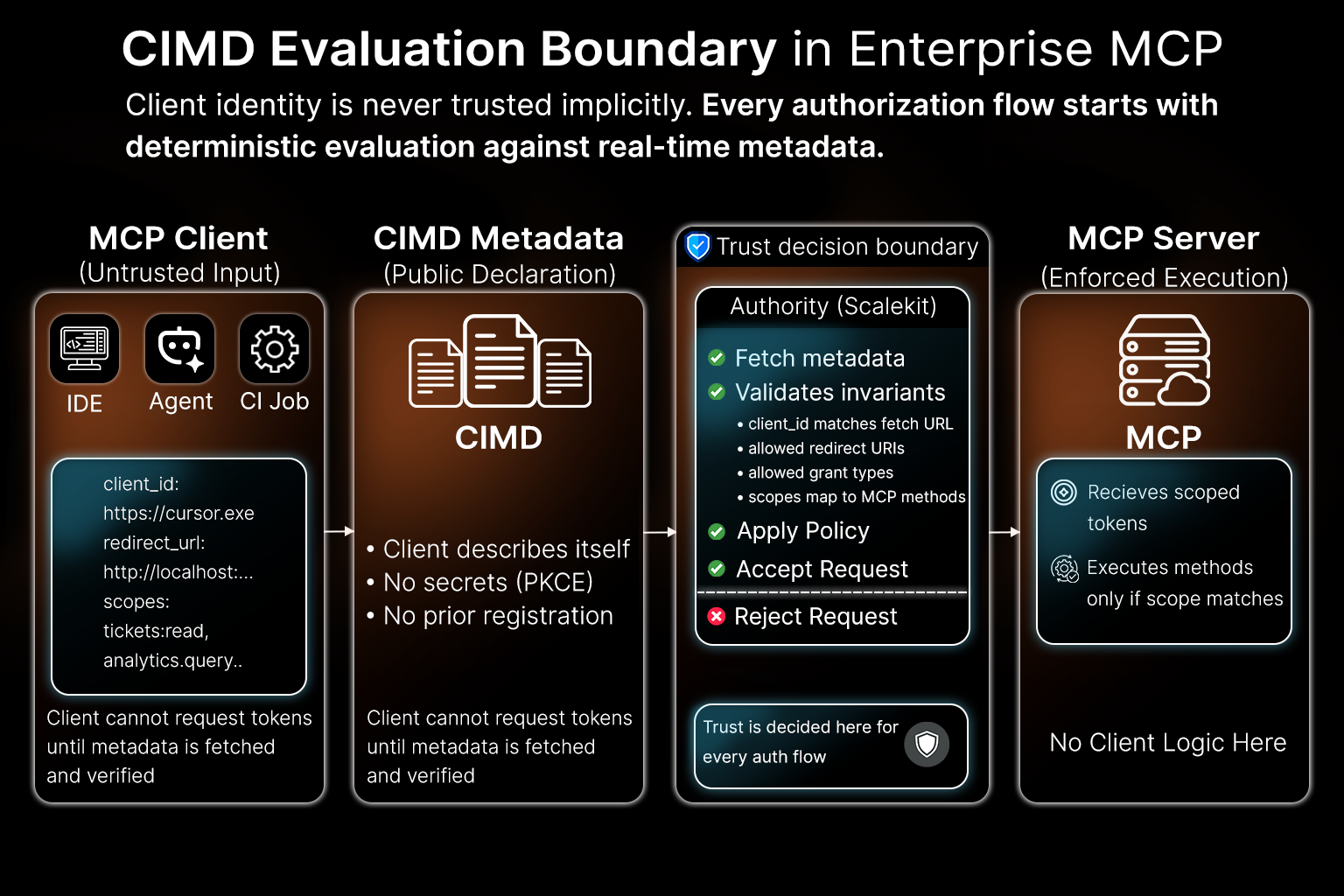
The flow described above remains unchanged when Scalekit is introduced. What changes is where the evaluation happens and how responsibility is divided between the OAuth authority and the MCP server.
When an IDE like Cursor initiates an OAuth flow against an MCP server backed by Scalekit, no client record exists upfront. There is no pre-created OAuth client, no stored secret, and no manual approval step. The only input provided by the client is the same client_id already described earlier: a URL pointing to a Client ID Metadata Document.
Before the request arrives, the system has:
Client identity is established entirely at request time.
The four-step evaluation you saw earlier is enforced as follows:
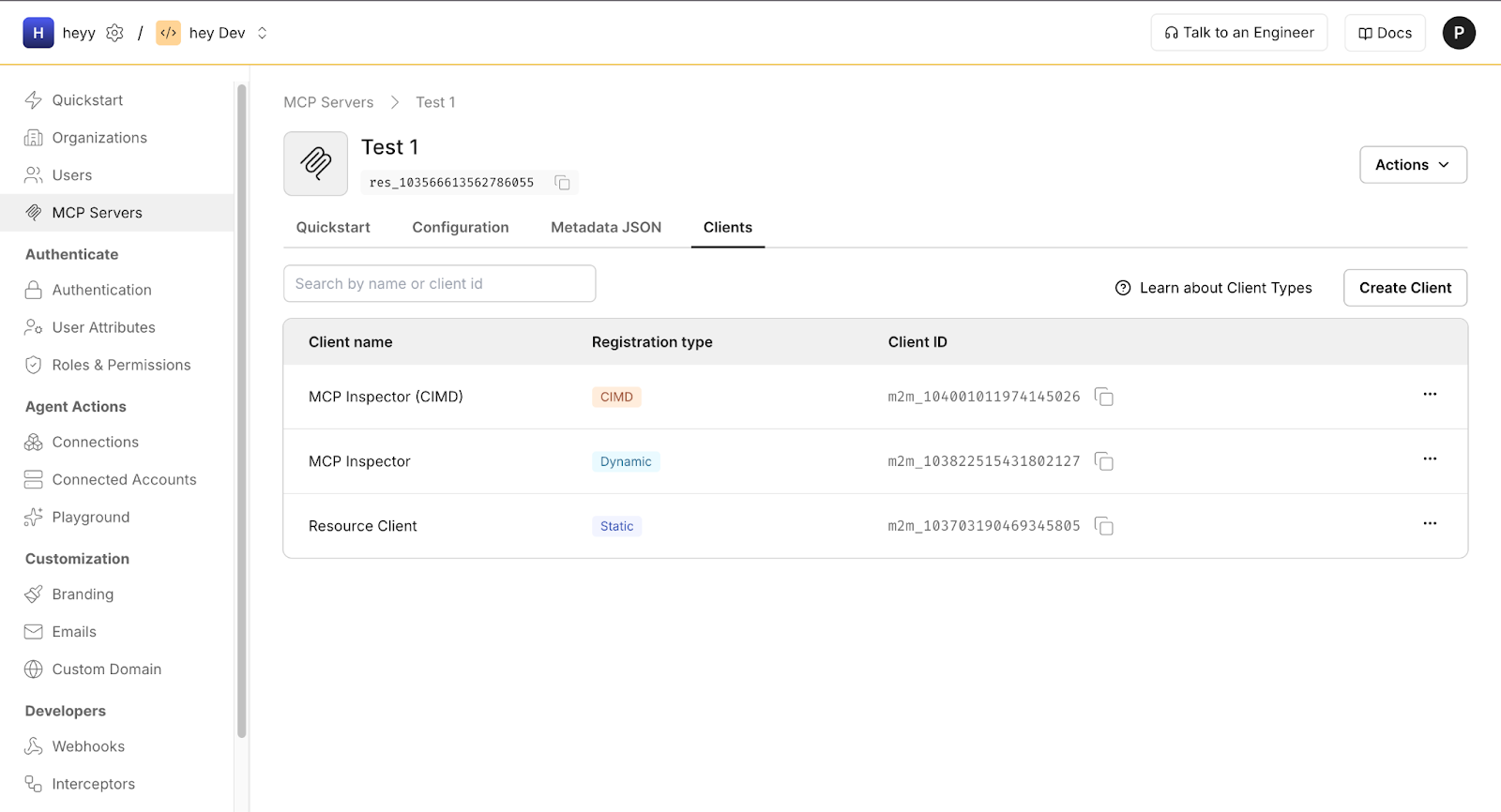
If any step fails, the request is rejected before tokens are issued.
CIMD changes how trust is derived, not who enforces access.
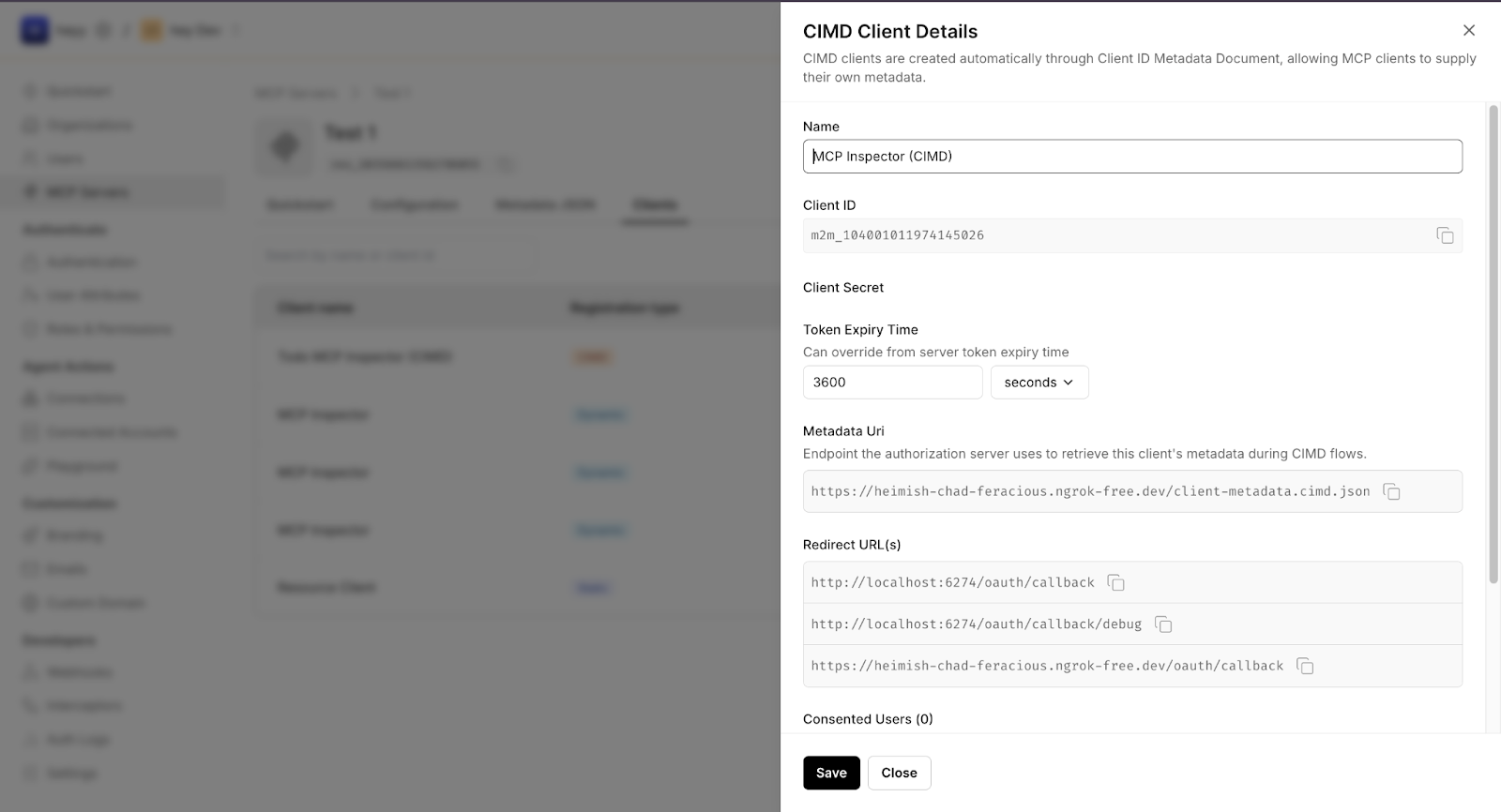
If the metadata changes or becomes unreachable, the next request fails automatically. There is no stale client state to clean up or rotate.
This separation is deliberate:
The earlier flow remains the source of truth. Scalekit simply enforces it consistently and safely at production scale.
This model scales because nothing accumulates silently. There are no forgotten client records, no leaked secrets, and no manual registration backlog. Every request is evaluated against the current metadata and the current policy.
That is why CIMD works naturally with Scalekit. It preserves strict OAuth semantics while allowing MCP servers to support IDEs, agents, and short-lived tools without reimplementing client identity logic or introducing operational drift.
Once the CIMD-based client has been validated and OAuth completes successfully, the interaction becomes intentionally unremarkable.
From the developer’s perspective, the action looks simple: inside Cursor, they trigger a ticket-related command such as creating a new issue or adding a comment without leaving the IDE. The request is sent to the MCP server using the access token issued after successful client validation.
Behind the scenes, the MCP server enforces the requested scopes and executes the corresponding tool. In this case, a new ticket is created in the internal system, attributed to the authenticated user and constrained by the permissions granted during authorization.
The important detail is not the ticket itself, but what did not happen:
From the server’s perspective, this action is indistinguishable from any other properly validated MCP client. The same flow applies whether the request originates from an IDE, a CI job, or an internal agent.
Most CIMD issues surface before any OAuth redirect or tool execution happens. From the development team’s perspective, this is intentional. Client metadata validation is designed to fail fast, while the request context is still small and easy to reason about. When Cursor cannot call the ticketing MCP server, the first question is not “why did authorization fail?” but “was the client’s metadata accepted at all?”
If the client_id URL is unreachable, times out, or returns invalid JSON, the server rejects the request immediately.
IDE clients often add debug callbacks or change local ports during development. If the active redirect URI is not listed exactly in redirect_uris, validation fails.
If the client requests scopes that the MCP server does not recognize or allow, validation fails before authorization.
Serving metadata over HTTP, using mixed content, or hosting metadata behind unstable tunnels leads to rejection.
Every failure in this flow maps directly to a specific validation rule. The server either accepts the client’s metadata or rejects it before any authorization state is created. There are no partial registrations, cached assumptions, or hidden side effects. Teams debug by inspecting the metadata document, fixing the violation, and retrying the request. This tight feedback loop enables CIMD to operate in environments where IDEs, agents, and internal tools evolve continuously.
Teams usually encounter CIMD issues long before production rollout. IDE integrations are developed locally, metadata files change frequently, and redirect URIs evolve as workflows are refined. Local testing is therefore not optional; it is how teams gain confidence that client identity will behave predictably as MCP usage expands.
The simplest and most effective test is manual retrieval. Fetch the client_id URL directly using a browser or curl and verify three things: the URL is reachable over HTTPS, the response is valid JSON, and the client_id field inside the document exactly matches the fetch URL. This mirrors the first validation step performed during an MCP OAuth flow and catches the most common errors early.
Many teams run a lightweight static server during development and expose it temporarily using a stable HTTPS tunnel. This allows the CIMD document to be edited and reloaded quickly while preserving the same structure used in production. The required discipline is consistency: the hosted metadata URL, the client_id value, and the redirect URIs referenced by the IDE must always stay in sync.
Before wider rollout, teams often add a small guardrail in the form of a script or CI check that validates basic invariants:
These checks catch drift early. If a metadata file is edited casually adding a redirect URI or changing a scope, the next validation run fails immediately. By treating CIMD as a public metadata artifact, similar to OpenAPI specs or JWKS files, teams keep client onboarding predictable even as IDEs and agents evolve.
CIMD shifts responsibility from server-side registration to client-owned metadata.
What changes:
This is especially important for IDEs like Cursor, where clients update frequently and cannot safely store long-lived credentials.
CIMD removes the need to maintain a growing client registry.
What changes:
Control remains entirely server-side, without accumulating long-lived client state.
CIMD makes trust boundaries explicit and auditable.
What changes:
This consistency enables MCP to move beyond prototypes without creating operational or security debt.
Most teams’ first experience with MCP occurs in a local or semi-controlled environment: a single IDE, a single MCP server, and a small set of tools. CIMD is intentionally designed for this phase. It allows client identity to be expressed explicitly, evaluated automatically, and rejected early when it does not align. Teams can experiment safely by changing metadata, observing validation failures, and refining policy without accumulating permanent state or manual registrations.
As MCP deployments grow, the same model continues to hold. IDEs like Cursor, CI jobs, and internal agents all identify themselves in the same way: by publishing metadata and letting the server decide whether to trust it. OAuth authorities such as Scalekit fit naturally into this flow by enforcing CIMD consistently and handling authorization without altering the client identity model. Nothing new is introduced as scale increases; teams simply tighten validation rules and scope boundaries based on real usage.
If you want to go deeper, there are a few natural next steps. Scalekit’s writing on what CIMD is and why it was introduced, as well as the CIMD vs DCR trade-offs in real MCP deployments, provides additional context on how these patterns show up in practice. Reading those alongside the MCP authorization specification and related GitHub discussions helps clarify when metadata-based identity is most appropriate, when DCR remains appropriate, and how teams combine both approaches in production. Together, these resources help teams move from a working integration to a hardened, enterprise-ready deployment without losing the flexibility that makes MCP viable.
CIMD is not strictly required for all MCP deployments, but it becomes essential when clients are dynamic or unknown in advance. In environments with IDEs, agents, or short-lived tools, CIMD provides a scalable way to evaluate client identity without preregistration or shared secrets.
Traditional OAuth registration assumes a static set of known clients created in advance. CIMD shifts registration to request time: the server fetches a client’s metadata, validates it, and decides whether to proceed. This eliminates manual onboarding and avoids long-lived client records that quickly become stale.
Scalekit serves as the OAuth authority and consistently enforces CIMD validation. It fetches the client_id metadata URL, validates the document against policy, and proceeds with authorization only if the client metadata is accepted. The underlying CIMD model remains unchanged; Scalekit provides a production-ready surface for it.
No. When CIMD is enabled, clients are not manually registered in advance. Scalekit imports client identity dynamically from the metadata document supplied by the client. If the metadata changes, the next fetch reflects those changes without requiring administrative updates.
The change takes effect the next time the metadata is fetched. If the updated document no longer meets the MCP server’s validation requirements for example, by removing a redirect URI that the client uses or requesting scopes the server does not recognize the request is rejected before authorization completes. This makes client behavior explicit and prevents silent drift over time.