

Picture a Monday sprint in which a client fires off “Can we catch up next Friday afternoon?” while a teammate forwards an .ics thread that conflicts with your standup. Alex, the on-call lead, scans three time zones, decodes vague phrasing, checks buffers around deploy windows, and drafts a reply that CCs everyone, only to learn the room is double-booked. Context switching steals an hour, and everybody is still confused about what’s actually on the calendar.
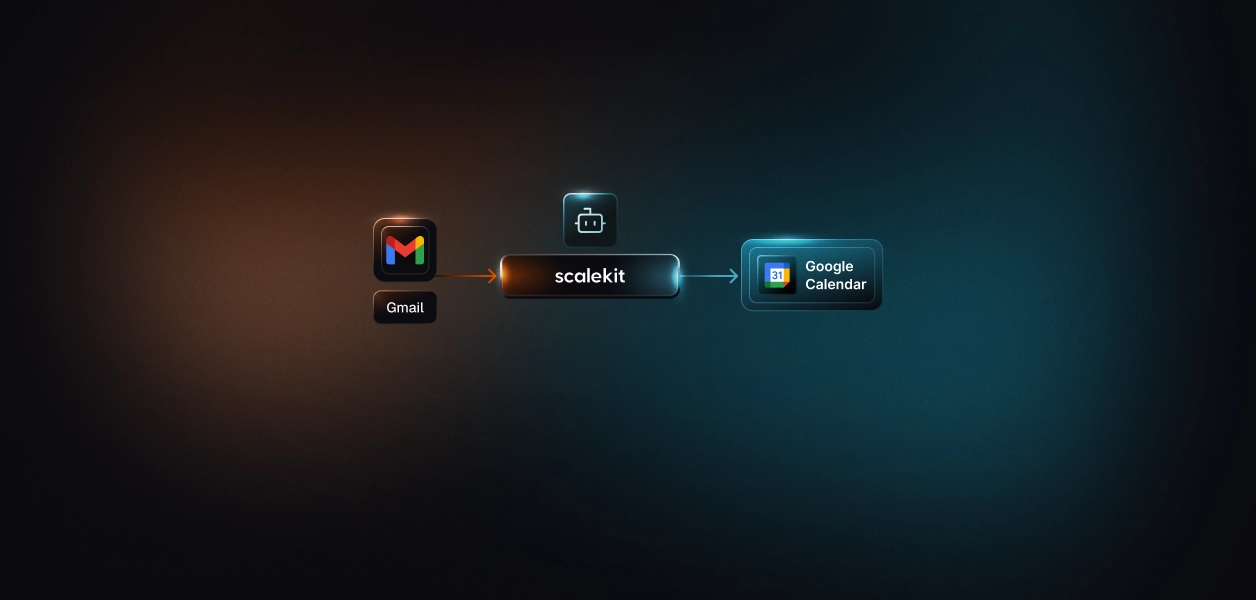
A scheduling agent closes the loop from email to calendar. Instead of manual triage, an agent reads inbound Gmail, extracts entities from natural language (“Tomorrow 4–6 PST”, “Early next week”), checks Google Calendar free/busy with work hours and buffers, proposes conflict-free slots, and, once confirmed, creates the event and replies with details. OAuth runs through Scalekit, so credentials stay simple, and idempotent logic avoids duplicate bookings.
You’ll see how to parse invites, resolve ambiguous dates across time zones, compute slot suggestions, create Calendar events, and send structured replies, using Scalekit connectors for Gmail and Google Calendar, plus an optional LLM for entity extraction. We’ll tie each step back to Alex’s week, so the flow stays grounded in real developer constraints: reliability, clarity, and minimal cognitive load.
Most scheduling chaos begins in Gmail threads filled with vague language, “next week,” “after standup,” or “anytime in the afternoon.” These phrases lack structure, forcing teams to manually interpret intent and verify availability across time zones. Alex’s team faces this every release cycle: multiple threads, overlapping times, and no single source of truth for what’s actually confirmed.
The switching between Gmail, Google Calendar, Slack, and Notion adds another layer of friction. Each hop steals attention from active work, making scheduling a cognitive tax rather than a background process. By the time a meeting lands on the calendar, someone is double-booked, or a key attendee is missing because the email context was lost during transfer.
Automation changes the texture of this workflow by connecting Gmail directly to Google Calendar. Instead of relying on human interpretation, an agent can parse structured details from incoming emails, understand time-related phrases through entity extraction, and fetch free/busy slots using the Calendar API. The same system can propose or confirm meetings instantly, cutting out ambiguity and protecting developer focus.
The scheduling agent runs as a connected workflow across Gmail, Google Calendar, and Scalekit. Each layer has a clear responsibility:
The goal: convert an unstructured meeting email into a precise event booking with zero manual intervention.
This separation ensures clean boundaries: connectors abstract remote systems, orchestration code remains testable, and the execution layer can scale independently.
Each run is stateless. The agent reads only the latest inbox and calendar data, decides, and exits cleanly, ideal for cron jobs, containers, or serverless executions.
Flowchart: From Gmail thread to confirmed Calendar event
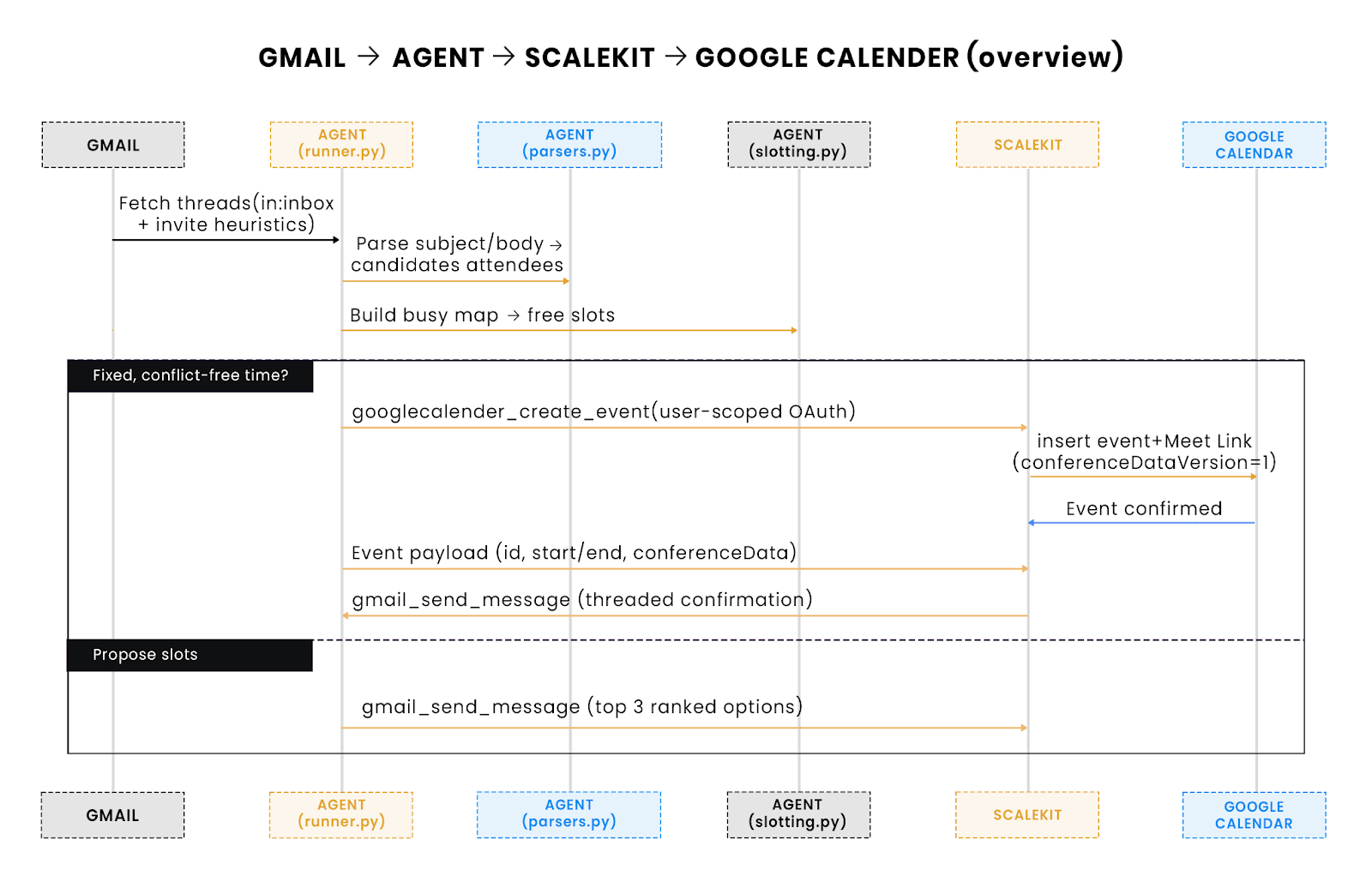
What to look for: This swimlane compresses the full lifecycle into ~10 steps: fetch → parse → slot → decide → book or propose → reply. Scalekit sits on the network boundary, handling OAuth, retries, and rate limits. The agent stays stateless: it reads Gmail/Calendar, decides, and exits.
Scalekit is the backbone between your agent and Google APIs, but the core mental model is Connections and Connected Accounts.
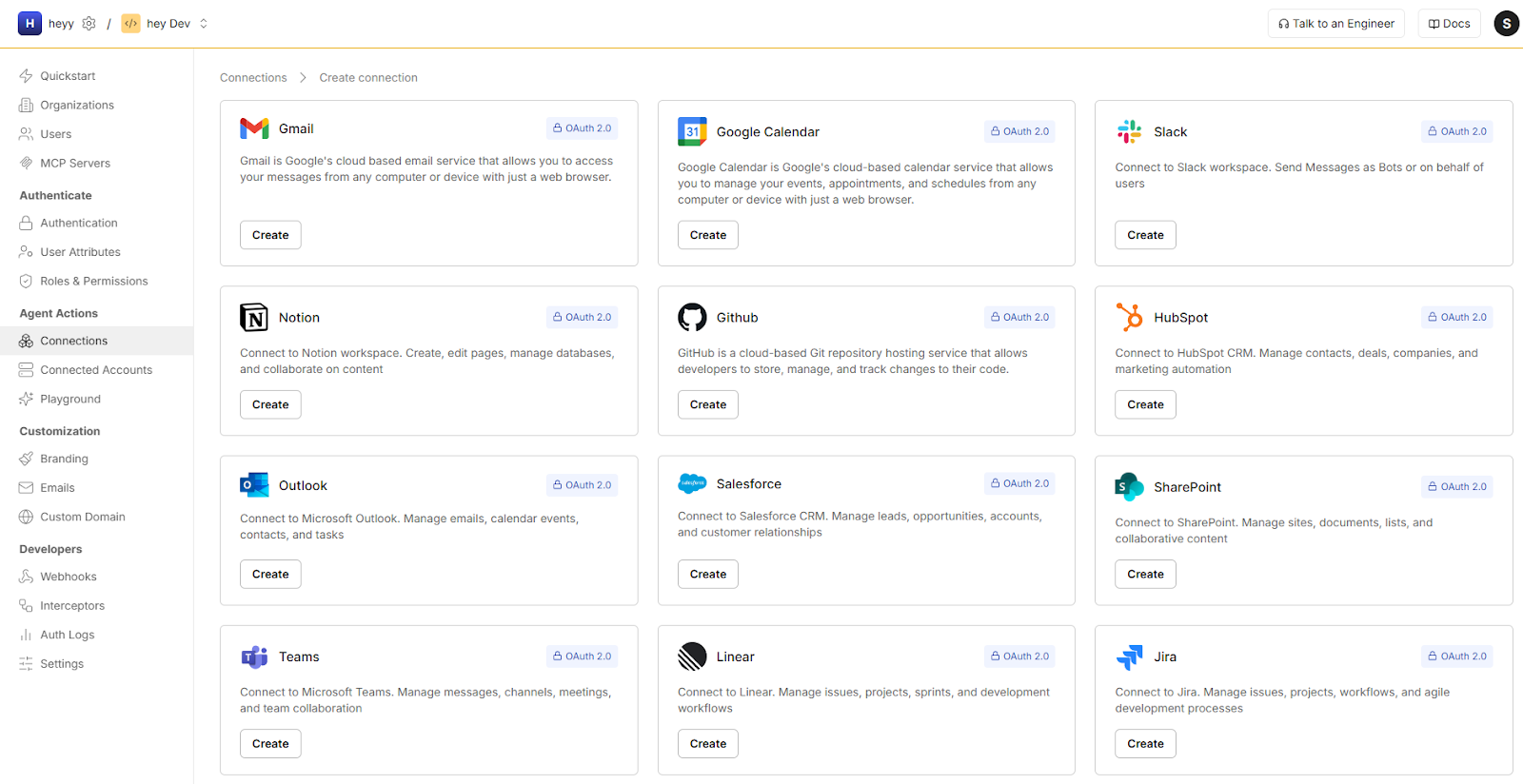
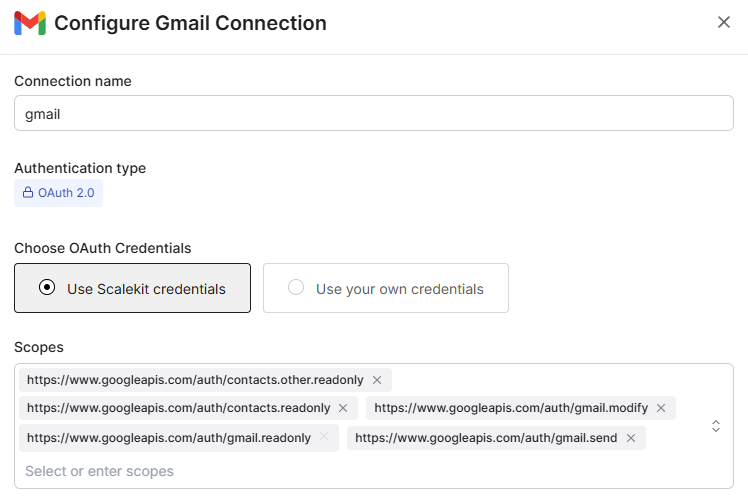
Why this is significant:
The SDK gives you a single .run() surface across tools (Gmail, Calendar, Slack, Notion, etc.). You pass the Identifier and params; Scalekit handles OAuth, retries, and rate limits. The Calendar connector sets conferenceDataVersion=1 under the hood, so Meet links are created on insert.
Scope guidance: Use least-privilege scopes (e.g., gmail.readonly, calendar.events) and avoid broad account scopes. Scalekit enforces user-scoped OAuth and manages token storage/refresh server-side.
Operational guarantees via SDK
With Connections + SDK, your agent code stays small, testable, and stateless, Scalekit takes care of the messy parts (OAuth, tokens, retries) so you can focus on parsing, slotting, and decisions.
Once integrations are connected, the Python layer coordinates everything:
1. Fetch recent Gmail messages (invites, .ics, Meet links)
2. Parse each message → structured meeting entities
3. Query Calendar → busy/free map
4. Decide: propose or confirm
5. Create Calendar event + threaded Gmail reply
Because every decision is a pure function of Gmail + Calendar input, runs are deterministic and safe to re-execute. Parsed emails are tracked to prevent duplicate scheduling.
The agent runs in two simple modes:
Both modes remain stateless and idempotent. Each run recomputes from source data, applies connector-level retries, and exits cleanly, so it can scale horizontally or operate as a nightly batch without shared locks or persistent state.
This structure strikes the right balance between flexibility and safety:
In short, the agent behaves like a production microservice: secure, repeatable, and extendable, yet small enough to understand end-to-end.
Scheduling automation lives or dies by its authentication model. A direct Google OAuth implementation requires token storage, refresh logic, and per-service scopes, all of which are risky and cumbersome in production. The scheduling agent sidesteps this entirely by delegating authentication to Scalekit’s managed OAuth flow, which centralizes credential security while keeping the local code stateless.
Each integration (Gmail and Google Calendar) is connected through a single user-scoped OAuth session. Instead of embedding Google credentials or secrets locally, developers register with Scalekit using two environment variables:
Once configured, the local Flask service exposes /auth/init routes for Gmail and Calendar. Visiting those URLs redirects the user to Google’s OAuth consent page. Scalekit handles the authorization grant, token exchange, refresh management, and secure storage.
After successful authentication, Scalekit stores and manages the tokens. The agent never sees or persists them locally. All future Gmail or Calendar operations reference the user’s identifier, and Scalekit injects the correct OAuth context during execution.
Use least-privilege scopes (e.g., gmail.readonly, calendar.events) and avoid broad account scopes.
Every API call from the agent (like gmail_fetch_mails or googlecalendar_create_event) goes through Scalekit’s connector runtime. The runtime applies:
This pattern removes the need for refresh tokens, background daemons, or Google client secrets. It also makes multi-user or enterprise scaling straightforward: each user authenticates once, and the agent can operate across hundreds of identifiers without local configuration changes.
This architecture gives two operational guarantees that traditional OAuth setups struggle with:
1. Stateless execution: The local agent can run as a cron job, container, or serverless function with no persistent storage requirements.
2. Isolated trust boundaries: Scalekit acts as the sole holder of sensitive credentials, meaning even a compromised local environment can’t exfiltrate Google tokens.
In short, authentication becomes declarative instead of imperative; you connect once, and the Scalekit layer guarantees secure, user-scoped access for all subsequent operations.
Parsing converts unstructured Gmail text into structured meeting entities that the agent can act on. The pipeline runs in three passes that keep concerns separate and the system testable: (1) structural detection, (2) entity extraction and normalization, and (3) intent classification.
Flowchart: Deterministic parsing with LLM fallback
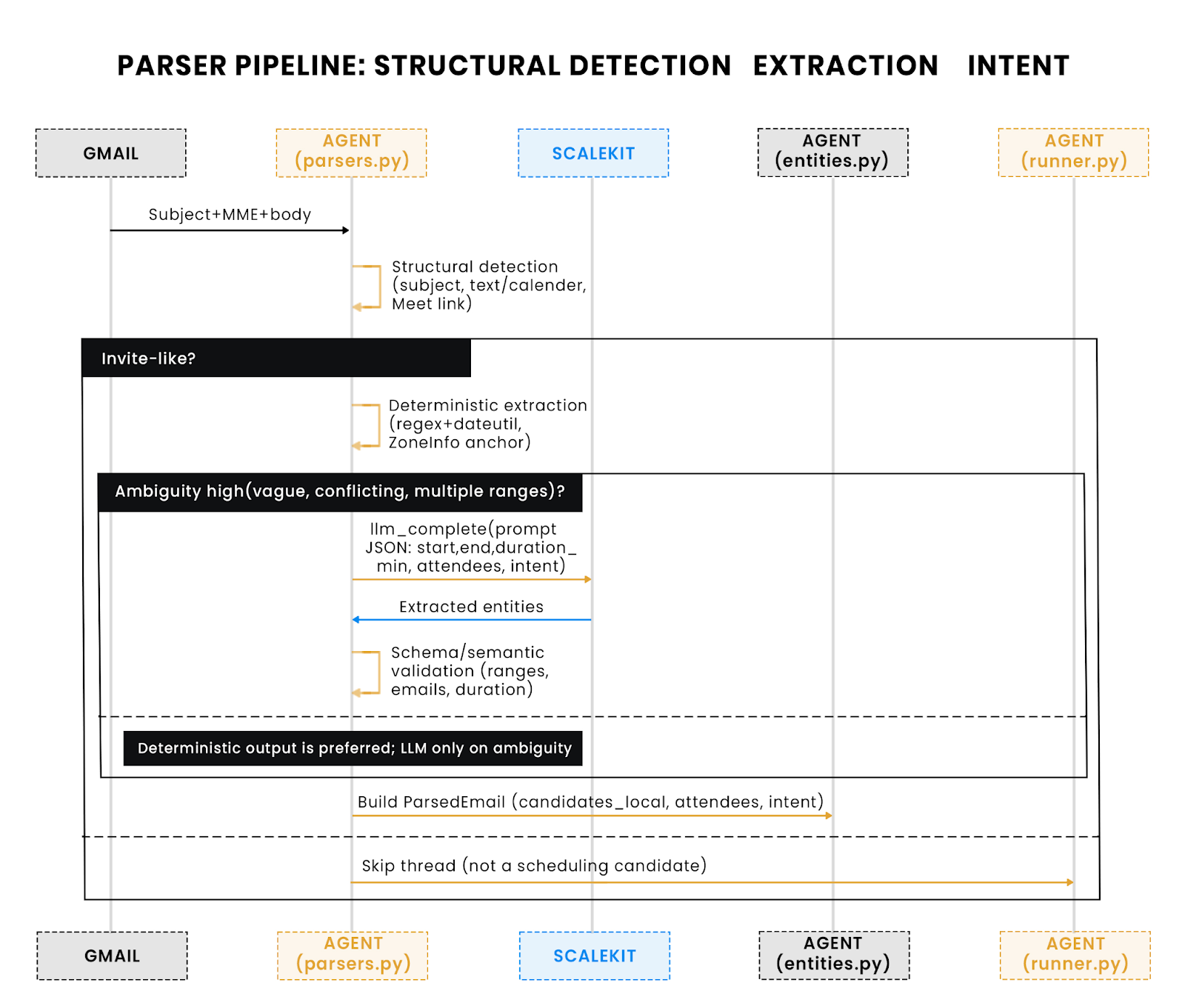
Why this matters: The diagram emphasizes deterministic-first parsing (fast, stable), with a narrow LLM used only when rules can’t disambiguate. Output is the single ParsedEmail contract, which the slotter consumes.
The parser filters candidate emails by subject, MIME parts, and invite signals before any heavy work.
Deterministic parsing handles the majority of cases fast and predictably. All datetime math anchors to the user’s local zone, then normalizes to UTC.
Normalization rules (examples):
When deterministic signals conflict (multiple ranges, vague phrases like “anytime”), call a narrow LLM via Scalekit to return structured JSON the agent can validate.
The agent merges LLM output only after schema validation (presence of start/end or duration_min, valid emails, sensible ranges).
The parser emits a single object that downstream code treats as the source of truth.
This contract feeds directly into slotting.py, which converts candidates to UTC, evaluates conflicts, and produces ranked proposals. By keeping deterministic extraction first and reserving the LLM for true ambiguity, the system stays predictable, testable, and cost-efficient.
Once an email is parsed into structured meeting entities, the next challenge is determining when the meeting can actually happen. The slotting engine inside slotting.py takes that parsed data, reads the user’s current Google Calendar via Scalekit’s connector, and produces a ranked list of viable time windows.
The process runs in four stages:
This flow ensures consistency: for any given input email and calendar state, the same output slots are produced every time.
The agent queries the user’s calendar through Scalekit’s googlecalendar_list_events connector, which returns all events in a time window relative to the parsed email’s proposed date.
The result is normalized into a list of intervals in UTC. Each event includes a start, end, and timezone. The agent immediately reprojects these times into the user’s local timezone (from USER_DEFAULT_TZ) to ensure cross-region consistency.
Busy intervals are merged to prevent overlap errors:
Once merged, the algorithm walks through the work-day window (WORK_START_LOCAL, WORK_END_LOCAL) and identifies gaps large enough to fit the requested meeting duration.
Each slot respects:
If the parsed email contains times in another zone (e.g., "4pm PST" while the user is in Asia/Kolkata), the agent converts the candidate window to UTC first, then to the user’s configured zone using pytz.
This guarantees that "4pm PST" never collides with "4pm IST" due to naive datetime handling, a subtle but common bug in scheduling systems.
Finally, the agent ranks the valid slots by proximity to the initially requested time and user-defined preferences (e.g., mornings first).
If multiple valid windows exist, the top three are proposed in the Gmail reply.
This ensures the agent behaves predictably: if a client asks for “early next week,” the reply might include something like:
Proposed slots:
- Mon, Oct 21 -- 10:00 AM-10:30 AM IST
- Mon, Oct 21 -- 11:00 AM-11:30 AM IST
- Tue, Oct 22 -- 10:00 AM-10:30 AM IST
The slotting layer is deliberately deterministic and stateless. It never stores intermediate data or learns from history; it computes availability purely from the latest Gmail and Calendar states. This keeps the logic reliable enough to run in CI pipelines, cron jobs, or serverless environments without data drift.
The agent finalizes scheduling by deciding whether to book immediately or propose slots. If the parsed email includes a precise, conflict-free time window, it creates a Calendar event and replies with confirmation in the same Gmail thread. If the request is flexible or conflicts exist, it replies with the top ranked options and defers creation until the sender picks one. All actions are idempotent: processed messages are tracked, and event creation includes a stable UID so reruns do not duplicate bookings.
Event payloads are assembled with explicit RFC3339 datetimes and the user’s local time zone. Attendees, conferencing, and metadata are included up front so the Calendar invite is complete and auditable. Scalekit’s Calendar connector executes the request under the correct user-scoped OAuth context; the local code never touches Google tokens.
Flowchart: Safe create (list-before-write) and reply-once
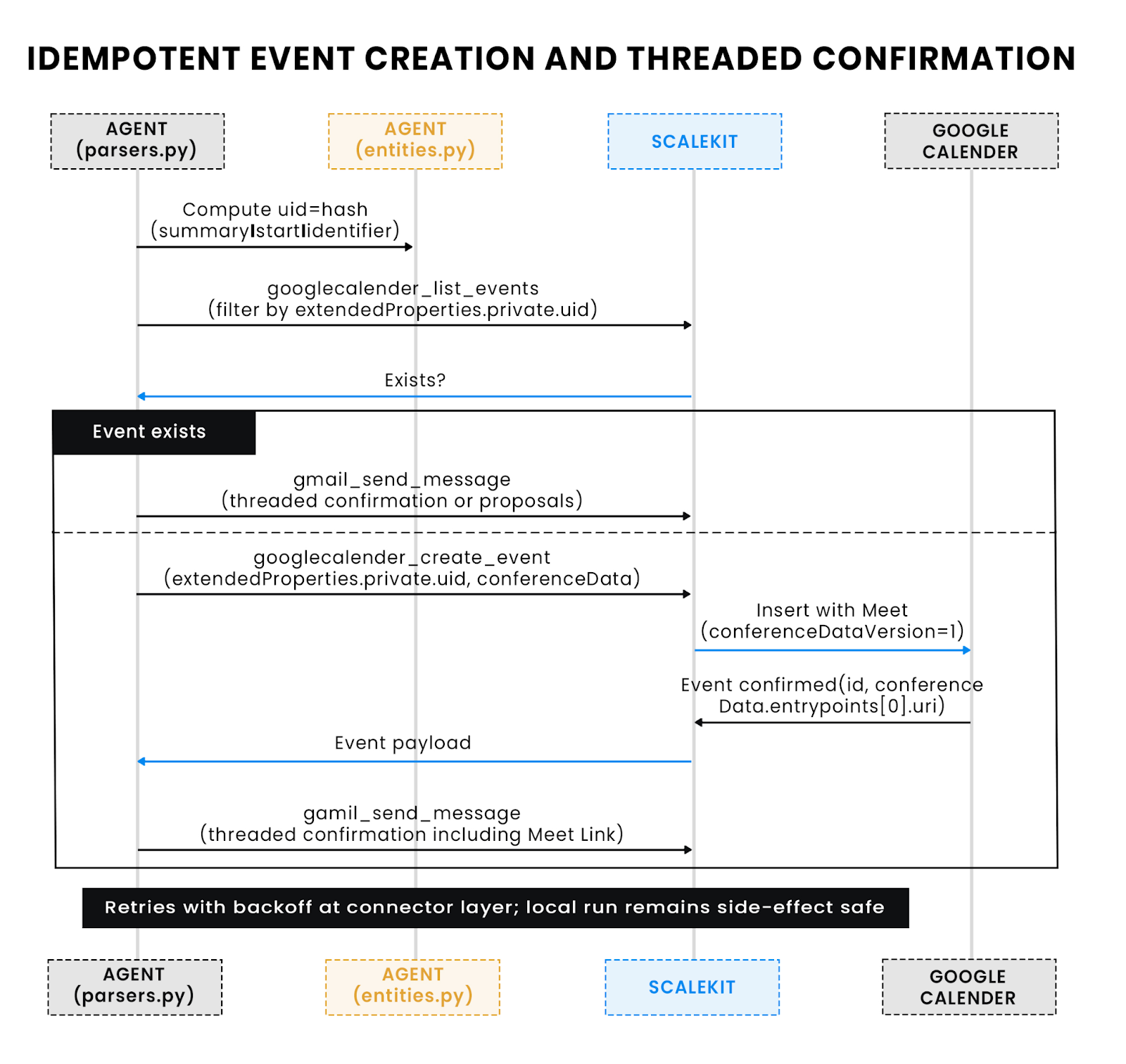
What to notice: The agent lists before creating, using extendedProperties.private.uid as a stable key. On duplicates, it no-ops and only replies. Meet links are taken from conferenceData.entryPoints[0].uri, falling back to hangoutLink as needed. Connectors handle retries so re-runs don’t double-book or double-post.
The connector sets conferenceDataVersion=1 under the hood, so Meet links are created on insert.
Replies are composed as threaded responses, so context stays in one place for the sender. For confirmed bookings, the message includes the final time (with time zone), the Meet link (if returned by Calendar), and the attendee list. For proposals, the message renders a short, numbered list of candidate slots, each expressed in the recipient’s local zone to reduce back-and-forth. The Gmail connector posts the reply without exposing SMTP or OAuth details.
Idempotency protects against duplicate actions during retries or reruns. The agent records a message fingerprint (e.g., Gmail messageId + normalized subject hash) after a successful outcome, and it stamps Calendar events with a stable iCal UID (or hashes summary + start). Before creating a new event, it checks for an existing event carrying the same UID or extended property. This strategy keeps Alex’s release week clean even if the runner executes multiple times or the Gmail thread receives follow-ups.
Idempotency tactics used by the agent
Production schedulers must expect flaky networks, Gmail thread races, and Calendar rate limits. The agent treats every external call as unreliable and builds retryable, idempotent operations around it. Scalekit’s connectors already apply exponential backoff and token refresh; the local layer adds pure-function decisions and stable keys so re-runs never double-book or spam a thread.
Two lightweight registries guard write paths: a message registry keyed by Gmail messageId and a calendar registry keyed by an event UID. Both can live in SQLite or a small JSON file for single-user runs.
Before creating anything, the agent lists by UID or extended property. Only absent? Then create. All connector calls pass through a retry wrapper with capped attempts and jitter.
Every event carries a stable UID computed from canonical fields. The agent also writes a namespaced extended property for quick lookups during replays.
Replies reference the Gmail thread ID and include the computed event UID in the body headers. On re-run, the agent checks the last message for that UID; if present, it skips sending.
Minimal, structured logs make failures triageable:
These patterns let you re-run the agent safely during peak traffic, recover from half-completed operations, and prove that no duplicated invites were sent, even under retries and rate limiting.
The end-to-end path stitches every module together into a deterministic pipeline. Each stage transforms data into a more structured form until the final confirmation reply closes the Gmail loop. The following trace shows a real run with representative payloads and call patterns, illustrating how the agent converts an unstructured email into a booked calendar event.
The Gmail connector fetches recent messages matching scheduling heuristics:
Example payload for one match:
parsers.py and the optional LLM module transform that text into a machine-readable object.
This object is serialized into the internal ParsedEmail dataclass and passed downstream.
slotting.py queries the user’s Google Calendar for the same day, merges busy intervals, and evaluates overlap.
If a direct conflict exists, the system returns the next three viable windows:
Proposed slots:
- Tue, Oct 21 -- 05:30 PM-06:30 PM IST
- Wed, Oct 22 -- 10:00 AM-11:00 AM IST- Wed, Oct 22 -- 11:30 AM-12:30 PM IST
Otherwise, it proceeds to event creation.
Typical connector response:
The agent stores the event UID in its registry to guarantee idempotency.
The Gmail connector posts a threaded reply summarizing what was booked:
Rendered email body:
Confirmed: Meeting about release timeline
When: Tue, Oct 21 2025 -- 4:00 PM-5:00 PM (PST)
Where: https://meet.google.com/abc-defg-hij
Attendees: chris@client.com, alex@company.com, priya@company.com
Logs for the same run show the traceable chain of identifiers:
[INFO] runId=20251021-1 msgId=199e77d984c0cd38 eventUID=4b51c7 decision=confirm duration=60 tz=America/Los_Angeles
Following the data from the inbox to the calendar highlights why the architecture holds up under real workloads:
This is the foundation for extending the system to multi-user or multi-channel scenarios, such as parsing Slack threads or voice-to-email transcripts while retaining the same secure, testable scheduling core.
Once deployed, the scheduling agent behaves like any other production microservice, stateless, event-driven, and self-healing through Scalekit’s connectors. Every run is isolated, meaning failures don’t leak state across executions. Logging, retries, and idempotency together make it safe to trigger as often as needed, even during peak load.
In real environments, concurrency matters more than code speed. The agent’s design ensures that:
This means ten users running the agent in parallel behave the same as one user running it alone, no shared locks or race conditions. Metrics like latency, API quota usage, and retries can be surfaced from the structured logs you’ve already integrated.
Because every integration call passes through Scalekit’s connector layer, extension is composable rather than invasive.
You can:
The system’s separation between parsing, scheduling, and communication layers means these additions don’t require changing core logic, only attaching new connectors or handlers.
In essence, this agent is not just a single-purpose scheduler; it’s a pattern for safe, idempotent automation between unstructured and structured data systems.
At the start, Alex’s team was drowning in the same chaos most engineering orgs face: ambiguous meeting requests, scattered time zones, and release-week coordination slipping through Gmail threads. What began as a simple “Can we talk next week?” routinely snowballed into duplicate invites, missed standups, and hours of lost focus.
The Gmail → Google Calendar scheduling agent resolves that friction by replacing guesswork with structure. Every step of Alex’s manual loop, reading, interpreting, cross-checking, and replying, became an automated chain of deterministic logic. Gmail parsing extracted intent; Scalekit’s connectors handled authentication and API reliability; slotting logic ensured time-zone accuracy and buffer safety; and idempotent event creation turned those unstructured requests into confirmed, conflict-free meetings.
The result isn’t just time saved, it’s trust restored. Teams can depend on what’s on the calendar because the system itself enforces consistency. The agent demonstrates that automation doesn’t have to be opaque or brittle; when built with firm boundaries and deterministic logic, it can be both explainable and production-grade.
If you’ve reached this point, you’ve seen how a focused agent can turn routine email clutter into real operational leverage. The same Scalekit pattern that powers Gmail → Calendar can automate dozens of similar bridges, Slack to Notion updates, GitHub PRs to documentation drafts, or alert emails to ticket creation.
To go deeper:
Automation doesn’t start with AI; it starts with systems that remove friction. This one just happens to begin with an email.
How does Scalekit manage OAuth tokens securely across multiple Google integrations?
Scalekit handles OAuth entirely server-side. Each user authenticates once through a magic-link flow, and Scalekit stores encrypted refresh tokens in its managed vault. When the agent invokes Gmail or Google Calendar connectors, Scalekit injects the correct user-scoped access token on the fly, no local storage, refresh logic, or Google client secrets needed. This separation keeps integrations stateless, secure, and compliant with Google’s OAuth best practices.
Can Scalekit connectors handle rate limits and retries for Gmail and Calendar APIs automatically?
Yes. Scalekit connectors implement built-in retry strategies with exponential backoff, adaptive rate control, and circuit-breaker logic for transient Google API failures. Each connector call is idempotent, meaning duplicate runs produce identical outcomes. This ensures agents can safely run as cron jobs, in serverless environments, or under high concurrency without risking duplicate events or quota exhaustion.
How does the scheduling agent ensure time-zone accuracy for global teams?
All datetime arithmetic happens in UTC, then reprojected into the user’s configured local zone using libraries like pytz or zoneinfo. Parsed phrases such as “4 PM PST” are normalized to UTC before comparison, eliminating drift when users in different regions interact. The .env configuration defines default work hours and time-zone context, so the same input yields identical results on any host.
Can the parsing logic handle complex or ambiguous meeting requests like “early next quarter” or “after the release”?
The base parser resolves common temporal phrases with rule-based heuristics, but it also supports an optional LLM extraction layer through Scalekit. Developers can extend this layer with custom prompts or fine-tuned models to interpret domain-specific time windows (like fiscal quarters or sprint milestones) and map them to concrete dates before slotting.
What are the best deployment patterns for a stateless scheduling agent integrating Gmail and Google Calendar?
The agent runs reliably in cron, container, or serverless form. For continuous use, a cron or Kubernetes Job offers predictable scheduling and simple observability. For event-driven use (triggered by a new email webhook or Slack command), a serverless function is ideal; each invocation performs a complete parse-slot-book cycle and exits cleanly. Because all state is externalized through Scalekit connectors and UIDs, redeployments and retries are safe by design.